
Remote work creates a steady stream of notes, meeting ideas, marked-up documents, and handwritten reminders. The right electronic writing tablet can keep that information organized without relying on piles of paper or a full laptop setup.
This roundup compares ten options across e-ink note-taking, digital paper, LCD writing, drawing, and PDF annotation. Consider pen feel, file handling, connectivity, and your preferred workflow before choosing.
Best 10 Electronic Writing Tablets for Remote Work Picks for 2026
Best Android Note-Taking Tablet

- Android 14 tablet with 6GB RAM and 128GB storage
- 16,384-level stylus with PDF and handwriting tools
- Color LCD with 90Hz refresh rate; not e-ink
Best For: Remote workers needing color documents, Android apps, and handwritten notes
Best Premium E-Ink Notebook

- 11.8-inch color e-ink display with reading light
- Marker Plus pen includes built-in eraser
- Organizes notes, tags, and annotated PDFs
Best For: Focused writing, reading, meetings, and PDF review
Best AI-Ready E-Ink Work Tablet

- 10.3-inch, 300-ppi e-ink display with 128GB storage
- Voice-to-text, handwriting conversion, and note summaries
- Android 14 with broad file and third-party app support
Best For: Document-heavy work, meetings, and AI-assisted note organization
Best Simple Desk Memo Board

- 10-inch bright monochrome LCD writing surface
- Protective cover folds into a stable stand
- Standalone design with erase and lock controls
Best For: Quick desk reminders, drafts, and temporary office notes
Best Smart Paper Notebook

- Writes on real A5 paper while syncing notes to your phone
- Offline storage with automatic syncing after reconnecting
- Supports tagging, search, editing, and PNG/PDF export
Best For: Remote workers who prefer paper writing with digital backups
Best for Live Remote Annotation
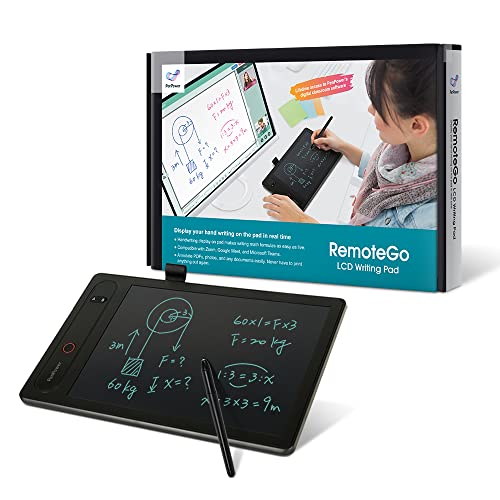
- Annotates meetings, documents, websites, and videos in real time
- Works with Zoom, Meet, Teams, and Webex on Windows and Mac
- Includes math formula recognition and annotation recording
Best For: Remote teaching, training, and visual collaboration
Best for Searchable Meeting Notes

- Converts handwritten notes into editable digital text
- Links audio recordings to corresponding written notes
- Stores notes offline and supports multiple sharing formats
Best For: Meeting-heavy professionals who need searchable notes and audio review
Best Budget Drawing Tablet
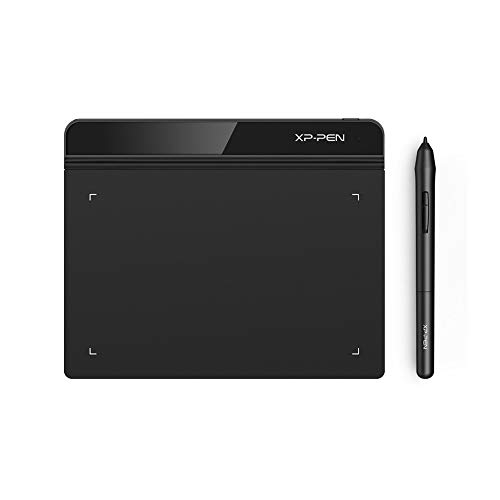
- Battery-free stylus for uninterrupted writing
- Supports Windows, Mac, and Chromebook
- Thin 6-by-4-inch portable design
Best For: Affordable computer-connected remote work and online teaching
Best AI Meeting Notebook
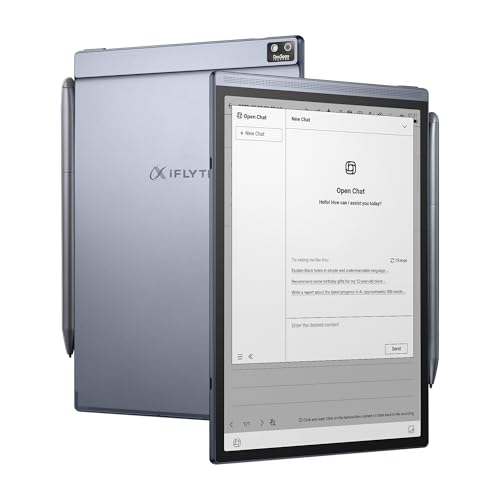
- Transcribes speech in 18 languages
- Converts handwriting across 133 languages
- Includes AI summaries and scheduling tools
Best For: Multilingual meeting notes and follow-up organization
Best Paper-Like E-Ink Tablet

- 10.3-inch 300 PPI pen-only E-Ink display
- Supports PDFs and 30-plus document types
- Works offline and includes cloud syncing
Best For: Focused handwriting, document markup, and private workflows
Best Android Note-Taking Tablet – XPPen Magic Note Pad
For shoppers comparing electronic writing tablets for remote work, the XPPen Magic Note Pad combines a full Android 14 tablet with focused note-taking tools. Its 10.95-inch color LCD offers three display modes, a 90Hz refresh rate, PDF support, handwriting conversion, audio recording, and cloud-upload options. Note that it is a standard Android tablet rather than an e-ink device.
Best For: Remote workers who want handwritten notes, PDF markup, Android apps, and color viewing in one device.
Pros:
- Includes a pressure-sensitive X3 Pro Pencil 2 with 16,384 pressure levels and a magnetic folio.
- Supports handwriting-to-text, PDF editing, audio recording, AI assistance, and cloud uploads through XPPen Notes.
- Offers 6GB RAM, 128GB storage, Android 14, a 90Hz display, and three selectable color modes.
- Anti-glare AG etched glass and low-blue-light certifications support extended reading and writing.
Cons:
- Its LCD screen is not an e-ink display, so the viewing experience differs from paper tablets.
- The listed AI Notes and MyScript features require a system upgrade.
This is the most versatile option here for remote work that involves more than handwriting, especially when color documents, Android applications, and cloud workflows matter. Choose it over a dedicated e-ink notebook if you prefer a conventional tablet ecosystem.
Best Premium E-Ink Notebook – reMarkable Paper Pro
The reMarkable Paper Pro is a strong choice among electronic writing tablets for remote work when distraction-free writing and comfortable reading are priorities. It pairs an 11.8-inch color e-ink display with an adjustable reading light, low-glare finish, folder and tag organization, PDF annotation, and handwriting conversion.
Best For: Professionals who want a premium paper-like workspace for notes, sketches, reading, and PDF review.
Pros:
- Color e-ink Canvas display supports writing, sketching, and reading with an adjustable reading light.
- Marker Plus includes a built-in eraser, and six spare tips are included.
- Folders, tags, PDF annotation, and handwriting-to-text conversion help organize work.
- Ultra-slim design, low-glare viewing, and outdoor readability suit mobile work.
Cons:
- Its Linux-based system is more focused than a general-purpose Android tablet.
- The supplied details list Wi-Fi and Bluetooth compatibility but only one USB-C port.
The Paper Pro prioritizes a refined writing experience over broad tablet functionality. It is particularly appealing for meetings, planning, document review, and focused reading where a low-glare color e-ink screen is more useful than a conventional LCD.
Best AI-Ready E-Ink Work Tablet – Penstar eNote 2
The Penstar eNote 2 stands out among electronic writing tablets for remote work by combining a 10.3-inch, 300-ppi e-ink screen with Android 14, 128GB of storage, voice-to-text, handwriting conversion, and split-screen reading and note-taking. Its broad file support and third-party app compatibility make it practical for document-heavy workflows.
Best For: Remote professionals who handle PDFs, varied file formats, meeting audio, and AI-assisted note organization.
Pros:
- Clear 10.3-inch, 2480×1860 e-ink display is designed for paper-like reading and outdoor visibility.
- Supports handwriting-to-text, real-time AI voice-to-text, note summaries, folders, tags, and split-screen work.
- Includes 128GB storage, 4GB RAM, Android 14, a microphone, four speakers, and third-party app support.
- Bundle includes a stylus, spare tips, magnetic folio, and charging cable.
Cons:
- The listed battery specifications vary between up to four weeks and an average life of two weeks.
- Its 0.97-kilogram weight may feel less convenient than lighter dedicated notebooks.
With extensive format support and built-in audio and AI features, the eNote 2 is well suited to remote work centered on research, meetings, and document management. It offers more workflow flexibility than a basic writing board while retaining an e-ink display.
Best Simple Desk Memo Board – JSJGETYI 10-Inch LCD Tablet
For simple reminders and drafts, this JSJGETYI board is a budget-friendly alternative to more advanced electronic writing tablets for remote work. Its 10-inch pressure-sensitive LCD provides bright monochrome writing, while the included cover folds into a stand. It operates as a standalone board and does not connect to phones or computers.
Best For: Desk-side reminders, quick calculations, temporary notes, and low-tech home-office use.
Pros:
- Bright, thicker monochrome lines provide a clear writing surface for notes and drafts.
- Foldable protective cover doubles as a stable stand.
- One-key erase and lock functions help clear the board or prevent accidental deletion.
- Lightweight 300-gram design and included stylus make it easy to keep nearby.
Cons:
- It cannot connect to phones or computers, and notes cannot be digitally saved without photographing or scanning them.
- The LCD does not light up in the dark and is recommended for well-lit areas.
- It lacks the document, cloud, and app features found on full digital notebooks.
This tablet is best viewed as a reusable office memo board rather than a connected productivity device. It makes sense for quick, disposable notes beside a workstation, but remote workers needing searchable records or synced documents should choose one of the e-ink or Android alternatives.
Best Smart Paper Notebook – XPPen Note Plus
The XPPen Note Plus is a strong choice among electronic writing tablets for remote work if you prefer writing on real paper while automatically creating a digital backup. It syncs handwritten notes to Android or iOS devices over Bluetooth 5.3 and supports offline writing when your phone is not connected.
Best For: Remote workers who want natural paper writing, searchable digital organization, and quick phone-based sharing.
Pros:
- Captures handwriting on real A5 paper and syncs it to a phone.
- Works offline, then auto-syncs saved notes after reconnecting.
- Supports editing, tagging, quick search, PNG/PDF export, and Google Cloud backup.
- Accepts any A5 notebook core up to 8 mm thick.
Cons:
- It uses a dedicated matching ink pen rather than a standard stylus or electronic screen.
- Phone compatibility is limited to Android 10 or later and iOS 14 or later.
With a 14-hour writing battery and a lightweight 350 g design, the Note Plus fits mobile work well. Its main appeal is the combination of familiar paper writing and flexible digital note management.
Best for Live Remote Annotation – RemoteGo LCD Writing Pad
The RemoteGo LCD Writing Pad is designed for collaborative electronic writing tablets for remote work. Its 10-inch LCD surface lets you write and annotate live during Zoom, Google Meet, Microsoft Teams, Webex, screen presentations, websites, documents, and videos on Windows or Mac.
Best For: Remote teachers, trainers, and professionals who need to explain ideas visually during video meetings or annotate shared content.
Pros:
- Provides visible, fine-line handwriting on a 10-inch LCD panel.
- Integrates with major video-conferencing platforms on Windows and Mac.
- Supports brushes, highlighters, screenshots, and video recording for saved annotations.
- Recognizes handwritten math formulas and exports them as LaTeX, MathML, or images.
Cons:
- USB connectivity makes it less portable than wireless writing tablets.
- The listed features rely on the DocuINK web app and supported desktop operating systems.
- It is oriented toward computer-based annotation rather than standalone note capture.
The RemoteGo is a practical specialist tool for live instruction and visual collaboration. Choose it when meeting annotation and screen sharing matter more than mobile, paper-style note taking.
Best for Searchable Meeting Notes – OPHAYA Smart Pen Notebook
The OPHAYA Smart Pen and Reusable Digital Notebook is a useful option among electronic writing tablets for remote work when meetings generate lots of handwritten information. It records writing digitally, converts notes to editable text, and can pair audio recordings with the corresponding written content.
Best For: Professionals who want searchable meeting notes, audio-linked writing, and quick sharing from an iOS or Android phone.
Pros:
- Captures handwritten notes in real time while you write on paper.
- Uses OCR to convert handwriting into editable text and generate Word files.
- Records audio alongside notes for later review.
- Supports offline storage and sharing in Word, PDF, PNG, MP4, and video formats.
Cons:
- Requires the Ophaya Pro+ app for syncing and digital note features.
- Compatibility is centered on iOS and Android devices rather than a broad computer workflow.
- Handwriting recognition and searchable notes depend on the software’s ability to interpret writing accurately.
Its combination of OCR, audio recording, offline storage, and multiple sharing formats gives the OPHAYA an especially meeting-focused feature set. It is a good fit for users who need to revisit both what they wrote and what was said.
Best Budget Drawing Tablet – XP-Pen StarG640
For shoppers comparing electronic writing tablets for remote work, the XP-Pen StarG640 is a compact, mouse-replacing option for handwritten notes, signatures, diagrams, and annotations. Its battery-free stylus and broad compatibility make it especially practical for online teaching and office applications.
Best For: Remote workers, teachers, and students who want an affordable USB writing tablet for Windows, Mac, or Chromebook.
Pros:
- Battery-free stylus requires no charging during use.
- Works with Word, PowerPoint, OneNote, Zoom, and other supported apps.
- Compatible with Windows, macOS, and Chrome OS devices.
- Thin, lightweight design is easy to carry.
Cons:
- Requires a connected computer and does not function as a standalone notebook.
- The 6-by-4-inch active area may feel limited for larger handwriting or detailed work.
The StarG640 is a straightforward choice when you need precise digital writing without paying for a full standalone tablet. It is best suited to desk-based workflows involving a laptop or desktop.
Best AI Meeting Notebook – iFLYTEK AINOTE Air 2
The iFLYTEK AINOTE Air 2 takes a more meeting-focused approach to electronic writing tablets for remote work. It combines digital handwriting with voice transcription, AI summaries, scheduling tools, and cloud storage for professionals who want notes and follow-up tasks in one device.
Best For: Multilingual professionals who need meeting transcription, searchable handwriting, and organized digital notes.
Pros:
- Provides real-time transcription in 18 languages without a subscription, according to the supplied notes.
- Recognizes handwriting in 133 languages and supports translation across 14 languages.
- 8.2-inch E-Ink display and 23ms latency aim to provide a paper-like writing experience.
- Includes 32GB local storage, 100GB permanent cloud storage, and OneDrive support.
Cons:
- Its Android-based workflow may be less flexible than a general-purpose computer tablet.
- The supplied specifications list the screen size as 8.2 centimeters, so shoppers should verify the displayed measurement before buying.
With transcription and task extraction built around meetings, the AINOTE Air 2 is more specialized than a basic graphics tablet. It makes the most sense for remote workers who will actively use its language and organization features.
Best Paper-Like E-Ink Tablet – Penstar eNote Bundle
For remote workers who prefer a paper-first workflow, the renewed Penstar eNote offers a 10.3-inch pen-only E-Ink display for handwriting, document markup, and focused reading. It also adds voice-to-text, cloud syncing, physical shortcut keys, and offline operation.
Best For: Professionals handling meeting notes, PDFs, private documents, and paperless workflows.
Pros:
- 300 PPI PureView E-Ink display is designed to resemble paper without backlighting or touch distractions.
- Supports more than 30 document formats, including PDF, EPUB, MOBI, and TXT.
- Offers 9 reprogrammable physical shortcut keys and an 8192-level pressure-sensitive stylus.
- Can work offline and sync through Google Drive, OneDrive, Dropbox, or the Penstar app.
Cons:
- Voice-to-text requires a network connection.
- This is a renewed, pen-only E-Ink device rather than a general-purpose touchscreen tablet.
- The supplied notes do not specify the complete operating system or battery details.
The Penstar eNote is a strong fit for focused writing and document review, especially where offline privacy matters. Its included folio, two styluses, and replacement nibs add practical value, but buyers should confirm the renewed unit’s condition and specifications.
How We Picked the Best Electronic Writing Tablets for Remote Work
We grouped these devices by the tasks remote workers actually perform: handwriting during meetings, reviewing PDFs, sharing notes, sketching ideas, converting speech to text, and keeping a simple reusable scratchpad. We also considered stylus responsiveness, writing surface size, portability, battery or battery-free operation, app and phone compatibility, and whether notes can be exported or synced.
Because these products serve different purposes, a premium e-ink notebook is not automatically better than an inexpensive LCD board. The best choice depends on whether you need searchable digital files, a paper-like display, live computer input, or quick handwritten notes with minimal setup.
Quick Comparison
| Best For | Look For | Product Types |
|---|---|---|
| Meeting notes | Comfortable pen, long battery life, organized storage | E-ink notebooks and digital paper tablets |
| PDF review and collaboration | Annotation tools, screen sharing, export options | Connected annotation tablets |
| Design and diagrams | Pressure sensitivity, computer compatibility, low-latency pen | Graphics tablets |
| Simple reminders | Low cost, easy erase, no charging | LCD writing pads |
Key Buying Factors for Electronic Writing Tablets for Remote Work
Writing Feel and Stylus Performance
A paper-like surface and responsive pressure sensitivity matter for long meetings, diagrams, and handwritten planning. Battery-free pens reduce charging interruptions, while bundled premium markers may offer shortcuts or erasing controls. Check whether the device supports palm rejection if you naturally rest your hand while writing.
Syncing, Export, and File Compatibility
Look for dependable phone or computer synchronization if notes need to reach coworkers. PDF support is especially useful for contracts, project briefs, and lesson materials. Confirm export formats and cloud compatibility before buying; some basic LCD boards only display handwriting and cannot save or transfer it.
Display, Size, and Portability
Larger screens are easier for PDFs and diagrams, but compact tablets fit better beside a laptop or in a work bag. E-ink displays are comfortable for reading and typically avoid notifications, while LCD writing pads are better suited to temporary notes and quick erasing.
Voice Features and Remote Collaboration
AI transcription can help capture meetings, but accuracy depends on microphones, accents, background noise, and supported languages. For collaborative work, prioritize annotation, screen recording, or direct computer input rather than choosing a tablet solely for its AI label.
Who Should Buy Which Electronic Writing Tablets for Remote Work?
Choose an e-ink notebook if you want a focused, paper-like replacement for multiple notebooks and need to retain organized notes. Choose a connected digital notebook if phone syncing and searchable or shareable files are central to your workflow.
Choose an annotation-focused tablet if your day revolves around reviewing PDFs, teaching, presenting, or commenting on documents. Choose a graphics tablet for digital illustration, diagrams, and precise computer-based work. Finally, choose an LCD writing pad when you need an inexpensive, instantly available surface for temporary reminders and calculations, but do not require saved files.
