
Looking for a simple way to add desktop-class graphics and extra connectivity to a laptop or handheld? The best eGPU enclosures with USB hub features can turn a compact setup into a more capable workstation or gaming rig.
In this roundup, we focus on performance, port options, charging support, GPU compatibility, and real-world convenience so you can choose a dock that fits how you actually work and play.
Best 10 Egpu Enclosures with USB Hub Picks for 2026
Best for AI Workflows
Plugable Thunderbolt 5 AI eGPU Enclosure

- Thunderbolt 5 with 80Gbps bandwidth
- Built-in USB-A, USB-C, and 2.5GbE
- 850W PSU with up to 600W for GPU
Best For: Windows 11 users building a powerful eGPU setup for local AI and workstation expansion.
Best for Thunderbolt 5 Speed
Razer Core X V2 eGPU Enclosure

- Supports up to 4-slot NVIDIA/AMD desktop GPUs
- Thunderbolt 5 with up to 80 Gbps bandwidth
- 140W USB-C power delivery for compatible laptops
Best For: Windows 11 laptop and handheld users who want a fast, future-ready eGPU enclosure.
Best All-in-One eGPU Dock
Nimo eGPU Enclosure with RX 7600M XT

- Built-in RX 7600M XT and 240W PSU simplify setup
- USB4 80Gbps plus Oculink for fast connectivity
- 65W PD and compact size suit travel-friendly use
Best For: Travelers and handheld or laptop users who want a ready-to-go external GPU dock.
Best for Thunderbolt 5 Workflows
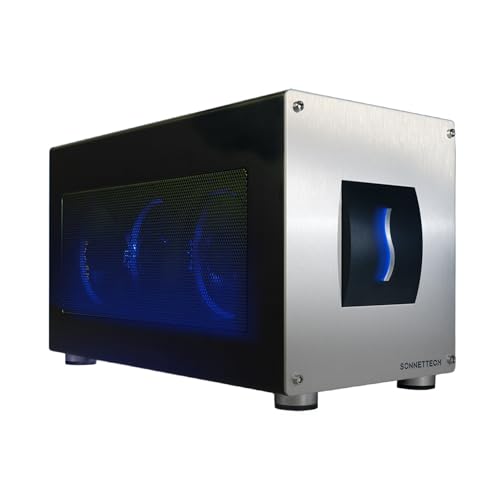
- 80 Gbps Thunderbolt 5 bandwidth
- Built-in USB-A ports plus 5GbE
- 850W PSU for triple-wide GPUs
Best For: Windows 11 users who need a high-end eGPU enclosure with hub-style connectivity.
Best for Portable All-in-One Kits
Compact eGPU Enclosure with USB Hub Features

- Includes 240W PSU, Thunderbolt cable, and carrying case
- Works with Thunderbolt 3/4 and USB4 laptops or handhelds
- Aluminum shell keeps the build compact and travel-friendly
Best For: Travelers and handheld gamers who want a complete, portable eGPU setup.
Best Hub-Ready eGPU Dock

- USB-A and daisy-chain ports add hub-style convenience
- Supports Thunderbolt 3/4 and USB4 laptops
- 80W USB-C PD helps power compatible devices
Best For: Users who want an eGPU enclosure that also doubles as a handy peripheral hub.
Best USB Hub Features

- Thunderbolt 3/4 and USB4 compatible
- USB-A and daisy-chain ports add hub-like convenience
- 85W PD charging supports compatible devices
Best For: Laptop and handheld users who want external graphics plus built-in peripheral expansion.
Best for AI-Ready Builds
MK-L18 Thunderbolt 3/4 USB4 eGPU Dock

- Thunderbolt 3/4 and USB4 compatibility
- 85W PD charging for single-cable use
- Supports modern NVIDIA and AMD GPUs
Best For: AI-focused users and power users who want a certified Thunderbolt/USB4 eGPU enclosure with fast charging.
Best for AI Workflows – Plugable Thunderbolt 5 AI eGPU Enclosure
If you want one of the most feature-rich egpu enclosures with usb hub support, the Plugable TBT5-AI stands out for Windows 11 users who need both GPU expansion and practical built-in connectivity. It combines an 850W PSU, Thunderbolt 5 bandwidth, and a USB hub-style mix of ports in one enclosure for demanding local AI and workstation setups.
Best For: Windows 11 buyers building a high-power eGPU setup for local AI models, creative work, or a desktop replacement with extra USB and network ports.
Pros:
- Thunderbolt 5 enclosure with 80Gbps bandwidth and a PCIe x16 slot for serious external GPU performance
- Built-in USB-A and USB-C ports, plus 2.5Gbps Ethernet, make it more useful than a basic eGPU dock
- 850W PSU with up to 600W dedicated to the GPU supports many high-end NVIDIA and AMD cards
- 96W host charging helps keep a Thunderbolt laptop powered from a single cable
Cons:
- Windows 11 only, with no support for macOS, Linux, ChromeOS, or Thunderbolt 3
- Large GPUs must fit the enclosure’s size and 3.5-slot limits
- GPU is not included, so total build cost can get high
For buyers comparing egpu enclosures with usb hub features, this Plugable model is less about portability and more about turning a Thunderbolt 5 laptop into a high-performance, well-connected workstation. The included USB, Ethernet, and charging features make it a strong choice when you want the enclosure to do more than just hold a graphics card.
Best for High-Power Builds – AOOSTAR AG02 EGPU Dock
If you’re comparing egpu enclosures with usb hub connectivity, the AOOSTAR AG02 stands out for its built-in 800W PSU, OCuLink input, and USB4 support. It’s aimed at users who want a high-power dock for modern GPUs without adding a separate power supply, while still keeping the setup compact and relatively straightforward.
Best For: Desktop and handheld users who need a powerful OCuLink eGPU dock for demanding graphics cards and want USB-connected flexibility in one station.
Pros:
- Built-in 800W power supply supports up to 600W GPU loads
- OCuLink plus USB4 connectivity for broad dock flexibility
- Open metal frame fits long graphics cards with easy airflow
- Auto-wake behavior helps streamline daily use
Cons:
- OCuLink is required, so it won’t suit USB4-only laptops
- No support for RTX 5090/5090D
- Hot-swap is limited to TGX devices, not standard OCuLink use
For buyers who want one of the more power-ready egpu enclosures with usb hub-style connectivity options, the AG02 is a strong pick as long as your host device has the right port and you don’t need absolute plug-and-play convenience.
Best for Thunderbolt 5 Speed – Razer Core X V2 eGPU Enclosure
If you want one of the most capable egpu enclosures with usb hub-style convenience for a laptop or handheld setup, the Razer Core X V2 is built for high-end desktop GPUs, fast Thunderbolt 5 links, and simple single-cable expansion. It’s a strong fit when you need real graphics performance without replacing your portable device, especially for gaming, creative work, or mixed-use desk setups.
Best For: Windows 11 users with Thunderbolt 4/5 or USB4 devices who want a high-performance eGPU enclosure for demanding GPU upgrades.
Pros:
- Supports large NVIDIA and AMD desktop graphics cards up to 4 slots wide
- Thunderbolt 5 connection delivers up to 80 Gbps bandwidth and 140W power delivery
- Tool-free access and modular design make GPU/PSU swaps easier
- Built-in 120mm fan helps maintain performance under load
Cons:
- GPU and power supply are sold separately
- Not compatible with Mac devices using M1 or later chips
- Doesn’t include built-in extra USB peripherals beyond the enclosure function
For buyers comparing egpu enclosures with usb hub features, this model stands out more for raw speed, broad GPU support, and easy expansion than for extra ports. If your priority is maximum external graphics performance from a single enclosure, it’s one of the more future-ready picks.
Best All-in-One eGPU Dock – Nimo eGPU Enclosure with RX 7600M XT
If you want one of the most convenient egpu enclosures with usb hub-style convenience, this Nimo unit is a strong pick because it combines the GPU, power supply, and high-speed laptop connectivity in a single portable dock. It’s aimed at users who want fast setup, less cable clutter, and a simple way to boost a laptop, mini PC, or handheld without building a full desktop-style enclosure.
Best For: Travelers, handheld gamers, and laptop users who want an all-in-one external GPU dock with minimal setup.
Pros:
- Built-in AMD Radeon RX 7600M XT and 240W PSU eliminate the need to source separate parts
- USB4 80Gbps and Oculink support give you flexible, high-bandwidth connection options
- 65W USB-C power delivery can charge many laptops while the eGPU is in use
- Compact 0.8L design is easier to pack than full-size enclosures
Cons:
- Integrated GPU means you can’t swap in a different graphics card later
- Less flexible than traditional eGPU enclosures for upgrade-focused builders
- Best value depends on whether you specifically want a portable all-in-one design
For buyers comparing egpu enclosures with usb hub features, this model stands out less as a general DIY dock and more as a ready-to-use performance upgrade. It makes the most sense if you value portability, single-cable convenience, and a built-in graphics card over long-term customization.
Best for Docked Power – AOOSTAR AG03 EGPU Dock with TB5
If you want one of the most feature-packed egpu enclosures with usb hub support, the AOOSTAR AG03 is built for high-wattage desktop GPUs, modern USB-C/TB connectivity, and laptop charging in one dock-style unit. Its 800W PSU, OCuLink input, dual Thunderbolt 5 ports, and integrated power delivery make it a strong pick for users who want a cleaner all-in-one setup.
Best For: Power users who need a dockable eGPU setup with fast laptop charging, broad USB-C compatibility, and room for a high-end graphics card.
Pros:
- 800W power supply supports demanding eGPU builds up to 500W.
- Dual Thunderbolt 5 plus OCuLink offers flexible host-device connectivity.
- PD charging up to 100W/140W helps replace a separate laptop charger.
- Hot-swap TGX support adds convenience for frequent dock users.
Cons:
- Overkill for casual users who only need basic external GPU support.
- Best features depend on compatible Thunderbolt 4/5, USB4, or OCuLink hardware.
- Large dock-and-PSU design takes more desk space than simpler enclosures.
For buyers comparing egpu enclosures with usb hub-style convenience, the AG03 stands out as a serious desktop replacement dock rather than a minimal enclosure. It makes the most sense when you want performance, charging, and connectivity in a single unit.
Best for Thunderbolt 5 Workflows – Sonnet Breakaway Box 850 T5
If you want one of the fastest egpu enclosures with usb hub features built in, the Sonnet Breakaway Box 850 T5 is aimed at demanding Windows users who need both GPU acceleration and extra port flexibility. Its Thunderbolt 5 connectivity, triple-wide card support, and onboard USB/Ethernet ports make it a strong fit for editing, rendering, and AI workstations.
Best For: Windows 11 laptop users who want a high-bandwidth eGPU enclosure with extra USB ports and wired networking.
Pros:
- 80 Gbps Thunderbolt 5 support for near-desktop GPU performance
- Built-in dock adds a Thunderbolt 5 port, three 10 Gbps USB-A ports, and 5GbE
- 850W PSU supports power-hungry modern GPUs
- Fits triple-wide NVIDIA and AMD graphics cards
Cons:
- Windows-focused, so it is not a universal cross-platform pick
- Larger and more workstation-oriented than compact enclosures
- Overkill if you only need light GPU acceleration
For buyers comparing egpu enclosures with usb hub functionality, this model stands out because it combines serious bandwidth with practical docking extras instead of treating the USB ports as an afterthought. It is a strong match if you want one enclosure to handle GPU power, peripheral hookups, and fast wired networking.
Best for Portable All-in-One Kits – Compact eGPU Enclosure with USB Hub Features
If you want one of the more complete egpu enclosures with usb hub-style convenience, this compact Thunderbolt 3/4 and USB4 dock packs in the essentials for a fast, portable setup. It includes a 240W power supply, Thunderbolt cable, PCIe power cable, and carrying case, making it a practical choice for laptops, gaming handhelds, and mini PCs that need desktop-class graphics on the go.
Best For: Travelers, handheld gaming users, and laptop owners who want a ready-to-use eGPU kit with minimal extra purchases.
Pros:
- Complete bundle includes PSU, cable, power lead, and carrying case
- Supports Thunderbolt 3/4 and USB4 systems with Windows and Linux compatibility
- Compact aluminum chassis is easy to carry and feels sturdy
- Multiple ports and PD charging add convenience for a streamlined desk setup
Cons:
- No graphics card included
- GPU size limits may rule out larger triple-slot cards
- Type-C ports without Thunderbolt/USB4 support will not work
This is a strong pick if you value portability and a simplified setup over maximum GPU compatibility. Among egpu enclosures with usb hub-like convenience, it stands out for being a near turn-key kit rather than just a bare enclosure.
Best Hub-Ready eGPU Dock – External GPU Enclosure Dock
If you want one of the more flexible egpu enclosures with usb hub support, this dock stands out for combining an external GPU enclosure with useful extra ports. It supports Thunderbolt 3/4 and USB4 systems, adds 80W USB-C power delivery, and gives you a 40Gbps TB4 port plus USB-A and daisy-chain connectivity for nearby peripherals.
Best For: Laptop and mini PC users who want an eGPU dock that can also function as a small USB hub for everyday accessories.
Pros:
- Includes hub-like connectivity with Thunderbolt, USB-A, and daisy-chain ports
- Supports a wide range of NVIDIA and AMD cards, including newer RTX and RX series
- 80W USB-C power delivery can help charge compatible laptops while in use
- Certified JHL7440 controller aims for solid performance in gaming and creative work
Cons:
- ATX power supply and graphics card are not included
- Only works with Thunderbolt 3/4 or USB4 devices
- Setup has important power-cable warnings that need to be followed carefully
For buyers comparing egpu enclosures with usb hub functionality, this model is a practical pick because it does more than just hold a GPU. Just make sure your laptop has the right port and you’re prepared to supply your own PSU and graphics card.
Best USB Hub Features – GODLIY eGPU Dock
If you want one of the more flexible egpu enclosures with usb hub, the GODLIY dock is built around Thunderbolt 3/4 and USB4 connections, with 40Gbps bandwidth, 85W PD charging, a USB-A port, and a daisy-chain port for extra peripherals. It’s a practical choice for gaming handhelds and laptops that need external graphics plus a little dock-style convenience.
Best For: Users who want an eGPU enclosure that doubles as a compact connectivity hub for a laptop or handheld setup.
Pros:
- Thunderbolt 3/4 and USB4 support gives it broad compatibility.
- Includes USB-A and daisy-chain ports, so it can function like a small hub.
- 85W Power Delivery helps charge compatible devices while in use.
- Supports a wide range of NVIDIA and AMD GPUs for demanding workloads.
Cons:
- Requires a Thunderbolt 3/4 or USB4 port, so older devices won’t work.
- ATX power supply and graphics card are not included.
- Setup includes a couple of important cable-routing warnings to follow carefully.
Overall, this is a strong pick if you want egpu enclosures with usb hub features in a single dock-style unit rather than a bare-bones graphics enclosure. It’s especially appealing for users who value charging and peripheral expansion alongside external GPU performance.
Best for AI-Ready Builds – MK-L18 Thunderbolt 3/4 USB4 eGPU Dock
If you want one of the more capable egpu enclosures with usb hub-style flexibility for a modern laptop or handheld, the MK-L18 is built around Thunderbolt 3/4 and USB4 compatibility, 85W power delivery, and support for current NVIDIA and AMD cards. It is a practical pick for users who need external GPU performance plus a clean single-cable setup for supported devices.
Best For: AI-focused users, creators, and power users who want a certified Thunderbolt/USB4 eGPU enclosure with fast charging and broad GPU support.
Pros:
- Works with Thunderbolt 3/4 and USB4 systems for broad device compatibility
- 85W PD charging helps power compatible laptops and handhelds over one cable
- Supports modern NVIDIA and AMD GPUs, including newer RTX 50-series options
- Open-frame aluminum design improves airflow and fits long graphics cards
Cons:
- Non-Thunderbolt/USB4 USB-C ports are not supported
- It is not a true USB accessory hub for multiple peripherals
- Some AI features are specialized and not meant for gaming or 3D rendering
This enclosure stands out if you need a certified, high-bandwidth eGPU dock with charging rather than a basic adapter. Among egpu enclosures with usb hub-like convenience, it is strongest for users who care more about stable performance, modern GPU support, and single-cable workflow than about a long list of extra ports.
How We Picked the Best Egpu Enclosures with USB Hub
We prioritized enclosures that balance graphics bandwidth, power delivery, and expansion-friendly design. For Egpu Enclosures with USB Hub functionality, that means looking beyond raw GPU support to the quality of the upstream connection, the number and type of ports, and whether the dock can handle charging and peripherals at the same time.
We also considered build practicality: PSU capacity, card clearance, compatibility with Thunderbolt 3/4, USB4, Thunderbolt 5, or OCuLink where relevant, plus whether the enclosure is a better fit for desktop replacements, travel-ready setups, or handheld gaming stations.
Quick Comparison
If you want the simplest plug-and-play path, Thunderbolt and USB4 models are usually the easiest to live with. If maximum throughput and lower latency matter more, OCuLink-based options can be appealing for supported systems. Some models also add stronger charging output, which can reduce cable clutter and make the dock more useful as a daily hub.
Key Buying Factors for Egpu Enclosures with USB Hub
Connection Standard
Match the enclosure to your device’s port support first. Thunderbolt 3/4, Thunderbolt 5, USB4, and OCuLink are not interchangeable in practice, and performance can vary based on your laptop, handheld, and cable quality.
USB Hub Usefulness
Check whether the extra ports are the ones you’ll actually use: USB-A for peripherals, USB-C for modern accessories, and enough bandwidth for storage, audio interfaces, or controllers. A hub that looks generous on paper may still feel limited if the ports are positioned poorly or share bandwidth in a way that affects your workflow.
Power Delivery and PSU Headroom
Good Egpu Enclosures with USB Hub features should do more than power a graphics card. Look at laptop charging wattage, total PSU output, and the enclosure’s supported GPU power limit so you do not outgrow the dock too quickly.
GPU Size and System Fit
Confirm card length, slot width, and cooling clearance. Larger enclosures are usually easier to live with for high-end cards, while compact designs make more sense if you value portability over maximum upgrade room.
Who Should Buy Which Egpu Enclosures with USB Hub?
Choose a Thunderbolt 4 or USB4 enclosure if you want broad compatibility and a cleaner one-cable setup. Go for Thunderbolt 5 or higher-bandwidth options if you are building around newer hardware and want more future-proofing. Pick OCuLink-focused models if your system supports it and you want a performance-oriented path for gaming or creator workloads.
If your priority is a travel-friendly desktop replacement, focus on compact enclosures with strong charging and a practical port layout. If you want the most flexible desk setup, choose a larger dock with a stronger PSU, better USB expansion, and room for full-size GPUs.
