
When it comes to optimizing your workstation’s performance, choosing the right ECC RAM kit is essential. These memory solutions boost reliability and speed, ensuring your system runs smoothly, even under heavy workloads. From NEMIX to A-Tech, there’s a range of options tailored to meet diverse needs. But what should you really consider before making a decision? Let’s explore the top choices and factors that can elevate your workstation to new heights.
NEMIX 32GB DDR4 SODIMM RAM Kit

If you’re looking to enhance your workstation’s reliability and performance, the NEMIX 32GB DDR4 SODIMM RAM Kit is an excellent choice. This kit features two 16GB modules, offering a total of 32GB of ECC memory with a speed of 2666 MHz. It’s compatible with various NAS and PC/Mac systems, particularly excelling in Synology NAS models. Users appreciate the straightforward installation process, typically completed in minutes, with immediate system recognition. With an impressive average customer rating of 4.7 stars, this RAM kit provides a cost-effective upgrade that greatly boosts your computing environment’s performance.
Best For: Those seeking a reliable and cost-effective memory upgrade for workstations and NAS systems, especially Synology models.
Pros:
- Easy and quick installation process with immediate system recognition.
- Significant performance improvements reported by users after upgrading from lower capacity RAM.
- Lifetime replacement warranty and support from experienced IT staff.
Cons:
- Some concerns about packaging quality upon delivery.
- May be less recognizable compared to more expensive Synology-branded RAM.
- Limited to compatibility with specific NAS and PC/Mac systems.
A-Tech 64GB DDR4 ECC UDIMM Server Memory Kit

Designed specifically for server and workstation systems, the A-Tech 64GB DDR4 ECC UDIMM Server Memory Kit stands out with its impressive capacity of 64GB spread across four 16GB modules. Operating at a speed of up to 2133MHz, this unbuffered memory kit enhances system performance and tackles demanding workloads with ease. Its dual-rank design and 288-pin configuration guarantee efficient memory management while reducing bottlenecks. Keep in mind that it’s not compatible with regular desktop or laptop PCs, so be sure to verify compatibility with your server model. Plus, you’ll enjoy peace of mind with a Limited Lifetime Warranty and reliable support.
Best For: Server and workstation users seeking high-capacity, reliable memory for demanding applications and workloads.
Pros:
- High Capacity: 64GB of memory across four 16GB modules enhances multitasking and workload management.
- Speed: Operates at up to 2133MHz, providing efficient performance for memory-intensive tasks.
- Warranty and Support: Comes with a Limited Lifetime Warranty and access to a dedicated support team.
Cons:
- Compatibility Limitations: Not compatible with standard desktop or laptop PCs; must verify compatibility with specific server models.
- ECC Specificity: Cannot be mixed with different types of ECC memory, limiting upgrade options.
- Unbuffered Design: May not be suitable for all high-performance server configurations that require buffered memory.
NEMIX 64GB DDR4 SODIMM Memory Kit

The NEMIX 64GB DDR4 SODIMM Memory Kit is an excellent choice for professionals needing reliable memory for workstation applications. With a speed of 2666MHz and a low voltage of 1.2V, this ECC unbuffered memory enhances performance while ensuring stability. Weighing just 2 ounces and measuring 7 x 4 x 1 inches, it’s easy to install, allowing you to upgrade your system quickly. Rated 5.0 out of 5 stars by users, it’s proven to work seamlessly in devices like the Synology DS1821+. Plus, NEMIX backs it with a lifetime replacement warranty, ensuring long-term reliability.
Best For: Professionals seeking reliable and high-performance memory upgrades for workstations and enterprise applications.
Pros:
- High Speed: Operates at 2666MHz for enhanced performance.
- Easy Installation: User-friendly design allows for quick upgrades in minutes.
- Lifetime Warranty: Backed by a lifetime replacement warranty for added peace of mind.
Cons:
- Limited Compatibility: Specifically designed for certain systems; may not work with all devices.
- ECC Feature: ECC memory may not be necessary for all users, particularly casual users.
- Higher Cost: Compared to standard non-ECC memory, it may be more expensive.
A-Tech 64GB DDR4 RAM Memory Upgrade Modules

For those seeking a reliable memory upgrade for microservers and workstations, the A-Tech 64GB DDR4 RAM Memory Upgrade Modules stand out with their ECC (Error-Correcting Code) technology. This kit includes two 32GB modules, boasting speeds of up to 3200MHz, ensuring enhanced performance and workload capacity. Designed specifically for networking platforms and embedded systems, these modules improve system efficiency while reducing bottlenecks. Remember, they’re not compatible with standard laptops or desktop PCs, so check your system’s compatibility. With a limited lifetime warranty and a supportive customer service team, A-Tech provides peace of mind alongside powerful performance.
Best For: Those in need of a high-performance memory upgrade for microservers, workstations, and networking platforms.
Pros:
- Enhanced performance and workload capacity with speeds up to 3200MHz.
- ECC technology provides improved reliability and error correction.
- Limited lifetime warranty and responsive customer support for peace of mind.
Cons:
- Not compatible with standard laptops or desktop PCs, limiting usability.
- Some reports of packaging issues or mislabeling from customers.
- Memory compatibility may vary across different system models, requiring careful verification.
NEMIX 256GB DDR5 ECC Registered Server Memory KIT

If you’re looking to boost your workstation’s reliability and performance, the NEMIX 256GB DDR5 ECC Registered Server Memory Kit is an excellent choice. This kit features four 64GB modules, delivering impressive 4800MHz speeds with a low power consumption of 1.1V. Designed specifically for compatibility with the ASUS Pro WS WRX90E SAGE SE motherboard, installation is simple and quick. With a lifetime replacement warranty and dedicated IT support, you can trust NEMIX for quality and reliability. Rated 5.0 out of 5 stars, this memory kit is a smart investment for anyone serious about enhancing their workstation’s capabilities.
Best For: Professionals and enterprises seeking to enhance the reliability and performance of their workstations with high-capacity ECC memory.
Pros:
- High capacity: Offers a total of 256GB using four 64GB modules, ideal for demanding applications.
- Fast speeds: Operates at 4800MHz, providing excellent data transfer rates for improved performance.
- Lifetime warranty: Backed by a lifetime replacement warranty, ensuring long-term reliability.
Cons:
- Compatibility limited: Specifically designed for ASUS Pro WS WRX90E SAGE SE motherboard, which may restrict usage with other systems.
- Higher cost: Investing in a premium memory kit like this may be more expensive compared to standard options.
- Installation requirement: Users must be comfortable with installing memory modules themselves, which may not suit everyone.
OWC 128GB DDR3 RAM Module Upgrade Kit

Designed specifically for workstations and servers, the OWC 128GB DDR3 RAM Module Upgrade Kit offers a substantial performance boost with its 8x16GB ECC Registered RDIMM configuration. This kit runs at 1600 MHz (PC3-12800) and is compliant with JEDEC standards, ensuring reliability. It’s essential to recognize that this ECC Registered memory isn’t compatible with standard desktop computers and shouldn’t be mixed with UNBUFFERED memory. By upgrading, you extend the life of your existing infrastructure while benefiting from a cost-effective solution for new systems. Plus, it comes with a limited lifetime warranty and access to free tech support from Other World Computing.
Best For: Professionals and businesses looking to upgrade workstations and servers with reliable ECC Registered memory.
Pros:
- High Capacity: Provides a significant 128GB of RAM, enhancing multitasking and performance.
- Reliability: ECC Registered memory ensures data integrity and reduces the risk of system crashes.
- Warranty and Support: Comes with a limited lifetime warranty and access to free tech support from Other World Computing.
Cons:
- Compatibility Limitations: Not suitable for standard desktop computers, which limits its use.
- Mixing Restrictions: Cannot be used with UNBUFFERED memory, potentially limiting upgrade options.
- Higher Cost: ECC Registered RAM typically comes at a higher price point compared to standard RAM.
OWC 512GB DDR5 RAM Module Upgrade Kit

The OWC 512GB DDR5 RAM Module Upgrade Kit stands out as an exceptional choice for professionals needing robust memory solutions in workstations and servers. This kit includes four 128GB DDR5 modules, providing a total of 512GB of memory. With a speed of 5200 MT/s and compliance with JEDEC standards, it guarantees high performance and reliability. Designed specifically for ECC Registered DIMM setups, it’s not compatible with standard desktops or unbuffered memory. Plus, OWC backs it with an industry-leading warranty and free technical support, making it a smart investment for extending infrastructure or building new systems efficiently.
Best For: Professionals and businesses seeking high-capacity, reliable memory solutions for workstations and servers.
Pros:
- High Capacity: Provides a total of 512GB memory, ideal for memory-intensive applications.
- Performance: Operates at a speed of 5200 MT/s, ensuring fast data processing and efficiency.
- Warranty and Support: Includes a Limited Lifetime Warranty and free technical support, offering peace of mind for users.
Cons:
- Compatibility: Not suitable for standard desktop computers or unbuffered memory setups.
- Cost: Higher investment compared to standard memory options, which may not be justifiable for all users.
- Specific Use Case: Designed specifically for workstations and servers, limiting its use for general consumers.
OWC 128GB DDR3 RAM Module Upgrade Kit

For professionals seeking to enhance their workstation’s performance, the OWC 128GB DDR3 RAM Module Upgrade Kit stands out with its impressive 128GB capacity. This kit features eight 16GB ECC Registered RDIMM memory modules, specifically designed for select workstations and servers. With compliance to JEDEC standards and a voltage of 1.5V, it guarantees peak performance. You’ll appreciate its ability to extend the life of your existing infrastructure while meeting or exceeding OEM specifications. Plus, it comes with a limited lifetime warranty and free tech support. Rated 4.2 out of 5 stars, it’s a reliable choice for boosting your workstation’s efficiency.
Best For: Professionals seeking to upgrade their workstations or servers with high-performance, reliable memory solutions.
Pros:
- High Capacity: Offers an impressive 128GB of memory for enhanced performance.
- ECC Registered: Ensures data integrity and reliability, essential for critical tasks.
- Limited Lifetime Warranty: Provides peace of mind with a warranty and free tech support.
Cons:
- Compatibility Limitations: Not compatible with standard desktop computers or UNBUFFERED memory.
- Higher Cost: May be more expensive compared to standard memory options.
- Requires Technical Knowledge: Installation may require expertise in workstation/server configurations.
Timetec Hynix 64GB DDR4 RAM Module Upgrade

Engineered with unbuffered ECC memory, the Timetec Hynix 64GB DDR4 RAM Module Upgrade is an excellent choice for professionals who demand reliability and performance in their workstation. This kit includes two 32GB modules, delivering a robust total of 64GB at a speedy 3200MHz. With a voltage of just 1.2V and a CAS latency of CL22, you’ll experience efficient multitasking and quick data access. Compatible with various Precision Workstations, this upgrade guarantees smooth operation for demanding applications. Plus, enjoy peace of mind with lifetime warranty coverage and free technical support in the USA. Elevate your performance today!
Best For: Professionals seeking reliable and high-performance memory upgrades for their Precision Workstations.
Pros:
- High Capacity: 64GB (2x32GB) modules allow for efficient multitasking and better performance in demanding applications.
- Fast Speed: Operates at 3200MHz, providing quick data access and enhanced system responsiveness.
- Lifetime Warranty: Offers peace of mind with a lifetime warranty and free technical support in the USA.
Cons:
- Compatibility Limitations: Only compatible with specific Precision Workstation models, limiting its use in other systems.
- CAS Latency: A CAS latency of CL22 may be higher than some competing RAM options, potentially affecting performance in latency-sensitive applications.
- Price Point: Higher initial investment compared to lower-capacity or non-ECC memory options.
NEMIX 32GB DDR5 RAM Memory KIT
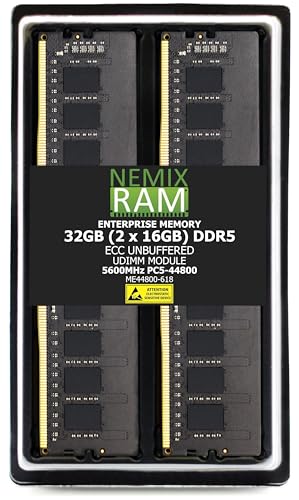
NEMIX 32GB DDR5 RAM Memory KIT is an excellent choice for professionals who require reliable performance in demanding workstation environments. With a speed of 5600MHz and ECC unbuffered design, this memory kit guarantees efficient processing and stability during heavy workloads. Installation is straightforward, allowing you to upgrade your system quickly. NEMIX RAM’s commitment to quality is backed by a lifetime replacement warranty, offering peace of mind. Priced competitively at $140, it delivers exceptional value compared to other brands. Users praise its compatibility and performance, making it a top choice for enhancing your workstation’s capabilities.
Best For: Professionals and gamers seeking reliable and high-performance memory upgrades for workstations and demanding applications.
Pros:
- High speed of 5600MHz ensures efficient processing and performance.
- Easy installation allows for quick upgrades without technical expertise.
- Backed by a lifetime replacement warranty, ensuring long-term reliability.
Cons:
- Limited to ECC unbuffered design, which may not suit all users.
- Some users may find the price slightly higher than non-ECC options.
- Availability may vary, affecting purchase options.
Factors to Consider When Choosing Ecc Ram Kits for Workstations
When choosing ECC RAM kits for your workstation, you need to take into account several key factors. Compatibility with your system, memory speed, and capacity are essential to guarantee peak performance. Plus, think about the type of ECC and how easy the installation process will be for you.
Compatibility With Systems
Choosing the right ECC RAM kit for your workstation involves several critical compatibility factors. First, verify the memory type, whether UDIMM or SODIMM, aligns with your system’s requirements. Next, check the RAM speed—like 2133MHz, 2666MHz, or 3200MHz—against your motherboard’s specifications to prevent performance bottlenecks. Additionally, confirm that the ECC RAM is compatible with your architecture, as some systems may only support unbuffered or registered types. Don’t forget to confirm the pin configuration; for example, 240-pin for DIMMs or 260-pin for SODIMMs must match your motherboard slots. Finally, review your workstation’s maximum supported RAM capacity to verify your chosen ECC RAM kit stays within limits, optimizing overall performance without issues.
Memory Speed Considerations
After ensuring compatibility with your system, memory speed becomes a pivotal factor in selecting the right ECC RAM kit for your workstation. Measured in megahertz (MHz), higher speeds directly influence data transfer rates, allowing for faster processing and improved overall performance. You’ll find ECC RAM kits available in speeds like 2133MHz, 2666MHz, and 3200MHz, each offering varying levels of enhancement. Opting for higher-speed RAM can greatly reduce bottlenecks in data-heavy applications, making it ideal for video editing, 3D rendering, and large database management. Just remember that not all systems support every speed, so verify your motherboard’s maximum supported RAM speed. Additionally, consider latency; lower CAS latency can enhance responsiveness alongside higher speeds.
Capacity Needs Assessment
To guarantee your workstation performs at its best, it’s essential to assess your capacity needs before selecting an ECC RAM kit. Start by evaluating the total memory requirements of your applications; tasks like virtualization or data analysis typically demand higher capacities, such as 64GB or more. Check how many memory slots your motherboard has, as this dictates your installation limits (e.g., 2x16GB or 4x16GB). Reflect on future scalability too; investing in higher capacity kits now can save you money down the line. Don’t forget to contemplate the specific ECC memory type your workstation supports, as this influences maximum capacity. Finally, balance total capacity with speed—sometimes, a lower capacity with higher speed offers better performance for certain applications.
ECC Type Selection
When selecting ECC RAM kits for your workstation, it is vital to contemplate the type of ECC memory that best fits your needs. ECC RAM is important for high-reliability tasks, as it detects and corrects memory errors, preventing data corruption. You’ll find two main types: Registered (RDIMM) and Unbuffered (UDIMM). Registered ECC provides better stability and scalability, especially for larger configurations. Confirm compatibility with your motherboard; you can’t mix ECC RAM types or combine it with non-ECC RAM, as this can cause system instability. Also, consider performance specifications like speed (measured in MHz) and CAS latency (CL), verifying they align with your workstation’s requirements for peak performance and responsiveness.
Installation Ease
Choosing the right ECC RAM kit not only involves understanding the types available but also considering how easy it is to install. The installation process is typically straightforward, often taking just minutes when you follow the owner’s manual. Most users find that their systems recognize ECC RAM immediately, which minimizes any setup time or complications. The standardized physical dimensions of SODIMM and UDIMM modules guarantee compatibility with your workstation’s designated slots. Many users report a smooth upgrade experience, highlighting the absence of compatibility warnings or errors during installation. Plus, a significant number of ECC RAM kits come with lifetime warranties, giving you peace of mind about both installation and long-term reliability.
Warranty and Support
Understanding the warranty and support options available can make a significant difference in your experience with ECC RAM kits for workstations. A solid warranty, often a lifetime replacement guarantee, allows you to swap out faulty memory modules without extra costs. Many manufacturers offer limited lifetime warranties, ensuring peace of mind regarding the longevity and reliability of your memory. Customer support is essential, too; having access to knowledgeable IT staff can help you troubleshoot installation or compatibility issues efficiently. It’s wise to choose ECC RAM from brands known for responsive customer service, as this enhances your installation experience. Additionally, some manufacturers provide technical support to verify compatibility with your specific workstation, ensuring you get the best performance.
Performance Improvement Potential
To maximize the performance improvement potential of ECC RAM kits for workstations, you’ll want to contemplate several key factors. First, consider upgrading to higher capacity RAM; moving from 32GB to 64GB can yield noticeable boosts in memory-intensive tasks like virtualization. Next, pay attention to memory speed—faster RAM, such as 3200MHz, provides quicker data access than slower options like 2133MHz, enhancing overall responsiveness. Additionally, ECC RAM’s ability to detect and correct single-bit errors provides greater stability, reducing crashes during critical operations. Finally, verify system compatibility; using ECC RAM designed for your specific workstation or server is essential, as improper configurations can hinder potential performance gains. Choosing wisely will elevate your workstation’s capabilities markedly.
