
When it comes to building a dual system, the case you choose can make all the difference in performance and aesthetics. You need spacious interiors, excellent airflow, and a layout that works for you. With so many options available, it’s essential to know which cases stand out. Let’s explore some of the top contenders that balance functionality and style, ensuring your setup is both powerful and visually appealing.
Thermaltake Core P200 Extended Water Cooling Pedestal (CA-1F4-00D1NN-00)
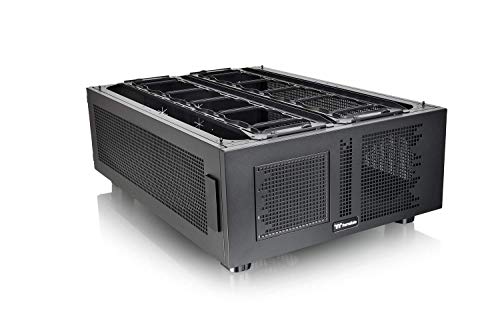
If you’re a PC enthusiast looking for a versatile and spacious case, the Thermaltake Core P200 Extended Water Cooling Pedestal (CA-1F4-00D1NN-00) is an excellent choice. Its fully modular design allows you to configure your setup however you like, making it perfect for dual systems. You can support up to 600mm radiators and enjoy optimized cooling performance. Although assembly can be a bit tricky for some, the solid steel construction guarantees durability. Plus, with heavy-duty casters, you can easily move it around. Users rave about the ample space and customization options, making it a worthy investment for serious builders.
Best For: PC enthusiasts looking for a versatile and spacious case that supports extensive cooling and customization options.
Pros:
- Solid steel construction ensures durability and longevity.
- Ample space for components, allowing for multiple cooling solutions and configurations.
- Heavy-duty casters provide ease of mobility for setup and maintenance.
Cons:
- Assembly can be challenging due to lack of instructions or missing parts.
- Some users reported difficulties with specific motherboard compatibility.
- The case’s heavy weight may pose challenges during setup.
Thermaltake Core W200 Super Tower Computer Case (CA-1F5-00F1WN-00)
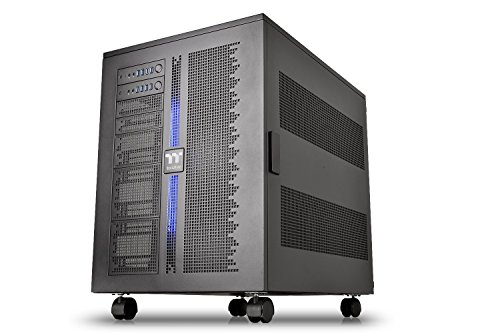
The Thermaltake Core W200 Super Tower Computer Case is an ideal choice for tech enthusiasts seeking a robust dual system setup. It accommodates two separate systems in a back-to-back configuration and supports various motherboard sizes. With its fully modular design, you can customize your layout effortlessly. The case features extensive cooling options, including support for up to two 600mm radiators and multiple fan mounts. Users appreciate the solid steel construction and spacious interior, although assembly may be challenging for novices. Overall, the W200 offers excellent performance and expandability, making it a worthy investment for serious builders.
Best For: Tech enthusiasts and advanced users looking for a versatile dual system setup with extensive cooling options.
Pros:
- Solid Construction: Made from durable steel, ensuring longevity and stability.
- Customizable Layout: Fully modular design allows for various configurations tailored to user preferences.
- Excellent Cooling Support: Capable of accommodating up to two 600mm radiators and multiple fans for optimal thermal management.
Cons:
- Challenging Assembly: May be difficult for novices due to the unassembled design and complex cable management.
- Heavyweight Design: Weighs over 90 pounds, making it cumbersome to move without assistance.
- Compatibility Issues: Some users report problems with certain workstation motherboards and heat sink installations.
NZXT H5 Flow 2024 Compact ATX Mid-Tower PC Gaming Case

For gamers seeking a compact yet powerful solution, the NZXT H5 Flow 2024 Compact ATX Mid-Tower PC Gaming Case stands out with its exceptional airflow design. Measuring 16.93 x 8.86 x 18.31 inches and weighing 17.6 pounds, it’s perfect for those tight on space. With two pre-installed 120mm Quiet Airflow fans and support for large radiators, cooling’s a breeze. You’ll appreciate the seamless cable management system that keeps your build tidy. Customers rave about its build quality, giving it a solid 4.7-star rating. If you want a stylish, efficient case, the NZXT H5 Flow is a fantastic choice.
Best For: Gamers and PC builders seeking a compact, high-performance case with excellent airflow and cable management.
Pros:
- Exceptional airflow design with ultra-fine mesh panels and pre-installed Quiet Airflow fans.
- User-friendly installation with ample cable management options and space for various components.
- High build quality with a modern aesthetic, praised by users for durability and functionality.
Cons:
- Limited bottom intake for the PSU, which may affect overall cooling efficiency.
- Fewer USB ports on the front panel than some users would prefer.
- Compatibility issues with larger GPUs due to support brackets, potentially limiting choices for high-end builds.
MUSETEX ATX Mid Tower Computer Case with 6 PWM ARGB Fans

Designed for gamers and PC enthusiasts who crave both performance and aesthetics, the MUSETEX K2 ATX Mid Tower Case stands out with its six PWM ARGB fans that deliver exceptional cooling while adding a vibrant visual flair. With dual tempered glass panels, you can showcase your high-end components beautifully. The case supports GPUs up to 420mm and CPUs up to 178mm in height, ensuring compatibility with most hardware. Its I/O panel features USB 3.0 and Type-C ports for high-speed connectivity. Plus, with a customer rating of 4.6 stars, it’s clear this case meets both style and functionality.
Best For: Gamers and PC enthusiasts seeking a stylish, high-performance case with excellent cooling capabilities.
Pros:
- Pre-installed 6 PWM ARGB fans for enhanced cooling and visual appeal.
- Spacious interior supports large GPUs and CPUs, accommodating most hardware configurations.
- Dual tempered glass panels provide a stunning display of internal components.
Cons:
- Some users reported issues with fan direction during installation.
- Minor quality control concerns noted by a few customers.
- Limited support for larger power supply units (max 238mm).
NZXT H9 Flow RGB+ Large Dual-Chamber ATX Mid-Tower Airflow PC Case

If you’re a gamer or a content creator seeking exceptional airflow and cooling for your high-performance components, the NZXT H9 Flow RGB+ Large Dual-Chamber ATX Mid-Tower Airflow PC Case is an excellent choice. Its dual-chamber design keeps your PSU and drives separate from the main components, enhancing thermal performance and cable management. Enjoy a panoramic view through seamless tempered glass, showcasing your build. With support for up to nine 140mm fans, optimized airflow, and RGB lighting via the NZXT Control Hub, your setup will not only perform well but also look stunning. It’s perfect for accommodating high-end GPUs and radiators up to 420mm.
Best For: Gamers and content creators seeking optimal airflow and stunning aesthetics in their high-performance PC builds.
Pros:
- Dual-chamber design enhances thermal performance and simplifies cable management.
- Supports extensive cooling options with the ability to accommodate up to nine 140mm fans and large radiators.
- Customizable RGB lighting with included RGB fans and the NZXT Control Hub for a visually striking setup.
Cons:
- Price point may be higher compared to standard cases, which could be a consideration for budget-conscious users.
- Size and weight could make it less portable for users who frequently transport their setups.
- Complexity in setup may be overwhelming for beginners unfamiliar with advanced PC builds and cable management.
ASUS ProArt PA602 E-ATX PC Case

The ASUS ProArt PA602 E-ATX PC Case stands out as an ideal choice for creators and professionals who demand exceptional cooling and airflow for high-performance builds. Its sleek design features dual 200mm front fans and a 140mm rear exhaust fan, ensuring optimal thermal management. You’ll appreciate the 15.5 mm front panel grill, allowing for 45% porosity, while air deflectors direct airflow precisely where it’s needed. With tool-less PCIe mounting and built-in wheels, transporting your setup is a breeze. Plus, the cable management system keeps your workspace organized. Rated 4.5 stars, it’s a solid investment for any serious creator.
Best For: Creators and professionals seeking a high-performance PC case with exceptional cooling and airflow features.
Pros:
- Great airflow with dual 200mm front fans and a well-ventilated front panel.
- User-friendly design featuring tool-less PCIe mounting and built-in wheels for easy transport.
- Excellent cable management system that keeps workspace organized and tidy.
Cons:
- Size may be excessive for users with limited space or those who prefer more compact builds.
- Some users have requested a smaller version of the case for easier integration into smaller setups.
- Weight of 35.5 pounds may be cumbersome for frequent relocation.
ASUS TUF Gaming GT502 Horizon ATX Mid-Tower PC Case

For gamers and content creators seeking a stylish yet functional setup, the ASUS TUF Gaming GT502 Horizon ATX Mid-Tower PC Case stands out with its boundless panoramic design. The tempered and tinted glass panels offer an unobstructed view of your components, showcasing your build. Its fully modular design allows for easy hardware installation, while the dual-chamber chassis guarantees efficient cooling for both your CPU and graphics card. You’ll appreciate the tool-free side panels, which you can remove effortlessly. Plus, with a front panel high-speed USB Type-C port, data transfer is quick and convenient, enhancing your overall experience.
Best For: Gamers and content creators looking for a stylish and efficient mid-tower PC case that enhances their build visibility and cooling performance.
Pros:
- Fully modular design allows for streamlined hardware installation.
- Dual-chamber chassis provides independent cooling zones for optimal performance.
- Tool-free side panels enable quick and easy access to components.
Cons:
- The tempered glass panels may be prone to fingerprints and smudges.
- Limited airflow options compared to some larger cases.
- Higher price point compared to basic PC cases.
CORSAIR 4000D RS ARGB Mid-Tower ATX PC Case

Designed for gamers and PC builders seeking customization, the CORSAIR 4000D RS ARGB Mid-Tower ATX PC Case stands out with its FRAME Modular Case System. Its sleek black design and weight of 18.04 pounds make it a sturdy yet stylish option. You’ll appreciate the optimized airflow from the 3D Y-pattern panel and pre-installed ARGB PWM fans, ensuring efficient cooling. With vertical GPU mounting and easy cable management, assembly is a breeze. Plus, it supports dual 360mm radiators for advanced cooling setups. With a 4.6-star rating, this case proves to be a top contender for your next build.
Best For: Gamers and PC builders seeking a customizable, high-performance case with excellent airflow and cooling capabilities.
Pros:
- Modular design allows for easy upgrades and custom configurations.
- Optimized airflow with a 3D Y-pattern panel and pre-installed ARGB PWM fans for efficient cooling.
- User-friendly assembly features that simplify cable management and installation.
Cons:
- Vertical GPU mounting requires a riser cable, which is not included.
- Limited color options, as it is only available in black.
- Weight may be a concern for users looking for a lighter case.
Lian Li DK-07X Motorized Standing Desk
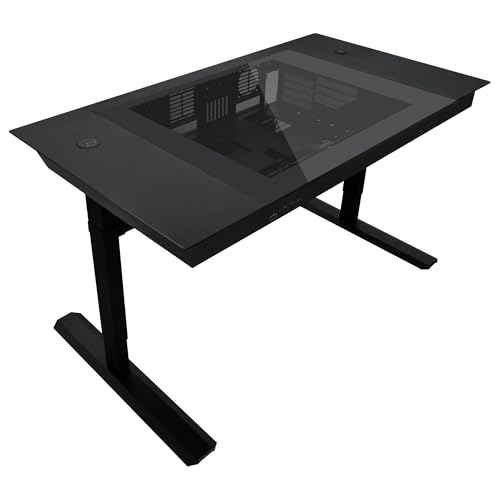
If you’re a PC enthusiast seeking a powerful setup, the Lian Li DK-07X Motorized Standing Desk is an excellent choice, as it supports dual E-ATX systems and offers height adjustability for comfortable use. With dimensions of 59 x 36 x 35 inches, it accommodates up to two ATX PSUs, 480mm radiators, and 17 fans, ensuring ideal airflow. The sleek metal and tempered glass design adds a modern touch to your space. Plus, built-in cable management keeps your workspace tidy. While assembly is straightforward, expect around 4 hours for setup. This desk’s functionality and quality make it a top contender for any dual system enthusiast.
Best For: PC enthusiasts looking for a high-quality, customizable dual system setup with a modern design and excellent airflow.
Pros:
- High-quality materials and construction for durability.
- Excellent airflow and modularity, accommodating large components and custom builds.
- Built-in cable management and integrated wireless charging for a tidy workspace.
Cons:
- Some assembly holes may not align properly, requiring additional effort during setup.
- Limited clearance for clamp systems due to the desk’s sleek design.
- The manual lacks detailed instructions, making certain assembly steps unclear.
CORSAIR 4000D RS Frame Modular Mid-Tower PC Case

The CORSAIR 4000D RS Frame Modular Mid-Tower PC Case is perfect for gamers and PC builders looking for versatility and superior airflow. With its FRAME Modular Case System, you can customize your setup effortlessly. It includes three CORSAIR RS PWM fans and features the InfiniRail mounting system for flexible fan configurations. This case supports multiple 360mm radiators, ensuring ideal cooling for powerful components. Although some users encountered challenges with large GPUs, it boasts excellent cable management and a user-friendly assembly process. With an impressive rating of 4.7 out of 5 stars, it’s a top choice for performance and style.
Best For: Gamers and PC builders seeking a customizable mid-tower case with superior airflow and cooling options.
Pros:
- Excellent airflow and cooling potential with three pre-installed CORSAIR RS PWM fans.
- User-friendly design for assembly and efficient cable management.
- Modular design allows for easy upgrades and flexible component placement.
Cons:
- Some users reported difficulties fitting larger GPUs comfortably.
- SSD trays may pose challenges in terms of accessibility and space.
- Display features may not function properly for some users.
Factors to Consider When Choosing Dual System PC Cases
When you’re choosing a dual system PC case, think about how you’ll manage space and the cooling options available. You’ll also want to take into account the modular design flexibility and whether your components will fit seamlessly. Finally, keep in mind the assembly complexity level, as this can affect your overall build experience.
Space Management Solutions
Choosing a dual system PC case requires careful consideration of space management solutions, especially since efficient use of space can greatly impact your system’s performance and organization. Look for modular designs that let you customize configurations, ensuring you can effectively house multiple components. Cases with separate chambers for each system improve airflow by isolating heat-generating parts, enhancing thermal performance. Opt for cases that accommodate large radiators and multiple fans to maximize cooling without sacrificing space. Effective cable management features like wide channels help keep your build tidy, while stacking capabilities enable expansion without taking up extra floor space. Prioritize these elements to create a well-organized and efficient dual system setup.
Cooling Options Availability
For ideal performance in your dual system PC case, consider the cooling options available, as they play an essential role in maintaining system stability and longevity. Look for cases that support extensive cooling, accommodating large radiators—some even up to 600mm. Effective airflow is vital, so choose models with perforated panels and multiple fan mounts for better air intake and exhaust. Independent cooling loops can optimize performance by allowing tailored solutions for each system. A dual-chamber layout can further enhance thermal management by separating components like the PSU and drives from the main system. Additionally, verify the case has pre-installed fans, options to add more, and dust filters to maintain airflow and cooling effectiveness over time.
Modular Design Flexibility
While considering a dual system PC case, modular design flexibility stands out as an essential factor that can greatly enhance your setup. A modular design allows you to customize configurations according to your preferences and requirements, making it easier to create a system that fits your specific needs. Fully dismantle designs enable you to replace or upgrade components with ease, ensuring better maintenance and longevity. Stackable features offer options to expand your setup without sacrificing space. Additionally, compatibility with various motherboard sizes increases your hardware choices, accommodating different performance levels. Finally, supporting multiple cooling solutions, including extensive radiator options, enhances thermal management, ensuring your dual systems perform effectively.
Component Compatibility Considerations
When setting up a dual system PC, confirming component compatibility can greatly impact your build’s success and functionality. First, check that the case supports multiple motherboard sizes like Mini ITX, Micro ATX, and XL-ATX to fit your configurations. Next, verify the maximum GPU length and CPU cooler height to avoid installation issues with larger components. It’s also essential to assess the mounting options for power supplies, as some cases allow dual PSU configurations. Don’t overlook cooling capabilities; confirm there’s adequate radiator support for liquid cooling, especially since dual systems generate more heat. Finally, consider cable management features to facilitate efficient routing between the two systems, which will enhance overall maintenance and assembly efficiency.
Assembly Complexity Level
Choosing a dual system PC case involves considering assembly complexity, which can greatly impact your building experience. Many cases arrive unassembled, requiring you to follow detailed instructions, which can be challenging if you’re a novice. The lack of physical manuals often complicates matters, leading to difficulties with screw compatibility and cable management. Cases with modular designs offer flexibility but may demand extra effort to configure multiple systems or cooling solutions effectively. Additionally, if you select a heavier case, often exceeding 90 pounds, mobility during assembly becomes harder. User feedback emphasizes the value of straightforward assembly features, like tool-free side panels and clear cable management, to enhance your overall building process. Choose wisely to guarantee a smoother experience!
Aesthetic Appeal Factors
Aesthetic appeal plays an essential role in selecting a dual system PC case, as it not only showcases your hardware but also enhances your overall setup. Look for cases with panoramic views and tempered glass paneling that let you display your components beautifully. Customizable RGB lighting options can help you personalize your build, creating a visually striking atmosphere. Many designs feature a modern mix of materials like metal and glass, ensuring your case looks professional and polished in any environment. Additionally, the modular design allows for creative layouts that cater to your style while maintaining functionality. Interchangeable front panels and decorative elements let you modify your case’s appearance without needing to change the internal components.
Connectivity Features Offered
Selecting a dual system PC case also involves understanding the connectivity features it offers. You’ll want to check the number and types of I/O ports, like USB 3.0 or USB Type-C, to guarantee compatibility with your peripherals. Look for integrated fan or RGB control hubs to manage cooling and lighting for both systems easily. It’s essential that the case supports dual power supply options for efficient system operation. Evaluate the internal layout to guarantee ample space for multiple motherboards and proper cable management. Features like tool-less mounting and removable side panels can streamline the installation process and enhance accessibility for future upgrades. These elements will help you maximize performance and maintain organization in your dual system setup.
Weight and Mobility Aspects
When considering a dual system PC case, you’ll quickly notice that weight and mobility are essential factors to address. These cases often exceed 90 pounds due to their sturdy construction and extra space for components, making them challenging to maneuver. Moving a heavy case can be particularly tricky in tight spaces or when traversing stairs. While many models come with casters for easier movement, the weight still demands careful handling, or you might need assistance to prevent damage. You’ll want to think about the logistics of transporting such a case, including the physical strain it may cause. Although a heavier case offers stability and durability, it can limit your flexibility in placement and accessibility within your workstation.
