
A dual-monitor dock can turn a laptop into a more comfortable home-office workstation with one connection for displays and accessories. But two HDMI ports do not guarantee two independent screens—or the resolution and refresh rate you expect.
These 10 options range from compact USB-C hubs to fuller desktop docks. The right choice depends on your laptop, monitors, charging needs, and how many devices you leave plugged in.
Best 10 Dual Monitor Laptop Dock for Work from Home Picks for 2026
Best Space-Saving Windows Dock
PULWTOP 11-in-1 Vertical Stand
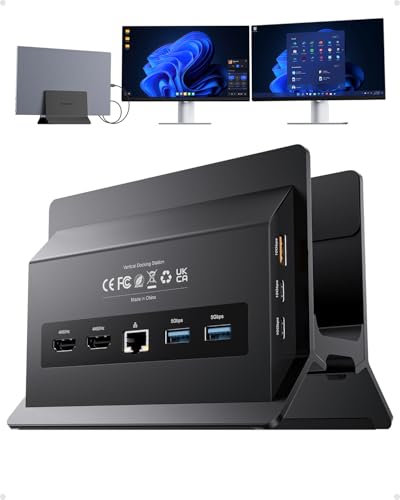
- Vertical laptop stand saves desk space
- Dual 4K@60Hz HDMI for compatible Windows laptops
- 10Gbps ports and Gigabit Ethernet
Best For: Windows dual-monitor setups with limited desk space
Best Dock for SD Cards

- Dual HDMI supports up to 4K@60Hz
- SD and microSD slots
- Up to 90W laptop charging
Best For: Windows users who import files from memory cards
Best Compact Dock with Ethernet

- Dual displays up to 4K@30Hz
- Ethernet and SD/microSD readers
- Up to 85W pass-through charging
Best For: Portable home-office setups needing wired internet
Best Dock with Power-Saving Mode
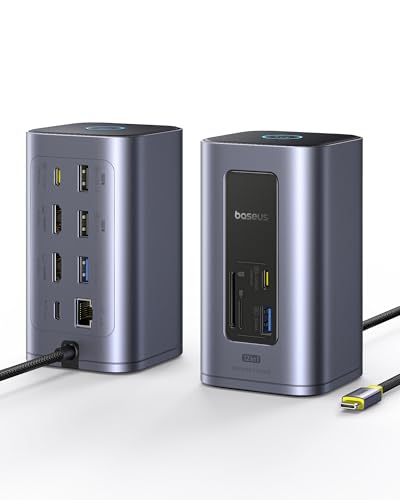
- Dual HDMI outputs rated 4K@60Hz
- 10Gbps USB and Gigabit Ethernet
- Button preserves PD while disconnecting other ports
Best For: Windows workstations with multiple peripherals
Best for Wired Home Offices

- Dual HDMI supports up to 4K at 60Hz
- Gigabit Ethernet and SD/microSD slots
- Up to 85W laptop pass-through charging
Best For: Windows users pairing two monitors with wired networking
Best for Mixed Monitor Connections

- Two HDMI, DisplayPort, and VGA outputs
- Three USB 2.0 accessory ports
- VGA use limits all displays to 1080p
Best For: Desks with mixed monitor connectors and a DP Alt Mode laptop
Best for Port-Heavy Desks

- Two HDMI and two DisplayPort connections
- Gigabit Ethernet, card slots, and 5Gbps USB
- macOS external displays mirror each other
Best For: Peripheral-heavy desks needing HDMI and DisplayPort options
Flexible Display Pick

- Two HDMI ports plus DisplayPort
- Up to 10Gbps on select USB ports
- Gigabit Ethernet and SD/microSD readers
Best For: Windows users who want flexible monitor hookups and peripheral ports
Peripheral-Heavy Pick

- Ten USB ports for desk accessories
- Two HDMI outputs advertised for dual 4K
- Gigabit Ethernet and up to 100W PD
Best For: Windows or ChromeOS desks with many always-connected peripherals
Multi-Device Charging Pick

- Up to 160W total charging output
- Two HDMI displays up to 2K@60Hz with DP 1.4
- Up to 10Gbps data transfer
Best For: Compatible Windows or ChromeOS users charging multiple devices at one desk
Best Space-Saving Windows Dock – PULWTOP 11-in-1 Vertical Stand
For a dual monitor laptop dock for work from home that also frees up desk space, this PULWTOP model combines an 11-in-1 dock with a vertical laptop stand. Its two HDMI ports support independent 4K@60Hz displays on compatible Windows laptops.
Best For: Windows laptop users who want two extended monitors and a smaller desk footprint.
Pros:
- Vertical stand keeps the laptop off the main work surface.
- Two HDMI ports support dual 4K@60Hz displays via MST.
- Includes 10Gbps data ports, Gigabit Ethernet, and up to 85W laptop charging.
Cons:
- Not compatible with Macs.
- Power adapter is not included; USB-C data ports do not output video or charge devices.
Choose this one if desk space and wired connectivity matter as much as display output. Check that your Windows laptop has a full-featured USB-C connection, and budget for a suitable PD adapter.
Best Dock for SD Cards – Acer 9-in-1 USB-C Dock
If your dual monitor laptop dock for work from home also needs card-reader access, Acer’s 9-in-1 hub brings two HDMI ports, SD and microSD slots, and four 5Gbps USB data ports into one compact setup. On a compatible Windows laptop, the HDMI ports support up to 4K@60Hz.
Best For: Windows users who regularly import files from SD cards while working across two monitors.
Pros:
- Two HDMI ports support dual 4K@60Hz output with a suitable host laptop.
- SD and microSD slots add convenient card access.
- Supports up to 90W laptop charging with a suitable 100W-class PD adapter.
Cons:
- A 100W+ power adapter is not included.
- On macOS, external monitors show the same content rather than two independent desktops.
This is a practical pick when card readers and USB ports matter alongside your screens. Before buying, confirm that your laptop’s USB-C port supports video output and PD if you plan to charge through the dock.
Best Compact Dock with Ethernet – Anker PowerExpand 8-in-1
Anker’s PowerExpand is a compact dual monitor laptop dock for work from home when you need wired internet, card readers, and basic peripherals on a single USB-C connection. It drives two HDMI displays at up to 4K@30Hz, or one at up to 4K@60Hz.
Best For: Home-office users who want a portable hub with Ethernet and dual displays without needing 60Hz on both screens.
Pros:
- Dual HDMI, Ethernet, USB-A ports, and SD/microSD readers cover common desk connections.
- Supports up to 85W USB-C pass-through charging.
- Compact body weighs 3.2 ounces.
Cons:
- Dual-display output is limited to 4K@30Hz per screen.
- macOS mirrors content across the two external monitors; Linux is not supported.
- Charging requires a separate 100W PD wall charger and USB-C cable.
It suits a mixed desk-and-travel routine, provided its dual-screen refresh rate meets your needs. Windows users seeking two independent 4K@60Hz displays should look elsewhere.
Best Dock with Power-Saving Mode – Baseus Spacemate Nomos Air
For a dual monitor laptop dock for work from home with room for more peripherals, the Baseus Spacemate Nomos Air offers a 12-in-1 connection set, dual HDMI outputs rated at 4K@60Hz, and 10Gbps USB data connections. Its 31.5-inch host cable offers more placement flexibility than a short built-in lead.
Best For: Windows laptop users who want a fuller desk setup and a way to disconnect peripherals without unplugging the dock.
Pros:
- Two HDMI outputs are rated for 4K@60Hz displays.
- Includes 10Gbps USB connections, Gigabit Ethernet, and SD/TF card access.
- Power-saving button disconnects ports other than PD while keeping laptop charging available.
Cons:
- Charger is not included.
- The product is presented as a dual-monitor dock for Windows; verify your laptop’s display support before purchase.
This is the option to consider when you want ports for a more involved workstation and value its power-saving button. Allow for a separate charger in your setup.
Best for Wired Home Offices – UGREEN 10-in-1 Dual-HDMI Dock
If you need a dual monitor laptop dock for work from home, this UGREEN model combines two HDMI outputs with Gigabit Ethernet, card readers, and USB connections in a compact hub.
Best For: Windows laptop users who want two external displays and a wired network connection from one USB-C dock.
Pros:
- Supports two displays up to 4K at 60Hz, subject to laptop compatibility.
- Includes Gigabit Ethernet and SD/microSD readers.
- Offers 5Gbps USB-C and USB-A data ports plus up to 85W laptop pass-through charging.
Cons:
- On macOS, the two external displays show identical content.
- The USB data ports do not provide video output or device charging.
This is a practical pick when networking and everyday peripherals matter as much as screen space. MacBook users who need two independent external desktops should look elsewhere.
Best for Mixed Monitor Connections – HoDo 8-in-1 Video Dock
This HoDo dual monitor laptop dock for work from home suits desks with different display cables: it provides two HDMI ports, DisplayPort, and VGA, alongside three USB 2.0 ports.
Best For: Users with a video-capable USB-C laptop who need flexible HDMI, DisplayPort, or VGA monitor connections.
Pros:
- Four video connectors offer options for mixed monitor setups.
- Supports up to 4K output on supported configurations and laptops.
- Three USB 2.0 ports accommodate a keyboard, mouse, and other basic accessories.
Cons:
- Connecting VGA limits all displays to 1080p.
- macOS external monitors show the same content; they cannot display separate extended desktops.
- Charging requires a compatible laptop and a suitable power adapter, which is not included.
Choose this dock for connector flexibility rather than fast file transfers: its USB data ports top out at 480Mbps. Check that your laptop’s USB-C port supports DisplayPort Alt Mode before buying.
Best for Port-Heavy Desks – MOKiN 14-in-1 Display Dock
For a dual monitor laptop dock for work from home with room to expand, this MOKiN 14-in-1 hub pairs two HDMI and two DisplayPort connections with Ethernet, card readers, and multiple USB ports.
Best For: Users who want a broad selection of display and peripheral connections on a single desk dock.
Pros:
- Two HDMI and two DisplayPort sockets support several multi-monitor connection combinations.
- Includes Gigabit Ethernet, SD/microSD slots, and multiple 5Gbps USB ports.
- A screen-off button offers a quick way to hide connected display content.
Cons:
- macOS laptops are limited to mirroring across connected external monitors, not independent external desktops.
- A 100W power adapter must be supplied separately for the charging setup described in the notes.
Its varied ports make it useful for a desk that changes peripherals or monitor cables. If separate external screens on a Mac are essential, the stated macOS limitation is the deciding drawback.
Flexible Display Pick – VVB 14-in-1 USB-C Dock
The VVB 14-in-1 is a dual monitor laptop dock for work from home when you want HDMI and DisplayPort choices alongside wired networking, card readers, and everyday USB connections. Its compact hub design expands one compatible USB-C port into 14 ports.
Best For: Windows laptop users who want flexible monitor connections and fast peripheral transfers in one hub.
Pros:
- Two HDMI ports and one DisplayPort support dual external monitors on compatible Windows laptops.
- USB-C and two USB-A 3.1 ports offer up to 10Gbps data transfer.
- Includes Gigabit Ethernet, SD/microSD readers, and a 3.5mm audio jack.
Cons:
- Dual-monitor output is listed at 4K@30Hz plus 1080p@60Hz with DP 1.4, rather than two 4K@60Hz screens.
- MacBooks support the same image on external monitors only; the charging adapter and cable are not included.
Check that your laptop’s USB-C port supports video output and Power Delivery before buying. If it does, this hub offers a useful mix of display options and desk essentials without claiming higher dual-screen resolutions than its specifications allow.
Peripheral-Heavy Pick – TobenONE 19-in-1 Dock
If your desk has more accessories than your laptop can handle, the TobenONE 19-in-1 is a dual monitor laptop dock for work from home built around connection capacity. It combines two HDMI outputs with 10 USB ports, Gigabit Ethernet, card slots, and audio through a single laptop connection.
Best For: Windows or ChromeOS users who keep multiple USB peripherals connected while working across two monitors.
Pros:
- Ten USB ports leave room for a keyboard, mouse, external storage, and other accessories.
- Two HDMI outputs are advertised for dual 4K displays on compatible laptops.
- Includes Gigabit Ethernet, SD/microSD slots, a 3.5mm audio jack, and up to 100W Power Delivery.
Cons:
- The notes specify a full-featured USB-C laptop port, so a basic data-only USB-C port will not provide the intended setup.
- The supplied notes do not specify a dual-display refresh rate or whether a power adapter is included.
This is the capacity-first choice for a crowded home desk. Confirm your laptop’s video-capable USB-C support, and verify the display specifications that matter to you before committing to a particular monitor setup.
Multi-Device Charging Pick – Anker Prime 14-in-1 Dock
The Anker Prime 14-in-1 is a dual monitor laptop dock for work from home that puts charging alongside display and data connections. Its stated 160W total output can charge up to four devices, while two HDMI ports and data ports help consolidate a desk setup.
Best For: Compatible Windows or ChromeOS laptop users who want a dock that also charges several devices.
Pros:
- Up to 160W total charging output across three USB-C charging ports and one USB-A charging port.
- Dual HDMI output supports up to 2K@60Hz with a DP 1.4 laptop, or 1080p@60Hz with DP 1.2.
- Offers data transfer speeds up to 10Gbps and includes a 3.3-foot upstream USB-C cable.
Cons:
- On macOS, both external monitors show identical images rather than separate extended desktops.
- Linux is not supported, and the dock does not support a 5120 × 1440 monitor.
Choose this dock when multi-device charging is as important as extra screen space. For a Windows dual-monitor setup, match your laptop’s DisplayPort capabilities to the stated HDMI resolutions before buying.
How We Picked the Best Dual Monitor Laptop Dock for Work from Home
We focused on docks and hubs advertised for dual-monitor laptop setups, then compared the specifications that matter at a home desk: video outputs, stated resolution and refresh-rate limits, USB ports, charging support, and connection style. The selection includes compact travel-friendly hubs and larger docks meant to stay connected. Product claims are a starting point, not a guarantee: your laptop’s USB-C or Thunderbolt capabilities and operating system determine what will actually work.
Quick Comparison: Which Type Fits Your Desk?
For a simple setup with two HDMI monitors and a few accessories, start with a smaller multiport USB-C hub, such as the Acer, Anker 8-in-1, UGREEN, or MOKiN options. If you keep several USB devices connected, compare the port-heavy TobenONE 19-in-1 and Anker Prime 14-in-1 models. The Baseus Spacemate Nomos Air is worth a closer look for a Windows-focused setup, while the dock with a vertical stand may help free desk space. Treat these as starting points rather than interchangeable choices; check each product’s display and power specifications before buying.
Key Buying Factors for a Dual Monitor Laptop Dock for Work from Home
Confirm Two Independent Displays
Check whether the dock supports extended displays, not just mirrored output. This is especially important for Macs: some USB-C docks that extend two screens on Windows may mirror them on macOS unless they use a compatible DisplayLink solution. Verify support for your specific laptop model, processor, and OS version.
Match Resolution, Refresh Rate, and Cables
A “4K” label might describe one display or a lower refresh rate when both outputs are active. Look for an explicit two-monitor specification—for example, the resolution and refresh rate supported on each screen simultaneously. Your laptop’s video output, dock, HDMI or DisplayPort cables, and monitors must all support the target mode.
Check Power and Everyday Ports
If you want one-cable laptop charging, compare the dock’s stated power delivery with your laptop charger’s wattage. Some hubs require a separate USB-C power adapter, and the wattage delivered to the laptop may be lower than the adapter’s rating. Count the ports you will use at once: keyboard, mouse, webcam, headset, storage, Ethernet, and any card reader. Also check whether the host cable reaches your preferred desk position.
Who Should Buy Which Dual Monitor Laptop Dock for Work from Home?
Choose a compact hub if you mainly need two displays, charging passthrough, and a handful of peripherals—and value easy portability. Choose a larger desktop dock if you want more devices permanently connected and fewer cables to reconnect each morning. Windows users can compare standard USB-C dual-display options first; Mac users should verify independent external-display support before choosing any dock. If you use high-resolution monitors or a power-hungry laptop, prioritize confirmed two-screen performance and adequate charging over the largest advertised port count.
