
The best drawing display tablets for professionals combine accurate pen tracking, dependable color, comfortable ergonomics, and a screen size suited to the way you work. The right choice depends on whether you prioritize a spacious desktop canvas, portability, shortcut controls, or broad device compatibility.
We compared ten leading pen displays and mobile drawing tablets across resolution, pressure sensitivity, color coverage, connectivity, and professional workflow needs. Use the guide below to narrow the list before choosing the model that fits your studio, classroom, or mobile setup.
Best 10 Drawing Display Tablets for Professionals Picks for 2026
Best for Color-Critical Work

- 18.4-inch 4K UHD display
- Calman-verified, wide-gamut color
- Dual styluses and wireless keydial
Best For: Color-focused studio illustration, design, photography, and video work
Best Mid-Size Professional Canvas

- 15.8-inch 2.5K QHD display
- 99% sRGB with ΔE<1.5 accuracy
- Dual dials and six shortcut keys
Best For: Artists and designers wanting a detailed, connected pen display with hardware controls
Best Standalone Option

- Standalone Android 14 drawing tablet
- 8GB RAM and 128GB storage
- Lightweight matte-screen design
Best For: Mobile sketching, drawing, writing, and computer-free creative work
Best Portable Connected Display
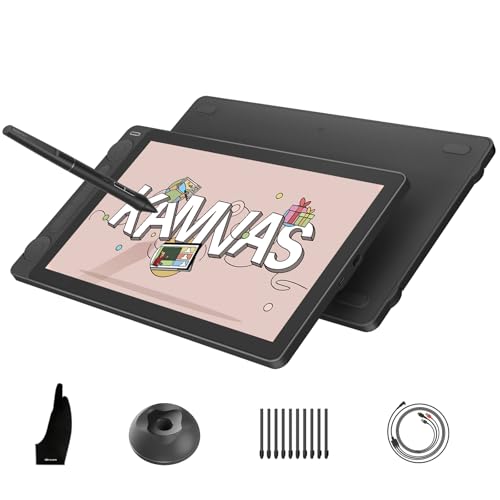
- Compact 13.3-inch full-laminated display
- 16,384 pressure levels and tilt support
- Dual dials with five shortcut keys
Best For: Portable professional drawing with a connected computer or compatible Android device
Precision Workflow Pick

- 16K pressure-sensitive stylus
- Full-laminated anti-glare display
- Red dial and 8 shortcut keys
Best For: Illustrators and designers needing precise, customizable PC-based workflow
Color-Forward Value

- 120% sRGB color gamut volume
- 6 keys plus touch bar
- Battery-free pen with tilt support
Best For: Artists wanting vibrant color and adjustable ergonomics on Windows, Mac, or Linux
Large-Canvas Professional Choice
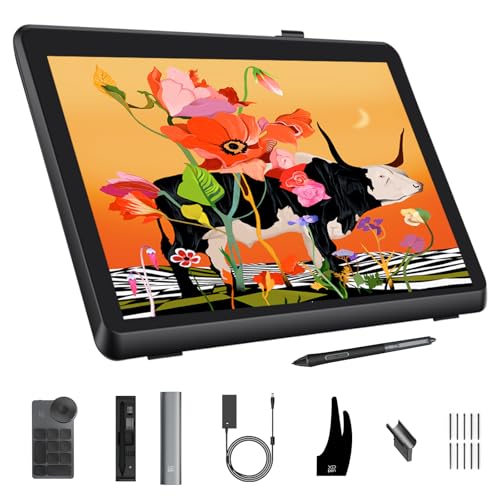
- Calman verified with Delta E<1
- 21.5-inch 2.5K display
- Wireless 40-key dial included
Best For: Color-critical professionals needing a spacious, high-resolution drawing canvas
Accessible Precision

- Fully laminated 11.6-inch anti-glare display
- 8,192 pressure levels with 60° tilt
- Red dial plus eight shortcut keys
Best For: Compact professional drawing, editing, and remote annotation
Color-Driven Workflow

- 16K pressure-sensitive battery-free stylus
- 95% P3 and 99% sRGB coverage
- USB-C connectivity and dual working modes
Best For: Color-conscious illustration, animation, and graphic design
Professional Color Control

- 14-inch laminated anti-glare 16:10 display
- 16K stylus with 99% sRGB coverage
- Stand, wireless remote, and wrist rest included
Best For: Detailed illustration, animation, 3D modeling, and color-critical work
Best for Color-Critical Work – XPPen Artist Pro 19 Gen2
The XPPen Artist Pro 19 Gen2 is a strong choice among drawing display tablets for professionals who need a large, highly detailed workspace and broad color coverage. Its 18.4-inch 4K display, Calman verification, and included shortcut dial are suited to illustration, design, photography, and video work.
Best For: Professional artists, designers, photographers, and film creators who prioritize resolution, color accuracy, and a spacious canvas.
Pros:
- 4K UHD resolution provides a detailed 3840×2160 workspace for layered artwork and close editing.
- Calman-verified color accuracy with 99.8% sRGB, 96% Adobe RGB, and 98% Display P3 coverage.
- Includes two styluses, 16,384 pressure levels, tilt support, and a wireless shortcut keyboard with dial.
- Full lamination, etched anti-glare glass, VESA support, and reversible USB-C connections add flexibility.
Cons:
- It is a large professional display, so it is less convenient for highly portable setups.
- As a pen display, it requires connection to a compatible computer or device.
Choose this model when display size, 4K clarity, and color-gamut coverage matter more than compactness. The dual-stylus setup and shortcut keyboard also make it well equipped for a dedicated studio workspace.
Best Mid-Size Professional Canvas – HUION Kamvas 16 Gen 3
The HUION Kamvas 16 (Gen 3) balances professional display specifications with a more manageable 15.8-inch format. For buyers comparing drawing display tablets for professionals, its 2.5K resolution, factory color accuracy, dual dials, and broad operating-system support make it a versatile workstation display.
Best For: Artists and designers who want a sharp, color-accurate pen display with physical controls and flexible computer or Android connectivity.
Pros:
- 2.5K QHD resolution and 186 PPI provide a sharp view on the 15.8-inch screen.
- Covers 99% sRGB and Rec.709 plus 90% Adobe RGB, with ΔE<1.5 color accuracy.
- PenTech 4.0 offers 16,384 pressure levels, 2g initial activation force, and tilt support.
- Two dials, six customizable keys, nano-etched glass, and full lamination support an efficient workflow.
Cons:
- It is not standalone and must connect to a computer, laptop, or compatible Android device.
- Connection depends on the included 3-in-1 cable or a compatible full-featured USB-C setup.
This is a practical middle ground for professionals who want detailed visuals and dedicated controls without moving to a very large display. Its compatibility with Windows, macOS, Linux, and supported Android devices adds useful flexibility.
Best Standalone Option – Wacom MovinkPad 11
The Wacom MovinkPad 11 takes a different approach to drawing display tablets for professionals: it is a self-contained Android 14 drawing tablet rather than a screen that needs a computer. Its built-in storage, lightweight design, matte display, and Pro Pen 3 make it useful for sketching and mobile creative work.
Best For: Mobile artists, illustrators, and note-takers who want to draw without carrying or connecting a separate computer.
Pros:
- All-in-one Android 14 design works without a computer and includes 8GB of memory and 128GB of storage.
- Lightweight 1.3-pound body and slim profile are convenient for travel and everyday carrying.
- Pro Pen 3 provides 8,192 pressure levels, three buttons, and stored replacement nibs.
- Matte etched glass reduces glare and provides a paper-like texture.
Cons:
- Its 11.45-inch, 2200×1440 display is smaller than the professional pen displays in this roundup.
- It has fewer stated pressure levels than the 16,384-level HUION and XPPen models.
Select the MovinkPad 11 when portability and independence from a computer are your priorities. It is especially convenient for capturing ideas on location, while its smaller screen may be less suitable for expansive desktop-style compositions.
Best Portable Connected Display – HUION Kamvas 13 Gen 3
The HUION Kamvas 13 (Gen 3) is a compact connected pen display for creators who want professional pen performance in a portable format. Among drawing display tablets for professionals, it stands out with PenTech 4.0, factory-calibrated color, dual dials, and a relatively light 865-gram body.
Best For: Artists, designers, editors, and animators who need a portable display for use with a computer, laptop, or compatible Android device.
Pros:
- PenTech 4.0 delivers 16,384 pressure levels, 2g initial activation force, tilt support, and reduced parallax.
- Canvas Glass 2.0 combines nano-etched anti-glare treatment with a paper-textured, full-laminated surface.
- 99% sRGB and Rec.709 coverage, 90% Adobe RGB, and ΔE<1.5 calibration support accurate color work.
- Two dials, five shortcut keys, symmetrical design, and 865-gram weight support flexible setups.
Cons:
- It is not standalone and requires a compatible computer, laptop, or Android device.
- The 13.3-inch screen offers less workspace than the 16-inch and 19-inch options.
This model is a sensible choice for professionals who regularly move between workspaces but still want strong pen precision and color coverage. Its smaller canvas is the main compromise, but the controls and portability help offset it.
Precision Workflow Pick – XPPen Artist 15.6 Pro V2
For professionals comparing drawing display tablets for professionals, the XPPen Artist 15.6 Pro V2 combines a full-laminated 15.4-inch anti-glare screen with highly sensitive pen input and practical workflow controls. Keep in mind that it must connect to a computer or laptop.
Best For: Illustrators and designers who want precise 16K pressure sensitivity, strong color coverage, and customizable controls in a mid-size pen display.
Pros:
- 16,384 pressure levels and a 60-degree tilt-supporting X3 Pro stylus for nuanced lines.
- Full-laminated anti-glare glass helps reduce parallax, with a 178-degree viewing angle.
- Red dial, eight customizable shortcut keys, and included adjustable stand support efficient sessions.
- Broad color coverage, including 99% sRGB, 96% Adobe RGB, and 96% Display P3.
Cons:
- It is not standalone and requires a compatible computer or laptop.
- The 250 cd/m² brightness may be less suitable for users seeking a particularly bright display.
Its combination of precise input, extensive shortcut customization, and color-focused display makes this a well-rounded choice for professional creative workflows, especially when desk space favors a 15.6-inch format.
Color-Forward Value – HUION Kamvas Pro 16
The HUION Kamvas Pro 16 is a practical option among drawing display tablets for professionals who want a laminated 15.6-inch screen, broad color coverage, and dedicated workflow controls. It must be connected to a computer or laptop to operate.
Best For: Digital artists who value vibrant color, adjustable viewing angles, and straightforward shortcut access across Windows, macOS, or Linux setups.
Pros:
- Full-laminated anti-glare display offers a lightly textured drawing surface and a 178-degree viewing angle.
- 120% sRGB and 92% AdobeRGB color gamut volume support vivid, detailed artwork.
- Six customizable keys and a touch bar provide quick access to zoom, brush size, and other commands.
- Battery-free pen includes 8,192 pressure levels, 60-degree tilt recognition, and two programmable buttons.
Cons:
- It is not a standalone device and requires connection to a compatible computer.
- The 1,920 x 1,080 resolution is lower than the 2.5K resolution offered by some larger professional displays.
With its included stand, strong color gamut, and useful touch bar, the Kamvas Pro 16 delivers a balanced feature set for artists who want a focused pen-display workstation without moving to a larger screen.
Large-Canvas Professional Choice – XPPen Artist Pro 22 Gen 2
For professionals seeking drawing display tablets for professionals with a spacious working area, the XPPen Artist Pro 22 Gen 2 pairs a 21.5-inch 2.5K display with Calman-verified color accuracy and 16K pen input. Its large format is designed for a computer-based creative setup.
Best For: Professional illustrators, photographers, and graphic designers who need a large, color-accurate canvas and flexible workflow controls.
Pros:
- Calman verification and Delta E<1 support consistent, color-critical work.
- 2,560 x 1,440 resolution, 137 PPI, and a 21.5-inch display provide a spacious, detailed canvas.
- 16K pressure sensitivity, 60-degree tilt, felt nibs, digital eraser, and ±0.4 mm accuracy support precise drawing.
- Included wireless ACK05 keydial offers 40 customizable keys and a physical dial.
Cons:
- Its larger 22-inch-class footprint requires more desk space than 15.6-inch models.
- The optional ACS15 height-adjustable stand is not included.
This is the strongest fit for detail-oriented professionals who can accommodate a larger display. Its color validation, higher resolution, ergonomic stand range, and wireless keydial make it particularly well suited to extended, demanding creative sessions.
Accessible Precision – XP-Pen Artist 12 Pro
The XP-Pen Artist 12 Pro is a compact option among drawing display tablets for professionals who want direct-on-screen control without a large desktop footprint. Its fully laminated 11.6-inch display, battery-free stylus, dial, and shortcut keys support detailed illustration, editing, and annotation, but it must be connected to a computer.
Best For: Digital artists, illustrators, teachers, and remote professionals who need a portable pen display with customizable controls.
Pros:
- Fully laminated anti-glare screen minimizes parallax for more precise cursor placement.
- Battery-free stylus offers 8,192 pressure levels and up to 60° tilt support.
- Red dial and eight customizable shortcut keys can speed up common editing tasks.
- Supports Windows, macOS, ChromeOS, and Linux, along with popular creative software.
Cons:
- Requires connection to a desktop or laptop and is not a standalone tablet.
- The 11.6-inch workspace may feel limited for complex professional projects.
Choose this model when accurate on-screen drawing and convenient physical controls matter more than a larger canvas or standalone operation. Its compact format also suits teaching, screen sharing, and mobile workstations.
Color-Driven Workflow – XP-Pen Artist 13.3 Pro V2
The XP-Pen Artist 13.3 Pro V2 is a strong fit for drawing display tablets for professionals who prioritize pen response, color coverage, and flexible connectivity. It combines a 13.3-inch fully laminated screen with a 16K stylus, USB-C support, shortcut controls, and a foldable stand.
Best For: Illustrators, animators, graphic designers, and creators who want a color-focused display that can also work in pen-tablet mode.
Pros:
- 16,384 pressure levels and low activation force support detailed, controlled strokes.
- 13.3-inch fully laminated FHD screen offers 99% sRGB, 89% Adobe RGB, and 95% P3 coverage.
- Full-featured USB-C connection works with compatible Windows, Mac, Chromebook, and Android devices.
- Includes a red dial, eight shortcut keys, foldable stand, pen holder, and replacement nibs.
Cons:
- It is not standalone and requires a compatible computer or other host device.
- Traditional HDMI setups require a separately sold 3-in-1 cable.
This is the more versatile choice for creators who want a modern USB-C workflow and strong stated color coverage. The ability to switch between pen-display and pen-tablet modes adds flexibility for long sessions and different workspaces.
Professional Color Control – XP-Pen Artist Pro 14 Gen2
The XP-Pen Artist Pro 14 Gen2 is designed for professionals comparing drawing display tablets for detailed illustration, animation, and 3D work. Its 14-inch 16:10 display, 16K stylus, high stated color coverage, foldable stand, wrist rest, and wireless shortcut remote create a well-equipped desktop setup.
Best For: Professional illustrators, animators, 3D artists, and designers who value color accuracy, ergonomic support, and dedicated controls.
Pros:
- 16,384 pressure levels from the X3 Pro stylus support nuanced, smooth linework.
- Fully laminated anti-glare etched glass reduces parallax, while the 14-inch 16:10 format provides a roomy workspace.
- 99% sRGB coverage, 123% sRGB gamut area ratio, and ΔE < 2.2 are suited to color-focused work.
- Includes a foldable stand, wireless shortcut remote, and X-Edge wrist rest.
Cons:
- Requires a computer or laptop and is not a standalone drawing tablet.
- Its advanced controls and accessories may be more than casual sketchers need.
Among these options, this model offers the most workstation-oriented feature set, especially for users who spend long hours refining color and detail. Its broad software and operating-system compatibility further supports varied professional workflows.
How We Picked the Best Drawing Display Tablets for Professionals
We focused on the features that have the greatest effect on real creative work: display resolution, color gamut, laminated screen construction, pressure sensitivity, pen performance, viewing comfort, and connection options. We also considered practical differences in size and format, including compact displays for travel, mid-size models for everyday illustration, and large screens for detailed painting, design, and animation.
Specifications such as 16K pressure levels can be useful, but they do not tell the whole story. Pen latency, cursor accuracy, surface texture, driver support, shortcut controls, and compatibility with Windows, macOS, Android, or ChromeOS can matter just as much. The selected models represent a range of professional workflows rather than one universal ideal.
Quick Comparison
| Best For | Look For | Recommended Type |
|---|---|---|
| Large studio canvases | 22-inch display, QHD resolution, adjustable stand | Large desktop pen display |
| Detailed illustration and design | 2.5K or 4K resolution, wide color coverage | Mid-size or large professional display |
| Travel and flexible setups | Compact size, USB-C connectivity, low power demands | Portable pen display |
| Android-based drawing | Built-in operating system, included professional stylus | Standalone mobile drawing tablet |
| Value-conscious professionals | Reliable pen technology and essential display features | 13- to 16-inch display |
Key Buying Factors for Drawing Display Tablets for Professionals
Screen Size and Resolution
A 13-inch display is easier to transport, while 15- to 16-inch models offer a more comfortable balance for daily work. Larger 19- and 22-inch screens provide additional room for palettes, timelines, and detailed artwork. Choose 2.5K or 4K when you frequently inspect fine linework or work with high-resolution assets; Full HD can still be practical on smaller screens.
Color and Surface Quality
Look beyond resolution. A wide-gamut panel, factory calibration, and strong brightness consistency are important for illustration, photography, branding, and video work. Matte or anti-glare coatings reduce reflections, while full lamination can make the pen tip appear closer to the cursor and improve hand-eye coordination.
Pen Feel and Controls
Battery-free pens reduce maintenance and usually feel natural for long sessions. Pressure sensitivity, tilt support, low activation force, and controlled initial strokes are especially valuable for inking and painting. Touch bars, express keys, and customizable shortcut buttons can speed up repetitive actions, although keyboard shortcuts may be preferable for some workflows.
Compatibility and Ergonomics
Confirm support for your operating system and creative applications before buying. Check whether the tablet needs separate HDMI, USB, or power connections, and whether your computer has the required ports. A stable stand, comfortable viewing angle, and manageable cable layout can make a bigger difference than a minor specification upgrade.
Who Should Buy Which Drawing Display Tablets for Professionals?
Choose a large XPPen display if you want maximum canvas space for illustration, animation, or detailed design. Mid-size HUION and XPPen models are the most versatile choices for professionals who need a capable primary display without a large desktop footprint. Compact 11- to 13-inch options suit students, traveling artists, and creators working in smaller spaces. For users who want to draw without a computer, the Wacom MovinkPad 11 is the standout standalone-style option in this selection.
In short, prioritize screen size and ergonomics for long studio sessions, color and resolution for precision work, and portability or standalone operation for flexible setups. Those priorities will help you choose among these Drawing Display Tablets for Professionals without paying for features your workflow will not use.
