
Receipts are easy to lose and tedious to enter by hand. A scanner can help you digitize them alongside invoices, statements, and other records—but the right choice depends on how many you handle and where you work.
These 10 picks span pocketable, single-sheet models and faster desktop scanners. Before choosing, consider the feeder, connection options, and software you’ll actually use to organize your files.
Best 10 Document Scanners for Receipts Picks for 2026
Best Portable Pick

- Compact, USB-powered design
- Up to 15 ppm, one-sided
- WorkScan editing tools
Best For: Scanning receipts while traveling
Best for Receipt Data

- Categorizes receipt data
- 100-sheet feeder; up to 45 ppm
- Wi-Fi and touchscreen scanning
Best For: High-volume receipt and invoice workflows
Best for QuickBooks Online
Canon imageFORMULA R40II Receipt Edition

- QuickBooks Online plugin
- 60-sheet feeder; up to 45 ppm
- No TWAIN or ISIS support
Best For: QuickBooks Online-focused offices
Best for Shared Workflows

- Personalized touchscreen profiles
- 100-sheet feeder; up to 45 ppm
- Wi-Fi 6 and USB-C
Best For: Shared document and receipt scanning
Bookkeeping-Friendly Portable Pick

- Receipt and invoice data extraction
- QuickBooks and TurboTax integration
- USB-powered; up to 10 ppm
Best For: Mobile receipt scanning tied to bookkeeping software
High-Volume Receipt Pick
ScanSnap iX2500 Receipt Edition
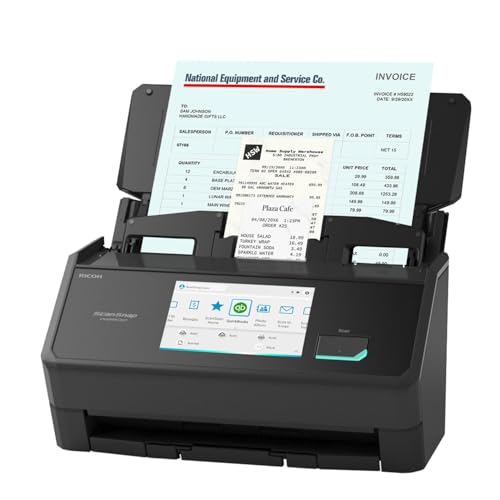
- 45 ppm double-sided scanning
- 100-sheet feeder
- Reviewable receipt data; QuickBooks workflow
Best For: Batch scanning receipts and invoices at a desk
Simple On-the-Go Pick

- 9.44-ounce USB-powered design
- Single page in as little as 5.5 seconds
- OCR for searchable PDFs
Best For: Scanning individual receipts while traveling
Best Compact Wireless Pick

- Space-saving desktop design
- Wi-Fi or USB connectivity
- 20-sheet feeder; duplex scanning
Best For: Small desks and varied paperwork
Best for Larger Stacks

- 50-sheet automatic feeder
- OCR for searchable PDFs
- USB connection; PC/Mac compatible
Best For: Larger batches and searchable files
Best White Compact Option

- Compact white design
- Wi-Fi or USB connectivity
- Scans receipts, cards, and documents
Best For: Small desks and a white finish
Best Portable Pick – HP HPPS100 USB Scanner
For shoppers comparing document scanners for receipts, the HP HPPS100 offers a compact, USB-powered option for scanning while traveling or moving between workspaces. It scans one side at a time and connects to a Windows or Mac computer.
Best For: People who need to digitize receipts and other loose documents away from a permanent desk setup.
Pros:
- Slim, lightweight design fits in a bag or briefcase.
- Scans at a stated speed of up to 15 pages per minute.
- HP WorkScan offers previewing, cropping and image cleanup.
Cons:
- One-sided scanning requires you to flip double-sided documents manually.
- Requires a USB connection to a computer.
Choose this HP model when portability matters more than hands-off, double-sided batch scanning.
Best for Receipt Data – Epson RapidReceipt RR-620W
Among document scanners for receipts, the Epson RapidReceipt RR-620W stands out for turning scanned receipts and invoices into categorized financial data. Its 100-sheet feeder, double-sided scanning and Wi-Fi connection also suit larger paper batches.
Best For: Businesses that regularly digitize receipts and want financial-software integration.
Pros:
- Scans both sides in one pass at up to 45 pages per minute.
- 100-sheet automatic document feeder reduces manual loading.
- Supports syncing categorized data with QuickBooks, TurboTax and Excel.
- Touchscreen supports scanning to email, cloud storage or a connected USB flash drive.
Cons:
- At 8.2 pounds, it is better suited to a desk than a travel bag.
This is a strong fit when receipt organization and batch capacity matter as much as scan speed.
Best for QuickBooks Online – Canon imageFORMULA R40II Receipt Edition
The Canon imageFORMULA R40II Receipt Edition is a practical choice among document scanners for receipts if your workflow centers on QuickBooks Online. It includes a CaptureOnTouch Scan to QuickBooks Online plugin and handles receipts alongside invoices, contracts and business cards.
Best For: Office users who want USB-connected batch scanning with a QuickBooks Online workflow.
Pros:
- Scans both sides in color at up to 45 pages per minute.
- 60-sheet automatic feeder supports batch jobs.
- Includes a Scan to QuickBooks Online plugin.
Cons:
- Designed for the included CaptureOnTouch software; TWAIN and ISIS drivers are not supported.
- Connects by USB rather than Wi-Fi.
Its software compatibility is the key buying check: it makes sense if CaptureOnTouch fits your setup, but not if you require TWAIN or ISIS support.
Best for Shared Workflows – ScanSnap iX2500
For teams comparing document scanners for receipts, the ScanSnap iX2500 offers personalized touchscreen profiles and destinations that include computers, mobile devices and cloud services. It also scans documents, photos and business cards.
Best For: Shared scanning stations that need flexible destinations and large-batch feeding.
Pros:
- Scans both sides at up to 45 pages per minute with a 100-sheet feeder.
- Offers Wi-Fi 6 and USB-C connections.
- Can automatically optimize, name and sort scanned files.
- Multi-feed and skew detection help catch feeding problems.
Cons:
- Unlike a receipt-focused financial workflow, the supplied features do not specify direct QuickBooks or tax-software integration.
Pick the iX2500 for adaptable scanning and file organization; verify your accounting workflow separately if direct data syncing is essential.
Bookkeeping-Friendly Portable Pick – Epson RapidReceipt RR-60
For buyers comparing document scanners for receipts, the Epson RapidReceipt RR-60 combines USB-powered portability with software designed to turn receipts, invoices, and business cards into usable financial data.
Best For: Mobile professionals who want receipt scanning with QuickBooks and TurboTax integration.
Pros:
- ScanSmart AI extracts data from financial paperwork for use with supported financial software.
- Scans up to 10 pages per minute in Automatic Feeding Mode.
- Handles ID cards and long pages up to 8.5 x 72 inches.
Cons:
- USB connection requires a computer; Wi-Fi connectivity is not listed.
Choose the RR-60 when getting receipt information into your bookkeeping workflow matters more than wireless scanning.
If your search for document scanners for receipts starts with a large stack of paperwork, the ScanSnap iX2500 Receipt Edition offers a 100-sheet feeder, 45 ppm double-sided scanning, and receipt-focused data extraction.
Best For: Busy offices that scan batches of receipts and invoices into QuickBooks.
Pros:
- Preconfigured touchscreen supports scanning receipts and invoices into QuickBooks.
- Extracted receipt and invoice fields can be reviewed and edited.
- Wi-Fi and USB connectivity, plus profiles for sending scans to devices and cloud services.
- Multi-feed and skew detection help prevent missed pages and paper damage.
Cons:
- At 7.7 pounds, it is less suited to carrying between locations than a compact mobile scanner.
Its feeder and receipt-processing tools make the iX2500 a strong desk-based choice when throughput and reviewable data take priority over portability.
Among document scanners for receipts, the Epson WorkForce ES-50 suits people who need a lightweight, USB-powered way to scan individual receipts and documents while traveling. It scans a single page in as little as 5.5 seconds.
Best For: Occasional receipt scanning on the road with a Windows or Mac computer.
Pros:
- Weighs 9.44 ounces and needs no battery or external power supply.
- Scans receipts, ID cards, and pages up to 8.5 x 72 inches.
- Included OCR supports searchable PDFs and editable Word and Excel files.
Cons:
- Single-sheet capacity means you insert pages individually rather than loading a stack.
- USB connection requires a computer; Wi-Fi connectivity is not listed.
The ES-50 prioritizes a light travel setup and straightforward document capture over batch feeding or receipt-specific financial data extraction.
Best Compact Wireless Pick – ScanSnap iX1300 (Black)
For document scanners for receipts that won’t take over a desk, the black ScanSnap iX1300 pairs a space-saving design with a 20-sheet feeder. It scans both sides at up to 30 pages per minute and connects by Wi-Fi or USB.
Best For: Small desks where wireless scanning and mixed receipt, card, and document handling matter more than feeder capacity.
Pros:
- Compact 11.7-by-4.5-inch footprint.
- Duplex scanning with automatic de-skew and blank-page removal.
- ScanSnap Home helps organize receipts, documents, and business cards.
Cons:
- 20-sheet feeder is smaller than the Epson model’s 50-sheet feeder.
- Wireless features may be unnecessary if you only scan to one USB-connected computer.
The iX1300 is a practical fit for varied paperwork in a tight space; choose a larger feeder if you regularly scan substantial stacks.
Best for Larger Stacks – Epson WorkForce ES-400 II
If your search for document scanners for receipts also includes frequent stacks of office paperwork, the Epson WorkForce ES-400 II offers a 50-sheet automatic document feeder and duplex scanning. Its ScanSmart software supports previews, email, cloud uploads, and automatic file naming.
Best For: PC or Mac users who want to process larger batches and create searchable files.
Pros:
- 50-sheet feeder reduces reloads during batch scanning.
- OCR creates searchable PDFs and can convert scans to editable Word or Excel files.
- Ultrasonic double-feed detection and skew correction help guard against missed pages.
Cons:
- USB connection only; no Wi-Fi is listed.
- Its 11.6-by-11.6-inch footprint takes more desk depth than the iX1300.
This is the stronger choice when feeder capacity and document-management features matter more than wireless placement.
Best White Compact Option – ScanSnap iX1300 (White)
The white ScanSnap iX1300 brings the same compact approach to document scanners for receipts as the black version, with Wi-Fi or USB connectivity and a 20-sheet feeder. It also handles documents, photos, thick items, and plastic cards.
Best For: Buyers who want the iX1300’s small footprint and mixed-media scanning in white.
Pros:
- Space-saving design measures 11.7 inches wide and 4.5 inches deep.
- One-touch duplex scanning at up to 30 pages per minute.
- ScanSnap Home supports organizing receipts alongside other scans.
Cons:
- 20-sheet capacity means more reloads for large batches.
- No functional advantage over the supplied black iX1300 model is indicated.
Choose this version for its white finish, not a different scanning workflow; the listed capabilities match the black model.
How We Picked the Best Document Scanners for Receipts
We focused on practical differences across portable and desktop models: how pages are fed, whether scanning is single- or double-sided, connectivity, desk space, and receipt-management features. The list includes general-purpose document scanners as well as receipt-focused editions. A receipt-focused name alone is not a reason to buy; the included software and workflow need to suit how you save and retrieve records.
Quick Comparison: Portable Vs. Desktop
Portable, single-sheet scanners suit occasional receipts, travel, and small workspaces. They take less room but require more hands-on feeding. The HP PS100, Epson RapidReceipt RR-60, and Epson WorkForce ES-50 belong in this group.
Desktop scanners are a better starting point for regular batches and mixed paperwork. Compare the Epson RapidReceipt RR-620W, Canon imageFORMULA R40II Receipt Edition, ScanSnap iX2500 and iX1300 options, and Epson WorkForce ES-400 II by their feeding setup, connectivity, and software. The black and white iX1300 listings share the same model name, so choose a color based on preference rather than treating them as different scanning classes.
Key Buying Factors for Document Scanners for Receipts
Feeding and Paper Handling
Receipts vary from short slips to long, thin strips, and some are curled or creased. Check the supported paper sizes and feeding instructions before buying. An automatic document feeder can save time with batches, but delicate or badly folded originals may still need careful manual handling.
Duplex Scanning and Volume
Duplex scanning captures both sides in one pass—useful when return policies, notes, or transaction details appear on the back. If you scan only a few one-sided receipts at a time, a compact single-sided unit may be sufficient. For recurring expense reports or boxes of records, prioritize a desktop workflow over the smallest footprint.
Connections and Software
USB offers a straightforward computer connection; wireless models may be more convenient in a shared workspace. Check compatibility with your operating system and your intended destination, whether that is local folders, a cloud service, or an expense platform. OCR can make scanned text searchable, but recognition and data extraction can need correction—especially on faint thermal receipts. Confirm what software or services are included and whether any features require an account or subscription.
File Quality and Record Keeping
Readable scans and a consistent naming system matter more than an impressive specification on its own. Test a few small-print receipts, verify amounts and dates, and keep originals when your accountant, employer, or applicable rules require them.
Who Should Buy Which Document Scanners for Receipts?
Choose a mobile model if you scan occasionally or need to pack it away. Start with a receipt-oriented model if organizing purchases is your main task, but compare its software with general-purpose alternatives. Pick a duplex desktop scanner for frequent batches or a mix of receipts and full-size documents. If you share a scanner or want fewer cables, narrow your choices to models with the connection options your setup needs.
