
Four external screens can make a laptop setup far more useful—but only if the dock and computer can drive them together. A dock’s advertised display count does not guarantee four monitors at your preferred resolution and refresh rate.
These nine options span Thunderbolt, USB-C, and DisplayLink designs. Use the guide below to narrow your choices by laptop, monitor connections, charging needs, and the type of work you do.
Best 9 Docking Stations with Quad Monitor Support Picks for 2026
High-Resolution Pick
TobenONE DL-7400 Five-Monitor Dock

- Five HDMI outputs; advertised 8K + four 4K@120Hz
- Active cooling and 2.5Gbps Ethernet
- 45W host charging; DisplayLink required
Best For: Five-screen workstations needing fast wired networking
Port-Rich Pick
TobenONE 20-in-1 Quad-Display Dock

- Four HDMI and four DisplayPort connections
- Advertised quad 4K@60Hz output
- Up to 100W host charging; M1 Macs limited to three displays
Best For: Peripheral-heavy desks with HDMI or DisplayPort monitors
Ultrawide Pick
WAVLINK Quad-Monitor DisplayLink Dock

- Quad DisplayPort supports up to 5120×1440@60Hz
- Four HDMI and four DisplayPort connections
- 100W host charging and 2.5Gbps Ethernet
Best For: Four-screen setups that include ultrawide DisplayPort monitors
Best Driverless Dock

- Four 4K 60Hz displays on qualifying Windows laptops
- Driverless USB4 and Thunderbolt operation
- Up to 98W laptop charging
Best For: Mixed-device offices with compatible quad-display Windows laptops
Best for Easy Setup
TobenONE DisplayLink Docking Station

- Up to four extended 4K 60Hz displays on Windows
- Ethernet, card readers, and extensive USB connectivity
- Up to 100W laptop charging
Best For: Peripheral-heavy desks needing multiple displays
Best Compact DisplayPort Pick
StarTech Quad DisplayPort Adapter

- Four 4K 60Hz DisplayPort monitor connections
- Up to 140W power-delivery passthrough
- Compact design with USB-A 2.0 passthrough
Best For: Portable four-monitor setups using DisplayPort screens
Best for Legacy Laptops

- Four 4K displays via DisplayPort, HDMI, or both
- Up to 100W Power Delivery
- USB-A host adapter and legacy charging tips included
Best For: Mixed fleets of newer and legacy laptops
Best Travel-Friendly Option
StarTech Quad HDMI 4K60 Adapter

- Four HDMI displays at 4K 60Hz
- Up to 140W power-delivery passthrough
- Compact design with one USB-A 2.0 port
Best For: Portable four-HDMI laptop setups
Best Thunderbolt Expansion
Plugable Quad Display Thunderbolt 4 Dock
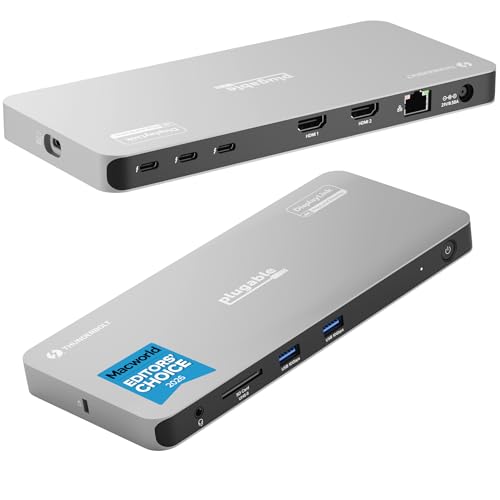
- Up to four 4K displays on supported hosts
- Three downstream 40Gbps Thunderbolt ports
- Up to 96W certified laptop charging
Best For: Multi-display desks needing Thunderbolt expansion
High-Resolution Pick – TobenONE DL-7400 Five-Monitor Dock
Among docking stations with quad monitor support, the TobenONE DL-7400 goes a step further with five HDMI outputs. Its advertised five-display configuration is one 8K screen plus four 4K screens at 120Hz, making it a fit for demanding multi-screen desks.
Best For: Users who want five external displays and fast wired networking from one dock.
Pros:
- Supports an advertised 8K-plus-four-4K@120Hz display configuration.
- Built-in cooling fan helps manage heat during heavy multi-display use.
- Includes 2.5Gbps Ethernet, seven USB ports, and SD/microSD card readers.
Cons:
- Requires a DisplayLink driver before use.
- Host USB-C charging tops out at 45W; HDCP is not supported.
The fifth display and active cooling distinguish this dock, but check whether 45W is enough for your laptop before relying on it as your only charger.
Port-Rich Pick – TobenONE 20-in-1 Quad-Display Dock
For buyers comparing docking stations with quad monitor support, this TobenONE 20-in-1 pairs four HDMI and four DisplayPort connections with advertised 4K@60Hz output across four external monitors. Its broad port selection is useful when a multi-monitor desk also needs room for peripherals.
Best For: Windows or compatible Mac users who want four 4K@60Hz displays, flexible video connections, and up to 100W laptop charging.
Pros:
- Offers four HDMI and four DisplayPort connections for monitor setup flexibility.
- Supports up to 100W host charging with a compatible laptop USB-C PD port.
- Includes USB-A and USB-C ports, card slots, Ethernet, audio, and a power button.
Cons:
- Requires DisplayLink driver installation and does not support HDCP.
- The supplied notes limit M1-chip MacBooks to three extended monitors.
This is the flexible-connection choice of the three, particularly if you mix HDMI and DisplayPort monitors. M1 MacBook owners should account for the stated three-monitor limit.
Ultrawide Pick – WAVLINK Quad-Monitor DisplayLink Dock
The WAVLINK dock stands out among docking stations with quad monitor support for its stated DisplayPort support of up to 5120×1440 at 60Hz on each of four outputs. It also offers quad 4K@60Hz options, making it worth considering if ultrawide screens are part of your workspace.
Best For: Multi-monitor users who want quad DisplayPort ultrawide support, 100W host charging, and 2.5Gbps Ethernet.
Pros:
- Advertises up to 5120×1440@60Hz or 4096×2160@60Hz across four DisplayPort outputs.
- Provides four HDMI and four DisplayPort connections.
- Includes 100W host charging, 2.5Gbps Ethernet, and an SD 4.0 card reader.
Cons:
- Its advertised 5120×1440 ultrawide configuration uses the DisplayPort outputs.
- Lists only three USB ports, fewer than either TobenONE dock here.
Choose this one for its specified quad-ultrawide DisplayPort option and strong charging and network features; if USB peripherals dominate your desk, compare port counts first.
Best Driverless Dock – StarTech Thunderbolt 4 Dock
Among docking stations with quad monitor support, this StarTech dock suits Windows users who want four 4K 60Hz displays without installing drivers. That output requires a Windows laptop with a 12th-gen or newer Intel CPU and DisplayPort 1.4 with DSC.
Best For: Mixed-device offices that need driverless docking and quad displays on compatible Windows laptops.
Pros:
- Supports up to four 4K 60Hz monitors on qualifying Windows systems.
- Driverless USB4 and Thunderbolt compatibility across Windows and macOS.
- Provides up to 98W laptop charging and includes a three-year warranty.
Cons:
- Mac support tops out at two extended 4K 60Hz displays under the specified chip and mode conditions.
- Older Windows systems without DSC may be limited to two or three displays.
Choose this dock if easy cross-platform deployment matters, but check your laptop’s display capabilities before planning a four-screen setup.
Best for Easy Setup – TobenONE DisplayLink Docking Station
For shoppers comparing docking stations with quad monitor support, this TobenONE model combines DisplayLink video with a broad selection of connections. It supports up to four extended 4K 60Hz displays on Windows and up to three external monitors on supported Macs after DisplayLink driver installation.
Best For: Multitaskers who need several displays, wired networking, card readers, and peripheral ports in one dock.
Pros:
- Offers four HDMI ports and two USB-C video ports for flexible display connections.
- Includes 2.5Gbps Ethernet, SD and microSD readers, USB ports, and audio.
- Provides up to 100W laptop charging and an 18W charging port.
Cons:
- Requires DisplayLink driver installation before use.
- macOS supports up to three external monitors, and HDMI 3 and HDMI 4 cannot operate simultaneously.
This is a practical choice for a peripheral-heavy desk, provided its driver requirement and Mac display limits fit your setup.
Best Compact DisplayPort Pick – StarTech Quad DisplayPort Adapter
Among docking stations with quad monitor support, this compact StarTech adapter is a focused option for four DisplayPort 1.4 monitors at 4K 60Hz. Its single USB-C connection also provides a USB-A 2.0 port and power-delivery passthrough.
Best For: Mobile workstation users who already have DisplayPort monitors and want a compact four-screen adapter.
Pros:
- Connects four 4K 60Hz DisplayPort monitors.
- Supports up to 140W power-delivery passthrough for laptop charging.
- Compact design includes a USB-A 2.0 port for a peripheral or dongle.
Cons:
- Requires DisplayPort monitor connections rather than HDMI.
- macOS requires manual DisplayLink driver installation; its limited extra ports make it less suitable as an all-in-one hub.
Pick it when screen count and portability matter more than a large port selection, and plan for a separate USB-C power source to use charging passthrough.
Best for Legacy Laptops – Targus Universal Quad 4K Dock
Targus USB-C Universal Quad 4K (QV4K) Docking Station with 100W Power Delivery, Black (DOCK570USZ)
Check Price On AmazonAmong docking stations with quad monitor support, this Targus model stands out for its host flexibility. It can run four 4K displays through DisplayPort, HDMI, or a mix of both, while offering up to 100W Power Delivery for compatible laptops.
Best For: Workstations that need four displays and compatibility with a mix of newer and legacy laptops.
Pros:
- Supports four 4K displays at up to 60Hz via DisplayPort or 50Hz via HDMI.
- Includes a USB-C-to-USB-A host adapter and charging tips for supported legacy laptops.
- Offers five USB ports, Gigabit Ethernet, and a headset jack.
Cons:
- HDMI output tops out at 50Hz when running four 4K displays.
- Security lock and VESA mounting bracket are sold separately.
Choose this dock if broad laptop compatibility matters more than getting 60Hz from every HDMI monitor. Check your laptop’s charging requirements before relying on the dock for power.
Best Travel-Friendly Option – StarTech Quad HDMI 4K60 Adapter
If you’re comparing docking stations with quad monitor support for a compact setup, this StarTech adapter connects four 4K 60Hz HDMI monitors through one USB-C host connection. Its small size makes it easier to move between desks than a full-size dock.
Best For: Laptop users who need four HDMI displays at home, in the office, or on the go.
Pros:
- Supports four 4K monitors at 60Hz over HDMI.
- Provides up to 140W USB-C power-delivery passthrough and a USB-A 2.0 port for a peripheral.
- Compact 4.7-by-3.4-by-0.6-inch design weighs 5.12 ounces.
Cons:
- macOS requires manual DisplayLink driver installation.
- Its single USB-A 2.0 passthrough port offers limited peripheral expansion.
This is a focused display-expansion choice rather than a port-heavy desktop dock. It makes the most sense when four HDMI outputs and portability are the priorities.
Best Thunderbolt Expansion – Plugable Quad Display Thunderbolt 4 Dock
For buyers seeking docking stations with quad monitor support and substantial peripheral expansion, this Plugable dock combines two HDMI outputs with two Thunderbolt display connections. Supported Windows and Mac computers can use up to four 4K extended displays, alongside laptop charging and additional connectivity.
Best For: Thunderbolt-equipped workstations that need multiple displays and high-speed device connections.
Pros:
- Supports up to four 4K displays on compatible hosts, using two HDMI and two Thunderbolt connections.
- Provides three downstream 40Gbps Thunderbolt ports and up to 96W certified host charging.
- Includes USB ports, Gigabit Ethernet, and an SD card slot.
Cons:
- The HDMI outputs require DisplayLink software; macOS needs a one-time manual installation.
- ChromeOS and base-model M1 or M2 Macs support three extended displays rather than four.
Its mix of native Thunderbolt video and DisplayLink gives compatible computers a versatile four-screen setup. Confirm your host’s display limits before buying, particularly if you use a base-model Mac.
How We Picked the Best Docking Stations with Quad Monitor Support
We focused on docks marketed for four external displays and compared the specifications buyers can check before ordering: host connection, video technology, output types, stated resolution and refresh rate, charging wattage, and extra ports. Manufacturer claims are a starting point, not a guarantee for every laptop. The achievable setup depends on the host computer, operating system, drivers, cables, and monitors; we did not treat advertised maximums as independently verified performance.
Quick Comparison: Which Type Fits Your Laptop?
Thunderbolt 4 docks are worth considering if your laptop supports Thunderbolt and you want a high-bandwidth, single-cable connection. Check the platform-specific display limits: a dock advertised for four displays on Windows may support fewer on a Mac. DisplayLink docks can be a practical route to four external screens, including on some laptops with restrictive native-display limits, but they require compatible software and are better suited to productivity than latency-sensitive graphics work. USB-C workstation docks offer specific HDMI or DisplayPort layouts; verify that your laptop’s USB-C port supports the dock’s required video mode and that its stated four-display configuration applies to your system.
Key Buying Factors for Docking Stations with Quad Monitor Support
Confirm Four External Displays on Your Exact Computer
Start with your laptop model and operating system, then read the dock’s compatibility notes. “Quad monitor” may describe a Windows configuration, a DisplayLink-assisted setup, or a particular combination of ports. Mac users should pay special attention to distinctions between native Thunderbolt displays and displays driven through DisplayLink. Check whether the laptop screen can remain active alongside the four external monitors if that matters to you.
Match Resolution, Refresh Rate, and Connectors
List each monitor’s resolution, desired refresh rate, and input ports before comparing docks. A headline such as “4K 60Hz” does not necessarily mean every connected screen can run at 4K 60Hz simultaneously. Check the dock’s supported four-monitor layout, especially when mixing HDMI and DisplayPort or using adapters. Higher refresh-rate claims may apply only to fewer displays or specific host connections.
Check Charging and Desk Connections
Compare the dock’s stated USB-C power delivery with your laptop charger’s wattage; a lower-powered dock may charge slowly under load. Then count the ports you actually use, such as Ethernet, USB for peripherals, and audio. If your desk is shared, consider whether the dock’s driver requirements and host-cable setup will work for every user.
Who Should Buy Which Docking Stations with Quad Monitor Support?
For spreadsheets, research, and communications across four screens, prioritize confirmed compatibility and the right output mix over the biggest resolution claim. Choose a DisplayLink model if your laptop needs software-assisted display expansion and your IT policy permits the driver. Favor a Thunderbolt 4 option when your computer supports it and its documented display configuration meets your needs. Pick a quad-HDMI or quad-DisplayPort workstation dock when matching four existing monitor cables is the simplest path. For color-critical, high-frame-rate, or other graphics-intensive work, verify the exact display path before relying on any software-driven setup.
