
Need more screens without adding another charger to your desk? DisplayLink docks can expand a compatible laptop into a multi-monitor workspace while delivering power over the same USB-C connection.
These 10 options span compact dual-display docks and larger triple- or quad-display setups. The best choice depends on your laptop’s charging needs, monitor connections, and willingness to install DisplayLink software.
Best 10 Displaylink Docks with Power Delivery Picks for 2026
Best for Triple 4K

- Up to three 4K@60Hz displays with a compatible host
- Up to 100W laptop Power Delivery
- Five USB data ports plus Ethernet and card readers
Best For: Three-screen Mac or Windows desks needing 4K resolution
Best for Office Multitasking

- Dual 2K@60Hz via DisplayLink display channels
- Up to 100W laptop Power Delivery
- HDMI, DisplayPort, USB, Ethernet, and card readers
Best For: Multi-monitor spreadsheets and office workflows
Best for HDMI Desk Setups
OREI SplitExtend Triple Monitor Dock

- Three HDMI outputs with host-dependent third display
- 100W laptop PD plus 20W accessory charging
- Six USB ports, Ethernet, and SD/TF slots
Best For: HDMI-focused desks needing charging and peripherals
Best for Four Displays
StarTech Quad HDMI Workstation Adapter

- Four 4K@60Hz HDMI monitor connections
- 140W Power Delivery passthrough
- Compact design with one USB-A 2.0 port
Best For: Four-screen setups with a separate USB-C power source
USB-A Workstation Pick
Kensington SD4760P Triple-Monitor Dock

- Three HDMI outputs for external displays
- Six 5Gbps USB-A ports
- Up to 100W laptop charging
Best For: Triple-monitor desks with USB-A peripherals
Portable Dual-4K Pick
Plugable 7-in-1 USB-C DisplayLink Dock
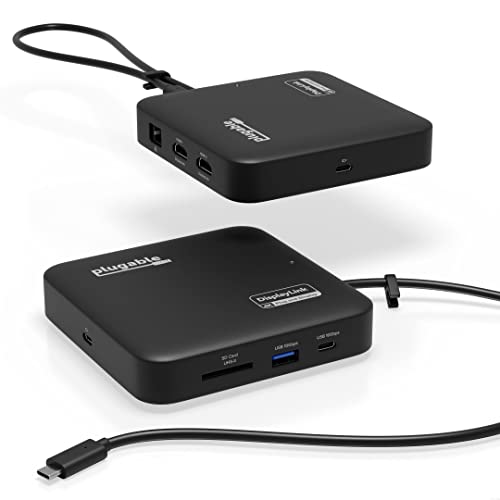
- Two extended 4K 60Hz HDMI displays
- Up to 82W pass-through charging
- USB-A, USB-C, Ethernet, and SD
Best For: Compact dual-4K setups on Windows or macOS
High-Speed Triple-Display Pick
WAVLINK 13-Port DisplayLink Dock

- Up to two 4K 60Hz screens plus one 2K 60Hz
- Six 10Gbps USB ports
- 100W charging; 130W adapter included
Best For: Triple-screen desks with fast USB accessories
Portable Pick

- Dual 4K 60Hz HDMI outputs
- Up to 82W laptop charging with external adapter
- SD reader, Gigabit Ethernet, and 10Gbps USB
Best For: Compact dual-monitor MacBook or Windows setups
Shared-Desk Pick

- Up to 96W laptop power delivery
- DisplayLink layout provisioning for shared desks
- 10 ports and DP Alt Mode support
Best For: Shared offices with repeatable dual-monitor setups
Triple-Monitor Pick

- Three extended displays for supported systems
- Up to 100W laptop charging
- Six 10Gbps USB ports
Best For: Three-monitor productivity workstations
Best for Triple 4K – WAVLINK DisplayLink-6950 Dock
Among displaylink docks with power delivery, this WAVLINK model is a strong choice for a three-screen desk: it supports up to three 4K displays at 60Hz on compatible laptops and supplies up to 100W to the host.
Best For: Mac or Windows users who want three high-resolution monitors alongside a full set of desk connections.
Pros:
- Two DisplayLink display channels plus a third HDMI connection support a triple-4K@60Hz setup when the host meets the requirements.
- Includes a 130W adapter for up to 100W laptop Power Delivery.
- Offers five USB data ports, Gigabit Ethernet, SD/TF readers, and audio connectivity.
Cons:
- Requires DisplayLink software; it is not plug-and-play.
- The third HDMI display requires USB-C video output, and HDMI and DisplayPort on the same display channel cannot be used simultaneously.
Choose this version if triple 4K resolution is the priority, but verify your laptop’s USB-C video and charging capabilities before buying.
Best for Office Multitasking – WAVLINK DisplayLink-6350 Dock
This WAVLINK entry in displaylink docks with power delivery focuses on office productivity. Its DisplayLink-6350 chipset supports up to dual 2K@60Hz through its Display 1/2 channels, while a separate HDMI Alt Mode connection can support a third monitor on a compatible host.
Best For: Spreadsheet, dashboard, and general office setups that need multiple displays without prioritizing triple 4K output.
Pros:
- Offers three HDMI sockets and two DisplayPort sockets for flexible monitor connections.
- Supplies up to 100W laptop Power Delivery using the included 130W adapter.
- Includes five USB data ports, Gigabit Ethernet, SD/TF readers, and audio connections.
Cons:
- Requires DisplayLink driver installation rather than plug-and-play setup.
- The third display needs USB-C video output; HDMI and DisplayPort on the same channel cannot be used together.
- Positioned for office work, not gaming or professional video editing.
It makes sense when connection variety and everyday multitasking matter more than maximum display resolution. Check your host’s USB-C video output and Power Delivery support first.
Best for HDMI Desk Setups – OREI SplitExtend Triple Monitor Dock
For shoppers comparing displaylink docks with power delivery, the OREI SplitExtend brings three HDMI connections and up to 100W laptop charging into a single-cable desk setup. Two HDMI outputs use DisplayLink; the third depends on video support from the laptop’s USB-C port.
Best For: HDMI-based workstations that also need USB peripherals, wired networking, and laptop charging.
Pros:
- Provides three HDMI outputs, six USB ports, Gigabit Ethernet, SD/TF slots, and audio.
- Supports 100W laptop Power Delivery and 20W for phones or accessories.
- Includes a USB-C cable, stand, and 150W power adapter.
Cons:
- Two HDMI outputs require a DisplayLink driver; the third requires USB-C video support.
- Mac extended-display limits vary, so compatibility should be checked before purchase.
This is a practical pick if your monitors use HDMI and you want the cable and power adapter in the box. Confirm the third-display requirements against your laptop before counting on all three outputs.
Best for Four Displays – StarTech Quad HDMI Workstation Adapter
If four screens are the goal, this StarTech adapter stands apart from larger displaylink docks with power delivery. It connects up to four 4K@60Hz HDMI monitors through one USB-C host connection while offering 140W Power Delivery passthrough.
Best For: Multi-monitor professionals who need four HDMI displays and already have a suitable USB-C power source.
Pros:
- Supports four 4K@60Hz HDMI monitors.
- Provides 140W Power Delivery passthrough and one USB-A 2.0 port for a peripheral or dongle.
- Compact, travel-ready design; DisplayLink drivers install automatically on most Windows and ChromeOS systems.
Cons:
- Power Delivery is passthrough, and the listed package does not specify an included power supply.
- macOS requires manual driver installation.
- Only one USB-A 2.0 passthrough port is listed, making it less suited to a peripheral-heavy desk.
Pick it for maximum screen count in a compact adapter, rather than as an all-in-one hub with Ethernet and card readers.
USB-A Workstation Pick – Kensington SD4760P Triple-Monitor Dock
The Kensington SD4760P is a practical choice among displaylink docks with power delivery if you need three external screens and plenty of USB-A connections. It supports one 4K display at 30Hz plus two 1080p displays at 60Hz, with up to 100W laptop charging.
Best For: A permanent desk setup with three HDMI monitors and multiple USB-A accessories.
Pros:
- Three HDMI outputs support a triple-monitor workspace.
- Six 5Gbps USB-A ports accommodate existing peripherals.
- Includes Gigabit Ethernet, audio, and a three-year limited warranty.
Cons:
- The 4K display is limited to 30Hz in the stated triple-display configuration.
- DisplayLink functionality requires a driver; there are no listed downstream USB-C ports.
Choose this dock when port count matters more than matching 4K resolution across every screen. Its optional under-desk mounting bracket can also help reclaim workspace, but is sold separately.
Portable Dual-4K Pick – Plugable 7-in-1 USB-C DisplayLink Dock
For shoppers comparing displaylink docks with power delivery, this Plugable 7-in-1 offers two extended 4K 60Hz HDMI displays in a compact, travel-ready design. Its USB-C power input accepts a compatible 45W–100W laptop adapter and passes up to 82W through to the computer.
Best For: Windows or macOS users who want two sharp external displays without committing to a large desktop dock.
Pros:
- Supports dual extended 4K displays at 60Hz via HDMI.
- Adds USB-A, USB-C, Gigabit Ethernet, and an SD card slot.
- Includes two-year defect coverage and lifetime support.
Cons:
- Pass-through charging tops out at 82W and requires a suitable power adapter.
- Dual-display operation requires DisplayLink software; macOS installation is manual.
This is the flexible pick for a two-screen workspace that moves between desks. Check your laptop’s power needs before relying on the dock’s 82W maximum pass-through output.
High-Speed Triple-Display Pick – WAVLINK 13-Port DisplayLink Dock
The WAVLINK dock stands out among displaylink docks with power delivery for its combination of three external displays, six 10Gbps USB ports, and up to 100W laptop charging. Its stated display configuration reaches two 4K 60Hz screens plus a third 2K 60Hz screen.
Best For: A fixed home-office workstation with three monitors and several fast USB accessories.
Pros:
- Offers three HDMI and two DisplayPort connections for display setup flexibility.
- Provides four USB-A and two USB-C ports, each rated for 10Gbps transfer.
- Includes a 130W power adapter and Gigabit Ethernet.
Cons:
- MacBook M1–M5 users need a DisplayLink driver and USB-C video output.
- Not recommended for gaming or HDCP-protected 4K streaming.
Its faster USB ports make this a stronger fit for desks with external storage as well as multiple monitors. Confirm that your laptop has a compatible video-capable USB-C connection before buying.
Portable Pick – StarTech 7-in-1 Dual 4K Dock
Among displaylink docks with power delivery, this compact StarTech model suits buyers who want dual 4K 60Hz HDMI monitors without a full-size desktop dock. Its DisplayLink support can add two extended displays to compatible MacBooks that otherwise support only one external monitor.
Best For: Mobile MacBook or Windows users who need dual displays, Ethernet, and an SD reader in a compact dock.
Pros:
- Two HDMI outputs support up to 4K at 60Hz each.
- Includes 10Gbps USB-A and USB-C data ports, Gigabit Ethernet, and an SD 4.0 reader.
- USB-C Power Delivery pass-through provides up to 82W for laptop charging with an external power adapter.
Cons:
- An external USB-C power adapter is needed for laptop charging.
- Only two USB data ports are listed, limiting room for peripherals.
This is a practical travel-friendly choice if dual monitors and a card reader matter more than a large USB hub. Account for the 18W the dock reserves when matching its charging capacity to your laptop.
Shared-Desk Pick – Dell Universal Dock UD22
For shared offices comparing displaylink docks with power delivery, the Dell UD22 offers a 10-port setup with HDMI, DisplayPort, dual-monitor support, and up to 96W laptop power delivery. Its DisplayLink layout provisioning is designed to restore a preconfigured display arrangement for users at shared desks.
Best For: Shared workstations that need repeatable monitor layouts and substantial laptop charging power.
Pros:
- Includes a 130W power adapter and provides up to 96W power delivery.
- DisplayLink layout provisioning helps streamline shared-desk setups.
- DP Alt Mode support allows an initial connection even without the DisplayLink driver installed.
Cons:
- The supplied specifications list only one HDMI port; check the DisplayPort connections against your monitors.
- The supplied notes do not specify supported monitor resolutions or refresh rates.
The UD22 stands out for office deployment rather than headline display specifications. Confirm your monitor connections and desired display modes before choosing it for a particular desk.
Triple-Monitor Pick – WAVLINK 100W DisplayLink Dock
Buyers seeking displaylink docks with power delivery for three extended monitors should consider this WAVLINK workstation dock. It pairs up to 100W laptop charging with one Alt Mode HDMI output rated for 4K at 60Hz and two additional HDMI or DisplayPort outputs rated for 2K at 60Hz.
Best For: Mac or Windows productivity desks needing three extended displays and plenty of fast USB connections.
Pros:
- Supports three extended displays, including on the Mac models listed in the supplied compatibility notes.
- Built-in 130W power supply supports up to 100W laptop charging through compatible USB-C ports.
- Provides six 10Gbps USB ports, Gigabit Ethernet, and a 3.5mm combination audio jack.
Cons:
- Requires driver installation; it is not plug and play.
- Does not support HDCP-protected playback and is not recommended for gaming.
- Linux is not supported.
Its mix of triple-display output and fast USB ports makes sense for office applications. Check your laptop’s USB-C Alt Mode and charging support, and choose another dock if protected video playback is essential.
How We Picked the Best Displaylink Docks with Power Delivery
We compared the listed monitor support, power-delivery ratings, video outputs, USB connectivity, and desk-friendly extras such as Ethernet and audio. We also considered the practical differences between a compact dual-display dock and a larger dock built for three or four screens. Listed specifications are a starting point, not a guarantee that every laptop can run every output combination.
Quick Comparison: Match the Dock to Your Setup
For two external 4K displays at 60Hz, start with the Plugable 7-in-1 or StarTech 7-in-1 models; both are listed with dual 4K HDMI outputs and 100W power delivery. The Dell UD22 is another dual-monitor option, with HDMI and DisplayPort outputs and a listed 96W delivery to the laptop.
For three screens, compare the OREI, Kensington SD4760P, and WAVLINK triple-monitor models. The OREI and Kensington listings specify 100W charging, while one WAVLINK listing specifies 130W PD. Check each model’s port layout: some offer three HDMI sockets, while others also include DisplayPort options. If you need four HDMI displays, the StarTech quad-HDMI workstation dock is the clearest match in this group, with a listed 140W PD rating.
Key Buying Factors for Displaylink Docks with Power Delivery
Laptop Charging
Compare the dock’s stated power delivered to the laptop with the wattage of your current charger. Do not assume a dock’s power-adapter rating equals its laptop-charging output; the Dell UD22, for example, lists a 130W adapter but 96W power delivery. A laptop that needs more power may charge slowly or lose battery during heavy use.
Displays, Ports, and Software
Count the monitors you will actually connect, then check the supported resolution and refresh rate for that exact configuration. Also verify whether the dock has the HDMI or DisplayPort connectors your monitors need. DisplayLink requires compatible software and permissions; confirm support for your operating-system version before buying, especially if you use an Apple-silicon Mac or a work-managed laptop. Some protected video services and latency-sensitive uses may not behave like a direct monitor connection.
Everyday Connections
Choose enough USB ports for your peripherals and check their speeds if you regularly move large files. Ethernet, audio, and front-facing ports can matter more day to day than an extra display output you will never use.
Who Should Buy Which Displaylink Docks with Power Delivery?
Choose a dual-display Plugable or StarTech dock for a simpler two-monitor desk; consider the Dell UD22 if its HDMI-and-DisplayPort mix fits your screens. Look at OREI, Kensington, or WAVLINK for three-monitor workspaces, comparing charging wattage and the specific USB ports you need. Pick the StarTech quad-HDMI model only if four HDMI displays justify the larger setup. Before checkout, verify the exact model’s laptop compatibility, included power adapter, and supported display configuration.
