
When you’re in the market for a DisplayLink dock with Ethernet, it’s essential to find one that meets your needs for seamless connectivity and performance. With so many options available, you might feel overwhelmed. But don’t worry, we’ve narrowed it down to the ten best docks that offer impressive features and reliable connections. Let’s explore what each one brings to the table and how they can elevate your workspace.
Anker Prime Docking Station (DL7400) – 14-Port Triple Display
If you’re looking for a powerful docking solution that can handle multiple displays, the Anker Prime Docking Station (DL7400) is an excellent choice. This 14-port docking station supports triple displays, including one in stunning 8K resolution, making multitasking a breeze. It features a 140W USB-C upstream port, ensuring your laptop stays charged while you work. With various connectivity options like HDMI, DisplayPort, and multiple USB ports, you’ll find everything you need for seamless performance. Plus, the built-in fan and ActiveShield 3.0 keep everything cool and stable. Just remember to install the latest DisplayLink driver for ideal functionality.
Best For: Professionals and creatives who need a high-performance docking station for multitasking with multiple displays.
Pros:
- Supports triple external monitors, including one in 8K, for enhanced productivity.
- Features a powerful 140W USB-C upstream port that charges laptops while in use.
- Equipped with ActiveShield 3.0 and a built-in fan for effective cooling and stability.
Cons:
- Requires the latest DisplayLink driver for optimal functionality.
- DRM-protected streaming may result in a black screen without adjusting browser settings.
- Front USB-C ports do not support media display, limiting their functionality for certain tasks.
Anker Prime Docking Station, 14-Port with 160W Max Output

The Anker Prime Docking Station is an ideal choice for professionals who need a reliable, high-performance solution for both charging and connectivity. With 14 ports, including USB-C, USB4, and Thunderbolt connections, you can enjoy fast data transfer speeds up to 10Gbps. It supports dual 4K displays, making multitasking a breeze. The powerful 160W output lets you charge up to four devices at once, with three USB-C ports delivering 100W each. Plus, the inclusion of audio and Ethernet ports guarantees you stay connected. Overall, this docking station enhances productivity and simplifies your workspace.
Best For: Professionals seeking a high-performance docking station for enhanced connectivity and charging capabilities.
Pros:
- Supports fast data transfer speeds up to 10Gbps across multiple ports.
- Dual HDMI ports allow for dual 4K display connectivity, improving multitasking efficiency.
- Capable of charging up to four devices simultaneously with a powerful 160W output.
Cons:
- Not compatible with Linux operating systems.
- External monitors on macOS display identical images, limiting display versatility.
- Does not support 5120*1440 monitor resolution.
Kensington 11-in-1 USB-C Docking Station

For professionals who need versatile connectivity and high-performance capabilities, the Kensington 11-in-1 USB-C Docking Station stands out as an ideal choice. It supports up to three external monitors, delivering stunning 4K visuals at 30Hz and dual 1080p at 60Hz using DisplayLink technology. This dock is compatible with various USB-C Alt Mode laptops, including the latest MacBook models. With 100W power delivery, it charges your laptop while providing multiple connectivity options, including HDMI and Gigabit Ethernet. Plus, the free DockWorks software enhances performance and security, ensuring a seamless experience for all your professional needs.
Best For: Professionals seeking versatile connectivity and high-performance capabilities for their USB-C laptops.
Pros:
- Supports multiple external displays: Connects up to three monitors, including one 4K and two 1080p.
- High power delivery: Provides up to 100W for charging laptops and accessories.
- Versatile connectivity options: Includes various ports for HDMI, USB-A, audio, and Ethernet.
Cons:
- Limited software availability: DockWorks software is only available for Windows users.
- Mounting bracket sold separately: Zero-footprint mounting option requires an additional purchase.
- Security accessories not included: Kensington cable lock must be purchased separately for added security.
Anker Nano Laptop Docking Station with Detachable Hub (13-in-1 USB-C)

Versatile and portable, the Anker Nano Laptop Docking Station with Detachable Hub is perfect for professionals on the go who need a powerful workstation setup. This 13-in-1 USB-C dock supports a triple-screen display, allowing you to maximize productivity. With multiple ports—including USB-C, HDMI, and Ethernet—you’ll easily connect all your devices. It delivers fast data transfer at 10 Gbps and up to 4K resolution on external displays. Weighing just 3.74L x 1.57W x 5.51H inches, it’s compact yet efficient. Backed by a 30-day return guarantee, you can trust its quality and performance for your connectivity needs.
Best For: Professionals who require a versatile and portable docking solution for multiple devices and displays.
Pros:
- Detachable hub allows for mobile access and flexibility while on the go.
- Supports triple-screen setup to enhance productivity with multiple external displays.
- Fast data transfer capability of up to 10 Gbps, ensuring quick file transfers.
Cons:
- May be limited compatibility with some devices not listed (specific compatibility issues could arise).
- The compact size may limit the number of ports that can be used simultaneously.
- May require a specific power adapter for optimal performance, which could be an additional cost.
Plugable Thunderbolt 4 Dock with 100W Charging (TBT4-UD5)
If you need a powerful docking solution that can handle high-resolution displays while providing ample charging capabilities, the Plugable Thunderbolt 4 Dock with 100W Charging (TBT4-UD5) is an excellent choice. This award-winning dock supports dual 4K 60Hz HDMI or a single 8K display, ensuring stunning visuals. With 40Gbps Thunderbolt 4 speed and an extensive 13-port design, including Gigabit Ethernet, it’s perfect for connecting all your devices. It’s compatible with various Windows and macOS systems, making it versatile for different laptop brands. Plus, with 100W Power Delivery, you’ll keep your devices powered while enjoying seamless connectivity.
Best For: Professionals and power users who require high-resolution display support and extensive connectivity options for their devices.
Pros:
- Supports dual 4K 60Hz or single 8K displays, providing stunning visuals for creative work or gaming.
- 40Gbps Thunderbolt 4 speed ensures fast data transfer rates for high-speed storage and peripherals.
- Versatile compatibility with various operating systems and laptop brands, making it suitable for diverse setups.
Cons:
- Limited to certain macOS models for dual display functionality, which may restrict usage for some users.
- Price point may be higher compared to simpler docking solutions, potentially deterring budget-conscious buyers.
- Weight of 2.4 pounds could make it less portable for users who need to travel frequently with their setup.
Plugable Dual DisplayPort & HDMI Docking Station (UD-6950Z)

The Plugable Dual DisplayPort & HDMI Docking Station (UD-6950Z) stands out as an ideal choice for professionals who rely on dual 4K monitors for their productivity. With support for 3840×2160 resolution at 60Hz, this dock guarantees crisp visuals. It features a vertical design for tidy cable management and offers six USB 3.0 ports, two HDMI, and two DisplayPort connections. Plus, the built-in Gigabit Ethernet keeps your internet connection stable. Compatible with various operating systems, it’s plug-and-play for Windows and ChromeOS users, while Mac users need a driver installation. Overall, it’s a solid investment for enhancing your workspace.
Best For: Professionals who need to connect dual 4K monitors for enhanced productivity and require a variety of ports for peripherals.
Pros:
- Supports dual 4K monitors at 60Hz for sharp visuals.
- Vertical design promotes clean cable management and saves desk space.
- Includes multiple ports, such as six USB 3.0 ports and both HDMI and DisplayPort connections.
Cons:
- Not optimized for gaming or HDCP content playback like Netflix or Hulu.
- Requires manual driver installation for Mac users, unlike the plug-and-play functionality for Windows and ChromeOS.
- Not compatible with Linux operating systems.
Plugable USB-C Triple Monitor Docking Station (UD-ULTCDL)

For professionals and creatives who need a robust setup, the Plugable USB-C Triple Monitor Docking Station (UD-ULTCDL) stands out with its ability to support three monitors simultaneously, even on systems limited to a single display. You can connect up to three HDMI displays, enjoying a primary monitor at 4K 30Hz and two additional screens at 1920×1200 60Hz. With 13 ports, including Gigabit Ethernet and multiple USB options, it offers extensive connectivity. Plus, it delivers up to 100W charging for your laptop. This dock is compatible with Windows, macOS, and ChromeOS, making it a versatile choice for any workstation.
Best For: Professionals and creatives seeking a versatile docking station that supports multiple monitors and extensive connectivity options.
Pros:
- Supports triple monitor setups, allowing for enhanced productivity with multiple displays.
- High charging capacity of up to 100W for laptops, ensuring devices remain powered during use.
- Wide compatibility with Windows, macOS, and ChromeOS systems, accommodating various laptops.
Cons:
- Requires DisplayLink Manager installation for macOS users, which may complicate setup for some.
- Limited primary monitor output of 4K at only 30Hz, which may not meet high-performance gaming or video editing needs.
- Weight of 400 grams may be less portable for users seeking a lightweight solution for travel.
TobenONE DisplayLink Docking Station for Quad 4K Monitors

Professionals who need to connect multiple displays will find the TobenONE DisplayLink Docking Station ideal, as it supports up to four external monitors with stunning 4K@60Hz resolution. This dock features 20 ports, including 4 HDMI, 4 DisplayPort, and several USB options, allowing you to optimize your workflow seamlessly. With a robust 150W power adapter, it provides 100W charging for your laptop while also supporting phone charging via USB-C. Compatible with various operating systems, including Windows and macOS, this docking station guarantees you stay connected. Plus, enjoy peace of mind with a 2-year defect coverage and dedicated customer support.
Best For: Professionals looking to enhance their multitasking capabilities with multiple 4K monitors and extensive connectivity options.
Pros:
- Supports up to four external 4K monitors at 60Hz for seamless multitasking.
- Features a variety of ports (20 total) including HDMI, DisplayPort, and multiple USB options for versatile connectivity.
- Comes with a 2-year defect coverage and dedicated customer support for peace of mind.
Cons:
- Requires Displaylink driver installation which may add extra setup steps.
- Limited to three external monitors for M1 chip MacBooks, reducing compatibility for some users.
- HDCP is not supported, which may limit the use of certain protected content.
Plugable 7-in-1 USB-C DisplayLink Dock
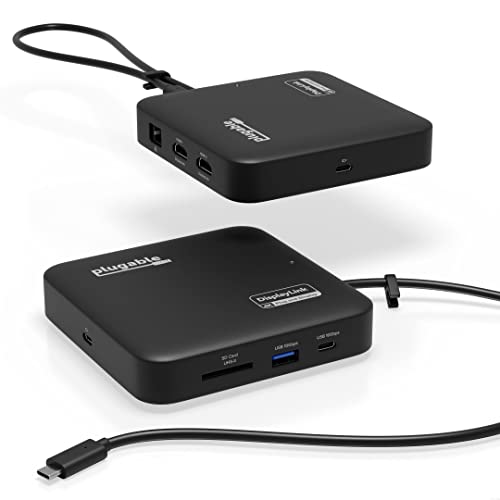
Compact and versatile, the Plugable 7-in-1 USB-C DisplayLink Dock is an ideal choice for anyone seeking a travel-friendly solution that seamlessly connects multiple devices. With dual HDMI outputs supporting 4K at 60Hz, you can easily expand your workspace. The dock features high-speed USB-C and USB-A ports, an SD card slot, and Gigabit Ethernet for reliable internet access. It provides up to 82W pass-through charging, ensuring your devices stay powered. Compatible with Windows and macOS, it supports MacBooks, including M1-M5 models. Plus, you’ll benefit from a 2-year warranty and lifetime customer support for peace of mind.
Best For: Professionals and travelers seeking a compact docking solution for multi-device connectivity on Windows and macOS.
Pros:
- Dual HDMI outputs support high-resolution 4K displays at 60Hz for enhanced productivity.
- High-speed USB-C and USB-A ports, along with an SD card slot, offer versatile connectivity options.
- Provides up to 82W pass-through charging, keeping devices powered during use.
Cons:
- Requires DisplayLink driver for dual display functionality, which may be an extra step for some users.
- Not compatible with HDCP protected video playback, limiting use for certain media applications.
- May not support gaming or 3D rendering effectively due to DisplayLink limitations.
Plugable 12-in-1 USB C Triple Monitor Docking Station

The Plugable 12-in-1 USB C Triple Monitor Docking Station stands out as the ideal solution for multitaskers who need to connect multiple displays seamlessly. With support for triple 4K displays via 3 HDMI or DisplayPort connections, you can expand your workspace effortlessly. You’ll appreciate its 100W Power Delivery, keeping your laptop charged while you work. Plus, with 6 USB 3.0 ports and Ethernet, you can connect all your essential devices without hassle. Compatible with various systems, including Windows and macOS, this dock truly enhances your productivity. Enjoy a 2-year warranty and lifetime support for peace of mind.
Best For: Multitaskers and professionals who need to connect multiple high-resolution displays and devices seamlessly.
Pros:
- Triple 4K Support: Easily connect three 4K monitors, enhancing productivity with a larger workspace.
- 100W Power Delivery: Keeps your laptop charged while in use, allowing for uninterrupted work sessions.
- Versatile Compatibility: Works with various operating systems, including Windows, macOS, and ChromeOS.
Cons:
- Limited to USB-C Devices: May not be compatible with older systems that lack USB-C or Thunderbolt ports.
- Size and Weight: At 2.7 pounds, it may be less portable compared to smaller docks.
- Potential Display Limitations: Some systems may face restrictions on using multiple displays simultaneously, particularly older models.
Factors to Consider When Choosing Displaylink Docks With Ethernet
When choosing a Displaylink dock with Ethernet, you’ll want to take into account several key factors. Monitor support options and power delivery capability can greatly impact your setup, while port variety and speed guarantee you stay connected. Don’t forget about compatibility with your devices and the design’s portability, as these elements can make a big difference in your overall experience.
Monitor Support Options
Choosing the right DisplayLink dock with Ethernet hinges greatly on how many monitors you plan to connect and their resolution. Many docks support dual or even triple monitor setups, but it’s vital to check the specifications. If you aim for high-resolution displays, some docks can deliver 4K at 60Hz for each monitor, enhancing your productivity experience. Also, consider the variety of port types available, like HDMI and DisplayPort, which provide flexibility in your display options. Don’t forget compatibility with your operating system; certain docks require specific drivers to enable multi-monitor capabilities. Finally, check the maximum number of supported displays, as some docks may limit connections based on your laptop’s capabilities.
Power Delivery Capability
While evaluating DisplayLink docks with Ethernet, power delivery capability is a critical factor to take into account. This refers to how much power the dock can supply to your devices, typically measured in watts (W). Many docks offer outputs of 100W or more, enabling you to charge multiple devices simultaneously. Consider the type and number of ports available; USB-C ports usually deliver higher wattage than USB-A ports. It’s vital to match the dock’s maximum power supply with your devices’ power needs to guarantee peak performance and avoid battery drain during heavy usage. Some docks even support charging laptops while driving multiple external displays, enhancing your multitasking efficiency. Always check these specs before making a decision.
Port Variety and Speed
Port variety and speed play an essential role in enhancing your workspace efficiency with DisplayLink docks that feature Ethernet. When selecting a dock, consider the total number of ports available. A higher variety allows you to connect multiple peripherals and monitors seamlessly. Look for docks with several USB-C and USB-A ports for faster data transfer speeds, typically reaching up to 10Gbps. Confirm the dock supports Gigabit Ethernet for reliable, high-speed internet connectivity. Additionally, evaluate the display capabilities regarding maximum resolutions, such as 4K at 60Hz or dual monitor setups, to optimize multitasking. Finally, pay attention to the power delivery capability; docks that provide up to 100W can charge your laptop while using other ports for data transfer.
Compatibility With Devices
When selecting a DisplayLink dock with Ethernet, it’s crucial to guarantee compatibility with your specific devices and operating systems. Check if the dock supports the required drivers for Windows, macOS, or ChromeOS before making a purchase. Many docks offer USB-C, USB4, and Thunderbolt connections, making them compatible with various modern laptops. However, if you’re using devices with Apple M1 or M2 chips, be aware that they might only support one external monitor without additional software. If you have older devices, confirm the dock works with legacy operating systems, as some may not support them. Finally, verify if the dock supports HDCP for streaming protected content, as this can affect your viewing experience.
Design and Portability
Choosing a DisplayLink dock with Ethernet involves more than just functionality; the design and portability can greatly impact your user experience. Look for a compact and lightweight dock that’s easy to carry, especially if you travel frequently. A design that promotes clean cable management will help reduce desk clutter, keeping your workspace organized. Consider docks with zero-footprint mounting options, as they maximize desktop space and enhance efficiency. Pay attention to the material and build quality; durable docks can withstand frequent use and transport. Finally, verify the layout allows for easy access to ports, making it simple to connect your peripherals without hassle. These factors will greatly enhance your overall experience with the dock.
Warranty and Support Services
Having a reliable warranty and robust support services can greatly enhance your experience with DisplayLink docks that feature Ethernet connectivity. Many docks come with warranty periods ranging from one to three years, covering defects and malfunctions. This means you won’t have to worry about unexpected repair costs, as warranty services often include parts and labor. Look for manufacturers that offer lifetime customer support, ensuring you get help with any technical issues you encounter. Extensive documentation and user manuals, sometimes accessible via QR codes, also help you troubleshoot and optimize your docking station. Finally, pay attention to reviews and customer feedback, as they can reveal how responsive and effective a company’s support services truly are.
