
If you’re looking to elevate your Lenovo ThinkPad setup, the right DisplayLink dock can make a significant difference. These docking stations provide seamless connectivity and boost productivity with multiple monitor support and fast data transfer. Choosing the right one requires careful consideration of your specific needs and preferences. Let’s explore the top options available and see how they can transform your workspace into a more efficient environment.
Anker Nano Laptop Docking Station with Detachable Hub (13-in-1 USB-C)

If you’re a Lenovo ThinkPad user looking for versatility, the Anker Nano Laptop Docking Station is an excellent choice. This 13-in-1 USB-C docking station lets you set up a triple-screen workstation, enhancing your productivity. With a detachable 6-in-1 hub, you can easily take your setup on the go. It offers multiple ports, including USB-C, HDMI, and Ethernet, supporting up to 4K resolution on external displays. Plus, you’ll enjoy fast data transfers at 10 Gbps. Weighing just over a pound, it’s compact yet powerful, making it a top contender for anyone wanting to elevate their workspace efficiency.
Best For: Users seeking a versatile docking station to enhance productivity with multiple display options and fast data transfer.
Pros:
- Compact design with a detachable hub for mobile convenience.
- Supports triple-screen setups and up to 4K resolution for external displays.
- Fast data transfer speeds of 10 Gbps via USB-C ports.
Cons:
- Limited compatibility with certain operating systems (macOS may mirror content).
- Requires a power adapter for maximum performance, adding to the setup complexity.
- Customer ratings indicate some users may experience minor issues with connectivity.
Anker Prime Docking Station (DL7400)
The Anker Prime Docking Station (DL7400) is an excellent choice for professionals seeking seamless multitasking on multiple screens. With 14 ports, it supports triple display setups, including one 8K monitor, maximizing your productivity. You’ll enjoy up to 140W power delivery through its USB-C ports, guaranteeing your laptop charges quickly while you work. Connectivity options include USB-A, HDMI, and a 2.5Gbps Ethernet port, making it versatile for all your devices. Plus, the smart display keeps you updated on charging performance. Remember, for peak use, make certain you have the latest DisplayLink driver installed. It’s a game-changer for any workspace!
Best For: Professionals who require a high-performance docking station for multitasking with multiple monitors and devices.
Pros:
- Supports triple display setups, including one 8K monitor, enhancing productivity and multitasking capabilities.
- Offers up to 140W power delivery through USB-C ports, ensuring rapid charging for laptops while in use.
- Includes a smart display for real-time updates on charging power and performance, allowing for efficient management of resources.
Cons:
- Requires the latest DisplayLink driver for optimal functionality, which may necessitate additional setup.
- DRM-protected content may not display correctly, potentially requiring adjustments to browser settings.
- The front USB-C ports do not support media display, limiting their use for connecting monitors.
Anker Prime Docking Station, 14-Port with 160W Max Output

For professionals seeking a versatile docking solution for their Lenovo ThinkPad, the Anker Prime Docking Station stands out with its impressive 14 ports and 160W max output. This 14-in-1 hub supports USB-C, USB4, and Thunderbolt connections, offering speeds up to 10Gbps. You can connect dual 4K displays via its dual HDMI ports, enhancing your multitasking experience. With the ability to charge up to four devices simultaneously, including three USB-C ports at 100W each, it meets all your power needs. Plus, friendly customer service is there to assist you, ensuring a seamless experience with your upgraded workspace.
Best For: Professionals seeking a versatile docking solution for their Lenovo ThinkPad that enhances connectivity and charging capabilities.
Pros:
- 14-in-1 hub providing extensive connectivity options with dual HDMI ports for dual display support.
- High charging capacity with a total output of 160W, allowing multiple devices to be charged simultaneously.
- Fast data transfer speeds of up to 10Gbps across 11 ports, ensuring efficient performance.
Cons:
- Not compatible with Linux, limiting use for users operating on that platform.
- External monitors display identical images on macOS, which may not be suitable for users seeking extended displays.
- Does not support 5120*1440 monitors, potentially restricting high-resolution display options for some users.
Lenovo ThinkPad Thunderbolt 3 Dock Gen 2 (40AN0135US)

Designed for professionals who demand high performance, the Lenovo ThinkPad Thunderbolt 3 Dock Gen 2 (40AN0135US) delivers exceptional connectivity and versatility. With 13 total ports, including dual HDMI and DisplayPort outputs, you can easily connect multiple UHD 4K displays. Its 135-watt power output guarantees your devices stay charged. This dock’s compatibility with various ThinkPad models enhances your workspace, allowing seamless integration. Plus, the Intel Thunderbolt chipset boosts productivity, guaranteeing fast file transfers and reliable network manageability. Weighing just 2 pounds, it’s portable and perfect for on-the-go professionals. Elevate your setup effortlessly with this robust docking station.
Best For: Professionals seeking a high-performance docking station that supports multiple UHD displays and offers extensive connectivity options.
Pros:
- Supports dual UHD 4K displays, making it ideal for multitasking and advanced video solutions.
- 135-watt power output ensures connected devices remain charged during use.
- Lightweight and portable, weighing only 2 pounds, perfect for on-the-go professionals.
Cons:
- Limited compatibility primarily focused on specific ThinkPad models.
- Higher price point compared to basic docking stations.
- Dependence on Thunderbolt 3 may limit use with non-compatible devices.
Plugable USB-C Triple Monitor Docking Station (UD-ULTCDL)

Looking to enhance your multitasking capabilities? The Plugable USB-C Triple Monitor Docking Station (UD-ULTCDL) is your go-to solution. With 13 ports, it supports three HDMI displays, allowing you to work efficiently across multiple screens. You’ll enjoy up to 4K resolution on your primary monitor and 1920×1200 on the others. Plus, it delivers 100W charging for your laptop. Compatible with Windows, macOS, and ChromeOS, this dock is perfect for a complete desk setup. Just remember to install the DisplayLink Manager for macOS to access its full potential. Rated 4.4 out of 5 stars, it’s a reliable choice for your workspace.
Best For: Professionals and multitaskers who need to connect multiple displays and devices for an efficient workspace.
Pros:
- Supports three HDMI displays, enhancing productivity with extended screen real estate.
- Delivers up to 100W charging for laptops, reducing the need for multiple chargers.
- Compatible with a variety of operating systems including Windows, macOS, and ChromeOS.
Cons:
- Requires installation of DisplayLink Manager for macOS to utilize multiple displays.
- Limited to a maximum resolution of 4K at 30Hz on the primary monitor.
- Some users may find the initial setup and configuration challenging.
Lenovo ThinkPad Universal USB-C Dock-40AY0090

The Lenovo ThinkPad Universal USB-C Dock-40AY0090 is the perfect solution for professionals seeking a clutter-free workspace and efficient connectivity. With its one-cable docking design, you’ll enjoy fast data transfers and rapid charging for your USB-C notebook. Plus, its plug-and-play functionality simplifies connecting displays and accessories. Whether you’re in the office, hot-desking, or working remotely, this dock enhances your productivity and keeps your desk organized. IT managers will appreciate the ability to remotely gather information and support critical updates, making it an ideal choice for diverse work environments. Elevate your workspace with this versatile dock today!
Best For: Professionals seeking an efficient, clutter-free workspace that enhances productivity in various work environments.
Pros:
- Plug-and-play functionality allows for easy connection of displays and accessories.
- Supports fast data transfers and rapid charging for USB-C notebooks.
- Enables IT managers to remotely monitor and manage connected devices.
Cons:
- Limited to USB-C compatible devices, which may exclude some older models.
- May require firmware updates for optimal performance, which can be an inconvenience.
- Depending on the setup, additional cables may still be necessary for certain peripherals.
Lenovo Thinkpad Docking Station for Dual Monitors

For professionals seeking efficient multitasking, the Lenovo ThinkPad Docking Station is an ideal choice, particularly with its robust support for dual monitors at 4K resolution. This dual monitor docking station features 11 ports, including HDMI and DisplayPort, ensuring you can connect all your essential devices effortlessly. With 90W of power, it delivers high-speed data transfer and energy supply through USB 3.1 Type A and C ports. It’s compatible with various Lenovo ThinkPad models, making it versatile for your needs. Plus, a microfiber cleaning cloth and a one-year warranty enhance your overall experience, ensuring your workspace stays organized and efficient.
Best For: Professionals seeking efficient multitasking with dual monitor setups and high-speed connectivity.
Pros:
- Supports dual 4K monitors, enhancing productivity with high-resolution displays.
- Multiple connectivity options with 11 ports, including HDMI, DisplayPort, and USB 3.1 for versatile device connections.
- Includes a microfiber cleaning cloth and a one-year warranty for added value and maintenance support.
Cons:
- Limited compatibility primarily with Lenovo ThinkPad models, which may not suit users with other laptop brands.
- Higher price point compared to some standard docking stations, potentially deterring budget-conscious buyers.
- Bulkier design may take up more desk space, which could be an issue for users with limited workspace.
Lenovo Thunderbolt 4 Docking Station (Renewed)

Designed specifically for professionals on the go, the Lenovo Thunderbolt 4 Docking Station (Renewed) is an ideal choice for those needing robust connectivity and power. With 9 ports, including 4 USB and 1 HDMI, you can easily connect multiple devices. The dock delivers a strong 135W power supply, ensuring your laptop and peripherals stay charged. Plus, its dual display capability enhances your productivity, making multitasking a breeze. This dock is universally compatible, particularly with Thunderbolt 3 and 4 systems. Rated 4.7 out of 5 stars, it’s a reliable choice for elevating your workspace efficiency.
Best For: Professionals and creatives who require robust connectivity and power for multiple devices on the go.
Pros:
- Multiple Ports: Offers 9 ports, including 4 USB and 1 HDMI, for versatile device connections.
- High Power Delivery: Provides a strong 135W power supply to keep laptops and peripherals charged.
- Dual Display Support: Enables dual monitor setup for enhanced productivity and multitasking.
Cons:
- Renewed Product: As a renewed item, there may be concerns about its condition or longevity compared to new products.
- Limited HDMI Ports: Only one HDMI port may be limiting for users needing more HDMI connections.
- Higher Price Point: Renewed products may still carry a price that’s close to new alternatives, affecting budget-conscious buyers.
Lenovo Docking Station USB C Bundle (40B00300US)

If you’re looking for a powerful docking solution for your Lenovo ThinkPad, the Lenovo Docking Station USB C Bundle (40B00300US) stands out with its impressive 4K display support and Thunderbolt 4 connectivity. This dock features multiple ports, including 2 DisplayPorts, an HDMI port, and 4 USB 3.2 Gen 2 Type-A connections, ensuring you can connect all your essential devices effortlessly. With a robust 300W adapter, it delivers up to 230W to your workstation, maintaining stable power for all connected devices. Plus, it comes with essential cables and a microfiber cloth, making it a complete package for your workspace.
Best For: Professionals and creatives who require high-performance connectivity and multiple monitor support for their Lenovo ThinkPad.
Pros:
- Supports 4K and 8K displays, allowing for exceptional visual clarity and multi-monitor setups.
- Robust power delivery with a 300W adapter, providing up to 230W to connected workstations.
- Comes with essential accessories, including various cables and a microfiber cleaning cloth for a complete setup.
Cons:
- Compatibility limited to USB C or Thunderbolt devices, which may exclude some older models.
- Firmware updates may be necessary to resolve potential connectivity issues, adding extra steps for users.
- Higher price point compared to basic docking stations, which may not be budget-friendly for all users.
Lenovo Docking Station for Dual Monitors (Thinkpad Dock)
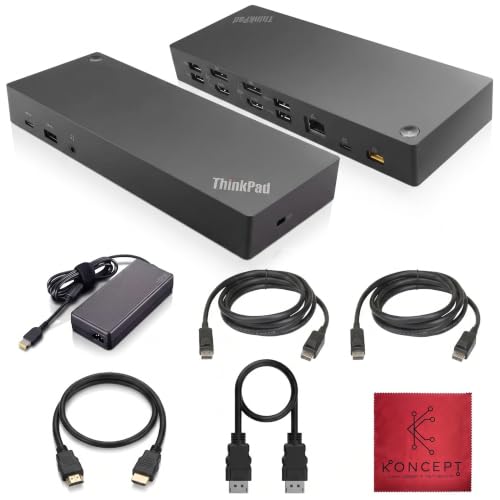
The Lenovo Docking Station 40AF0135US stands out as an ideal solution for professionals seeking enhanced productivity with dual monitor support. This hybrid USB-C dock offers multiple connectivity options, including two DisplayPort and two HDMI outputs, allowing you to connect dual monitors seamlessly. With seven USB ports and a reliable 135W power supply, you can efficiently manage all your devices. The dock’s compatibility with various ThinkPad models guarantees it meets your needs. Plus, it comes with essential accessories like HDMI and DisplayPort cables. Enjoy a more productive workspace and elevate your setup with this powerful docking station.
Best For: Professionals and enterprises looking for an efficient docking solution to enhance productivity with dual monitor support.
Pros:
- Multiple Display Options: Supports dual monitors with two DisplayPort and two HDMI outputs for versatile display setups.
- Ample Connectivity: Offers seven USB ports, including high-speed USB 3.1 Gen 2 options, ensuring all devices can be connected simultaneously.
- Included Accessories: Comes with essential cables and a microfiber cleaning cloth, providing everything needed for immediate setup.
Cons:
- Limited Compatibility: Primarily designed for Lenovo ThinkPad models, which may restrict use with other laptop brands.
- Size and Weight: Its dimensions may require more desk space, which could be a concern for users with limited workspace.
- Price Point: Some users may find the cost higher compared to simpler docking stations with fewer features.
Factors to Consider When Choosing Displaylink Docks for Lenovo Thinkpad
When choosing a DisplayLink dock for your Lenovo ThinkPad, you’ll want to take into account several key factors. Compatibility with your specific ThinkPad model and the display resolution support are essential to guarantee peak performance. Additionally, reflect on the number of ports available, power delivery capabilities, and how easy it is to install and set up the dock.
Compatibility With Thinkpad Models
Choosing the right DisplayLink dock for your Lenovo ThinkPad is essential for guaranteeing compatibility and performance. First, check that the dock supports the USB-C or Thunderbolt ports on your ThinkPad model for seamless connectivity. Remember that some older ThinkPad versions might not fully utilize advanced features like dual or triple monitors. You should also consider the power delivery requirements, as certain models need a higher wattage to charge effectively while in use. Finally, always verify that the dock’s firmware is updated to maintain compatibility with the latest ThinkPad models and avoid any connectivity issues. By addressing these factors, you’ll enhance your workspace experience and guarantee smooth operation with your Lenovo ThinkPad.
Display Resolution Support
Ensuring that your DisplayLink dock supports the right display resolutions can greatly enhance your multi-monitor setup with your Lenovo ThinkPad. Look for docks that allow for multiple external monitors, ideally supporting up to three displays. High-resolution output is a must, so aim for models that support 4K on primary displays while checking secondary display resolutions, which may be limited to 1920×1200. Remember, compatibility with your operating system is essential; install the necessary DisplayLink drivers for peak performance. Some docks might struggle to mirror high-resolution displays, so review the specifications carefully. By choosing a dock that meets these resolution requirements, you’ll maximize your productivity and enjoy a seamless visual experience.
Number of Ports Available
As you explore DisplayLink docks for your Lenovo ThinkPad, the number of available ports plays an essential role in maximizing your connectivity options. Ports can range from 11 to 14, so choose wisely based on your needs. Look for multiple video output options like HDMI and DisplayPort, ensuring compatibility with various displays. A mix of USB-A and USB-C ports is important for connecting different peripherals and charging devices. Don’t overlook Ethernet ports for reliable internet access, especially in an office setting. Additionally, dedicated audio jacks for microphones and headphones can enhance your remote work experience. By considering these factors, you’ll create a versatile and efficient workspace tailored to your requirements.
Power Delivery Capabilities
After evaluating the number of ports available, it’s also important to assess the power delivery capabilities of DisplayLink docks for your Lenovo ThinkPad. Look for docks that offer high wattage, ideally 140W or more, to guarantee your laptop can charge quickly while you work. Many docks come with multiple USB-C ports that support power delivery, allowing you to maintain connectivity and charge your devices simultaneously. Always check the total power output to confirm it meets your laptop’s needs, especially if you plan to connect additional peripherals. Docks with smart power management systems can adjust power distribution to prevent overheating, enhancing performance during heavy usage. Prioritizing these features will optimize your workspace experience.
Installation and Setup Ease
When choosing a DisplayLink dock for your Lenovo ThinkPad, ease of installation and setup can greatly enhance your experience. Most DisplayLink docks require the installation of the DisplayLink Manager software, which might add some steps to your initial setup. However, many docks offer plug-and-play functionality, letting you connect with minimal configuration. Be sure to check compatibility with your operating system, as proper drivers are essential for functionality. Some docks also provide automatic firmware updates, making maintenance easier and ensuring you have the latest features. For ideal performance, connect the dock to a power source and securely attach all cables. This straightforward setup process allows you to focus on enhancing your workspace without unnecessary hassle.
Cooling and Performance Features
Choosing a DisplayLink dock for your Lenovo ThinkPad involves more than just connectivity; cooling and performance features play an essential role in maintaining ideal operation. Effective cooling systems, like built-in fans and thermal management technologies, prevent overheating during demanding tasks, ensuring stability and longevity. Active cooling solutions can greatly enhance performance by keeping temperatures ideal, allowing for high data transfer rates without thermal throttling. Look for docks with features like ActiveShield technology, which monitors and regulates temperature while providing real-time updates on performance. Additionally, consider docks with higher wattage power supplies (140W or more) to power your laptop and peripherals efficiently. Finally, the dock’s design and material can influence heat dissipation and overall performance during extended use.
Warranty and Support Options
While cooling and performance features are fundamental for your DisplayLink dock, warranty and support options shouldn’t be overlooked. When choosing a dock for your Lenovo ThinkPad, consider the warranty duration, which typically ranges from 1 to 2 years, protecting you against defects. Many docks also offer a 30-day return policy, allowing you to get refunds or replacements for defective products. It’s important to check the specifics of the warranty coverage, including what parts are included and whether accidental damage is covered. Additionally, look for manufacturers that provide dedicated customer support for setup and troubleshooting. User reviews can give you insights into the responsiveness and effectiveness of customer service, which can be essential for resolving any issues that arise.
Price and Value Comparison
Understanding the price and value of DisplayLink docks for your Lenovo ThinkPad is essential because it directly impacts your productivity and user experience. These docks typically range from $150 to $300, with various features justifying the cost based on your needs. Assess the value by considering port availability, as options usually offer 10 to 14 ports for extensive connectivity. Price differences often reflect capabilities like higher resolution support, including up to 8K, which enhances multitasking. Additionally, many docks come with warranties of one to two years, providing peace of mind. User ratings averaging 4.2 to 4.4 stars indicate strong performance relative to price, helping you make an informed choice that meets your workspace requirements.
