
Choosing the right digital signage displays can make a big difference in how clearly your message gets seen and how easily your content gets managed.
Below, we’ve narrowed the field to 10 standout options for businesses that want brighter screens, easier setup, better touch interaction, or more flexible kiosk-style deployment.
Best 10 Digital Signage Displays Picks for 2026
Commercial 4K Business Display
Samsung QE50T 50-inch 4K UHD Signage

- 50-inch 4K UHD panel
- 300-nit non-glare display
- HDMI, USB, and built-in media player
Best For: Retail, education, and office signage
Signage Media Player
Amazon Signage Stick 4K Business Player

- 4K media player with Wi‑Fi 6E
- Auto-launches CMS in kiosk mode
- Mobile app setup and remote management
Best For: Businesses using a CMS that need simple 4K signage playback
Interactive Portable Signage
15.6" Touchscreen Android Display

- 10-point touch screen with 2K FHD panel
- Built-in battery and adjustable stand
- Android 13 with wireless screen sharing
Best For: Interactive kiosks and portable indoor presentations
High-Brightness Counter Display

- 700-nit commercial brightness
- Free lifetime Cloud CMS included
- Portrait or landscape countertop setup
Best For: Countertop menus and reception signage
Interactive Floor Kiosk
65-inch 4K Touchscreen Floor Kiosk
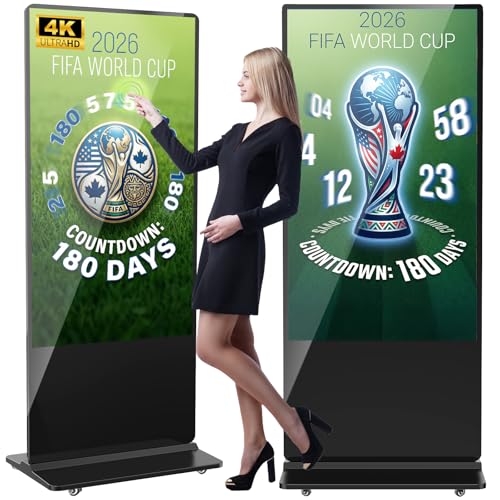
- 4K IPS panel with 178° viewing angle
- Split-screen playback plus timed on/off
- Wi-Fi, HDMI, USB, and Ethernet support
Best For: Stores and venues that want a large interactive signage kiosk
Shelf Edge Display
29-inch Ultra-Wide 700-Nit Shelf Screen

- 32:9 ultra-wide format for shelf and aisle use
- 700-nit FHD panel for indoor retail visibility
- Cloud CMS for remote content updates
Best For: Retail shelves, checkout counters, and narrow merchandising spaces
Portable Mobile Kiosk
32-inch Foldable Android Signage Display

- FHD IPS screen with 178° viewing angle
- Foldable wheeled design for mobility
- USB, HDMI, Wi-Fi, and CMS control
Best For: Mobile promotions and temporary signage setups
Ultra-Bright Commercial Pick
50" 1000-Nit 4K UHD Signage Screen

- 1000-nit brightness for clearer visibility
- Ultra-narrow bezels and slim wall-mount design
- Android, HDMI, and CMS support for scheduling
Best For: High-visibility wall-mounted menu boards and tiled commercial displays
Interactive Floor Stand Pick
Android Touch Kiosk Signage Display

- Touch IPS panel with 600-nit brightness
- USB, HDMI, Wi-Fi, and Android support
- Split-screen mode for mixed content displays
Best For: Interactive public spaces that need a freestanding kiosk
Wall-Mount Touch Pick
32" FHD Android 14 Touch Signage Monitor

- 10-point touch with anti-glare glass
- Android 14 plus HDMI, USB, and CMS support
- Flexible wall-mount and 24/7 operation
Best For: Indoor wall-mounted interactive signage and business displays
Commercial 4K Business Display – Samsung QE50T 50-inch 4K UHD Signage
If you need a straightforward digital signage display for business environments, the Samsung QE50T brings a larger 50-inch 4K UHD panel, 300-nit brightness, and a non-glare finish for everyday indoor visibility. It’s built for 16/7 operation, so it fits well in commercial spaces that need consistent daytime playback without constant intervention.
Best For: Retail, education, and office signage that needs a dependable 50-inch 4K screen with simple HDMI or USB content playback.
Pros:
- 50-inch 4K UHD panel with intelligent UHD upscaling for sharper content handling
- Non-glare screen and 300 nits brightness for indoor commercial visibility
- Supports HDMI and USB input, plus a built-in media player for direct playback
- VESA mountable in portrait or landscape mode with a slim bezel-less design
Cons:
- 300 nits is best suited to indoor use rather than very bright spaces
- Designed for 16/7 operation, not continuous 24/7 use
- No touchscreen capability listed
Overall, this is a practical commercial display if you want a large-format screen with reliable signage-focused features and flexible mounting options. The 3-year warranty and dust-resistant design add reassurance for business deployment.
Signage Media Player – Amazon Signage Stick 4K Business Player
The Amazon Signage Stick is a compact way to power digital signage displays with 4K playback and CMS compatibility. It auto-launches your content management system in kiosk mode, which makes it a good fit for businesses that want unattended operation with minimal setup.
Best For: Businesses that already use a CMS and want a simple, secure 4K signage player with easy mobile setup.
Pros:
- Auto-launches CMS in kiosk mode for unattended signage playback
- Free mobile app setup makes multi-device deployment easier
- Supports leading CMS providers and automatic CMS updates
- Wi‑Fi 6E, quad-core processor, and 4K output in a small device
Cons:
- CMS subscription is required for compatible software use
- Depends on the rest of your display setup for screen quality
- Best suited to users who already have a content platform in place
This is a strong pick when you need the player side of a signage system rather than a full display. Its security features, mobile management, and kiosk-mode operation make it especially practical for multi-location business use.
Interactive Portable Signage – 15.6" Touchscreen Android Display
This 15.6-inch digital signage display is built around interactivity, with a 10-point capacitive touchscreen, Android 13, and wireless screen mirroring. Its compact size, adjustable stand, and built-in battery make it useful when you need a portable commercial display that can move between rooms or setups.
Best For: Interactive kiosks, small indoor ads, and portable presentations where touch control and battery power matter.
Pros:
- 10-point capacitive touchscreen with 2K FHD visual support
- Built-in 10000mAh battery for 4–6 hours of use
- Android 13 with 4GB RAM and 64GB storage for app use
- Supports wireless screen sharing and reverse control via Eshare
Cons:
- 15.6-inch size is better for close-range use than larger audience viewing
- Battery runtime is limited compared with plugged-in signage displays
- 700-ish commercial brightness is not listed; it is rated at 400 cd/㎡ instead
For businesses that want an interactive digital signage display rather than a fixed menu board, this model offers a flexible feature set. The touch layer, portable stand, and multiple connectivity options make it versatile for indoor commercial use.
High-Brightness Counter Display – 18.5" Digital Menu Board
If your priority is visibility at the counter, this 18.5-inch digital signage display is designed as a bright menu board with 700 nits and 24/7 business use in mind. The built-in lifetime free CMS, Android 12 platform, and desktop stand make it a practical option for restaurants, cafés, reception desks, and other front-of-house spots.
Best For: Countertop menus and reception displays that need bright, always-on signage with remote content management.
Pros:
- 700 nits of brightness for clear visibility in commercial settings
- Free lifetime Cloud CMS with remote scheduling and playlist control
- Supports portrait or landscape placement with the included desktop stand
- Flexible inputs include HDMI, LAN, TF card, USB 2.0, and USB 3.0
Cons:
- 720P HD resolution is lower than full HD or 4K options
- 18.5-inch size is best for countertop use rather than larger wall signage
- 2GB RAM and 32GB storage are modest for heavier app demands
As a menu board or compact commercial display, this model is built around convenience and brightness more than premium resolution. The cloud CMS and 3-year warranty make it especially appealing for businesses that want easy ongoing management.
Interactive Floor Kiosk – 65-inch 4K Touchscreen Floor Kiosk
If you want digital signage displays that can handle both high-impact advertising and hands-on interaction, this 65-inch floor-standing kiosk is built for the job. It combines a 4K IPS panel, split-screen playback, and Android-based media tools so businesses can show multiple content types at once in busy commercial spaces.
Best For: Retail, hospitality, and public-facing locations that want a large interactive display with flexible media playback.
Pros:
- 65-inch 4K IPS screen with a 178° viewing angle for strong visibility
- Supports split-screen playback, automatic loop playback, subtitles scrolling, and timed on/off
- Works with Wi-Fi, Ethernet, HDMI, USB, and external player boxes
- Available in touch and non-touch versions with free logo/poster customization
Cons:
- Large floor-standing format needs dedicated space
- At 60 kg, it is not designed for easy repositioning
- Best suited to commercial use rather than casual home viewing
Overall, this model stands out when you need one of the more versatile digital signage displays for content-rich presentations. The combination of 4K clarity, multi-format input support, and 3-year after-sales coverage makes it a practical long-term option for customer-facing installations.
Shelf Edge Display – 29-inch Ultra-Wide 700-Nit Shelf Screen
This ultra-wide model is a smart pick for digital signage displays where shelf space matters more than floor space. Its 32:9 layout is designed for retail shelves, aisles, checkout areas, and counters, making it easier to present pricing, product details, and promotions in one compact screen.
Best For: Retailers and service counters that need a bright, space-saving shelf display.
Pros:
- Ultra-wide 32:9 screen fits above shelves and along aisles
- 700-nit brightness and FHD commercial panel support indoor visibility
- Cloud-based CMS allows remote updates for one screen or a network
- Full-metal enclosure, hidden VESA mount, and 50,000+ hour service life
Cons:
- Display-only design with no touchscreen or kiosk functions
- FHD 1080p ultra-wide resolution is lower than 4K alternatives
- Most useful in narrow retail placements rather than open lobby setups
For shelf-edge merchandising, this screen is focused and practical. It is one of the better digital signage displays for businesses that want bright, organized messaging without giving up valuable floor or counter space.
Portable Mobile Kiosk – 32-inch Foldable Android Signage Display
This 32-inch kiosk is a flexible option for digital signage displays that need to move between locations. It pairs an IPS FHD panel with Android media playback, remote CMS control, and a foldable wheeled design, so it can work well for temporary promotions, events, or changing business setups.
Best For: Businesses that need a portable signage screen for events, retail, hotels, or restaurants.
Pros:
- FHD IPS screen with a 178° viewing angle for clear viewing
- USB/HDMI plug-and-play support plus Wi-Fi and CMS remote updates
- Automatic loop playback and timed power on/off help streamline operation
- Foldable, movable design with built-in wheels for easier transport
Cons:
- Less permanent than a fixed wall- or floor-mounted display
- 32-inch size may be small for large open areas
- Portable build may not suit installations that need a heavy-duty kiosk
If you need a display that can travel with your promotions, this model is a sensible fit. It balances flexibility, remote management, and continuous playback, which makes it useful for businesses that rotate content often.
Ultra-Bright Commercial Pick – 50" 1000-Nit 4K UHD Signage Screen
This digital signage display is built for bright, professional environments where clarity matters. With a 50-inch 4K panel, 1000-nit brightness, ultra-narrow bezels, and 24/7 operation support, it suits businesses that need a polished, high-impact screen for menus, promotions, and live content.
Best For: High-visibility commercial installs, especially wall-mounted menu boards and tiled multi-screen setups.
Pros:
- 1000-nit brightness helps content stay visible in demanding commercial spaces.
- 6.8mm ultra-narrow bezel and 3.5cm slim profile support a seamless tiled look.
- Android-based system includes Google Play Store, HDMI plug-and-play, and CMS tools for remote scheduling.
- Flexible 2-6 zone layout can show videos, QR codes, countdowns, social feeds, and more.
Cons:
- Designed more for commercial mounting than casual home use.
- Large 50-inch format may be more than some small spaces need.
If you want a commercial display that combines brightness, a clean bezel design, and remote content control, this model is a strong fit. Its feature set is especially practical for restaurants and storefronts that need dependable digital signage displays running all day.
Interactive Floor Stand Pick – Android Touch Kiosk Signage Display
This digital signage display is a freestanding kiosk option built for public-facing spaces that need interactive content. It combines an IPS touch panel, Android OS, multiple input options, and split-screen playback so businesses can present ads, information, and promotions in one unit.
Best For: Malls, airports, hospitals, and retail spaces that need an interactive floor-standing signage kiosk.
Pros:
- Touchscreen IPS display offers bright visuals with 600-nit brightness and a 178° viewing angle.
- Supports USB, HDMI, 5G Wi-Fi, Google Apps, and Android-based content updates.
- Split-screen function lets you show videos, images, and text at the same time.
- Freestanding design is suited to high-traffic public environments.
Cons:
- Floor-standing format takes more space than wall-mounted displays.
- Best suited to interactive or public-area use rather than simple signage alone.
For businesses that want an engaging kiosk-style solution, this model offers a flexible way to manage content and capture attention. It is a practical choice when your digital signage displays need both visibility and touch interaction in one commercial unit.
Wall-Mount Touch Pick – 32" FHD Android 14 Touch Signage Monitor
This digital signage display is geared toward wall-mounted business use where touch control and flexible mounting matter. It pairs a 32-inch Full HD screen with AG anti-glare glass, Android 14, and HDMI support, making it a practical fit for reception areas, offices, retail counters, and information boards.
Best For: Wall-mounted interactive signage, reception displays, and extended-screen business use.
Pros:
- 32-inch 1920 x 1080 FHD panel delivers clear, vivid signage content.
- 10-point PCAP touch and AG glass support responsive use with reduced glare.
- Android 14 with 4GB RAM and 32GB storage supports compatible apps and media.
- HDMI input, USB playback, CMS support, and 24/7 operation add flexibility.
Cons:
- 350-nit brightness is lower than high-brightness commercial models.
- Better suited to indoor controlled-light environments than very bright spaces.
This model stands out if you need a compact, touch-enabled display that can work as both signage and a business monitor. For teams comparing digital signage displays for reception, retail, or office use, it offers a balanced mix of interactivity and installation flexibility.
How We Picked These Digital Signage Displays
We focused on features that matter in real business use: screen size, brightness, resolution, touch support, operating system, connectivity, and installation flexibility. We also looked for models suited to common commercial settings such as retail aisles, lobby walls, menu boards, shelf-edge messaging, and interactive kiosks.
Quick Comparison
If you want a simple rule of thumb, choose a high-brightness display for brightly lit areas, a touch model for self-service or wayfinding, and a media-player-ready option if you need a simpler content setup. Larger formats work well for distance viewing, while compact screens are better for counters, shelves, and tight spaces.
Key Buying Factors for Digital Signage Displays
Brightness and Viewing Environment
Brightness is one of the most important specs. Standard indoor screens can work in controlled lighting, but retail windows, open lobbies, and sunlit areas usually benefit from higher-nit panels so content stays readable.
Resolution and Screen Size
Match the resolution to the size and viewing distance. 4K is a strong choice for larger signage and detailed visuals, while Full HD can be perfectly adequate for smaller displays and closer viewing applications.
Touch, Player, and Software Needs
Some Digital Signage Displays are built for interactive use, while others are better as straightforward advertising screens. If your team wants easy content updates, look for built-in Android systems, auto-play support, or compatibility with your preferred CMS.
Mounting and Form Factor
Wall-mounted screens, freestanding kiosks, shelf displays, and tabletop units serve different roles. Consider where the display will live, whether it needs to move, and how much physical space you have for installation.
Who Should Buy Which Digital Signage Displays?
Retailers and restaurants often need bright, reliable screens for promotions and menus. Offices, hotels, and campuses may prefer large-format displays or kiosks for check-in, directions, and announcements. If you need self-service, look for touch capability; if you need simple playback, prioritize an easy media player or auto-update workflow.
In short, the best choice depends on where the display will be used, how often content changes, and whether your team needs interaction or just strong visual impact.
