
When your projects outgrow a typical desktop, 128GB of RAM can give demanding apps, large datasets, and multiple virtual machines more room to run. But memory capacity alone does not make a PC a good match.
These 10 picks span compact AI-focused systems, gaming towers, and professional workstations. The right choice depends on your software, graphics needs, upgrade plans, and available desk space.
Best 10 Desktops with 128gb RAM Picks for 2026
Compact AI Pick

- Ryzen AI Max+ 395 with 128GB LPDDR5X-8000
- 2TB SSD plus a second M.2 slot
- Dual USB4, Wi-Fi 7, and 2.5GbE
Best For: Compact local AI and creative work
Everyday Power Tower

- Core Ultra 9 285K and 128GB DDR5-5600
- RTX 5060 8GB dedicated graphics
- 1TB NVMe SSD; keyboard and mouse included
Best For: High-memory multitasking in a conventional tower
Expandable AI Workstation

- Ryzen AI Max+ 395 and 128GB unified memory
- PCIe x16 slot and dual M.2 slots
- USB4 V2 and dual 10GbE networking
Best For: Expandable local AI and clustered workflows
Gaming and Storage Pick

- Core i9-14900 with 128GB DDR5
- RTX 5060 Ti with 16GB GDDR7
- 4TB SSD and Windows 11 Pro
Best For: Gaming and creation with ample built-in storage
Best for Easy Setup

- 128GB onboard LPDDR5X memory
- Ryzen AI Max+ 395 and Radeon 8060S
- OCuLink connection for an external GPU
Best For: Compact local AI and creative work
Gaming Tower Pick

- 128GB DDR5-5600 memory
- Core Ultra 9 285K and RTX 5070
- Liquid cooling and Thunderbolt 4
Best For: Gaming and GPU-assisted media work
Networked AI Pick

- 128GB shared LPDDR5X memory
- Dual 10GbE and four-display support
- 2TB SSD with two M.2 slots
Best For: Local AI work with fast NAS access
High-Capacity Workstation
Lenovo ThinkStation P2 Gen 2, 5TB
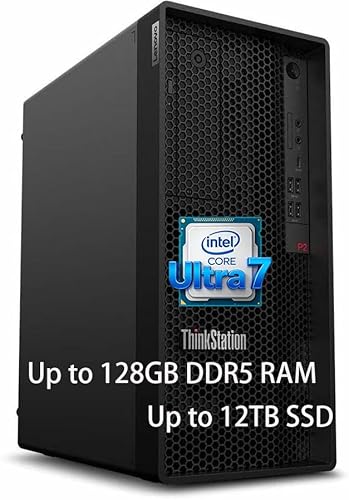
- 128GB DDR5 RAM
- 4TB SSD plus 1TB HDD
- 20-core Core Ultra 7 265K
Best For: Large projects and memory-heavy professional workloads
Compact Office Pick
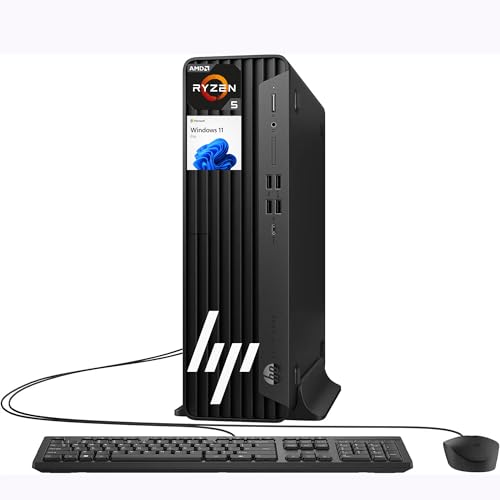
- 128GB DDR5 RAM and 2TB SSD
- Compact small-form-factor case
- HDMI, DisplayPort, and 11 USB ports
Best For: RAM-heavy office work with limited desk space
Mixed-Storage Workstation
Lenovo ThinkStation P2 Gen 2, 3TB
- 128GB RAM
- 2TB SSD plus 1TB HDD
- 20-core Core Ultra 7 265K
Best For: Memory-heavy work with mixed SSD and HDD storage
Compact AI Pick – BOSGAME M5 AI Mini PC
Among desktops with 128gb ram, the BOSGAME M5 stands out for fitting a Ryzen AI Max+ 395, 128GB of LPDDR5X-8000 memory, and a 2TB SSD into a mini PC. Its shared memory is particularly useful for local AI work and graphics-heavy projects.
Best For: Buyers who want a compact desktop for local AI experiments, editing, and multi-monitor work.
Pros:
- 16-core, 32-thread processor with a 50 TOPS NPU.
- Radeon 8060S graphics can draw on the large shared memory pool.
- Dual USB4, Wi-Fi 7, 2.5GbE, and a second M.2 slot offer useful connectivity and storage expansion.
Cons:
- The 128GB of onboard memory cannot be expanded beyond its listed capacity.
- Uses integrated rather than dedicated graphics.
This is a strong space-saving choice when high-bandwidth shared memory matters more than a replaceable graphics card or RAM upgrades.
Everyday Power Tower – Dell Tower Plus EBT2250
If you prefer a conventional tower among desktops with 128gb ram, the Dell Tower Plus EBT2250 pairs a 24-core Intel Core Ultra 9 285K with 128GB of DDR5-5600 memory. Its RTX 5060 8GB graphics card and included keyboard and mouse make it a practical ready-to-use setup.
Best For: Buyers who want a Windows tower for intensive multitasking with a dedicated GPU.
Pros:
- 24-core processor and 128GB of DDR5-5600 memory.
- Dedicated RTX 5060 graphics with 8GB of GDDR7 memory.
- Wi-Fi 7, multiple display outputs, and an included wired keyboard and mouse.
Cons:
- The 1TB SSD is smaller than the storage supplied with several other systems here.
- Its listed maximum RAM is 128GB, leaving no stated capacity for a future memory increase.
Choose this Dell when a familiar tower format and dedicated graphics are higher priorities than maximum included storage.
Expandable AI Workstation – MINISFORUM MS-S1 MAX
The MINISFORUM MS-S1 MAX is one of the more workstation-oriented desktops with 128gb ram in this selection. It combines a Ryzen AI Max+ 395 with 128GB of LPDDR5x-8000 unified memory and adds expansion and networking options aimed at demanding local AI workflows.
Best For: Developers and studios building a compact local AI workstation or a multi-unit setup.
Pros:
- 16-core, 32-thread APU with a 50 TOPS NPU and shared CPU/GPU memory.
- Full-length PCIe x16 slot, dual M.2 slots, and USB4 V2 connectivity.
- Dual 10GbE ports and support for clustered deployments.
Cons:
- The 128GB LPDDR5x memory is presented as a fixed unified-memory configuration, not a RAM upgrade path.
- The supplied details give inconsistent storage figures, so confirm the installed SSD capacity before ordering.
Its expansion slot and fast networking distinguish it from simpler mini PCs, especially if your plans extend beyond a single desktop.
Gaming and Storage Pick – HP OMEN 16L
For shoppers comparing desktops with 128gb ram for gaming and content creation, this HP OMEN 16L configuration brings a 24-core Intel Core i9-14900, an RTX 5060 Ti with 16GB of graphics memory, and a roomy 4TB SSD. It also comes with Windows 11 Pro.
Best For: Buyers who want substantial included storage and a dedicated GPU alongside 128GB of RAM.
Pros:
- RTX 5060 Ti with 16GB of GDDR7 graphics memory.
- 4TB PCIe NVMe SSD provides ample space for games and project files.
- Windows 11 Pro, Wi-Fi 6, keyboard, and mouse are included.
Cons:
- The listed 128GB maximum RAM leaves no stated room for a capacity upgrade.
- Wi-Fi 6 is an older wireless standard than the Wi-Fi 7 listed for some alternatives.
This configuration makes the most sense if dedicated graphics and generous built-in storage matter more to you than the latest wireless specification.
Best for Easy Setup – GMKtec EVO-X3 AI Mini PC
Among desktops with 128gb ram, the GMKtec EVO-X3 is a compact option for local AI and creative workloads. Its Ryzen AI Max+ 395 pairs 16 cores with 128GB of onboard LPDDR5X memory and a 2TB PCIe 4.0 SSD.
Best For: Developers and creators who want substantial shared memory and capable integrated graphics in a mini PC.
Pros:
- 128GB LPDDR5X at 8000 MT/s provides room for large models and heavy multitasking.
- Radeon 8060S integrated graphics support creative work without a separate desktop GPU.
- OCuLink PCIe Gen4 x4 offers an external GPU connection.
Cons:
- Onboard LPDDR5X memory is not presented as upgradeable.
- OCuLink devices must be connected or disconnected while the PC is powered off.
Choose this model when desk space and shared memory matter more than a traditional tower layout. If you plan to use an external GPU, account for the OCuLink power-off requirement.
Gaming Tower Pick – HP OMEN 45L GT22
For shoppers comparing desktops with 128gb ram that also have a dedicated graphics card, the HP OMEN 45L GT22 pairs 128GB of DDR5-5600 with an Intel Core Ultra 9 285K and GeForce RTX 5070. Its liquid-cooled tower is aimed at gaming and media work.
Best For: Gamers and video editors who want a dedicated GPU, abundant memory and a full-size desktop.
Pros:
- 24-core Core Ultra 9 285K and 128GB DDR5 support demanding multitasking.
- GeForce RTX 5070 includes 12GB of GDDR7 graphics memory.
- Liquid cooling, Thunderbolt 4 and Wi-Fi 6E add useful tower features.
Cons:
- The included 1TB SSD may fill quickly with large games or video projects.
- Its 21.85-by-8.03-by-18.5-inch case needs considerably more space than a mini PC.
This is the straightforward choice of the three if a dedicated NVIDIA GPU is a priority. Check whether the supplied storage and tower footprint suit your setup.
Networked AI Pick – GEEKOM A9 Mega AI Workstation
The GEEKOM A9 Mega stands out among desktops with 128gb ram for its compact size and workstation-oriented connectivity. It combines a Ryzen AI Max+ 395, 128GB of LPDDR5X shared memory and a 2TB PCIe Gen4 SSD.
Best For: Local AI developers and small studios that need fast NAS connections and multiple displays.
Pros:
- Supported settings can allocate up to 96GB of shared memory to the Radeon 8060S GPU.
- Dual 10GbE ports, dual USB4 and dual HDMI 2.1 suit networked, multi-display setups.
- Two M.2 slots support up to 8TB total storage; a 3-year limited warranty is included.
Cons:
- Its LPDDR5X memory is onboard rather than described as upgradeable.
- Running very large AI models depends on compatible drivers, software and model quantization.
The A9 Mega makes particular sense if your workflow moves large files to a NAS or spans several monitors. Treat its stated large-model support as a compatibility-dependent capability, not a guarantee for every model.
High-Capacity Workstation – Lenovo ThinkStation P2 Gen 2, 5TB
Among desktops with 128GB RAM, this ThinkStation P2 Gen 2 stands out for its listed 5TB storage configuration: a 4TB SSD plus a 1TB HDD. Its 20-core Intel Core Ultra 7 265K and Windows 11 Pro suit demanding multitasking and business workloads.
Best For: Professionals who need substantial memory and room for large project files.
Pros:
- 128GB DDR5 RAM for memory-heavy applications and multiple virtual machines.
- 4TB SSD and 1TB HDD provide separate fast and bulk storage.
- Tool-less design is intended to simplify servicing and upgrades.
Cons:
- Listed graphics are integrated, so buyers needing a dedicated GPU should check the configuration.
- The notes describe storage options up to 12TB, but this listing specifies 5TB.
Choose this configuration when the larger SSD matters; verify any graphics requirements before ordering.
Compact Office Pick – HP Elite SFF G9, 2TB
If desk space is limited, this HP Elite SFF G9 is a compact option among desktops with 128GB RAM. The listed configuration pairs that memory with a 2TB PCIe NVMe SSD, Windows 11 Pro, and integrated Radeon 760M graphics.
Best For: Offices that need substantial RAM in a small-form-factor desktop.
Pros:
- Small-form-factor case measures 11.9 x 10.6 x 3.7 inches.
- Includes 11 USB ports, HDMI, DisplayPort, and Ethernet.
- Wired keyboard and mouse are included.
Cons:
- Integrated graphics may not meet needs that call for a dedicated GPU.
- The title and bullets identify a Ryzen 5 8500G, while the details list a different Ryzen 5 series; confirm the exact CPU before purchase.
Its compact case and port selection make it practical for a busy desk, provided the processor configuration checks out.
Mixed-Storage Workstation – Lenovo ThinkStation P2 Gen 2, 3TB
This ThinkStation P2 Gen 2 is one of the desktops with 128GB RAM aimed at professional multitasking. Its listed 3TB configuration combines a 2TB SSD and 1TB HDD with an Intel Core Ultra 7 265K and Windows 11 Pro.
Best For: Professionals who want workstation-class memory with SSD and HDD storage.
Pros:
- 128GB RAM supports large datasets and multiple virtual machines.
- 20-core Core Ultra 7 265K is suited to demanding multitasking.
- Tool-less design is intended to make maintenance easier.
Cons:
- Listed graphics are integrated rather than a dedicated GPU.
- The notes also describe storage options up to 12TB; this listing specifies 3TB.
This is the smaller-storage ThinkStation configuration in this roundup. Confirm that its 2TB SSD is enough for active projects before choosing it.
How We Picked the Best Desktops with 128gb RAM
We looked at the listed processor, graphics, storage, form factor, and memory configuration of each selected 128GB system. We also considered whether the design suits its likely workload: a compact PC may save space, while a tower may offer more room for dedicated graphics, cooling, and future upgrades. A listing alone cannot establish sustained performance, noise, or component compatibility, so confirm those details with the seller and manufacturer before ordering.
Quick Comparison: Which Type Fits?
The BOSGAME M5, MINISFORUM MS-S1 MAX, GMKtec EVO-X3, and GEEKOM A9 Mega pair 128GB of memory with AMD Ryzen AI Max+ 395 processors in compact systems. They are worth considering when space matters and your applications suit their integrated graphics. The Dell Tower Plus and HP OMEN models are larger alternatives for buyers seeking a dedicated NVIDIA GPU; check the exact GPU on each listing, particularly the OMEN 45L. The Lenovo ThinkStation P2 Gen 2 listings target buyers who prefer a workstation-style tower and differ here in advertised storage capacity. The HP Elite SFF G9 is the small-form-factor office option, but its listed Ryzen 5 specification is unusual for that model name and deserves verification.
Key Buying Factors for Desktops with 128gb RAM
Memory Type and Upgrade Path
Check whether the full 128GB is installed and whether it is soldered or socketed. Compact systems using LPDDR5X generally do not offer the same memory-upgrade flexibility as towers with DDR5 DIMM slots. If you might need more memory later, confirm the motherboard’s supported maximum and available slots.
CPU, GPU, and Software Fit
More RAM will not compensate for a processor or GPU that misses your software’s requirements. For CUDA-dependent applications, rendering, or gaming, verify the dedicated NVIDIA GPU model and its VRAM. For CPU-heavy development or analysis, compare core counts, cooling, and the performance requirements of your specific tools. If you plan to run local AI models on an integrated-GPU mini PC, check the software’s hardware support and usable memory allocation first.
Storage, Ports, and Support
Large media projects and virtual machines can fill a 1TB drive quickly. Compare installed SSD capacity with available drive bays or M.2 slots, and check the ports needed for displays, fast external storage, and networking. Confirm warranty coverage and return terms, especially on listings with unusual specifications or seller-installed upgrades.
Who Should Buy Which Desktops with 128gb RAM?
Choose a Ryzen AI Max+ mini PC if you prioritize a small footprint and have confirmed your applications support its graphics platform. Consider the Dell Tower Plus or an HP OMEN tower if you need a listed dedicated GPU; compare VRAM and case size before deciding. Look at the ThinkStation P2 Gen 2 options if a workstation-style tower and the advertised storage capacity matter most. The Elite SFF G9 may suit an office desk with limited space, but verify its processor and memory configuration first. For any of these Desktops with 128gb RAM, the best value is the system whose CPU, GPU, storage, and upgrade options match work you actually do.
