
A desktop CNC router can bring milling, engraving, and sign-making capabilities to a workshop without requiring industrial floor space. The challenge is finding a machine that fits a small desk while still offering useful work area, rigidity, and manageable setup.
We compared 10 compact models across footprint, construction, spindle power, material capability, expandability, and beginner-friendliness. Use the guide below to narrow the list based on your projects and available workspace.
Best 10 Desktop CNC Routers for Small Desks Picks for 2026
Best Beginner Pick

- Compact 300 x 180 x 45 mm work area
- GRBL control with included offline controller
- Handles wood, acrylic, PCB, PVC, and soft aluminum
Best For: Beginners and makers with limited desk space
Best Lightweight Option

- 15-pound design fits small desk corners
- All-metal Z-axis targets stable engraving
- Includes cutters, collet, and assembly tools
Best For: DIY learning, STEM education, and small nameplate projects
Best Advanced Enclosed Choice

- Includes a 4th-axis rotary module
- Auto probing, leveling, and quick tool changes
- Wi-Fi and USB with cross-platform software
Best For: Advanced hobbyists making detailed 3D and rotary projects
Best Power Upgrade

- 710-watt spindle reaches 30,000 RPM
- All-metal frame with dual X-axis rails
- Designed for wood, acrylic, PCB, and selected metals
Best For: Makers needing stronger desktop cutting performance
Best Beginner Enclosed Pick
Genmitsu Cubiko Desktop CNC Router
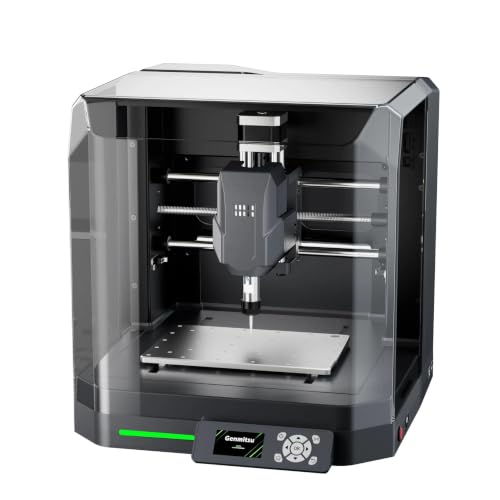
- Factory-assembled for faster setup
- Enclosure helps reduce dust and noise
- Works with several popular CNC software options
Best For: Beginners with compact workspaces and light-duty projects
Best Expandable Work Area
FoxAlien Masuter Pro CNC Router

- 15.75 x 15.75-inch engraving area
- Pre-wired parts support quick assembly
- Compatible with multiple spindle configurations
Best For: DIY hobbyists who want room to expand
Best High-Power Desktop Option
Genmitsu PROVerXL 4030S CNC Router

- 710-watt spindle handles demanding materials
- 130mm pass height supports taller projects
- 32-bit controller enables smoother motion
Best For: Experienced makers with a sturdy dedicated workspace
Best Metal-Cutting Pick

- Rigid all-metal frame with dual linear guides
- 800W router for wood and selected metals
- Upgradeable spindle, motors, screws, and table
Best For: Makers needing compact metal-cutting capability and upgrade potential
Best High-Clearance Option

- 410 x 405mm work area for larger projects
- 710W digital-display compact router
- 100mm pass height and reinforced T-track spoilboard
Best For: Desktop users who need taller-material clearance and a supported work surface
Best Beginner-Friendly 4040

- 435 x 400mm working area for signs and prototypes
- Reinforced spoilboard limits bed flex
- Quick assembly with GRBL and upgrade support
Best For: Beginners wanting a stable, expandable desktop CNC platform
Best Beginner Pick – Genmitsu 3018-PRO
If you are comparing desktop CNC routers for small desks, the Genmitsu 3018-PRO is a practical starting point. Its compact footprint, beginner-friendly assembly, 300 x 180 x 45 mm work area, and GRBL control make it suitable for learning CNC carving, engraving, and light milling without taking over a workbench.
Best For: Beginners, makers, classrooms, and home workshops handling wood, acrylic, PVC, plastic, PCB, and soft aluminum projects.
Pros:
- Compact 300 x 180 x 45 mm working area suits small-desk projects.
- GRBL control and Candle software offer a flexible, well-supported workflow.
- Offline controller allows basic operation without a connected computer.
- Supports several materials, including wood, acrylic, PCB, PVC, and soft aluminum.
Cons:
- The 120-watt motor is intended for light-duty work rather than demanding machining.
- Beginners still need to learn G-code, tool selection, and cutting settings.
The 3018-PRO is a sensible choice when desk space and ease of entry matter most. It offers useful flexibility for small projects, while its modest power keeps it better suited to engraving, carving, prototyping, and light milling.
Best Lightweight Option – TTC3018 Pro
For shoppers seeking desktop CNC routers for small desks, the TTC3018 Pro emphasizes compactness and straightforward assembly. Weighing 15 pounds and measuring 420 x 355 x 280 mm, it offers a 300 x 180 x 40 mm working area for nameplates, DIY projects, and small-batch work.
Best For: DIY users, STEM education, maker training, and small projects in wood, acrylic, MDF, nylon, and similar materials.
Pros:
- Lightweight 15-pound design fits desk corners and small workspaces.
- All-metal Z-axis with T8 lead screws is designed for improved stability.
- Includes 10 standard cutters, an ER11 collet, tools, and a 775 spindle motor.
- Compatible with GRBL, ArtCam, Fusion360, and Windows or Mac workflows.
Cons:
- Connection is limited to a wired USB link; it has no Bluetooth, Wi-Fi, or built-in TF card slot.
- The 300 x 180 x 40 mm work area limits larger projects.
The TTC3018 Pro makes sense if you want a lightweight learning machine with an included starter kit. Its wired-only control and compact work area are tradeoffs, but the all-metal Z-axis and educational assembly design add appeal for hands-on users.
Best Advanced Enclosed Choice – Carvera Air with 4th Axis
The Carvera Air is a more advanced option among desktop CNC routers for small desks, combining an enclosed mini-mill format with automated features and a 4th-axis rotary kit. Its auto probing and leveling, quick tool changer, cross-platform software, and Wi-Fi or USB connectivity support more complex workflows than a basic three-axis starter machine.
Best For: Advanced hobbyists and makers creating detailed 3D, cylindrical, double-sided, wood, plastic, or metal projects.
Pros:
- Included 4th-axis module supports cylindrical machining and 3D shapes.
- Quick tool changer can switch tools in about 10 seconds.
- Auto probing and leveling help calibrate uneven materials.
- Supports Mac, Windows, iOS, Android, and Linux control workflows.
Cons:
- At 99 pounds with a 23 x 22 x 22-inch package, it is substantially less portable than compact 3018-style machines.
- Its advanced features and 4th-axis capability may be more than beginners need.
The Carvera Air is best viewed as a capability-focused desktop system rather than a minimalist desk accessory. Choose it when automated setup, rapid tool changes, and rotary machining justify the larger, heavier investment.
Best Power Upgrade – Genmitsu 3020-PRO Ultra
If your small desk can accommodate a heavier machine, the Genmitsu 3020-PRO Ultra brings substantially more cutting power to the desktop CNC router category. Its 710-watt spindle, all-metal construction, dual X-axis rails, and 60 mm stepper motors are designed for deeper, more stable work in wood, acrylic, carbon fiber, and selected metals.
Best For: Makers who need stronger spindle performance for wood, acrylic, PCB work, aluminum, soft titanium, and other demanding desktop projects.
Pros:
- 710-watt spindle operates from 6,500 to 30,000 RPM with adjustable speed settings.
- All-metal frame, dual X-axis rails, and reinforced components support rigidity.
- 60 mm stepper motors provide up to 7.3 Nm of stated torque.
- Modular spindle-holder compatibility allows expansion with laser or alternate spindle modules.
Cons:
- At 15.3 kg, it is much heavier than lightweight 3018-style machines.
- The 11.8 x 8.1 x 3.1-inch work area remains suited to relatively small projects.
- Its greater power and metalworking capability may be unnecessary for basic engraving.
The 3020-PRO Ultra is the strongest fit here for users prioritizing rigidity and cutting power over portability. Confirm your desk can support its weight and footprint before choosing it for deeper cuts or harder materials.
Best Beginner Enclosed Pick – Genmitsu Cubiko Desktop CNC Router
If you need desktop CNC routers for small desks, the Genmitsu Cubiko is a practical beginner-friendly option. Its 13 x 13 x 12.48-inch footprint, factory-assembled design, and included enclosure make it well suited to learning, engraving, and light-duty DIY work in a compact workspace.
Best For: Beginners working on wood, acrylic, PCBs, plastics, and selected soft metals who want an enclosed, ready-to-learn machine.
Pros:
- Factory-assembled design reduces initial setup time.
- Enclosure helps contain dust and reduce operating noise.
- Supports Genmitsu App, Fusion 360, Candle, Easel, and Carveco.
- Auto Z-probing and height-mapping support assist with uneven materials.
Cons:
- Its 75-watt power rating limits it to light-duty metal and carving applications.
- Proper calibration and a conductive probe connection are required for optimal probing.
- The compact work area is better suited to smaller projects than large stock.
The Cubiko stands out when a small-desk setup, lower-friction assembly, and dust containment matter more than high-power cutting. It is a sensible starting point for hobby projects, prototyping, and creative CNC learning.
Best Expandable Work Area – FoxAlien Masuter Pro CNC Router
For shoppers comparing desktop CNC routers for small desks, the FoxAlien Masuter Pro offers a useful balance of compact organization and a relatively generous 15.75 x 15.75-inch engraving area. Its pre-wired construction, all-aluminum frame, and upgrade-friendly spindle compatibility suit hands-on hobby work.
Best For: DIY users who want a stable machine for wood, acrylic, MDF, nylon, and future expansion with larger or more powerful spindle options.
Pros:
- All-aluminum structure and linear-rail Z-axis support stability.
- Main components are pre-assembled and pre-wired for a stated 10–15-minute setup.
- Includes 52mm and 65mm spindle clamps for customization.
- Optional Y-axis extension can expand the working area.
Cons:
- Its 26-inch width may require more desk space than the smaller Cubiko.
- The 69mm spindle clamp is sold separately.
- It does not include an enclosure in the supplied components.
The Masuter Pro is a strong fit if you want more usable carving space without immediately moving to a larger machine. Its aluminum construction and upgrade path make it particularly appealing for hobbyists who expect their projects to grow.
Best High-Power Desktop Option – Genmitsu PROVerXL 4030S CNC Router
The Genmitsu PROVerXL 4030S is a powerful choice among desktop CNC routers for small desks, but its 30.59-inch width and 33-kilogram weight mean it needs a sturdy, dedicated surface. In return, it provides a 710-watt spindle, 130mm pass height, upgraded linear guidance, and a 32-bit controller for demanding hobby and precision work.
Best For: Experienced makers who need faster cutting, taller workpiece clearance, and stronger performance on wood, acrylic, and aluminum.
Pros:
- 710-watt spindle provides stronger cutting force for harder materials.
- 130mm pass height accommodates taller objects and thicker materials.
- Upgraded Z-axis linear guideway and stated ±0.05mm repeatable positioning accuracy support precise work.
- 32-bit MCU and redesigned drive electronics support smoother, faster motion.
Cons:
- Its large footprint and 33kg weight are challenging for a genuinely small desk.
- Wireless control requires a separately purchased Wi-Fi module.
- Higher power and capability may be more machine than beginners need.
The 4030S is best viewed as a compact-but-serious workstation rather than a lightweight desktop gadget. Choose it when cutting power, vertical clearance, and repeatable performance justify dedicating substantial desk space.
Best Metal-Cutting Pick – 3030-Evo Max
For desktop CNC routers for small desks, the 3030-Evo Max offers a compact, rigid platform aimed at light-duty work in wood, acrylic, MDF, plastics, and selected metals. Its dual linear guides, 800W trim router, and upgrade paths make it a flexible choice when workspace is limited but material range matters.
Best For: Makers who want a small, rigid CNC router with aluminum-cutting capability and room to upgrade.
Pros:
- All-metal structure with dual MGN-15 linear guides on each axis.
- 800W router supports six speed settings from 8,000 to 24,000 RPM.
- Upgradeable to a 1.5kW spindle, ball screws, closed-loop motors, and a larger 3060 table.
- Wi-Fi control, GRBL_ESP32 firmware, limit switches, emergency stop, and Z probe included.
Cons:
- Router speed adjustment requires manual dial control.
- The listed work area and 39.5-pound weight may still require a sturdy desk.
- Some advanced capabilities require optional upgrades.
The 3030-Evo Max stands out when compact dimensions and metal-focused rigidity are more important than a lightweight setup. Its upgradeability also helps accommodate more demanding projects over time.
Best High-Clearance Option – Genmitsu 4040-PRO MAX
The Genmitsu 4040-PRO MAX is a practical option among desktop CNC routers for small desks, combining a 410 x 405 x 77mm work area with a 710W digital-display trimmer. Its reinforced spoilboard and linear guideway design focus on stable motion during engraving and cutting.
Best For: Users who need a relatively large desktop work area, improved spoilboard support, and extra clearance for taller materials.
Pros:
- Linear guideway structures on the X and Z axes support stable motion.
- Reinforced MDF spoilboard includes a central aluminum support bar and integrated T-track.
- 710W trimmer provides power for engraving and cutting applications.
- 100mm pass height accommodates taller materials than the standard PRO version.
Cons:
- At 24 kg, it is relatively heavy for a small-desk machine.
- The 4040 work area requires more desk depth than smaller CNC routers.
- The supplied notes do not specify included accessories or upgrade options beyond the trimmer.
Choose the 4040-PRO MAX if material clearance and a reinforced work surface are priorities. It offers useful capacity for a desktop machine, but measure your desk carefully before buying.
Best Beginner-Friendly 4040 – Genmitsu 4040-PRO
The Genmitsu 4040-PRO is a capable choice for desktop CNC routers for small desks, with a 435 x 400 x 80mm working area and pre-assembled modules designed for quick setup. Its reinforced spoilboard and lead-screw motion system are suited to signs, reliefs, prototypes, and general woodworking projects.
Best For: Beginners and makers who want a stable 4040-format machine with a supported GRBL workflow and upgrade potential.
Pros:
- Reinforced hybrid spoilboard helps reduce bed flex and sagging.
- Dual 16mm HSS steel tubes and lead screws provide rigid motion.
- 32-bit controller with silent Toshiba drivers supports quieter operation.
- Pre-assembled modules can reduce assembly time to about 15 minutes.
Cons:
- The 20.84 kg machine still needs a stable, adequately sized desk.
- The supplied notes do not include a router wattage or spindle specification.
- Cutting performance depends on appropriate bits and settings, especially for composites.
The 4040-PRO makes sense for users who value straightforward setup, a flatter spoilboard, and a broadly supported GRBL workflow. Its accessory ports and spindle-mount support also leave room for future expansion.
How We Picked the Best Desktop CNC Routers for Small Desks
We focused on machines that are practical for compact workshops, maker spaces, and home offices with a dedicated work surface. Our comparisons consider the router’s external footprint, usable cutting area, frame rigidity, axis design, spindle or trim-router power, supported materials, setup requirements, and available accessories. Enclosures, dust management, emergency controls, software compatibility, and upgrade paths also matter because a small-desk machine should be convenient as well as capable.
Keep in mind that listed work areas and machine dimensions are not interchangeable. A router may fit on a desk yet need additional room for cables, dust collection, stock loading, and access to the emergency stop.
Quick Comparison
| Best For | What to Prioritize | Models to Consider |
|---|---|---|
| First-time users | Simple setup, documentation, and enclosure options | Genmitsu 3018-PRO, TTC3018 Pro, Cubiko |
| Wood, acrylic, and hobby engraving | Reliable motion system and manageable work area | Masuter Pro, 3020-PRO Ultra |
| More demanding projects | Rigid frame, stronger spindle, and greater Z clearance | PROVerXL 4030S, 3030-Evo Max |
| Larger desktop workpieces | Expanded cutting area and sturdy construction | 4040-PRO, 4040-PRO MAX |
| Enclosed, advanced workflows | Noise and dust containment plus rotary capability | Carvera Air |
Key Buying Factors for Desktop CNC Routers for Small Desks
Footprint and Usable Workspace
Measure the desk, then reserve extra clearance around the machine. Compare the actual cutting area with your typical stock size; a compact frame is not useful if your projects constantly overhang the bed.
Frame Rigidity and Material Capability
Wood, MDF, plastics, and acrylic generally demand less rigidity than aluminum or brass. All-metal frames and dual linear guides can reduce flex, but cutting harder materials also requires appropriate tooling, conservative feeds, workholding, and dust or chip control.
Spindle, Router, and Noise
Higher power can improve material removal, but it does not automatically produce better results. Check speed control, collet compatibility, replacement-tool availability, and whether the machine’s noise level suits your workspace.
Enclosure, Safety, and Dust Collection
An enclosure can contain chips, reduce noise, and make a small indoor setup more practical. It still does not replace eye protection, ventilation, safe workholding, supervision, and a suitable dust-collection strategy.
Software and Expansion
Confirm that the controller works with your preferred design and toolpath software. Offline controllers, limit switches, probing, rotary accessories, spoilboards, and upgraded clamps can significantly affect long-term value.
Who Should Buy Which Desktop CNC Routers for Small Desks?
Choose a 3018-class machine if you are learning CNC, engraving small pieces, or need the lowest-cost entry point. The Cubiko is a sensible direction for beginners who value an enclosure, while the Masuter Pro and 3020-PRO Ultra suit users who want a sturdier platform for wood, acrylic, and light-duty projects.
Step up to the PROVerXL 4030S or 3030-Evo Max when you need more room, rigidity, or router power. The 4040 models make more sense for larger stock and users willing to dedicate more desk space. Choose the Carvera Air if enclosure convenience, automation, and a fourth-axis workflow are more important than the simplest possible setup.
