
Choosing among desktop CNC routers for beginners can feel complicated when machines vary widely in work area, spindle power, construction, and included features. The right model depends on what you want to make, where you will use it, and how much setup you are comfortable handling.
We’ve gathered 10 approachable CNC routers spanning compact entry-level machines, enclosed designs, larger work areas, and models capable of handling tougher materials. Use the guide below to narrow the options by capability, safety, and long-term value.
Best 10 Desktop CNC Routers for Beginners Picks for 2026
Best Entry-Level Pick

- Pre-assembled parts simplify setup
- Handles wood, plastic, acrylic, and soft metals
- Supports useful accessory upgrades
Best For: Beginners learning CNC on smaller creative projects
Best Stable Upgrade

- All-aluminum frame with linear-rail Z-axis
- Offers a generous 400 x 400 x 60mm work area
- Pre-wired design supports quick assembly
Best For: Beginners wanting stability and room for larger projects
Best High-Power Option

- 710W spindle for stronger cutting
- 130mm pass height handles taller workpieces
- 32-bit control and linear guideway support precision
Best For: Beginners planning larger or more demanding projects
Best Safety-Focused Value

- 500W spindle with all-metal construction
- Six limit switches and emergency stop
- 80mm Z-axis travel with offline control
Best For: Beginners wanting compact, safety-conscious versatility
Best Enclosed Starter
Genmitsu Cubiko Desktop CNC Router
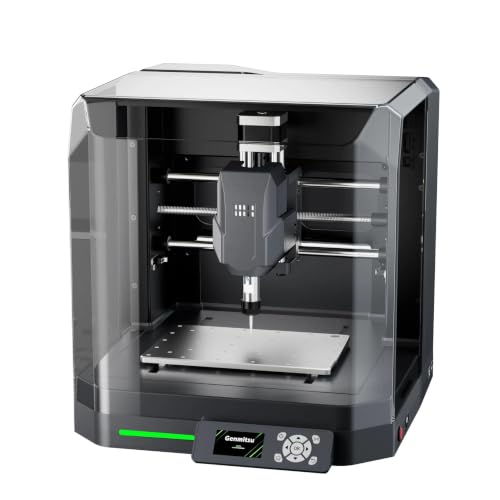
- Pre-assembled for a quicker start
- Supports several popular CNC software options
- Enclosure helps reduce dust and noise
Best For: Beginners learning engraving and light-duty desktop CNC work
Best for Larger, More Powerful Projects
Genmitsu 4040-PRO MAX CNC Router

- 710-watt trimmer supports powerful cutting
- 410 x 405 mm work area for larger projects
- Integrated T-track improves clamping flexibility
Best For: Makers who want room to grow into larger CNC projects
Best Compact Learning Kit

- Compact 15-pound design suits small desks
- Includes cutters, collet, motor, and tools
- Hands-on assembly supports STEM and maker learning
Best For: Students and hobbyists learning CNC on small projects
Best Beginner Value

- Compact 3-axis machine with a 300 x 180 x 45 mm work area
- GRBL control plus an included offline controller
- Works with several materials using suitable bits and settings
Best For: Beginners and small home, classroom, or maker-space projects
Best All-Metal Upgrade

- All-metal construction with reinforced motion components
- 710W spindle with 6,500–30,000 RPM adjustment
- 60mm stepper motors deliver 7.3 Nm of torque
Best For: Makers wanting a more rigid desktop CNC for wood and selected metal work
Best Larger Work Area

- 435 x 400 x 80 mm working area for larger projects
- Reinforced spoilboard helps reduce sagging and bed flex
- Pre-assembled modules and GRBL control simplify the learning curve
Best For: Makers who want beginner-friendly control with room for larger projects
Best Entry-Level Pick – Genmitsu 3018-PROVer V2
For shoppers comparing desktop CNC routers for beginners, the SainSmart Genmitsu 3018-PROVer V2 is a straightforward starting point. Its pre-assembled gantry and one-piece aluminum spoilboard help reduce setup time, while limit switches, an emergency stop, and a Z-probe add useful beginner-friendly features.
Best For: First-time CNC users making artwork, personalized gifts, and small projects from wood, plastic, acrylic, MDF, PVC, PCB, carbon fiber, and some soft metals.
Pros:
- Pre-assembled main parts allow setup in under an hour.
- Supports a wide range of materials, including soft copper and aluminum.
- Expandable with accessories such as extension kits, a stronger spindle, and offline control.
- Includes limit switches, an emergency stop, and a Z-probe.
Cons:
- Its compact 3018-format work area is better suited to smaller projects.
- Design work requires separate CAD/CAM software, such as Carveco, Fusion 360, or Easel.
The 3018-PROVer V2 is a sensible value choice for learning CNC fundamentals and building skills gradually. Its accessory ecosystem also gives beginners room to expand as their projects become more ambitious.
Best Stable Upgrade – FoxAlien Masuter Pro
The FoxAlien Masuter Pro is a strong contender among desktop CNC routers for beginners who want a larger work area and an all-aluminum frame. Pre-wired components and a detailed manual keep assembly approachable, while the linear-rail Z-axis is designed for stability during engraving and cutting.
Best For: Hobbyists and DIY users working on larger wood, acrylic, MDF, nylon, and similar projects who want a sturdy, expandable machine.
Pros:
- All-metal construction and a linear-rail Z-axis support stability and durability.
- Large 15.75 x 15.75 x 2.36-inch engraving area.
- Pre-wired parts can make assembly take about 10–15 minutes.
- Includes 52mm and 65mm spindle clamps and supports future customization.
Cons:
- The 69mm spindle clamp is sold separately.
- Optional Y-axis and spindle upgrades add to the overall cost.
Choose the Masuter Pro if a beginner-friendly setup matters but you do not want to outgrow a small work area quickly. Its metal construction and upgrade options make it a practical platform for developing more advanced hobby projects.
Best High-Power Option – Genmitsu PROVerXL 4030S
Among desktop CNC routers for beginners, the Genmitsu PROVerXL 4030S stands out for users who want more power and capacity from the start. Its 710W spindle, heavy-duty structure, 130mm pass height, and upgraded linear guideway are suited to larger, thicker, and more demanding work.
Best For: Beginners and advancing hobbyists who need a larger machine for wood, acrylic, aluminum, relief carving, curved surfaces, or taller workpieces.
Pros:
- 710W spindle provides stronger cutting performance than standard hobby machines.
- 130mm pass height accommodates taller objects and thicker materials.
- 32-bit MCU and linear guideway are designed for smoother, precise motion.
- Pre-assembled modular design reduces setup time to about 20 minutes.
Cons:
- Its 33kg weight and larger footprint require substantial workspace.
- Wireless app control requires a separately purchased Wi-Fi module.
- Higher power and capacity may be more than a casual beginner needs.
The 4030S is a forward-looking choice for beginners who already expect to tackle substantial projects. It costs workspace and complexity compared with smaller routers, but its power, pass height, and precision-focused design provide significant headroom.
Best Safety-Focused Value – LUNYEE 3018 PRO MAX
The LUNYEE 3018 PRO MAX combines a compact 3018-style format with a 500W spindle and an all-metal frame. For people shopping desktop CNC routers for beginners, its six limit switches, emergency-stop button, manual handwheels, and included offline control make it an accessible option for learning hands-on machining.
Best For: Beginners who want a compact machine with extra safety hardware for cutting and carving wood, acrylic, MDF, plastic, and selected metals.
Pros:
- 500W spindle supports cutting dense materials, including aluminum and copper.
- All-metal construction is designed for durability and stability.
- Six limit switches and an emergency stop add important safety controls.
- Supports spindle and carving modes, with up to 80mm of Z-axis travel.
Cons:
- The 3018 working area is smaller than larger-format desktop routers.
- The 12mm optical-axis upgrade kit is sold separately.
- Installation and wiring require following the supplied videos and instructions.
The 3018 PRO MAX offers more spindle power and Z-axis travel than a basic entry-level machine while keeping a compact footprint. It is a practical fit for beginners who value safety features and material flexibility over a large work envelope.
Best Enclosed Starter – Genmitsu Cubiko Desktop CNC Router
For shoppers comparing desktop CNC routers for beginners, the Genmitsu Cubiko emphasizes an easier start with a factory-assembled design and an included enclosure. It supports popular software options and is suited to engraving, carving, PCB work, and light-duty projects in materials such as wood and acrylic.
Best For: Beginners who want an enclosed, pre-assembled machine for learning, DIY projects, and small desktop prototyping.
Pros:
- Factory-assembled design can reduce setup time for new users.
- Supports Genmitsu App, Fusion 360, Candle, Easel, and Carveco.
- Auto Z-probing and height-mapping support can help with uneven materials when properly calibrated.
- Enclosure helps contain dust and reduce operating noise, with a cover-open stop function.
Cons:
- Its 75-watt power rating is intended for light-duty work rather than demanding cutting.
- Automatic probing requires proper calibration and a conductive probe connection.
- The compact desktop format limits project size.
The Cubiko is a practical entry point when convenience, software flexibility, and a more contained workspace matter more than high-power production. Its integrated frame and enclosure make it particularly appealing for home makers and first-time CNC users.
Best for Larger, More Powerful Projects – Genmitsu 4040-PRO MAX CNC Router
Among desktop CNC routers for beginners, the Genmitsu 4040-PRO MAX stands out for its larger work area, 710-watt trimmer, and reinforced spoilboard. Its linear guideway structures and GRBL control are aimed at stable engraving and cutting across wood, acrylic, and selected metal projects.
Best For: Beginners and makers who want more cutting power, a larger work area, and flexible clamping for bigger projects.
Pros:
- 710-watt digital display trimmer provides substantially more power for engraving and cutting.
- 410 x 405 x 77 mm work area accommodates larger projects than compact hobby routers.
- Reinforced spoilboard with integrated T-track supports versatile clamping and helps resist sagging.
- 100 mm pass height supports taller materials.
Cons:
- At 24 kg, it is less portable than smaller desktop machines.
- The higher-power design may be more machine than a beginner needs for small engraving tasks.
- The supplied notes do not indicate that an enclosure is included.
The 4040-PRO MAX is a strong choice for a beginner who expects to grow beyond small signs and light engraving. Its larger work envelope, reinforced bed, and powerful trimmer offer room for more ambitious projects while retaining GRBL control.
Best Compact Learning Kit – TTC3018 Pro CNC Router
The TTC3018 Pro is a compact option for shoppers exploring desktop CNC routers for beginners, especially in education and maker settings. It includes standard cutters and assembly tools, uses a wired GRBL connection, and provides a 300 x 180 x 40 mm work area for small engraving and milling projects.
Best For: Students, hobbyists, and users with limited desk space who want a hands-on CNC assembly and learning experience.
Pros:
- Compact 15-pound design fits small workspaces.
- Includes 10 cutters, an ER11 collet, a 775 spindle motor, and professional tools.
- All-metal Z-axis with T8 backlash-eliminating lead screws is specified for 0.1 mm positioning accuracy.
- Compatible with GRBL, ArtCam, Fusion 360, and Windows or Mac OS.
Cons:
- Transfer is wired through USB; Bluetooth, Wi-Fi, and a built-in TF card slot are not supported.
- The 300 x 180 x 40 mm work area is limited to smaller projects.
- Its assembly-based design requires more hands-on setup than a pre-assembled router.
The TTC3018 Pro makes the most sense when learning how CNC components work is part of the goal. Its small footprint and included accessories lower the barrier to starting, while the wired GRBL workflow keeps the control setup straightforward.
Best Beginner Value – Genmitsu 3018-PRO
For shoppers comparing desktop CNC routers for beginners, the Genmitsu 3018-PRO offers a compact way to learn carving, engraving, milling, and basic CNC workflows. Its 300 x 180 x 45 mm work area suits small projects, while the upgraded assembly and raised base help simplify setup and improve stability.
Best For: Beginners, home workshops, classrooms, and makers working on small wood, acrylic, PVC, plastic, PCB, and soft-aluminum projects.
Pros:
- Compact 3-axis design with a practical 300 x 180 x 45 mm working area.
- Supports materials including wood, acrylic, PVC, plastic, PCB, and soft aluminum with suitable bits and settings.
- GRBL control and included offline controller provide flexible ways to run compatible G-code.
- Upgraded assembly reduces setup complexity for new users.
Cons:
- The compact work area is intended for smaller projects rather than large signs or panels.
- Material capability depends on using appropriate bits and cutting settings.
The 3018-PRO is a sensible starting point for learning CNC fundamentals without taking over a workbench. Choose it when compact size, community-supported GRBL control, and beginner-friendly operation matter more than extra cutting capacity.
Best All-Metal Upgrade – Genmitsu 3020-PRO Ultra
The Genmitsu 3020-PRO Ultra is a stronger desktop CNC option for beginners who expect to move into more demanding work. Its all-metal frame, 710W spindle, dual linear rails on the X-axis, and 60mm stepper motors provide a more substantial platform for wood, acrylic, and selected metal projects.
Best For: Beginners and intermediate makers who want a rigid desktop machine for wood, acrylic, PCB work, carbon fiber, and aluminum projects.
Pros:
- 710W spindle offers adjustable speeds from 6,500 to 30,000 RPM with six settings.
- All-metal construction, reinforced X-axis backplate, and linear rails support stable machining.
- 60mm stepper motors provide 7.3 Nm of torque and can cut aluminum up to 1.5mm in one pass under stated conditions.
- Modular assembly and compatible spindle or laser mounts allow future expansion.
Cons:
- Its 11.8 x 8.1 x 3.1-inch work area is still limited for larger projects.
- The more powerful, all-metal design is a heavier and more substantial setup than a basic entry-level router.
The 3020-PRO Ultra makes sense if you want beginner-accessible assembly but do not want to quickly outgrow a lightweight machine. Its rigidity and spindle power are the main reasons to choose it over a smaller starter model.
Best Larger Work Area – Genmitsu 4040-PRO
For desktop CNC routers for beginners who need room to grow, the Genmitsu 4040-PRO provides a substantially larger 435 x 400 x 80 mm working area. Pre-assembled modules, GRBL control, and a reinforced spoilboard make it approachable while supporting larger signs, reliefs, prototypes, and woodworking projects.
Best For: Beginners and growing makers who need more workspace for wood, acrylic, MDF, nylon, carbon-fiber composites, and larger detail-oriented projects.
Pros:
- Large 435 x 400 x 80 mm working area accommodates bigger projects.
- Reinforced hybrid spoilboard with a center aluminum support bar helps reduce sagging and bed flex.
- Dual 16mm HSS steel tubes, lead-screw drives, and silent Toshiba drivers support stable, quieter motion.
- Pre-assembled modules can shorten assembly to about 15 minutes, with upgrade ports for compatible accessories.
Cons:
- The larger frame and 20.84 kg weight require more dedicated workspace.
- It is a more substantial investment in space and equipment than a compact 3018-style machine.
The 4040-PRO is the strongest fit when project size is the main limitation of smaller beginner routers. It offers a roomier platform and upgrade path, making it useful for learners who already anticipate larger or more advanced CNC work.
How We Picked the Best Desktop CNC Routers for Beginners
We focused on machines that offer a practical starting point for new users without limiting future projects too quickly. Our evaluation considers frame rigidity, working area, spindle or router power, assembly requirements, control compatibility, safety features, documentation, and upgrade potential. We also considered whether each router is better suited to light engraving, sign-making, carving, prototyping, or more demanding milling.
Because “beginner-friendly” does not mean the same thing for everyone, the selection includes compact 3018-style machines, larger 4030 and 4040 platforms, all-metal frames, enclosed designs, and models with emergency stops, limit switches, or offline controls.
Quick Comparison
| What matters most | Best starting point | Why |
|---|---|---|
| Lowest-cost learning platform | Compact 3018-class router | Small footprint and simpler projects |
| More room for signs and panels | 4030 or 4040-class router | Larger work area reduces repositioning |
| Cleaner, safer home setup | Enclosed desktop router | Helps contain chips and reduces operating noise |
| Greater material flexibility | Rigid all-metal, higher-power model | Better support for harder materials and deeper cuts |
Key Buying Factors for Desktop CNC Routers for Beginners
Work Area and Machine Footprint
A compact 3018 machine is easier to place and suitable for small signs, engraving, jewelry, and practice cuts. Choose a 4030 or 4040 platform if you expect to work on larger plaques, panels, or repeated production pieces. Measure both the machine and the clearance needed around it before buying.
Frame Rigidity and Materials
Rigid aluminum construction helps reduce vibration and improves cut consistency. Wood, acrylic, MDF, plastics, and nylon are common beginner materials, while metal cutting requires slower feeds, suitable tooling, secure workholding, and a machine designed for the added load. A more powerful spindle alone does not make every router suitable for metal.
Controls, Software, and Setup
Most entry-level routers use GRBL-based control and require design software, toolpath software, and a sender or controller. Look for clear manuals, active community support, limit switches, and an emergency stop if you want an easier learning curve. Offline control can be useful when you do not want to keep a computer connected.
Safety and Noise
CNC routers create sharp chips, dust, and noise. An enclosure can make a desktop setup more manageable, but it does not replace eye protection, dust collection, ventilation, supervision, and safe operating procedures. Confirm that the enclosure has adequate access and ventilation for the materials you plan to cut.
Upgrade Potential
Check whether the router supports a spoilboard, stronger spindle, dust shoe, probing accessories, rotary attachments, or expanded workholding. Upgrade compatibility can matter more than a small difference in initial price if you expect your projects to grow.
Who Should Buy Which Desktop CNC Routers for Beginners?
Choose a Compact 3018 Model If You’re Learning
Compact routers are a sensible choice for beginners with limited space, modest budgets, and small projects. They are useful for learning CAD/CAM workflows and testing wood, acrylic, MDF, and other lighter materials.
Choose an Enclosed Model for Home Workshops
An enclosed machine is a strong fit for shared rooms, classrooms, or users who prioritize containment and a tidier workspace. You will still need dust management and ventilation, but the enclosure can make routine use more convenient.
Choose a 4030 or 4040 Model for Larger Projects
Move to a larger platform if you plan to make signs, panels, or batches of parts. These machines take up more room and may require a sturdier bench, but the added workspace can save time and reduce the need to reposition stock.
Choose a Rigid, Higher-Power Model for Advanced Materials
If your plans include frequent work in aluminum or other demanding materials, prioritize rigidity, accurate motion, suitable tooling, and conservative cutting settings rather than spindle wattage alone. Beginners should expect a steeper learning curve and more attention to workholding and chip removal.
