
When you’re involved in video editing, the quality of your audio can make or break your project. Choosing the right desk speakers is essential for clear sound and accurate reproduction. Whether you need studio monitors for precision or compact options for limited space, there are plenty of choices out there. Let’s explore some of the best desk speakers that can elevate your editing experience and help you achieve that perfect sound.
PreSonus Eris 3.5 Studio Monitors (Pair)

If you’re a video editor seeking studio-quality sound without breaking the bank, the PreSonus Eris 3.5 Studio Monitors are an excellent choice. These compact powered monitors deliver 50 watts of Class AB amplification, ensuring accurate audio for your projects. With a 3.5-inch woven-composite woofer, you’ll experience tight bass, while the 1-inch silk-dome tweeter provides superior stereo imaging. The ultra-wide listening sweet spot means you’ll enjoy clear sound from various angles. Plus, with flexible connectivity options, including TRS and RCA inputs, they easily fit into your setup. These monitors combine performance and elegance, making them perfect for any desktop.
Best For: Video editors and multimedia creators looking for studio-quality sound in a compact, affordable package.
Pros:
- Studio-quality sound with accurate audio performance for music production and multimedia reference.
- Ultra-wide listening sweet spot allows for clear sound from various angles, enhancing the listening experience.
- Flexible connectivity options including TRS, RCA, and aux inputs, making integration into different setups easy.
Cons:
- Mediocre cable quality reported by some users, which may require upgrades for optimal performance.
- Cheap cabinet build noted by some customers, potentially impacting durability.
- Not suitable for large rooms, limiting effectiveness in bigger spaces.
Nylavee Hi-Fi Stereo Computer Speakers with LED Lighting

For video editors seeking an immersive audio experience, the Nylavee Hi-Fi Stereo Computer Speakers with LED Lighting stand out as an excellent choice. You’ll enjoy rich, 10W Hi-Fi sound thanks to the two full-range speakers and built-in passive radiators that enhance bass. With nine customizable LED lighting modes, you can set the perfect mood for your editing sessions. Plus, the plug-and-play design makes connecting to your devices effortless, whether you’re using a PC, laptop, or gaming console. Compact and versatile, these speakers fit easily into your workspace, ensuring a seamless blend of performance and aesthetics.
Best For: Video editors and gamers seeking high-quality audio and customizable lighting effects for an enhanced experience.
Pros:
- Immersive audio performance with 10W Hi-Fi sound and enhanced bass from built-in passive radiators.
- Customizable LED lighting with nine modes to match mood or room ambience.
- Compact and versatile design that fits well in any workspace, allowing for flexible placement.
Cons:
- Limited connectivity options as it requires a USB power source and 3.5mm AUX for audio input.
- May lack advanced features found in higher-end speaker systems, such as Bluetooth connectivity or multi-channel audio.
- Potential for cable clutter due to the need for separate power and audio connections.
Logitech Z313 2.1 Multimedia Speaker System
The Logitech Z313 2.1 Multimedia Speaker System stands out as an excellent choice for video editors seeking immersive audio quality. With a peak power of 50 watts, this system delivers full-range audio and strong bass that fills your room, enhancing your editing experience. The compact subwoofer fits into tight spaces while producing deeper bass. You’ll appreciate the easy setup—just connect the speakers to the subwoofer and plug it into your device with a 3.5mm headphone jack. Plus, the control pod allows for effortless volume and headphone adjustments, making it a practical addition to your workspace.
Best For: The Logitech Z313 2.1 Multimedia Speaker System is best for video editors seeking immersive audio quality and strong bass to enhance their editing experience.
Pros:
- Compact subwoofer fits into tight spaces while delivering deep bass.
- Easy setup with simple connections to various devices using a 3.5mm headphone jack.
- Control pod allows for convenient volume and headphone adjustments.
Cons:
- Maximum output power of 25 watts may not be sufficient for larger rooms.
- Lacks waterproof features, making it less suitable for use in damp environments.
- Tabletop mounting may limit placement options in some setups.
Logitech Z207 2.0 Stereo Computer Speakers with Bluetooth

Designed with versatility in mind, the Logitech Z207 2.0 Stereo Computer Speakers with Bluetooth are ideal for video editors who need reliable audio performance without breaking the bank. These compact speakers offer Bluetooth connectivity and a wired option, allowing you to easily switch between devices. With a sleek design that saves desk space, they deliver rich stereo sound and decent bass for their size. The user-friendly setup makes pairing a breeze, and the on-speaker headphone jack adds convenience. With positive reviews and a solid durability track record, these speakers are a smart choice for enhancing your editing sound experience.
Best For: Video editors seeking reliable audio performance and versatile connectivity options without a hefty price tag.
Pros:
- Easy Bluetooth pairing and wired connection options for seamless device switching.
- Compact vertical design saves desk space while providing stability.
- Positive user reviews highlight good sound quality and decent bass for casual listening.
Cons:
- Sound quality may not satisfy audiophiles or those seeking high-end audio performance.
- Volume levels may not effectively fill larger rooms.
- Some users reported that bass can overpower other frequencies.
Amazon Basics Stereo 2.0 Speakers for PC or Laptop

If you’re looking for an affordable and straightforward audio solution for video editing, the Amazon Basics Stereo 2.0 Speakers are a solid choice. These compact speakers, powered via USB, deliver a total RMS power of 2.4 watts, ensuring clear sound for your editing sessions. With a frequency range of 80 Hz to 20 KHz, you’ll enjoy enhanced audio quality. The in-line volume control and touch interface make adjustments easy. Plus, the blue LED lights add a touch of style. Weighing just 1.43 pounds, they fit perfectly on any desk while providing a reliable sound experience for your projects.
Best For: Those seeking an affordable and easy-to-use audio solution for video editing and general computer use.
Pros:
- Compact design makes them suitable for small desk spaces.
- USB-powered for convenience, eliminating the need for additional power outlets.
- In-line volume control allows for quick and easy sound adjustments.
Cons:
- Limited power output may not satisfy those needing high-volume audio.
- Bass response may not be sufficient for bass-heavy music or gaming.
- No Bluetooth connectivity, restricting use to wired devices only.
Computer Speakers for Desktop PC and Laptop

Looking for a compact yet powerful audio solution for your video editing needs? The EL024 computer speakers deliver impressive sound quality with two 1.4-inch internal magnetic speakers, perfect for enhancing your audio experience. These monitor speakers attach easily to your desktop or monitor edges, saving valuable space. With a single USB cable, you’ll enjoy stable audio transmission without interruptions. They’re compatible with Mac, Windows, and some Android devices, making them versatile for your setup. While the bass may not match a subwoofer, the convenience of multi-functional buttons guarantees you control your sound effortlessly. Upgrade your editing workspace today!
Best For: Those looking for compact and efficient speakers that enhance audio quality for video editing on desktops or laptops.
Pros:
- Compact design allows for easy attachment to monitors, saving desktop space.
- Stable audio transmission through a single USB cable minimizes interruptions.
- Multi-functional buttons offer convenient control over volume and mute functions.
Cons:
- Sound quality may lack bass compared to larger subwoofer systems.
- Limited compatibility with devices requiring a 3.5mm audio cable, such as TVs or Xbox.
- Not waterproof, making them suitable only for indoor use.
Dell SP3022 USB Computer Speaker for PC and Laptop

For video editors seeking clarity and precision in their audio, the Dell SP3022 USB Computer Speaker stands out with its MS-Teams certification and advanced AI technology. This compact soundbar delivers full duplex audio, ensuring your voice remains clear while minimizing background noise. Weighing just 11.52 ounces, it fits seamlessly on your desk or monitor base. With USB-A and USB-C connectivity, it’s compatible with most devices. Plus, the LED indicators help you manage calls and volume easily. Rated 4.4 out of 5 stars, it’s a top choice for enhancing your editing experience without sacrificing space or style.
Best For: Video editors and professionals seeking clear audio and compact design for their workspace.
Pros:
- MS-Teams Certified: Ensures compatibility and optimal performance for online meetings and calls.
- AI Technology: Features noise and echo cancellation for enhanced voice clarity.
- Compact Design: Fits easily on monitor bases or desktops, saving space while maintaining style.
Cons:
- Limited Power Output: At 2 x 1.8W, it may not be powerful enough for larger rooms or spaces.
- Corded Electric: Lacks the convenience of a wireless option, limiting placement flexibility.
- Weight: While lightweight, some users may prefer a more portable option for travel use.
LENRUE G11 Computer Speakers for Desktop

The LENRUE G11 Computer Speakers are an excellent choice for video editors seeking high-quality audio without clutter. These compact speakers fit neatly under your monitor, freeing up valuable desk space. Equipped with four large amplifier IC horns, they deliver immersive stereo sound, perfect for movies and music. Plus, their touch control feature makes it easy to turn the lights on and off. Installation is a breeze—just plug in the USB and 3.5mm audio cables. With a solid rating of 4.3 stars from over 4,200 customers, they’re a reliable option for enhancing your video editing experience.
Best For: Video editors seeking compact, high-quality audio solutions that enhance their workspace without clutter.
Pros:
- Immersive Sound Quality: Equipped with four large amplifier IC horns for distortion-free, stereo sound.
- Compact Design: Fits neatly under monitors, saving valuable desk space.
- Easy Installation: Plug and play functionality with USB and 3.5mm audio connections.
Cons:
- Limited Warranty: Warranty coverage may not be as comprehensive as some competitors.
- Volume Control: The top volume knob may not be as precise as digital volume controls.
- Touch Control Sensitivity: Touch lights might be overly sensitive for some users.
Logitech S150 USB Speakers with Digital Sound
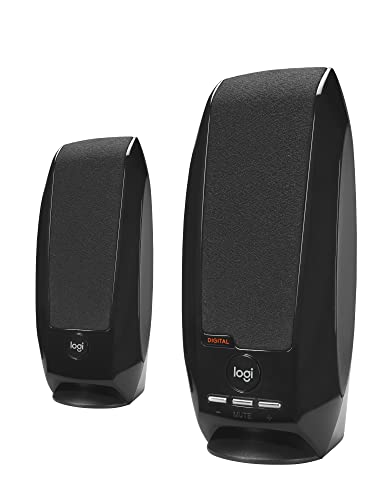
If you’re seeking an affordable yet effective audio solution for video editing, the Logitech S150 USB Speakers with Digital Sound are an excellent choice. With a peak power of 2 Watts and RMS power of 1.2 Watts, you’ll enjoy balanced and crystal-clear audio that enhances your editing experience. Their simple USB connection makes setup a breeze, and the orange LED indicator lets you know when they’re powered on. Plus, the easy volume control and mute function are conveniently located on the right speaker. Lightweight and slim, these speakers fit perfectly into any workspace, providing durability and portability for your editing needs.
Best For: Budget-conscious video editors seeking reliable and portable audio solutions.
Pros:
- Balanced audio sound with deep, immersive clarity enhances the editing experience.
- Simple USB connection makes setup quick and easy without the need for extra power adapters.
- Lightweight and slim design allows for easy movement and accommodates various workspace setups.
Cons:
- Limited power output may not satisfy users needing louder sound for larger spaces.
- Basic design lacks advanced features like Bluetooth connectivity or built-in subwoofers.
- Volume control and mute function are only available on the right speaker, which may not be convenient for all setups.
Redragon GS520 RGB Desktop Speakers

Designed for video editors seeking both quality and style, the Redragon GS520 RGB Desktop Speakers deliver an enhanced auditory experience with their advanced 2.0 channel stereo sound. You’ll enjoy clear audio thanks to the full-range sound drive unit, perfect for fine-tuning your projects. The touch-controlled RGB lighting offers six vibrant modes to match your workspace’s mood, and you can easily switch it off if you prefer a more subdued atmosphere. With a minimalist design and straightforward volume controls, these speakers easily fit into any setup. Plus, the plug-and-play functionality makes connecting to your PC, TV, or laptop a breeze.
Best For: Video editors and content creators seeking high-quality audio and stylish design for their workspace.
Pros:
- Enhanced clear sound with full-range 2.0 channel stereo for superior audio quality.
- Touch-controlled RGB lighting with six vibrant modes to customize your workspace ambiance.
- Minimalist design and easy-access volume controls for user-friendly operation.
Cons:
- Limited bass response compared to larger speaker systems.
- Cable length may be restrictive for larger desk setups.
- RGB lighting may not appeal to users who prefer a more traditional aesthetic.
Factors to Consider When Choosing Deskspeakers for Video Editing
When choosing desk speakers for video editing, you’ll want to contemplate several key factors. Audio clarity and bass response are essential for accurate sound reproduction, while connectivity options can impact your workflow. Don’t forget to take into account speaker size, design, and power output to guarantee they fit your setup and meet your editing needs.
Audio Clarity and Accuracy
Choosing desk speakers for video editing isn’t just about volume; audio clarity and accuracy play a pivotal role in your editing process. You need speakers that allow you to assess dialogue, sound effects, and music levels accurately, ensuring a balanced final product. Look for studio-quality monitors featuring woven-composite woofers and silk-dome tweeters for precise sound reproduction. A wider frequency response range helps you hear low and high frequencies clearly, essential for mixing and mastering audio tracks. Additionally, sound imaging from high-frequency drivers lets you position sounds spatially, enhancing the immersive experience. Finally, consider calibration features like tuning controls to adapt the sound to your workspace, which will further improve your audio accuracy during editing.
Bass Response Quality
While bass response quality might seem like a secondary concern, it’s actually vital for video editing. Accurate low-frequency sounds help you sync audio with visual elements effectively. High-quality speakers equipped with woven-composite woofers offer tighter bass, ensuring clearer sound reproduction that’s important for identifying audio details during your editing sessions. A good bass response not only enhances your viewing experience but also immerses you in the audio, making it easier to judge its overall impact. Look for speakers with adjustable tuning controls for low frequencies, allowing you to customize the settings based on your room size and speaker placement. This improves bass performance and prevents misinterpretation of sound effects, ensuring you deliver professional-quality video edits.
Connectivity Options Available
A strong bass response enhances your overall audio experience, but to truly optimize your video editing workflow, considering connectivity options is key. Look for desk speakers that offer multiple connectivity choices like 3.5mm AUX, USB, and Bluetooth. This flexibility allows you to connect various devices effortlessly. Additionally, speakers with both balanced (TRS) and unbalanced (RCA) inputs cater to both professional audio gear and consumer electronics. Easy-access headphone outputs are a must for monitoring audio quickly without disrupting your main setup. Opt for plug-and-play functionality to minimize setup time, eliminating the need for extra drivers. Ensuring compatibility with desktops, laptops, and mobile devices will enhance your editing environment and streamline your workflow.
Speaker Size and Design
When it comes to desk speakers for video editing, size and design play essential roles in ensuring an efficient and comfortable workspace. You’ll want to choose compact speakers, typically around 5.5D x 6W x 8.3H inches, that fit comfortably without overcrowding your desk. A rectangular prism design allows for seamless integration into various setups, whether on desktops or bookshelves. For the best audio performance, look for speakers with low-mass tweeters and woven-composite woofers, which enhance sound accuracy. Consider the weight as well; options range from 1.43 pounds to over 6 pounds, providing stability during use. Finally, opt for a sleek and professional appearance to maintain an organized workspace, steering clear of flashy designs that could distract you.
Power Output Levels
Power output levels greatly impact your audio experience during video editing, as they determine the clarity and balance of sound. To guarantee ideal performance, aim for speakers with at least 25 watts RMS power, which is essential for effective monitoring. If you want to enhance dynamic range, consider speakers with dual amplification, offering around 50 watts total output. This setup helps represent both low and high frequencies accurately. Additionally, keep an eye on the peak power output; this indicates how much sound the speakers can handle without distortion during intense audio peaks. Professional-grade monitoring speakers often have tailored power outputs to meet specific production needs, including precise bass response and clarity in higher frequencies.
Acoustic Tuning Features
While you might focus on power output levels when choosing desk speakers for video editing, acoustic tuning features are equally essential for achieving ideal sound quality. Look for speakers with high- and low-frequency controls, allowing you to customize the sound based on your room size and speaker orientation. This customization helps optimize audio performance. Speakers with ultra-wide dispersion characteristics enhance the listening sweet spot, providing accurate sound representation from various angles—crucial for precise audio placement. Woven-composite woofers contribute to tighter bass and cleaner sound, improving clarity during editing sessions. Additionally, some monitors offer placement recommendations based on user experiences, which can markedly enhance your workspace’s overall listening experience and help minimize sound reflections and distortions.
Price and Warranty Considerations
Selecting desk speakers for video editing involves not just sound quality and acoustic tuning, but also price and warranty considerations. First, determine your budget, as options range from economical to high-end models. Higher-priced speakers often deliver superior sound quality and features essential for precise audio monitoring. Next, check the warranty period, typically from one year to limited lifetime, which guarantees product durability and reliability. Additionally, review the return policy, allowing you to test the speakers without fear of getting stuck with an unsatisfactory product. Finally, think of it as a long-term investment; spending a bit more upfront on quality speakers can save you money in the long run by reducing replacements and enhancing your editing experience.
