
When it comes to safeguarding your sensitive information, choosing the right NAS desk backup system in 2025 is essential. With threats like ransomware on the rise, you need a solution that combines security and efficiency. From robust hardware encryption to impressive storage capacities, these systems offer more than just backup—they provide peace of mind. Curious about which models stand out this year? Let’s explore the top options available for your data protection needs.
UGREEN NASync DXP2800 2-Bay Desktop NAS Bundle
If you’re looking for a reliable and spacious storage solution, the UGREEN NASync DXP2800 2-Bay Desktop NAS Bundle is perfect for you. With a massive capacity of up to 76TB, it allows you to back up files, photos, and videos effortlessly. This bundle’s one-time purchase offers better long-term value than cloud storage, keeping your data secure and under your control. The user-friendly app makes setup and file-sharing a breeze across multiple devices. Plus, its AI-powered photo album feature organizes images and removes duplicates, freeing up space. Experience superior performance powered by the 12th Gen Intel N100 processor and a 2.5GbE network port.
Best For: Those seeking a secure, high-capacity local storage solution without ongoing fees, ideal for backing up large amounts of data.
Pros:
- One-time purchase leads to long-term cost savings compared to cloud storage.
- Massive storage capacity of up to 76TB for extensive file backups, including photos and videos.
- User-friendly app with AI features for easy setup, file sharing, and photo organization.
Cons:
- Diskless design requires separate purchase of hard drives.
- Initial setup may be challenging for users unfamiliar with NAS systems.
- Limited warranty or support options may deter some users.
QNAP TS-233 2 Bay Desktop NAS
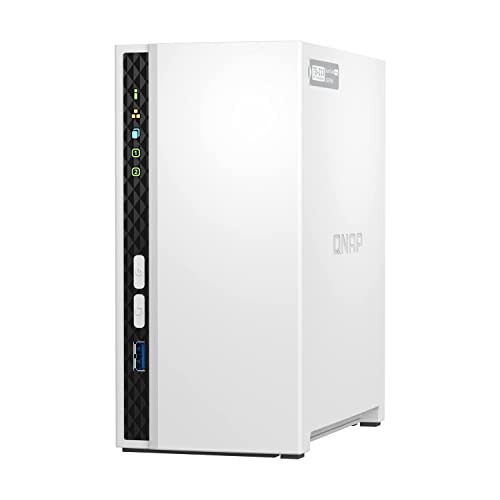
The QNAP TS-233 2 Bay Desktop NAS is an excellent choice for budget-conscious users seeking a reliable solution for file storage and multimedia streaming. With its ARM Cortex-A55 quad-core processor and 2 GB DDR4 RAM, you’ll enjoy smooth performance. This diskless design allows you to centrally store and organize your personal photos, music, and videos. Plus, you can easily back up Windows computers using the NetBak Replicator software or Mac computers with Time Machine. Its snapshot technology helps mitigate ransomware threats, making it a smart investment for your data security needs. Enjoy peace of mind with this efficient NAS solution!
Best For: Budget-conscious users seeking a reliable solution for file storage and multimedia streaming.
Pros:
- Affordable option for home NAS needs.
- Supports easy backup for both Windows and Mac systems.
- Includes security features like storage snapshot technology to protect against ransomware.
Cons:
- Diskless design requires users to purchase hard drives separately.
- Limited performance due to 2 GB of RAM and an ARM processor, which may not suffice for heavy workloads.
- No advanced features found in higher-end NAS models, such as dual WAN support or more extensive RAID configurations.
QNAP TS-464 High-Performance Desktop NAS with 24TB Storage Capacity

For users seeking a reliable and high-performance solution for file management and backup, the QNAP TS-464 Desktop NAS stands out with its impressive 24TB storage capacity. This 4-bay NAS features a quad-core Intel Celeron processor and 8GB DDR4 RAM, ensuring smooth performance for large file transfers. With dual 2.5GbE ports and M.2 SSD slots, you’ll enjoy enhanced speed and cache acceleration. Preconfigured with four 8TB Seagate IronWolf drives and a 3-year data recovery plan, it’s perfect for organizing photos, music, and videos. Rated 4.5 out of 5 stars, it’s a top choice in network-attached storage.
Best For: Users seeking a reliable and high-performance solution for file management, backup, and media organization.
Pros:
- High storage capacity: Offers 24TB of storage, expandable up to 66TB.
- Fast data transfer: Equipped with dual 2.5GbE ports for enhanced file sharing and large transfers.
- Data recovery service: Includes a 3-year Rescue Data Recovery Services plan for added peace of mind.
Cons:
- Initial cost: The upfront investment may be significant for some users.
- Complex setup: Setting up NAS systems can be complicated for those unfamiliar with network configurations.
- Limited support for non-technical users: Advanced features may require technical knowledge to fully utilize.
Western Digital 6TB My Book Desktop External Hard Drive

Looking for a reliable storage solution? The Western Digital 6TB My Book Desktop External Hard Drive is an excellent choice. With a robust 6TB capacity, it offers ample space for your important files. Weighing just 2.31 pounds and measuring 3.46 x 8.5 x 6.7 inches, it’s easy to fit into your workspace. Featuring USB 3.0 and 2.0 compatibility, you’ll enjoy fast data transfer speeds. Plus, 256-bit AES hardware encryption and password protection keep your data secure. Compatible with both Windows and Mac, this drive is a trusted option, boasting a 4.4-star rating from over 13,000 users.
Best For: Those seeking a reliable and secure external storage solution for backing up important files on both Windows and Mac systems.
Pros:
- Large capacity: Offers 6TB of storage, providing ample space for documents, photos, and videos.
- Fast data transfer: Features USB 3.0 compatibility for quick data transfers, while also being backward compatible with USB 2.0.
- Data security: Includes 256-bit AES hardware encryption and password protection to keep your files safe.
Cons:
- Requires software installation: Device management and backup software need to be downloaded and installed separately.
- Weight: At 2.31 pounds, it may be heavier than some users prefer for portable storage solutions.
- Limited to one USB 3.0 port: Only one USB 3.0 and one USB 2.0 port may limit simultaneous connections.
WD 12TB My Book Desktop External Hard Drive

With a massive 12TB capacity, the WD My Book Desktop External Hard Drive is an excellent choice for anyone needing extensive storage for business or personal use. It’s designed to store your photos, videos, and documents securely, featuring 256-bit AES hardware encryption for added safety. The included management and backup software allows for easy organization and password protection. You’ll appreciate the SuperSpeed USB 3.0 interface, ensuring quick data transfers. Plus, it’s compatible with both Mac and PC. With a stellar rating of 4.4 out of 5 stars, this hard drive is a reliable option for your data security needs.
Best For: Individuals and businesses looking for a reliable and secure external storage solution with ample capacity for data backup and organization.
Pros:
- Massive 12TB capacity allows for extensive storage of files, photos, videos, and documents.
- 256-bit AES hardware encryption provides enhanced security for sensitive information.
- SuperSpeed USB 3.0 interface ensures fast data transfer rates, compatible with both Mac and PC.
Cons:
- Requires management and backup software installation for full functionality, which may be inconvenient for some users.
- Physical size and weight may not be ideal for portability compared to smaller external drives.
- Limited return window of 30 days for refunds may be restrictive for some customers.
UGREEN NASync DXP8800 8-Bay Desktop NAS with Cat 8 Ethernet Cable

The UGREEN NASync DXP8800 8-Bay Desktop NAS is perfect for tech enthusiasts and professionals who demand high performance and extensive storage capabilities. With dual 10GbE network ports, you can achieve download speeds up to 2500MB/s, all powered by a 12th Gen Intel Core i5 processor. Its 8-bay design supports up to 256TB of storage and offers various RAID configurations, making it ideal for thousands of HD movies and documents. The all-inclusive app simplifies management, giving you centralized access to your files. Plus, the included Cat 8 Ethernet cable guarantees high-speed connectivity for peak performance.
Best For: Tech enthusiasts and professionals requiring high-performance storage solutions with extensive capacity.
Pros:
- High-speed performance with dual 10GbE network ports, achieving download speeds up to 2500MB/s.
- Large storage capacity of up to 256TB with support for various RAID configurations, suitable for extensive media libraries.
- User-friendly management through an all-inclusive app providing centralized access to files and storage management.
Cons:
- Diskless design requires separate purchase of drives, potentially increasing overall cost.
- Initial setup may be complex for less tech-savvy users unfamiliar with NAS systems.
- Limited warranty information provided, which may concern some potential buyers about long-term support.
QNAP TS-h765eU 4-Bay NAS

Designed for small businesses or remote offices, the QNAP TS-h765eU 4-Bay NAS offers a compact solution for efficient data management and backup. With its Intel Atom x7405C 4-core processor and 8 GB DDR5 RAM, you’ll enjoy robust performance. The NAS supports four 3.5-inch SATA drives and features three NVMe slots for expanded storage. Dual 2.5GbE ports enhance file sharing and streamline large transfers. Plus, its 12-inch chassis depth means you can fit it into tight spaces easily. Utilize backup options for Google Workspace and Microsoft 365 accounts, ensuring your data stays secure and accessible.
Best For: Small businesses or remote offices looking for a compact and efficient data management solution.
Pros:
- Robust performance with an Intel Atom x7405C 4-core processor and 8 GB DDR5 RAM.
- Versatile storage options with support for four 3.5-inch SATA drives and three NVMe slots.
- Enhanced networking capabilities with dual 2.5GbE ports for faster file sharing and transfers.
Cons:
- Limited maximum RAM upgrade to 16 GB may not meet the needs of more demanding applications.
- Short chassis depth may limit the use of certain larger expansion cards or additional hardware.
- Requires additional setup for backing up Google Workspace and Microsoft 365, which may be complex for some users.
Synology 2-Bay DiskStation DS223 Bundle (Black)

If you’re looking for a reliable and efficient storage solution, the Synology 2-Bay DiskStation DS223 Bundle is an excellent choice. This sleek black unit comes with two Synology HAT3300 4TB SATA HDDs, offering ample space for your data needs. Made from durable alloy steel and aluminum, it’s compatible with both NAS and desktop setups. With a perfect 5.0-star rating from initial users, you can trust its performance. Plus, the straightforward Amazon return policy guarantees peace of mind. Don’t hesitate to invest in this robust backup system to secure your valuable data effortlessly.
Best For: Individuals and small businesses looking for a reliable and efficient storage solution with ample data capacity.
Pros:
- Ample Storage: Comes with two 4TB HDDs, providing a total of 8TB of storage space.
- Durable Construction: Made from high-quality alloy steel and aluminum, ensuring longevity and reliability.
- User-Friendly Warranty: Clear return policy and manufacturer’s warranty available for added peace of mind.
Cons:
- Limited Reviews: Currently only one customer review available, which may not represent broader user experiences.
- Initial Cost: The upfront investment may be higher compared to basic storage options.
- Compatibility Limitations: While compatible with NAS and desktop, it may not suit all user setups or specific needs.
Seagate BarraCuda 2TB Internal Hard Drive (ST2000DM008)

Ideal for creative professionals and gamers alike, the Seagate BarraCuda 2TB Internal Hard Drive (ST2000DM008) stands out with its impressive 7200 RPM speed and 256MB cache, ensuring quick access to your data. This 3.5-inch SATA HDD offers proven reliability and optimized read/write caching technology, making it perfect for tasks like music, video, and photo editing. Weighing just 15.8 ounces, it fits seamlessly into your setup. Plus, with a customer rating of 4.6 out of 5 stars, you can trust its performance. Enjoy peace of mind with Seagate’s warranty and the free DiscWizard software for easy data migration.
Best For: Creative professionals and gamers seeking a reliable and high-speed internal storage solution.
Pros:
- Optimized performance with 7200 RPM speed and 256MB cache for fast data access.
- Versatile use for tasks such as music, video, and photo editing, as well as gaming.
- Includes free Seagate DiscWizard software for easy data migration and cloning.
Cons:
- 3.5-inch form factor may not fit in all compact setups or laptops.
- Mechanically-based HDD may be less durable than SSDs in terms of shock resistance.
- Limited to SATA interface, which may not offer the same speed as newer NVMe drives.
UGREEN NASync DXP2800 2-Bay Desktop NAS
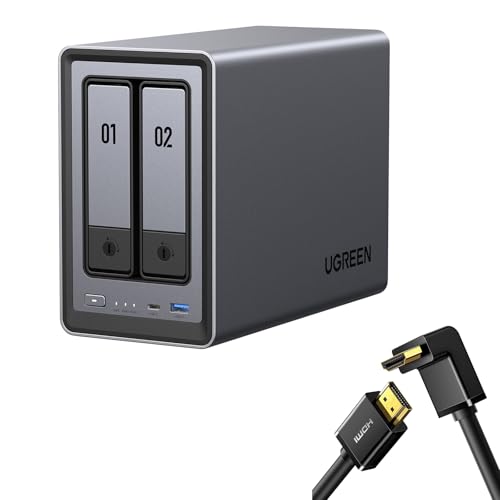
For those seeking a powerful yet user-friendly storage solution, the UGREEN NASync DXP2800 2-Bay Desktop NAS stands out with its impressive capacity of up to 76TB. With a 12th Gen Intel N100 processor and a 2.5GbE network port, you can run multiple applications simultaneously and transfer a 1GB file in just 3 seconds. The intuitive app allows for simple setup and easy file sharing across various devices, while the AI-powered photo album feature intelligently organizes your memories. Plus, there’s no ongoing fee, ensuring better long-term value compared to cloud storage. Enjoy enhanced data security and control with local storage.
Best For: Those in need of a high-capacity, secure, and user-friendly storage solution for backing up and organizing files, photos, and videos.
Pros:
- Massive storage capacity of up to 76TB, accommodating extensive data needs.
- User-friendly app for easy setup and file sharing across multiple devices and platforms.
- AI-powered photo organization that automatically sorts and enhances your photo collections.
Cons:
- Diskless bundle requires users to purchase hard drives separately.
- Initial investment might be high compared to some cloud storage options.
- Limited availability as the product is set to be released on April 18, 2024.
Factors to Consider When Choosing Deskbackup Systems Nas
When choosing a desk backup system for your NAS, consider several key factors. You’ll want to assess storage capacity options, performance specifications, and the user interface experience. Additionally, don’t overlook data security features and backup compatibility to guarantee you get the best fit for your needs.
Storage Capacity Options
Choosing the right NAS system involves carefully evaluating its storage capacity options, which can greatly impact your data management strategy. First, consider the maximum storage capacity; it can range from a few terabytes to over 256TB, depending on the number of bays and drive compatibility. Look for systems that support RAID configurations to enhance data redundancy and expand storage options. Evaluate if the NAS accommodates both HDDs and SSDs, as SSDs provide faster access speeds while HDDs offer larger capacities at lower costs. Also, think about scalability; some NAS systems allow for additional drive bays or external storage solutions. Finally, check the supported drive sizes, since limitations can affect your overall storage potential.
Performance Specifications
While evaluating NAS desk backup systems, performance specifications play an essential role in ensuring your data management needs are met efficiently. Consider the processor type; Intel and ARM chips impact speed and multitasking abilities. The network interface is vital too; options like 1GbE, 2.5GbE, and 10GbE ports directly affect data transfer rates, enabling quicker access to your files. RAM capacity matters as well—higher RAM, like 2GB or 8GB, allows for smoother multitasking and enhances responsiveness. Additionally, explore storage configurations such as RAID levels, which improve performance and data redundancy. Finally, support for SSD caching through M.2 slots can greatly boost performance, giving you faster access to frequently used data and reducing latency in file retrieval.
User Interface Experience
The user interface experience is essential in selecting NAS desk backup systems, as it directly impacts how easily you can manage your data. A user-friendly interface streamlines setup and file sharing across various operating systems, making it accessible for everyone. Look for NAS systems with intuitive mobile and web applications, allowing remote access and management of your files and settings. Features like AI-powered photo organization can enhance your experience by automatically sorting media. Additionally, guarantee the system supports easy firmware upgrades through a centralized app to keep you updated with the latest features and security enhancements. Finally, tools for instantly removing duplicate files help maintain organized storage without requiring manual intervention.
Data Security Features
When managing your data, protecting it from threats is just as important as having a user-friendly interface. Look for NAS systems that offer 256-bit AES hardware encryption to safeguard your sensitive information from unauthorized access. Features like snapshot technology are essential, as they let you restore data to a previous state, especially during ransomware attacks. Make sure the NAS includes solid user authentication methods, like password protection, to secure access to your files and settings. It’s also smart to opt for devices that provide regular automated backups, giving you a safety net against data loss. Finally, consider NAS solutions with RAID configurations for redundancy, enhancing fault tolerance and protecting your data against drive failures.
Backup Compatibility
Choosing the right NAS for your backup needs involves considering its compatibility with various operating systems. You want a system that works seamlessly with Windows and macOS to guarantee smooth data transfers and backups. Look for NAS devices that support popular backup software, enabling you to automate your backup processes effortlessly. For Mac users, features like Time Machine compatibility make managing and restoring backups a breeze. Additionally, some NAS systems provide snapshot technology, protecting your data against ransomware by allowing easy recovery of previous file versions. Finally, verify that the NAS supports backup for cloud services and other applications to enhance your overall data protection strategy. This compatibility is essential for making sure your data remains secure and accessible.
Cost-Effectiveness Analysis
While considering a NAS for your desk backup system, it is crucial to evaluate its cost-effectiveness. Unlike cloud storage services, which often come with ongoing subscription fees, a NAS usually involves a one-time purchase cost. This can lead to better long-term value. With local NAS solutions, you gain enhanced security and control over your data since everything’s stored on-site. Many NAS systems offer massive storage capacities—up to 76TB—allowing you to back up large volumes of files, photos, and videos. The initial investment can save you from recurring payments associated with cloud storage. Plus, by using a NAS, you reduce your dependency on internet connectivity, potentially lowering bandwidth costs over time. Choose wisely for your data’s future.
