
A laptop desk mount can free up workspace and put your screen closer to a comfortable viewing height. But the right choice depends on more than laptop size: tray dimensions, arm movement, and desk compatibility all matter.
These 10 picks include laptop-only mounts and arms that can hold either a laptop tray or a compatible monitor. Use the guide below to narrow down the setup that fits your desk and how you work.
Best 10 Desk Mounts for Laptops Picks for 2026
Best for Flexible Positioning
monTEK 2-in-1 Laptop & Monitor Arm

- Fits 12–18-inch laptops
- Detachable vented tray
- Clamp or grommet mounting
Best For: Switching one arm between a laptop and monitor
Best for Extended Reach

- 19.3-inch maximum extension
- Fits laptops up to 17 inches
- Monitor capacity up to 26.4 pounds
Best For: Bringing a laptop closer without using desktop space
Best for Thick Desks

- Clamp fits desks up to 4 inches
- 16-inch height adjustment
- Vented 14-by-11-inch tray
Best For: Mounting a laptop on a thicker desktop
Best for Ventilated Tray

- Tray has 240 ventilation holes
- Fits laptops up to 17 inches
- Includes cable-management clips
Best For: Elevating a laptop on a ventilated tray
Best for Easy Setup

- Supports laptops up to 17 inches and 22 pounds
- C-clamp fits desks up to 3.4 inches thick
- 17-inch pole and 16.5-inch arm extension
Best For: Thicker desks and flexible laptop placement
Best for Wooden Desks
HUANUO Laptop Tray Monitor Arm
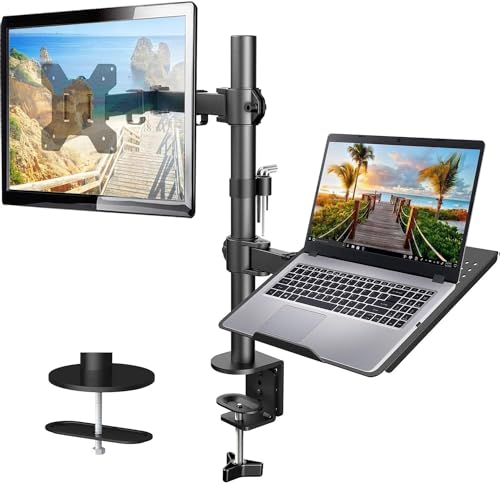
- 14 x 12-inch ventilated tray with bottom lip
- Converts to a 13–32-inch VESA monitor arm
- Clamp and grommet mounts specified for wooden desks
Best For: Wooden-desk setups switching between laptop and monitor
Best for a Secured Tray

- Tray has anti-slip pads and Velcro straps
- Holds notebooks up to 17 inches
- Converts to a compatible 13–32-inch monitor arm
Best For: Laptop users who want added tray retention
Compact Convertible Pick

- Laptop tray fits notebooks up to 17 inches
- Supports 13- to 32-inch VESA monitors
- Stated capacity: 3.3–17.6 lb
Best For: Switching one desk arm between a laptop and monitor
Best Heavy-Duty Pick

- Ventilated tray fits notebooks up to 17 inches
- Converts to a 13- to 34-inch VESA monitor mount
- Arm extends up to 18.1 inches
Best For: Securing a laptop on an adjustable, ventilated tray
Extended-Reach Pick
MOUNT PRO Laptop Arm Desk Mount

- Arm extends up to 20.9 inches
- Stated capacity: 4.4–22 lb
- Adjustable side clamps and cable management
Best For: Extra reach and height at a sitting or standing desk
Best for Flexible Positioning – monTEK 2-in-1 Laptop & Monitor Arm
Among desk mounts for laptops, this monTEK arm stands out for its broad range of positioning adjustments. Its detachable tray holds 12–18-inch laptops, or you can remove it to mount a 17–32-inch VESA monitor.
Best For: Anyone who wants one adjustable arm that can serve a laptop now and a monitor later.
Pros:
- Offers tilt, swivel, rotation, and height adjustment.
- Vented metal tray has extendable, scratch-free clamps.
- Includes cable management and clamp or grommet installation.
Cons:
- Supports one laptop or monitor at a time, not both simultaneously.
- Monitor capacity is limited to 19.8 pounds.
Check your desk thickness before ordering: the clamp fits 0.39–3.1-inch desktops, while the grommet option fits 0.39–1.8 inches. If those measurements work, this is a versatile way to clear space beneath your laptop.
Best for Extended Reach – WALI Full-Motion 2-in-1 Arm
If you need desk mounts for laptops that can bring the screen closer, this WALI arm offers up to 19.3 inches of extension and 17.3 inches of height adjustment. The ventilated tray holds a notebook up to 17 inches and 22 pounds; remove it to use the arm with a compatible VESA monitor.
Best For: Users who want substantial reach and height adjustment from a single-device mount.
Pros:
- Provides tilt, swivel, and 360-degree rotation.
- Supports VESA 75x75mm or 100x100mm monitors up to 26.4 pounds.
- Offers clamp and grommet installation options.
Cons:
- Holds a laptop or monitor, not both at once.
- Laptop tray is specified for notebooks no larger than 17 inches.
The supplied specifications disagree on maximum monitor size: the bullet points say 32 inches, while the product title and details say 34 inches. Verify compatibility before buying for a screen over 32 inches.
Best for Thick Desks – WALI Adjustable Laptop Mount
Desk thickness can rule out otherwise suitable desk mounts for laptops. This WALI mount’s C-clamp fits desktops from 0.4 to 4 inches thick, and its 14-by-11-inch vented tray supports a laptop up to 17 inches and 22 pounds.
Best For: Laptop users with a thicker desk who want a height-adjustable, space-saving mount.
Pros:
- C-clamp accommodates desks up to 4 inches thick.
- Provides 16 inches of height adjustment, plus tilt, swivel, and rotation.
- Can mount a compatible 75x75mm or 100x100mm VESA monitor instead of the laptop tray.
Cons:
- Tilt is limited to 15 degrees in either direction.
- The grommet option fits desks only up to 2.2 inches thick.
The wide clamp range is the deciding feature here. If your desk falls within it, this mount provides a practical way to raise your laptop while reclaiming the space underneath.
Best for Ventilated Tray – HUANUO Laptop Desk Mount
For shoppers comparing desk mounts for laptops with airflow in mind, this HUANUO model has a 13.8-by-11.8-inch tray with 240 ventilation holes. It holds laptops up to 17 inches, or the tray can be removed to mount a 15–32-inch VESA monitor.
Best For: Users who want a ventilated laptop tray and a straightforward option to switch to a monitor.
Pros:
- Ventilated tray has 240 holes for airflow.
- Supports up to 22 pounds, with tilt, swivel, and rotation adjustments.
- Includes cable clips and both C-clamp and grommet mounting hardware.
Cons:
- Accommodates one laptop or monitor at a time.
- Specified laptop fit stops at 17 inches.
Its 15-inch pole provides height positioning, while the included cable clips help keep wires along the mount. Measure your desk first: the clamp fits 0.39–3.07 inches, and the grommet mount fits 0.39–2.36 inches.
Best for Easy Setup – VIVO Single Laptop Desk Mount
Among desk mounts for laptops, this VIVO model is a practical pick when you need a wide mounting range. Its ventilated 14 x 11.8-inch tray supports laptops up to 17 inches and 22 pounds, while the arm lets you move the tray out of your main work area.
Best For: Laptop users with thicker desks who want flexible positioning and a choice of mounting methods.
Pros:
- C-clamp fits desks up to 3.4 inches thick; a grommet mount is also included.
- Adjusts along a 17-inch pole and extends up to 16.5 inches.
- Cable clips help route cords along the arm and pole.
Cons:
- The 14 x 11.8-inch tray takes up space above the desk, so check your intended placement.
- It holds one laptop or a compatible monitor, not both at once.
The generous clamp capacity sets this one apart. Check your laptop’s weight and where the arm will swing before choosing a spot on your desk.
Best for Wooden Desks – HUANUO Laptop Tray Monitor Arm
If you’re comparing desk mounts for laptops that can later serve as a monitor arm, this HUANUO model offers both uses. It comes with a ventilated 14 x 12-inch laptop tray and supports compatible 13- to 32-inch VESA monitors when configured for a screen.
Best For: Wooden-desk setups that may switch between a laptop tray and a single monitor.
Pros:
- Tray has a 0.8-inch bottom lip and a ventilated surface.
- Arm extends up to 16 inches and offers tilt, swivel, and rotation adjustments.
- Includes C-clamp and grommet hardware plus integrated cable management.
Cons:
- The manufacturer specifies wooden desks for both mounting methods.
- C-clamp fits desks 0.39–3.07 inches thick; the grommet option fits 0.39–2.36 inches.
This is a useful convertible choice if your desk meets the material and thickness requirements. If you plan to use a monitor, verify its VESA pattern and weight first.
Best for a Secured Tray – MOUNT PRO Laptop Arm Mount
This MOUNT PRO option stands out among desk mounts for laptops for its tray’s anti-slip pads and Velcro straps. It accommodates notebooks up to 17 inches and can be converted to hold a compatible 13- to 32-inch VESA monitor by removing the tray.
Best For: Users who want additional laptop retention on an adjustable arm, with the option to mount a monitor later.
Pros:
- Ventilated tray includes four anti-slip pads and Velcro straps.
- Offers -45° to +90° tilt, 180° swivel, and 360° rotation.
- Includes cable management and a choice of clamp or grommet mounting.
Cons:
- The manufacturer advises against rotating the tray vertically while holding a laptop.
- Mounting is specified for desks 0.39–2.76 inches thick.
Choose this one if securing the laptop on its tray is a priority. For monitor use, check the stated 4.4–19.8-pound weight range and VESA compatibility before buying.
Compact Convertible Pick – ErgoFocus Laptop Desk Mount
Among desk mounts for laptops, the ErgoFocus is a straightforward choice if you want one arm that can hold a notebook now and a monitor later. Its included tray supports laptops up to 17 inches; the VESA mount accepts 13- to 32-inch monitors with 75 x 75 mm or 100 x 100 mm patterns.
Best For: A workstation that may switch between a laptop and a single monitor.
Pros:
- Convertible laptop-tray and monitor-mount design.
- Gas-spring arm supports a stated 3.3–17.6 lb weight range.
- Includes clamp and grommet mounting hardware.
Cons:
- The 11.8 x 10.23-inch tray and 17-inch laptop limit may rule out larger notebooks.
- Its 17.6 lb maximum is lower than the other two mounts here.
Check your device’s weight and, for a monitor, its VESA pattern before choosing this arm. It makes the most sense when convertible mounting matters more than maximum load capacity.
Best Heavy-Duty Pick – HUANUO 2-in-1 Laptop Mount
The HUANUO stands out among desk mounts for laptops if tray airflow and a secure hold are priorities. Its 11.8 x 10.4-inch ventilated tray fits notebooks up to 17 inches, with anti-slip pads, a bottom guard, and Velcro straps; remove the tray to mount a compatible 13- to 34-inch monitor.
Best For: A laptop setup that needs a ventilated, secured tray and flexible arm positioning.
Pros:
- Tray ventilation, six anti-slip pads, a bottom guard, and straps help support the laptop.
- Arm extends up to 18.1 inches and reaches a stated maximum height of 17.5 inches.
- Offers clamp or grommet installation and supports 75 x 75 mm or 100 x 100 mm VESA monitors.
Cons:
- Its stated 4.85–19.8 lb capacity makes device weight worth checking before purchase.
- The counterbalanced arm may rise when you remove the laptop; hold the arm and lift the laptop slowly.
This is a practical fit when you expect to reposition your screen regularly. Measure your desk thickness first: the clamp fits 0.39–2.56 inches, while the grommet mount works with desks up to 2.95 inches thick.
Extended-Reach Pick – MOUNT PRO Laptop Arm Desk Mount
If you need more height and reach from desk mounts for laptops, consider the MOUNT PRO. Its gas-spring arm extends up to 20.9 inches and reaches a stated maximum height of 23.6 inches, while the removable tray accommodates laptops up to 17 inches.
Best For: A sitting or standing desk setup that benefits from extra arm reach and adjustable laptop positioning.
Pros:
- Stated 4.4–22 lb device-weight range and support for VESA monitors up to 32 inches.
- Ventilated tray has adjustable side clamps that can be positioned to avoid laptop ports.
- Includes clamp and grommet mounting options plus built-in cable management.
Cons:
- Devices below 4.4 lb fall outside its stated gas-spring weight range.
- Its grommet mount is specified for desks only 0.39–1.97 inches thick, narrower than its clamp range.
The longer reach and adjustable tray make this the strongest candidate here for a setup that needs frequent repositioning. Confirm your laptop’s weight and your desk’s mounting dimensions before installation.
How We Picked the Best Desk Mounts for Laptops
We focused on practical differences within the selected lineup: stated laptop and monitor compatibility, tray design, adjustment options, and mounting style. Several models are sold as 2-in-1 mounts, meaning the arm can support a laptop tray or a monitor. That does not necessarily mean it holds both at once. Because product names do not establish every fit detail, check the current listing and installation instructions before ordering, particularly for weight limits and desk thickness.
Quick Comparison: Which Style Fits Your Setup?
For a laptop-only workstation, a dedicated tray mount such as the VIVO STAND-V001L is a straightforward starting point. If you may switch between a laptop and an external display, compare the 2-in-1 options from monTEK, HUANUO, MOUNT PRO, and the other listed brands. If you need the tray to move frequently between sitting and standing positions, prioritize the arm’s height range, reach, and ease of adjustment over its advertised screen-size limit.
Most products here target laptops up to about 17 inches, while some also advertise compatibility with monitors around 32 to 34 inches. Those numbers are screening tools, not a guarantee of fit: tray footprint, device weight, and VESA requirements can be more decisive.
Key Buying Factors for Desk Mounts for Laptops
Tray Fit and Load Rating
Measure your laptop’s width and depth, then compare them with the tray’s usable surface and retaining edges. Check the supported weight with accessories attached, and leave room for charging cables and ventilation. A snug tray matters if you regularly reposition the arm.
Adjustment and Ergonomics
Look for enough height, extension, rotation, and tilt to bring the screen into a comfortable position without pulling the tray past the desk’s edge. A raised laptop screen usually calls for a separate keyboard and mouse; otherwise, better screen height can create an awkward typing position. Confirm whether the arm’s adjustment mechanism suits the weight of your laptop.
Desk and Monitor Compatibility
Check clamp opening, required edge clearance, and whether your desktop is sturdy enough for a concentrated clamp load. Grommet installation may be useful if your desk has a suitable hole, but do not assume every model includes that option. For monitor use, verify the VESA pattern, monitor weight, and whether the necessary hardware is included. Also check whether a 2-in-1 model requires you to swap the tray for the monitor bracket.
Who Should Buy Which Desk Mounts for Laptops?
Choose a dedicated laptop tray mount if your laptop is your main screen and you want a simpler purchase. Pick a convertible laptop-or-monitor arm if your setup may change, after confirming what it can hold at one time. For a large laptop or a deep desk, focus on verified tray dimensions, load capacity, and reach rather than the broadest advertised compatibility range. If your desk edge is obstructed or the top is thin or delicate, resolve the installation question first; even a well-adjusted arm is the wrong buy if it cannot mount securely.
