
If you’re a creator looking to streamline your workspace, finding the right desk mount USB hub can make all the difference. With multiple ports and high-speed capabilities, these hubs can help you connect your devices more efficiently. But not all hubs are created equal. You’ll want to evaluate various factors that can enhance your setup. Let’s explore the top options available and see which ones might transform your creative workflow.
ORICO USB Hub 3.0, Clamp USB Adapter with Extra Power Supply Port

If you’re a creator looking to streamline your workspace, the ORICO USB Hub 3.0 is your go-to solution. This clampable USB adapter features an aluminum design, offering three USB-A data ports and one USB-C port, all with 5Gbps speeds. Its adjustable clamp mounts securely to your desk or monitor, ensuring stability without scratches. Plus, the extra power supply port enhances safety for high-power devices. Compatible with multiple operating systems and plug-and-play functionality, you won’t need any drivers. Weighing just 3.49 ounces, it’s a lightweight yet durable addition to your setup, making connectivity effortless and efficient.
Best For: Creators and professionals seeking an efficient and organized workspace with multiple USB connections.
Pros:
- Clampable design allows for easy mounting on desks or monitors, saving space.
- High-speed connectivity with 5Gbps data transfer rates on all ports for efficient device use.
- Wide compatibility with various operating systems and plug-and-play functionality, requiring no driver installation.
Cons:
- Limited number of ports (only 3 USB-A and 1 USB-C) may not suffice for users with many devices.
- Extra power supply port requires an additional power adapter for high-power devices, which is not included.
- Aluminum construction may be prone to scratches if not handled carefully.
Atolla 7-Port USB 3.0 Hub for Desk Organization

The atolla 7-Port USB 3.0 Hub is the perfect solution for creators who need to maximize their workspace efficiency. With its 7-port expansion, you can easily connect multiple devices like flash drives, keyboards, and printers through one USB port. Its innovative design features removable sliding rails, making it easy to mount on desks or monitor stands, keeping your workspace neat and organized. You’ll enjoy high-speed data transfer up to 5Gbps, and the plug-and-play functionality means you won’t need any drivers. Plus, it’s compatible with a variety of systems, ensuring seamless use across your devices.
Best For: Creators and professionals seeking to enhance workspace organization and connectivity with multiple USB devices.
Pros:
- 7-Port Expansion: Connect multiple devices effortlessly through a single USB port.
- High-Speed Data Transfer: Achieve data speeds up to 5Gbps for quick file transfers.
- Innovative Design: Removable sliding rails allow for versatile mounting options, reducing cable clutter.
Cons:
- Limited Power Delivery: Only supports devices with lower power consumption due to the 5V/3A input.
- Weight: At 4.6 ounces, it may not be as portable as other USB hubs.
- Design Specificity: Requires specific mounting setups for optimal organization, which may not suit all users.
ORICO Desk Grommet USB 3.0 Hub
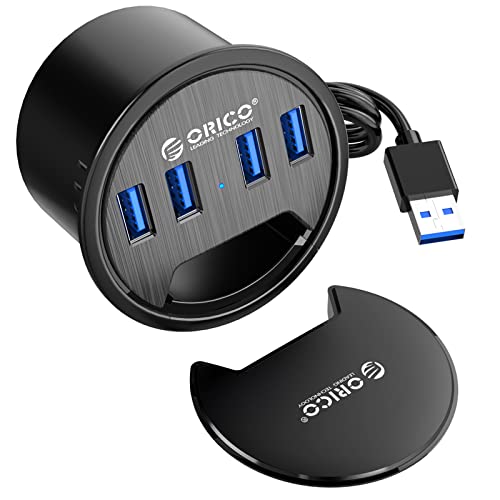
For creators who need seamless connectivity and efficient workspace management, the ORICO Desk Grommet USB 3.0 Hub stands out with its innovative design and functionality. This compact hub features four USB 3.0 ports, allowing you to connect devices like flash drives and HDDs at speeds up to 5Gbps. It easily mounts in a standard 2.36″ grommet hole, optimizing your desk space. Plus, the dustproof cover keeps ports clean when not in use. With a 4.9ft cord and plug-and-play setup, managing your cables becomes a breeze, making it an essential tool for any productive workspace.
Best For: Creators and professionals who require efficient workspace management and seamless connectivity for multiple USB devices.
Pros:
- Optimizes desk space with easy installation in a standard 2.36″ grommet hole.
- High-speed data transfer up to 5Gbps for quick syncing of devices.
- Dustproof cover protects ports when not in use, keeping your workspace tidy.
Cons:
- Requires a grommet hole of specific diameter, limiting installation options.
- Fixed cord length of 4.9ft may not suit all desk configurations.
- Limited to USB 3.0 ports, which may not support newer USB standards and devices.
4-Port USB 3.0 Portable Desk Hub with 3.3ft Cable
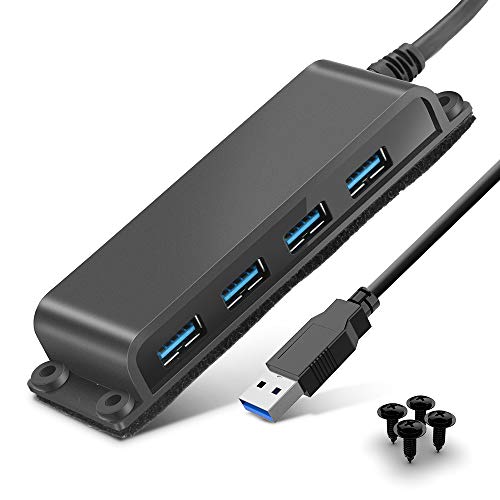
Creators who need a reliable and flexible solution for connecting multiple devices will find the Rocketek 4-Port USB 3.0 Portable Desk Hub an ideal choice. With a 3.3ft cable, it allows for easy positioning, whether you prefer desk clamp or wall mounting. You’ll enjoy lightning-fast data transfer speeds of up to 5Gbps, making it ten times faster than USB 2.0. Compatible with a wide range of devices, including MacBooks and mobile HDDs, this hub supports plug-and-play functionality—no drivers needed. Plus, you get peace of mind with an 18-month warranty and friendly customer support ready to assist you.
Best For: Creators and professionals who need a reliable and efficient solution for connecting multiple USB devices seamlessly.
Pros:
- Fast Data Transfer: Achieves speeds of up to 5Gbps, significantly faster than USB 2.0.
- Flexible Mounting Options: Can be easily desk clamped or wall-mounted for optimal positioning.
- Wide Compatibility: Works with various operating systems and devices, including laptops and mobile HDDs.
Cons:
- Limited Ports: Only four USB ports may not be sufficient for users with many devices.
- Cable Length: The 3.3ft cable may feel restrictive for some setups.
- No Individual Port Control: Lacks power switches for individual ports, which could be inconvenient for managing connected devices.
EJAY 4 Ports 10Gbps USB-C Hub Splitter for iMac 2021 and Later
Designed specifically for iMac users from 2021 onward, the EJAY 4 Ports 10Gbps USB-C Hub Splitter enhances your workspace with its clamp-style installation and adjustable design. Measuring just 3.66 x 1.8 x 0.86 inches and weighing 6.4 ounces, it’s lightweight yet powerful. With USB 3.2 GEN2 speeds up to 10Gbps, you’ll enjoy seamless data transfers. The hub includes a 47-inch C to C data cable and supports desks between 0.2 to 1.2 inches thick. Plus, it organizes your cables, making your setup tidy and efficient. Plug and play functionality means you won’t need any drivers—just connect and go!
Best For: The EJAY 4 Ports 10Gbps USB-C Hub Splitter is best for iMac users looking to expand connectivity and improve cable management in their workspace.
Pros:
- High-speed Data Transfer: Offers USB 3.2 GEN2 speeds up to 10Gbps for efficient file transfers.
- Adjustable Clamp Design: Easily mounts to desks of varying thickness, providing a secure and convenient setup.
- User-Friendly Installation: Plug and play functionality ensures quick and easy connection without the need for drivers.
Cons:
- Limited Compatibility: Specifically designed for iMac 2021 and later, which may not suit users with older models.
- Weight and Size: While lightweight, some users may prefer a more compact hub option for portability.
- Power Supply Requirement: Requires a 5V Type C power supply for optimal performance with multiple devices.
ORICO USB Hub 3.0 with Extra Power Port and Card Reader

If you’re a creator looking to optimize your workspace, the ORICO USB Hub 3.0 with Extra Power Port and Card Reader is an excellent choice. This clampable hub easily mounts to your desk or monitor, providing two USB-A ports, a 3.5mm AUX port, and an SD/TF card reader—all through a 3.3FT cable. Its extra power supply port supports high-power devices, ensuring safety while you work. Compatible with various systems, it’s a plug-and-play solution, so you won’t need to fuss with driver installations. Plus, ORICO’s customer service promises quick support for any issues you might face.
Best For: Creators and professionals seeking an efficient and organized workspace with easy access to multiple devices.
Pros:
- Clampable design allows for secure mounting on desks or monitors, saving valuable desk space.
- Extra power supply port supports high-power devices, ensuring reliable performance and safety.
- Plug-and-play functionality eliminates the need for driver installation, making it user-friendly across various operating systems.
Cons:
- Power adapter not included, which may be necessary for certain high-power devices.
- Limited to USB-A ports, which may not accommodate all modern devices without adapters.
- 3.3FT cable length may be restrictive depending on the setup and distance from the computer.
USBGear 7-Port USB 3.2 Gen 1 Charging and SuperSpeed Mountable Data Hub
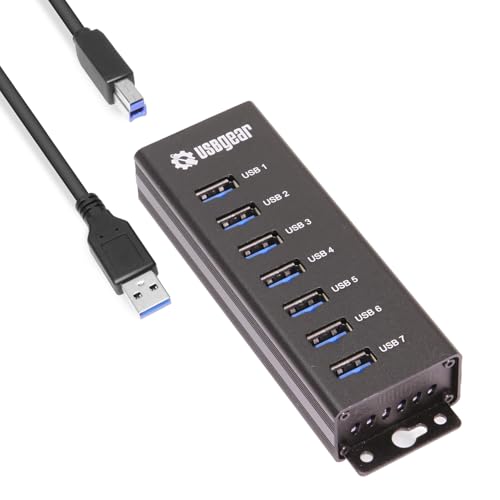
For anyone needing efficient port expansion, the USBGear 7-Port USB 3.2 Gen 1 Charging and SuperSpeed Mountable Data Hub stands out with its impressive seven USB 3.2 Gen 1 Type-A ports. You’ll enjoy fast data transfer speeds of up to 5Gbps, perfect for sharing large files. With a total power budget of 20W, each port supports fast charging at 900mA. The hub’s integrated metal mounting flanges make it easy to install on any surface, ideal for various environments like offices or labs. Rated 4.3 stars by users, it’s a reliable choice for enhancing your workspace efficiency.
Best For: Users needing multiple USB ports for fast data transfer and charging in professional or industrial settings.
Pros:
- Fast data transfer speeds of up to 5Gbps, making it ideal for large file transfers.
- Supports fast charging at 900mA per port, allowing efficient device charging.
- Easy mounting options with integrated metal flanges for versatile installation in various environments.
Cons:
- Limited to USB 3.2 Gen 1, which may not be the fastest option available compared to newer USB standards.
- Weight of 13.4 ounces might be cumbersome for portable use or when mounted on lightweight surfaces.
- Warranty information not explicitly stated, potentially causing concerns for some buyers regarding support.
CY USB 3.0 Hub Desk Grommet Splitter Dock Station

The CY USB 3.0 Hub Desk Grommet Splitter Dock Station is perfect for creators who need quick and easy access to their PC ports. Designed for a 60mm grommet hole, you’ll enjoy a tool-free installation with plug-and-play functionality. This hub supports data sync speeds up to 5Gbps, letting you transfer HD movies in seconds. It includes two USB 3.0 ports, an SD/TF card reader, and a Type-C port. Compatible with Windows, Mac, and Linux systems, you can connect various devices effortlessly. Plus, its user-friendly design allows large data cables to pass through, keeping your workspace organized.
Best For: Creators and professionals who need quick and convenient access to multiple PC ports in their workspace.
Pros:
- Tool-free installation allows for easy setup with plug-and-play functionality.
- High data transfer speeds of up to 5Gbps facilitate quick file transfers, such as HD movies.
- User-friendly design accommodates large data cables, helping to keep your workspace organized.
Cons:
- Limited Type-C functionality as it only supports USB 3.0 data and DC 5V power, excluding audio and video output.
- Requires a specific grommet hole size (60mm), which may not be compatible with all desks.
- No built-in power supply, which may limit the functionality of some connected devices.
USB C Hub Clamp with 2-Port USB 3.0 and Card Reader

Designed specifically for creators who need seamless access to multiple devices, the USB C Hub Clamp with 2-Port USB 3.0 and Card Reader offers a practical solution for expanding your workspace. This mountable hub attaches securely to your desktop or monitor edge, accommodating thicknesses from 0.39” to 1.18”. With two USB 3.0 ports and an SD/TF card reader, you can easily connect smartphones and external drives. Its durable aluminum design guarantees heat dissipation, while soft silicone pads protect your surfaces. Plus, it doubles as a handy cell phone holder for your office setup. Enjoy effortless plug-and-play connectivity!
Best For: Creators and professionals who need easy access to multiple devices while working in a compact workspace.
Pros:
- Durable aluminum design ensures longevity and effective heat dissipation.
- Mountable design allows for secure attachment to desktops or monitor edges, saving desk space.
- Plug & Play functionality makes it easy to set up without the need for driver installation.
Cons:
- Requires an additional power adapter for charging, which may be inconvenient for some users.
- Limited charging power (less than 5W) may not support all devices effectively.
- Only data transmission capabilities; separate cables are needed for charging devices.
4 Port Aluminum Desk USB 3.0 Hub with Clamp Design

If you need a reliable solution for managing multiple devices at your workspace, the 4 Port Aluminum Desk USB 3.0 Hub with Clamp Design is an ideal choice. With its adjustable screw clip, it securely attaches to surfaces between 0.39 and 1.26 inches thick. The sleek aluminum alloy not only looks great but also helps dissipate heat rapidly. Enjoy lightning-fast data transfer speeds of up to 5Gbps, making it ten times faster than USB 2.0. You can connect various devices, from smartphones to keyboards, all while enjoying compatibility with multiple operating systems. Plus, it comes with a 12-month customer service guarantee!
Best For: Users looking to expand USB connectivity on their desktop or workspace with a sleek and efficient hub.
Pros:
- Compact and Stylish: The aluminum design enhances the aesthetics of any workspace while ensuring durability.
- High-Speed Data Transfer: Offers data transfer speeds of up to 5Gbps, significantly reducing wait times for file transfers.
- Versatile Compatibility: Works seamlessly with a variety of devices and operating systems, including Windows, Mac OS, and Linux.
Cons:
- Limited Number of Ports: Only provides four additional ports, which may not be sufficient for users with many devices.
- Clamp Design Limitations: The adjustable clip may not fit all desk thicknesses, potentially limiting installation options.
- Requires External Power: May need an external power source for optimal performance with power-hungry devices.
Factors to Consider When Choosing Desk Mount USB Hubs for Creators
When choosing a desk mount USB hub, you’ll want to take into account several key factors. Think about the port count and types, as well as the data transfer speed that meets your needs. Also, evaluate the design, mounting options, power supply features, and compatibility with your devices to guarantee a seamless setup.
Port Count and Types
Choosing the right desk mount USB hub involves careful consideration of port count and types, as these factors greatly impact your workflow. Look for hubs with 2 to 7 ports to meet your connectivity needs. A mix of USB-A and USB-C ports is essential, ensuring compatibility with various devices like laptops, smartphones, and peripherals. This flexibility allows you to connect multiple devices simultaneously without hassle. Additional features, such as card readers and charging capabilities, enhance usability by enabling data transfer and device charging at the same time. Finally, consider the hub’s design and installation options, like clamp mechanisms, to optimize your desk space while maintaining stability and easy access.
Data Transfer Speed
How do you confirm your desk mount USB hub meets your data transfer needs? First, consider the USB standard it supports. USB 3.0 provides speeds up to 5Gbps, ten times faster than USB 2.0’s 480Mbps. If you often transfer large media files, like videos or high-resolution images, look for hubs that support USB 3.2, which can reach up to 10Gbps. This speed is vital for enhancing your productivity. Additionally, make sure all devices connected to the hub support the same or higher USB standards to achieve peak speeds. Finally, choose a hub with enough ports to accommodate all your devices simultaneously, maximizing efficiency and keeping your workflow uninterrupted.
Design and Mounting Options
Design and mounting options are vital factors to take into account for creators seeking desk mount USB hubs. Look for clamp designs that easily attach to desk or monitor edges, accommodating thicknesses from 0.19 to 1.26 inches. Adjustable screws are essential for a secure fit, ensuring stability when connecting or disconnecting devices. Consider hubs with grommet hole mounting options to optimize desk space and provide easier access to USB ports. Some models feature removable sliding rails, making it simple to mount on different surfaces and manage cables effectively. Finally, choose user-friendly designs that allow for tool-free installation, so you can rearrange your workspace without hassle whenever inspiration strikes.
Power Supply Features
Power supply features play an essential role in selecting the right desk mount USB hub for your creative setup. First, check for an extra power supply port to safely accommodate high-power devices, preventing voltage fluctuations during use. Look for hubs that offer sufficient power delivery, ideally a 5V/3A input, to maintain stable performance when multiple devices are connected. It’s also critical to guarantee the hub supports charging capabilities alongside data transfer; some models only handle data. Evaluate the compatibility of the power supply with your devices, confirming it meets USB-C or other power input standards. Finally, consider the hub’s overall power budget—higher outputs, like 20W, allow efficient charging for more devices without overloading.
Compatibility With Devices
When choosing a desk mount USB hub, compatibility with your devices is essential for ensuring a smooth workflow. Make sure the hub works seamlessly with your laptops, desktops, and operating systems like Windows, macOS, or Linux. If you have a mix of newer and older devices, look for hubs that offer backward compatibility with USB standards (2.0/1.0). Check the number and types of ports available, such as USB-A and USB-C, to connect various peripherals like external hard drives and keyboards. Features like card readers or power delivery can enhance functionality. Finally, opt for hubs with plug-and-play capabilities to simplify setup, allowing you to focus on your creative work without hassle.
Cable Management Solutions
Effective cable management is essential for maintaining an organized workspace, especially for creators who rely on multiple devices. Choosing a desk mount USB hub with integrated cable management solutions can help you keep your cables neat and accessible. Look for features like clips or grommet designs that allow you to route and conceal cables along surfaces. Dustproof covers and cable trays can protect connections and maintain a tidy appearance when ports aren’t in use. Hubs with adjustable clamp designs also facilitate better cable routing, ensuring you can access devices without tangling or stretching cables across your workspace. A well-managed cable system not only reduces distractions but also prolongs cable lifespan by minimizing wear and tear.
Material Durability and Heat
An organized workspace not only helps with cable management but also influences the longevity and performance of your devices. When choosing a desk mount USB hub, consider the materials used. Premium aluminum alloy hubs enhance durability and provide rapid heat dissipation, preventing overheating during prolonged use. Sturdy clampable designs guarantee stability, minimizing movement when connecting or disconnecting devices. Look for hubs featuring soft silicone pads, which protect surfaces from scratches while adding grip. The right materials directly impact the hub’s lifespan—higher-quality options usually resist wear and tear better than plastic alternatives. Efficient heat dissipation is vital; excessive heat can slow down data transfer rates and damage both the hub and your devices. Choose wisely to enhance your workspace efficiency.
Installation Ease and Support
Choosing a desk mount USB hub that’s easy to install can save you time and frustration, especially if you’re frequently rearranging your workspace. Look for hubs with adjustable clamps that fit various desk edges or monitor stands, typically ranging from 0.19 to 1.1 inches. A tool-free installation and plug-and-play functionality are essential, allowing you to set up without extra drivers. User-friendly designs, like removable sliding rails, let you quickly access ports while reducing clutter. Also, consider hubs with long cables (3.3ft or longer) for flexible positioning. Finally, verify the hub includes silicone pads to protect surfaces and maintain stability during use, making your workspace both efficient and organized.
