
A cable tray can clear the tangle beneath your desk without forcing you to unplug everything each time you move a device. The right one depends on what you need to hide—and what your desktop allows you to mount.
These 10 options include compact metal trays, longer fabric organizers, two-packs, and clamp-on designs. Use the buying guide below to narrow the choice by desk size, cable load, and installation method.
Best 10 Desk Cable Management Trays Picks for 2026
Longest Tray
Univivi 36-Inch Fabric Cable Tray

- 36-inch fabric storage tray
- Clamp-on or screw-in mounting
- Opens for easier cable changes
Best For: Wide desks with multiple adapters and sockets
Heavy-Duty Fabric Pick
Cinati 28.4-Inch Clamp-On Tray
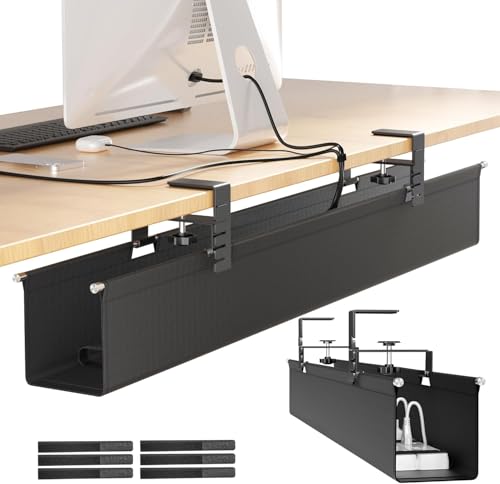
- 28.4-inch fabric enclosure
- Clamp rated for up to 30 pounds
- Fits 0.4- to 2.4-inch desktops
Best For: Roomy no-drill storage for power accessories
Low-Profile Screw Mount

- Compact 16.5-by-3-inch rack
- Metal construction holds 11 pounds
- Front opening aids cable access
Best For: Wood desks needing a compact permanent mount
Compact Mesh Clamp

- 13.4-inch carbon-steel mesh basket
- No-drill clamp with rubber pads
- Holds about 15 pounds
Best For: Smaller desks with flat clamp-friendly edges
Best Screw-In Set

- Two 17.32-inch steel trays
- Beveled opening for access
- Screws and cable ties included
Best For: Desks that allow screw-in mounting
Best Long Clamp-On Tray

- 25-inch metal mesh tray
- Clamp fits 0.4- to 2-inch edges
- Two sections require assembly
Best For: Standing desks with a compatible clamp-on edge
Best Adhesive Pair

- Two 17-inch PVC trays
- No-screw adhesive installation
- Adhesive specifies 24-hour cure
Best For: No-screw mounting on a suitable desk surface
Best for Compact Desks
Cinati 13.4-Inch Clamp-On Cable Tray

- 13.4-inch metal tray
- No-drill clamp fits 0.4–2.4-inch desks
- Includes clips and cable ties
Best For: Smaller desks needing repositionable cable storage
Best for Long, Fixed-Width Storage
LOVJOYSE 25.3-Inch Mesh Cable Tray

- 25.3-inch metal tray
- 15-pound stated capacity
- No-drill clamp for desks up to 2 inches thick
Best For: Desks with multiple devices and room for a long tray
Best for Adjustable Length
BIWIST Extendable 31-Inch Cable Tray

- Extends to a stated 31 inches
- Open carbon-steel construction
- Verify mounting method before buying
Best For: Adjustable storage for multiple power strips and cords
Longest Tray – Univivi 36-Inch Fabric Cable Tray
If you need desk cable management trays for a wide setup, the Univivi offers 36 inches of storage for adapters, sockets, and cords. Its Oxford fabric tray can be opened to make changes easier, with built-in ties to hold items in place.
Best For: Wide desks with several power accessories to hide.
Pros:
- 36-by-5.5-by-5.5-inch tray provides substantial storage space.
- Offers clamp-on or screw-in installation, including a clamp option for glass and metal desktops.
- Opens for easier access and includes built-in cable ties.
Cons:
- Desks with drawers or a back rod need at least 5.3 inches of clearance along the edge.
- Clamp installation leaves the clips visible on the desktop.
Choose this one when capacity and access matter more than a completely concealed mount. Measure both your desk width and edge clearance before ordering.
Among fabric desk cable management trays, this Cinati model pairs a 28.4-inch enclosure with a metal clamp bracket rated to hold up to 30 pounds. It is designed to conceal power strips, adapters, and loose wiring without drilling into the desktop.
Best For: Desks that need roomy, no-drill storage for power accessories.
Pros:
- 28.4-by-4.3-by-4.7-inch fabric enclosure hides cables and accessories.
- Clamp bracket supports up to 30 pounds and fits desktops 0.4 to 2.4 inches thick.
- Includes seven built-in ties and six additional ties; clamp padding helps protect the desktop.
Cons:
- Clamp mounting requires a suitable desk edge within the stated thickness range.
- Its 28.4-inch length may be more than a compact desk can accommodate.
This is a practical choice if you want the coverage of a fabric enclosure and the flexibility to reposition it without screw holes. Check the available space beneath your desk first.
For buyers comparing compact desk cable management trays, the VIVO is a 16.5-inch metal rack that mounts beneath a wood or particle-board desktop. Its partially closed shape helps hide cables and a power strip, while the front opening keeps them accessible.
Best For: Wood or particle-board desks where a low-profile, screw-mounted rack makes sense.
Pros:
- Compact 16.5-by-3-inch footprint suits smaller cable runs.
- Metal construction supports up to 11 pounds.
- Front opening makes it easier to add or remove cables.
Cons:
- Requires screws and a wood or particle-board mounting surface.
- Its 11-pound rating and 3-inch width offer less capacity than larger trays in this roundup.
The VIVO favors a discreet, permanent installation over no-drill convenience. Confirm that the underside of your desk can take screws and accommodate mounting holes 11 inches apart.
The Litwaro is one of the shorter desk cable management trays here, measuring 13.4 inches long. Its carbon-steel mesh basket clamps to a flat desk edge, with side openings for routing cables and rubber pads to help prevent scratches.
Best For: Smaller desks needing a no-drill metal tray.
Pros:
- Clamp installation avoids drilling and can face inward or outward.
- Carbon-steel basket holds about 15 pounds.
- Side openings aid cable routing, while rubber clamp pads protect the desk.
Cons:
- Fits flat desk edges only, at thicknesses from 0.4 to 2.4 inches.
- Its 13.4-inch length leaves less room for accessories than longer trays.
Pick this mesh option when you want a compact, accessible cable basket rather than a fabric enclosure. Check that your desk has a flat, clamp-friendly edge.
Best Screw-In Set – pamo Steel Under-Desk Trays
For desk cable management trays that mount securely beneath a desk, this pamo set offers two powder-coated steel trays. Each measures 17.32 inches long, with a beveled opening that keeps cables and power strips accessible.
Best For: Desks where screw-in mounting is acceptable and you want to spread cables across two trays.
Pros:
- Two trays let you separate cables and power supplies.
- Beveled design helps you reach plugs and switches.
- Includes mounting screws and reusable cable ties.
Cons:
- Requires screws in the underside of the desk.
- At 17.32 inches each, the trays are shorter than a single 25-inch option.
The steel construction makes this a practical choice for heavier adapters, while the two-piece layout gives you flexibility in where to mount them.
Best Long Clamp-On Tray – Mzmaxy 25-Inch Cable Tray
If you need desk cable management trays without drilling, this Mzmaxy model clamps to the desk edge. Its 25-inch metal mesh tray is designed to hold cables and power strips, with a stated weight capacity of approximately 15 pounds.
Best For: Standing desks with a 0.4- to 2-inch-thick edge and room for a long clamp-on tray.
Pros:
- Clamps on without drilling and has rubber pads to protect the desk surface.
- Supports inward or outward positioning.
- Mesh construction provides ventilation, while the open side allows cables to pass through.
Cons:
- Only fits desk edges within the stated 0.4- to 2-inch thickness range.
- The two tray sections must be screwed together before mounting.
Choose this when length and repositionable, no-drill installation matter more than a completely tool-free setup.
Best Adhesive Pair – Scanfield 17-Inch Trays
Among desk cable management trays that avoid screws and clamps, this Scanfield two-pack uses self-adhesive mounting. Each 17-inch PVC tray has a stated 3.5-inch interior for power strips, chargers, and bundled cords.
Best For: A no-screw under-desk setup where adhesive mounting suits the desk surface.
Pros:
- Installs without drilling or additional tools.
- Two trays provide separate spaces for cords and accessories.
- Room for power strips, chargers, and bundled cables.
Cons:
- The adhesive specifies a 24-hour cure, so it is not an instant-load installation.
- Adhesive mounting may be less convenient if you plan to reposition the trays.
This pair is a straightforward way to hide cables without putting screws into a desk; allow for the stated cure time before loading the trays.
Best for Compact Desks – Cinati 13.4-Inch Clamp-On Cable Tray
Among desk cable management trays, this 13.4-inch Cinati model is a practical choice when you want to lift a power strip and loose cords off the floor without drilling into your desk. Its clamp fits desktops 0.4 to 2.4 inches thick.
Best For: Smaller desks that need a repositionable, no-drill tray.
Pros:
- Clamp installation requires no desk holes and allows repositioning.
- Anti-scratch mats help protect the desktop.
- Metal tray holds up to 10 pounds; four clips and six ties are included.
Cons:
- The 13.4-inch length offers less room than the longer trays here.
- Desktop thickness must fall within the 0.4-to-2.4-inch clamp range.
Choose it for a compact setup where easy mounting matters more than maximum tray capacity; check that your power strip fits its 13.4-by-4.6-inch footprint.
Best for Long, Fixed-Width Storage – LOVJOYSE 25.3-Inch Mesh Cable Tray
If you need more continuous space than compact desk cable management trays provide, this 25.3-inch LOVJOYSE tray gives power strips, adapters, and cords a longer place to sit. It clamps on without drilling and has two openings for routing cables.
Best For: Desks with several devices that need a long, fixed-width cable tray.
Pros:
- 25.3-inch tray supports up to 15 pounds.
- Clamps to desks up to 2 inches thick, with rubber pads to help prevent scratches.
- Open mesh provides access and airflow; two holes help route cords.
Cons:
- Will not fit desktops thicker than 2 inches.
- Its 25.3-inch length may be more than a small desk needs.
This is the straightforward longer-tray option if your desk has room for it. Measure the available mounting span and desktop thickness before choosing it.
Best for Adjustable Length – BIWIST Extendable 31-Inch Cable Tray
The BIWIST stands out among desk cable management trays for its retractable design, which extends to a stated maximum of 31 inches. Its clamp-on installation avoids drilling, while the open carbon-steel structure provides space for cables and power strips.
Best For: Setups that need an adjustable-length tray for multiple power strips and cords.
Pros:
- Extendable design reaches up to 31 inches.
- Clamps to the desk without drilling and can be relocated.
- Open structure allows airflow and helps limit dust buildup.
Cons:
- The supplied details do not state a weight capacity or desk-thickness range.
- The listing gives conflicting installation information: its bullets describe a clamp, while its details say self-adhesive.
Its adjustable length is useful if you want to tailor the storage span, but verify the mounting method and desk compatibility before ordering.
How We Picked These Desk Cable Management Trays
We focused on the details that affect everyday use: tray length and depth, mounting method, access to cords, and whether the design suits a few cables or a power strip and adapters. The selections cover screw-mounted, clamp-on, and no-drill approaches, plus metal and fabric construction. Check each listing’s current dimensions, load rating, and desk-thickness requirements before ordering; product names alone do not confirm compatibility.
Quick Comparison: Which Layout Fits?
Start with the space you need to organize, not the longest tray available. A compact tray around 13 to 17 inches can handle a small power strip and a modest cable bundle. A two-pack lets you separate power from data cables or cover two areas beneath a wider desk. Options around 25 to 36 inches suit longer workstations with more devices, provided there is clear mounting space under the desktop. An extendable design offers flexibility if you expect your setup to change.
Choose an open metal tray when you want to see and reach plugs easily. A fabric-style organizer may give cords a more concealed look, but check how its openings work with the size of your adapters.
Key Buying Factors
Mounting and Desk Compatibility
Clamps are useful if you rent, frequently reconfigure your desk, or do not want to drill. Measure the desktop thickness and inspect its edge: a beveled edge, apron, or support bar can interfere with a clamp. Screw-mounted trays keep the desk edge clear but require a suitable underside and careful screw placement. For any product described as “no drill,” verify whether it uses clamps, adhesive, or another attachment method.
Usable Space and Weight
Measure your power strip, including plugs that protrude from its sides or top. Then allow room for power bricks, cable bends, and your hand when changing connections. Exterior tray length does not tell you its usable depth or height. Check the stated weight limit where one is provided, and avoid placing heavy adapters in a tray whose capacity is unclear.
Routing and Access
Look at where cables enter and exit, whether plugs remain reachable, and whether the tray will block desk controls or sit in your knee space. Leave slack for a height-adjustable desk at both its lowest and highest positions. Reusable ties can keep excess cord inside the tray without making future changes difficult.
Who Should Buy Which Desk Cable Management Trays?
For a small desk or simple laptop setup, start with a compact tray and confirm it fits your power strip. For a wide desk or several monitors, consider a longer tray or a two-pack so cables can follow their devices. If avoiding holes is the priority, compare clamp clearance and desk-edge shape before choosing a no-drill model. If you swap equipment often, favor an open design with easy access over the most concealed option. The best Desk Cable Management Trays fit the hardware you actually own while keeping plugs reachable and cables clear of your feet.
