
Choosing the right dock can make a Dell laptop feel far more capable at your desk, especially if you rely on dual monitors, wired peripherals, and a single-cable setup.
This roundup focuses on practical options for different power needs, display setups, and budgets so you can quickly narrow down the best fit.
Best 10 Dell USB C Docking Stations Picks for 2026
Best for Managed Workstations

- Up to 100W charging for compatible laptops
- Supports up to four high-resolution displays
- Built for IT management and durable daily use
Best For: IT-managed offices and hybrid workers who need a dependable USB-C dock.
Best for Dell-Laptop Compatibility
WD19S Dell USB-C Dual Monitor Dock

- Dell-focused compatibility for select Inspiron, Latitude, Precision, XPS, and Venue models
- HDMI, mini-DisplayPort, USB-C, USB-A, and Ethernet in one dock
- Renewed bundle includes an HDMI cable and cleaning cloth
Best For: Dell laptop users who want a dependable USB-C dock for dual monitors and everyday office connectivity.
Best for Multi-Display Workstations
Dell WD19 180W USB-C Docking Station
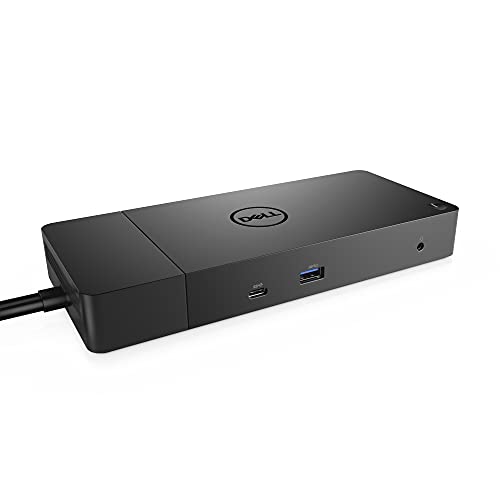
- Dual DisplayPort plus HDMI for flexible monitor setups
- Up to 130W power delivery for compatible Dell laptops
- Built-in Gigabit Ethernet and multiple USB ports
Best For: Dell users building a reliable multi-monitor desk setup with one cable.
Best for Triple Displays
Dell USB-C Docking Station 8-in-1

- Dual HDMI, DisplayPort, and VGA video outputs
- Up to 100W USB-C power delivery passthrough
- 3 USB 2.0 ports for everyday peripherals
Best For: People who want a multi-monitor USB-C dock for supported Dell, HP, Lenovo, or Surface laptops.
Best for Dell Multi-Monitor Setups
Dell WD19 130W USB-C Docking Station

- Dual DisplayPort plus HDMI 2.0B for multi-monitor use
- 90W power delivery with 130W adapter
- Gigabit Ethernet and multiple USB-A ports
Best For: Dell users who want a dependable USB-C dock for dual monitors and wired accessories.
Best for Triple-Display Workflows
14-in-1 USB C Dock for Dell Laptops

- Dual HDMI plus DisplayPort for flexible monitor setups
- 14 ports cover USB, Ethernet, SD/TF, and audio
- 100W PD support and 10Gbps data ports
Best For: Dell and other USB-C laptop users who want a multi-monitor dock with lots of connectivity.
Best Universal Pick
Dell D6000 Universal Dock with Dual Monitor Support

- Works with Dell and non-Dell laptops
- Dual 4K or single 5K display support
- Includes 130W power supply and HDMI cable
Best For: People who need a versatile dock for mixed laptop brands and multi-monitor workstations.
Best for Dual-Monitor Workstations
WD19 Dell USB-C Dock with 180W Adapter

- Dual-monitor output with HDMI and DisplayPort
- 180W adapter helps power a fuller desk setup
- Multiple USB-A ports and audio jacks for peripherals
Best For: Dell and USB-C laptop users who want a reliable dual-monitor dock for office productivity.
Best for Dell Multi-Port Expansion
WD19 Dell USB-C Docking Station Bundle

- Dual-monitor support with HDMI and DisplayPort outputs
- Includes 130W adapter, HDMI cable, and cleaning cloth
- Adds Ethernet and multiple USB ports for a full desk setup
Best For: Dell laptop users who want a practical dual-monitor dock with bundled accessories.
Best for Legacy Ports
WD19 Dell USB-C Dual Monitor Dock

- HDMI, VGA, and mini DisplayPort support
- Includes 180W power adapter and HDMI cable
- Ethernet plus multiple USB-A ports
Best For: Users who need a versatile Dell dock with older display ports and a ready-to-use bundle.
Best for Managed Workstations – Dell Pro Dock WD25 USB-C Dock
If you want one of the more business-ready dell usb c docking stations, the Dell Pro Dock WD25 is built for mainstream office setups that need simple charging, flexible display output, and centralized management. It delivers up to 100W power, supports modern Dell AI PCs and many non-Dell systems, and is geared toward reliable day-to-day use.
Best For: IT-managed offices, hybrid workers, and anyone who wants a durable USB-C dock with strong compatibility and display expandability.
Pros:
- Up to 100W USB-C power delivery for charging while you work
- Native support for up to four high-resolution displays
- Manageability features suited to IT deployment and fleet control
- Robust USB-C connector plus ambidextrous cable routing
Cons:
- More focused on office productivity than mobile convenience
- Advanced management features may be unnecessary for solo users
- May be more dock than needed for basic single-monitor setups
As far as dell usb c docking stations go, this model stands out for balancing power, sustainability, and workplace manageability rather than chasing flashy extras. It is a smart pick if you need a dock that can live on a desk all day and stay dependable in a mixed-PC environment.
Best for Dell-Laptop Compatibility – WD19S Dell USB-C Dual Monitor Dock
If you want one of the more practical dell usb c docking stations for a Dell laptop workspace, this renewed WD19S bundle covers the basics well. It adds HDMI, mini-DisplayPort, USB-A, USB-C, and Ethernet connectivity, so you can keep multiple peripherals and a dual-monitor setup organized through a single cable.
Best For: Dell laptop owners who want a straightforward USB-C dock with strong compatibility and wired networking.
Pros:
- Includes HDMI cable and cleaning cloth in the bundle
- Offers HDMI, mini-DisplayPort, USB-C, USB-A, and Ethernet ports
- Works with select Dell Inspiron, Latitude, Precision, XPS, and Venue devices
- Useful for dual-monitor productivity setups over USB-C or Thunderbolt 3
Cons:
- Renewed product may not appeal to buyers wanting brand-new gear
- Compatibility is best for supported Dell and USB-C/Thunderbolt laptops
- Not the simplest choice if you only need a basic single-display dock
Overall, this dock is a sensible pick if you need reliable expansion without paying for extras you will not use. Among dell usb c docking stations, it stands out most for Dell-focused compatibility and a well-rounded port selection.
Best for Multi-Display Workstations – Dell WD19 180W USB-C Docking Station
Dell WD19 180W Docking Station (130W Power Delivery) USB-C, HDMI, Dual DisplayPort, Black
Check Price On AmazonIf you need one of the more capable dell usb c docking stations for a desk setup with multiple monitors and plenty of peripherals, the Dell WD19 180W is a strong practical choice. It adds HDMI, dual DisplayPort, Ethernet, and several USB ports, while delivering up to 130W of power to compatible Dell laptops for a cleaner one-cable setup.
Best For: Dell laptop users who want a reliable USB-C dock for dual or triple-display productivity and wired accessories.
Pros:
- Supports HDMI plus dual DisplayPort outputs for flexible monitor setups
- Delivers up to 130W power delivery for compatible Dell systems
- Includes Gigabit Ethernet and multiple USB-A/USB-C ports for full desktop expansion
- Ships with a USB-C cable for straightforward setup
Cons:
- Compatibility should be checked carefully before buying
- Bulkier than compact travel docks
- Not the cheapest option in the category
Overall, the WD19 is a solid pick if you want dependable expansion and charging from one dock rather than a minimal hub. Among dell usb c docking stations, it stands out for its monitor support and office-friendly port selection.
Best for Triple Displays – Dell USB-C Docking Station 8-in-1
If you need one of the more flexible dell usb c docking stations for a Dell or HP laptop, this 8-in-1 adapter is built around multi-monitor expansion. It combines dual HDMI, DisplayPort, and VGA outputs with USB 2.0 ports and up to 100W USB-C power delivery, making it a practical pick for office desks that need lots of display options without moving up to a full desktop dock.
Best For: Users who want a budget-friendly USB-C dock for running multiple external displays on supported Dell, HP, Lenovo, or Surface laptops.
Pros:
- Offers 4 video outputs, including dual HDMI, DisplayPort, and VGA
- Supports up to 100W USB-C charging passthrough
- Includes 3 USB 2.0 ports for keyboard, mouse, and basic peripherals
- Works with many full-featured USB-C laptops that support DisplayPort Alt Mode
Cons:
- VGA use can reduce overall display resolution to 1080p
- Mac users get mirrored external screens rather than true extended displays
- Compatibility is limited to laptops with video-capable USB-C ports
For shoppers comparing dell usb c docking stations, this model stands out for its strong monitor flexibility and straightforward all-in-one design. It is especially appealing if your priority is extra screen support over faster USB expansion or premium dock features.
Best for Dell Multi-Monitor Setups – Dell WD19 130W USB-C Docking Station
Dell WD19 130W Docking Station (with 90W Power Delivery) USB-C, HDMI, Dual DisplayPort, black
Check Price On AmazonThe Dell WD19 is a practical option in dell usb c docking stations if you want a straightforward USB-C dock with strong display support and enough ports for a busy desk. It combines dual DisplayPort, HDMI, Ethernet, and multiple USB-A connections in a compact package.
Best For: Dell laptop users who need a reliable dock for dual monitors, wired networking, and everyday peripherals.
Pros:
- Supports dual DisplayPort plus HDMI 2.0B for flexible monitor setups
- Includes USB-C, multiple USB-A ports, and Gigabit Ethernet
- 130W power adapter with 90W power delivery for compatible Dell systems
Cons:
- Not the smallest dock for ultra-minimal desks
- Compatibility details matter, especially for non-Dell laptops
For buyers comparing dell usb c docking stations, the WD19 stands out as a dependable choice when monitor expansion and everyday connectivity matter more than flashy extras. It is especially sensible for Dell-focused setups that need a dock built for office productivity.
Best for Triple-Display Workflows – 14-in-1 USB C Dock for Dell Laptops
If you need one of the more feature-packed dell usb c docking stations for a multi-monitor desk setup, this 14-in-1 hub is built around display expansion and everyday port flexibility. It adds dual HDMI plus DisplayPort, wired Ethernet, fast USB data ports, card readers, and 100W power delivery support for compatible USB-C laptops.
Best For: Dell, Lenovo, and HP laptop users who want a single dock for dual monitors, wired networking, and plenty of peripheral connections.
Pros:
- Supports dual HDMI or triple-display setups on compatible Windows laptops
- Includes 14 total ports, covering USB-C, USB-A, Ethernet, SD/TF, and audio
- Offers up to 100W USB-C charging input with 87W safe power output
- 10Gbps USB ports are handy for external drives and other high-speed accessories
Cons:
- MacBooks only mirror the same image across external displays
- Display and charging features depend on your laptop’s USB-C/Thunderbolt support
- Charging cable and adapter are not included
This is a strong pick if you want one of the more versatile dell usb c docking stations for mixed work-from-home or office use, especially when dual monitors and extra ports matter more than a compact footprint.
Best Universal Pick – Dell D6000 Universal Dock with Dual Monitor Support
If you need one of the more flexible dell usb c docking stations for mixed-device setups, the Dell D6000 is built to handle a wide range of laptops while adding the ports most workspaces actually need. It combines USB, HDMI, DisplayPort, and audio connections in a single dock, with support for dual 4K displays or a single 5K monitor.
Best For: Users who want a universal dock that works across Dell and non-Dell laptops with strong display expansion.
Pros:
- Universal compatibility makes it useful for Dell and non-Dell systems
- Supports dual 4K monitors or one 5K display for productivity
- Multiple USB, HDMI, DisplayPort, and audio ports reduce adapter clutter
- Includes a 130W power supply and HDMI cable in the box
Cons:
- Renewed condition may not appeal to buyers wanting brand-new hardware
- Older dock design may feel less compact than newer USB-C-only options
- Display and charging performance can vary by laptop compatibility
Overall, the D6000 is a practical pick if your setup needs broad compatibility and serious monitor support rather than the newest design. For shoppers comparing dell usb c docking stations, it stands out as a versatile, workspace-friendly dock that covers the essentials well.
Best for Dual-Monitor Workstations – WD19 Dell USB-C Dock with 180W Adapter
If you need one of the more practical dell usb c docking stations for a tidy desk setup, this renewed Dell WD19 is built around dual-monitor productivity and simple one-cable connectivity. It adds HDMI, DisplayPort, and multiple USB ports, making it a solid fit for office users who want to expand a compatible Dell or USB-C/Thunderbolt laptop without a lot of extra clutter.
Best For: Dell laptop owners and business users who want a straightforward dual-monitor dock with dependable peripheral expansion.
Pros:
- Supports dual monitors with HDMI and DisplayPort output options
- Includes a 180W adapter for a more complete desktop-style setup
- Offers useful USB-A ports plus audio connections for peripherals
- Renewed pricing can make it a value-friendly docking option
Cons:
- Compatibility depends on your laptop’s USB-C or Thunderbolt support
- Renewed condition may not appeal to buyers wanting brand-new gear
- Firmware updates may be needed if you run into connection issues
Overall, this WD19 is a strong pick if you want a dock that focuses on practical expansion rather than flashy extras. For shoppers comparing dell usb c docking stations, it stands out as a no-nonsense choice for dual displays and everyday office connectivity.
Best for Dell Multi-Port Expansion – WD19 Dell USB-C Docking Station Bundle
If you want a practical way to add wired networking, multiple displays, and extra USB ports, this bundle is a solid fit for shoppers comparing dell usb c docking stations. It includes the WD19 dock, a 130W Dell power adapter, an HDMI cable, and a microfiber cloth, making it a straightforward workstation upgrade for compatible Dell laptops.
Best For: Dell users who need a reliable USB-C dock for dual-monitor setups and everyday office connectivity.
Pros:
- Supports dual-monitor docking with HDMI and DisplayPort outputs
- Includes useful extras like a 130W charger, HDMI cable, and cleaning cloth
- Offers strong port variety, including Ethernet and multiple USB connections
- Works with many Dell Inspiron, Latitude, Precision, XPS, and Venue models
Cons:
- Compatibility depends on your laptop’s USB-C DisplayPort or Thunderbolt support
- Renewed condition may not appeal to buyers who want brand-new hardware
- Best suited to Dell systems, so it is less universal than some docks
For a budget-conscious workstation upgrade, this dock bundle covers the essentials without much fuss. It is a good option if you want dell usb c docking stations that focus on practical expansion rather than flashy extras.
Best for Legacy Ports – WD19 Dell USB-C Dual Monitor Dock
If you need one of the more flexible dell usb c docking stations for a mixed workspace, this renewed WD19 bundle is built to cover older and newer peripherals at once. It includes the dock, an original Dell 180W power adapter, an HDMI cable, and a cleaning cloth, making it a practical plug-in upgrade for compatible Dell and USB-C laptops.
Best For: Users who want broad video port options, wired networking, and a ready-to-use Dell dock bundle for home or office setups.
Pros:
- Includes HDMI, VGA, and mini DisplayPort for flexible monitor connections
- Offers Ethernet plus multiple USB-A ports for peripherals and stable networking
- Comes with a 180W power adapter and HDMI cable in the bundle
- Works with select Dell Inspiron, Latitude, Precision, XPS, and Venue models
Cons:
- Compatibility is limited, so checking your laptop model is essential
- Renewed condition may not appeal to buyers who want a brand-new unit
- Not ideal if you only need a very simple single-monitor dock
As a feature-rich option among dell usb c docking stations, this WD19 stands out for buyers who value connector variety and a complete bundle over minimalism. It is especially useful if your desk still relies on a mix of modern USB-C and older display connections.
How We Picked the Best Dell USB C Docking Stations
We looked for docks that balance real-world compatibility, display support, charging wattage, and port selection. Priority went to models that work well with Dell laptops and offer the kind of connections most buyers actually use every day, including HDMI, DisplayPort, USB-A, and USB-C.
We also weighed whether a dock supports a simple single-cable desk setup, how well it handles dual monitors, and whether the power delivery is enough for common Dell business and creator laptops.
Quick Comparison: What Matters Most
When comparing Dell USB C Docking Stations, the biggest differences usually come down to monitor support and power output. Some docks are built for straightforward dual-monitor setups, while others aim for more flexible port expansion or universal compatibility across laptop brands.
If you need to run multiple displays or higher-resolution monitors, check the dock’s video-output combination and any bandwidth limits. If your laptop charges slowly under load, prioritize higher-wattage power delivery so you can dock and charge at the same time without losing performance.
Key Buying Factors for Dell USB-C Docking Stations
Power Delivery
Match the dock’s charging wattage to your laptop’s needs. Many Dell productivity laptops are fine with 90W to 130W, but larger systems may benefit from higher output for more stable charging during heavy use.
Display Support
Think about whether you want one monitor, two monitors, or a more flexible multi-display setup. Also confirm whether your monitors use HDMI, DisplayPort, or both, since the best dock is the one that fits your existing screens without extra adapters.
Ports and Desk Setup
A good dock should reduce clutter, not add it. Look for enough USB ports for keyboard, mouse, storage, and headsets, plus Ethernet if you want a reliable wired network connection.
Compatibility and Use Case
Some Dell USB C Docking Stations are best for Dell systems, while universal docks make sense if you switch between different laptop brands. If you travel often, a smaller USB-C hub may be more convenient than a full-size desktop dock.
Who Should Buy Which Dell USB C Docking Stations?
Choose a higher-wattage Dell dock if you use a performance-oriented laptop, dual external monitors, or a busy workstation with multiple accessories. If your needs are lighter, a simpler dock with solid charging and basic display support may be the better value.
For mixed-device households or office environments, a universal dock can be the most flexible choice. For a dedicated Dell workstation, a model designed around Dell laptops usually offers the cleanest, most predictable experience.
