
Choosing the right workstation is about more than raw specs. You need the right GPU, enough memory, and a platform that matches your software and workflow.
These 9 best Dell Precision GPU workstations for 2026 cover desktop towers, mobile workstations, and practical expansion options for demanding professional use.
Best 9 Dell Precision GPU Workstations Picks for 2026
Best for CAD Power
Dell Precision 5820 Xeon/Quadro P4000

- Quadro P4000 for CAD and 3D workloads
- 64GB RAM for heavy multitasking
- 1TB NVMe SSD for fast workflow
Best For: Engineers and creators who need dependable workstation graphics and lots of memory.
Best Value Refurbished
Dell Precision T5810 Xeon 12-Core 64GB
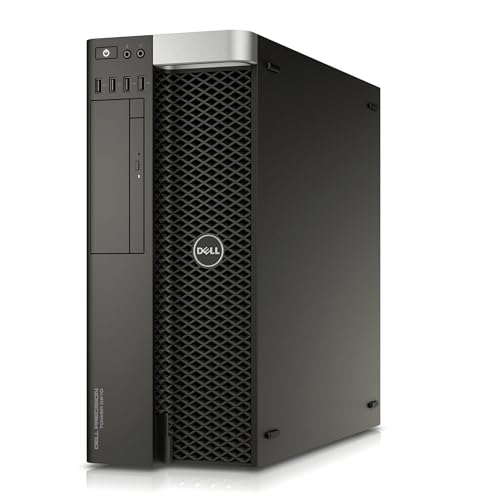
- 12-core Xeon for strong multitasking
- 64GB DDR4 and 480GB SSD for speed
- Pro Nvidia graphics for workstation apps
Best For: Refurbished buyers who want a capable, memory-rich workstation for productivity and light pro graphics.
Best for Custom GPU Builds
Dell Precision T7810 Dual Xeon Workstation
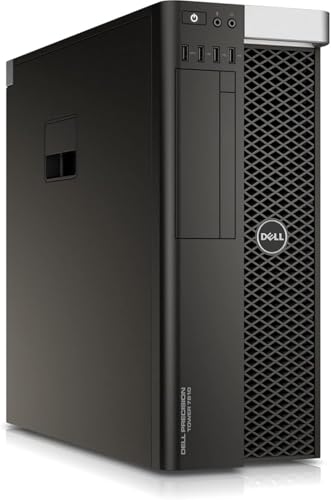
- Dual Xeon workstation platform
- 64GB RAM for heavy multitasking
- No GPU, storage, or OS included
Best For: Buyers who want a customizable Dell tower foundation for GPU-focused workstation builds.
Best for 4K GPU Projects
Dell Precision Tower 5820 W-2123 64GB 1TB NVMe P2000
- 64GB RAM for demanding multitasking
- Quadro P2000 for pro graphics workflows
- 1TB NVMe SSD for quick load times
Best For: Professionals who want a renewed Dell Precision tower with strong memory and a workstation GPU.
Best Mobile Workstation

- RTX A1000 workstation GPU for pro apps
- 32GB RAM and 1TB SSD for heavy multitasking
- Portable 15.6-inch design with Windows 11 Pro
Best For: Professionals who need a mobile Dell Precision for design, engineering, and business work.
Best Refurbished RTX Workhorse
Dell Precision 5820 Xeon W-2223, RTX 4000

- RTX 4000 graphics for pro apps and editing
- 64GB RAM with dual NVMe storage
- Renewed Precision tower with Windows 11 Pro
Best For: Creatives and professionals who want a refurbished workstation with pro graphics and plenty of memory.
Best Refurbished Value
Dell Precision 3570 i5 Workstation with T550 GPU
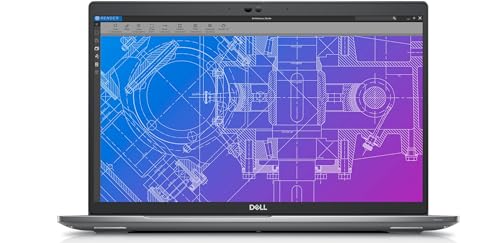
- 32GB DDR5 RAM for smooth multitasking
- NVIDIA T550 GPU for CAD and rendering support
- Renewed pricing makes workstation specs more affordable
Best For: Professionals and students who want dependable workstation performance at a lower refurbished price.
Best High-End Mobile Workstation
Dell Precision 7680 RTX 2000 Ada

- RTX 2000 Ada 8GB for pro graphics workloads
- 64GB DDR5 RAM and 1TB SSD for heavy multitasking
- Thunderbolt 4, HDMI, USB-A, and Ethernet support
Best For: Architects, engineers, and creators who need a powerful mobile workstation.
Best for CAD Power – Dell Precision 5820 Xeon/Quadro P4000
Dell Precision Tower 5820 Workstation W-2133 6C 3.6Ghz 64GB 1TB NVMe P4000 Win 11 (Renewed)
Check Price On AmazonIf you want a renewed tower that still feels built for serious work, this Dell Precision is a strong fit among dell precision gpu workstations. The Xeon W-2133, 64GB of RAM, 1TB NVMe SSD, and Quadro P4000 give it the core hardware needed for CAD, 3D design, and other demanding professional tasks.
Best For: Engineers, designers, and content creators who need workstation-class GPU performance and plenty of memory for heavy multitasking.
Pros:
- Quadro P4000 GPU is well-suited for CAD, modeling, and other precision-driven software
- 64GB RAM supports large projects, virtual machines, and smooth multitasking
- 1TB NVMe SSD helps with fast boots, launches, and file transfers
- Xeon 6-core CPU adds reliable workstation performance for sustained workloads
Cons:
- Renewed condition may not appeal to buyers who want new hardware only
- Older platform lacks the newest workstation CPU and GPU generations
- Large tower design is not ideal for tight desks or portable use
For buyers comparing dell precision gpu workstations, this model stands out as a practical value option: it balances professional graphics, memory headroom, and fast storage without pushing into top-tier new-system pricing.
Best for Dell GPU Power Expansion – COMeap GPU Power Cable for Precision 5820/7820
If you’re upgrading dell precision gpu workstations, this COMeap adapter is a practical way to add PCIe power for a compatible graphics card without replacing the whole system PSU. It’s designed specifically for the Dell Precision 5820 and 7820 motherboard power header, making it a targeted solution for these tower workstations.
Best For: Owners of Dell Precision 5820 or 7820 systems who need a direct GPU power adapter for a 6-pin or 8-pin graphics card.
Pros:
- Made for Dell Precision 5820 and 7820 motherboards, so the fit is purpose-built.
- Supports both 6-pin and 8-pin GPU connections from common workstation and gaming cards.
- 21-inch sleeved cable gives helpful reach for cleaner routing inside the chassis.
- Rated up to 300W, which covers many single-GPU workstation upgrades.
Cons:
- Not compatible with other Dell models, motherboards, or PSUs.
- Requires careful installation to avoid damaging hardware.
For dell precision gpu workstations that need a compatible power lead rather than a full PSU swap, this is a focused accessory with the right connector layout and power rating. Just be sure your system is exactly the supported Precision 5820 or 7820 before buying.
Best Value Refurbished – Dell Precision T5810 Xeon 12-Core 64GB
If you want a capable tower for demanding office workloads, CAD basics, or light visualization, this Dell Precision model is a practical entry in the world of dell precision gpu workstations. Its 12-core Xeon CPU, 64GB of DDR4 memory, and SSD storage give it plenty of responsiveness for multitasking, while the included Quadro-class graphics make it better suited to pro apps than a typical consumer desktop.
Best For: Buyers who need a refurbished workstation with strong CPU and memory specs for productivity, design, and general professional use.
Pros:
- 12-core Xeon processor handles heavier multitasking well
- 64GB DDR4 RAM is excellent for large projects and many open apps
- 480GB SSD improves boot times and everyday responsiveness
- Professional Nvidia graphics are useful for workstation software
Cons:
- No operating system included, so setup takes extra work
- Quadro NVS 315 is modest for graphics-intensive workloads
- Refurbished condition may vary from unit to unit
Overall, this T5810 is a solid budget-conscious pick if you care more about CPU cores, memory, and reliability than cutting-edge GPU power. For many dell precision gpu workstations shoppers, it offers a balanced upgrade path without the price of a newer tower.
Best for Custom GPU Builds – Dell Precision T7810 Dual Xeon Workstation
If you want one of the more flexible dell precision gpu workstations for a custom build, the Dell Precision T7810 is a strong foundation. It combines dual Xeon processors with 64GB of RAM and a roomy tower chassis, making it well suited to demanding professional workflows once you add your own storage, graphics card, and operating system.
Best For: Buyers who want a workstation-class Dell tower to customize for GPU-intensive tasks, virtualization, or technical computing.
Pros:
- Dual Xeon E5-2630 v3 processors for solid multi-core workstation performance
- 64GB of RAM supports heavy multitasking and memory-intensive applications
- Spacious Precision tower design leaves room for upgrades and expansion
- No preinstalled GPU, storage, or OS makes it easy to tailor the build
Cons:
- Requires additional parts before it is ready to use
- Older platform may not match newer workstations in efficiency
- No included GPU means extra planning for graphics-focused workloads
Overall, this is a practical choice if you want a configurable entry point into dell precision gpu workstations without paying for bundled components you may replace anyway. It makes the most sense for buyers who value expandability and can source their own GPU and storage to match the job.
Best for 4K GPU Projects – Dell Precision Tower 5820 W-2123 64GB 1TB NVMe P2000
Dell Precision Tower 5820 Workstation W-2123 4C 3.6Ghz 64GB 1TB NVMe P2000 Win 11 (Renewed)
Check Price On AmazonIf you need a dependable entry point into dell precision gpu workstations, this renewed Precision Tower 5820 gives you workstation-class parts with plenty of memory and a Quadro P2000 for CAD, light 3D work, and multi-monitor productivity.
Best For: Buyers who want a renewed Dell Precision tower with strong RAM capacity and a capable NVIDIA GPU for professional desktop workloads.
Pros:
- 64GB RAM helps with multitasking and heavier project files
- NVIDIA Quadro P2000 is well-suited to pro apps and stable drivers
- 1TB NVMe SSD supports fast boots and responsive storage
- Renewed tower format offers workstation hardware at a lower cost
Cons:
- Older W-2123 CPU is not the fastest option for compute-heavy tasks
- Renewed condition may vary compared with a new system
Overall, this is a solid practical choice for dell precision gpu workstations if you value RAM, a pro-grade GPU, and expandable tower design over chasing the newest processor generation.
Best Mobile Workstation – Dell Precision 5570 RTX A1000
If you want a portable option in the world of dell precision gpu workstations, the Dell Precision 5570 blends a 14-core Core i7, 32GB of RAM, and an NVIDIA RTX A1000 into a slim 15.6-inch chassis. It’s a practical pick for CAD, light 3D work, and professional multitasking when you need workstation-class hardware without moving up to a bulkier tower.
Best For: Professionals who want a travel-friendly Dell Precision with solid GPU support for design, engineering, and content workflows.
Pros:
- RTX A1000 GPU adds workstation-grade graphics support
- 32GB RAM and 1TB SSD provide strong headroom for demanding projects
- 15.6-inch FHD+ display keeps the system relatively portable
- Windows 11 Pro suits business and managed IT environments
Cons:
- RTX A1000 is better for moderate workloads than heavy 3D rendering
- Non-touch display may not suit every creative workflow
- Not as expandable as a larger desktop workstation
Overall, this Precision 5570 is a well-balanced choice for buyers comparing dell precision gpu workstations and prioritizing mobility, memory, and pro-level graphics in one package. It makes the most sense for users who need a capable everyday workstation more than a maxed-out rendering machine.
Best Refurbished RTX Workhorse – Dell Precision 5820 Xeon W-2223, RTX 4000
If you need a capable tower for demanding creative or engineering tasks, this Dell Precision GPU workstation stands out for its balanced mix of CPU, memory, and pro-grade graphics. The Xeon W-2223, 64GB of RAM, and Nvidia Quadro RTX 4000 make it a practical fit for editors, CAD users, and anyone comparing dell precision gpu workstations for serious desktop performance.
Best For: Professionals who want a refurbished Precision tower with strong multitasking, workstation graphics, and ample storage.
Pros:
- Quadro RTX 4000 with 8GB GDDR6 is well-suited to creative and pro apps
- 64GB DDR4 RAM plus dual NVMe SSDs help with speed and multitasking
- Windows 11 Pro and included keyboard/mouse add value out of the box
Cons:
- No built-in Wi-Fi or Bluetooth card included
- 4-core Xeon CPU is solid, but not ideal for heavily threaded workloads
As a renewed tower, this system is less about flashy specs and more about dependable workstation fundamentals. For buyers shopping dell precision gpu workstations, it offers a strong graphics-first configuration that makes sense if you want pro-class support without paying for a brand-new build.
Best Refurbished Value – Dell Precision 3570 i5 Workstation with T550 GPU
If you want a capable entry in the world of dell precision gpu workstations without paying new-workstation pricing, this renewed Dell Precision 3570 is a practical pick. It combines a 12th Gen Core i5, 32GB of DDR5 memory, and an NVIDIA T550 GPU for CAD, light 3D work, editing, and everyday multitasking.
Best For: Professionals, students, and budget-conscious buyers who need a reliable mobile workstation for design, engineering, and creative software.
Pros:
- 32GB DDR5 RAM helps keep heavy multitasking and professional apps responsive
- NVIDIA T550 GPU adds useful graphics support for rendering and CAD workflows
- 512GB NVMe SSD delivers fast boot times and quick file access
- Renewed pricing can offer strong value for workstation-grade hardware
Cons:
- HD display resolution is modest for detailed visual work
- Renewed condition may not appeal to buyers wanting brand-new hardware
- Core i5 performance is solid, but not ideal for the heaviest workstation loads
Overall, this Precision 3570 is a smart value option if you need one of the more affordable dell precision gpu workstations for real productivity rather than flashy specs. It is best suited to users who care more about dependable performance, memory headroom, and GPU support than premium display quality.
Best High-End Mobile Workstation – Dell Precision 7680 RTX 2000 Ada
If you need one of the more capable dell precision gpu workstations for serious CAD, rendering, editing, or engineering tasks, the Precision 7680 stands out with workstation-grade hardware and broad connectivity. Its RTX 2000 Ada GPU, Intel Core i7 HX processor, and 64GB of DDR5 memory make it a strong fit for demanding pro apps without stepping up to a heavier desktop replacement.
Best For: Architects, engineers, designers, and technical users who want a high-performance 16-inch mobile workstation for complex professional workloads.
Pros:
- RTX 2000 Ada 8GB handles pro graphics and GPU-accelerated workloads well
- 64GB DDR5 RAM and 1TB SSD support heavy multitasking and fast project access
- Strong port selection, including Thunderbolt 4, HDMI, USB-A, and Ethernet
- Windows 11 Pro and ISV-oriented workstation design suit business use
Cons:
- FHD+ display is solid, but not as sharp or color-rich as higher-end panels
- Large, powerful chassis is less portable than thinner mainstream laptops
- Price will likely be too high for casual users or light creative work
This Precision makes sense if you want dependable workstation-class performance in a mobile form factor. Among dell precision gpu workstations, it leans toward professionals who value stability, memory capacity, and expandability more than ultra-light portability or a premium display upgrade.
How We Picked These Dell Precision GPU Workstations
We focused on workstation platforms that make sense for real professional workloads: CAD, 3D modeling, content creation, simulation, and general business production. Priority went to systems with pro-class GPUs, strong CPU options, generous RAM, and useful storage configurations. We also considered upgradeability, form factor, and whether each machine is better suited to desk-based power users or mobile professionals.
Quick Comparison
Desktop towers generally deliver the best thermal headroom, expansion, and long-term value. Mobile workstations trade some raw power for portability, making them ideal for users who split time between office and field work. Renewed systems can be a smart way to get higher-tier specs at a lower cost, while accessory items like GPU power cables help support compatible tower upgrades.
Key Buying Factors for Dell Precision GPU Workstations
GPU Type and VRAM
For workstation software, GPU stability and driver support often matter more than gaming benchmarks. Look for Quadro, RTX A-series, or similar pro GPUs if your apps depend on certified graphics performance. VRAM requirements rise quickly with 3D scenes, high-resolution timelines, and multi-display setups.
CPU and Core Count
Intel Xeon and high-end Core i7/i9-class processors both have a place. Choose higher core counts for rendering, multitasking, and simulation, while higher clock speed can help with interactive modeling and lighter day-to-day responsiveness.
Memory and Storage
For most professionals, 32GB is a practical floor and 64GB is a better target for heavier workloads. NVMe SSDs improve boot time, project loading, and cache performance. Dual-drive setups can help separate operating system files from active project storage.
Form Factor and Upgrade Path
Among Dell Precision GPU Workstations, towers usually offer the easiest path to future GPU, RAM, and storage upgrades. Laptops are better when mobility is essential, but you should verify power limits, cooling capacity, and available ports before buying.
Who Should Buy Which Dell Precision GPU Workstations?
If you want maximum expandability for CAD or 3D work, choose a Precision tower workstation. If you need a balance of performance and portability, a Precision mobile workstation is the better fit. Buyers on a budget should consider renewed desktop models, while users with demanding GPU-accelerated workloads should prioritize systems with stronger pro graphics and more VRAM.
In short, match the machine to your software, workspace, and upgrade plans rather than chasing the biggest spec sheet. That approach will get you the best long-term value from Dell Precision.
