
GPU liquid cooling can help manage heat, but choosing a kit takes more than matching radiator size. The water block must fit your graphics card, and the radiator, pump, and tubing must fit your case.
These five options include DIY component kits and GPU-specific AIO coolers. Use the buying guide to narrow down which approach fits your card and your comfort level with installation.
Best 5 Custom Water Cooling Kits for Gpus Picks for 2026
Most Complete DIY Bundle
240mm CPU/GPU Water Cooling Kit
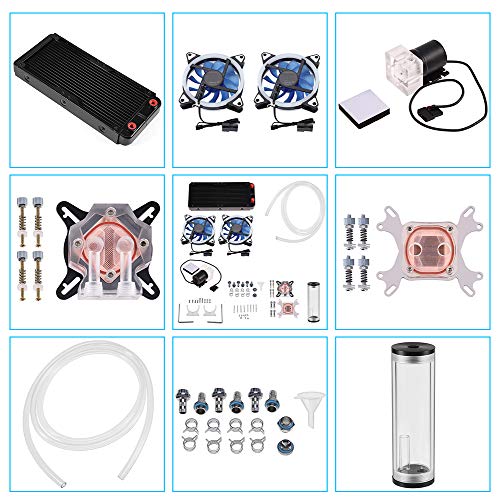
- CPU and GPU blocks included
- 240mm radiator and two LED fans
- Pump, reservoir, and loop fittings bundled
Best For: Builders assembling a bundled CPU/GPU loop
Card-Specific GPU Option
240mm Cooler for Gigabyte RTX 5070 Ti Gaming OC
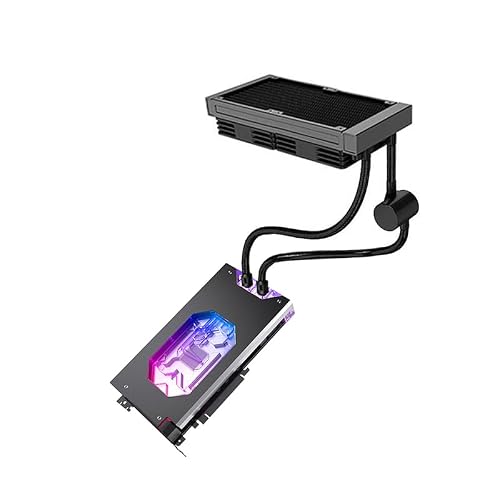
- Named for one Gigabyte RTX 5070 Ti model
- Copper base with microchannels
- Confirm package contents before purchase
Best For: Owners of the named Gigabyte RTX 5070 Ti Gaming OC
Visible-Loop DIY Pick

- Copper-base CPU and GPU blocks
- Clear reservoir and hose
- CPU block excludes AMD AM4
Best For: Builders who want a visible DIY CPU/GPU loop
Tesla H200 Specialist
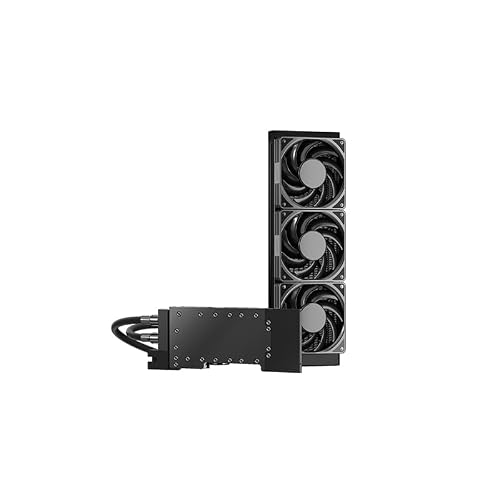
- Listed for Tesla H200 141G
- Copper microchannel base
- Split-type pump and braided tubing
Best For: Cooling a compatible Tesla H200 141G
DIY Loop Starter

- 240mm heat sink and LED fans
- Copper-base CPU/GPU block
- Visible acrylic reservoir
Best For: Desktop DIY loops with verified block compatibility
Most Complete DIY Bundle – 240mm CPU/GPU Water Cooling Kit
Among custom water cooling kits for gpus, this 240mm DIY bundle stands out for including both CPU and GPU blocks, a pump, a reservoir, and the basic loop hardware in one package. It is a starting point if you want to assemble a visible cooling loop rather than buy a GPU-only cooler.
Best For: Desktop builders who want a bundled CPU/GPU loop and are prepared to check block and case compatibility before installation.
Pros:
- Includes a 240mm radiator, two LED fans, CPU and GPU blocks, pump, reservoir, hose, connectors, and clamps.
- Both blocks use copper bases; the transparent acrylic reservoir makes coolant circulation visible.
- G1/4-threaded GPU block and listed tubing sizes provide useful details for planning connections.
Cons:
- The GPU block is described as universal, but no specific graphics-card fit list is supplied.
- A DIY loop requires checking component clearances and assembling the tubing and fittings.
This is the more accessory-rich choice for a first custom loop, but verify your GPU mounting pattern and radiator space before buying.
Card-Specific GPU Option – 240mm Cooler for Gigabyte RTX 5070 Ti Gaming OC
If you are comparing custom water cooling kits for gpus by graphics-card fit, this 240mm option is named for the Gigabyte RTX 5070 Ti Gaming 16G OC. Its listed design emphasizes a copper base, microchannels, a split-type pump, and braided tubing rather than broad GPU compatibility.
Best For: Owners of the named Gigabyte RTX 5070 Ti Gaming 16G OC who want a GPU-focused liquid-cooling option.
Pros:
- The title identifies a specific GPU model and 240mm configuration.
- Copper base plate and 0.3mm jet microchannels are specified for the cooling assembly.
- Lists a split-type pump, high-airflow cooling design, and braided tubing.
Cons:
- No compatibility with other graphics cards is stated.
- The supplied included-components list names a GPU block kit, screws, and manual; confirm exactly what ships before ordering.
Prioritize an exact match to your card, and check the seller’s package contents and installation requirements before committing.
Visible-Loop DIY Pick – 240mm CPU/GPU Cooling Kit
For shoppers considering custom water cooling kits for gpus alongside CPU cooling, this DIY kit pairs copper-base blocks with a 240mm heat sink, pump, clear cylindrical reservoir, transparent hose, and LED fans. It suits a hands-on build where seeing the coolant loop is part of the appeal.
Best For: Desktop builders seeking a visible CPU/GPU DIY loop with a 240mm cooling setup.
Pros:
- Copper-base CPU and GPU blocks are listed.
- Transparent acrylic reservoir and hose keep the loop visible.
- The kit lists a 240mm heat sink and LED fans with 3-pin and 4-pin power connections.
Cons:
- The CPU block explicitly does not support AMD AM4.
- No GPU-specific compatibility list is provided.
- The stated noise level is 50 dB, so check whether that suits your build goals.
The component mix is useful for a display-oriented DIY loop, but confirm CPU socket, GPU block fit, and case space first.
Tesla H200 Specialist – 360mm GPU AIO Cooler
Among custom water cooling kits for GPUs, this 360mm AIO is a specialized choice for an NVIDIA Tesla H200 141G rather than a general-purpose graphics card. Its copper base, microchannel design, split-type pump, and aluminum construction are aimed at sustained cooling under heavy loads.
Best For: Buyers cooling a compatible Tesla H200 141G who want a dedicated GPU liquid-cooling assembly.
Pros:
- Copper base with a 0.3mm jet microchannel design and 44 waterways.
- Split-type pump and 360mm radiator configuration.
- Metal construction and braided EPDM tubing intended for durability.
Cons:
- Listed for a specific Tesla GPU; compatibility with other cards is not established.
- Specified noise level is 45.6 dB.
Choose this for its stated H200 fit and cooling hardware, but verify your exact card and installation requirements before buying.
DIY Loop Starter – 240mm CPU/GPU Cooling Kit
DIY 240mm Cooler CPU/GPU Block Pump Reservoir LED Fan Heat Sink Compputer Water Cooling Kit
Check Price On AmazonIf you are comparing custom water cooling kits for GPUs, this DIY kit provides parts for a desktop loop: a 240mm heat sink, copper-base CPU/GPU block, pump, transparent acrylic reservoir, flexible hose, and LED fans. It suits buyers who want to assemble a visible cooling system rather than buy a GPU-specific AIO.
Best For: Desktop builders planning a DIY liquid-cooling loop and willing to check block compatibility.
Pros:
- Includes a 240mm heat sink, pump, reservoir, block, hose, and LED fans.
- Transparent acrylic reservoir makes coolant circulation visible.
- Copper-base block is intended to aid heat transfer.
Cons:
- GPU model compatibility and mounting details are not specified.
- DIY assembly requires more planning than a preassembled cooler.
This is a practical starting set for a visible desktop loop, provided you confirm that the included block and fittings suit your planned build.
How We Picked the Best Custom Water Cooling Kits for Gpus
We considered the five selected listings as two distinct approaches: DIY kits with separate blocks, pumps, reservoirs, and radiators, and GPU AIO coolers intended for particular cards or configurations. We prioritized the information a buyer can verify before ordering: GPU block fit, radiator size, included components, installation complexity, and maintenance needs. Listing descriptions alone cannot establish cooling performance, noise levels, or long-term reliability, so treat those as questions to investigate rather than guaranteed advantages.
Quick Comparison
The three DIY 240 mm kits are starting points for a configurable loop. They list a CPU/GPU block, pump, reservoir, radiator, fans, and connectors, but you should confirm exactly which parts and fittings are included. The 240 mm AIO listing names a Gigabyte RTX 5070 Ti Gaming 16G OC configuration; its stated card fit is more useful than a generic “GPU cooler” label, but the exact card model and PCB revision still need checking. The server-oriented AIO listing advertises 240 mm and 360 mm versions and high pump and fan speeds; choose only after confirming the specific version, card fit, mounting hardware, and acceptable noise level.
Key Buying Factors for Custom Water Cooling Kits for Gpus
Block and Card Compatibility
This is the first filter. A GPU water block must match the card’s PCB layout and cool the components it is designed to cover, including the GPU, memory, and power-delivery areas where applicable. Check the manufacturer’s compatibility list against your card’s exact brand, model, and revision. A product title mentioning “GPU block” does not establish fit. Confirm that any cooler advertised for both CPU and GPU use includes the hardware needed for your intended installation.
Radiator Fit and Complete Loop Parts
Check whether your case supports a 240 mm or 360 mm radiator in the proposed location, with enough clearance for the radiator, fans, tubing, and nearby components. For DIY kits, verify tubing size, fitting type and count, coolant requirements, pump power connections, and a practical place to mount the reservoir. A kit that lacks a compatible block or essential fittings can require substantial extra purchases.
Installation and Upkeep
DIY loops require planning, filling, leak testing, and periodic inspection. An AIO generally reduces loop assembly, but installing a GPU cooler may still require removing the stock heatsink and fitting new thermal pads or mounting hardware. Check warranty implications and follow the cooler and graphics-card instructions. Neither approach makes an incompatible block safe to install.
Who Should Buy Which Custom Water Cooling Kits for Gpus?
Choose a DIY kit if you want control over loop layout and are prepared to verify every component and maintain the system. Consider the card-specific AIO if you own the exact supported Gigabyte model and want to avoid assembling a full loop. Consider the server-oriented AIO only if its mounting details and operating noise suit your build. If you cannot confirm block compatibility for your exact GPU, keep the stock cooler while you look for a documented match.
