
When it comes to optimizing your GPU’s performance, choosing the right custom loop water cooling kit is essential. These kits not only manage heat efficiently but also add a touch of style to your setup. With various options available, from RGB lighting to sleek designs, you can find the perfect kit that suits your needs. Let’s explore the top contenders that promise to keep your graphics card cool and quiet.
CORSAIR XH505i RX 360 RGB Custom Cooling Kit

If you’re looking to elevate your gaming or content creation experience, the CORSAIR XH505i RX 360 RGB Custom Cooling Kit is the perfect choice for those who demand exceptional cooling performance. This complete Hydro X Series kit features a powerful XC7 CPU water block, XD6 pump reservoir, and three RX120 RGB fans, ensuring peak thermal management. The 360mm XR5 radiator enhances efficiency while the stunning RGB lighting adds flair to your setup. With easy installation and iCUE software integration, you can customize fan settings and monitor temperatures effortlessly. It’s time to take your GPU cooling to the next level with this impressive kit.
Best For: Gamers and content creators seeking high-performance cooling solutions with customizable RGB lighting for their systems.
Pros:
- Exceptional Cooling Performance: The XC7 CPU water block and XR5 radiator provide efficient thermal management.
- Easy Installation: Streamlined assembly with included tools and reduced cabling through the iCUE LINK ecosystem.
- Customizable RGB Lighting: Individually addressable RGB LEDs enhance aesthetics and can be synchronized with other iCUE-compatible products.
Cons:
- Weight: At 12.6 pounds, the kit may be heavy for some builds, potentially affecting compatibility with certain cases.
- Noise Level: Operating at 36 decibels, it may be louder than some users prefer, especially in quiet environments.
- Complexity: Custom hardline setups may be challenging for beginners without prior experience in water cooling.
CORSAIR XG3 RGB Hybrid GPU Water Block

The CORSAIR XG3 RGB Hybrid GPU Water Block is ideal for gamers and PC enthusiasts seeking top-tier cooling performance and customizable aesthetics. Designed for NVIDIA GeForce RTX 5080, 5070 Ti, and 5070 GPUs, it features 18 addressable RGB LEDs, allowing you to tailor the lighting to your setup. Its innovative hybrid design efficiently cools both the GPU and VRAM while a dedicated fan manages the circuit board and VRM. With a built-in temperature sensor and iCUE LINK support, you gain precise control over performance. Plus, it comes with a 3-year warranty, ensuring peace of mind with your investment.
Best For: Gamers and PC enthusiasts looking for high-performance cooling solutions with customizable RGB lighting.
Pros:
- Efficient hybrid cooling design for both GPU and VRAM.
- Customizable RGB lighting with 18 addressable LEDs.
- Built-in temperature sensor for precise liquid cooling control.
Cons:
- Requires CORSAIR iCUE LINK system hub for full functionality.
- Limited compatibility with specific NVIDIA GPUs only.
- Additional cost for compatible coolants may be necessary.
CORSAIR Hydro X Series XG5 RGB GPU Water Block for ASUS ROG RTX 5090
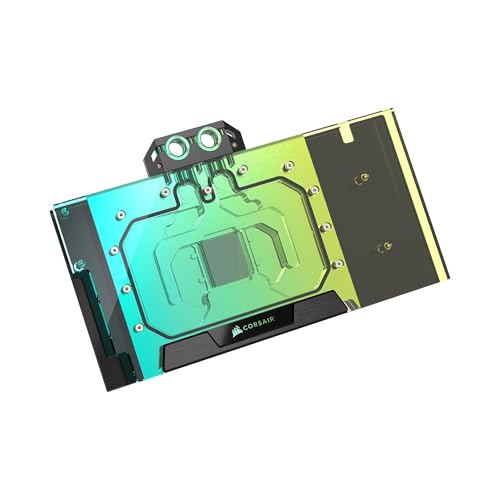
For enthusiasts looking to push their ASUS ROG Astral GeForce RTX™ 5090 to new heights, the CORSAIR Hydro X Series XG5 RGB GPU Water Block stands out with its total conversion design that efficiently cools not just the GPU but also the memory and VRM. Its nickel-plated copper construction and 67 high-density cooling fins guarantee peak thermal transfer, keeping coolant temperatures below 60°C. Installation’s a breeze with pre-applied thermal paste and included G1/4 ports. Plus, customize your setup with 16 addressable RGB LEDs, all controllable through the CORSAIR iCUE system. Enjoy a 3-year warranty and first-rate performance!
Best For: Enthusiasts looking to enhance the cooling performance and aesthetics of their ASUS ROG Astral GeForce RTX™ 5090.
Pros:
- Total conversion design efficiently cools GPU, memory, and VRM.
- Fully customizable RGB lighting with 16 addressable LEDs.
- Easy installation with pre-applied thermal paste and included ports.
Cons:
- Requires additional components like the CORSAIR iCUE Controller for full RGB control.
- Compatibility limited to ASUS ROG Astral GeForce RTX™ 5090.
- Higher price point compared to standard air cooling solutions.
ASUS ROG RYUJIN III WB WHT CPU Water Block for Intel and AMD

Designed for both Intel and AMD users, the ASUS ROG RYUJIN III WB WHT CPU Water Block is an ideal choice for those looking to optimize their custom loop water cooling setups. This Asetek-powered unit features 178 micro-cooling fins and a copper alloy cold plate for rapid cooling, ensuring your CPU performs at its best. With a stunning 3.5-inch LCD display and an embedded Axial-tech fan that lowers motherboard VRM temperatures by up to 35°C, it blends functionality and aesthetics. Plus, the all-copper ROG fittings guarantee seamless water flow, enhancing your cooling system’s efficiency and appearance.
Best For: Enthusiasts and gamers seeking optimal CPU cooling performance with stylish aesthetics for their custom water cooling setups.
Pros:
- High-performance cooling with 178 micro-cooling fins and a copper alloy cold plate.
- Stunning 3.5-inch LCD display providing vibrant visuals and real-time monitoring.
- Reduces motherboard VRM temperatures by up to 35°C, enhancing overall system stability.
Cons:
- May require more complex installation compared to air coolers.
- Higher price point compared to traditional cooling solutions.
- Compatibility limited to specific Intel and AMD socket types.
CORSAIR iCUE Link XG3 RGB Hybrid GPU Water Block for AMD RX 7900 XT

Engineered specifically for the AMD RX 7900 XT series, the CORSAIR iCUE Link XG3 RGB Hybrid GPU Water Block elevates your cooling game by combining efficient liquid cooling with a dedicated fan for enhanced thermal management. Its design not only reduces noise but also features a built-in temperature sensor for precise control via CORSAIR iCUE software. With 18 addressable RGB LEDs, you can customize your system’s lighting for an immersive experience. The patent-pending iCUE LINK system simplifies cable management, allowing you to daisy-chain components effortlessly. Plus, it comes with a 3-year warranty for peace of mind.
Best For: Enthusiasts looking to enhance their AMD RX 7900 XT’s cooling performance while adding customizable RGB lighting.
Pros:
- Combines liquid cooling with a dedicated fan for optimal thermal management.
- Built-in temperature sensor allows for precise cooling via CORSAIR iCUE software.
- 18 addressable RGB LEDs enable extensive lighting customization for an immersive visual experience.
Cons:
- Requires iCUE LINK System Hub for full functionality, which is sold separately.
- Installation may be complex for users unfamiliar with GPU water blocks.
- Only compatible with AMD RX 7900 XT models, limiting its use for other GPUs.
CORSAIR Nautilus 360 RS ARGB Liquid CPU Cooler

The CORSAIR Nautilus 360 RS ARGB Liquid CPU Cooler stands out with its whisper-quiet operation, making it an ideal choice for gamers and content creators who demand high performance without the distracting noise. With a 360mm AIO design, it efficiently cools your CPU while operating at just 20 dBA. Featuring a convex cold plate and pre-applied thermal paste, it guarantees peak thermal transfer. The RS120 ARGB fans deliver strong airflow and high static pressure, enhanced by CORSAIR AirGuide technology. Plus, customizable RGB lighting lets you personalize your setup, making it as visually stunning as it is effective.
Best For: Gamers and content creators seeking efficient CPU cooling with minimal noise disruption during operation.
Pros:
- Whisper-quiet operation at just 20 dBA, ideal for quiet environments.
- Customizable RGB lighting with eight RGB LEDs on the pump head and fans for a personalized aesthetic.
- Strong cooling performance with a convex cold plate and pre-applied thermal paste for optimal thermal transfer.
Cons:
- Larger size may not fit in all cases, requiring careful compatibility checks.
- Optional iCUE controller sold separately for advanced lighting control, adding to overall cost.
- Noise level of 36 dBA when under heavy load, which may be noticeable in very quiet settings.
CORSAIR iCUE Link XC7 RGB Elite CPU Water Block

If you’re looking for a high-performance cooling solution that combines aesthetics with functionality, the CORSAIR iCUE Link XC7 RGB Elite CPU Water Block is an excellent choice. Its sleek Stealth Gray design features a transparent flow chamber illuminated by 24 customizable RGB LEDs, adding flair to your setup. The innovative Hexa-Flow Cooling Engine guarantees even cooling across CPU cores, while the ultra-fine copper cold plate maximizes heat dissipation. Installation is a breeze with its tool-less design and pre-applied thermal paste. Plus, the iCUE LINK technology simplifies connectivity, reducing cable clutter and enhancing your system’s overall look.
Best For: Gamers and PC enthusiasts seeking a high-performance, visually appealing cooling solution for their CPU.
Pros:
- Innovative Cooling: The Hexa-Flow Cooling Engine ensures even heat distribution across CPU cores, enhancing performance.
- Customizable Aesthetics: Features 24 RGB LEDs that can be personalized through CORSAIR iCUE software for a unique visual experience.
- Easy Installation: Tool-less design and pre-applied thermal paste simplify the setup process.
Cons:
- Weight: At 5.6 ounces, it may be heavier compared to some other CPU coolers on the market.
- Price Point: Higher-end features may come with a premium price, which might not fit all budgets.
- Cable Management: While iCUE LINK reduces clutter, some users may still find cable management challenging with multiple components.
Corsair Hydro X Series XG7 RGB Water Block for ASUS ROG Strix and TUF Gaming GeForce RTX 3090 Ti

Designed specifically for ASUS ROG Strix and TUF Gaming GeForce RTX 3090 Ti graphics cards, the Corsair Hydro X Series XG7 RGB Water Block delivers exceptional cooling performance that every gamer and overclocker craves. Its nickel-plated copper cold plate, combined with over 60 high-density cooling fins, guarantees peak thermal transfer for your GPU, memory, and VRM. The stylish aluminum casing and unique manifold enhance aesthetics while protecting sensitive components. With a full-length backplate, you get durability and reliability under any performance conditions. This water block is the perfect choice for maximizing your graphics card’s potential and keeping temperatures in check.
Best For: Gamers and overclockers looking to enhance cooling performance and aesthetics for their ASUS ROG Strix and TUF Gaming GeForce RTX 3090 Ti graphics cards.
Pros:
- Exceptional cooling performance with nickel-plated copper cold plate and high-density fins.
- Stylish design featuring an aluminum casing and unique manifold for aesthetic appeal.
- Full-length backplate provides added protection and durability for critical components.
Cons:
- Compatibility limited to ASUS ROG Strix and TUF Gaming GeForce RTX 3090 Ti models.
- Installation may require advanced technical skills and knowledge of water cooling systems.
- Higher price point compared to traditional air coolers.
CORSAIR Hydro X Series iCUE Link XG7 RGB GPU Water Block for MSI GeForce RTX 4080

For gamers and creators seeking top-tier cooling performance, the CORSAIR Hydro X Series iCUE Link XG7 RGB GPU Water Block is an exceptional choice tailored specifically for MSI GeForce RTX 4080 Gaming Strix and TUF cards. Crafted from CNC-cut nickel-plated copper and surrounded by an aluminum casing, this water block guarantees efficient thermal transfer with over 50 high-density cooling fins. Installation’s a breeze with pre-applied thermal material and standard G1/4” threads. Plus, its iCUE LINK compatibility helps minimize cable clutter. With an average rating of 4.3 stars, it’s clear users appreciate its performance and aesthetic appeal.
Best For: Gamers and creators looking for high-performance cooling solutions for their MSI GeForce RTX 4080 Gaming Strix and TUF cards.
Pros:
- Efficient cooling with over 50 high-density fins, enhancing thermal transfer.
- Easy installation with pre-applied thermal material and standard G1/4” threads.
- Aesthetic appeal with transparent flow path and discrete RGB lighting.
Cons:
- Requires a separate purchase for the iCUE LINK System Hub for optimal connectivity.
- May add complexity to builds for users unfamiliar with water cooling systems.
- Relatively heavy at 2.09 pounds, which could impact overall system weight.
DIY 240mm Water Cooling Kit for CPU/GPU
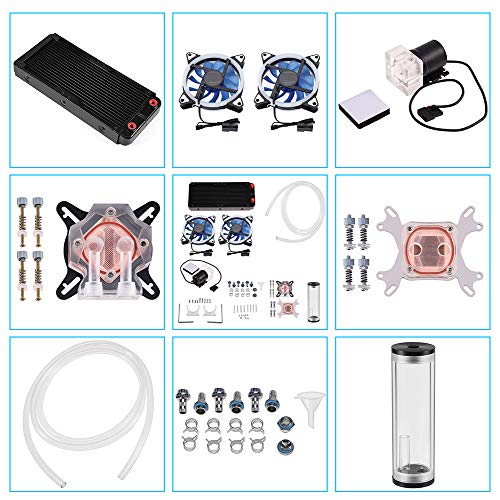
The DIY 240mm Water Cooling Kit is an excellent choice for enthusiasts looking to keep their CPU and GPU cool during intense gaming or overclocking sessions. This kit features a copper base for superior heat transfer, two high-performance LED fans, and a 9W water pump that operates quietly while delivering 600L/H. Its transparent cylindrical reservoir and durable hoses make installation straightforward. With universal compatibility for various platforms and multiple tube sizes, you won’t face compatibility issues. Plus, customer support is ready to assist with any concerns, ensuring your cooling solution remains efficient and effective.
Best For: Enthusiasts looking for an efficient and customizable cooling solution for high-performance CPUs and GPUs during gaming or overclocking.
Pros:
- Superior Heat Transfer: Copper base CPU/GPU block enhances cooling efficiency.
- Quiet Operation: The 9W water pump operates at a low noise level of 35.2 dB.
- Universal Compatibility: Supports multiple tube sizes and various platforms, making installation easy.
Cons:
- Average Customer Rating: The product has a 3.6 out of 5-star rating based on 178 reviews.
- Installation Complexity: While it includes all necessary components, some users may find installation challenging without prior experience.
- Limited Noise Level: Although quiet, the 35.2 dB may still be noticeable in very quiet environments.
Factors to Consider When Choosing Custom Loop Water Cooling Kits for GPUs
When choosing a custom loop water cooling kit for your GPU, it’s crucial to take into account several key factors. You’ll want to verify compatibility with your specific GPU model, evaluate cooling performance metrics, and contemplate the aesthetic design features that appeal to you. Additionally, assess the installation complexity and warranty options to make an informed decision.
Compatibility With GPU Models
Choosing a custom loop water cooling kit that fits your GPU model is crucial for peak performance. First, verify the kit’s compatibility with your specific GPU, as various kits cater to different architectures and cooling needs. Check for the necessary mounting hardware and components, like backplates and fittings, that align with your GPU’s design. It’s also important to confirm the thermal performance specifications of the cooling kit, making sure it can effectively dissipate heat generated under load. Additionally, consider the cooling method—whether it’s a hybrid design that combines liquid and air cooling for better efficiency. Always refer to detailed product documentation or manufacturer information to avoid any installation issues related to compatibility.
Cooling Performance Metrics
While evaluating custom loop water cooling kits for GPUs, it’s essential to understand the cooling performance metrics that directly impact your system’s efficiency. Start by checking the maximum coolant temperature; many effective designs operate around 60°C. Pay attention to construction materials—copper cold plates provide superior thermal conductivity compared to alternatives. Also, look for high-density cooling fins, ideally over 60, as they enhance thermal transfer by increasing heat dissipation surface area. Consider systems that incorporate dedicated fans for cooling circuit boards and VRMs, which can considerably reduce localized heat buildup, boosting overall stability. Finally, choose kits with built-in temperature sensors for precise monitoring, allowing you to optimize cooling management through software integration.
Aesthetic Design Features
Cooling performance metrics are important, but don’t overlook the aesthetic design features that can elevate your custom loop water cooling setup. Individually addressable RGB lighting lets you customize colors and effects for a truly personalized look. Transparent flow chambers and acrylic materials enhance visual appeal, showcasing coolant flow and internal components. Look for unique design elements like aluminum casings or CNC-machined parts that not only boost aesthetics but also improve performance. Customizable backplates protect sensitive components while adding visual flair. Additionally, modular designs in water blocks and reservoirs allow for versatile configurations, making your gaming rig not just functional but visually striking. Consider these features to create a cohesive and eye-catching setup.
Installation Complexity Level
When diving into custom loop water cooling kits for GPUs, you need to contemplate the installation complexity that comes with them. Unlike all-in-one solutions, these kits demand a solid grasp of water cooling principles and component compatibility. You’ll need to manage tubing routing, ensuring ideal flow paths while avoiding kinks, which requires careful planning. Many kits include tools for cutting and bending hardline tubing, but achieving clean bends can be challenging for beginners. Additionally, some setups may require extra components like reservoirs and pumps, adding to the complexity and installation time. While pre-assembled parts and clear instructions can simplify the process, expect to invest time to create an efficient and functional cooling loop.
Warranty and Support Options
After you’ve tackled the complexities of installation, it’s important to evaluate the warranty and support options that come with custom loop water cooling kits for GPUs. Look for a manufacturer’s warranty that typically lasts 2 to 3 years; this offers peace of mind against defects. Review the return policy, as many brands provide a full refund within 30 days for damaged items, ensuring you can return unsatisfactory products. Check if specific components like pumps and radiators have individual coverage. Responsive customer support can be essential for troubleshooting, so assess their availability. Finally, be aware of warranty conditions, such as needing proof of purchase or following installation guidelines to remain eligible for support.
