
If you’re looking to enhance your workspace in 2025, investing in a curved ultrawide monitor might be your best move. These monitors offer stunning visuals and seamless integration with macOS, making them perfect for both creative tasks and gaming. With options featuring USB-C connectivity and impressive resolutions, you’ll find a model that fits your needs. Let’s explore the top contenders that can transform your productivity and elevate your setup.
Dell 34 Plus USB-C Curved Monitor (S3425DW)

If you’re a Mac user seeking an immersive display for both productivity and casual gaming, the Dell 34 Plus USB-C Curved Monitor (S3425DW) is an excellent choice. This 34-inch monitor boasts a stunning 3440 x 1440 resolution and a 120Hz refresh rate, ensuring smooth visuals. With 99% sRGB and 95% DCI-P3 color coverage, you’ll enjoy vibrant colors for your creative projects. Plus, its integrated speakers and ComfortView Plus technology enhance your audio experience while reducing eye strain. The single USB-C cable simplifies setup, making it easy to connect to your Mac mini and keep your workspace clutter-free.
Best For: Users seeking a versatile 34-inch monitor that excels in productivity, casual gaming, and vibrant color display.
Pros:
- High resolution (3440 x 1440) and 120Hz refresh rate provide smooth and immersive visuals.
- 99% sRGB and 95% DCI-P3 color coverage deliver vibrant and accurate colors for creative work.
- Single USB-C cable simplifies connectivity and reduces desk clutter.
Cons:
- Some users report ghosting during fast-paced gaming scenarios.
- There are occasional issues with refresh rates and color accuracy noted by certain users.
- Integrated speakers may not satisfy those seeking high-quality audio performance.
Sceptre 34-Inch Curved Ultrawide WQHD Monitor (C345B-QUT168)

The Sceptre 34-Inch Curved Ultrawide WQHD Monitor (C345B-QUT168) is a game-changer for Mac users seeking an immersive visual experience. With a stunning 3440 x 1440 resolution and a 1500R curvature, it maximizes your screen space for multitasking. Enjoy a rapid 165Hz refresh rate and a 1ms response time, making it suitable for both productivity and casual gaming. The vibrant 99% sRGB color coverage enhances your visuals, while the luminous backcover lights add a modern touch. Plus, the Picture by Picture feature lets you view multiple inputs effortlessly. At an affordable price, it’s a fantastic addition to your workspace.
Best For: Users looking for an affordable, high-performance monitor that enhances productivity and gaming experiences.
Pros:
- Affordable price point for a 34-inch ultrawide monitor.
- Excellent for multitasking with Picture by Picture feature.
- High refresh rate and low response time suitable for casual gaming.
Cons:
- Issues with color depth and vibrancy compared to higher-end models.
- Some users report ghosting and smearing during fast-paced scenes.
- Occasional problems with stuck pixels and backlight visibility.
Samsung 34 ViewFinity S50GC Series Ultra-WQHD Monitor (LS34C502GANXZA)

Samsung’s 34 ViewFinity S50GC Series Ultra-WQHD Monitor (LS34C502GANXZA) stands out as an exceptional choice for Mac users who crave an expansive and vibrant workspace. With a stunning resolution of 3440 x 1440 pixels and a refresh rate of 100Hz, you’ll enjoy smooth visuals and lifelike details. Its HDR10 support enhances colors, while features like Picture-in-Picture and Picture-by-Picture allow seamless multitasking. The monitor’s eye-care technologies, including Eye Saver Mode and flicker-free operation, guarantee comfort during long sessions. Weighing only 10.8 pounds, it’s easy to set up, making it a great fit for your creative endeavors.
Best For: Professionals and gamers seeking an expansive, high-resolution monitor for multitasking and immersive experiences.
Pros:
- Ultra-WQHD resolution provides exceptional detail and clarity for various tasks.
- High refresh rate of 100Hz minimizes motion blur, perfect for gaming and video playback.
- Eye care features such as Eye Saver Mode and flicker-free technology enhance comfort during extended use.
Cons:
- The ultra-wide format may not be ideal for general web browsing and coding tasks.
- Initial setup can be challenging, requiring specific cables and driver updates.
- Some users may find the expansive size overwhelming in smaller workspaces.
Samsung Viewfinity S65UA 34-Inch Ultrawide QHD Curved Monitor

For those seeking an immersive viewing experience that enhances productivity, the Samsung Viewfinity S65UA 34-Inch Ultrawide QHD Curved Monitor stands out with its 1000R curvature, perfectly aligning with the natural curve of your eyes. Its 3440 x 1440 resolution and HDR10 color technology deliver stunning visuals, essential for design projects and gaming. With a 100Hz refresh rate, you’ll enjoy smooth performance while multitasking effortlessly. The USB Type-C port simplifies connectivity, reducing clutter. Plus, intelligent eye care features help minimize fatigue, making this monitor an excellent choice for Mac users looking to elevate their workspace.
Best For: Those who seek an immersive and productive workspace, particularly designers and gamers using Mac systems.
Pros:
- Exceptional 3440 x 1440 resolution with HDR10 for vibrant and accurate colors.
- 1000R curvature reduces eye strain and enhances immersion for extended use.
- USB Type-C connectivity simplifies setup with data transfer and charging through a single cable.
Cons:
- Limited KVM capabilities may not fully support switching between multiple computers.
- Some reports of initial defects, such as dead pixels or cracks upon delivery.
- Weight of 16.76 pounds may make it less portable compared to lighter monitors.
Philips 346E2CUAE 34 Curved UltraWide Monitor

With its impressive 34-inch curved display and UltraWide QHD resolution, the Philips 346E2CUAE monitor is an excellent choice for Mac users who crave an immersive viewing experience. The 1500R curvature enhances your field of vision, while the vibrant color gamut guarantees lifelike images. With a 100Hz refresh rate and a lightning-fast 1ms response time, gaming and multitasking become seamless. Plus, the USB-C connectivity simplifies your workspace. You can easily adjust the height for ideal viewing comfort, and with MultiView technology, managing multiple applications side by side becomes a breeze. Elevate your workspace with this stylish and functional monitor.
Best For: Users who seek an immersive and vibrant display for gaming, multitasking, and productivity in a stylish format.
Pros:
- Immersive Viewing Experience: The 1500R curvature and UltraWide QHD resolution provide a captivating visual experience.
- Fast Performance: With a 100Hz refresh rate and 1ms response time, gaming and multitasking are incredibly smooth.
- Versatile Connectivity: USB-C support allows for easy connection to various devices while reducing cable clutter.
Cons:
- Limited Color Accuracy for Professionals: May not meet the needs of creative professionals requiring higher color precision.
- Optimal Viewing Angle Required: Best viewed directly from the front, which may not be suitable for all setups.
- Weight Discrepancy: The listed weight of 0.01 ounces seems inaccurate for a monitor of this size.
Samsung C34J791 34-inch QHD Ultrawide Curved Monitor (Renewed)

The Samsung C34J791 34-inch QHD Ultrawide Curved Monitor stands out as an ideal choice for Mac users seeking both performance and connectivity. With its ultra-wide WQHD resolution of 3440 x 1440, you’ll enjoy vibrant colors and deeper blacks, thanks to QLED technology. The monitor features Intel Thunderbolt 3, providing 40 Gbps processing speed—four times faster than USB—and up to 85W laptop charging. Its compatibility with various devices guarantees seamless connections to docks and peripherals. Elevate your workspace with this renewed option, perfectly tailored for your Mac and designed to enhance productivity and creativity.
Best For: Mac users looking for a high-performance, ultra-wide monitor with advanced connectivity options.
Pros:
- Ultra-wide WQHD resolution for enhanced productivity and immersive experience.
- QLED technology provides a wider color range and deeper blacks for stunning visuals.
- Thunderbolt 3 connectivity allows for fast data transfer and convenient laptop charging.
Cons:
- The monitor may be bulky for smaller workspaces.
- Renewed condition may vary in quality compared to brand new products.
- Limited adjustability options for height and tilt may not suit all user preferences.
LG 38WR85QC-W 38 inch Curved UltraWide Monitor

Designed for creative professionals and avid gamers alike, the LG 38WR85QC-W 38 inch Curved UltraWide Monitor stands out with its stunning WQHD+ resolution and vibrant color accuracy. Its 21:9 aspect ratio and 2300R curvature immerse you in your work or gaming. With a rapid 144Hz refresh rate and 1ms response time, you’ll enjoy ultra-smooth gameplay free of tearing, thanks to NVIDIA G-SYNC and AMD FreeSync compatibility. The elegant design and adjustable stand enhance your setup, while the built-in USB hub simplifies connectivity. Though the built-in speakers may disappoint, this monitor’s features make it a worthy investment for productivity and gaming.
Best For: Creative professionals and gamers seeking an immersive experience with high performance and vibrant color accuracy.
Pros:
- High refresh rate (144Hz) and 1ms response time for ultra-smooth gameplay.
- Wide color coverage (DCI-P3 98%) and HDR support for exceptional visual quality.
- Elegant design with adjustable stand and built-in USB hub for convenient connectivity.
Cons:
- Built-in speakers are underwhelming, necessitating external audio solutions.
- Some users report minor backlight bleed and potential uniformity issues.
- Weight and stand depth may limit compatibility with certain desk setups.
LG UltraWide QHD 34-Inch Curved Computer Monitor (34WQ73A-B)
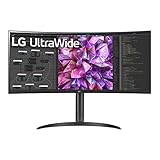
For professionals in graphic design and photography, the LG UltraWide QHD 34-Inch Curved Monitor (34WQ73A-B) offers an immersive viewing experience with its stunning 3440 x 1440 resolution and 99% sRGB color coverage. You’ll appreciate its IPS display, which delivers sharp, realistic colors from wide angles. With HDR 10 compatibility, built-in KVM, and USB Type-C, multitasking becomes seamless. Features like Reader Mode and Flicker Safe protect your eyes during long sessions. Enjoy easy setup and customizable layouts with screen-splitting software. Ideal for creative work, this monitor elevates your workspace, making it a fantastic choice for Mac users.
Best For: Professionals in graphic design and photography who seek an immersive and color-accurate monitor for multitasking.
Pros:
- High resolution of 3440 x 1440 with 99% sRGB color coverage for stunning visual clarity.
- Built-in KVM and USB Type-C for seamless control of multiple devices and easy connectivity.
- Eye protection features like Reader Mode and Flicker Safe enhance comfort during extended use.
Cons:
- Limited USB-C ports may restrict connectivity options.
- Only supports a 60 Hz refresh rate, which may not meet the needs of some gamers.
- Some users reported power issues when connected to power strips, leading to potential performance concerns.
LG 34SR63QA-W 34 inch Smart Curved Monitor
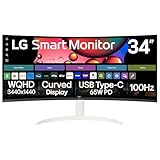
Looking for an immersive viewing experience? The LG 34SR63QA-W 34-inch Smart Curved Monitor delivers stunning visuals with its QHD resolution and 21:9 aspect ratio. The 1800R curve enhances your field of vision, making multitasking effortless. Enjoy built-in streaming access to popular platforms like Netflix and Disney+, and connect seamlessly with USB-C for power delivery. With HDR10 and up to 99% sRGB color gamut, colors pop vividly. Its sleek, virtually frameless design fits beautifully in any workspace. Plus, the tilt adjustment guarantees ideal comfort. Elevate your setup and enhance productivity with this remarkable ultrawide monitor tailored for Mac users.
Best For: Creative professionals and multitaskers seeking an expansive workspace with vibrant visuals and smart streaming capabilities.
Pros:
- Great picture quality with QHD resolution and HDR10 support for vivid colors.
- Built-in streaming services for easy access to popular platforms like Netflix and Disney+.
- Sleek, virtually frameless design enhances aesthetic appeal and maximizes screen space.
Cons:
- Some users reported issues with smart TV app resolution, affecting viewing experience.
- Misleading for dual monitor setups, as it may not meet expectations for users looking for that configuration.
- Concerns over display quality have been noted by certain customers.
Samsung 34 Odyssey G5 Ultra-Wide Gaming Monitor (LC34G55TWWNXZA)

Experience unparalleled immersion with the Samsung 34 Odyssey G5 Ultra-Wide Gaming Monitor, perfect for gamers and creatives alike. Its 34-inch WQHD display boasts a 1000R curvature that matches your field of view, pulling you into every scene. With a 165Hz refresh rate and 1ms response time, you’ll enjoy smooth gameplay free of motion blur. HDR10 technology enhances color accuracy, revealing stunning details in both bright and dark scenes. Multiple connectivity options make setup easy, though consider a monitor arm for ideal positioning. Overall, it’s a fantastic choice for an elevated workspace and immersive experience.
Best For: Gamers and creatives looking for an immersive ultra-wide display experience with high refresh rates and vibrant color accuracy.
Pros:
- Excellent immersion with 1000R curvature that matches the human field of view.
- Smooth gameplay with a 165Hz refresh rate and 1ms response time, minimizing motion blur.
- HDR10 technology enhances color accuracy, providing stunning detail in various lighting conditions.
Cons:
- Built-in stand lacks sufficient adjustability; consider a monitor arm for better positioning.
- Some users report issues with power management and clunky input switching.
- Customer support experiences can vary, leading to dissatisfaction with warranty claims.
Factors to Consider When Choosing Curved Ultrawide Monitors for Mac
When you’re choosing a curved ultrawide monitor for your Mac, several key factors come into play. You need to think about compatibility with macOS, resolution and aspect ratio, and color accuracy to guarantee a seamless experience. Additionally, consider the refresh rate and available connectivity options to make certain the monitor fits your setup perfectly.
Compatibility With Macos
Selecting a curved ultrawide monitor for macOS involves several key factors to assure peak performance. First, verify the monitor supports USB-C connectivity. This feature allows for seamless data transfer and power delivery, essential for many Mac devices. Next, check for compatibility with macOS’s native resolution settings to avoid any scaling issues, especially with resolutions like 3440 x 1440 pixels. Look for useful features like Picture-in-Picture (PIP) or Picture-by-Picture (PBP) to enhance your multitasking experience. Be aware of user feedback regarding setup challenges; some monitors may need specific USB-C cables or driver updates. Finally, consider the refresh rates supported, as macOS might not recognize higher rates, impacting performance during gaming or video playback.
Resolution and Aspect Ratio
A high-resolution curved ultrawide monitor can greatly enhance your Mac experience by providing an expansive view that’s perfect for multitasking. With a resolution of 3440 x 1440 pixels, you’ll enjoy sharp visuals that make it easier to work on multiple applications side-by-side without feeling cramped. The 21:9 aspect ratio offers 30% more screen space than standard widescreens, boosting your productivity and creating a more immersive cinematic experience. Additionally, consider the curvature—like 1500R or 1000R—since it aligns with the natural curve of your eyes, reducing strain during long sessions. Just remember to check compatibility with your Mac’s resolution and aspect ratio settings to guarantee peak display performance and a seamless user experience.
Color Accuracy and Gamut
After establishing the importance of resolution and aspect ratio in your curved ultrawide monitor, it’s time to focus on color accuracy and gamut. For creative professionals, color accuracy is vital. Look for monitors that offer coverage of color gamuts like 99% sRGB and over 98% DCI-P3, ensuring vibrant, true-to-life colors. A wider color gamut provides a more accurate representation of colors, essential for tasks like photo editing and graphic design. HDR support can enhance your experience by displaying deeper blacks and brighter highlights. Additionally, consider monitors with advanced color technologies for consistent quality across wide viewing angles, especially in collaborative settings. Calibration capabilities and built-in tools can help you tailor the display to your specific needs, enhancing overall color fidelity.
Refresh Rate Considerations
When choosing a curved ultrawide monitor for your Mac, understanding refresh rates is vital to enhancing your viewing experience. A higher refresh rate, like 120Hz or 165Hz, offers smoother motion, improving responsiveness, especially for gaming and fast-paced video content. Monitors with refresh rates of 100Hz or higher can greatly reduce motion blur, guaranteeing visual clarity during dynamic tasks. It’s important to make sure the monitor’s refresh rate aligns with your Mac’s output capabilities to avoid screen tearing or stuttering. Refresh rates below 60Hz can lead to noticeable lag, diminishing your experience, particularly during multitasking or creative work. Utilizing features like AMD FreeSync or G-SYNC can further enhance performance by synchronizing the monitor’s refresh rate with your graphics card.
Connectivity Options Available
Choosing the right connectivity options is essential for maximizing your experience with a curved ultrawide monitor on your Mac. Look for monitors with USB-C connectivity, allowing you to charge and transfer data with a single cable—this is especially handy for Mac users. Make sure the monitor supports Thunderbolt 3 for faster data transfer speeds and easy connections to multiple peripherals. HDMI and DisplayPort options are also vital, ensuring compatibility with various devices without needing extra adapters. Additionally, consider monitors with built-in KVM functionality, which lets you control multiple devices with one keyboard and mouse. Finally, verify the power delivery capabilities, as some models can charge your devices while in use, simplifying your desk setup and reducing cable clutter.
Ergonomics and Design Features
Maximizing your productivity with a curved ultrawide monitor involves not just connectivity but also considering ergonomics and design features. Look for models with a curvature radius like 1800R or 1500R, as these align with your eye’s natural shape, enhancing comfort during long sessions. Adjustable stands are essential—they let you modify height, tilt, and swivel, promoting ergonomic alignment and reducing neck strain. A virtually frameless design maximizes screen real estate and minimizes distractions, making your workspace more immersive. Integrated features like KVM switches allow for seamless control across multiple devices, streamlining your organization. Plus, with blue light reduction and flicker-free technologies, you’ll mitigate eye strain, further enhancing your overall experience. Choose wisely for ideal comfort and efficiency!
Gaming Performance Capabilities
A curved ultrawide monitor can elevate your gaming experience on a Mac, but it’s vital to take into account several performance capabilities. Look for models with a high refresh rate of at least 100Hz to guarantee smooth gameplay, especially in fast-paced scenarios. A low response time, ideally 1ms or lower, is important to minimize motion blur and ghosting effects. Compatibility with technologies like AMD FreeSync or G-Sync can greatly reduce screen tearing and stuttering, enhancing fluidity. Monitors with a curvature around 1000R are ideal, as they align with the natural curvature of your eye, providing an immersive experience. Finally, confirm HDR support for improved color accuracy and contrast, enriching your visual immersion in games.
Price and Warranty Options
When investing in a curved ultrawide monitor for your Mac, price and warranty options play a crucial role in your decision-making process. Prices can range from about $300 to over $1,500, depending on size, resolution, refresh rate, and panel technology. It’s essential to evaluate what fits your budget while meeting your needs. Many manufacturers offer warranties from one to four years, covering defects and performance issues. Don’t forget to check the return policy—most retailers allow returns within 30 days for defective items, though restocking fees may apply. Extended warranties are also available for high-investment monitors, providing extra peace of mind. Customer reviews underline how warranty support can greatly enhance your overall satisfaction with the purchase.
