
A curved ultrawide monitor for productivity can make multitasking feel easier, cleaner, and less cramped. With more horizontal space, you can keep spreadsheets, timelines, and reference windows visible at once.
This roundup focuses on models that balance workspace, ergonomics, and connectivity for modern desk setups, including USB-C options, high-resolution panels, and business-friendly features.
Best 10 Curved Ultrawide Monitor for Productivity Picks for 2026
Best for Single-Cable Productivity
Dell 34 Plus 34" USB-C Curved Monitor

- USB-C with up to 65W power delivery reduces cable clutter
- 34-inch 3440 x 1440 ultrawide format boosts multitasking space
- 120Hz refresh and FreeSync Premium keep motion smooth
Best For: Remote workers and laptop users who want a clean, high-productivity ultrawide setup.
Best for USB-C Business Setups
Samsung CH890 34" Curved Ultrawide

- 34-inch 3440 x 1440 panel for multitasking
- USB-C, HDMI, and DisplayPort connectivity
- Adjustable stand with height, tilt, and swivel
Best For: Office and remote-work users who want a wide, tidy, and ergonomic workspace.
Best Value Large-Screen Pick
Sceptre 34-Inch Curved Ultrawide WQHD Monitor

- 34-inch 3440 × 1440 ultrawide workspace
- 1500R curve supports easier multitasking
- Up to 180Hz plus 99% sRGB for versatility
Best For: Budget-minded buyers who want a wide, productive screen for multitasking and everyday office work.
Best for Superwide Multitaskers
INNOCN 49" Curved Ultrawide Monitor

- 49-inch 32:9 format is ideal for side-by-side workflows
- USB-C 65W helps keep laptop desks cleaner
- 144Hz and Adaptive-Sync add smoothness beyond office use
Best For: People who want a huge single-screen workspace for multitasking, docking, and split-screen productivity.
Best for Multitasking
LG 34WR55QK-B 34-inch Curved UltraWide

- 34-inch 21:9 screen for multi-window work
- USB-C with 65W power delivery for easy docking
- Picture-by-Picture and OnScreen Control boost workflow
Best For: People who want a wide, flexible monitor for multitasking, laptop docking, and everyday productivity.
Best for Maximum Screen Space
INNOCN 45C1R 45" 5K2K Ultrawide Monitor

- Huge 32:9 canvas for side-by-side multitasking
- USB-C, HDMI, DP, USB, and RJ45 connectivity
- PIP/PBP support for working from multiple inputs
Best For: Power users who want a single extra-wide display for multitasking and hybrid work.
Best for Docking-Station Desks
Samsung 49” Curved Ultrawide Business Monitor

- 49-inch 1000R curve with Dual QHD for expansive multitasking
- USB-C with 90W charging plus DisplayPort and HDMI inputs
- Built-in speakers and height-adjustable stand help simplify the desk
Best For: Professionals who want one big screen to power a clean, multi-device workstation.
Best for a One-Screen Desktop Upgrade
INNOCN 45-Inch 5K2K Ultrawide Monitor
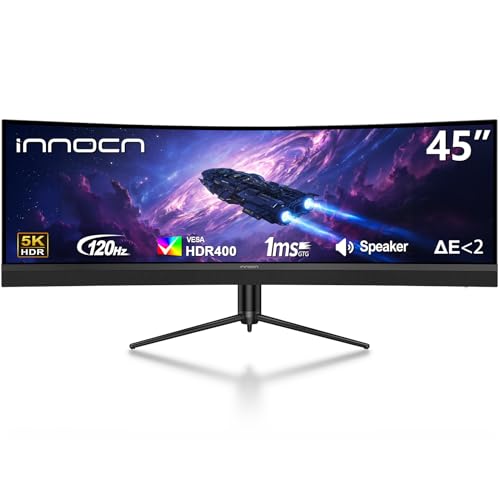
- 45-inch 5K2K ultrawide workspace
- USB-C with 65W charging support
- PIP/PBP and adjustable stand
Best For: Remote workers and power users who want a giant single-screen setup for multitasking.
Best for Multi-Tasking
INNOCN 49" 240Hz Curved Ultrawide Monitor

- 49-inch 32:9 panel with 5120 x 1440 resolution
- USB-C with 65W power delivery for laptop docking
- PIP/PBP support for two sources on one screen
Best For: Power users who want a single oversized display for multitasking, spreadsheets, and split-screen workflows.
Best for Single-Cable Productivity – Dell 34 Plus 34" USB-C Curved Monitor
If you want a curved ultrawide monitor for productivity that keeps the desk clean and still looks sharp, the Dell 34 Plus hits a strong balance. The 34-inch 3440 x 1440 panel gives you plenty of room for side-by-side windows, while USB-C connectivity with up to 65W power delivery helps simplify laptop setups.
Best For: Remote workers, laptop users, and anyone who wants a wide, clutter-free monitor for multitasking, meetings, and daily office work.
Pros:
- USB-C single-cable setup with up to 65W charging keeps desks organized
- 3440 x 1440 ultrawide resolution is great for spreadsheets, docs, and split-screen work
- 120Hz refresh rate and FreeSync Premium make scrolling and motion feel smoother
- Strong color coverage and contrast add polish for creative and mixed-use tasks
Cons:
- VA panel performance is solid, but not as ideal for color-critical pro work as higher-end IPS or OLED options
- Integrated speakers are convenient, though not a replacement for dedicated audio
For a curved ultrawide monitor for productivity, this Dell model stands out most for its practical mix of screen space, USB-C simplicity, and smooth everyday performance. It’s a sensible choice if you want one monitor that can handle work first and entertainment second without adding desk clutter.
Best for USB-C Business Setups – Samsung CH890 34" Curved Ultrawide
If you want a curved ultrawide monitor for productivity that keeps a desk setup clean and efficient, the Samsung Business CH890 is built for exactly that. Its 34-inch 21:9 WQHD panel gives you plenty of horizontal space for side-by-side documents, timelines, and multitasking, while USB-C helps reduce cable clutter.
Best For: Office users, remote workers, and business setups that need a wide workspace with simple single-cable connectivity.
Pros:
- 34-inch 3440 x 1440 ultrawide screen is great for split-screen work and multitasking
- USB-C, HDMI, and DisplayPort make it easy to connect modern laptops and desktops
- 100Hz refresh rate and FreeSync provide smoother motion than typical office monitors
- Fully adjustable stand plus VESA support improves ergonomic comfort
Cons:
- Not the sharpest pick for creators who want higher-than-WQHD resolution
- Curved design may take some getting used to if you prefer flat panels
This Samsung is a strong curved ultrawide monitor for productivity if you value practical workspace gains over flashy extras. It stands out most for business users who want a wide, comfortable display with flexible connectivity and easy day-to-day multitasking.
Best Value Large-Screen Pick – Sceptre 34-Inch Curved Ultrawide WQHD Monitor
If you want a curved ultrawide monitor for productivity without paying premium-brand prices, the Sceptre 34-inch model packs a lot into the desk space it takes up. Its 3440 × 1440 resolution gives you plenty of room for side-by-side windows, while the 1500R curve helps keep the whole screen comfortable to scan during long work sessions.
Best For: Budget-conscious buyers who want a roomy ultrawide layout for multitasking, spreadsheets, and everyday office work.
Pros:
- 34-inch 3440 × 1440 panel offers strong workspace for multitasking
- 1500R curvature makes the wide format easier to view at a glance
- Up to 180Hz refresh rate is a nice bonus for smoother scrolling and mixed work/play use
- 99% sRGB coverage is useful for creators who want solid color output
Cons:
- Built-in speakers are convenient, but not a substitute for dedicated audio
- Less polished feature set than higher-end office ultrawides
- Large footprint may be a tight fit on compact desks
For shoppers prioritizing screen real estate over luxury extras, this is a practical curved ultrawide monitor for productivity that covers the essentials well. It’s especially appealing if you want a wide, immersive workspace and don’t mind trading away some premium finishing touches to keep the price in check.
Best for Single-Cable Workstations – Samsung ViewFinity S65UA 34-Inch Ultrawide
If you want a curved ultrawide monitor for productivity that helps tame a busy desk, the Samsung ViewFinity S65UA is built around multitasking comfort. Its 34-inch 21:9 screen, 1000R curve, and USB-C connectivity make it a practical fit for laptop users who want more screen space, fewer cables, and an easier all-day viewing experience.
Best For: Laptop users and remote workers who want a wide, curved display with one-cable USB-C convenience and strong eye comfort features.
Pros:
- 34-inch ultrawide 21:9 panel gives you room for side-by-side apps and documents
- USB-C with 90W charging helps keep a laptop connected with one cable
- 1000R curve, TUV-certified eye care, and flicker-free support improve long work sessions
- 100Hz refresh rate makes scrolling, cursor movement, and general use feel smoother
Cons:
- Not the sharpest choice if you specifically want 4K resolution
- 100Hz is nice for work, but not a true high-end gaming refresh rate
- Large ultrawide footprint may be more monitor than very small desks need
For buyers focused on comfort, cable reduction, and efficient multitasking, this is a strong curved ultrawide monitor for productivity. It blends the right work-first features without turning the desk into a cable mess, which makes it especially appealing for modern laptop-based setups.
Best for Superwide Multitaskers – INNOCN 49" Curved Ultrawide Monitor
If you want a curved ultrawide monitor for productivity, the INNOCN 49C1G stands out with its 49-inch 32:9 layout, 144Hz refresh rate, and USB-C connectivity. It gives you a huge desktop-sized workspace for side-by-side windows, spreadsheets, timelines, and video calls without needing two monitors.
Best For: Professionals, creators, and multitaskers who want a single-screen setup with lots of horizontal space and modern USB-C convenience.
Pros:
- Massive 49-inch 32:9 screen is excellent for split-screen work and multitasking
- USB-C with 65W power delivery simplifies laptop setups
- 144Hz, Adaptive-Sync, and HDR400 add smoothness for work and play
- Height, tilt, and swivel adjustment improve day-to-day comfort
Cons:
- 3840 x 1080 resolution is good for width, but not as sharp as higher-res ultrawides
- Large footprint may overwhelm smaller desks
- Built-in speakers are basic
For buyers who care more about screen real estate and workflow efficiency than pixel density, this is a very capable curved ultrawide monitor for productivity. The PIP/PBP features and USB-C docking-style setup make it especially appealing for people juggling multiple devices.
Best for Multitasking – LG 34WR55QK-B 34-inch Curved UltraWide
If you want a curved ultrawide monitor for productivity, the LG 34WR55QK-B is built around screen space and simple multitasking. Its 34-inch 3440 x 1440 panel gives you room for side-by-side windows, while USB-C, HDMI, DisplayPort, and OnScreen Control make it easy to manage a full work setup.
Best For: Workers, students, and remote professionals who want a wide desktop for multi-window workflows, laptop docking, and easy day-to-day screen management.
Pros:
- 34-inch 21:9 display is great for side-by-side apps and spreadsheets
- USB-C with up to 65W power delivery helps simplify laptop connectivity
- OnScreen Control and Picture-by-Picture make multitasking easier
- Height- and tilt-adjustable stand adds flexibility for desk setups
Cons:
- 100Hz is smooth, but not aimed at high-end gaming
- 5ms response time is more practical than premium-fast
- HDR10 is a nice bonus, but not a true HDR workstation display
The LG 34WR55QK-B fits well if you want a curved ultrawide monitor for productivity with straightforward connectivity and enough width to keep work flowing without constant window switching.
Best for Maximum Screen Space – INNOCN 45C1R 45" 5K2K Ultrawide Monitor
If you want a curved ultrawide monitor for productivity that can replace a dual-monitor setup, the INNOCN 45C1R is built around space and flexibility. Its 32:9 5120 x 1440 panel gives you a huge desktop for spreadsheets, timelines, and side-by-side windows, while the 1500R curve helps keep everything comfortably in view.
Best For: Power users who want a single extra-wide display for multitasking, content creation, and occasional gaming.
Pros:
- Massive 45-inch 32:9 screen makes multitasking feel more like two monitors in one
- USB-C with power delivery plus HDMI, DisplayPort, USB, and RJ45 support broad connectivity
- PIP/PBP split-screen tools are ideal for working from multiple sources at once
- Height, tilt, and swivel adjustments make it easier to dial in an ergonomic setup
Cons:
- Very large footprint may overwhelm smaller desks
- VA panel and 3000:1 contrast are good, but not the sharpest fit for color-critical work
- USB-C power delivery is listed at 65W in the specs, not the 90W in the title
For buyers prioritizing sheer workspace, this is a strong curved ultrawide monitor for productivity with enough extras to support hybrid work and light gaming. The tradeoff is size, so make sure your desk and viewing distance can handle a 45-inch panel before committing.
Best for Docking-Station Desks – Samsung 49” Curved Ultrawide Business Monitor
If you want a curved ultrawide monitor for productivity that can also replace part of your docking setup, this Samsung 49-inch business display is built to do both. The 32:9 Dual QHD panel gives you plenty of room for side-by-side windows, while USB-C with 90W charging helps keep cables under control.
Best For: Professionals who want one big screen to power a clean, multi-device workstation.
Pros:
- Massive 49-inch 1000R curved panel with Dual QHD resolution for multitasking
- USB-C, DisplayPort, and dual HDMI inputs make it easy to connect multiple devices
- 90W USB-C charging helps reduce desk clutter and simplify laptop setups
- 120Hz refresh rate makes scrolling and occasional gaming feel smoother
Cons:
- Large footprint may be too much for compact desks
- High-end feature set likely places it above basic office-monitor budgets
This is a strong fit if you want a curved ultrawide monitor for productivity and also need a hub-like monitor that cuts down on accessories. Its size, connectivity, and ergonomic business focus make it especially appealing for serious multitaskers.
Best for a One-Screen Desktop Upgrade – INNOCN 45-Inch 5K2K Ultrawide Monitor
If you want a curved ultrawide monitor for productivity that can replace a dual-monitor setup, this 45-inch 32:9 panel is built for serious multitasking. The 5120 x 1440 resolution gives you a huge amount of workspace, while the 1500R curve helps keep everything in view without constant head-turning.
Best For: Remote workers, creators, and power users who want a massive single display for split-screen apps, timelines, spreadsheets, and mixed work/play use.
Pros:
- Massive 45-inch 5K2K workspace is excellent for side-by-side windows
- USB-C with 65W power delivery keeps laptop setups cleaner
- PIP/PBP support makes it easy to work from two sources at once
- Height-adjustable stand plus tilt/swivel help fine-tune ergonomics
Cons:
- Needs a large desk and enough viewing distance to feel comfortable
- VA panel is good for general use, but not ideal for color-critical professionals
- Not everyone will need this much screen if they only use one app at a time
This is a strong choice if you want a curved ultrawide monitor for productivity and prefer one expansive display over two smaller screens. It combines strong multitasking features, modern connectivity, and a desktop-friendly stand in a format that makes heavy workflow management feel easier.
Best for Multi-Tasking – INNOCN 49" 240Hz Curved Ultrawide Monitor
If you want a curved ultrawide monitor for productivity that also handles gaming, the INNOCN 49C1S stands out with a huge 49-inch 32:9 panel, 5120 x 1440 resolution, and a wraparound 1800R curve. It gives you the equivalent of two QHD workspaces side by side, plus USB-C, DisplayPort, HDMI, and PIP/PBP tools for running multiple devices at once.
Best For: People who want one oversized screen for spreadsheets, timelines, coding, and split-screen multitasking, with the option to game after work.
Pros:
- Massive 32:9 display replaces a dual-monitor setup for many productivity workflows
- USB-C with 65W power delivery makes laptop docking more convenient
- PIP/PBP support helps you work from two sources on one screen
- Height, tilt, and swivel adjustments improve desk ergonomics
Cons:
- Very wide size needs plenty of desk space
- 240Hz is more than most office users need, so some of the cost goes toward gaming features
- VA panel viewing characteristics may not match top IPS options for color-critical work
This is a compelling curved ultrawide monitor for productivity if you value screen real estate above all else and want a single display that can replace multiple monitors. It is especially useful for power users who juggle lots of windows and inputs, though it is best suited to larger desks and mixed work-play setups.
How We Picked the Best Curved Ultrawide Monitor for Productivity
We focused on displays that make daily work easier rather than chasing pure gaming specs. For a Curved Ultrawide Monitor for Productivity, the most useful factors were screen real estate, sharpness, panel quality, USB-C convenience, stand adjustability, and sensible refresh rates for smooth scrolling and window management.
We also prioritized models with resolutions that keep text crisp, along with ports and features that reduce desk clutter. For most buyers, the best monitor is the one that improves workflow without forcing compromises in comfort or connectivity.
Quick Comparison
In this group, 34-inch 3440 x 1440 models are the most balanced choice for mixed office use, offering enough width for side-by-side apps without overwhelming smaller desks. Larger 49-inch dual-QHD and 5K2K displays suit heavy multitaskers who want multiple windows open all day, while 45-inch ultrawides sit in the middle for users who want more immersion and room than a 34-inch panel.
USB-C with power delivery is especially valuable for laptop users because it can handle video, data, and charging through one cable. If your work depends on text clarity, prioritize higher pixel density over raw size; if you routinely juggle many sources at once, extra width may matter more than density.
Key Buying Factors for a Curved Ultrawide Monitor for Productivity
Size and Resolution
For most desks, 34-inch 3440 x 1440 monitors are the sweet spot. They provide strong multitasking benefits without requiring a huge viewing distance. Larger 49-inch models can replace dual monitors, but they need more desk depth and more intentional app organization.
Curvature and Viewing Comfort
A moderate curve can reduce eye movement across a wide panel and help the edges feel more natural. For productivity, you want a curve that supports comfort rather than one chosen only for gaming immersion.
Connectivity
USB-C is one of the biggest quality-of-life upgrades for laptop-based work. Look for models with USB-C power delivery, plus HDMI and DisplayPort if you plan to connect multiple devices. PIP/PBP can also help when you need to view two systems at once.
Panel Quality and Refresh Rate
Color accuracy, brightness, and text clarity matter more than extreme refresh rates. That said, a 100Hz or 120Hz panel can make scrolling and cursor movement feel smoother than a standard 60Hz display, which is a nice bonus for long workdays.
Who Should Buy Which Curved Ultrawide Monitor for Productivity?
If you want the most practical all-around setup, choose a 34-inch WQHD model with USB-C and an adjustable stand. If you work across spreadsheets, code, dashboards, or multiple apps at once, a 49-inch dual-QHD ultrawide can be a major productivity upgrade. If you want extra width without moving all the way to a superwide format, a 45-inch 5K2K monitor offers a compelling middle ground.
Remote workers and hybrid laptop users should lean toward USB-C models with charging, while office setups shared between multiple devices may benefit from stronger port selection and PBP support. In short, the best Curved Ultrawide Monitor for Productivity is the one that matches your desk size, workflow, and connection needs.
