
If you’re looking to elevate your viewing experience, the curved 45-inch monitors of 2025 have a lot to offer. With advancements in technology, these models promise stunning visuals and impressive performance for gamers and creatives alike. You’ll find features like high refresh rates and vibrant color accuracy. But which models stand out in this competitive market? Let’s explore the top contenders that could redefine your setup.
LG Ultragear 45-Inch Curved Gaming Monitor (45GR75DC-B)

The LG Ultragear 45-Inch Curved Gaming Monitor (45GR75DC-B) is perfect for gamers seeking an immersive experience, thanks to its expansive 45-inch QHD display and a stunning 32:9 aspect ratio. With a 200Hz refresh rate and 1ms response time, you’ll enjoy smooth, fluid gameplay without interruptions. The VESA DisplayHDR 600 enhances color accuracy, making every detail pop. Plus, with multiple connectivity options like HDMI, DisplayPort, and USB Type-C, you can easily connect your devices. The adjustable stand and virtually borderless design guarantee a comfortable viewing experience, while the LED backlighting adds style to your gaming setup.
Best For: Gamers looking for an immersive and high-performance display that enhances their gaming experience with vibrant colors and smooth visuals.
Pros:
- Large and immersive 45-inch QHD curved display with a 32:9 aspect ratio for a wide field of view.
- High refresh rate of 200Hz and 1ms response time for fluid and responsive gameplay, ideal for competitive gaming.
- Multiple connectivity options including HDMI, DisplayPort, and USB Type-C, making it versatile for various devices.
Cons:
- Weight of 19.4 pounds may require a sturdy desk or mount for optimal stability.
- Limited return window of 30 days for defective or damaged items, which may not be sufficient for all customers.
- Price point may be higher than standard monitors, making it less accessible for budget-conscious gamers.
Samsung 49 Odyssey OLED G9 Gaming Monitor (G91SD)

For gamers seeking an immersive experience, the Samsung 49 Odyssey OLED G9 Gaming Monitor (G91SD) stands out with its QD-OLED technology, delivering vibrant colors and stunning visuals. The dual QHD resolution of 5120 x 1440 guarantees crystal-clear images, while the 0.03ms response time and 144Hz refresh rate assure ultra-smooth gameplay. Its curved 32:9 design enhances your field of view, making every session more engaging. Plus, built-in features like burn-in prevention and an ergonomic stand guarantee longevity and comfort. Backed by a 3-year warranty, this monitor is a powerhouse for any serious gamer looking to elevate their setup.
Best For: Gamers looking for an immersive and high-performance monitor to enhance their gaming experience with vibrant visuals and ultra-smooth gameplay.
Pros:
- QD-OLED technology provides a wider color spectrum and exceptional image quality.
- Ultra-fast response time of 0.03ms and a 144Hz refresh rate ensure smooth and responsive gameplay.
- Curved 32:9 design enhances immersion and expands the field of view for a more engaging experience.
Cons:
- The large screen size may require ample desk space and proper mounting.
- Potential for burn-in despite built-in prevention features, necessitating careful use.
- Higher price point compared to standard monitors may not fit all budgets.
Asus ROG Strix XG49VQ 49” Curved Gaming Monitor

Gaming enthusiasts seeking an immersive experience will find the Asus ROG Strix XG49VQ to be an exceptional choice. With a massive 49” DFHD display and a stunning 1800R curve, it envelops you in every gaming environment. Enjoy smooth gameplay with a 144Hz refresh rate and FreeSync 2 HDR, while the DisplayHDR 400 certification guarantees vibrant visuals. You can customize your viewing with ergonomic adjustments and various color modes, enhancing your gaming experience. Plus, ASUS Eye Care technology reduces eye strain. Don’t forget the complimentary 3-month Adobe Creative Cloud access, perfect for enhancing your creative projects, valid until 2026!
Best For: Gaming enthusiasts looking for an immersive and high-performance display experience.
Pros:
- 144Hz refresh rate provides smooth gameplay and reduces motion blur.
- 1800R curved display enhances immersion and offers a wider field of view.
- ASUS Eye Care technology minimizes eye strain during long gaming sessions.
Cons:
- The ultra-wide format may not be suitable for all types of content or applications.
- Limited resolution (3840 x 1080) compared to higher-end monitors with 4K options.
- Size may require significant desk space and suitable mounting solutions.
LG 34-inch UltraWide Curved Computer Monitor (34WR55QK-B)

Designed for multitaskers and content creators, the LG 34-inch UltraWide Curved Computer Monitor (34WR55QK-B) offers an immersive 21:9 aspect ratio that enhances productivity and viewing experiences. With a stunning WQHD resolution of 3440 x 1440 and a refresh rate of 100Hz, your visuals will be crisp and fluid. Its 99% sRGB color gamut and HDR10 support guarantee vibrant colors for every task. The monitor features OnScreen Control for easy workspace customization and a Reader Mode to reduce blue light. Plus, with USB Type-C connectivity and adjustable ergonomics, it fits seamlessly into your workspace.
Best For: Multitaskers and content creators seeking an immersive and vibrant viewing experience.
Pros:
- High Resolution: WQHD (3440 x 1440) provides sharp and detailed visuals.
- Wide Color Gamut: Up to 99% sRGB ensures accurate and vibrant color reproduction.
- Versatile Connectivity: USB Type-C with 65W power delivery and multiple ports for enhanced compatibility.
Cons:
- Weight: At 15.2 pounds, it may require a sturdy desk for support.
- Price Point: Higher-end compared to standard monitors, which may not fit all budgets.
- Limited Height Adjustment: While adjustable, the range may not accommodate all ergonomic preferences.
Dell S2722DGM Curved Gaming Monitor – 27-inch QHD
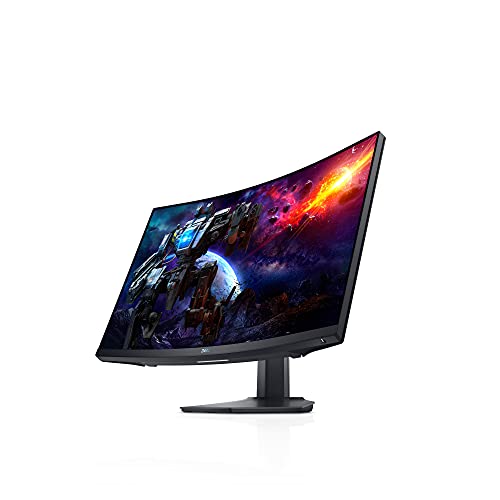
With its impressive 165Hz refresh rate and ultra-fast 1ms response time, the Dell S2722DGM Curved Gaming Monitor is a top choice for serious gamers seeking smooth and responsive gameplay. This 27-inch QHD monitor features a 1500R curvature and a 178-degree viewing angle, immersing you in every detail. Its sleek design, with a 3-sided narrow border, minimizes distractions and enhances your experience. Plus, you can adjust the height and tilt for maximum comfort. With HDMI and DisplayPort connectivity, it easily connects to your devices. Rated 4.5 out of 5 stars, it’s a reliable option for any gaming setup.
Best For: Serious gamers looking for a high-performance monitor with smooth gameplay and immersive visuals.
Pros:
- High Refresh Rate: With a 165Hz refresh rate, it provides fluid and responsive gameplay.
- Fast Response Time: The 1ms response time minimizes motion blur, enhancing clarity during fast-paced gaming.
- Adjustable Design: Height and tilt adjustability allows for a comfortable viewing experience tailored to individual preferences.
Cons:
- Limited Connectivity Options: Only HDMI and DisplayPort are available, which may not suit all users’ needs.
- Weight: At 5.76 pounds, it may be cumbersome for some to move or install.
- Curvature Preference: The 1500R curvature may not appeal to everyone and could take time to get used to.
Sceptre 27-inch Curved 240Hz Gaming Monitor (C275B Series)

If you’re a competitive gamer seeking an edge, the Sceptre 27-inch Curved 240Hz Gaming Monitor (C275B Series) is an excellent choice. With a stunning 1920×1080 resolution and a lightning-fast 1ms response time, you’ll enjoy smooth gameplay. The 1500R curvature immerses you in the action, while the 100% sRGB color gamut guarantees vibrant visuals. Plus, AMD FreeSync™ Premium technology eliminates screen tearing for a seamless experience. You’ll find versatile connectivity options with two HDMI and two DisplayPort inputs, along with built-in speakers for great audio. With a 4.5-star rating, this monitor is a solid investment for serious gamers.
Best For: Competitive gamers looking for a high-performance monitor with immersive visuals and fast response times.
Pros:
- High Refresh Rate: The 240Hz refresh rate ensures smooth gameplay, ideal for fast-paced gaming.
- Immersive Curvature: The 1500R curvature enhances the gaming experience by providing a more immersive field of view.
- Vibrant Colors: With 100% sRGB color gamut, the monitor delivers vivid colors and sharp contrasts for an engaging visual experience.
Cons:
- Limited Resolution: The 1920×1080 resolution may not meet the needs of gamers seeking higher pixel density.
- Built-in Speakers: While convenient, the built-in speakers may not provide the best audio quality compared to dedicated sound systems.
- Weight: At 14.57 pounds, it may be heavier than some other monitors, making it less portable.
Lenovo Legion 44.5″ Curved Gaming Monitor and RGB Gaming Keyboard

The Lenovo Legion 44.5″ Curved Gaming Monitor is perfect for serious gamers who demand an immersive experience. With a stunning 5120 x 1440 resolution, every detail pops on the ultra-wide screen. The adjustable stand guarantees ergonomic comfort, letting you tilt, swivel, and set the height just right. Pair it with the K310 Wired Keyboard, featuring a full-size layout and 24-key rollover for exceptional performance. Its dynamic 5-zone RGB lighting adds flair, while the compact design suits both tournaments and casual play. Enjoy silent operation and durability, with each key designed for 20 million clicks, enhancing your gaming sessions effortlessly.
Best For: Serious gamers seeking an immersive and ergonomic gaming experience with high-resolution visuals and customizable RGB aesthetics.
Pros:
- Exceptional 5120 x 1440 resolution for clear and vibrant gameplay.
- Ergonomic adjustable stand for personalized comfort during long gaming sessions.
- Dynamic RGB lighting on the keyboard enhances the gaming environment and aesthetics.
Cons:
- The large size of the monitor may require significant desk space.
- Wired keyboard limits mobility compared to wireless options.
- Higher price point may not be suitable for budget-conscious gamers.
Samsung 32 UJ59 Series 4K UHD Computer Monitor

For creative professionals and avid gamers alike, the Samsung 32 UJ59 Series 4K UHD Computer Monitor stands out with its stunning 4K resolution, delivering four times the detail of Full HD. You’ll enjoy a billion color shades, ensuring your images are vivid and realistic. With seamless upscaling technology, even lower resolutions look near UHD quality. Gamers will appreciate the smoother gameplay thanks to AMD FreeSync, minimizing stutter and input lag. Plus, its multitasking capabilities with Picture-by-Picture make it easy to connect multiple devices. The slim bezels and stylish design fit perfectly into any workspace while reducing eye strain during long sessions.
Best For: Creative professionals and gamers seeking a high-resolution monitor with vibrant colors and smooth performance.
Pros:
- Stunning 4K resolution provides four times the detail of Full HD, enhancing visual experiences.
- AMD FreeSync technology reduces stutter and input lag for a smoother gaming experience.
- Multitasking features like Picture-by-Picture allow for easy connection of multiple devices without losing quality.
Cons:
- Limited adjustability in stand height and tilt may not suit all ergonomic preferences.
- Potential for color accuracy issues in certain settings, which may affect professional graphic work.
- Higher price point compared to standard monitors, which may not be justifiable for casual users.
G50 Mechanical Spring Arm Curved Arc Monitor Holder

Looking to elevate your viewing experience? The G50 Mechanical Spring Arm Curved Arc Monitor Holder is your perfect solution. Designed to accommodate displays from 27 to 45 inches, it supports weights up to 35.2 lbs. With 360° rotation, ±90° swivel, and a tilt range of +15° to -60°, you can easily find your ideal angle. Its 11.2-inch lift distance and 25.2-inch extension maximize flexibility. Plus, it features a USB port for added convenience. Best of all, it requires no assembly, making setup a breeze. Enhance your workspace ergonomically with this versatile monitor holder today!
Best For: The G50 Mechanical Spring Arm Curved Arc Monitor Holder is best for individuals seeking an ergonomic and adjustable solution for their large-screen monitors in home or office settings.
Pros:
- Versatile Compatibility: Fits most 27 to 45 inch displays, including curved and ultra-wide screens.
- Easy Adjustability: Offers 360° rotation, ±90° swivel, and a tilt angle of +15° to -60° for optimal viewing angles.
- Convenient Features: Includes a USB port for easy device connectivity and requires no assembly for quick setup.
Cons:
- Weight Limitations: May not be suitable for extremely heavy monitors exceeding 35.2 lbs.
- Limited Vertical Adjustment: The upright lift distance of 11.2 inches might not meet the needs of all users.
- Single Piece Design: Being a single piece may limit customization options for specific setups.
LG Ultragear 45-Inch Curved Gaming Monitor (45GR65DC-B)

Gaming enthusiasts seeking an immersive experience will find the LG Ultragear 45-Inch Curved Gaming Monitor (45GR65DC-B) hard to resist. With its stunning 5120 x 1440 resolution and 32:9 aspect ratio, you’ll dive deep into your favorite games. The 200Hz refresh rate and 1ms response time guarantee smooth gameplay, while AMD FreeSync Premium Pro eliminates tearing. The monitor features a sleek, virtually borderless design, adjustable stand, and vibrant LED backlighting. Plus, with multiple connectivity options, you can easily connect your devices. Rated 4.4 stars, this monitor is a must-have for serious gamers looking to elevate their gaming setup.
Best For: Serious gamers seeking an immersive and high-performance gaming experience with a large, curved display.
Pros:
- High 5120 x 1440 resolution and 32:9 aspect ratio for an expansive field of view.
- Fast 200Hz refresh rate and 1ms response time for smooth and responsive gameplay.
- Multiple connectivity options, including HDMI 2.1 and DisplayPort 1.4, for versatile device connectivity.
Cons:
- The monitor’s large size may require ample desk space for proper placement.
- At 19.4 pounds, it may be heavy and cumbersome to mount or adjust.
- The price point may be higher than standard monitors, making it less accessible for casual gamers.
Factors to Consider When Choosing Curved 45 Inch Monitors
When you’re choosing a curved 45-inch monitor, you need to take into account several key factors. Think about the resolution and clarity for your viewing experience, along with the refresh rate and color accuracy that can enhance your visuals. Don’t forget to check the connectivity options and ergonomic design features that suit your setup and comfort.
Resolution and Clarity
To guarantee a satisfying viewing experience with your curved 45-inch monitor, it’s crucial to prioritize resolution and clarity. Look for a resolution of at least 5120 x 1440 (Dual QHD) to assure sharp images and clear detail across the screen. Aim for a higher pixel density, around 110 pixels per inch, to enhance clarity, especially during gaming or multimedia use. Monitors supporting HDR, like VESA DisplayHDR 600, can display a broader range of colors and contrast, greatly improving image quality. Additionally, a color gamut coverage of up to 95% DCI-P3 assures vibrant and accurate colors, essential for gaming and graphic work. Finally, consider the curvature, as a more pronounced curve can enhance immersion but may distort clarity at extreme angles.
Refresh Rate Importance
Alongside resolution and clarity, refresh rate plays a significant role in your overall experience with a curved 45-inch monitor. The refresh rate determines how often the image updates per second, affecting how smooth motion appears. For gaming, a refresh rate of 200Hz is ideal, ensuring ultra-smooth gameplay that’s essential in competitive scenarios. Monitors with 144Hz or higher sync well with modern graphics cards, enhancing visuals and reducing screen tearing. A higher refresh rate makes your display more responsive, allowing actions to feel fluid and immediate, especially in fast-paced gaming. Additionally, many gaming monitors support technologies like AMD FreeSync or G-Sync, which eliminate screen tearing and elevate your immersive experience even further.
Color Accuracy Range
Color accuracy is vital for anyone looking to get the most out of their curved 45-inch monitor, especially if you’re involved in design, gaming, or video editing. When evaluating options, consider the color accuracy range expressed as a percentage of color gamut coverage; monitors with up to 95% DCI-P3 coverage offer superior color fidelity. Look for models with VESA DisplayHDR 600 certification, as they enhance contrast and support a wider color spectrum. Additionally, monitors that support 10-bit color can display over a billion shades, important for precise color work. Panel technology matters too; IPS panels generally provide the best color reproduction and viewing angles. Finally, consider calibration capabilities to guarantee consistent color performance across various lighting environments.
Connectivity Options Available
Having guaranteed your curved 45-inch monitor delivers excellent color accuracy, it’s time to reflect on how well it connects to your devices. Look for a monitor that offers a variety of connectivity options, including HDMI 2.1, DisplayPort 1.4, and USB Type-C. These ports enhance compatibility with your gaming consoles and PCs. The USB Type-C port is especially handy, as it often supports power delivery, allowing you to charge devices while connecting. Multiple HDMI and DisplayPort inputs make switching devices effortless, eliminating the hassle of re-plugging. Additionally, consider monitors with extra USB ports for peripherals to streamline your workspace. Features like Picture-in-Picture (PiP) or Picture-by-Picture (PbP) can boost your multitasking capabilities by displaying content from multiple sources.
Ergonomic Design Features
When choosing a curved 45-inch monitor, it’s essential to contemplate ergonomic design features that enhance your comfort and productivity. Look for adjustable stands that allow you to modify height, tilt, and swivel, so you can find the perfect viewing angle for those long hours. A three-side virtually borderless design minimizes distractions, creating a more immersive experience. The monitor’s curvature, typically between 1800R and 1500R, aligns with the natural shape of your eye, reducing strain and enhancing comfort. Additionally, some models include eye care technologies like flicker-free backlighting and blue light filters to combat eye fatigue. Ultimately, these ergonomic features not only improve your posture but also elevate the overall aesthetics of your workspace.
Gaming Performance Capabilities
Gaming performance is a critical factor to evaluate when selecting a curved 45-inch monitor, especially if you’re looking to elevate your gaming experience. Aim for a refresh rate of at least 200Hz to guarantee smooth gameplay and reduce motion blur during fast-action sequences. A response time of 1ms or lower is ideal for minimizing ghosting effects, enhancing clarity in fast-paced environments. Features like AMD FreeSync Premium Pro can markedly improve performance by synchronizing the monitor’s refresh rate with your graphics card, eliminating tearing and stuttering. Additionally, high dynamic range (HDR) support, such as VESA DisplayHDR 600, enhances visual quality with a wider color gamut. Finally, confirm you have connectivity options like HDMI 2.1 for peak performance.
Price and Budget Considerations
While evaluating gaming performance is essential, understanding price and budget considerations is equally important when choosing a curved 45-inch monitor. Prices typically range from $800 to $2,000, influenced by features like resolution and refresh rate. Don’t forget to factor in additional costs for accessories, such as monitor arms, which can improve ergonomics and comfort. Higher-priced models often come with advanced features like HDR support, but budget models can still deliver solid performance for general use. Always compare warranties and return policies, as they can affect your purchase’s overall value. Investing in a monitor with a higher refresh rate and better color accuracy can enhance your experience, potentially justifying a higher upfront cost. Choose wisely!
