
When it comes to enhancing your creative workspace, choosing the right monitor can make all the difference. In 2025, several creator monitors with USB-C docks stand out for their productivity features. From stunning resolutions to ergonomic designs, these options cater to various needs. But which ones truly deliver unmatched performance? Let’s explore the top four selections that could transform your setup.
Dell S2722QC 27-Inch 4K USB-C Monitor

If you’re a creative professional seeking a monitor that can handle both your design work and casual gaming, the Dell S2722QC 27-Inch 4K USB-C Monitor is an excellent choice. With its stunning 4K UHD resolution and 99% sRGB color coverage, your designs come to life with vibrant colors. The USB-C connectivity simplifies your workspace, providing power and data through a single cable. While the built-in speakers might not impress, the adjustable stand offers ideal viewing angles. Ideal for both productivity and casual gaming, this monitor balances features and quality, making it a valuable addition to your creative setup.
Best For: Creative professionals seeking a versatile monitor for design work and casual gaming.
Pros:
- Stunning 4K UHD resolution with 99% sRGB color coverage for vibrant and accurate colors.
- USB-C connectivity provides a convenient single-cable solution for power and data.
- Adjustable stand allows for optimal viewing angles, enhancing user comfort.
Cons:
- Integrated speakers are considered weak, leading users to prefer external headphones.
- Limited USB port placement can make accessibility challenging for some users.
- Stand stability may be a concern, with some users finding it slightly wobbly.
Lenovo 27″ FHD Monitor with USB-C Dual 4K Display Travel Dock
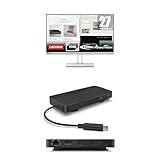
The Lenovo 27″ FHD Monitor with USB-C Dual 4K Display Travel Dock is an excellent choice for remote professionals seeking to enhance their productivity. With a 27-inch display and 1920×1080 resolution, it covers 100% of the sRGB spectrum. You’ll enjoy smooth visuals with a 100Hz refresh rate and AMD FreeSync support. The travel dock features 7 ports, including dual 4K display support and USB-C Power Delivery up to 100W. Its modern design, made from recycled materials, fits seamlessly into any workspace. Ideal for remote work, this monitor helps you stay efficient and connected wherever you are.
Best For: Remote professionals and everyday users looking to enhance their productivity and entertainment experience.
Pros:
- High 100Hz refresh rate with AMD FreeSync support for smooth visuals.
- Versatile connectivity options with dual 4K display support and multiple USB ports.
- Eco-friendly design featuring 66% post-consumer recycled content.
Cons:
- Relatively low customer rating of 2.3 out of 5 stars.
- Limited resolution at 1920×1080 compared to higher-end monitors.
- Best Sellers Rank indicates it may not be a popular choice among consumers.
Lenovo IdeaCentre Gaming 5i Desktop Bundle

For gamers and creators seeking a powerful yet compact system, the Lenovo IdeaCentre Gaming 5i Desktop Bundle stands out with its impressive Intel i5 processor and NVIDIA GeForce RTX 3050 graphics card. This bundle includes 8GB RAM and a 512GB SSD, ensuring smooth performance for demanding tasks. The USB-C Dual Display Travel Dock allows you to connect dual 4K displays effortlessly, enhancing your productivity. With a sleek design featuring teal accents and sustainable materials, it not only looks great but also supports your eco-friendly goals. Enjoy reliable connectivity and excellent cooling, making it perfect for both work and play.
Best For: Gamers and creators looking for a powerful, compact desktop with advanced graphics capabilities and sustainable design.
Pros:
- High-performance components: Equipped with a 12th Generation Intel i5 processor and NVIDIA GeForce RTX 3050 for enhanced gaming and creative tasks.
- Dual display support: The USB-C Dual Display Travel Dock allows for easy connection of dual 4K displays, boosting productivity.
- Sustainable design: Made with 66% Post-Consumer Recycled Content, aligning with eco-friendly goals.
Cons:
- Limited RAM: With only 8GB RAM, it may not be sufficient for heavily multitasking or very demanding applications.
- Average customer ratings: A 4.0 out of 5 stars rating suggests some users may have experienced issues or dissatisfaction.
- 30-day return policy: The return policy may be restrictive for buyers who need more time to evaluate the product.
ASUS 23.8” 1080P Docking Monitor (VA24ECPSN)

Designed for creative professionals and multitaskers, the ASUS 23.8” 1080P Docking Monitor (VA24ECPSN) stands out with its versatile USB-C connectivity. With a Full HD IPS display, a 75Hz refresh rate, and Adaptive-Sync technology, you’ll enjoy smooth visuals free from tearing. Its ergonomic design allows for height adjustment, tilt, swivel, and pivot, ensuring comfort during long work sessions. Extensive connectivity options, including HDMI, DisplayPort, and a USB hub, enhance your setup. Plus, the TÜV Rheinland-certified Flicker-free and Low Blue Light technologies prioritize your eye comfort. Enjoy a month of Adobe Creative Cloud with your purchase—perfect for creative tasks!
Best For: Creative professionals and multitaskers seeking a versatile and ergonomic monitor with excellent connectivity options.
Pros:
- Full HD IPS display with a 75Hz refresh rate for smooth visuals and vibrant colors.
- Extensive connectivity options, including USB-C for easy laptop docking and charging.
- Ergonomic design allows for height adjustment, tilt, swivel, and pivot for personalized comfort.
Cons:
- Limited to a 23.8-inch screen size, which may not be suitable for users needing larger displays.
- The weight of 11.79 pounds may be cumbersome for some setups, especially for wall mounting.
- The one-month Adobe Creative Cloud access may not be sufficient for long-term creative needs.
Factors to Consider When Choosing Creator Monitors With USB-C Docks
When choosing creator monitors with USB-C docks, you need to take into account several key factors. Screen resolution and refresh rate can greatly impact your work, while color accuracy is essential for any creative project. Don’t forget to evaluate connectivity options and ergonomic features to guarantee a comfortable and efficient setup.
Screen Resolution Importance
Choosing the right screen resolution for your creator monitor is important, as it directly influences the clarity and detail of your work. Higher resolutions, like 4K UHD (3840 x 2160), deliver considerably more pixel density than FHD (1920 x 1080), allowing you to see intricate details essential for photo editing and graphic design. With four times the pixel count of Full HD, 4K monitors provide greater screen real estate, making multitasking and side-by-side image comparisons easier. Additionally, color accuracy and depth improve with higher resolutions, which is crucial for precise color grading. Monitors with enhanced resolutions often support wider color gamuts, ensuring you can work with a broader range of colors, important for producing high-quality content.
Refresh Rate Considerations
While screen resolution plays a significant role in your work’s clarity and detail, refresh rate also impacts how smoothly your content appears. A higher refresh rate, like 100Hz, offers smoother motion and minimizes motion blur, making it ideal for video editing and gaming. If you primarily do standard photo editing or general tasks, a monitor with a 60Hz refresh rate might suffice, but you may notice choppy visuals during fast-paced content. Monitors with Adaptive-Sync technology eliminate screen tearing, enhancing your experience during dynamic sessions. Consider your main use case: higher refresh rates benefit gaming and motion graphics, while lower rates can be fine for static content. Just verify your refresh rate aligns with your graphics capabilities for the best results.
Connectivity Options Available
As you explore creator monitors with USB-C docks, it’s vital to evaluate the connectivity options available. Look for models that offer multiple ports, including USB connections, HDMI, and Ethernet, to enhance your setup. USB-C Power Delivery is another important feature, allowing you to charge your devices while transferring data and video signals simultaneously. High resolutions and refresh rates are essential for graphic-intensive tasks, so seek monitors that support up to 4K resolution and 100Hz refresh rates. Additionally, check for compatibility with Adaptive-Sync technology to minimize screen tearing during fast-paced content playback. Finally, don’t overlook ergonomic features and adjustability options, as these can greatly improve comfort during long creative sessions.
Color Accuracy Requirements
When setting up your creative workspace, color accuracy plays a pivotal role in achieving the best results. You’ll want a monitor that closely matches the original colors in your content, especially for tasks like photo editing and graphic design. Look for displays with high color coverage, ideally 99% sRGB or higher, to reproduce a wider range of vibrant colors. Consider monitors that support a color depth of 1.07 billion colors for smoother gradients and precise representation. Features like AMD FreeSync and low blue light technology can enhance your experience during long sessions by reducing eye strain. Finally, opt for monitors with calibration capabilities to guarantee the most accurate color reproduction for your professional projects.
Ergonomics and Adjustability
To create a productive and comfortable workspace, it’s crucial to prioritize ergonomics and adjustability in your choice of monitors. Look for designs that offer height adjustment, tilt, swivel, and pivot features. These adjustments help you maintain proper posture, reducing neck and back strain during long work sessions. A frameless design can also enhance immersion, allowing you to focus without distractions from monitor bezels. Consider monitors that support VESA mounting for greater flexibility in customizing your workspace. Additionally, opt for models with low blue light technology and flicker-free certification. These features improve eye comfort, making them suitable for extended use and boosting your overall productivity as a creator.
Build Quality and Design
Choosing monitors with solid build quality and thoughtful design can greatly enhance your creative workspace. Look for durability; modern monitors often use materials like post-consumer recycled content, promoting sustainability. Adjustable stands that offer height, tilt, swivel, and pivot capabilities guarantee ergonomic comfort during those long creative sessions. A frameless design minimizes distractions and maximizes screen real estate, providing an immersive experience. VESA compatibility adds versatility, allowing you to mount your monitor according to your personal preferences. Finally, consider aesthetics; sleek and modern looks can complement various creative environments, harmonizing with your overall setup. By focusing on these factors, you’ll create a productive and enjoyable workspace tailored to your needs.
