
A warm MacBook Pro does not always need another fan. The right cooling pad can lift it off a soft surface, improve airflow around the chassis, and make long sessions more comfortable.
These 10 options range from slim desk stands to fan-equipped pads. The best choice depends on your MacBook’s size, your workspace, and whether you need active cooling or simply better clearance.
Best 10 Cooling Pads for Macbook Pro Picks for 2026
Smart Cooling Pick
Razer Adaptive Smart Cooling Pad

- Automatic fan control
- Frames fit 14–18-inch laptops
- Three-port USB-A hub
Best For: Desk setups needing adjustable, automated cooling
Contact Cooling Pick
MetFut Detachable Peltier Stand
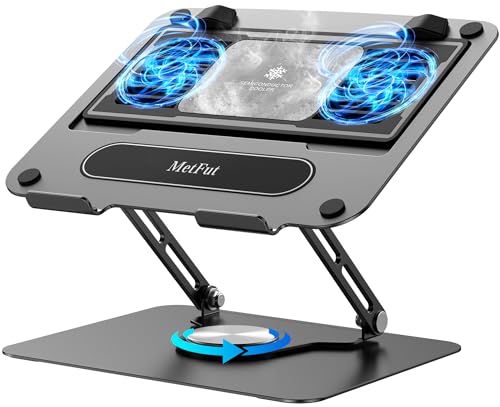
- Detachable thermoelectric cooler
- Adjustable, rotating stand
- 20W mode needs separate adapter
Best For: MacBook Pro models within the 15.6-inch stand limit
Large-Laptop Pick
ChillCore A21 Nine-Fan Cooling Pad

- Nine fans with selectable modes
- Eight height settings
- LCD display and RGB controls
Best For: Larger laptops in a stationary setup
Portable Pick
havit HV-F2056 Three-Fan Cooling Pad

- Slim, roughly 697 g design
- Three USB-powered fans
- USB-C MacBooks need an adapter
Best For: Simple cooling you can move between desks
Best Adjustable Aluminum Stand

- Seven adjustable heights
- Aluminum surface with a 160mm fan
- Fits 12- to 15.6-inch laptops
Best For: Portable cooling with flexible stand height
Best Slim Triple-Fan Option

- Three 110mm fans
- Fits 12- to 17-inch laptops
- Includes a USB-A to USB-A cable
Best For: Simple triple-fan cooling across laptop sizes
Best Fan-Control Flexibility
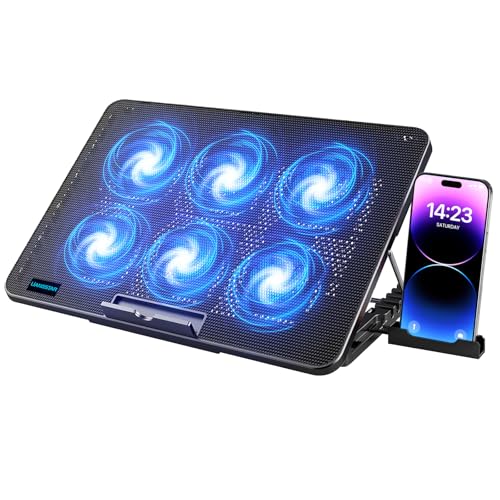
- Six fans with group controls
- Seven adjustable heights
- Fits 12- to 17.3-inch laptops
Best For: Adjustable airflow and a phone-friendly setup
Best for Lap Use
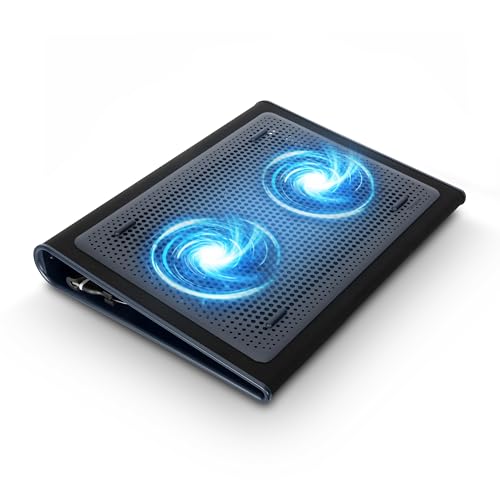
- Cushioned neoprene underside
- Two USB-A-powered fans
- Mesh top and four rubber stops
Best For: Cushioned cooling while working on your lap
Best Compact Adjustable Stand

- Five adjustable height settings
- Two fans beneath metal mesh
- Two USB 2.0 ports and phone holder
Best For: Adjustable desk use with a laptop within the stated size range
Best Three-Fan Option
Adjustable Cooling Pad with Phone Holder

- Three fans with speed wheel
- Five stand height settings
- Phone holder and USB ports
Best For: Adjustable desk cooling for a laptop under 17 inches
Smart Cooling Pick – Razer Adaptive Smart Cooling Pad
Among cooling pads for MacBook Pro, the Razer Adaptive Smart Cooling Pad stands out for its automatic fan control and included magnetic frames designed for laptops from 14 to 18 inches. Its foam seals and 140 mm fan create a pressure chamber, making it a more substantial desk setup than a slim travel pad.
Best For: MacBook Pro owners who want automatic fan adjustment and a pressure-chamber design.
Pros:
- Automatically adjusts fan speed as cooling needs change.
- Includes three magnetic frames for different laptop sizes.
- Adds a three-port USB-A hub and customizable fan settings through Razer Synapse.
Cons:
- At 2.61 kg and 4.49 inches tall, it is less convenient to carry.
- Its Razer HyperBoost feature is specified for compatible Razer Blade laptops, not MacBooks.
This is worth considering if you have desk space for a larger pad and value automated cooling. Treat its Blade-specific performance feature as a separate perk rather than a MacBook Pro benefit.
Contact Cooling Pick – MetFut Detachable Peltier Stand
If you’re comparing cooling pads for MacBook Pro, the MetFut stand offers a different approach: its detachable cooler combines a thermoelectric panel with two fans and is designed to press against the laptop’s base. The carbon-steel stand also adjusts in height and angle and rotates for screen sharing.
Best For: Owners of MacBook Pro models within the stand’s 15.6-inch, 20-pound limit who want an adjustable stand with detachable contact cooling.
Pros:
- Detachable cooler lets you use the stand without active cooling.
- Height, angle, and 360-degree rotation offer flexible positioning.
- Spring dampers help the cooling panel maintain contact with the laptop base.
Cons:
- Maximum 20W cooling requires a compatible USB adapter sold separately; laptop USB power provides 5W operation.
- The manufacturer warns that humidity or idle operation may produce mist on the cooling panel.
Check your MacBook Pro’s dimensions before ordering, especially if you have a larger model. The contact-based design is distinctive, but its power requirement and mist warning deserve attention.
Large-Laptop Pick – ChillCore A21 Nine-Fan Cooling Pad
The ChillCore A21 is one of the larger cooling pads for MacBook Pro shoppers to consider, with a stated laptop fit of 15.6 to 19.3 inches. Nine fans, eight height settings, an LCD fan-speed display, and RGB lighting make it a feature-heavy choice for a stationary setup.
Best For: Larger MacBook Pro setups where adjustable height and on-pad fan controls matter more than a minimal appearance.
Pros:
- Nine fans offer selectable cooling modes.
- Eight height settings provide a wide range of viewing angles.
- LCD shows fan speed; controls also adjust the RGB lighting.
Cons:
- Its stated 15.6-inch minimum fit makes it a less certain choice for smaller MacBook Pro models.
- RGB lighting may not suit a restrained workspace.
Choose this pad for its range of adjustments and visible controls, but confirm that your laptop sits securely on its 16.1-by-11.9-inch surface.
Portable Pick – havit HV-F2056 Three-Fan Cooling Pad
For shoppers seeking simpler cooling pads for MacBook Pro, the havit HV-F2056 uses three USB-powered fans beneath a metal-mesh surface. Its slim, roughly 697 g build and two height settings make it a practical option when you want a pad you can move between desks.
Best For: MacBook Pro owners who want a lightweight, straightforward fan pad and can accommodate its USB-A connection.
Pros:
- Slim 1.18-inch profile and lightweight construction aid portability.
- Three fans circulate air under the laptop.
- Two height settings and an extra USB port add everyday convenience.
Cons:
- The included cable uses USB-A; USB-C-only MacBooks need an adapter.
- Its stated laptop range is 15.6 to 17 inches, so check the fit for smaller models.
This is the uncomplicated option of the group. Check both laptop fit and port compatibility before buying so its portability does not come with an unexpected adapter requirement.
Best Adjustable Aluminum Stand – ICE COOREL Cooling Pad
Among cooling pads for MacBook Pro, this ICE COOREL model stands out if you want an aluminum surface and plenty of positioning options. Its mesh top and single 160mm fan provide airflow, while the fan speed adjusts from 1,000 to 1,400 RPM.
Best For: Users with a 12- to 15.6-inch laptop who want a portable cooler that doubles as an adjustable stand.
Pros:
- Seven height settings and two baffles help position and secure the laptop.
- Aluminum-alloy surface and mesh design support heat dissipation.
- Two USB 2.0 ports and an included USB cable offer convenient connectivity.
Cons:
- The stated 15.6-inch maximum rules out larger laptops.
- Its single-fan layout offers fewer fan-placement options than multi-fan pads.
This is a practical pick when stand adjustability matters as much as active cooling. Check your MacBook Pro’s size before choosing it.
Best Slim Triple-Fan Option – TECKNET Laptop Cooling Pad
If you’re comparing cooling pads for MacBook Pro and want broad size compatibility, the TECKNET pad supports laptops from 12 to 17 inches. Three 110mm fans run at 1,200 RPM, powered through your laptop’s USB port.
Best For: MacBook Pro users who want a slim, straightforward three-fan pad for extended work sessions.
Pros:
- Three fans, an on/off switch, and LED indicators make operation easy to check.
- Two height settings and rubber pads provide a more comfortable, secure setup.
- A second USB port can connect a peripheral while the cooler is powered.
Cons:
- Only two height settings limit positioning choices.
- The included power cable is USB-A to USB-A, so a MacBook Pro without a USB-A port needs a compatible adapter or connection.
TECKNET keeps the setup simple while covering a wide range of laptop sizes. Its USB-A cable is the main compatibility detail to check before buying.
Best Fan-Control Flexibility – LIANGSTAR Six-Fan Cooling Pad
For shoppers weighing cooling pads for MacBook Pro, the LIANGSTAR pad offers more fan-control options than a basic single-speed stand. Its six fans can run together or in separate groups of three, with two switches for adjusting fan speed.
Best For: Users with a 12- to 17.3-inch laptop who want adjustable airflow, multiple stand heights, and a place to prop up a phone.
Pros:
- Six fans can run together or in groups of three for flexible airflow.
- Seven height settings, a non-slip baffle, and bottom pads support angled use.
- Two USB ports and a stowable phone holder add desk-side convenience.
Cons:
- The phone holder and extra fan controls may be unnecessary if you want a simpler pad.
- One USB port is used to power the cooler, leaving one for another device.
Choose this model if you expect to adjust both your viewing angle and fan operation regularly. Its stated size range includes larger MacBook Pro models.
Best for Lap Use – Targus Dual Fan Lap Chill Mat
Among cooling pads for MacBook Pro, the Targus Lap Chill Mat is the comfort-focused option: its soft neoprene underside cushions your lap while two USB-A-powered fans move air through an open mesh top. Its 15-by-11.75-inch surface is marketed for laptops up to 17 inches.
Best For: MacBook Pro users who work with their laptop on their lap and want a cushioned, gently tilted surface.
Pros:
- Soft neoprene underside makes lap use more comfortable.
- Dual fans and an open mesh top promote airflow.
- Four rubber stops help keep the laptop in place.
Cons:
- Requires USB-A power; a compatible adapter may be needed.
- The tilt is fixed rather than height-adjustable.
Choose this mat for lap comfort over desk-stand adjustability. Check your MacBook Pro’s dimensions against the mat’s surface before buying.
Best Compact Adjustable Stand – KeiBn S039 Cooling Pad
If you’re comparing cooling pads for MacBook Pro and prefer an adjustable desk setup, the KeiBn S039 combines two fans with a metal mesh surface and five height settings. It’s specified for laptops up to 15.6 inches, so measure your MacBook Pro before choosing it.
Best For: Users with a suitably sized MacBook Pro who want multiple typing angles and a spare USB port.
Pros:
- Five height positions offer more flexibility than a fixed-angle pad.
- Two baffles help prevent the laptop from sliding.
- Two USB 2.0 ports provide a connection for the included cable and another device.
- Includes a hideaway phone holder.
Cons:
- The stated 15.6-inch laptop limit may rule out larger MacBook Pro models.
- MacBook Pro setups without USB-A need a compatible adapter for the supplied cable.
The S039 makes sense when stand adjustability matters as much as airflow. Its listed size range is the key compatibility check.
Best Three-Fan Option – Adjustable Cooling Pad with Phone Holder
For shoppers considering cooling pads for MacBook Pro with more angle and fan controls, this model pairs three fans with a five-level stand and a fan-speed wheel. The supplied listing says it fits laptops under 17 inches and includes a phone holder.
Best For: Desk users who want three fans, adjustable height, and a place to prop up a phone.
Pros:
- Three fans have a simple wheel for speed adjustment.
- Five height settings let you change the laptop’s angle.
- Stainless steel mesh surface and front anti-slip pads support everyday use.
- Includes a phone holder and USB ports.
Cons:
- The included USB-to-USB cable requires a separate adapter for a USB-C-only MacBook Pro connection.
- The stated fit is for laptops under 17 inches; verify your laptop’s dimensions.
This is the most feature-packed stand of the three, but its USB connection and size limit are worth checking before purchase.
How We Picked the Best Cooling Pads for Macbook Pro
We compared the listed laptop-size ranges, fan setups, height options, portability, and intended use of the 10 selected pads. We also considered practical MacBook Pro issues: whether a pad provides stable support, leaves room for airflow, and can be powered without an inconvenient adapter. Product listings alone cannot establish measured temperature drops or noise levels, so treat fan counts and marketing claims as features to compare, not performance guarantees.
Quick Comparison
For a compact desk setup, the slim havit HV-F2056 and TECKNET pads are straightforward starting points; check their dimensions against your MacBook before buying. The adjustable aluminum stand is worth considering if typing angle matters as much as airflow. The Razer adaptive pad offers automated fan control for buyers who want a more involved active-cooling setup.
For a larger workstation, the nine-fan RGB pad and six-fan adjustable pad emphasize fan coverage and height settings, though their size and lighting may be unnecessary for a minimalist desk. The Targus Lap Chill Mat is the distinct choice for use on your lap: its soft underside creates a barrier between the laptop and your legs. The two-fan S039 and three-fan pad offer other adjustable-stand configurations without requiring a large RGB model. The generically named black laptop stand is a basic alternative; verify its exact specifications before comparing it on price.
Key Buying Factors for Cooling Pads for Macbook Pro
Fit and Stability
Match the pad’s supported size to your specific MacBook Pro, then check the platform’s actual width and depth. A stated laptop-size range does not tell you whether the rubber grips line up well or the computer feels secure at steeper angles.
Airflow and Noise
MacBook Pro models differ in their thermal design. A pad may help keep the underside clear, particularly on a desk or other firm surface, but its fans cannot replace the laptop’s internal cooling system. More fans do not automatically mean better results; airflow placement and tolerable noise matter more than fan count alone.
Power and Ergonomics
Many pads use USB-A power, while some MacBook Pro models have only USB-C or Thunderbolt ports. Check the connector and budget for an adapter or hub if needed. Also check height settings: a raised screen can improve viewing comfort, but extended typing on a tilted laptop may be less comfortable than using an external keyboard.
Who Should Buy Which Cooling Pads for Macbook Pro?
Choose a slim pad if you move between rooms and mainly want clearance beneath the laptop. Choose an adjustable stand if your priority is screen height and a stable desk position. Consider a larger fan-equipped model for sustained demanding workloads if you have space and do not mind extra cables or fan noise. Pick the cushioned Targus mat for lap use. If your MacBook already performs comfortably on a hard, unobstructed surface, a fan pad may offer little benefit; improving room airflow or elevating the laptop could be enough.
