
The best conference room cameras make hybrid meetings easier by combining wide-angle video, reliable microphones, and simple compatibility with popular conferencing platforms.
We compared 10 models across image quality, room coverage, audio performance, tracking features, connectivity, and setup requirements to help you choose the right fit for your meeting space.
Best 10 Conference Room Cameras Picks for 2026
Best All-in-One System
TONGVEO 1080p AI Auto-Tracking Camera

- 1080p at 60fps via HDMI and USB 3.0
- AI face and humanoid tracking
- Includes Bluetooth speakerphone
Best For: Small-to-medium rooms needing integrated video and audio
Best 4K Compact Webcam
AV Access BizEye AI Conference Camera
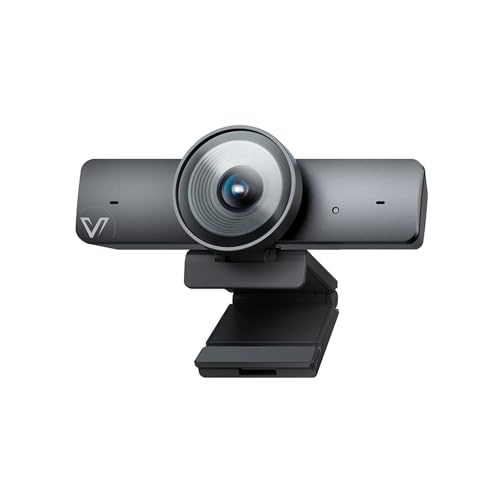
- 4K video at 30fps
- 1/1.8-inch CMOS sensor
- AI framing and presenter tracking
Best For: Small rooms needing sharp video and simple USB setup
Best Established Huddle-Room Option

- 4K sensor with 120° field of view
- Beamforming microphones
- USB BYOD and room-system support
Best For: Huddle rooms and small professional meeting spaces
Best Gesture-Controlled PTZ

- 4K at 30fps with 120° FOV
- Gesture, remote, and AI tracking controls
- Includes battery-powered speakerphone
Best For: Presentations requiring hands-free camera control
Compact All-in-One Pick

- 1080p video at 30 fps with a Carl Zeiss lens
- Integrated speakerphone and noise-canceling microphone
- USB plug-and-play with remote pan, tilt, and zoom
Best For: Small rooms and desk-based video meetings
Smart 360-Degree Pick

- 4K 360-degree video and audio up to 18 feet
- Automatically focuses on whoever is speaking
- Compatible with Teams, Zoom, Meet, Webex, and more
Best For: Hybrid meetings needing room-wide speaker coverage
Flexible PTZ System

- 4K 30 fps PTZ camera with 3x optical zoom
- AI face and humanoid tracking for active speakers
- Wireless speakerphone with four microphones and 16.4-foot pickup
Best For: Small-to-medium rooms needing PTZ flexibility and strong audio options
Premium All-in-One Pick

- 4K camera with 5x digital zoom
- Four beamforming noise-reducing microphones
- Built-in Bluetooth speaker and PTZ controls
Best For: Professional rooms needing integrated video and audio
Smart Tracking Pick

- 4K HDR video with a 1/2-inch sensor
- AI pan-and-tilt tracking follows movement
- DeskView, Whiteboard, and gesture controls
Best For: Presenters and small rooms needing automatic framing
360-Degree Coverage Pick

- Captures a full 360-degree view
- Four noise-reduction microphones and built-in speaker
- USB plug-and-play with broad compatibility
Best For: Round-table meetings needing full-room coverage
Best All-in-One System – TONGVEO 1080p AI Auto-Tracking Camera
For shoppers comparing conference room cameras for small-to-medium meeting spaces, this TONGVEO system combines a 1080p PTZ camera with a Bluetooth conference speakerphone. Its AI tracking, HDMI and USB 3.0 outputs, and integrated audio make it a practical all-in-one setup.
Best For: Small-to-medium conference rooms needing integrated video and wireless audio.
Pros:
- AI face and humanoid tracking with 350° horizontal and 180° vertical movement.
- Outputs 1080p video at up to 60fps through HDMI and USB 3.0.
- Speakerphone offers full-duplex audio, echo cancellation, and up to a 16.4-foot pickup range.
Cons:
- The camera is wired, while the speakerphone is wireless.
- It uses 3x optical zoom rather than 4K video.
This is a flexible choice when a meeting room needs both camera and speakerphone functionality in one package. Its plug-and-play connectivity and broad app compatibility also simplify deployment.
Best 4K Compact Webcam – AV Access BizEye AI Conference Camera
Among conference room cameras for small meeting spaces, the AV Access BizEye stands out with a 1/1.8-inch CMOS sensor, 4K video, and AI framing features. Its compact USB design also works for home offices, streaming, and straightforward laptop or monitor setups.
Best For: Small rooms and hybrid workspaces that prioritize sharp 4K video and automated framing.
Pros:
- 1/1.8-inch CMOS sensor is designed to improve detail and low-light performance.
- 4K video at 30fps with a 120° wide-angle field of view.
- AI auto framing, presenter tracking, and gallery modes can keep participants centered.
Cons:
- The built-in microphone is specified for voice pickup up to 3 meters.
- It uses 5x digital zoom rather than optical zoom.
This model is a good fit when image quality and automated composition matter more than motorized PTZ movement. USB plug-and-play compatibility keeps installation simple across major conferencing platforms.
Best Established Huddle-Room Option – Logitech MeetUp 4K
For buyers seeking conference room cameras from an established conferencing brand, the Logitech MeetUp is built specifically for huddle and small rooms. It combines a 4K sensor, 120° field of view, beamforming microphones, and flexible mounting in an all-in-one design.
Best For: Huddle rooms and small meeting spaces using BYOD or dedicated room systems.
Pros:
- 4K video, 120° viewing angle, and 5x HD zoom capture small-room meetings clearly.
- Beamforming microphones pick up voices from up to 4 meters.
- Supports USB BYOD connectivity, multiple mounting options, and room deployments for Teams, Zoom, and Google Meet.
Cons:
- The expansion microphone is sold separately.
- Its 4K capture is listed at 30fps.
MeetUp is a polished choice for organizations that want a compact small-room system with installation and management options. The optional expansion mic may be necessary for larger tables or greater pickup coverage.
Best Gesture-Controlled PTZ – TONGVEO 4K AI Camera System
This TONGVEO system is one of the more feature-rich conference room cameras for presenters who want hands-free control. It pairs a 4K PTZ camera with gesture control, AI tracking, a speakerphone, and multiple installation and control options.
Best For: Presentations and remote meetings where 4K video, presenter tracking, and hands-free controls are useful.
Pros:
- Captures 4K video at 30fps with a 120° wide-angle field of view.
- Offers AI tracking, six gesture controls, remote control, and 5x digital zoom.
- Includes a speakerphone with two noise-reducing microphones, 5-meter pickup, and 6–8 hours of battery life.
Cons:
- The camera requires a wired USB connection and external power.
- 4K capability depends on compatible equipment and software.
- The listed remote focus controls do not apply to this version.
This kit is especially appealing for presenters who move around or want to change framing without touching the camera. Its RS232 and RS485 support adds control flexibility, while the included speakerphone helps complete the meeting setup.
Compact All-in-One Pick – Logitech BCC950
The Logitech BCC950 is a practical choice for buyers who want a simple conference room camera with integrated audio. Its 1080p video, 30 fps capture, speakerphone, and plug-and-play USB connection make it well suited to small meeting spaces and desk-based conferencing.
Best For: Small conference rooms, private offices, and teams that want camera and speakerphone functions in one USB device.
Pros:
- Combines 1080p HD video with a full-duplex speakerphone and noise-canceling microphone.
- Omnidirectional audio, echo cancellation, and stated voice coverage up to 8 feet from the base.
- Remote and base controls support pan, tilt, zoom, volume, mute, and call functions.
- Compatible with Windows and macOS, with support for Skype for Business, Cisco Jabber, and WebEx.
Cons:
- The listed audio pickup range is limited to 8 feet, making it less suitable for larger rooms.
- Its freestanding desktop form factor may be less appropriate for permanent ceiling or wall installations.
- Video resolution is 1080p rather than 4K.
The BCC950 prioritizes straightforward setup and integrated controls over advanced room coverage. It is a sensible conference room camera for compact spaces where participants sit relatively close to the device.
Smart 360-Degree Pick – Meeting Owl 4+
The Meeting Owl 4+ stands out among conference room cameras for hybrid meetings that need a full-room view. It combines 4K 360-degree video, 360-degree audio, and automatic speaker focus to help remote attendees follow conversations around the room.
Best For: Small to large meeting rooms, hybrid collaboration, and organizations managing multiple room devices.
Pros:
- Captures 360-degree video in 4K and 360-degree audio up to 18 feet.
- Automatically focuses on active in-room speakers using visual and audio cues.
- Works with Microsoft Teams and virtually all major web-based conferencing platforms listed in the notes.
- Supports fleet administration through The Nest, plus expansion with additional Owl devices or microphones.
Cons:
- The advanced 360-degree system may be more equipment than a small, single-presenter meeting requires.
- Expansion and enterprise management features may add complexity compared with a basic USB webcam.
- The device uses Wi-Fi connectivity, which may require additional network planning in managed offices.
With automatic framing and ecosystem expansion options, the Meeting Owl 4+ is designed for rooms where participants speak from different positions. It is especially compelling when remote engagement and room-wide visibility matter more than a conventional front-facing camera view.
Flexible PTZ System – TONGVEO 4K AI Conference Kit
This TONGVEO kit pairs a 4K PTZ conference room camera with a wireless Bluetooth speakerphone. Its 93-degree view, AI auto-tracking, HDMI and USB 3.0 outputs, and multiple microphone connection options give small and medium rooms a more configurable video and audio setup.
Best For: Small-to-medium conference rooms, classrooms, worship spaces, medical meetings, and users who need PTZ movement plus flexible installation.
Pros:
- Supports 4K video at 30 fps, 3x optical zoom, and a 93-degree wide-angle view.
- AI tracking can recognize faces and people, then follow the active speaker.
- Offers HDMI output for 4K video and USB 3.0 output for 1080p video.
- Wireless speakerphone includes four omnidirectional microphones, a 16.4-foot pickup distance, and USB, Bluetooth 5.0, or dongle connectivity.
Cons:
- USB output is listed at 1080p, so 4K conferencing through a computer may require HDMI.
- The speakerphone is specified for approximately 6–8 hours of continuous use on its battery.
- PTZ controls, AI tracking, and multiple connection methods may require more setup than an all-in-one webcam.
This system is a strong fit when buyers want adjustable camera positioning, optical zoom, and flexible display connections rather than a fixed desktop camera. Its separate speakerphone also makes it easier to position audio coverage for a room of roughly 8–12 people.
Premium All-in-One Pick – Bose Professional VB-S
The Bose Professional VB-S is a polished choice for conference room cameras when clear audio matters as much as sharp video. It combines a 4K camera, beamforming microphones, and a Bluetooth speaker in one low-profile unit, with PTZ controls and auto-framing for more flexible meetings.
Best For: Offices, classrooms, and professional meeting spaces that want an integrated video-and-audio setup.
Pros:
- 4K Ultra HD video with 5x digital zoom and a wide field of view
- Four beamforming microphones focus on voices and reduce unwanted noise
- Includes digital PTZ, two auto-framing modes, remote control, and customizable presets
- Works with Google Meet, Microsoft Teams, Zoom, and more
Cons:
- Display mounting kit is sold separately
- Its stationary form factor may be less suitable for highly mobile setups
The VB-S stands out as a complete conference-room camera system rather than a basic webcam. Its strong audio, flexible mounting, and built-in speaker make it especially practical where a clean installation and reliable voice pickup are priorities.
Smart Tracking Pick – Insta360 Link 2
The Insta360 Link 2 is a compact option among conference room cameras, combining 4K HDR video with physical AI pan-and-tilt tracking. Its autofocus, noise-canceling microphone, and software-based controls make it useful for meetings, presentations, and hybrid work setups.
Best For: Presenters, small meeting spaces, and users who want automatic framing with a compact USB camera.
Pros:
- 4K video from a 1/2-inch sensor with HDR and low-light performance
- AI tracking physically pans and tilts to keep people in frame
- Includes DeskView, Whiteboard, portrait, gesture-control, and smartphone-control features
- Privacy mode tilts the camera down after inactivity
Cons:
- Requires a PC or Mac for available flash storage and software controls
- Not currently compatible with ARM-based Windows systems
- Its compact design is oriented more toward personal or small-room use than large conference halls
The Link 2 is a flexible choice when active presenters need to move without constantly adjusting the camera. It offers advanced framing and creative modes in a small package, though larger rooms may benefit from a dedicated multi-microphone system.
360-Degree Coverage Pick – TOUCAN SC360
The TOUCAN SC360 takes a different approach to conference room cameras with 360-degree capture, four noise-reduction microphones, and a built-in speaker. Its USB plug-and-play setup and broad device compatibility make it a straightforward option for teams that want coverage around the room without manually repositioning the camera.
Best For: Small to large meeting rooms where full-room visibility and simple USB setup are priorities.
Pros:
- 360-degree viewing angle helps capture participants around the room
- Four microphones support clearer voice pickup and noise reduction
- Includes a speaker and supports USB plug-and-play connectivity
- Works with PCs, laptops, MacBooks, tablets, Zoom, Microsoft Teams, and other conferencing platforms
Cons:
- Video resolution is 1080p rather than 4K
- Fixed-focus and autofocus specifications may offer less control than a dedicated PTZ camera
- Its 360-degree design may be more than needed for a single-presenter setup
The SC360 is focused on room-wide participation rather than cinematic image quality. For collaborative meetings where people sit around different sides of a table, its 360-degree coverage, microphones, and speaker can simplify the equipment arrangement.
How We Picked the Best Conference Room Cameras
We focused on the features that matter most in real meeting rooms: video resolution, field of view, microphone pickup, speaker quality, automatic framing, tracking accuracy, connection options, and ease of installation. The selection includes compact desktop units, all-in-one conference systems, 360-degree cameras, and PTZ models for larger spaces.
We also considered practical compatibility. USB connectivity is useful for plug-and-play laptop meetings, while HDMI, Bluetooth, and dedicated control options can make a camera more flexible in a permanent conference-room setup. Features such as AI framing, gesture control, noise reduction, and speaker tracking were treated as conveniences rather than substitutes for strong core image and audio performance.
Quick Comparison
- Best for simple desktop meetings: Logitech BCC950
- Best for compact 4K conferencing: AV Access AI-powered 4K webcam
- Best for wide, shared-room coverage: Logitech MeetUp
- Best for 360-degree visibility: Meeting Owl 4+ or TOUCAN 360-degree camera
- Best for presenter tracking and flexibility: Insta360 Link 2
- Best for PTZ control and optical zoom: TONGVEO all-in-one systems
- Best for integrated audio quality: Bose Professional VB-S
Key Buying Factors for Conference Room Cameras
Room Size and Viewing Angle
Small rooms may work well with a desktop webcam or a camera offering roughly 90 degrees of coverage. Larger rooms usually benefit from a wider lens, 360-degree capture, or a PTZ camera that can pan, tilt, and zoom toward participants.
Resolution and Low-Light Performance
4K provides extra detail and room for digital cropping, but resolution alone does not guarantee a better meeting image. Sensor quality, exposure control, HDR, and lighting have a major effect on faces and presentations.
Microphones and Speakers
Check the expected pickup range and whether the system includes echo cancellation and noise reduction. Built-in speakers are convenient, while larger rooms may require external audio equipment for consistent coverage.
Tracking and Controls
AI tracking can keep a presenter or speaker centered, but it varies in speed and accuracy. PTZ controls and optical zoom are valuable when participants sit farther from the camera or when operators need precise framing.
Connectivity and Software Compatibility
Confirm support for your preferred meeting platform and operating system. USB is generally the simplest option; HDMI, Bluetooth, and additional control interfaces are useful for installed systems and mixed-device environments.
Who Should Buy Which Conference Room Cameras?
Choose a compact webcam with integrated audio for a home office, huddle room, or occasional meeting setup. For a medium conference room, an all-in-one 4K or PTZ system offers a stronger balance of coverage, tracking, and connection options. Choose a 360-degree model when participants sit around a table and equal visibility matters more than traditional front-facing framing. For presentation-heavy rooms, prioritize reliable tracking, wide coverage, and optical zoom. Finally, buyers who already have separate speakers and microphones can focus on camera quality and mounting flexibility rather than paying for bundled audio.
