
If you need desktop-class expansion without opening your computer, a compact Thunderbolt PCIe expansion chassis is one of the most practical upgrades you can buy. It lets you add capture cards, storage, networking, and other PCIe hardware to systems that only have Thunderbolt or USB4.
In this roundup, we focus on compact options that balance size, performance, slot count, and real-world compatibility for creators, engineers, and mobile workstations.
Best 9 Compact Thunderbolt Pcie Expansion Chassis Picks for 2026
Best for Thunderbolt 3 Workflows

- 40Gbps Thunderbolt 3 with strong PCIe bandwidth
- One half-length, full-height, single-width PCIe slot
- Compact enclosure with daisy-chain support
Best For: Users who need one fast PCIe card in a compact Thunderbolt 3 enclosure.
Best for Silent Capture Workflows
Thunderbolt 4/3 USB4 PCIe Expansion Enclosure
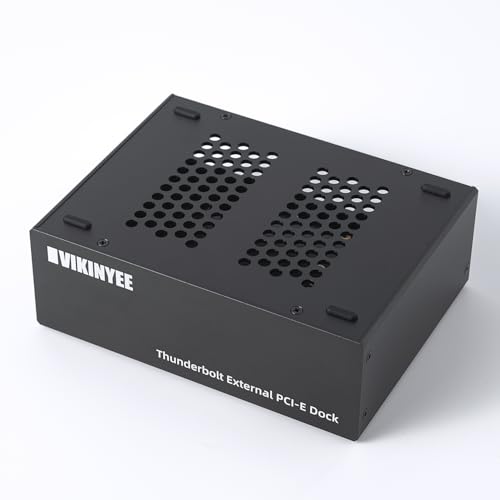
- 40Gbps external PCIe 3.0 x4 expansion
- Fanless aluminum chassis for quiet operation
- Works with macOS, Windows, and Linux
Best For: Creators and IT users who need a silent external PCIe slot for capture cards, 10GbE, or NVMe adapters.
Best for Tight Builds
Sonnet Echo Express SEL Thunderbolt 3 Chassis

- Ultra-compact enclosure for small workspaces
- One low-profile PCIe slot keeps it simple
- Thunderbolt 3 connectivity for modern setups
Best For: People who only need a single low-profile PCIe card in the smallest possible chassis.
Best for Thunderbolt 5 Speed
OWC Mercury Helios 5S Thunderbolt 5

- Over 6000MB/s bandwidth for high-demand workflows
- One PCIe 4.0 x4 slot for pro expansion cards
- Three TB5 ports add extra device and display connections
Best For: Creators and power users needing a fast external PCIe slot for pro peripherals.
Best for Simple Multi-Card Expansion

- Adds four external PCIe x1 slots
- USB-C locking host connection included
- Rugged steel build with OS-independent support
Best For: IT and pro users needing a rugged external chassis for add-in cards, not GPUs.
Best for Dual-Slot Expansion
Thunderbolt 3 to 2 PCIe Expansion Chassis

- Dual PCIe 3.0 x16 slots for flexible card support
- Silent all-aluminum enclosure with passive cooling
- Works with Thunderbolt 3/4 and USB4 systems
Best For: Users who need a quiet external PCIe enclosure for multiple expansion cards.
Best for Thunderbolt 5 Bandwidth
Sonnet Echo SE I T5 PCIe Expansion Chassis

- Up to 6000 MB/s bi-directional PCIe bandwidth
- Fits half-length+, full-height, single-width PCIe 4.0 x8 cards
- Quiet aluminum enclosure with auxiliary PCIe power
Best For: Pro users who need a fast external PCIe enclosure for one high-performance card.
Best for 4K/5K Expansion
StarTech Thunderbolt 3 PCIe Chassis

- 40Gbps Thunderbolt 3 connection
- Supports 4K/5K display workflows
- Toolless aluminum build with active cooling
Best For: People adding PCIe cards like capture, networking, or storage to a Thunderbolt 3/4 computer.
Best for Dual PCIe Workflows
Dual PCIe Thunderbolt 3/4 USB4 Chassis

- Two external PCIe 3.0 x16 slots over one Thunderbolt/USB4 connection
- 40Gbps bandwidth for capture cards, 10GbE, and NVMe add-ins
- Fanless aluminum design with a built-in 60W PSU
Best For: Users who need two external PCIe slots for pro capture, networking, or storage expansion.
Best for Thunderbolt 3 Workflows – Sonnet Echo Express SE1
If you need a compact thunderbolt pcie expansion chassis for a Mac or Windows laptop, the Sonnet Echo Express SE1 is a practical way to add a single high-performance PCIe card over Thunderbolt 3. It keeps the footprint small while still delivering full-speed expansion for many pro workflows.
Best For: Editors, audio pros, and IT users who need one fast PCIe card connected to a Thunderbolt 3 computer without internal slots.
Pros:
- 40Gbps Thunderbolt 3 connection with strong PCIe bandwidth
- Supports one half-length, full-height, single-width PCIe card
- Small desktop footprint with daisy-chain support for extra devices
Cons:
- Only one PCIe slot, so it is not for multi-card setups
- Not suitable as a GPU chassis
For buyers who want a compact thunderbolt pcie expansion chassis without giving up performance, this Sonnet model is a solid fit. It is especially useful when you only need one compatible card and want a tidy, space-saving enclosure.
Best for Silent Capture Workflows – Thunderbolt 4/3 USB4 PCIe Expansion Enclosure
If you need a compact thunderbolt pcie expansion chassis for serious I/O, the VK-G2 is built for exactly that job: it turns a Thunderbolt 3/4 or USB4 port into a PCIe 3.0 x4 slot for capture cards, 10GbE, audio interfaces, or NVMe adapters. The all-aluminum enclosure is designed for passive cooling, so it stays quiet in studios and edit bays while still delivering up to 40Gbps bandwidth.
Best For: Video editors, streamers, and pro users who want a silent external PCIe slot for capture cards or high-speed networking.
Pros:
- Supports PCIe 3.0 x4 cards up to 145mm long
- Fanless aluminum design for 0dB operation
- Dual Thunderbolt ports with 15W PD and daisy-chaining support
- Driverless on macOS, Windows, and Linux
Cons:
- Only fits PCIe cards within the 145mm length limit
- Not ideal if you need multiple expansion slots
- Best suited to Thunderbolt/USB4 systems rather than basic USB-C laptops
This compact thunderbolt pcie expansion chassis stands out for quiet, pro-oriented workflows more than sheer flexibility. If you want a no-fuss external PCIe slot with solid connectivity and passive cooling, it’s a strong fit for capture, networking, and storage expansion.
Best for Tight Builds – Sonnet Echo Express SEL Thunderbolt 3 Chassis
Sonnet Echo Express SEL Thunderbolt 3-to-PCIe Expansion Chassis (1 Low Profile Slot)
Check Price On AmazonIf you need a compact thunderbolt pcie expansion chassis for a desk with very little room, the Sonnet Echo Express SEL is built around a single low-profile PCIe slot and a space-saving enclosure. It’s a practical way to add one expansion card over Thunderbolt 3 without committing to a larger, more expensive chassis.
Best For: Users who only need one low-profile PCIe card and want the smallest possible Thunderbolt 3 expansion setup.
Pros:
- Very compact design for minimal desk or rack space
- Single low-profile PCIe slot keeps the setup simple
- Thunderbolt 3 connection makes it easy to attach to modern systems
Cons:
- Only supports one expansion card
- Low-profile slot limits card compatibility
- Not ideal if you need multiple PCIe devices
Overall, this is a straightforward compact thunderbolt pcie expansion chassis for buyers who value size and simplicity over expansion capacity. If your workflow fits a single compatible card, it’s an efficient way to add PCIe connectivity without extra bulk.
Best for Thunderbolt 5 Speed – OWC Mercury Helios 5S Thunderbolt 5
If you need a compact thunderbolt pcie expansion chassis for a MacBook, Mac mini, or other space-limited workstation, the OWC Mercury Helios 5S brings desktop-class PCIe expandability over Thunderbolt 5. It is a strong fit for high-bandwidth workflows like video capture, NVMe RAID, audio I/O, and fast networking when an internal slot is not available.
Best For: Creators and power users who want a fast external PCIe slot for capture cards, storage, or pro connectivity on small computers.
Pros:
- Thunderbolt 5 design delivers over 6000MB/s of bandwidth for demanding peripherals
- One PCIe 4.0 x4 slot fits half-length, full-height, single- or double-width cards
- Three TB5 ports add flexible downstream connectivity and 15W device power
Cons:
- Requires you to supply your own compatible PCIe card
- Higher-end performance and expansion features come at a premium price
For buyers comparing a compact thunderbolt pcie expansion chassis, this model stands out for combining modern Thunderbolt 5 bandwidth with practical expansion options for pro workflows. It is a strong pick if you want one enclosure to handle both PCIe cards and extra Thunderbolt connectivity.
Best for Simple Multi-Card Expansion – StarTech 4-Slot PCIe Chassis
StarTech 4-Slot Expansion Chassis x2 Host Card (4PCIE-Enclosure) for Desktops, Servers
Check Price On AmazonIf you need a compact thunderbolt pcie expansion chassis alternative for adding multiple PCIe cards to a desktop or server, this StarTech unit keeps the setup straightforward. It gives you four external PCIe x1 slots, uses a locking USB-C host connection, and is built for OS-independent operation across Windows, macOS, and Linux.
Best For: IT admins, labs, and advanced users who need a rugged way to add network, serial, USB, or I/O cards to a system with limited internal expansion.
Pros:
- Four-slot external chassis expands PCIe capacity without opening the host system
- USB-C locking host card and included cable make the connection secure
- Steel enclosure, vented cooling, and included power adapter suit demanding installs
- OS-independent design works across Windows, macOS, and Linux
Cons:
- Not intended for GPUs, so it is not a general-purpose graphics expansion box
- PCIe 2.0 x2 bandwidth is adequate for many add-in cards, but not heavy workloads
- External cards may still need drivers depending on the device and OS
This is a practical choice if you want a compact thunderbolt pcie expansion chassis style solution for non-GPU expansion, especially where reliability, simple deployment, and broad OS compatibility matter more than raw bandwidth.
Best for Dual-Slot Expansion – Thunderbolt 3 to 2 PCIe Expansion Chassis
If you need a compact thunderbolt pcie expansion chassis that can handle more than one add-in card, this dual-slot enclosure is a practical way to turn a Thunderbolt 3/4 or USB4 system into a flexible desktop-style workstation. It’s especially useful when you want room for capture cards, network adapters, or other PCIe hardware without giving up a quiet setup.
Best For: Laptop, Mac, or NUC users who want dual PCIe expansion in a silent, portable enclosure.
Pros:
- Two PCIe 3.0 x16 slots for broader card compatibility
- 40Gbps Thunderbolt connection keeps external PCIe expansion practical
- All-aluminum passive design runs silently
- Includes power support for cards that need extra headroom
Cons:
- PCIe cards still need their own drivers
- Limited by the chassis size and card dimensions
- Not as simple as a basic plug-in dock for casual users
This compact thunderbolt pcie expansion chassis stands out if you want dual-slot flexibility in a quiet enclosure, but it makes the most sense for buyers who already know which PCIe cards they plan to install.
Best for Thunderbolt 5 Bandwidth – Sonnet Echo SE I T5 PCIe Expansion Chassis
If you need a compact thunderbolt pcie expansion chassis for serious add-in cards, the Sonnet Echo SE I T5 is built for pro workflows that need speed, flexibility, and a small desktop footprint. It turns a Thunderbolt 5 or USB4 connection into a full PCIe expansion slot, making it a practical external option for audio interfaces, video capture, storage controllers, and networking cards.
Best For: Mac, Windows, and Linux users who need a fast external PCIe enclosure for one high-performance card.
Pros:
- Thunderbolt 5 connection with up to 6000 MB/s bi-directional PCIe bandwidth
- Supports half-length plus, full-height, single-width PCIe 4.0 x8 cards
- Auxiliary PCIe power helps support more demanding expansion cards
- Compact aluminum chassis with quiet, temperature-controlled fan cooling
Cons:
- Only fits one PCIe card, so it is not ideal for multi-card builds
- Requires Thunderbolt 5 or USB4 support to get the most from its performance
- Premium pricing makes it better suited to pro-grade setups than casual users
This is a strong choice if you want a compact thunderbolt pcie expansion chassis that prioritizes raw bandwidth and pro compatibility over versatility. The second Thunderbolt port and quiet cooling make it especially appealing for studio desks and mobile production rigs.
Best for 4K/5K Expansion – StarTech Thunderbolt 3 PCIe Chassis
If you need a compact thunderbolt pcie expansion chassis that adds real PCIe flexibility to a laptop or desktop, this StarTech enclosure is a strong fit. It gives you one external PCIe 3.0 x16 slot over Thunderbolt 3, supports driverless use on macOS and Windows, and keeps the setup simple with a toolless aluminum design and included cable.
Best For: Users who want to add capture cards, fast networking, storage adapters, or other single-width PCIe cards to a Thunderbolt 3/4 system.
Pros:
- Thunderbolt 3 connectivity with up to 40Gbps bandwidth
- Supports 4K/5K displays and a wide range of PCIe accessories
- Toolless aluminum enclosure with active cooling and included power adapter
- Driverless compatibility for macOS and Windows
Cons:
- Only one PCIe slot, so expansion is limited
- Does not support GPU graphics cards
- Best with single-width cards up to 8 inches long
This compact thunderbolt pcie expansion chassis is less about raw versatility and more about dependable, straightforward add-on expansion. If your workflow needs capture, storage, or networking hardware rather than a GPU, it delivers a clean and practical Thunderbolt-to-PCIe bridge.
Best for Dual PCIe Workflows – Dual PCIe Thunderbolt 3/4 USB4 Chassis
If you need a compact thunderbolt pcie expansion chassis that can host more than one add-in card, this VK-N2L enclosure is built for workstation-style setups on laptops and mini PCs. It connects over Thunderbolt 3/4 or USB4, delivers 40Gbps bandwidth, and is a strong fit for capture, networking, and storage expansion.
Best For: Creators and IT users who want two external PCIe slots for capture cards, 10GbE adapters, or NVMe-based workflows on macOS, Windows, or Linux.
Pros:
- Dual PCIe slots give you more flexibility than single-slot expansion enclosures.
- 40Gbps connection is suitable for high-bandwidth cards like Decklink capture hardware.
- Built-in 60W PSU keeps installed cards powered without relying on host charging.
- Fanless aluminum chassis runs silently for editing bays and studio environments.
Cons:
- Does not provide Power Delivery to charge the connected laptop.
- Card size is limited, so larger PCIe boards may not fit.
- Requires drivers for the installed PCIe cards, even though the chassis itself is plug-and-play.
This is a practical pick if you want a compact thunderbolt pcie expansion chassis with dual-slot capability and quiet operation, especially when your workflow depends on more than one external PCIe card.
How We Picked the Best Compact Thunderbolt Pcie Expansion Chassis
We prioritized chassis that make sense for portable and space-limited setups: compact footprints, solid thermal design, reliable Thunderbolt or USB4 connectivity, and clear support for the kinds of PCIe cards people actually use. We also weighed slot size, power delivery, and whether a model is better suited to single-card workflows or multi-card expansion.
Quick Comparison
For the fastest decision, think in terms of use case. Single-slot models are usually the best fit for capture cards, audio interfaces, and network adapters. Dual- and multi-slot designs are better for users who need more I/O flexibility or multiple add-in cards at once. Newer Thunderbolt 5 options offer the most headroom, while Thunderbolt 3 and USB4 models can still be excellent value for many workflows.
Key Buying Factors for Compact Thunderbolt Pcie Expansion Chassis
Slot Count and Card Height
Match the chassis to your hardware first. A one-slot enclosure is simpler and smaller, but if you need more than one PCIe device, you will want a dual- or four-slot model. Also confirm whether the chassis supports full-height or low-profile cards, since that determines compatibility more than raw bandwidth.
Connection Standard and Bandwidth
Thunderbolt 5 offers the most future-proof performance, especially for demanding peripherals and multi-device setups. Thunderbolt 3 and USB4 are still widely compatible and sufficient for many capture, audio, and storage uses, but they may impose more practical limits with high-bandwidth cards.
Power and Cooling
External PCIe enclosures need enough power for the installed card and enough airflow to keep it stable under load. If you plan to run capture hardware or continuously active expansion cards, cooling design matters as much as the port speed.
Host Compatibility
Check operating system support, especially if you use macOS, Windows, Linux, or mixed environments. Some enclosures are more plug-and-play than others, and a few are best paired with specific workflows such as video capture or workstation add-ons.
Who Should Buy Which Compact Thunderbolt Pcie Expansion Chassis?
If you want the simplest setup, choose a single-slot Compact Thunderbolt Pcie Expansion Chassis. If you need more flexibility for pro video, networking, or multiple adapters, a dual-slot or four-slot option is the safer choice. If your workflow is bandwidth-sensitive and you want the longest useful lifespan, Thunderbolt 5 models are the strongest bet.
For most buyers, the right choice comes down to balancing size, slot count, and card support rather than chasing the highest port number. Pick the smallest chassis that still fits your hardware and your workflow, and you will usually get the best mix of value, portability, and reliability.
