
Compact router cooling fans can help reduce heat around modems, routers, DVRs, game consoles, and crowded media cabinets without requiring complicated installation. The best options combine dependable airflow with low noise, flexible USB power, and a size that fits your equipment layout.
We compared 10 USB-powered fan solutions, from tiny 40mm ventilators to dual 140mm models, to help you match cooling performance, control options, and cabinet space to your setup.
Best 10 Compact Router Cooling Fans Picks for 2026
Quiet Dual-Fan Cooling

- Dual 120mm USB fans
- 104 CFM total airflow
- Speed controller and 19 dBA rating
Best For: Quiet cooling for routers, AV equipment, and consoles with available space
Ultra-Compact Router Cooling

- 40mm mini footprint
- Three speed settings
- 8.71 CFM airflow
Best For: Narrow router spaces and small electronics projects
Adjustable Dual-Row Cooling

- Two connected 80mm fans
- Three adjustable speeds
- Up to 31.98 CFM listed airflow
Best For: Routers and enclosures needing adjustable, broader airflow
High-Airflow USB Cooling

- 56.7 CFM listed airflow
- 23 dBA listed noise
- Includes feet and mounting hardware
Best For: Full-size router, modem, and home-theater cooling setups
Best Compact USB Pick
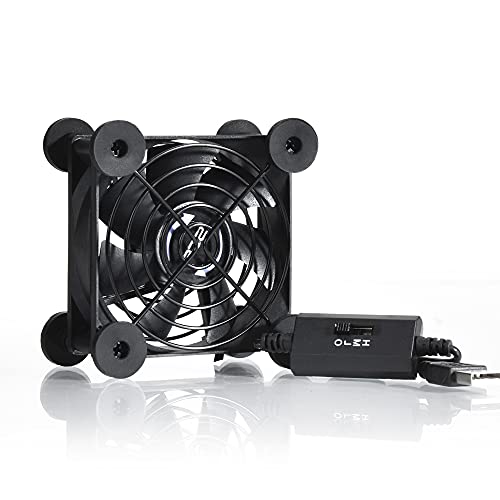
- Compact 80mm design with flat or upright placement
- Three speeds, with low-speed noise rated at 21dB
- USB-powered with protective grills
Best For: Small setups needing adjustable, portable cooling
Best Wide-Coverage Option
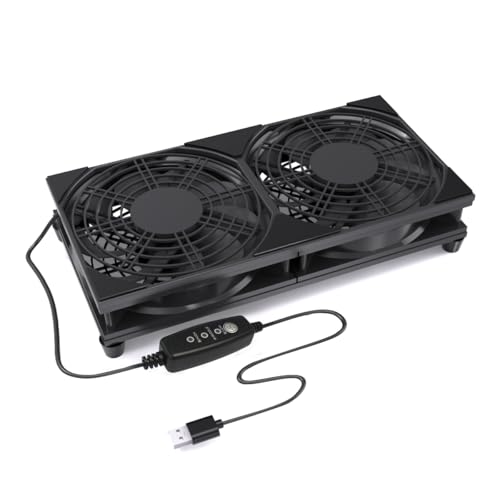
- Dual 120mm fans cover a wider area
- Three adjustable speeds for flexible airflow
- Raised base and USB plug-and-play power
Best For: Routers, modems, and AV equipment needing broad airflow
Flexible USB Cooling
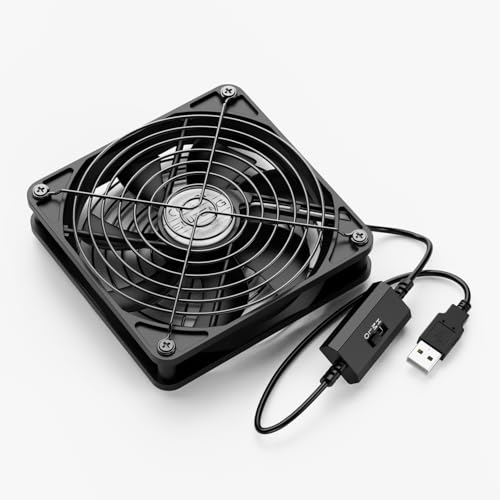
- Three adjustable speed settings
- Flat or upright placement
- 56 CFM airflow with dual bearings
Best For: Versatile cooling for routers and nearby electronics
Quiet Router Cooling

- Low-noise silicone feet
- High, medium, low, and off modes
- 50,000-hour dual ball bearings
Best For: Noise-conscious router and modem cooling
High-Speed USB Cooling

- Reaches 2,000 RPM
- Eight anti-vibration feet
- Horizontal or vertical placement
Best For: Adjustable, higher-speed cooling for routers and equipment
Quiet Dual-Fan Cooling – AC Infinity MULTIFAN S7
For compact router cooling fans that can also handle larger electronics, the AC Infinity MULTIFAN S7 combines two 120mm USB fans with adjustable speed control. Its low listed noise level and flexible horizontal or vertical placement make it practical for routers, receivers, consoles, and cabinets.
Best For: Quiet cooling of routers, AV equipment, game consoles, and other electronics with room for two 120mm fans.
Pros:
- Dual fans provide a combined listed airflow of 104 CFM.
- Multi-speed controller helps balance airflow and noise.
- Dual-ball bearings are rated for 67,000 hours and support flat or upright placement.
- USB power works with many electronics and consoles.
Cons:
- Each fan measures 4.7 by 4.7 by 1 inch, so it needs more space than a mini fan.
- The two-fan design may be more cooling capacity than a small router requires.
The MULTIFAN S7 is a strong choice when you want adjustable, relatively quiet airflow and can accommodate a dual-fan setup. Its size makes it better suited to an equipment shelf or cabinet than a very tight router enclosure.
Ultra-Compact Router Cooling – SCCCF 40mm USB Fan
This mini fan is a practical option when compact router cooling fans must fit in a narrow space. Its 40mm footprint, USB connection, three speed settings, and lightweight design suit small routers, TV boxes, Raspberry Pi projects, and other space-constrained electronics.
Best For: Small routers and DIY electronics installations where a larger 80mm or 120mm fan will not fit.
Pros:
- Very small 1.57 by 1.57 by 0.79-inch design weighs about 9.07 grams.
- Three speed settings allow adjustable ventilation.
- Dual-ball bearings are rated for 65,000 hours and permit flat or upright placement.
- Includes a 3.3-foot USB cable and a protective metal grille.
Cons:
- Listed airflow is 8.71 CFM, considerably less than larger fans.
- Its listed noise level is 31.3 dB, so it is not the quietest option here.
- The small size should be confirmed against the available mounting area before purchase.
The SCCCF 40mm fan prioritizes fit over maximum airflow. It is best for targeted ventilation in tight router spaces, though larger equipment or hotter enclosures may benefit from a higher-capacity fan.
Adjustable Dual-Row Cooling – ELUTENG Dual 80mm USB Fan
For compact router cooling fans with stronger coverage than a single mini fan, the ELUTENG dual-row 80mm model uses two connected fans and three adjustable speeds. It can be positioned horizontally or vertically and connects directly to a USB port for simple installation.
Best For: Routers, hard drive enclosures, TV boxes, and other equipment needing adjustable dual-fan airflow.
Pros:
- Two connected 80mm fans provide a listed airflow up to 31.98 CFM.
- Three speed settings support quieter or stronger cooling needs.
- Hydraulic bearings and removable rubber shock absorbers support stable operation.
- Metal grilles help protect fingers and cables from the blades.
Cons:
- The connected dual-fan housing is larger than a single compact fan.
- Noise is listed from 25.6 dB at low speed to 32.5 dB at high speed.
- The supplied specifications contain inconsistent dimensions, so confirm the available space before installation.
The ELUTENG is a balanced middle-ground choice: more capable than a 40mm mini fan while remaining USB powered and speed adjustable. Its dual-row format is most useful when the router or enclosure has enough surface area for the larger housing.
High-Airflow USB Cooling – 120mm 5V USB Router Fan
This 120mm USB fan is suited to buyers who want compact router cooling fans with higher airflow for a shelf, cabinet, or home-theater setup. It uses a simple 5V USB connection and includes a protective net, feet, and mounting hardware for flexible placement.
Best For: Routers, modems, AV receivers, TV boxes, and other electronics with room for a full-size 120mm fan.
Pros:
- Provides a listed 56.7 CFM of airflow at 1500 RPM.
- USB power makes setup straightforward with compatible electronics.
- Listed noise level is 23 dBA.
- Includes protective netting, four feet, and mounting screws and nuts.
Cons:
- The 120mm by 25mm fan requires substantially more space than a 40mm model.
- It uses sleeve bearings with a listed 35,000-hour life, shorter than the ball-bearing options here.
- Only one fan is included.
The 120mm model is a sensible choice when airflow matters more than minimizing the fan footprint. Its included hardware helps with placement, but measure the router shelf or cabinet first to ensure the full-size housing fits.
Best Compact USB Pick – Quiet 80mm Router Cooling Fan
For shoppers comparing compact router cooling fans, this 80mm USB model offers a small footprint, adjustable airflow, and flexible placement. Its three-speed controller lets you prioritize quieter operation or stronger cooling for routers, consoles, receivers, and other equipment.
Best For: Small setups needing a portable, adjustable USB fan that can sit flat or upright.
Pros:
- Compact 3.64-by-3.64-inch design with shockproof feet for flat or upright placement.
- Three speed settings, including a low setting rated at 21dB.
- USB-powered operation works with compatible routers, gaming consoles, and audio-visual equipment.
- Protective iron grills cover both sides of the fan.
Cons:
- Its single 80mm fan has less coverage than larger dual-fan designs.
- The USB power connection requires an available compatible USB port or adapter.
This is a practical choice when space is limited and you want straightforward speed control. The included USB connection and reversible placement make it easy to position near a router or other warm electronics.
Best Wide-Coverage Option – Dual 120mm Router Cooling Fan
This dual-fan model is a useful option among compact router cooling fans when you want broader airflow across a router, modem, TV box, or AV cabinet. Two 120mm fans, three speed settings, and a raised base provide adjustable cooling without requiring drivers or a complicated setup.
Best For: Routers and small electronics that benefit from wider airflow coverage and an elevated base.
Pros:
- Dual 120mm fans move air across a wider surface area.
- Three adjustable speeds accommodate different devices and placement positions.
- USB plug-and-play power works with USB adapters, power banks, computers, TVs, and monitors.
- Raised feet improve air intake and help stabilize the fan on desks or shelves.
Cons:
- The dual-fan layout takes more horizontal space than a single 80mm unit.
- The supplied details list compatibility broadly but do not specify a router-specific mounting system.
Choose this model if airflow coverage matters more than the smallest possible footprint. Its protective grills and stable elevated base make it well suited to open placement in an entertainment center or cabinet.
Best High-Airflow Design – Dual 140mm USB Router Cooling Fan
For buyers who want substantial airflow from compact router cooling fans, this dual 140mm USB model combines a 65.8 CFM airflow rating with quiet 18dB operation. Its stackable design, one-touch switch, and dual USB ports add flexibility for routers, receivers, consoles, and computer cabinets.
Best For: Larger electronics setups needing high airflow, quiet operation, and stackable placement.
Pros:
- Dual 140mm fans provide a listed 65.8 CFM airflow capacity.
- 18dB operating noise supports quieter office, bedroom, or gaming setups.
- Raised feet support stackable cooling and create storage space beneath the fan.
- Dual USB ports, a one-touch switch, and shock-absorbing pads improve convenience.
Cons:
- The larger dual-140mm design may be less suitable for very cramped router spaces.
- Its higher airflow capacity may be more than needed for a small, lightly loaded router.
- The product uses USB power, so a suitable USB source is required.
This is the strongest airflow-focused option in the group, while remaining quiet and easy to operate. Its size makes it better for open shelves, cabinets, or stacked equipment than for tight enclosed spaces.
Flexible USB Cooling – ELUTENG 120mm 3-Speed Fan
For shoppers comparing compact router cooling fans, the ELUTENG offers a straightforward USB-powered option with adjustable airflow. Its flat-or-upright design makes it practical for routers, receivers, consoles, and other electronics in narrow spaces.
Best For: Versatile cooling around routers, modems, TV equipment, and game consoles.
Pros:
- Three-speed controller supports low, medium, and high airflow settings.
- USB 5V power works with compatible electronics and adapters.
- Can operate flat or upright, with protective aluminum grills on both sides.
- Dual ball bearings are rated for a 45,000-hour lifespan.
Cons:
- Its 120mm footprint may be larger than some compact router setups can accommodate.
- The listed noise level reaches 29dB, so it may not be the quietest option at higher speeds.
With 56 CFM airflow and flexible placement, this ELUTENG fan is a useful general-purpose choice when you want adjustable cooling without a dedicated router mounting system.
Quiet Router Cooling – 120mm 3-Speed USB Router Fan
This 120mm model is a strong contender among compact router cooling fans when noise control matters. It combines USB power, three speed settings, vibration-dampening silicone feet, and flexible horizontal or vertical placement.
Best For: Quiet cooling for routers, modems, receivers, DVRs, and TV boxes.
Pros:
- Three-degree speed control cycles through high, medium, low, and off modes.
- Silicone feet help reduce vibration and listed noise ranges from 9.3 to 16.8dBA.
- Dual ball bearings are rated for a 50,000-hour lifespan.
- USB connectivity supports convenient plug-and-use operation.
Cons:
- The 4.72-by-4.13-inch dimensions require more clearance than smaller fans.
- Its maximum airflow is listed at 53.35 CFM, below some larger high-airflow alternatives.
This fan balances useful airflow with noise-focused construction, making it especially appealing for equipment placed in bedrooms, offices, or other sound-sensitive areas.
High-Speed USB Cooling – Easy Cloud 120mm 3-Speed Fan
The Easy Cloud 120mm fan suits shoppers seeking compact router cooling fans with a higher top speed. Its USB design, three-speed controller, and anti-vibration feet make it adaptable for routers, cabinets, servers, DVRs, and consoles.
Best For: Users who want adjustable cooling with a 2,000 RPM high-speed setting.
Pros:
- Three speeds provide options for quieter operation or faster heat removal.
- Maximum speed reaches 2,000 RPM for responsive cooling.
- Eight anti-vibration feet support horizontal or vertical placement.
- USB connectivity works with devices equipped with a USB port.
Cons:
- The listed 33dB noise level is higher than the supplied rating of the quieter competing model.
- Its 51 CFM airflow is slightly lower than the other listed 120mm fans.
- It is a single 120mm fan, so placement space is still required around the router.
Choose this model when speed flexibility is more important than the lowest listed noise level. The 2,000 RPM setting offers extra headroom, while the lower settings support quieter everyday use.
How We Picked the Best Compact Router Cooling Fans
We focused on practical features that matter in real home-office and entertainment setups: fan size, airflow potential, noise-conscious design, speed control, power requirements, portability, and placement flexibility. The selection includes compact single-fan models, dual-fan systems, and wide 240mm units so you can choose based on the equipment and available space rather than relying on one universal design.
USB power was also a priority because it works with many routers, televisions, game consoles, power banks, and USB adapters. Product descriptions can vary, so verify dimensions, connector style, and included controls before ordering.
Quick Comparison
| Fan Type | Best For | What to Look For |
|---|---|---|
| 40mm mini fan | Very tight spaces | Targeted airflow and easy placement |
| 80mm single fan | Small cabinets and receivers | Balanced size, noise, and cooling |
| 120mm single fan | Routers, DVRs, and media shelves | Broader airflow and speed control |
| Dual 120mm or 140mm fan | Large equipment or hot cabinets | Higher coverage and available clearance |
| 240mm fan | Wide vents and enclosed shelves | Full-width ventilation with low-speed operation |
Key Buying Factors for Compact Router Cooling Fans
Size and Placement
Measure the shelf, vent, and equipment surface before buying. A larger fan can move air more effectively at lower speeds, but it may block vents or fail to fit behind a router. Mini fans suit narrow gaps but generally provide more localized cooling.
Airflow and Speed Settings
Adjustable speeds let you prioritize quiet operation during normal use and stronger ventilation during heavy workloads or warm weather. For a closed cabinet, favor broader coverage or dual-fan designs. For a single hot spot, a smaller directional fan may be sufficient.
Noise and Controls
Look for models described as quiet or whisper-quiet, especially near bedrooms, desks, and televisions. A wired speed controller or one-touch switch makes adjustment easier than repeatedly unplugging the fan.
Power and Cable Compatibility
Most options use 5V USB power, but check whether your equipment has a spare USB port and whether the cable reaches the desired position. A USB wall adapter or power bank can provide additional placement flexibility.
Who Should Buy Which Compact Router Cooling Fans?
Choose a 40mm model for a very confined space or a targeted cooling point. An 80mm fan is a practical middle ground for compact shelves, receivers, and small cabinets. A 120mm model is usually the most versatile choice for routers, modems, DVRs, and home media equipment. Pick a dual 120mm or 140mm fan when you need coverage across a wider device or want stronger cabinet circulation. A 240mm model makes the most sense when a shelf or vent opening is wide enough to support full-length airflow.
Whichever of these Compact Router Cooling Fans you choose, keep the intake and exhaust paths unobstructed, clean dust from the blades periodically, and avoid placing the fan where it merely recirculates hot air inside a sealed compartment.
