
Compact OLED reference monitors combine deep blacks, high contrast, and strong color performance in spaces where a full-size professional display is impractical. This roundup compares portable 4K OLED screens, fast QD-OLED gaming panels, and versatile USB-C options.
Use the buying guide below to narrow the choices by resolution, color gamut, refresh rate, connectivity, portability, and the type of work you do.
Best 10 Compact OLED Reference Monitors Picks for 2026
Best High-Refresh Reference

- 26.5-inch WQHD Quantum Dot OLED panel
- 240Hz refresh and 0.03ms response time
- 10-bit color with 99% DCI-P3
Best For: Color-conscious gaming and desktop work
Best Ultra-Portable 4K
UPERFECT 13.3-inch OLED Monitor

- 4K OLED with 109% DCI-P3 coverage
- 500 nits and 1.07 billion colors
- 16-ounce aluminum portable design
Best For: Bright mobile second-screen setups
Best QD-OLED Gaming Balance

- 27-inch QHD QD-OLED panel
- 240Hz refresh and 0.03ms response
- HDR400 True Black and G-SYNC Compatible
Best For: Hybrid gaming and creative desktop use
Best 4K Touchscreen Pick
INNOCN 15.6-inch 4K OLED Touch Monitor
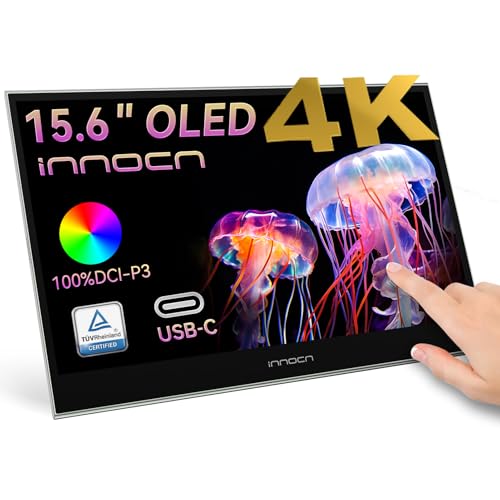
- 4K OLED panel with 100% DCI-P3 and 10-bit color
- 10-point touchscreen for direct editing control
- USB-C and mini HDMI plug-and-play connectivity
Best For: Photo and video editors needing high-resolution touch input
Best Travel-Friendly OLED Pick

- 16-inch WUXGA OLED with 95% DCI-P3 coverage
- Lightweight 1.12-pound body and adjustable kickstand
- Dual USB-C plus Mini HDMI connectivity
Best For: Travelers and mobile productivity users
Best 4K OLED Detail

- 4K UHD OLED resolution for highly detailed images
- 0.6-inch-thick, 1.5-pound portable design
- USB-C supports 60W two-way power
Best For: Creative professionals needing portable 4K detail
Best Travel Reference – InnoView 14-inch 4K OLED Monitor
For creators who need compact OLED reference monitors on the move, the InnoView combines a 14-inch 4K UHD panel with 100% DCI-P3 coverage and a factory-rated Delta E below 2. Its slim, lightweight design makes it practical for editing, review work, and presentations away from a full-size desk.
Best For: Creative professionals, photographers, and video editors who need a portable color-focused reference display.
Pros:
- 3840×2400 resolution, 100% DCI-P3 coverage, and Delta E below 2.
- OLED self-lit pixels provide deep contrast, with a listed 100000:1 ratio.
- Lightweight 1.24-pound design with a 0.15-inch minimum thickness.
- USB-C and HDMI connectivity support laptops, phones, cameras, and consoles.
Cons:
- 60Hz refresh rate is less suited to high-refresh gaming.
- Glare finish may be less convenient in brightly lit environments.
- Some devices may require separate monitor power to prevent flicker or a black screen.
This is a strong travel-oriented option when color coverage, sharpness, and portability matter more than screen size. Confirm that your source device supports 4K at 60Hz before buying.
Best High-Refresh Reference – MSI MAG 274QP QD-OLED X24
The MSI MAG 274QP QD-OLED X24 is a desktop-sized choice among compact OLED reference monitors, pairing a 26.5-inch WQHD Quantum Dot OLED panel with 10-bit color and 99% DCI-P3 coverage. It is especially compelling when accurate color must coexist with fast gaming performance.
Best For: Desktop users who want color-capable OLED imaging alongside competitive gaming speed.
Pros:
- 10-bit Quantum Dot OLED panel supports 1.07 billion colors and 99% DCI-P3.
- Extreme 1,500,000:1 native contrast and Delta E rated at 2 or less.
- 240Hz refresh rate and 0.03ms response time support smooth motion.
- Height, tilt, swivel, and VESA mounting adjustments add setup flexibility.
Cons:
- WQHD resolution is lower than the 4K options in this roundup.
- At 20.7 pounds, it is not a travel-oriented monitor.
- Its gaming-focused feature set may be more than needed for simple reference viewing.
Choose this model when motion handling and OLED contrast are as important as color depth. MSI also includes OLED Care 2.0 software and a fanless graphene heatsink aimed at panel care and durability.
Best Ultra-Portable 4K – UPERFECT 13.3-inch OLED Monitor
The UPERFECT 13.3-inch display is one of the most compact OLED reference monitors for users who prioritize portability without giving up 4K detail. Its 109% DCI-P3 specification, 500-nit brightness, and aluminum housing suit mobile editing, presentations, and second-screen setups.
Best For: Remote workers and creative users who need a bright, lightweight 4K OLED second screen.
Pros:
- 3840×2160 resolution with a listed 109% DCI-P3 gamut.
- 500-nit brightness and 1.07 billion colors support vivid viewing.
- 16-ounce body and slim 0.39-inch depth are easy to pack.
- USB-C and HDMI connections provide broad device compatibility.
Cons:
- 13.3-inch screen size limits viewing area for full-time desktop editing.
- 60Hz refresh rate is not designed for high-refresh gaming.
- Glossy mirror glass can reflect surrounding light.
This model is a practical pick for a portable 4K workflow, particularly when weight and brightness matter. Its small panel is best used as a precise secondary display rather than a large primary monitor.
Best QD-OLED Gaming Balance – AOC Q27GAZD 27-inch Monitor
The AOC Q27GAZD offers a compact desktop footprint while delivering the contrast and color potential expected from a QD-OLED panel. Its 27-inch QHD screen, HDR400 True Black support, and broad stated gamut make it suitable for gaming as well as photo and video work.
Best For: Users who want one QD-OLED monitor for fast gaming, entertainment, and occasional creative editing.
Pros:
- 27-inch QHD resolution provides crisp 2560×1440 detail.
- 240Hz refresh rate and 0.03ms response time support clear, fluid motion.
- HDR400 True Black and 1,500,000:1 contrast enhance dark-scene depth.
- G-SYNC Compatible Adaptive-Sync helps reduce tearing and stutter.
Cons:
- QHD resolution provides less workspace detail than the listed 4K models.
- The glossy finish may reflect ambient light.
- Its strongest feature set is gaming-oriented rather than dedicated color-reference work.
The Q27GAZD is a versatile choice for buyers who want OLED blacks and wide-gamut color without sacrificing refresh rate. It makes the most sense as a hybrid gaming and creative monitor rather than a specialized studio reference display.
Best 4K Touchscreen Pick – INNOCN 15.6-inch 4K OLED Touch Monitor
For creators who need compact OLED reference monitors with plenty of workspace, the INNOCN combines a 15.6-inch 4K OLED panel with 10-point touch input. Its 100% DCI-P3 coverage, 10-bit color, and USB-C or mini HDMI connectivity make it a flexible second screen for photo and video work.
Best For: Photo and video editors who want a high-resolution, touchscreen portable display.
Pros:
- Sharp 3840×2160 4K resolution with 100% DCI-P3 coverage and 10-bit color.
- 10-point touch support enables tapping, swiping, and pinch-to-zoom control.
- Works in secondary, mirrored, or extended-display modes with compatible devices.
- Plug-and-play USB-C and mini HDMI connections require no driver installation.
Cons:
- The glossy finish can be less suitable for bright, reflective workspaces.
- Its 60Hz refresh rate is oriented toward creative work rather than high-refresh gaming.
- Compatibility depends on a connected USB-C or mini HDMI port supporting video and audio.
The INNOCN is the strongest resolution-focused choice here, especially when touch control and detailed color work matter more than refresh rate. Its portable format also supports laptops, phones, consoles, and other compatible sources.
Best High-Refresh Option – UPERFECT 14-inch 3K OLED Touch Monitor
The UPERFECT is a strong contender among compact OLED reference monitors for users who value fluid motion as much as image quality. Its 14-inch 3K OLED touchscreen pairs a 120Hz refresh rate with a lightweight metal design that suits mobile work and gaming setups.
Best For: Mobile gamers, editors, and professionals who want smooth motion in a lightweight touchscreen display.
Pros:
- 3K 2880×1800 OLED resolution delivers deep blacks and detailed images.
- 120Hz refresh rate and listed 0.1ms response time support smooth motion.
- Pixel-accurate touchscreen input is designed for precise taps, swipes, and drawing.
- Thin 0.12-inch, 1.29-pound metal design includes an adjustable stand and VESA support.
Cons:
- 3K resolution runs at 100Hz through HDMI; full 120Hz requires USB-C.
- The 14-inch screen is smaller than the other listed options.
- Its glossy finish may reflect ambient light.
Choose the UPERFECT when responsive interaction and smooth scrolling are priorities. The refresh-rate limitation over HDMI is worth checking before purchase, but USB-C users can access its full 120Hz capability.
Best Color-Managed Travel Monitor – ViewSonic VP16-OLED Portable Monitor
The ViewSonic VP16-OLED is a practical choice among compact OLED reference monitors for creative professionals who prioritize color confidence and travel-friendly setup features. Its OLED panel is Pantone Validated and connects through USB-C or micro HDMI, while the integrated stand, tripod mount, hood, and cover support flexible mobile use.
Best For: Traveling photographers, designers, and remote creatives who need validated color and built-in positioning options.
Pros:
- Pantone Validated OLED display is designed for accurate creative color work.
- USB-C supports data, audio, video, and 40W device charging through one cable.
- Height-adjustable stand, integrated tripod mount, monitor hood, and screen cover add setup flexibility.
- Includes USB-C and micro HDMI connectivity plus a 3-year limited warranty.
Cons:
- Its 1920×1080 resolution is lower than the 3K and 4K alternatives.
- The listed 60Hz refresh rate is less suited to high-refresh gaming.
- Product details vary on size and weight, so buyers should verify the final specifications.
The VP16-OLED stands out for a color-focused mobile workflow rather than maximum resolution or speed. Its professional accessories and long warranty make it appealing for users who regularly edit away from a desk.
Best Travel-Friendly OLED Pick – AOC 16T40D
The AOC 16T40D is a practical choice among compact OLED reference monitors when portability and everyday connectivity matter most. Its 16-inch WUXGA panel combines OLED contrast with a lightweight design, built-in kickstand, USB-C inputs, and Mini HDMI compatibility.
Best For: Travelers, remote workers, and creators who want a lightweight OLED display for productivity, media, and flexible device connections.
Pros:
- 16-inch OLED display with 1920×1200 resolution, 16:10 aspect ratio, and 95% DCI-P3 coverage.
- Lightweight 1.12-pound design with an adjustable 0°–180° smart kickstand.
- Dual USB-C ports and Mini HDMI support laptops, Macs, tablets, consoles, and other devices.
- Includes dual 1W speakers, 170° viewing angles, and 75mm VESA compatibility.
Cons:
- WUXGA resolution is lower than the 4K and 3K alternatives in this roundup.
- The glossy screen finish may produce reflections in bright environments.
The AOC stands out as a highly portable, well-connected option for general mobile work. Choose it when low weight and flexible connectivity are more important than maximum resolution or refresh rate.
Best 4K OLED Detail – ViewSonic VX1655-4K-OLED
The ViewSonic VX1655-4K-OLED is a strong fit for shoppers seeking compact OLED reference monitors with high pixel density. Its 4K UHD resolution, OLED contrast, portable 1.5-pound design, and single-cable USB-C setup make it suited to detailed work away from a desktop.
Best For: Creative professionals, work nomads, and users who prioritize 4K detail in a portable monitor.
Pros:
- 3840×2160 4K UHD OLED resolution with individually lit pixels and an 80,000,000:1 listed contrast ratio.
- Compact 0.6-inch-thick design weighing 1.5 pounds.
- USB-C supports single-cable connectivity and 60W two-way power delivery.
- Integrated stand supports portrait and landscape modes, with a protective cover included.
Cons:
- Its 60Hz refresh rate is lower than the UPERFECT model’s 120Hz rate.
- 4K operation can demand more power from connected devices than lower-resolution displays.
This ViewSonic is the resolution-focused choice in the group. It offers a strong balance of sharpness, portability, and connection flexibility, especially for users who need detailed visuals rather than high-refresh gaming performance.
Best High-Refresh OLED – UPERFECT 14-Inch 3K OLED
The UPERFECT 14-inch model is the performance-oriented option among compact OLED reference monitors. It pairs a 3K 2880×1800 OLED panel with a 120Hz refresh rate, 0.1ms response time, 500-nit brightness, and wide 120% DCI-P3 gamut for gaming and creative tasks.
Best For: Gamers, photographers, designers, and creators who want smooth motion, wide color coverage, and a compact premium display.
Pros:
- 3K OLED resolution with a listed 5,000,000:1 contrast ratio and 120% DCI-P3 gamut.
- 120Hz refresh rate and 0.1ms response time support smooth, responsive motion.
- 500-nit peak brightness, 178° viewing angles, and FreeSync support.
- Full-metal chassis, built-in 90° adjustable stand, and dual VESA mounting holes.
Cons:
- HDMI use limits the 2880×1800 mode to 100Hz; full 120Hz requires USB-C.
- The supplied details advise connecting the power adapter before use.
- Its glossy finish may be more reflective under strong ambient light.
The UPERFECT offers the most motion-focused specification set here while retaining a compact 14-inch form factor. It is the better match for users who value refresh rate and response time alongside OLED contrast and broad color coverage.
How We Picked These Compact OLED Reference Monitors
We selected displays that offer a useful combination of OLED contrast, color coverage, image detail, and practical connectivity. The list includes portable monitors for laptops and mobile workstations as well as desktop-sized QD-OLED displays for demanding gaming and production setups. We also considered resolution, refresh rate, brightness, touch support, USB-C compatibility, portability, and whether a monitor’s specifications suit color-sensitive work.
OLED performance can vary significantly between models, so specifications such as 100% DCI-P3 coverage, 10-bit color, 4K resolution, and high contrast should be treated as important starting points rather than a complete calibration guarantee.
Quick Comparison
- Best for portable 4K detail: The 13.3-, 15.6-, and 16-inch 4K OLED models provide the sharpest image for photo editing, video review, and high-resolution laptop workflows.
- Best for fast desktop gaming: The 27-inch QHD QD-OLED monitors combine large-screen workspace with 240Hz refresh rates, extremely low response times, and adaptive sync.
- Best for travel: The 14- and 15.6-inch USB-C monitors are easier to carry and generally simpler to connect to compatible laptops.
- Best for interactive work: Touchscreen models can be useful for creative applications, presentations, and secondary-control workflows.
Key Buying Factors for Compact OLED Reference Monitors
Resolution and Screen Size
Choose 4K when you need crisp text, detailed still images, or a practical preview of UHD video. A 3K panel can provide an excellent balance of sharpness and efficiency, while 1080p is more suitable for lightweight travel use and secondary-screen duties. Smaller screens make high resolutions look especially sharp, but operating-system scaling may be necessary.
Color and Calibration
Look for wide-gamut coverage such as DCI-P3 and, where available, 10-bit color support. These features benefit editing and grading, but professional results still depend on calibration, color-management support, and consistent viewing conditions. Check whether the monitor includes an appropriate color mode and whether your computer can output the required color depth.
Brightness, Contrast, and OLED Care
OLED delivers excellent black levels and contrast, but sustained brightness may be lower than on some LCD reference displays. For long sessions with static interfaces, use screen-saving features, vary content when practical, and review the manufacturer’s guidance on image retention and warranty coverage.
Connections and Portability
USB-C is convenient, but verify that the port supports both video input and enough power for your setup. HDMI and mini HDMI can broaden compatibility, while a built-in stand, speakers, cover, or touch layer may improve mobile usability. Also account for the monitor, cable, and power-adapter weight when planning travel.
Who Should Buy Which Compact OLED Reference Monitors?
Choose a portable 4K OLED if image detail and color work matter more than maximum refresh rate. A 3K 120Hz model is a strong middle ground for creators who also want smooth gaming and responsive everyday use. A 1080p portable OLED makes the most sense as a compact second display for documents, timelines, monitoring, or travel.
For a permanent desk setup focused on competitive gaming, a 27-inch QHD QD-OLED monitor offers the most immersive combination of speed and contrast. Touchscreen models suit creators and presenters who benefit from direct interaction, while buyers seeking dependable reference behavior should prioritize calibration controls, color-management compatibility, and a workflow that minimizes static content.
