
A compact keyboard workstation can make a small desk, shared office, or mobile setup substantially more usable. The options in this roundup range from rolling desks and standing risers to slim wireless keyboards and foldable travel combos.
Use the buying guide below to match the right format, connectivity, ergonomics, and portability to the way you work.
Best 10 Compact Keyboard Workstations Picks for 2026
Best Rolling Workstation
Topeakmart 3-Tier Computer Desk

- Built-in AC outlets and USB charging
- Keyboard tray plus printer and shelf storage
- Rolling, narrow design for flexible placement
Best For: Home offices and mobile, storage-focused workstations
Best Travel Kit
ProtoArc XKM01 Foldable Keyboard Combo

- Keyboard, mouse, stand, and case included
- Full-size 105-key layout with number pad
- Quiet, rechargeable setup for mobile work
Best For: Travelers building an ergonomic workstation away from home
Best Adjustable Desk

- Pneumatic height adjustment from 28.3 to 44 inches
- Keyboard tray and phone or tablet slot included
- Lockable casters support mobile or stationary use
Best For: Sit-stand laptop work in compact rooms
Best Lightweight Combo
Samsers Folding Bluetooth Keyboard

- Full-size foldable keyboard with numeric keypad
- Connects to three devices across 2.4G and Bluetooth
- Includes quiet mouse, phone stand, and hard case
Best For: Quiet, portable typing on laptops, tablets, and phones
Best Trackball Workstation Keyboard

- Compact wired layout with integrated trackball
- Quiet scissor keys rated for up to 10 million presses
- Two built-in USB 2.0 hubs
Best For: Windows workstations needing compact navigation and connectivity
Best Compact Wireless Workstation Keyboard

- Bluetooth connection without a USB receiver
- Compact layout retains a full number pad
- Spill-resistant design with up to 12-month battery life
Best For: Wireless office setups that need number-pad functionality
Best Adjustable Keyboard Workstation Riser
23.6-Inch Standing Desk Converter
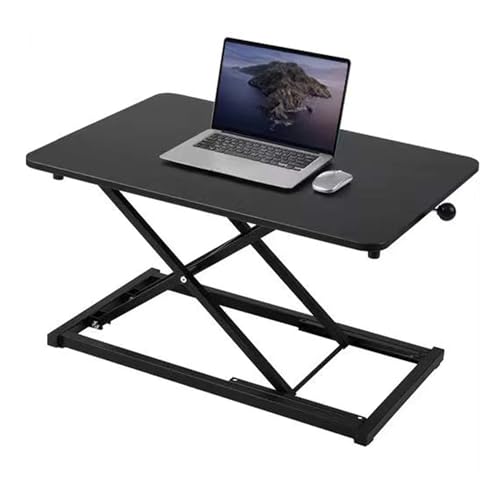
- Manual height adjustment from 2.3 to 16 inches
- 23.6-by-13.4-inch work surface
- Metal scissor-lift design with non-slip base
Best For: Turning an existing desk into a sit-stand keyboard workstation
Space-Saving Wireless Pick
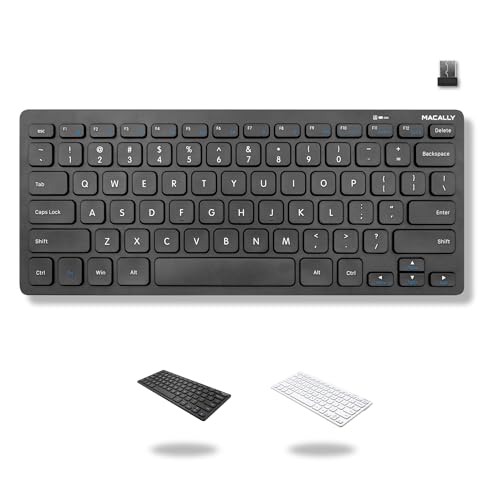
- 78-key layout without a number pad
- 2.4GHz USB-A plug-and-play connection
- Includes AAA battery and on/off switch
Best For: Portable, uncluttered workstations
Quiet Portable Value
TECKNET Mini Wireless Keyboard

- Lightweight 11.5-inch compact design
- Quiet scissor-switch keys and media hotkeys
- Up to 32.8-foot 2.4GHz wireless range
Best For: Travel, office, and living-room setups
Best Rolling Workstation – Topeakmart 3-Tier Computer Desk
For shoppers seeking compact keyboard workstations with added storage, this rolling Topeakmart desk combines a keyboard tray, printer shelf, drawer, and elevated shelf in a narrow design. Its built-in power outlet and USB ports also make it practical for charging devices while you work.
Best For: Home offices, classrooms, studios, and anyone who needs a mobile workstation with storage and integrated power.
Pros:
- Built-in 1500W outlet with two AC outlets and two USB ports.
- Includes a keyboard tray, drawer, shelves, and printer-access shelf.
- Rolling design and water- and scratch-resistant veneer support flexible daily use.
- Assembly tools and instructions are included.
Cons:
- Its 51.77-inch height and multi-tier design may be too large for some very small spaces.
- The supplied notes do not indicate that the height is adjustable.
This is a strong choice when compact keyboard workstations need to do more than hold a laptop. The storage and charging features add usefulness, while the casters make it easier to reposition around the room.
Best Travel Kit – ProtoArc XKM01 Foldable Keyboard Combo
This ProtoArc kit is among the most portable compact keyboard workstations, pairing a foldable full-size keyboard with a mouse, adjustable laptop stand, and protective hard case. It is designed to create a more ergonomic setup away from a conventional desk.
Best For: Remote workers, frequent travelers, digital nomads, and shared spaces where quiet operation matters.
Pros:
- Includes a foldable keyboard, mouse, adjustable laptop stand, and hard case.
- Full-size 105-key layout includes a numeric keypad and function row.
- Quiet scissor switches and silent-click mouse suit offices, cafés, and lounges.
- Rechargeable devices offer up to 150 days of keyboard standby and 200 days for the mouse.
Cons:
- The complete kit weighs 1.22 kg, so it is less minimal than a keyboard alone.
- Compatibility details list Android and Windows as the minimum operating-system family, despite broader device compatibility claims.
Choose this bundle if portability and posture support are priorities. The stand and full-size layout make it more workstation-like than a typical travel keyboard, while the case keeps the accessories together.
Best Adjustable Desk – BONTEC Mobile Standing Desk
For a sit-stand option among compact keyboard workstations, the BONTEC mobile desk offers pneumatic height adjustment from 28.3 to 44 inches. Its keyboard tray, phone slot, lockable casters, and compact footprint support flexible laptop or monitor use.
Best For: Users who want to alternate between sitting and standing in home offices, classrooms, bedrooms, or shared work areas.
Pros:
- Gas-spring lift adjusts smoothly between sitting and standing heights.
- Retractable keyboard tray accommodates a full-size keyboard and mouse.
- Lockable wheels make the desk easy to move and secure in place.
- Waterproof, scratch-resistant MDF desktop is easy to clean.
Cons:
- The 25.6-by-17.7-inch surface may be limiting for larger multi-device setups.
- It provides one shelf and one utility drawer, so storage is relatively limited.
This model is a practical pick when adjustable height matters more than extensive storage. The stable H-shaped base and lockable casters help balance mobility with everyday working stability.
Best Lightweight Combo – Samsers Folding Bluetooth Keyboard
The Samsers folding combo offers a lightweight route to compact keyboard workstations, with a full-size keyboard, wireless mouse, phone stand, and protective case. Its 2.4G and Bluetooth connections let you switch among up to three devices for flexible mobile work.
Best For: Commuters, travelers, writers, and anyone who needs a quiet full-size typing setup for laptops, tablets, or phones.
Pros:
- Full-size keys and numeric keypad avoid a cramped travel layout.
- Supports one 2.4G connection and two Bluetooth devices.
- Includes a mouse, phone stand, cable, and hard case.
- Rechargeable design and quiet scissor switches suit shared spaces.
Cons:
- The compact kit is not a height-adjustable workstation; the included stand is for phone support.
- The mouse is designed for portability and short work sessions rather than maximum size or bulk.
This is a convenient choice for users who already have a surface but need better input tools. It delivers a familiar full-size layout in a travel-friendly package without the bulk of a desktop keyboard setup.
Best Trackball Workstation Keyboard – Perixx PERIBOARD-526
For compact keyboard workstations where desk space and navigation efficiency matter, the Perixx PERIBOARD-526 combines a small wired keyboard with an integrated trackball. Its low-profile scissor keys and built-in USB hubs help keep everyday office setups organized.
Best For: Windows users who want a compact keyboard with integrated cursor control and extra USB connectivity.
Pros:
- Compact 11.18-by-7.17-inch design helps conserve desk space.
- Integrated trackball reduces the need for a separate mouse.
- Quiet scissor keys and two USB 2.0 hubs support efficient workstations.
Cons:
- Wired USB-A connectivity limits placement compared with wireless models.
- Compatible operating systems are listed as Windows 7 through Windows 11.
- It is not water resistant.
The PERIBOARD-526 is a practical choice for business or control-area setups that need compact input, quiet typing, and built-in navigation without adding a separate mouse.
Best Compact Wireless Workstation Keyboard – Logitech K250
The Logitech K250 is a strong fit for compact keyboard workstations that still need a dedicated number pad. Bluetooth connectivity avoids a USB receiver, while the spill-resistant design, adjustable tilt legs, and included batteries support everyday office use.
Best For: Users who want a space-conscious wireless keyboard with a full number pad for Windows, Mac, or compatible tablets.
Pros:
- Bluetooth connects without occupying a USB port or requiring a receiver.
- Compact layout includes a number pad, arrow keys, and F-key shortcuts.
- Includes two AAA batteries and offers up to 12 months of daily use.
Cons:
- Bluetooth-only connectivity may not suit devices without Bluetooth.
- Requires two AAA batteries, even though they are included.
- The listed minimum operating system version is Windows 10.
Choose the K250 when wireless flexibility and number-pad access are more important than the smallest possible footprint. Its graphite finish and lightweight build also make it suitable for portable or shared work areas.
Best Adjustable Keyboard Workstation Riser – 23.6-Inch Standing Desk Converter
For compact keyboard workstations that need sit-stand flexibility, this 23.6-inch desk converter raises a laptop, keyboard, and mouse from an existing desk. Its manual lift rod and scissor-lift structure provide adjustable positioning without requiring assembly.
Best For: Home-office users who want to convert a standard desk into an adjustable standing workstation.
Pros:
- Height adjusts from 2.3 to 16 inches for seated or standing work.
- 23.6-by-13.4-inch surface accommodates a keyboard, mouse, and laptop.
- Non-slip base and metal scissor-lift mechanism support stability.
Cons:
- It is a freestanding converter, so it requires an existing desk.
- The manual lift mechanism does not offer powered adjustment.
- Its larger footprint may exceed the needs of very small desks.
This converter is best for users prioritizing ergonomic height changes over a standalone keyboard. The ready-to-use design and broad height range make it a straightforward way to add standing capability to an existing workstation.
Space-Saving Wireless Pick – Macally Compact Keyboard
The Macally Compact Wireless Keyboard is a practical choice for compact keyboard workstations where desk space and portability matter. Its 78-key layout omits the number pad, while the 2.4GHz USB-A receiver provides a plug-and-play connection for compatible computers.
Best For: Travelers, small desks, and Windows or Chromebook users with an available USB-A port.
Pros:
- Compact 78-key layout saves desk space and is easy to carry.
- Includes 12 shortcut keys for everyday computer tasks.
- USB-A receiver offers simple plug-and-play setup without drivers or software.
- Includes one AAA battery and an on/off switch.
Cons:
- Uses a USB-A receiver rather than Bluetooth.
- No number pad, which may not suit frequent numeric-data entry.
- Compatibility is best suited to devices with a USB-A port.
Choose this Macally model when you want a straightforward, portable keyboard that keeps a compact workstation uncluttered. Its simple wireless setup and included battery make it convenient for occasional travel or everyday office use.
Quiet Portable Value – TECKNET Mini Wireless Keyboard
The TECKNET Mini Wireless Keyboard fits compact keyboard workstations with its lightweight, 11.5-by-4.9-inch design and low-profile scissor-switch keys. It uses a 2.4GHz USB connection with up to a 32.8-foot range, making it suitable for desk, travel, and living-room setups.
Best For: Users who want a lightweight, quiet keyboard for Windows, Mac, ChromeOS, or Linux devices with USB-A.
Pros:
- Lightweight and portable at about 10.4 ounces.
- Low-profile chocolate keycaps provide smooth, quiet typing.
- Media hotkeys support convenient everyday control.
- Includes a 36-month warranty with registration.
Cons:
- Does not support Bluetooth.
- Requires two AAA batteries, which are not included.
- Enter-key layout differs from standard full-size keyboards and may require adjustment.
This TECKNET is a sensible option when portability and quieter typing are more important than a traditional full-size layout. Check your device for a USB-A port and consider the different Enter-key arrangement before buying.
Ultra-Slim Office Choice – Arteck Compact Wireless Keyboard
The Arteck Ultra Slim Wireless Keyboard is designed for compact keyboard workstations that still need full-size keys. Its slim 11.12-by-4.7-inch body uses quiet scissor-switch keys, while the included USB receiver enables immediate setup with compatible computers, laptops, and smart TVs.
Best For: Office users who want full-size keys in a thin, lightweight wireless keyboard.
Pros:
- Ultra-thin 0.2-inch profile and lightweight 7.65-ounce design.
- Provides full-size keys and convenient shortcuts in a compact body.
- Quiet Scissors X structure supports comfortable typing.
- Includes two AAA batteries and offers up to four months between changes under stated usage.
Cons:
- Uses a USB receiver rather than Bluetooth.
- Listed compatibility is centered on Windows devices.
- Not water resistant.
The Arteck stands out for users who want to preserve familiar full-size key spacing while reducing the keyboard’s footprint. Its thin profile and included batteries make it particularly well suited to tidy office desks and lightweight travel kits.
How We Picked These Compact Keyboard Workstations
We selected products that address different space-saving needs rather than treating every setup as a standard desktop keyboard. The lineup includes complete rolling workstations, height-adjustable platforms, compact wireless keyboards, foldable keyboard-and-mouse combinations, and a mini wired keyboard with an integrated trackball.
Our comparisons focus on practical factors: footprint, keyboard layout, connectivity, power or battery requirements, portability, adjustment options, and compatibility. A small accessory can be the best choice for a laptop user, while a rolling desk or riser may better suit someone who needs a complete workstation.
Quick Comparison
- Complete workstation: Topeakmart’s rolling computer desk adds a desk surface, keyboard tray, storage potential, power outlet, and USB ports.
- Mobile or flexible work: BONTEC’s rolling standing desk and the 23.6-inch keyboard riser support changes in working position.
- Travel: ProtoArc and Samsers folding combos reduce packing size while combining a keyboard and mouse.
- Small wired setup: The Perixx mini keyboard adds a built-in trackball and USB hubs where desk space is limited.
- Everyday wireless typing: Logitech, Macally, TECKNET, and Arteck offer compact keyboard formats for computers and compatible devices.
Key Buying Factors for Compact Keyboard Workstations
Measure the Complete Footprint
Check the available width and depth, including room for a mouse, monitor stand, cables, and wrist movement. A narrow keyboard is not enough if the desk or riser leaves no usable mousing area.
Choose the Right Layout
Compact models save space by reducing navigation keys or spacing, while keyboards with number pads are better for spreadsheets and frequent numeric entry. Foldable designs prioritize portability over a traditional rigid feel.
Compare Connectivity and Power
Bluetooth is useful for laptops, tablets, and multi-device setups, while 2.4GHz wireless receivers often provide straightforward desktop pairing. Wired keyboards avoid battery replacement. Confirm your computer has the needed USB ports or an appropriate adapter.
Consider Ergonomics and Adjustability
A keyboard riser or standing desk can improve posture only when its height and angle suit your chair, monitor, and elbows. Look for stable construction, enough surface support, and easy adjustment rather than choosing solely by maximum height.
Account for Accessories
Built-in trackballs, media keys, rechargeable batteries, USB hubs, keyboard trays, power outlets, and casters can reduce clutter. They may also add bulk, so prioritize features that solve a real problem in your workspace.
Who Should Buy Which Compact Keyboard Workstations?
Choose the Topeakmart rolling desk if you need a more complete, movable workstation with integrated power features. The BONTEC standing desk or adjustable keyboard riser is better for users who already have a desk and want to alternate between sitting and standing.
For commuters and frequent travelers, the ProtoArc and Samsers folding combos offer the most portable approach. Pick the Perixx if a trackball and wired reliability matter more than wireless freedom. For a simple everyday replacement, compare the Logitech, Macally, TECKNET, and Arteck keyboards by layout, device compatibility, battery expectations, and preferred shortcut controls.
