
If you need pro-level rendering power without a bulky tower, a compact GPU rendering workstation can be the smartest way to build a capable creator setup. These small-form-factor systems are designed to balance CPU speed, graphics performance, memory capacity, and expansion in a desk-friendly footprint.
In this roundup, we focused on 9 models that make sense for 3D work, motion graphics, AI-assisted workflows, and content creation where space, thermals, and connectivity all matter.
Best 9 Compact GPU Rendering Workstation Picks for 2026
Best for AI-Accelerated Power
MINISFORUM MS-S1 Max Ryzen AI Workstation

- 16-core Ryzen AI Max+ 395 with 32 threads
- Radeon 8060S graphics and five 8K display outputs
- Dual 10G LAN, Wi‑Fi 7, 64GB RAM, 2TB SSD
Best For: 3D artists and power users who need a small but highly capable workstation for rendering and multitasking.
Best for Tight Workspaces
Lenovo ThinkStation P3 Tiny Gen 2

- Tiny workstation footprint fits cramped desks and studios
- RTX A1000 8GB handles GPU-accelerated creative workloads
- Core Ultra 9, 32GB DDR5, and 1TB SSD support fast multitasking
Best For: Creators and professionals who need workstation performance in a very small desktop.
Best for High-Speed I/O
MINISFORUM MS-01 i9 Mini Workstation

- Core i9-13900H for strong creator and multitasking performance
- Dual 10G SFP+ and dual 2.5G LAN for fast wired workflows
- Expandable M.2/U.2 storage plus PCIe x16 GPU support
Best For: Power users who need a compact workstation with fast networking, storage expansion, and optional GPU upgrades.
Best for 8K Editing

- Ultra 9 285H with Arc 140T graphics
- 32GB DDR5 RAM and 2TB SSD
- 8K quad-display support with WiFi 7
Best For: Creators and developers who want a quiet mini PC for editing, multitasking, and multi-monitor work.
Best for Legacy Displays
A2 Mini PC i9 13900HK Workstation

- Core i9-13900HK for strong workstation performance
- VGA plus HDMI/DP/USB-C for modern and legacy displays
- 8 USB-A ports, dual LAN, 32GB DDR5, and 1TB NVMe
Best For: Businesses, labs, and creators who need a compact workstation with legacy display support.
Best Compact AI Workstation
Lenovo ThinkStation P3 Ultra SFF Gen 2

- RTX 4000 SFF Ada for pro-grade rendering and 3D work
- 64GB DDR5 RAM plus 2TB Gen 5 SSD for speed
- Tiny SFF chassis with enterprise security and durability
Best For: Creators and professionals who need workstation GPU power in a small footprint.
Best for Multi-Display Workflows
ACEMAGIC M1A Pro i9 Mini Workstation

- Core i9-13900HK and Arc A770 for creator workloads
- Up to 4 displays with USB4, DP, and HDMI outputs
- Compact chassis with DDR5 and PCIe 4.0 storage support
Best For: Creators and power users who need desktop-like performance in a small, multi-monitor-ready PC.
Best for Tiny AI Workspaces
Lenovo ThinkStation P3 Tiny Gen 2

- 1L chassis fits tight desks and behind-monitor setups
- RTX A1000 8GB plus Core Ultra 7 for workstation tasks
- 32GB RAM, 1TB SSD, Wi‑Fi 7, and 3-year warranty
Best For: Designers and AI-focused users who need workstation power in a very small footprint.
Best for Tight Desks
Lenovo ThinkStation P3 Tiny Workstation
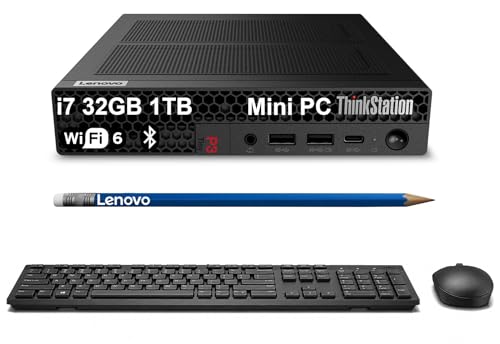
- Tiny 3.01 lb design saves valuable desk space
- Core i7-14700 and 32GB DDR5 support serious multitasking
- ISV-certified for major CAD and engineering apps
Best For: Engineers, designers, and office users who need a tiny workstation for CAD and productivity.
Best for AI-Accelerated Power – MINISFORUM MS-S1 Max Ryzen AI Workstation
If you want a compact gpu rendering workstation that can handle demanding creative and multitasking loads, the MINISFORUM MS-S1 Max stands out with a Ryzen AI Max+ 395 chip, Radeon 8060S graphics, and a surprisingly dense feature set for its size. It is aimed at buyers who need desktop-class performance, lots of display outputs, and serious networking in a small enclosure.
Best For: 3D artists, editors, and power users who want a compact workstation for rendering, CAD, and multi-monitor productivity.
Pros:
- Ryzen AI Max+ 395 with 16 cores, 32 threads, and strong AI/NPU headroom
- Radeon 8060S graphics and five 8K video outputs for flexible multi-display setups
- Dual 10G Ethernet plus Wi‑Fi 7 for fast wired and wireless connectivity
- 64GB LPDDR5 memory, 2TB SSD, and room for additional storage expansion
Cons:
- Premium specs likely put it well above entry-level mini PC pricing
- Integrated graphics will not replace a high-end discrete GPU for the heaviest 3D workloads
- Dense feature set may be more machine than casual users need
For buyers prioritizing performance per liter, this is a compelling compact gpu rendering workstation that leans hard into connectivity, display output, and workstation-class processing. It is a smart fit if you want a small system that can still support serious creative work without giving up expansion or networking speed.
Best for Tight Workspaces – Lenovo ThinkStation P3 Tiny Gen 2
If you need a compact gpu rendering workstation that can sit almost anywhere, the ThinkStation P3 Tiny Gen 2 is built for serious work in a very small footprint. It pairs an Intel Core Ultra 9 vPro processor with an NVIDIA RTX A1000 8GB GPU, giving you a capable balance of CPU speed, professional graphics, and portability-friendly size.
Best For: Creators, designers, and small studios that want workstation-class performance without giving up desk space.
Pros:
- Ultra-compact 3.01 lb chassis is easy to place on a desk, shelf, or behind a monitor
- NVIDIA RTX A1000 8GB supports GPU-accelerated rendering and pro app workflows
- Core Ultra 9 vPro CPU and 32GB DDR5 memory handle demanding multitasking well
- WiFi 7, DisplayPort, HDMI 2.1, and RJ-45 offer flexible connectivity
Cons:
- RTX A1000 is solid for light to moderate rendering, but not a top-tier GPU
- Limited internal room means fewer upgrade options than a full-size tower
- Included 300W power supply reflects its tiny-form-factor design constraints
For buyers who care more about footprint than brute-force expandability, this is a smart compact gpu rendering workstation choice. It is especially appealing if you want workstation features, professional graphics, and modern wireless connectivity in a machine that disappears into tight spaces.
Best for High-Speed I/O – MINISFORUM MS-01 i9 Mini Workstation
The MINISFORUM MS-01 is a strong fit if you want a compact gpu rendering workstation with serious connectivity, fast storage options, and room to grow. Its Core i9-13900H, dual 10G SFP+ ports, and PCIe expansion make it more versatile than a typical mini PC for creator and pro-lab setups.
Best For: Creators, engineers, and power users who need a small workstation for rendering, storage-heavy workflows, and ultra-fast networking.
Pros:
- Core i9-13900H delivers strong multitasking and creator-performance headroom
- Dual 10G SFP+ plus dual 2.5G LAN is excellent for fast transfers and NAS use
- Expandable with M.2, U.2 support, and a PCIe x16 slot for RTX 3050 testing
- Triple-display support helps streamline editing, CAD, and monitoring workflows
Cons:
- RTX 3050 support is limited to tested compatibility, not a built-in GPU solution
- Premium networking and expansion features add complexity and cost
- Best value depends on whether you will actually use the advanced ports and storage options
If your priority is a compact gpu rendering workstation with networking and expansion features most mini PCs skip, the MS-01 stands out. It is less about raw gaming flash and more about dense workstation capability in a very small footprint.
Best for 8K Editing – GEEKOM IT15 Mini PC
If you want a compact gpu rendering workstation that can also handle coding, multitasking, and light AI workloads, the GEEKOM IT15 is a strong all-around pick. It pairs Intel’s Ultra 9 285H with Arc 140T graphics, 32GB of DDR5 memory, and a fast 2TB SSD, so it feels responsive when you’re moving between creative apps and heavy browser workloads.
Best For: Video editors, developers, and creators who want a small desktop that can drive multiple displays and stay quiet under load.
Pros:
- Intel Ultra 9 285H and Arc 140T give it impressive performance for its size
- 32GB DDR5 RAM and 2TB Gen 4 SSD support smooth multitasking and fast project loading
- Dual USB4, dual HDMI, and 8K quad-display support make it easy to build a compact workstation
- WiFi 7, 2.5GbE, and Bluetooth 5.4 provide modern connectivity for work and collaboration
Cons:
- Integrated graphics are capable, but not a replacement for a full-size discrete GPU
- Best suited to compact productivity and creator tasks rather than high-end gaming
- Premium specs may be more than casual users need
The IT15 stands out as a flexible compact gpu rendering workstation for users who need real desktop-class speed in a tiny chassis. It is especially appealing if you value multi-monitor workflows, quiet operation, and enough headroom for editing and AI-assisted tasks without moving to a full tower.
Best for Legacy Displays – A2 Mini PC i9 13900HK Workstation
If you need a compact gpu rendering workstation for mixed office, creative, and industrial use, the A2 Mini PC stands out for its Core i9-13900HK performance, quad-display support, and unusually broad port selection. It is a strong fit when space is tight but you still want desktop-class CPU speed, fast NVMe storage, and plenty of USB connectivity.
Best For: Buyers who need a small, high-performance workstation with VGA compatibility for legacy monitors, projectors, or factory equipment.
Pros:
- Core i9-13900HK delivers strong 14-core, 20-thread performance for demanding workloads.
- VGA, HDMI, DisplayPort, and USB-C outputs make it easy to support modern and legacy displays.
- 8 USB-A ports plus dual LAN help connect peripherals, storage, and wired networks.
- 32GB DDR5 RAM and 1TB NVMe SSD provide a solid high-speed starting point.
Cons:
- Integrated Iris Xe graphics are not a substitute for a dedicated GPU in heavy 3D rendering.
- Compact cooling is good for the size, but prolonged peak loads may still run warmer than a full tower.
- Its feature set is more specialized than a typical general-purpose mini PC.
For a compact gpu rendering workstation, this model makes sense when CPU power, multi-monitor support, and legacy display compatibility matter more than raw discrete-GPU horsepower. It is especially appealing for business users, labs, and creators who need a dense, flexible desktop replacement.
Best Compact AI Workstation – Lenovo ThinkStation P3 Ultra SFF Gen 2
If you need a compact gpu rendering workstation that can handle serious creative and AI workloads without taking up much desk space, the ThinkStation P3 Ultra is built for that job. It pairs Intel Core Ultra 9 power with NVIDIA RTX 4000 SFF Ada graphics, fast Gen 5 storage, and plenty of memory in a small, business-ready chassis.
Best For: Creators, engineers, and AI users who want workstation-class GPU performance in a very small footprint.
Pros:
- RTX 4000 SFF Ada delivers strong pro graphics performance for 3D, BIM, and rendering
- 64GB DDR5 RAM and 2TB PCIe Gen 5 SSD support heavy multitasking and fast project loading
- Compact SFF design with enterprise security and MIL-STD-810H durability
- Intel NPU adds extra AI acceleration for modern workflows
Cons:
- Small form factor means less upgrade room than a full-size tower
- Premium hardware lands it in a higher price tier
- USB-C front ports are data transfer only, not video output
This is a strong fit if you want a compact gpu rendering workstation that prioritizes space efficiency without sacrificing pro-grade GPU capability. It is especially appealing for studios and offices that need dependable performance in a small, secure, easy-to-place system.
Best for Multi-Display Workflows – ACEMAGIC M1A Pro i9 Mini Workstation
If you need a compact gpu rendering workstation that can also handle creator apps, this ACEMAGIC mini PC stands out for pairing an Intel Core i9-13900HK with a discrete Intel Arc A770 GPU. It’s built for sustained workloads like Blender, Premiere Pro, AI inference, and virtualization while keeping the footprint small enough for tight desks and studio setups.
Best For: Creators, power users, and gamers who want desktop-like CPU/GPU performance in a compact chassis with strong multi-monitor support.
Pros:
- Core i9-13900HK plus Arc A770 gives it real headroom for rendering and AI tasks
- USB4, dual DP, and dual HDMI support up to 4 displays for complex workspaces
- DDR5 memory and PCIe 4.0 SSD options help keep projects and multitasking responsive
- 54W sustained cooling aims to maintain performance during longer sessions
Cons:
- Smaller GPU platform won’t match a full-size desktop graphics card for top-end 3D workloads
- Intel Arc compatibility can vary by app compared with more established creator GPUs
Overall, this is a smart pick if you want a compact gpu rendering workstation that can replace a bulky tower without giving up serious CPU power or flexible display output. It’s especially appealing for desks that need one box to cover editing, coding, rendering, and multitasking.
Best for Tiny AI Workspaces – Lenovo ThinkStation P3 Tiny Gen 2
If you need a compact gpu rendering workstation that can sit on a crowded desk or mount behind a monitor, the ThinkStation P3 Tiny Gen 2 is built for exactly that kind of job. It pairs an Intel Core Ultra 7 vPro processor, NVIDIA RTX A1000 graphics, 32GB of RAM, and a 1TB SSD in a 1L chassis, so it’s easy to place without giving up workstation-class features.
Best For: Designers, AI analysts, and studio users who want serious workstation performance in a very small footprint.
Pros:
- 1L chassis is ideal for space-limited desks, kiosks, and behind-monitor installs
- RTX A1000 8GB and Core Ultra 7 deliver solid GPU-accelerated and AI-friendly performance
- 32GB DDR5 memory and 1TB PCIe Gen5 SSD provide a strong out-of-box config
- Wi‑Fi 7, vPro, and a 3-year warranty add modern connectivity and business confidence
Cons:
- Small size means less upgrade room than a full tower workstation
- RTX A1000 is capable, but not a substitute for higher-end pro GPUs in heavy 3D work
- Premium workstation pricing may be hard to justify for light office use
For buyers who value footprint as much as performance, this is a very practical compact gpu rendering workstation. It won’t replace a big desktop for the heaviest rendering jobs, but it offers an excellent balance of size, speed, and business-ready features.
Best for Tight Desks – Lenovo ThinkStation P3 Tiny Workstation
If you need a compact gpu rendering workstation that fits into a cramped office or studio, the Lenovo ThinkStation P3 Tiny is built around space savings without giving up workstation-class reliability. The 14th-gen Core i7, 32GB of DDR5 memory, and dual NVMe SSDs make it a strong choice for CAD, 3D modeling, and multi-tasking in a tiny footprint.
Best For: Engineers, designers, and hybrid professionals who want a very small workstation for CAD, light rendering, and dual-display productivity.
Pros:
- Ultra-compact 3.01 lb chassis saves serious desk space
- Intel Core i7-14700 with 32GB DDR5 handles demanding business workflows
- ISV certification adds confidence for AutoCAD, SOLIDWORKS, ArcGIS, and more
- Good connectivity with HDMI 2.1, DisplayPort 1.4, USB-C, and Wi-Fi 6
Cons:
- Intel UHD Graphics 770 is not ideal for heavy GPU rendering
- Small form factor limits upgrade flexibility compared with larger towers
As a compact gpu rendering workstation, this Lenovo is best when size, stability, and professional app support matter more than raw graphics horsepower. It’s a practical fit for space-constrained users who need dependable workstation performance for everyday design work.
How We Picked These Compact GPU Rendering Workstations
We looked for systems that offer a practical mix of CPU horsepower, GPU capability, memory support, fast storage, and modern I/O. Because a Compact GPU Rendering Workstation often has tighter cooling and upgrade limits than a full-size tower, we gave extra weight to efficiency, workstation-grade reliability, and ports that matter for creators and developers.
Quick Comparison
Shortlist by workload first: integrated-GPU mini PCs can work for lighter rendering, while models with discrete NVIDIA or Arc graphics are better suited to GPU-accelerated rendering, AI tasks, and multi-display setups. If you need the strongest workstation graphics in a small chassis, prioritize models with discrete pro GPUs and higher memory headroom. If portability and office-friendly noise are more important, lean toward compact systems with strong CPUs and efficient thermals.
Key Buying Factors for a Compact GPU Rendering Workstation
CPU and GPU Balance
Rendering performance depends on the workload. CPU-based rendering benefits from high core counts and sustained clocks, while GPU rendering usually scales better with a capable discrete GPU. Make sure the machine matches your software pipeline rather than chasing specs alone.
Memory and Storage
For modern creative work, 32GB is a practical floor, while 64GB or more is preferable for larger scenes, multitasking, and heavier compositing. Fast NVMe storage helps with project loading, cache files, and scratch performance, especially in a Compact GPU Rendering Workstation where internal expansion may be limited.
Connectivity and Display Support
Check for enough high-speed USB, multiple video outputs, and networking that fits your studio. Dual 10GbE, 2.5GbE, USB4, and Thunderbolt-class ports can be especially useful for fast asset transfers, external storage, and multi-monitor workflows.
Thermals, Noise, and Upgradability
Small systems vary widely in cooling design. A well-built compact workstation should sustain performance under load without excessive throttling or fan noise. Also confirm whether RAM, SSDs, and Wi-Fi modules are user-upgradable, since that affects long-term value.
Who Should Buy Which Compact GPU Rendering Workstation?
If you want the strongest all-around performance in a small chassis, choose a higher-end model with more memory and better graphics. If your workload is mostly light 3D work, editing, or AI-assisted productivity, a CPU-forward mini PC with integrated graphics may be enough. For users who depend on GPU acceleration, professional drivers, or multi-display production work, a discrete-GPU workstation is the safer buy. For buyers comparing Lenovo, MINISFORUM, GEEKOM, and similar compact systems, the best choice usually comes down to how demanding your renders are and how much room you have for heat, noise, and future upgrades.
