
A compact external GPU dock can give a compatible mini PC or laptop access to a desktop graphics card without a full-size PC build. The right choice depends less on the dock’s footprint than on how it connects to your computer.
These picks span USB4 and Thunderbolt docks, OCuLink options, and M.2 risers. Check your host port, graphics card, and power supply before choosing.
Best 10 Compact External GPU Dock Picks for 2026
Compact OCuLink Pick

- 5.51-by-2.56-inch dock
- PCIe 4.0 x4 OCuLink connection
- Supports ATX or SFX power supplies
Best For: OCuLink systems needing a small, flexible dock
USB4/TB4 Pick

- Requires full-function 40Gbps USB4 or TB4
- Open frame fits varied GPU sizes
- USB4 cable and mounting hardware included
Best For: Systems with a full-function USB4 or Thunderbolt 4 port
Flexible PSU Pick
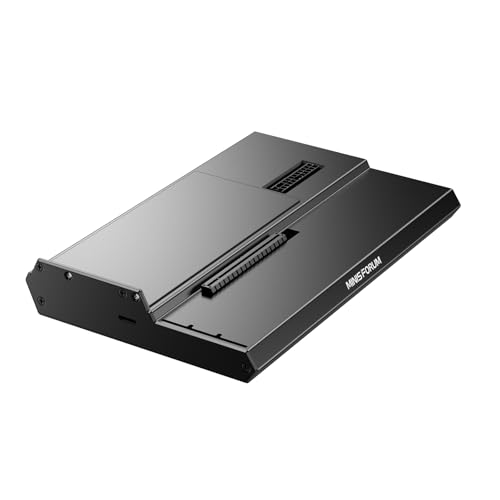
- Compact 5.51-inch-long board
- ATX and SFX PSU support
- ForcePowerOn startup switch
Best For: OCuLink builds needing ATX or SFX PSU flexibility
Cable-Included Pick

- Includes 50cm shielded OCuLink cable
- PCIe 4.0 x4 connection
- Requires a standard ATX power supply
Best For: OCuLink setups needing an included cable
Best for Easy Storage
OwlTree Detachable OCuLink Dock

- Detachable design with included 50 cm cable
- PCIe 4.0 x4 OCuLink connection
- Requires separate GPU and ATX PSU
Best For: OCuLink users prioritizing easy storage
Best PSU Flexibility

- Accepts ATX or SFX power supplies
- PCIe 4.0 x4 OCuLink connection
- No Thunderbolt support; GPU and PSU sold separately
Best For: OCuLink mini PC owners choosing an ATX or SFX PSU
Best for Dual-Location Setups

- ATX/SFX support with 6-pin DC output system
- Includes OCuLink and 6-pin cables
- Hot swapping limited to specified TGX devices
Best For: OCuLink setups split between home and office
Best Thunderbolt Hub

- Thunderbolt 3/4 or USB4 host required
- Up to 85W charging plus USB-A and daisy-chaining
- GPU and power supply sold separately
Best For: Thunderbolt or USB4 setups needing charging and extra ports
Best Long-Cable M.2 Option

- 50cm detachable, shielded riser cable
- NVMe M.2 connection; rated up to PCIe 5.0 x4
- Requires separate GPU and 500W+ ATX PSU
Best For: NVMe M.2 setups needing more GPU placement distance
Best Short-Cable M.2 Option

- 30cm detachable flat riser cable
- NVMe M.2 connection; rated up to PCIe 5.0 x4
- Needs separate GPU and 500W+ ATX PSU
Best For: NVMe M.2 setups with the GPU positioned close to the host
Compact OCuLink Pick – MINISFORUM DEG1 Dock
The MINISFORUM DEG1 is a compact external gpu dock for a laptop or mini PC with a compatible OCuLink connection. Its 5.51-by-2.56-inch footprint is easy to pack, while the open design accommodates graphics cards without a stated length limit.
Best For: OCuLink-equipped systems whose owners want a small dock and flexibility to use an ATX or SFX power supply.
Pros:
- OCuLink 4i connection uses PCIe 4.0 x4, with a stated transfer rate of up to 64Gbps.
- Supports ATX and SFX power supplies.
- ForcePowerOn switch with LED offers forced-start and follow-up startup modes.
Cons:
- Follow-up startup is limited to compatible MINISFORUM mini PCs using original cables.
- OCuLink is not hot-pluggable; shut down the computer before unplugging it.
Choose this version if its compact board and power-supply flexibility suit your setup. Check your computer’s OCuLink compatibility before buying.
USB4/TB4 Pick – RIITOP Open-Frame eGPU Dock
The RIITOP is a compact external gpu dock option for shoppers who need a USB4 or Thunderbolt 4 connection rather than OCuLink. Its open-frame design leaves room for graphics cards of different sizes, but it requires a full-function 40Gbps host port.
Best For: Owners of USB4- or Thunderbolt 4-equipped systems who want to choose their own GPU and ATX or SFX power supply.
Pros:
- Supports a full-function 40Gbps USB4 or Thunderbolt 4 connection.
- Open design has no stated graphics-card size restriction.
- Includes a USB4 cable, GPU mounting pillars, and a power-supply bracket.
Cons:
- Graphics card and ATX/SFX power supply are not included.
- macOS support is limited to AMD graphics cards; NVIDIA is not supported on Mac.
This is the port-matched choice for a USB4/TB4 setup, not a workaround for a limited-function USB-C port. Confirm your host port’s specifications and GPU compatibility first.
Flexible PSU Pick – MINISFORUM DEG1 OCuLink Dock
This listing of the MINISFORUM DEG1 offers a compact external gpu dock built around OCuLink 4i. The board measures 5.51 by 2.56 by 0.79 inches and supports either an ATX or SFX power supply for an open graphics-card setup.
Best For: Buyers with an OCuLink-equipped computer who want a small DEG1 dock and a choice of standard power-supply formats.
Pros:
- PCIe 4.0 x4 OCuLink connection is rated for up to 64Gbps.
- Open design has no stated graphics-card length limit.
- ForcePowerOn switch with LED provides two startup modes.
Cons:
- Follow-up startup works only with compatible MINISFORUM mini PCs and original cables.
- OCuLink does not support hot-plugging.
The compact size and ATX/SFX support make this a flexible OCuLink build component. It shares the DEG1 model name and core specifications with another listing in this roundup, so compare the listings before choosing between them.
Cable-Included Pick – UTLGAMENG OCuLink eGPU Dock
The UTLGAMENG is a compact external gpu dock for a laptop or mini PC with OCuLink. It connects through PCIe 4.0 x4 and comes with a 50cm shielded OCuLink cable, making the included connection hardware a useful distinction.
Best For: OCuLink users who want an open-frame dock with a cable included and plan to use a standard ATX power supply.
Pros:
- Includes a 50cm shielded SFF-8611 OCuLink cable.
- PCIe 4.0 x4 connection is rated for 64Gbps.
- Open frame supports NVIDIA, AMD, and Intel graphics cards without a stated length limit.
Cons:
- GPU and required standard ATX power supply are not included.
- OCuLink is not hot-pluggable; power off before connecting or disconnecting.
This dock makes sense if you want the OCuLink cable in the package. Install the appropriate GPU drivers before first use, as the listing warns the card may otherwise go undetected.
Best for Easy Storage – OwlTree Detachable OCuLink Dock
This compact external gpu dock is a practical pick if you want an open OCuLink setup that is easier to store between uses. Its ends detach, and the package includes a 50 cm flexible OCuLink cable for connecting a compatible laptop or mini PC.
Best For: Buyers with an OCuLink-equipped computer who want a detachable dock and already plan to supply an ATX PSU and graphics card.
Pros:
- PCIe 4.0 x4 OCuLink connection rated at 64 Gbps.
- Detachable design and thin, shielded cable support easier storage and routing.
- Open design accommodates graphics cards of different lengths; status LEDs aid monitoring.
Cons:
- GPU and power supply are not included; the dock accepts standard ATX power supplies only.
- OCuLink is not hot-pluggable, so the computer must be shut down before disconnecting.
The included cable and storage-friendly design distinguish this dock, but budget for an ATX PSU and check that your computer has the required OCuLink connection.
Best PSU Flexibility – MINISFORUM DEG1 eGPU Dock
The MINISFORUM DEG1 is a compact external gpu dock for buyers who want a choice of ATX or SFX power supplies. It connects through OCuLink 4i at PCIe 4.0 x4 and provides a PCIe x16 slot for a graphics card.
Best For: Owners of OCuLink-equipped mini PCs who want to choose between ATX and SFX power supplies.
Pros:
- Supports both ATX and SFX standard power supplies.
- OCuLink 4i uplink and PCIe x16 downlink operate at PCIe 4.0 x4.
- Offers a follow-start function with compatible MINISFORUM Mini PCs when using original wires.
Cons:
- Supports OCuLink only, not Thunderbolt.
- GPU and power supply are not included.
- OCuLink cannot be hot-plugged; turn off the computer before disconnecting.
The PSU choice is the DEG1’s main advantage. Confirm your computer has OCuLink, and do not count on the follow-start feature outside the specified MINISFORUM setup.
Best for Dual-Location Setups – AOOSTAR EG01 OCuLink Dock
The AOOSTAR EG01 is a compact external gpu dock built around an open aluminum-alloy body and an OCuLink PCIe 4.0 x4 connection rated at 64 Gbps. It supports ATX or SFX power supplies and includes a 6-pin DC output adapter system intended to simplify moving between office and home setups.
Best For: OCuLink users who want ATX/SFX PSU options and the dock’s 6-pin DC output system for a two-location setup.
Pros:
- Supports ATX and SFX standard power supplies and graphics cards rated up to 350 W.
- Open design places no stated restriction on graphics-card length.
- Includes an OCuLink cable, 6-pin cable and holder.
Cons:
- Standard OCuLink connections require shutdown before plugging or unplugging; hot swapping is limited to specified TGX devices.
- The open dock does not enclose the graphics card.
The EG01 offers useful power-supply flexibility and included cables, but check your computer’s OCuLink compatibility and treat hot swapping as a TGX-specific exception.
Best Thunderbolt Hub – ORARA Mini eGPU Dock
If your laptop or NUC has Thunderbolt 3, Thunderbolt 4, or USB4, this compact external gpu dock offers a way to connect a PCIe graphics card while adding hub functions. Its JHL7440 controller supports a PCIe 3.0 x4 connection, and the dock can deliver up to 85W of USB Power Delivery charging.
Best For: Thunderbolt 3/4 or USB4 users who want an open GPU dock with charging and extra ports.
Pros:
- Supports Thunderbolt daisy-chaining and includes a 10Gbps USB-A port.
- Accepts ATX, SFX, FLEX, or 12V DC power supplies.
- Compact 7.8 × 7.8 × 1.9-inch dock weighs 500g.
Cons:
- Graphics card and power supply are not included.
- Requires a Thunderbolt 3/4 or USB4 host; an ordinary USB-C port will not work.
- The listing specifies Windows 11 as its minimum required OS version.
Check the host port, operating system, and graphics card power requirements before buying. This is a flexible open dock, not a complete plug-and-play GPU enclosure.
Best Long-Cable M.2 Option – OwlTree PCIe 5.0 Dock, 50cm
This compact external gpu dock connects through a host’s NVMe-compatible M.2 slot rather than a Thunderbolt or USB port. Its detachable 50cm flat riser cable gives you more room to position a full-size graphics card beside a mini PC, NUC, or compatible laptop. OwlTree rates the link for up to PCIe 5.0 x4.
Best For: An NVMe M.2-based setup that needs extra cable length to place the GPU away from the host.
Pros:
- 50cm flexible, shielded flat cable offers placement flexibility.
- Supports full-size graphics cards, including listed RTX 50 Series and RX 90xx Series models.
- Detachable dock and cable aid storage; status LEDs show device state.
Cons:
- Requires an NVMe M.2 interface; SATA M.2, Wi-Fi, WWAN, and USB connections are unsupported.
- Needs a separate standard ATX power supply rated 500W or higher; GPU is also not included.
Choose the 50cm version when routing distance matters. Before ordering, verify that you can access a suitable NVMe M.2 slot and accommodate the external ATX power supply.
Best Short-Cable M.2 Option – OwlTree PCIe 5.0 Dock, 30cm
For a nearby GPU placement, this compact external gpu dock pairs an NVMe M.2-to-PCIe x16 dock with a 30cm detachable flat cable. It is rated for up to PCIe 5.0 x4 and supports full-size graphics cards, including the listed RTX 50 Series and RX 90xx Series models.
Best For: A mini PC, NUC, or compatible laptop with an accessible NVMe M.2 slot and space to position the GPU close by.
Pros:
- 30cm, 0.8mm-thick flexible cable suits close-together components.
- Shielded flat cable is designed to limit interference.
- Detachable design aids storage, while status LEDs provide visual feedback.
Cons:
- Does not work through USB or M.2 SATA, Wi-Fi, or WWAN slots.
- GPU and standard ATX power supply are not included; the specified PSU rating is 500W or higher.
- 30cm cable offers less positioning reach than the 50cm version.
Pick this version if the shorter cable reaches your intended GPU location. As with any M.2-based dock, confirm the host slot and power-supply fit before purchasing.
How We Picked These Compact External GPU Docks
We focused on the connection types, power requirements, and physical layouts represented in the selected products. A dock is only useful if its host connection works with your computer, its slot can accommodate your graphics card, and you can power that card safely. We also considered whether a setup is an open dock or a more contained enclosure. Similar-looking listings may differ by cable length or included accessories, so verify the exact package before ordering.
Quick Comparison: Choose the Connection First
USB4 and Thunderbolt 3/4 docks are the place to start if your computer has a compatible high-speed port and you want a setup without opening the computer. A USB-C-shaped port alone does not establish eGPU support; check the computer’s specifications.
OCuLink docks suit PCs with a compatible OCuLink connection. They use a PCIe-based link, but need the correct port and cable and are less convenient for frequent unplugging.
M.2-to-PCIe risers suit hands-on builds where you can access a compatible internal M.2 slot. Check the slot’s PCIe generation and lane configuration; using it may mean giving up an SSD position. Cable length and routing also matter.
Key Buying Factors for a Compact External GPU Dock
Host and GPU Compatibility
Confirm the host interface first, then check the graphics card’s size, slot fit, and power connectors. A PCIe x16-shaped slot does not mean the dock connects to the host with 16 lanes. Likewise, a dock advertised with PCIe 5.0 support cannot make an older host slot run at PCIe 5.0 speeds. Expect some performance loss versus the same card in a desktop PC, especially in bandwidth-sensitive tasks.
Power Supply and What’s Included
Many open docks require a separate ATX or SFX power supply; others list onboard or DC power. Match the supply’s capacity and connectors to your GPU’s requirements, and confirm whether the PSU, host cable, and GPU power leads are included. Do not assume a dock powers your laptop through its host connection.
Desk Space and Safety
An open dock may have a small base but leave a large card, cables, and PSU exposed. Measure the whole setup, allow airflow, and place it where the card cannot be knocked over or shorted by loose objects. An enclosure can be tidier, but check its GPU length, thickness, and ventilation limits.
Who Should Buy Which Compact External GPU Dock?
Choose a compatible USB4 or Thunderbolt dock if convenience is your priority. Choose OCuLink if your PC provides the connection and you are comfortable with a less plug-and-play setup. Choose an M.2 riser only if you can confirm internal slot compatibility and have a safe cable path. If you need a quiet, portable, fully enclosed solution, inspect enclosure dimensions and included parts closely: the smallest-looking Compact External GPU Dock is not always the most practical one.
