
The best compact drawing display tablets give artists a direct, natural way to draw on screen without taking over a desk. This roundup compares 10 standout models across screen size, pen performance, portability, controls, compatibility, and price.
Whether you need a lightweight tablet for travel, a dependable display for a home studio, or a standalone device that works without a computer, the right choice depends on how and where you create.
Best 10 Compact Drawing Display Tablets Picks for 2026
Best Overall Compact Display

- Laminated anti-glare 11.6-inch Full HD screen
- 8192 pressure levels with 60-degree tilt support
- Red Dial plus eight customizable shortcut keys
Best For: Artists and teachers wanting precise computer-connected drawing with workflow controls
Best Standalone Pick

- Standalone 10-inch Android drawing tablet
- Preloaded apps and lifetime beginner tutorials
- Laminated display with 4096-level active pen
Best For: Beginners and travelers who want computer-free drawing
Best Lightweight Option

- Lightweight 11.6-inch Full HD IPS display
- Battery-free 8192-level pen with digital eraser
- Six shortcut keys and programmable touch bar
Best For: Students, teachers, and artists using a compact computer-connected setup
Best Color Accuracy

- 13.3-inch laminated Canvas Glass 2.0 display
- 16384 pressure levels with PenTech 4.0
- 99% sRGB, factory calibration, dual dials, and stand
Best For: Designers and illustrators prioritizing color consistency and responsive control
Premium Precision Pick

- 16K-pressure battery-free stylus with eraser
- Fully laminated FHD display with broad color coverage
- Dial, eight keys, stand, and dual connection options
Best For: Detailed illustration and feature-focused creative workflows
Most Portable Metal Build

- Compact 11.6-inch laminated FHD display
- Slim all-metal body with anti-glare glass
- Two pens, 28 nibs, six keys, and flexible cables
Best For: Portable drawing, teaching, and compact workstations
Vivid Color Value

- Full-laminated FHD screen with stated 124% sRGB gamut
- Battery-free 16K stylus with tilt support
- Eight shortcut keys and dual USB-C ports
Best For: Color-focused digital painting and cross-device creativity
Best with Extra Features
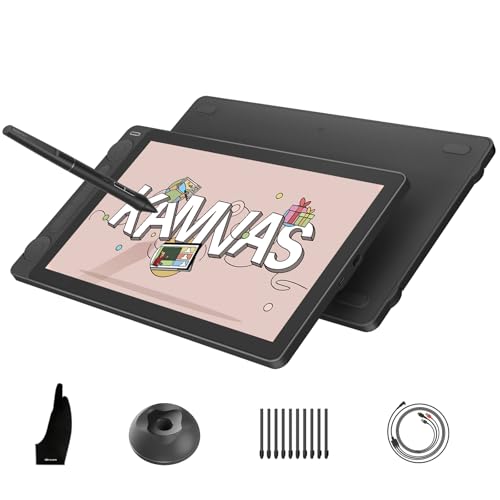
- Full-laminated anti-glare Canvas Glass 2.0 surface
- 16,384-pressure-level PenTech 4.0 stylus
- Factory-calibrated color with dual dials
Best For: Color-conscious artists and designers
Best Budget-Friendly Option
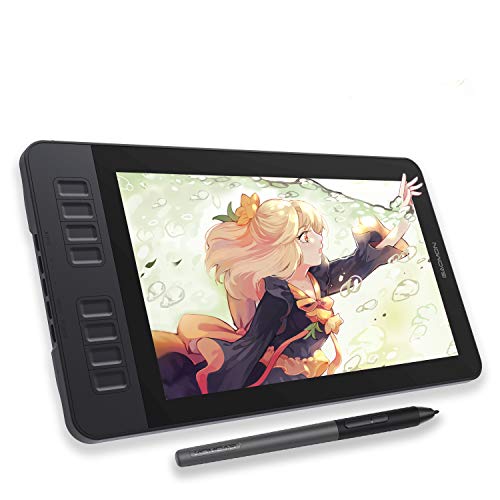
- 11.6-inch full HD anti-glare drawing screen
- Battery-free stylus with tilt and 8,192 levels
- Eight programmable shortcut keys
Best For: Beginners, students, and everyday digital sketching
Best Large-Screen Detail

- 16-inch 2.5K QHD full-laminated display
- 16,384-pressure-level X3 Pro stylus
- Includes stand, wireless remote, and wrist rest
Best For: Detailed illustration, editing, and 3D work
Best Overall Compact Display – XPPen Artist12 Pro
The XPPen Artist12 Pro is a strong choice among compact drawing display tablets for artists who want a laminated, paper-like screen and hands-on workflow controls. Its 11.6-inch Full HD display connects to a computer and combines a Red Dial with eight customizable shortcut keys.
Best For: Digital artists, illustrators, and teachers who want precise on-screen drawing with extensive shortcut controls.
Pros:
- Fully laminated anti-glare screen helps reduce parallax and reflections.
- 8192 pressure levels and 60-degree tilt support enable expressive strokes and shading.
- Battery-free stylus, Red Dial, and eight customizable keys streamline creative work.
- Works with Windows, macOS, ChromeOS, and Linux.
Cons:
- It is a pen display, not a standalone tablet, so it requires a connected host device.
- The 11.6-inch workspace may feel limiting for users who prefer larger canvases.
- Connection uses a 3-in-1 cable, which may require port adapters on some computers.
Choose the Artist12 Pro if workflow controls and reduced parallax matter more than standalone portability. It is a compact computer-connected display with useful features for both art and remote instruction.
Best Standalone Pick – PicassoTab A10
The PicassoTab A10 stands out among compact drawing display tablets because it works without a computer. This portable 10-inch Android tablet includes drawing software, tutorials, a laminated display, and an active pen for creating wherever you have space to work.
Best For: Beginners, students, and travelers who want an all-in-one drawing tablet for learning and portable creativity.
Pros:
- Standalone design runs drawing apps directly on the tablet.
- Preloaded creative apps and lifetime tutorial access support beginners.
- Laminated 10-inch display reduces glare and parallax for a more natural feel.
- Octa-core performance, 6GB RAM, and expandable storage support multitasking.
Cons:
- Its 4096 pressure levels are lower than those of the other listed displays.
- The 10-inch screen provides less workspace than larger pen displays.
- At 1.5 kg, it may be less lightweight than expected for a compact tablet.
The A10 is the practical choice when independence from a computer is the priority. Its bundled apps and tutorials make it especially approachable for beginners, while expandable storage adds room for creative files.
Best Lightweight Option – XP-PEN Artist12
The XP-PEN Artist12 is a compact drawing display tablet for users who want an affordable-feeling, computer-connected setup with a small Full HD screen. Its battery-free pen includes a digital eraser, while six shortcut keys and a touch bar support everyday drawing and editing.
Best For: Students, teachers, and digital artists who need a lightweight 11.6-inch display for drawing, editing, and online instruction.
Pros:
- 11.6-inch Full HD IPS display offers 72% NTSC and 100% sRGB coverage.
- Battery-free pen provides 8192 pressure levels and includes a rear digital eraser.
- Six customizable keys and a programmable touch bar help reduce keyboard use.
- Supports major creative software and remote-work platforms.
Cons:
- It must connect to a computer and requires available HDMI and USB-A ports or adapters.
- Unlike the Artist12 Pro, it has fewer shortcut keys and no Red Dial.
- The display is compact, which may not suit large or complex canvases.
Consider the Artist12 when low weight and straightforward controls are more important than advanced dial-based navigation. Its pen and remote-teaching features make it versatile for both creative and educational use.
Best Color Accuracy – HUION Kamvas 13 Gen 3
The HUION Kamvas 13 Gen 3 is a compact drawing display tablet for creators who want a slightly larger 13.3-inch workspace and strong color performance. It pairs a fully laminated Canvas Glass 2.0 screen with 16384 pressure levels, dual dials, shortcut keys, and an included adjustable stand.
Best For: Illustrators, designers, and animators who prioritize color consistency, pen responsiveness, and flexible positioning.
Pros:
- 13.3-inch fully laminated display uses Canvas Glass 2.0 to reduce glare.
- 16384 pressure levels and 2g initial activation force support detailed strokes.
- 99% sRGB coverage, Rec.709 support, and factory calibration report aid color-focused work.
- Dual dials, five shortcut keys, and an included adjustable stand support efficient sessions.
Cons:
- It is not standalone and must connect to a compatible computer or Android device.
- Some single-cable setups require a full-featured USB-C cable sold separately.
- The 13.3-inch model is less compact than the 10- or 11.6-inch options.
The Kamvas 13 Gen 3 is the most feature-rich choice here for creators who need better color confidence and a more spacious compact canvas. Its stand and dial controls also make longer sessions easier to configure.
Premium Precision Pick – XP-PEN Artist 13.3 Pro V2
For artists seeking compact drawing display tablets with advanced pen control, the XP-PEN Artist 13.3 Pro V2 combines a 13.3-inch fully laminated FHD screen with an impressive 16K-pressure battery-free stylus. Its dual connection options and included stand make it practical for both desk-based and portable creative work.
Best For: Detailed illustration, manga line art, graphic design, animation, and users who want both pen-display and traditional pen-tablet modes.
Pros:
- 16,384 pressure levels, low activation force, tilt support, and a built-in pen eraser.
- Fully laminated 1920×1080 display with broad stated color coverage and anti-glare film.
- Red dial, eight customizable shortcut keys, metal backing, and included foldable stand.
- Supports USB-C direct connection plus legacy HDMI setups and works with compatible Windows, Mac, Chromebook, and Android devices.
Cons:
- It must be connected to a compatible computer or other supported device to work.
- The full-featured USB-C connection requires a compatible USB 3.1/DisplayPort device.
- The 3-in-1 cable for traditional HDMI setups is sold separately.
This is the most feature-rich option in the group for creators who prioritize precision, color coverage, and workflow controls. Its larger 13.3-inch screen remains portable, though users should confirm their device supports the required connection standard.
Most Portable Metal Build – VEIKK VK1200 V2
The VEIKK VK1200 V2 is a compact drawing display tablet designed for creators who want an easy-to-carry 11.6-inch screen. Its full-laminated anti-glare glass, slim all-metal body, and included connection cables make it a straightforward choice for drawing, teaching, and remote work.
Best For: Students, art teachers, traveling artists, digital sketching, e-signatures, and users who prefer a smaller metal pen display.
Pros:
- Compact 11.6-inch 1920×1080 full-laminated display with anti-glare glass.
- Battery-free stylus with 8,192 pressure levels and 60-degree tilt recognition.
- Six programmable shortcut keys and two included pens with 28 replacement nibs.
- Supports single-cable USB-C connection or HDMI and USB-A-to-C cabling, with Windows, macOS, and Linux support.
Cons:
- It requires a connected computer and is not a standalone tablet.
- Its stated 72% NTSC color gamut is narrower than some alternatives in this roundup.
- The smaller 11.6-inch workspace may feel limiting for users accustomed to larger displays.
Choose the VK1200 V2 when portability, durability, and practical accessories matter more than maximum pressure sensitivity or color gamut. The compact footprint and included cables suit smaller workstations, but check your computer’s ports before buying.
Vivid Color Value – UGEE UE12 11.6-inch
The UGEE UE12 stands out among compact drawing display tablets with an 11.6-inch full-laminated FHD screen and a stated 124% sRGB color gamut. It pairs a battery-free 16K-pressure stylus with eight shortcut keys, dual USB-C ports, and broad compatibility for artists working across computers and supported mobile devices.
Best For: Color-focused illustration, digital painting, students, and creators who want an 11.6-inch display with extensive device compatibility.
Pros:
- Full-laminated anti-glare 1920×1080 display designed to reduce parallax.
- Stated 124% sRGB gamut with selectable sRGB, Adobe RGB, and DCI-P3 color spaces.
- Battery-free stylus offers 16K pressure sensitivity, 60-degree tilt recognition, two pen buttons, and replacement nibs.
- Eight tactile shortcut keys plus dual Type-C ports support flexible operation and connection.
Cons:
- It requires a connected compatible device rather than operating independently.
- The supplied details list 8,192 pressure levels in the specifications despite describing the stylus as 16K-capable, so buyers should verify the current listing.
- The 11.6-inch screen provides less workspace than larger pen displays.
The UE12 is a compelling choice for users who value color flexibility and modern connectivity in a small format. Its listed Windows, macOS, Android, and Chrome compatibility is useful, but confirm the exact pressure specification and device requirements before purchase.
Best with Extra Features – HUION Kamvas 13 (Gen 3)
The HUION Kamvas 13 (Gen 3) is a strong compact drawing display tablet for creators who want a portable, color-focused pen display. Its full-laminated Canvas Glass 2.0, 16K pressure pen, and dual dials make it well suited to detailed digital artwork, while its 865g weight helps with mobile setups. It must be connected to a compatible computer, laptop, or supported Android device.
Best For: Artists and designers who prioritize accurate color, precise pen control, and portability.
Pros:
- Full-laminated, anti-glare Canvas Glass 2.0 provides a paper-textured drawing surface.
- PenTech 4.0 offers 16,384 pressure levels, tilt support, and low initial activation force.
- Factory-calibrated color with 99% sRGB/Rec.709 and 90% Adobe RGB coverage.
- Two dials and five press keys provide customizable workflow controls.
Cons:
- Not a standalone tablet; it requires a computer, laptop, or compatible Android device.
- Its broad feature set may be more than beginners need.
For creators seeking a compact pen display with professional-minded color performance, the Kamvas 13 Gen 3 is one of the more capable options here. Confirm your device supports the required connection standards before buying.
Best Budget-Friendly Option – GAOMON PD1161
The GAOMON PD1161 is a compact drawing display tablet designed for beginners, students, and creators who want to draw directly on an 11.6-inch screen. Its matte film, battery-free stylus, and programmable shortcut keys offer a straightforward setup for sketching, editing, note-taking, and digital illustration. It requires a Windows or macOS computer with suitable HDMI and USB connections.
Best For: Beginners and students who want an accessible on-screen drawing experience.
Pros:
- 11.6-inch full HD IPS display supports direct drawing with an included matte film.
- Battery-free stylus provides 8,192 pressure levels and tilt functionality.
- Eight programmable side keys and two pen buttons help speed up common tasks.
- Works with popular software such as Krita, Photoshop, Blender, SAI, and MediBang.
Cons:
- Not a standalone tablet and requires a connected computer.
- Connection may require HDMI and USB ports, an adapter, or the included power adapter.
- Its smaller screen and 72% NTSC color gamut are less suited to demanding color-critical work.
The PD1161 keeps the essentials simple and approachable. It is a practical pick for learning digital art or handling everyday creative and teaching tasks without stepping up to a larger, higher-resolution display.
Best Large-Screen Detail – XPPen Artist Pro 16 Gen2
The XPPen Artist Pro 16 Gen2 is a compact drawing display tablet for artists who want more workspace and QHD detail without moving to a larger desktop display. Its 16-inch 2.5K screen, full lamination, 16K stylus, foldable stand, and wireless shortcut remote support detailed and extended creative sessions. It must be connected to a compatible computer or laptop.
Best For: Illustrators, editors, and 3D creators who need a spacious, high-resolution display.
Pros:
- 16-inch 2560×1600 QHD display provides a spacious 16:10 workspace.
- Full-laminated anti-glare glass helps reduce parallax between the pen and cursor.
- X3 Pro stylus offers 16,384 pressure levels and 60-degree tilt support.
- Includes a foldable stand, wireless shortcut remote, and ergonomic wrist rest.
Cons:
- Not a standalone tablet; it requires a compatible computer connection.
- At 3.88 kg, it is less travel-friendly than smaller pen displays.
- The larger feature set and accessories may be unnecessary for simple sketching.
The Artist Pro 16 Gen2 is the better fit when screen area and resolution matter more than minimum size. Its QHD panel and included ergonomic accessories make it particularly appealing for detailed illustration, editing, and 3D work.
How We Picked the Best Compact Drawing Display Tablets
We focused on the features that most affect the drawing experience: display size and resolution, laminated screen construction, color coverage, pressure sensitivity, tilt support, shortcut controls, stylus design, connectivity, operating-system compatibility, and portability. We also included both computer-connected pen displays and a standalone option for buyers who want to draw without a separate PC or Mac.
Specifications can vary by configuration, so confirm the included cables, software support, warranty, and compatibility before ordering. A tablet advertised for Windows or macOS may have different functionality on Android or ChromeOS.
Quick Comparison
- Best for a compact professional setup: Look for a laminated 11.6- to 13.3-inch display with strong color coverage and reliable pen tracking.
- Best for portability: Choose a slim model with USB-C connectivity, modest power requirements, and a protective case or stand.
- Best for controls: Models with dials and programmable shortcut keys can reduce keyboard dependence during long sessions.
- Best without a computer: A standalone drawing tablet is the simplest option for mobile sketching, though it may offer less software flexibility than a PC-connected display.
- Best for more workspace: A 16-inch QHD display provides additional room for panels, layers, and detailed compositions while remaining smaller than a full studio monitor.
Key Buying Factors for Compact Drawing Display Tablets
Screen Size, Resolution, and Lamination
An 11.6-inch display is easy to fit into a small workspace, but a 13.3- or 16-inch model can feel more comfortable for detailed illustration. Full lamination reduces the gap between the pen tip and the image, while higher resolution keeps lines and interface text sharper.
Pen Performance
Battery-free pens are convenient because they do not need charging. Pressure sensitivity matters for line-weight control, but calibration, low initial activation force, tilt recognition, and driver stability are equally important. Very high pressure-level figures should not outweigh real-world pen feel.
Color and Surface Finish
Artists working for print, illustration, or video should check color-gamut claims and calibration options. Matte or anti-glare surfaces can reduce reflections, although they may introduce more texture or screen grain than glossy panels.
Connections and Compatibility
Check whether the tablet uses a single USB-C cable or a multi-cable connection, and verify that your computer has the required ports. Confirm support for your preferred applications, including Photoshop, Clip Studio Paint, Krita, Blender, and other creative software.
Who Should Buy Which Compact Drawing Display Tablets?
Students and beginners should prioritize straightforward drivers, a comfortable screen size, and a reasonable price over advanced controls. Illustrators and comic artists may prefer a laminated display, accurate color, tilt support, and programmable keys. Animation and design users benefit from a larger 13.3- or 16-inch workspace and higher resolution. Traveling creators should choose the lightest compatible model and account for the stand, cables, and power adapter. Artists who work away from a computer should consider the standalone option, while anyone upgrading a permanent studio setup may appreciate a larger QHD display and dedicated dial controls.
