
Need a small dock that can turn a thin laptop into a proper workstation? A compact DisplayLink dock for laptops can add external displays, wired networking, and everyday ports without taking up much desk space.
Below, we focus on practical picks that balance portability, display support, power delivery, and broad compatibility for work-from-home, office, and hybrid use.
Best 10 Compact Displaylink Dock for Laptops Picks for 2026
Best for Small Spaces
StarTech USB 3.0 Mini Dock, Dual 4K DP

- Dual DisplayPort outputs with 4K 60Hz support
- Compact bus-powered design with a 1 ft cable
- Gigabit Ethernet adds reliable wired networking
Best For: Portable dual-monitor setups in small offices, travel bags, or shared workspaces.
Best for Dual 4K Mac & Windows
Plugable 7-in-1 DisplayLink Dock
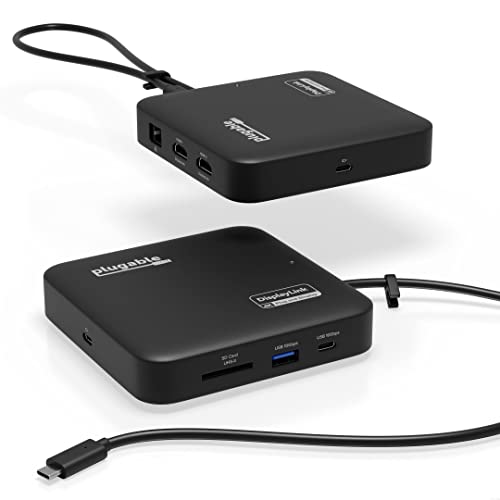
- Dual 4K 60Hz HDMI outputs
- Compact 7-in-1 travel-ready design
- Up to 82W pass-through charging
Best For: MacBook and Windows users who want a small dock with dual-monitor support and everyday connectivity.
Best for Legacy Multiport Expanders
WAVLINK Dual-Monitor DisplayLink Dock

- Dual HDMI/DVI display support for multitasking
- 6 USB ports plus Gigabit Ethernet and audio
- Wide compatibility across major OS platforms
Best For: Users who need a compact wired dock with dual-monitor support and plenty of legacy ports.
Best for Triple-Monitor Workstations
Plugable 13-in-1 USB-C Docking Station

- Triple 4K monitor support at 60Hz
- 100W laptop charging plus accessory power
- 10Gbps USB-C dock with Ethernet and card readers
Best For: People who want a compact displaylink dock for laptops with a full triple-monitor workstation setup.
Best for Dual 4K Workflows
Plugable Dual DisplayPort & HDMI Dock

- Dual 4K monitor support at 60Hz
- USB-C and USB 3.0 host compatibility
- Six USB ports plus Ethernet and audio
Best For: Professionals who want a compact dock for dual 4K productivity setups.
Best for Dual 4K Setups
Acer 9-in-1 USB-C Dock with 2 HDMI

- Dual 4K@60Hz HDMI outputs for two-monitor setups
- 9-in-1 expansion with USB-A, USB-C, SD/microSD, and PD
- Short built-in cable and aluminum body for a cleaner desk
Best For: Laptop users who need a compact dual-monitor dock with charging and extra ports.
Best for Triple Displays
Plugable 13-in-1 Triple Monitor Dock

- Triple HDMI output with DisplayLink multi-monitor support
- 100W charging plus a front 20W USB-C device port
- Good mix of USB-A, Ethernet, SD, and audio ports
Best For: Users who want a single dock for three monitors, charging, and full desk connectivity.
Best for Dual-Display Macs

- Enables dual 4K 60Hz monitors on many Macs
- 100W charging plus Ethernet and card readers
- Compact aluminum build for desk setups
Best For: MacBook owners who need a compact dock for dual monitors and everyday productivity.
Best for Small Spaces – StarTech USB 3.0 Mini Dock, Dual 4K DP
If you need a compact displaylink dock for laptops that can add dual-monitor output without taking over your desk, the StarTech USB 3.0 Mini Dock is built for exactly that job. It combines dual DisplayPort connections, Gigabit Ethernet, and a bus-powered design in a small, travel-friendly format.
Best For: Laptop users who want a portable dual-4K dock for small offices, hybrid work, or shared workspaces.
Pros:
- Dual DisplayPort outputs with up to 4K 60Hz support
- Very compact, bus-powered design with a 1 ft attached cable
- Includes Gigabit Ethernet for more stable wired networking
- Automatic driver setup helps simplify deployment
Cons:
- USB-A only, so newer USB-C laptops need an adapter
- DisplayPort-only video outputs may not suit HDMI-only monitors
- Not ideal if you want a full-size dock with extra ports
As a compact displaylink dock for laptops, this StarTech model stands out when desk space and portability matter more than extra connectivity. It’s a practical pick for users who want reliable dual-screen productivity and wired Ethernet in a minimal footprint.
Best Triple-Display Powerhouse – Anker Prime DL7400 Dock
If you want a compact displaylink dock for laptops that can drive a serious workstation, the Anker Prime DL7400 stands out with triple 4K 60Hz support, plenty of USB-C options, and up to 140W laptop charging. It is a strong fit for Windows users who need a small dock that can still handle multiple monitors and a full desk setup.
Best For: Windows laptop users who want a compact dock with triple-display output, fast charging, and lots of ports.
Pros:
- Triple 4K 60Hz support makes multi-monitor setups much easier
- 140W upstream charging plus three USB-C ports for flexible power delivery
- 14 total ports, including Ethernet, SD/TF slots, and audio
- Smart display and cooling fan help you monitor performance
Cons:
- Windows-only for DisplayLink triple-display use
- Requires the latest DisplayLink driver to work properly
- Included cable is recommended; other USB-C cables may cause issues
This is a compelling choice if you need a compact displaylink dock for laptops that does far more than basic monitor expansion. It is best suited to desk-based Windows setups where high charging wattage, triple-screen output, and broad port availability matter more than portability alone.
Best for Dual 4K Mac & Windows – Plugable 7-in-1 DisplayLink Dock
If you need a compact displaylink dock for laptops that can drive two external monitors without taking over your desk, this Plugable model is a strong fit. It combines dual 4K 60Hz HDMI outputs, 10Gbps USB ports, Ethernet, SD card support, and USB-C charging in a travel-friendly design.
Best For: MacBook and Windows users who want reliable dual-monitor support, fast wired connectivity, and a small dock for office or travel setups.
Pros:
- Dual 4K 60Hz HDMI outputs for extended displays
- Compact 7-in-1 layout with USB-C, USB-A, SD, and Gigabit Ethernet
- Up to 82W pass-through charging keeps a laptop powered
- Works with macOS and Windows, including Apple Silicon Macs
Cons:
- DisplayLink driver setup is required, especially on macOS
- Not ideal for HDCP-protected video, gaming, or 3D rendering
For buyers who want a compact displaylink dock for laptops that prioritizes dual-display productivity over gaming features, this Plugable dock hits a practical sweet spot. It is especially appealing if you need a small, dependable hub for a MacBook or USB-C Windows laptop.
Best for Legacy Multiport Expanders – WAVLINK Dual-Monitor DisplayLink Dock
If you want a compact displaylink dock for laptops that adds dual displays plus real desktop ports, the WAVLINK dock is a practical pick. It combines HDMI/DVI video, multiple USB ports, Ethernet, and audio in a single hub, making it useful for home offices and mixed-device setups.
Best For: Buyers who need a compact, wired docking station for dual monitors and lots of USB peripherals.
Pros:
- Dual-monitor support with HDMI and DVI for flexible screen setups
- Six USB ports, Gigabit Ethernet, and a 3.5mm audio jack
- Broad compatibility across Windows, macOS, ChromeOS, Ubuntu, and Android OTG
- Useful for extending older laptops that need more physical ports
Cons:
- Video output limits are modest compared with newer Thunderbolt docks
- Requires DisplayLink drivers, so setup is less seamless than native USB-C docks
- Bulkier than ultra-minimal travel docks
As a compact displaylink dock for laptops, this WAVLINK model is strongest when port count and compatibility matter more than cutting-edge video specs. It is a solid utility dock for everyday multitasking, especially if you still rely on HDMI/DVI displays and wired peripherals.
Best for Triple-Monitor Workstations – Plugable 13-in-1 USB-C Docking Station
If you need a compact displaylink dock for laptops that can handle a full desk setup, the Plugable UD-ULTC4K is built for serious multitasking. It adds triple-monitor support, wired networking, card readers, USB expansion, and laptop charging through one USB-C connection.
Best For: Windows, Mac, and ChromeOS users who want a compact displaylink dock for laptops with triple 4K monitor support and all-in-one workstation connectivity.
Pros:
- Supports up to three 4K displays at 60Hz for dense multitasking
- 10Gbps USB-C connection with 100W laptop charging and accessory charging
- Multiple video outputs and plenty of ports for docks, peripherals, and Ethernet
Cons:
- DisplayLink drivers are required on macOS, which adds setup steps
- HDCP is not supported, so some streaming services may not work on external displays
This is a strong choice if your priority is maximizing screen space from a compact displaylink dock for laptops without piling on extra adapters. It is especially useful for office users and developers who want a single dock to anchor a multi-monitor setup.
Best for Dual 4K Windows Workflows – Anker Nano 8-in-1 Dual Monitor Dock
If you want a compact displaylink dock for laptops that can still handle serious multitasking, the Anker Nano is built for Windows users who need dual-monitor output, fast data ports, and laptop charging in one small hub. It’s a practical fit for desk setups where space is tight but you still want a clean, high-performance connection.
Best For: Windows laptop users who want dual 4K external displays, fast 10Gbps ports, and pass-through charging in a compact dock.
Pros:
- Supports dual 4K@60Hz output on compatible Windows laptops
- Includes three 10Gbps data ports plus SD/TF card slots
- Offers up to 85W pass-through charging for your laptop
- Compact 8-in-1 design reduces desk clutter
Cons:
- Charger and cable are not included
- MacOS mirror mode only, so it won’t extend to two distinct displays
- Requires compatible USB-C/DP Alt Mode hardware for full display support
For Windows buyers who need a compact displaylink dock for laptops, this Anker option stands out for its strong dual-monitor support and fast everyday I/O. It’s not the simplest universal pick, but it’s a smart choice if you want a tidy dock that can do more than basic expansion.
Best for Dual 4K Workflows – Plugable Dual DisplayPort & HDMI Dock
If you need a compact displaylink dock for laptops that can drive serious multitasking, the Plugable UD-6950Z is a strong fit. It adds dual DisplayPort and HDMI outputs, six USB 3.0 ports, Gigabit Ethernet, and audio in a relatively clean vertical footprint, making it a practical hub for office and home desk setups.
Best For: Windows, macOS, and ChromeOS users who want a compact dock for dual 4K monitors and everyday productivity.
Pros:
- Supports dual 4K displays at 60Hz through DisplayLink technology
- Offers both USB-C and USB 3.0 host connections for broad compatibility
- Includes six USB ports, Gigabit Ethernet, and an audio jack
Cons:
- Does not charge the connected laptop
- Not suitable for gaming or HDCP-protected streaming video
- Mac setup requires driver installation
For productivity-focused buyers, this compact displaylink dock for laptops delivers a lot of I/O without taking over the desk. It is especially appealing if dual-monitor support matters more than charging or entertainment features.
Best for Dual 4K Setups – Acer 9-in-1 USB-C Dock with 2 HDMI
If you want a compact displaylink dock for laptops-style setup without a bulky desktop hub, this Acer USB-C docking station is built for dual monitors, fast charging, and everyday peripherals in one small aluminum body. It’s a practical pick for users who need HDMI expansion, SD card access, and a short integrated cable for a cleaner desk.
Best For: Laptop users who want a compact dual-monitor dock with 4K output, USB expansion, and up to 90W charging.
Pros:
- Dual HDMI ports support up to 4K@60Hz for mirrored or extended displays.
- 9-in-1 layout adds USB-A, USB-C, SD/microSD, and 100W PD pass-through.
- Built-in 0.65 ft cable and aluminum shell keep the setup tidy and travel-friendly.
Cons:
- Requires a USB-C port with DisplayPort Alt Mode support.
- Mac users have display-mode limitations compared with Windows laptops.
Overall, this is a strong choice if your priority is a compact displaylink dock for laptops-style workspace upgrade, especially when you need dual HDMI output and a simple all-in-one port extender. Just double-check USB-C video support before buying.
Best for Triple Displays – Plugable 13-in-1 Triple Monitor Dock
If you need a compact displaylink dock for laptops that can drive more than one external screen, this Plugable dock is built for the job. It combines triple HDMI output, laptop charging, and a broad set of office ports into a single desktop hub, making it a practical pick for workstations that need serious connectivity without a lot of clutter.
Best For: Laptop users who want triple-monitor support, simple desk consolidation, and strong compatibility across Mac, Windows, and ChromeOS.
Pros:
- Triple HDMI output with DisplayLink support for up to three extended displays
- 100W USB-C charging keeps many laptops powered through the dock
- Includes useful extras like Ethernet, SD card reader, audio, and multiple USB ports
- Works with Windows, macOS, and ChromeOS via USB-C, USB4, or Thunderbolt
Cons:
- Mac users must install DisplayLink Manager to enable multi-monitor output
- Not suitable for protected streaming content like Netflix or Hulu
For buyers comparing a compact displaylink dock for laptops, this model stands out more for productivity and port count than for minimal size. It is a strong fit if your priority is a tidy, all-in-one office setup with dependable multi-display expansion.
Best for Dual-Display Macs – Plugable UD-6950PDH 4K Dock
If you need a compact displaylink dock for laptops that can push two external monitors from a MacBook, the Plugable UD-6950PDH is built for that job. It combines dual 4K output, 100W charging, and a wide mix of ports in a space-saving aluminum chassis, making it a practical pick for desk setups that need more screen space without a bulky dock.
Best For: MacBook users, hybrid workers, and office setups that need reliable dual 4K external displays with one-cable connectivity.
Pros:
- Drives 2x 4K displays at 60Hz on supported Macs via DisplayLink
- Includes HDMI, DisplayPort, USB-A, USB-C, Ethernet, SD/microSD, and audio
- 100W USB-C power delivery helps keep laptops charged on the desk
- Compact aluminum design feels tidy and office-ready
Cons:
- Requires DisplayLink driver installation for full functionality
- HDCP is not supported, which can limit some protected video playback
- Not the simplest plug-and-play option for users who want zero setup
As a compact displaylink dock for laptops, this Plugable model stands out most when your priority is maximizing monitor support on a Mac that normally limits external displays. It is less about being ultra-minimal and more about delivering dependable productivity features in a relatively small footprint.
How We Picked the Best Compact Displaylink Dock for Laptops
We prioritized dock size, display output options, laptop compatibility, charging wattage, and port mix. For a Compact Displaylink Dock for Laptops, the best choices are the ones that solve real setup problems: adding multiple monitors, reducing cable clutter, and working reliably across different systems.
We also looked for clear support notes for Windows, macOS, and ChromeOS, plus practical features like Ethernet, USB-A, USB-C, SD card readers, and enough power delivery to keep a laptop charged during heavy use.
Quick Comparison
If you want the simplest setup, choose a dual-display dock with strong charging and a few fast data ports. If you work with more demanding multitasking, a triple-display model is often worth the extra desk space. Travel-focused users usually benefit from smaller 7-in-1 or 8-in-1 units, while desktop replacement users should look at higher-port-count docks with stronger power output.
Key Buying Factors for a Compact Displaylink Dock for Laptops
Display Support
Check how many external monitors you need and whether the dock supports dual or triple 4K at 60Hz. Also confirm whether it uses HDMI, DisplayPort, or a mix of both, since that affects cable choice and monitor compatibility.
Power Delivery
Make sure the dock can provide enough USB-C charging for your laptop. Light ultrabooks may be fine with 65W to 85W, while more powerful systems often benefit from 100W or more. If you use a single-cable desk setup, charging headroom matters.
Compatibility
DisplayLink is especially useful for expanding monitor support on systems that may otherwise be limited, including certain MacBook, Windows, and ChromeOS setups. Still, driver installation may be required, so it is smart to verify support before buying.
Port Selection
Think about your peripherals. USB-A ports are still essential for many accessories, while USB-C, SD card slots, and Ethernet can make a compact dock far more useful without adding bulk.
Who Should Buy Which Compact Displaylink Dock for Laptops?
If you want a travel-friendly setup, go for a smaller dock with dual 4K support and moderate charging. If your workspace needs multiple monitors and a full peripheral hub, choose a larger DisplayLink dock with triple-display output and higher wattage.
Mac users should pay close attention to driver requirements and monitor-count support, while Windows users often have the widest range of configuration flexibility. For most buyers, the best Compact Displaylink Dock for Laptops is the one that matches your monitor count, power needs, and desk-space limits without overpaying for features you will not use.
