
Compact digital signage displays help businesses share menus, promotions, and announcements in tight spaces without sacrificing clarity or polish.
Whether you need a countertop screen, a touch-enabled kiosk, or a simple plug-and-play player, the right pick depends on placement, content, and how much control you want.
Best 10 Compact Digital Signage Displays Picks for 2026
Countertop Retail Signage
18.5" Countertop Digital Signage Display

- 18.5-inch indoor countertop format
- Landscape and portrait stands included
- 700-nit 1080P screen with CMS and USB playback
Best For: Indoor counters, checkout areas, and reception desks
Compact Wall Signage
Samsung 24” Commercial UHD LED LCD Display Sign

- 24-inch compact commercial wall display
- Full HD resolution with Home UI and Favorites folder
- Built-in Wi-Fi plus cloud-based Samsung VXT management
Best For: Small wall installations in offices, entrances, and promo areas
Signage Media Player

- Compact 4K signage player for existing displays
- Auto-launches CMS in kiosk mode
- Easy setup with mobile app and CMS compatibility
Best For: Businesses needing a simple media player for current screens
Touchscreen Counter Signage
10.1 Inch Android Digital Signage Display
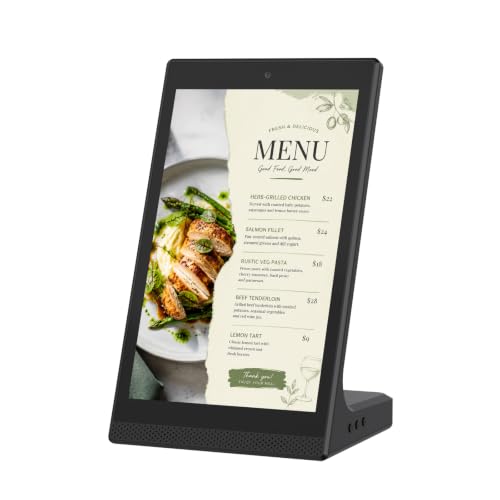
- 10.1-inch tabletop touchscreen format
- WiFi and USB support local content management
- Built for menus, notices, and close-range displays
Best For: Small indoor counters that need interactive signage
Large-Format Indoor Signage

- 32-inch IPS display with FHD 1080p clarity
- USB, HDMI, WiFi, and CMS remote updates
- Foldable, wheeled design for easier movement
Best For: Retail, hospitality, and events needing a movable indoor signage kiosk
Countertop Signage with Charging

- Dual-sided 7-inch touchscreen for close-range messaging
- Built-in battery for cordless operation
- Cloud CMS and device charging in one unit
Best For: Restaurants and reception areas that want compact signage with charging
Interactive Desktop Signage

- 10-point touchscreen for interactive use
- App or USB updates with loop playback
- Compact L-shaped stand fits counters well
Best For: Counters and tabletops that need interactive signage in a small footprint
Countertop Menu Board
18.5" 700 Nits Digital Menu Board

- 700 nits brightness for commercial visibility
- Free lifetime Cloud CMS with remote management
- Desktop stand for portrait or landscape use
Best For: Restaurants, cafes, reception desks, and retail counters
Portable Touch Display
15.6" Battery-Powered Touch Signage
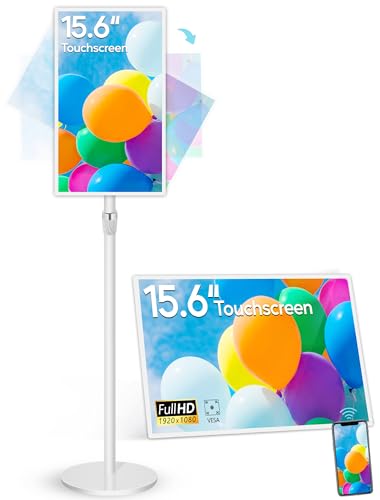
- 10000mAh battery for 4-6 hours of use
- 10-point capacitive touchscreen with Android 13
- Wireless screen mirroring and adjustable stand
Best For: Portable indoor signage, demos, and interactive displays
Freestanding Touch Kiosk
32" Interactive Digital Signage Kiosk

- 32-inch IPS touch panel with 600 nits brightness
- Split-screen feature for multiple content types
- USB, HDMI, 5G Wi-Fi, and Android OS support
Best For: Malls, airports, hospitals, and retail kiosks
Countertop Retail Signage – 18.5" Countertop Digital Signage Display
This compact digital signage display is built for close-range countertop use in indoor business spaces like checkout counters, reception desks, and waiting areas. The 18.5-inch screen, 700-nit brightness, and 1080P resolution make it a practical fit for menus, service details, store information, and brand visuals where customers pause and look.
Best For: Restaurants, cafes, salons, clinics, retail counters, and front desks that need an indoor countertop sign.
Pros:
- Landscape and portrait stands included for flexible countertop placement
- 700-nit 1080P display supports clear indoor close-range viewing
- CMS publishing, USB playback, loop playback, and scheduling are supported
- Metal housing and tempered glass front are designed for commercial counter use
Cons:
- Display only, so it is not a touchscreen tablet or POS terminal
- Designed for indoor use, not outdoor waterproof installation
- Best suited to counter placement rather than wall mounting
This model stands out if you want a sturdy countertop sign with flexible orientation options and basic remote content management. It balances practical business use with commercial construction for everyday indoor signage.
Compact Wall Signage – Samsung 24” Commercial UHD LED LCD Display Sign
If you want a compact digital signage display for a tighter wall space, this 24-inch Samsung commercial screen is aimed at efficient indoor promotion and information sharing. It offers Full HD resolution, a compact design, and cloud-based remote management through Samsung VXT for businesses that want a streamlined display setup.
Best For: Offices, entrances, exits, and promotional wall displays in space-conscious commercial settings.
Pros:
- Compact 24-inch design helps save wall space
- Full HD resolution supports clear commercial content
- Home UI and Favorites folder simplify navigation to common features
- Built-in Wi-Fi and Samsung VXT support remote control and management
Cons:
- Wall-mount format may not suit countertop or tabletop use
- Screen size is compact, so it is better for focused messaging than large-area visibility
- Uses a simple commercial display approach rather than interactive signage features
This is a solid choice when you want a branded commercial display with easy remote management and a small footprint. It is especially appealing for businesses that need a dependable wall sign for entrances, offices, or promo areas.
Signage Media Player – Amazon Signage Stick 4K
The Amazon Signage Stick is a compact digital signage display solution when you already have a screen and need a simple 4K media player to run business content. It auto-launches your CMS in kiosk mode, supports CMS providers, and is designed for easy setup through the free mobile app.
Best For: Businesses that want an easy-to-manage signage player for existing displays.
Pros:
- Auto-launches CMS in kiosk mode for unattended operation
- Easy setup through the free Amazon Signage app
- Supports CMS compatibility and automatic CMS updates
- Wi-Fi 6E, 4K output, and quad-core processing in a small device
Cons:
- Requires an existing display since it is a media player, not a screen
- CMS subscription is required for provider integration
- Best for signage workflows rather than standalone display needs
This is the right pick if your priority is simple content playback and remote management rather than buying a new screen. Its small size, security features, and CMS support make it a practical signage add-on for businesses of any size.
Touchscreen Counter Signage – 10.1 Inch Android Digital Signage Display
This compact digital signage display is built as a tabletop touchscreen sign for indoor business counters and desktop use. The 10.1-inch Android screen supports WiFi and USB connectivity, making it suitable for menus, notices, brand slides, product showcases, and other close-range information.
Best For: Restaurants, retail counters, reception desks, salons, clinics, and small indoor display areas.
Pros:
- 10.1-inch compact tabletop design saves space
- Touchscreen support allows simple tap and swipe interaction
- WiFi and USB connectivity help with file transfer and local content management
- Works for menus, price lists, notices, and customer-facing signage
Cons:
- Small screen size limits viewing distance and large-format visibility
- Best suited to indoor close-range use rather than broad-area messaging
- Touch-first operation may not be necessary for every signage setup
This model is a strong option if you need an interactive countertop display for quick updates and close-up customer viewing. It fits well in compact business spaces where clear, hands-on sign control matters more than screen size.
Large-Format Indoor Signage – 32-Inch Android Kiosk
If you need compact digital signage displays that still make a big visual impact, this 32-inch indoor kiosk is built for high-visibility promotional work. Its IPS panel, FHD 1080p resolution, and 178° viewing angle help content stay clear from different positions, while USB/HDMI input and auto loop playback keep setup straightforward.
Best For: Retail stores, restaurants, hotels, malls, and event spaces that need a portable indoor display with remote content control.
Pros:
- 32-inch IPS display with FHD 1080p image and video quality
- USB, HDMI, WiFi, and CMS support for flexible content updates
- Automatic loop playback plus timed power on/off settings
- Foldable, movable design with built-in wheels for easier transport
Cons:
- Much larger than countertop signage, so it needs floor space
- Primarily geared toward indoor use
- Advanced CMS features may be more than some simple setups need
This model stands out when you want a larger, plug-in-ready display that can be moved between locations and managed remotely. It is a practical choice for businesses that need signage with continuous playback and quick updates without constant manual intervention.
Countertop Signage with Charging – 7-Inch Dual-Sided Display
For compact digital signage displays that do more than play ads, this 7-inch tabletop unit combines a dual-sided touchscreen with built-in phone charging. It is designed for counters, tables, and reception areas where space is limited but customer engagement and convenience both matter.
Best For: Restaurants, cafes, bars, hotels, and front desks that want a small signage display with added charging utility.
Pros:
- Dual-sided 7-inch touchscreen for menus, ads, QR codes, and announcements
- Built-in battery supports portable use without constant wall power
- Cloud-based WiFi CMS for remote content updates
- 3-in-1 charging cables plus USB-A port add customer convenience
Cons:
- Small 7-inch screen is best for close viewing only
- Battery life depends on brightness and charging activity
- Less suited to large-format advertising needs
This is a smart pick if your goal is to combine tabletop advertising with practical value at the point of contact. It is especially useful in settings where a small footprint and customer-facing utility are more important than screen size.
Interactive Desktop Signage – 10.1-Inch L-Shaped Kiosk
This 10.1-inch desktop option is a strong fit if you want compact digital signage displays with touchscreen interaction and flexible content control. It supports app-based updates over Wi-Fi or offline USB playback, while the L-shaped design keeps the screen stable and easy to view on a counter or tabletop.
Best For: Retail counters, restaurants, hotels, clinics, and trade show tables that need interactive signage in a small footprint.
Pros:
- 10-point capacitive touchscreen for interactive customer engagement
- LedArt app and USB support make content updates easy
- L-shaped stand provides a stable, space-saving tabletop setup
- Wi-Fi, Ethernet, Bluetooth, speakers, and camera add flexibility
Cons:
- HD 800×1280 resolution is more modest than larger FHD displays
- Best suited to desktop and counter placement, not wall-sized messaging
- Interactive features may be unnecessary for simple looping signage
This model is a practical choice when engagement matters as much as display. Its touchscreen, app-based management, and compact footprint make it well suited to businesses that want a polished counter display without taking up much space.
Countertop Menu Board – 18.5" 700 Nits Digital Menu Board
This compact digital signage display is built for countertop use where visibility and quick updates matter. The 18.5-inch screen, 700 nits brightness, and Android 12 platform make it a practical fit for businesses that want a small-format menu board or promo screen for daily commercial use.
Best For: Restaurants, cafes, bakeries, reception desks, and retail counters that need a bright tabletop display.
Pros:
- 700 nits brightness helps content stay visible in busy business environments.
- Free lifetime Cloud CMS supports remote uploads, playlists, scheduling, and multi-display control.
- Desktop stand supports both landscape and portrait placement on counters and desks.
- Flexible connections include HDMI, LAN, TF card, USB 2.0, USB 3.0, and DC.
Cons:
- 720P HD resolution is less sharp than full HD options.
- Built-in memory is modest at 2GB RAM and 32GB storage.
Overall, this is a straightforward choice if you want a compact digital signage display for menus, promotions, or welcome messaging without relying on printed signs. The remote CMS and countertop-friendly stand make it easy to manage and place in common front-of-house settings.
Portable Touch Display – 15.6" Battery-Powered Touch Signage
If you want compact digital signage displays that can move between locations, this 15.6-inch unit stands out for portability and interaction. It combines a capacitive touchscreen, adjustable stand, Android 13, and a built-in battery, making it useful for short-term promotions, demos, or flexible indoor displays.
Best For: Businesses, showrooms, and indoor spaces that need a portable interactive signage screen.
Pros:
- Built-in 10000mAh battery supports 4-6 hours of use when fully charged.
- 10-point capacitive touchscreen adds interactive control and whiteboard-style use.
- Android 13 with autoplay and app support gives it flexible content options.
- Includes wireless screen mirroring plus a desktop/floor stand with angle adjustment.
Cons:
- 400 cd/m² brightness is lower than some higher-output commercial displays.
- Battery runtime may be limiting for all-day unplugged use.
This model makes sense when portability matters as much as signage performance. Its touch capability, mirroring support, and adaptable stand give it more use cases than a basic static display, especially for indoor business settings.
Freestanding Touch Kiosk – 32" Interactive Digital Signage Kiosk
This freestanding option is a larger compact digital signage display for environments that need a kiosk-style presence rather than a tabletop unit. With a 32-inch touch panel, 600 nits brightness, Android OS, and split-screen support, it is designed for interactive messaging in high-traffic public spaces.
Best For: Malls, airports, hospitals, and retail spaces that need a freestanding interactive kiosk.
Pros:
- 600 nits brightness and IPS technology help keep visuals clear in public areas.
- Touchscreen support makes it useful for interactive content and product browsing.
- Split-screen function lets you show multiple content types at once.
- USB, HDMI, 5G Wi-Fi, and Google Apps support flexible content management.
Cons:
- As a kiosk, it requires more floor space than desktop signage.
- The 32-inch size may be more than needed for smaller counters or desks.
For businesses that want a more immersive display than a small menu board, this kiosk format offers strong flexibility and engagement tools. The freestanding design, Android platform, and lifetime technical support make it a solid fit for ongoing public-facing use.
How We Picked the Best Compact Digital Signage Displays
We focused on screens that fit real-world business use: small footprints, dependable brightness, simple content management, and the right mix of touch or non-touch operation. We also prioritized models that make installation and daily updates easier for busy teams.
For Compact Digital Signage Displays, practical details matter more than flashy specs. A great option should be easy to mount or place, visible in typical indoor lighting, and compatible with the way you plan to run content.
Quick Comparison: What Matters Most
Some buyers need a basic display for looping ads or menus, while others need an interactive screen for self-service or guided ordering. Larger compact models tend to offer better visibility from a distance, while smaller tabletop units work better for counters, reception desks, and point-of-sale areas.
- Best for simple playback: Media-player-based options with minimal setup
- Best for interactivity: Touchscreen models with app or CMS control
- Best for flexibility: Battery-powered or portable designs
- Best for visibility: Higher-brightness displays for brighter indoor areas
Key Buying Factors for Compact Digital Signage Displays
Screen Size and Placement
Choose a size that matches viewing distance and available space. Smaller displays are ideal for counters and checkout areas, while 18.5-inch to 24-inch screens often strike a strong balance between footprint and readability. For lobby floors or larger retail areas, a bigger kiosk may be more effective than a tabletop unit.
Brightness and Image Quality
Brightness affects how well your message stands out under store lighting. Look for clear text, strong contrast, and enough nits for the environment. Full HD is usually sufficient for menus and promotions, while 4K playback can be helpful for premium visuals and motion graphics.
Touch, Software, and Connectivity
If you need wayfinding, ordering, or customer interaction, touch support and responsive software are essential. If the screen is only for looping promotions, a simpler player may be easier to manage. Check for WiFi, USB, CMS support, and compatibility with your content workflow.
Power, Mounting, and Daily Use
Battery power can be useful for temporary setups, events, or moving displays between locations. Adjustable stands, compact bases, and VESA-style mounting options make placement easier. Also consider durability and how often staff will update content or relocate the unit.
Who Should Buy Which Compact Digital Signage Displays?
Retailers and restaurants with limited counter space should lean toward smaller tabletop or countertop models. Businesses that want guided interaction or menu browsing should prioritize touchscreens. If your team values simplicity above all else, a professional media player paired with an existing screen may be the most efficient choice. For larger open areas, a floor-standing kiosk is the better fit.
In short, the best Compact Digital Signage Displays are the ones that match your space, content style, and maintenance capacity—not just the biggest spec sheet.
