
A good boom arm can make a desk microphone easier to position while keeping your workspace clearer. Compact models are especially useful for streamers, podcasters, gamers, and home-recording setups with limited room.
We’ve selected 10 compact desk boom arms with different approaches to reach, mounting, rotation, storage, and microphone support. Use the guide below to narrow your choices based on your desk and equipment.
Best 10 Compact Desk Boom Arms Picks for 2026
Most Stable Low-Profile Pick
Aokeo AK-58i Low Profile Mic Arm

- Low-profile design sits below the monitor
- 2 kg capacity with multiple thread adapters
- 360-degree rotation and concealed cable routing
Best For: Stable, discreet setups on desks under 7 cm thick
Best Portable Value
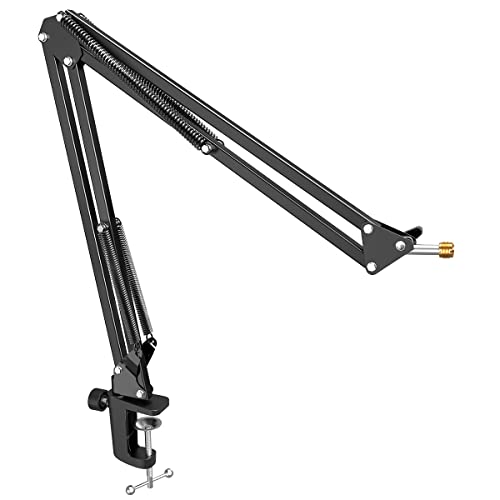
- Foldable for storage and transport
- Metal clamp fits desks up to 2 inches thick
- 180-degree adjustment with included thread adapter
Best For: Small desks, beginners, and portable recording setups
Best Versatile Mount
NEEWER MS007 Low Profile Boom Arm

- Extends to 26.5 inches with adjustable ball head
- Supports microphones and lightweight accessories
- Cable channels accommodate USB and XLR cables
Best For: Multi-purpose creator desks and flexible recording stations
Best Extended Reach
FIFINE BM88W Low Profile Boom Arm

- Reaches up to 29 inches
- 220-degree vertical and 360-degree horizontal adjustment
- Cable channels and multiple thread adapters included
Best For: Users needing long reach in a low-profile setup
Heavy-Duty Desk Stability
InnoGear DS3 Compact Desktop Boom Arm

- Supports microphones and equipment up to 2.64 pounds
- Small weighted base with foldable arm
- Includes versatile 1/4-, 3/8-, and 5/8-inch adapters
Best For: Stable desktop setups using heavier microphones or multiple device types
Low-Profile Screen-Friendly Arm
Aokeo AK-55 Low-Profile Mic Boom Arm

- Low-profile shape stays below the computer screen
- 360-degree arm rotation and 180-degree vertical movement
- Supports up to 2 kilograms with included adapters
Best For: Gaming and streaming desks where clear screen visibility matters
Space-Saving Lightweight Setup
TODI Slim Folding Mic Boom Arm

- Folds away to conserve desk space
- Extends up to 29 inches across larger desks
- Includes cable management and a 360-degree base hinge
Best For: Lightweight microphones and tidy, foldable desktop setups
Low-Profile Flexibility

- 25.6-inch reach with 360° rotation
- Supports up to 3.3 pounds
- Includes multiple thread adapters
Best For: Compact streaming and podcasting desks
Extended Compact Reach

- Includes a 9.8-inch extension rod
- Supports up to 4 pounds
- 360° rotatable aluminum arm
Best For: Heavier microphones and wider desks
Clean Cable Management
InnoGear LP98 Low-Profile Mic Arm

- Arm sits 3.35 inches above the desk
- Integrated magnetic cable channel
- Multiple rotation and tilt adjustments
Best For: Minimalist desks needing tidy cable routing
Most Stable Low-Profile Pick – Aokeo AK-58i Low Profile Mic Arm
For shoppers comparing compact desk boom arms, the Aokeo AK-58i emphasizes stability and a discreet under-monitor profile. Its steel construction, low center of gravity, and broad thread compatibility make it a practical option for gaming, streaming, podcasting, and recording.
Best For: Users who prioritize a steady, unobtrusive microphone arm for desks up to 7 cm thick.
Pros:
- Low-profile design helps reduce visual obstruction and keeps the arm below the monitor.
- 360-degree arm rotation and 180-degree vertical adjustment support flexible positioning.
- Supports up to 2 kg and includes 1/4-inch, 3/8-inch, and 5/8-inch thread adapters.
- Steel construction and concealed cable routing support a tidy, durable setup.
Cons:
- The desk clamp is limited to tables less than 7 cm thick.
- The microphone is not included.
The AK-58i is a strong fit when stability and a clean sightline matter more than maximum reach. Its 2 kg capacity also gives it broad compatibility with microphones and shock mounts.
Best Portable Value – FIFINE CS1 Scissor Boom Arm
The FIFINE CS1 is one of the more portable compact desk boom arms, with a foldable scissor design and a clamp that fits desks up to 2 inches thick. Its metal build, spring support, and 180-degree adjustment make it suitable for flexible home recording setups.
Best For: Beginners, gamers, and podcasters who need a foldable arm for smaller desks or travel.
Pros:
- Foldable design saves desktop space and is convenient to carry.
- Wider metal clamp includes an anti-scratch pad and a locking knob.
- 180-degree vertical adjustment provides useful microphone positioning range.
- Includes a 3/8-inch to 5/8-inch adapter for broad microphone compatibility.
Cons:
- The clamp only fits desktops 2 inches thick or less.
- It offers less stated reach and load information than some competing arms.
- The microphone is not included.
The CS1 makes sense for users who value portability and easy storage. Its clamp and spring-supported metal arm provide a practical balance for standard desktop microphones without taking over the workspace.
Best Versatile Mount – NEEWER MS007 Low Profile Boom Arm
The NEEWER MS007 stands out among compact desk boom arms for its aluminum construction, long extension, and accessory-friendly mounting system. Its low-profile dual-arm layout keeps the microphone below the monitor while offering support for microphones, shock mounts, phone holders, small cameras, and fill lights.
Best For: Content creators who want one adjustable desk arm for microphones and lightweight camera or lighting accessories.
Pros:
- Dual-arm low-profile design helps preserve screen and desk visibility.
- Extends to 26.5 inches and supports 360-degree horizontal rotation with 100-degree tilt.
- Aluminum alloy construction supports loads up to 3.3 pounds.
- Built-in cable channels and included straps help manage USB and XLR cables.
Cons:
- Its 3.3-pound load limit may not suit heavier equipment.
- The clamp fits desks from 1 to 6 cm thick, so compatibility should be checked carefully.
- The listed weight is 3.3 pounds, making it heavier than some simpler arms.
The MS007 is a versatile choice for a creator workstation that uses more than a microphone. Its ball head, extension pole, multiple adapters, and cable channels give it broader utility than a basic mic-only boom arm.
Best Extended Reach – FIFINE BM88W Low Profile Boom Arm
The FIFINE BM88W combines a low-profile layout with a 29-inch reach, making it a compelling option among compact desk boom arms for users who need more positioning freedom. Its metal construction, cable channels, rotatable ball head, and multi-thread adapters support a tidy recording or streaming setup.
Best For: Podcasters, streamers, and home-office users who need extended reach without placing the arm across the top of the screen.
Pros:
- 29-inch extension and 360-degree horizontal adjustment provide broad positioning flexibility.
- 220-degree vertical adjustment helps accommodate different recording angles.
- Metal construction and a low-profile design support a clean, stable workspace.
- Includes a rotatable ball head, cable management, and 1/4-inch, 3/8-inch, and 5/8-inch adapters.
Cons:
- The maximum recommended load is 1.5 kg.
- The clamp fits desks from 0.8 to 2.4 inches thick.
- The microphone is not included, and the ball-head color may vary.
The BM88W is a good match when reach is a priority but a conventional overhead arm would interfere with the screen. Check desk thickness and microphone weight before buying, especially for larger microphones or shock mounts.
Heavy-Duty Desk Stability – InnoGear DS3 Compact Desktop Boom Arm
For compact desk boom arms that prioritize stability, the InnoGear DS3 combines a weighted steel base with a foldable arm and a small 6.7-by-4.7-inch footprint. Its 2.64-pound capacity and included thread adapters make it a flexible option for microphones, webcams, and cameras.
Best For: Creators who need a stable, portable desktop stand for heavier microphones or mixed equipment.
Pros:
- Supports up to 2.64 pounds with a weighted 2.4-pound base.
- Compact, foldable design suits small desks and travel.
- Includes 3/8-to-5/8-inch and 3/8-to-1/4-inch adapters.
- Non-slip pads help protect the desk and reduce movement.
Cons:
- Maximum height is limited to 15 inches.
- Position adjustments require the included Allen wrench.
The DS3 is a strong pick when a compact footprint matters but you do not want to sacrifice load capacity. Its desktop base is less suited to users who specifically want a clamp-mounted arm.
Low-Profile Screen-Friendly Arm – Aokeo AK-55 Low-Profile Mic Boom Arm
The Aokeo AK-55 is one of the more unobtrusive compact desk boom arms, using a low-profile shape that extends below the computer screen and helps conceal the microphone cable. Its metal construction and 2-kilogram capacity suit gaming, podcasting, recording, and streaming setups.
Best For: Gamers and streamers who want a low-visibility arm with broad microphone compatibility.
Pros:
- Low-profile design helps reduce visual obstruction.
- Arms rotate 360 degrees, while the microphone arm swings 180 degrees vertically.
- Supports up to 2 kilograms and includes 1/4- and 5/8-inch adapters.
- Cable routing along the lower arm helps keep the setup tidy.
Cons:
- Fits tables less than 7 centimeters thick.
- Its 90-centimeter maximum height may not suit every elevated setup.
The AK-55 stands out for keeping the microphone arm below the monitor’s main sightline while retaining extensive positioning flexibility. Check your desk thickness before buying, since the fit is specified for tables under 7 centimeters.
Space-Saving Lightweight Setup – TODI Slim Folding Mic Boom Arm
The TODI TDMS02BKUS is a slim option among compact desk boom arms, folding away when not in use and extending up to 29 inches across a larger desktop. It includes cable management and a 360-degree base hinge, but it is intended for lightweight microphones rather than heavy studio models.
Best For: Users who want a foldable, cable-organized arm for a lightweight microphone.
Pros:
- Space-saving body folds away when not in use.
- Extends up to 29 inches for larger office desks.
- 360-degree base hinge supports flexible positioning.
- Built-in cable channels help reduce cable pulling and clutter.
Cons:
- Designed for lightweight microphones, not heavy-duty or studio models.
- Does not fit some 1/4-inch microphones, including Blue Yeti ORB and Yeti X.
- Includes 3/8- and 5/8-inch threads but no 1/4-inch thread.
The TODI is appealing when desk space and storage are priorities, especially for a long desktop where its 29-inch reach is useful. Confirm your microphone’s weight and thread size carefully before choosing it.
Low-Profile Flexibility – InnoGear MU-LP26
The InnoGear MU-LP26 is a practical choice for compact desk boom arms when you want a streamlined setup that can tuck beneath a monitor. Its 25.6-inch reach, 360° horizontal rotation, and 250° vertical adjustment provide plenty of positioning flexibility without taking over the workspace.
Best For: Streamers, podcasters, and home studios needing a low-profile arm with broad microphone compatibility.
Pros:
- Low-profile design helps keep the area beneath a monitor clear.
- Supports microphones and accessories weighing up to 3.3 pounds.
- 360° horizontal rotation and 250° vertical adjustment allow precise positioning.
- Includes 3/8-to-5/8-inch and 3/8-to-1/4-inch adapters plus a universal mic clip.
Cons:
- The clamp fits desks up to 2.75 inches thick, so thicker desktops are excluded.
- Its 3.3-pound capacity may not suit especially heavy microphone setups with accessories.
With its alloy-steel construction, padded C-style clamp, and included adapters, the MU-LP26 balances stability and versatility. It is a strong fit when keeping the microphone accessible while maintaining an uncluttered desk is the priority.
Extended Compact Reach – M05 Pro Boom Arm
The M05 Pro is one of the more capable compact desk boom arms for setups that need extra reach. Its 9.8-inch extension rod helps span wider desks or monitors, while the foldable aluminum arm rotates 360° for flexible microphone placement.
Best For: Gamers, streamers, and podcasters who need a longer reach and a higher 4-pound load capacity.
Pros:
- 4-pound maximum load supports heavier microphones such as the Blue Yeti.
- Included 9.8-inch extension rod helps clear monitors and reach across wider desks.
- 360° rotation supports flexible positioning during recording or streaming.
- Includes a mic clip, cable bands, and a 3/8-to-5/8-inch conversion screw.
Cons:
- The clamp fits desks up to 2 inches thick.
- HyperX QuadCast requires an adapter that is not included.
- The supplied notes recommend following the installation video and product description before use.
The M05 Pro stands out for combining a relatively compact, foldable design with extra reach and the highest stated weight capacity in this group. It is worth considering when a basic low-profile arm would not extend far enough across your desk.
Clean Cable Management – InnoGear LP98 Low-Profile Mic Arm
The InnoGear LP98 is designed for compact desk boom arms where a tidy appearance matters. Its lower arm sits just 3.35 inches above the desk, and the integrated magnetic cable channel keeps wiring contained without relying on bulky external hooks.
Best For: Minimalist workstations and small streaming desks that need low clearance and built-in cable organization.
Pros:
- Ultra-low profile helps free desk space and preserve monitor visibility.
- Magnetic cable management keeps wires hidden and tangle-free.
- Offers 360° base rotation, 180° swivel, 170° tilt, and 360° shaft rotation.
- Includes 3/8-to-5/8-inch and 3/8-to-1/4-inch adapters for microphones and compatible webcams.
Cons:
- The clamp fits flat-edged desks up to 2.36 inches thick.
- Maximum load is 3.3 pounds.
- A shock mount is not included.
The LP98 is especially compelling if cable clutter is as much a concern as microphone placement. Its alloy-steel construction and broad adjustment range add stability and flexibility, while the low 3.35-inch profile keeps the arm visually unobtrusive.
How We Picked These Compact Desk Boom Arms
We focused on low-profile and space-conscious microphone arms suited to desktop use. The selection considers microphone compatibility, stated weight capacity, adjustment range, mounting hardware, desk-clamp design, rotation, folding or storage features, and suitability for streaming, podcasting, gaming, and recording. Because manufacturers list specifications differently, confirm the current dimensions, included adapters, and maximum load before buying.
Quick Comparison
Low-profile arms such as the Aokeo AK-58i, NEEWER MS007, FIFINE BM88W, and InnoGear low-profile models are designed to keep the microphone closer to the desk and out of the way of monitors. The FIFINE CS1 and Aokeo AK-55 offer familiar scissor-arm designs for straightforward positioning. The InnoGear 2.64-pound model is worth considering when your microphone and accessories approach the upper end of a compact arm’s capacity. The TODI, M05 Pro, and 360-degree InnoGear options emphasize rotation, flexibility, or convenient storage.
Key Buying Factors for Compact Desk Boom Arms
Microphone Weight and Compatibility
Check the complete microphone setup—not just the microphone’s bare weight. Shock mounts, pop filters, extension tubes, and heavier USB or broadcast microphones add load. Make sure the arm’s rating exceeds your total setup weight and that the package includes the required 3/8-inch or 5/8-inch adapter.
Desk Clearance and Clamp Fit
Measure the available desk edge, including any rear wall, shelf, monitor stand, or cable tray. A low-profile arm saves vertical space, but its clamp still needs enough thickness and a flat, stable surface. Avoid mounting where the desk flexes or where the clamp could interfere with drawers and accessories.
Reach, Movement, and Stability
Consider whether the microphone must swing over a keyboard, move beside a monitor, or fold away after use. A 360-degree or highly rotatable design can improve positioning, while stronger joints and a substantial clamp help prevent drift. Longer reach is useful only if the arm remains stable under load.
Cable Management and Daily Use
Integrated or attachable cable routing keeps the setup tidy and reduces strain on the microphone connection. Also look for accessible tension controls and joints that can be adjusted without excessive force. If you regularly switch between speaking and keyboard use, quick repositioning may matter more than maximum reach.
Who Should Buy Which Compact Desk Boom Arms?
Choose a low-profile model if preserving monitor visibility and desk space is your priority. Pick a traditional scissor arm for simple, familiar adjustment and general streaming or gaming use. Users with heavier microphones should prioritize a clearly stated higher load capacity and a strong clamp. If you frequently pack away your setup, consider a foldable or storable arm such as the M05 Pro or TODI. For flexible multi-angle positioning, a rotatable 360-degree design may be the better fit. Whichever model you choose, verify its current specifications and test the clamp on your exact desk before installing an expensive microphone.
