
Running AI models locally can give developers and creative teams more control over data and workflows, but the right small-footprint machine depends on more than processor branding. Memory capacity, software compatibility, and sustained performance can matter just as much.
These ten compact systems span AMD Ryzen AI Max desktops, NVIDIA GB10 machines, and business-oriented HP configurations. Use the comparisons below to narrow the field by workload and budget—not just headline specifications.
Best 10 Compact AI Workstations Picks for 2026
Best Windows All-Rounder

- 128GB unified memory
- 2TB SSD with second M.2 slot
- Up to four displays
Best For: Windows-based AI and creative workflows
Best NVIDIA Reference Platform

- GB10 Grace Blackwell platform
- 128GB unified memory
- 4TB self-encrypting NVMe storage
Best For: NVIDIA-based local AI development
Best for High-Speed Networking

- Dual 10GbE ports
- Five video outputs
- 128GB memory and 2TB SSD
Best For: Network-heavy, multi-monitor workflows
Best Stackable AI System

- GB10 Grace Blackwell chip
- 128GB memory
- Supports dual-system stacking
Best For: Scalable local AI development
Windows Business Pick

- Ryzen AI Max+ PRO 395 processor
- 128 GB LPDDR5X and 2 TB SSD
- Windows 11 Pro; integrated graphics
Best For: Windows-based business workflows
Local AI Model Pick

- NVIDIA GB10 Grace Blackwell Superchip
- 128 GB unified memory; 4 TB SSD
- DGX OS on an ARM-based platform
Best For: Developers running AI models locally
External GPU Expansion Pick

- 16-core Ryzen AI Max+ 395
- 128 GB LPDDR5X; 2 TB SSD
- OCuLink port for external GPU expansion
Best For: Local AI and creative work with GPU expansion
Flexible Office Pick
HP Z2 Mini G1a Ryzen AI MAX PRO 385
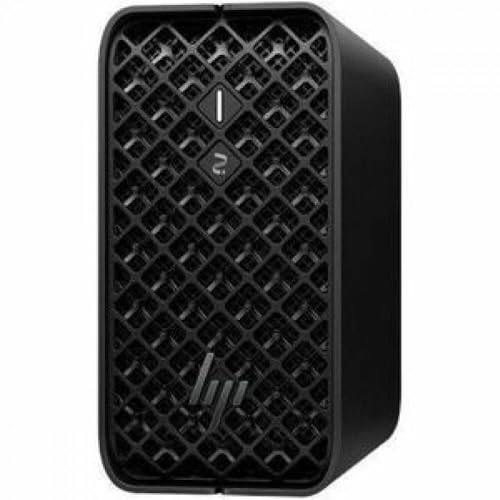
- 32GB RAM and 1TB SSD
- Flexible mounting options
- Integrated Radeon 8050S graphics
Best For: Space-conscious business workstations
High-Memory AI Pick
GMKtec EVO-X3 Ryzen AI Max+ 395

- 128GB LPDDR5X and 2TB SSD
- 50-TOPS dedicated NPU
- OCuLink external-GPU option
Best For: Memory-intensive local AI and creative work
CAD Workflow Pick
HP Z2 Mini G1a Ryzen AI Max PRO 380

- Stated CAD-app ISV certifications
- Thunderbolt 4 and Wi-Fi 7
- Resealed for SSD upgrade
Best For: Engineers and designers using professional applications
Best Windows All-Rounder – BOSGAME M5 Ryzen AI Max+ 395
Among compact ai workstations, the BOSGAME M5 is a practical Windows 11 Pro choice for buyers who want local AI capability alongside editing, 3D work, and everyday desktop tasks. Its Ryzen AI Max+ 395 pairs 128GB of unified memory with Radeon 8060S graphics.
Best For: Windows users balancing local AI, creative projects, and multi-display productivity.
Pros:
- 128GB unified memory provides room for memory-intensive models and projects.
- 2TB PCIe 4.0 SSD plus a second M.2 slot supports storage expansion.
- Dual USB4, HDMI 2.1, and DisplayPort 1.4 support up to four displays.
Cons:
- Integrated graphics may not suit buyers who specifically require a discrete GPU.
- The supplied configuration lists fixed LPDDR5X memory; no RAM upgrade path is specified.
Choose the M5 if a familiar Windows desktop and broad connectivity matter as much as AI specifications; confirm software compatibility with its AMD platform before buying.
Best NVIDIA Reference Platform – NVIDIA DGX Spark
NVIDIA DGX Spark™ - Personal AI Desktop Supercomputer – Desktop GB10 Grace Blackwell Chip
Check Price On AmazonFor developers comparing compact ai workstations, NVIDIA DGX Spark brings the GB10 Grace Blackwell Superchip and NVIDIA AI software stack to a desktop system. Its 128GB unified memory is positioned for local experimentation with large models, including up to 200-billion-parameter models at FP4.
Best For: AI developers who want NVIDIA’s integrated hardware and software environment for local prototyping.
Pros:
- GB10 platform is specified at up to 1 petaFLOP of FP4 AI performance.
- 128GB unified memory supports substantial local model work.
- Includes a 4TB self-encrypting NVMe drive and ConnectX-7 networking.
Cons:
- Runs NVIDIA DGX OS rather than Windows 11.
- The quoted petaFLOP figure uses FP4 precision and should not be treated as general-purpose performance.
DGX Spark makes the most sense when its NVIDIA development stack is the main attraction, rather than conventional PC flexibility.
Best for High-Speed Networking – MINISFORUM MS-S1 Max
The MINISFORUM MS-S1 Max stands out among compact ai workstations when fast wired networking and numerous display outputs are priorities. It combines a Ryzen AI Max+ 395, 128GB of memory, and Radeon 8060S graphics with two 10GbE ports.
Best For: AI and creative workflows that need fast network access or extensive multi-monitor setups.
Pros:
- Dual 10GbE ports suit high-speed wired network connections.
- HDMI, two USB4, and two USB4 V2 ports provide five video outputs.
- 2TB SSD, a second PCIe 4.0 M.2 slot, and an internal PCIe slot offer expansion options.
Cons:
- The supplied details do not clearly identify a preinstalled operating system.
- Its Radeon 8060S is integrated graphics, not a discrete card.
Prioritize this model over simpler mini PCs if its dual 10GbE connections and display layout solve a real workflow need; verify the OS configuration before ordering.
Best Stackable AI System – ASUS Ascent GX10
The ASUS Ascent GX10 is one of the more specialized compact ai workstations here: its GB10 Grace Blackwell platform, 128GB memory, and NVIDIA software stack target local AI development rather than general Windows desktop use. Its 5.91-inch-square footprint helps it fit into crowded workspaces.
Best For: Developers building local AI workflows who may later connect a second GX10.
Pros:
- GB10 is specified at up to 1 petaFLOP of AI performance.
- 128GB memory supports substantial on-device model work.
- ConnectX-7 networking supports dual-GX10 system stacking.
Cons:
- Runs NVIDIA DGX OS, so it is not a drop-in Windows workstation.
- The supplied notes do not clearly state the installed SSD capacity; verify the exact configuration.
Consider the GX10 when its NVIDIA stack and two-system scaling path are worth more to you than broad consumer-PC compatibility.
Windows Business Pick – HP Z2 Mini G1a
Among compact ai workstations, the HP Z2 Mini G1a is a practical choice for buyers who need Windows 11 Pro and substantial memory in a mini PC. It pairs an AMD Ryzen AI Max+ PRO 395 with 128 GB of LPDDR5X memory and a 2 TB SSD.
Best For: Windows-based business workflows that benefit from ample memory and local storage.
Pros:
- 128 GB of memory and a 2 TB SSD provide room for demanding projects.
- Windows 11 Pro comes installed.
- Includes Ethernet, Wi-Fi, six USB ports, and two Thunderbolt ports.
Cons:
- Radeon 8060S graphics are integrated and use shared memory.
- The listed 128 GB of memory is also the stated maximum.
Choose this model when Windows compatibility and a ready-to-use business setup matter more than having a dedicated graphics card.
Local AI Model Pick – HP ZGX G1n
The HP ZGX G1n stands apart from general-purpose compact ai workstations with its NVIDIA GB10 Grace Blackwell Superchip, 128 GB of coherent unified memory, and 4 TB SSD. Its listed capabilities focus on prototyping, fine-tuning, and running AI models locally.
Best For: AI developers who want a small, dedicated system for local model workflows.
Pros:
- Listed support for local workflows with models up to 200B parameters.
- 128 GB of unified memory and 4 TB of SSD storage.
- 10 Gigabit Ethernet and 200 Gigabit networking capabilities are listed.
Cons:
- Runs DGX OS rather than Windows.
- ARM-based architecture may require buyers to check compatibility with their existing software.
This is the specialized option of the three: its AI-focused hardware is compelling if your tools fit its operating system and architecture.
External GPU Expansion Pick – GMKtec EVO-X3
The GMKtec EVO-X3 is worth considering among compact ai workstations if you want strong integrated hardware now and an external GPU option later. Its Ryzen AI Max+ 395 has 16 cores and 32 threads, paired with 128 GB of LPDDR5X memory and a 2 TB PCIe 4.0 SSD.
Best For: Developers and creators who want to run local AI workloads with the option to add external graphics.
Pros:
- Ryzen AI Max+ 395 combines a 16-core CPU with an AI NPU.
- 128 GB of memory offers a sizable pool for local workloads.
- OCuLink PCIe 4.0 x4 provides an external GPU connection.
- Includes 2.5GbE, Wi-Fi 7, and Bluetooth 5.4.
Cons:
- An external GPU requires a separate dock and graphics card.
- The LPDDR5X memory is described as onboard.
Its appeal is flexibility: start with the integrated Radeon 8060S graphics, then use OCuLink if your workload calls for a dedicated GPU.
Flexible Office Pick – HP Z2 Mini G1a Ryzen AI MAX PRO 385
Among compact ai workstations, this HP Z2 Mini G1a suits buyers who want a ready-to-use Windows 11 Pro system without giving up much desk space. It pairs a Ryzen AI MAX PRO 385 with 32GB of RAM, a 1TB SSD, and integrated Radeon 8050S graphics.
Best For: Business users who need a compact workstation with flexible mounting options and professional Windows features.
Pros:
- 32GB RAM and 1TB SSD provide a practical starting configuration.
- Desk-, monitor-, or rack-mountable design helps free workspace.
- Mini DisplayPort, USB-C, Ethernet, Wi-Fi, and Bluetooth support varied setups.
Cons:
- Graphics are integrated and use shared memory.
- Listed maximum RAM is 32GB, limiting memory headroom.
Choose this configuration if deployment flexibility matters more than future memory upgrades. Its Radeon graphics and Ryzen AI processor make it a capable compact option, but check your software’s requirements before committing to demanding rendering work.
High-Memory AI Pick – GMKtec EVO-X3 Ryzen AI Max+ 395
If your shortlist of compact ai workstations centers on local AI and large working datasets, the GMKtec EVO-X3 stands out with a Ryzen AI Max+ 395, 128GB of LPDDR5X memory, and a 2TB PCIe 4.0 SSD. Its 16-core processor and Radeon 8060S integrated graphics also suit demanding creative multitasking.
Best For: Developers and creators who prioritize substantial unified memory for local AI and graphics-heavy projects.
Pros:
- 128GB LPDDR5X memory offers room for memory-intensive workflows.
- Ryzen AI Max+ 395 includes a dedicated NPU rated at up to 50 TOPS.
- OCuLink PCIe Gen4 x4 provides an external-GPU connection option.
Cons:
- LPDDR5X memory is installed on-board, so buyers should select the capacity they need upfront.
- OCuLink devices must be connected or disconnected while the PC is powered off.
The EVO-X3 is the strongest fit here when memory capacity is the deciding factor. The external-GPU port adds flexibility, though its no-hot-plug requirement is worth planning around.
CAD Workflow Pick – HP Z2 Mini G1a Ryzen AI Max PRO 380
For buyers comparing compact ai workstations for professional applications, this HP Z2 Mini G1a configuration emphasizes CAD-friendly credentials and extensive connectivity. It combines a Ryzen AI Max PRO 380, 32GB LPDDR5X memory, Radeon 8040S graphics, and Windows 11 Pro in a small-form-factor desktop.
Best For: Engineers and designers who want a compact Windows workstation with stated ISV certifications and multiple display connections.
Pros:
- Listing cites ISV certifications for applications including AutoCAD, SOLIDWORKS, and MATLAB.
- Two Thunderbolt 4 ports, two Mini DisplayPort 2.1 ports, and Wi-Fi 7 offer connection flexibility.
- Dedicated NPU is rated at 50 TOPS for supported local AI workloads.
Cons:
- The computer has been resealed for an SSD upgrade.
- SSD capacity varies by configuration from 1TB to 2TB; verify the selected option.
This is a practical choice when application compatibility and ports matter as much as raw specifications. Confirm the exact SSD configuration and the seller-provided one-year warranty before ordering.
How We Picked These Compact AI Workstations
We focused on small-footprint systems with configurations relevant to local AI development and workstation use. The selection covers AMD Ryzen AI Max models with different memory capacities, NVIDIA GB10 systems, and professional desktop options. We weighed stated memory and storage, platform differences, connectivity, and the intended buyer for each configuration. Listed specifications do not establish real-world tokens per second, training speed, noise, or sustained performance; check independent tests for those claims.
Quick Comparison
For memory-heavy local models: The listed 128GB configurations include the BOSGAME M5, MINISFORUM MS-S1 Max, GMKtec X3 and EVO-X3, HP Z2 Mini G1a with Ryzen AI Max+ PRO 395, and ASUS Ascent GX10. NVIDIA DGX Spark also belongs on the shortlist for buyers considering the GB10 platform; confirm the exact configuration before ordering.
For a professional Windows desktop: Compare the HP Z2 Mini G1a configurations by processor, installed memory, storage, operating system, warranty, and support. The 32GB Ryzen AI Max PRO 385 and PRO 380 listings are distinct from the 128GB PRO 395 version. Check the HP ZGX G1n’s exact specifications separately rather than assuming they match another HP mini workstation.
Key Buying Factors for Compact AI Workstations
Memory and Model Fit
Start with the models you intend to run, including their quantization, context length, and any room needed for other applications. A 128GB system offers more headroom than a 32GB configuration, but usable model capacity depends on the platform and how memory is allocated. If RAM is soldered, buy for your likely future workload.
Software Platform
Check your actual frameworks, model runtimes, drivers, and operating system requirements before choosing between AMD-based systems and NVIDIA GB10 machines. GPU acceleration support varies by tool; a powerful chip is less useful if your workflow cannot run efficiently on it. Confirm whether the system ships ready to use or requires setup.
Ports, Storage, and Sustained Use
Count the displays, high-speed peripherals, network connections, and external drives you need. Verify each listing’s port version and video-output capabilities rather than relying on the number of USB-C connectors. Large model files also fill SSDs quickly, so check capacity and upgrade options. For long inference or development sessions, look for credible thermal and noise testing.
Who Should Buy Which Compact AI Workstations?
Choose a 128GB Ryzen AI Max configuration if your priority is fitting larger local models or multitasking within an AMD-based workflow. Shortlist DGX Spark or ASUS Ascent GX10 if your software requirements favor the NVIDIA GB10 ecosystem, then compare their exact configurations and support terms. Pick an HP Z2 Mini G1a configuration if business purchasing, Windows 11 Pro, or vendor support is central; the 32GB versions make more sense when your workloads fit that memory limit. Whatever the badge, confirm the seller’s precise SKU, return policy, and tested performance for your applications before paying.
