
The best commercial-grade vertical computer mice can reduce forearm rotation while giving office professionals, support teams, designers, and other heavy users more comfortable control throughout the workday.
We compared 10 wired and wireless options across grip design, tracking, buttons, connectivity, power, and value to help you choose a dependable vertical mouse for your workspace.
Best 10 Commercial-Grade Vertical Computer Mice Picks for 2026
Top Pick

- 57-degree handshake design supports a neutral wrist posture
- 4,000 DPI sensor with adjustable cursor speed
- Wireless design with USB receiver and charging cable
Best For: Right-handed office professionals wanting a refined wireless ergonomic mouse
Best Wired Value

- Four DPI settings up to 6,400
- Quiet clicks and six-button layout
- Plug-and-play wired USB connection
Best For: Medium- to large-handed users seeking a quiet wired office mouse
Best for Small Hands

- Designed for small to medium right hands
- Bluetooth and Logi Bolt wireless connectivity
- Quiet clicks, SmartWheel, and customizable buttons
Best For: Small- to medium-handed right-handed office users
Best Customizable Wired Option

- Upright grip helps limit forearm twisting
- Six customizable buttons and four speed settings
- Finger support suits medium to large right hands
Best For: Professionals needing extensive wired mouse customization
Compact Wireless Comfort

- Vertical design for a more natural wrist position
- Bluetooth and USB-A connectivity for up to three devices
- Rechargeable battery with quiet primary clicks
Best For: Small- to medium-handed multi-device users
Reliable Wired Ergonomics

- Wired USB connection needs no battery or pairing
- Ergonomic handshake grip for extended use
- 1000/1600 DPI and navigation buttons
Best For: Fixed desk setups and wired-workflow users
Colorful Multi-Device Control

- Bluetooth and 2.4G support for three devices
- Four DPI settings up to 2400
- Seven-color lighting with power-saving features
Best For: Small- to medium-handed multi-device users
Best Wired Pick
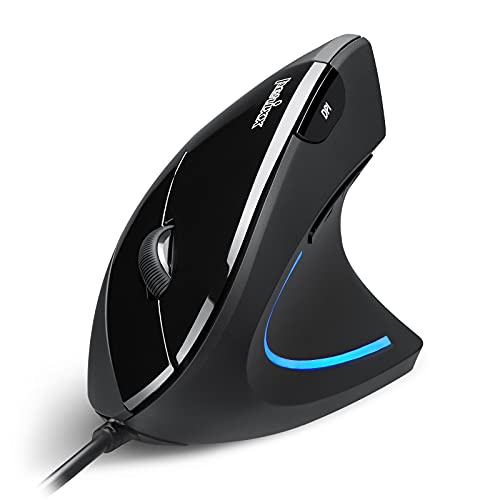
- Wired USB connection with a 5.9-foot cable
- Quiet primary buttons and vertical right-handed grip
- Adjustable DPI with six-button navigation
Best For: Windows office setups that prioritize stable wired performance
Best Wireless Value

- Wireless USB receiver connection for cable-free use
- Neutral handshake-style ergonomic design
- Three DPI settings and automatic power saving
Best For: Everyday laptop and office users who prefer simple wireless operation
Best Quiet Wireless Pick

- Quiet clicks on all buttons for shared spaces
- Six DPI levels from 800 to 4800
- 24-month battery claim and multi-OS compatibility
Best For: Noise-sensitive offices needing adjustable wireless control
Top Pick – Logitech MX Vertical
For shoppers comparing commercial-grade vertical computer mice, the Logitech MX Vertical stands out with a 57-degree angle, a high-precision sensor, and wireless connectivity. Its handshake-shaped design is intended to reduce wrist pressure and limit hand movement during extended computer work.
Best For: Right-handed professionals seeking a polished wireless ergonomic mouse for office and productivity use.
Pros:
- 57-degree angle and textured grip support a natural hand position.
- 4,000 DPI sensor and cursor-speed switch provide precise control.
- Wireless operation, USB receiver, Bluetooth-style device support, and USB-C charging cable add flexibility.
- Designed and tested using criteria from leading ergonomists.
Cons:
- Right-hand orientation limits use for left-handed users.
- Its vertical shape may require an adjustment period.
- Offers four buttons, fewer than some productivity-focused alternatives.
The MX Vertical is a strong all-around option when wireless convenience and refined ergonomic design matter more than extensive button customization.
Best Wired Value – TECKNET Vertical Mouse
The TECKNET Vertical Mouse is a practical choice among commercial-grade vertical computer mice for buyers who prefer a wired setup. It combines a handshake-style profile with four DPI levels, six buttons, quiet clicking, and plug-and-play USB operation.
Best For: Medium- to large-handed right-handed users who want an affordable, quiet wired mouse for everyday work.
Pros:
- Four adjustable DPI levels range from 1,000 to 6,400 for flexible control.
- Vertical design is intended to reduce wrist and forearm strain.
- Virtually silent clicks suit libraries and other quiet environments.
- USB plug-and-play setup requires no driver installation.
Cons:
- Best suited to medium and large hands.
- Side buttons are not functional on macOS.
- The 1.5-meter cable restricts placement compared with wireless models.
Choose the TECKNET when dependable wired connectivity, quiet operation, and a broad DPI range are more important than wireless freedom or universal side-button support.
Best for Small Hands – Logitech Lift
The Logitech Lift is a compact-feeling wireless option in the commercial-grade vertical computer mice category, designed specifically for small to medium right hands. Its 57-degree profile, softly textured grip, quiet clicks, and customizable controls make it well suited to long work sessions.
Best For: Small- to medium-handed right-handed users who want a quiet wireless mouse for office productivity.
Pros:
- Vertical shape promotes a more natural forearm and wrist posture.
- Soft grip and thumb rest support day-long comfort.
- Connects through Bluetooth Low Energy or the included Logi Bolt USB receiver.
- Offers customizable buttons, quiet clicks, SmartWheel scrolling, and up to two years of battery life.
Cons:
- Designed for right-handed use only.
- Its fit may be less comfortable for medium-to-large hands.
- Runs on a replaceable AA battery rather than a rechargeable battery.
The Lift is a sensible pick for users who prioritize a smaller ergonomic profile, quiet operation, and flexible wireless connectivity over high-end sensor specifications.
Best Customizable Wired Option – Evoluent Vertical Mouse
The Evoluent Vertical Mouse is a purpose-built choice among commercial-grade vertical computer mice, with an upright handshake grip developed for ergonomic use. Its six customizable buttons, four pointer speeds, and finger support make it particularly appealing for professionals who want to reduce repeated hand movements.
Best For: Medium- to large-handed right-handed professionals who need extensive button customization and a wired connection.
Pros:
- Upright grip is designed to reduce wrist strain and forearm twisting.
- Six customizable buttons support productivity-focused workflows.
- Four pointer speeds include indicator lights for quick adjustments.
- Finger support helps keep the pinkie from rubbing against the desk.
Cons:
- Designed for right-handed users with medium to large hands.
- Optional Mouse Manager software customization is specified for Windows.
- Wired operation offers less desk flexibility than wireless models.
The Evoluent is the strongest fit here for buyers who value deep control customization and a deliberately sculpted ergonomic shape over compactness or wireless convenience.
Compact Wireless Comfort – ProtoArc EM11 NL
For shoppers comparing commercial-grade vertical computer mice for long work sessions, the ProtoArc EM11 NL combines a natural vertical grip with wireless flexibility. It is designed for small to medium hands, supports three connected devices, and includes a rechargeable battery.
Best For: Small- to medium-handed users who want a rechargeable vertical mouse for multi-device workstations.
Pros:
- Vertical handshake-style design helps keep the wrist and forearm in a more natural position.
- Connects with dual Bluetooth and a 2.4G USB-A receiver, supporting up to three devices.
- Rechargeable 500mAh battery, adjustable 1000/1600/2400 DPI, and quiet left/right clicks.
Cons:
- Designed specifically for hands under 7.5 inches, so larger-handed users may find it cramped.
- There is a learning curve, and the manufacturer recommends allowing one to two weeks to adjust.
- Side buttons are not compatible with macOS, and the included receiver is USB-A rather than USB-C.
The EM11 NL is a practical choice when ergonomic positioning and multi-device connectivity matter more than extensive customization. Measure your hand before ordering and plan for an adjustment period.
Reliable Wired Ergonomics – Anker Vertical Mouse
For buyers seeking commercial-grade vertical computer mice without wireless batteries or pairing, Anker’s wired model offers a straightforward ergonomic setup. Its USB connection, optical tracking, and compact design suit everyday computer and laptop use.
Best For: Office users who prefer a dependable wired connection and a simple vertical design.
Pros:
- Handshake-style ergonomic shape is intended to support a more natural wrist and arm position.
- USB connection avoids charging and wireless pairing requirements.
- Offers 1000/1600 DPI tracking and next/previous buttons for easier navigation.
- Compact, lightweight body includes a 4.9-foot cable and an 18-month warranty.
Cons:
- The wired design limits placement flexibility compared with wireless alternatives.
- Its maximum sensitivity is 1600 DPI, lower than some competing vertical mice.
- Listed operating-system compatibility is limited to Windows 10 and Linux.
The Anker is a sensible low-maintenance option for a fixed desk setup. Choose it if consistent USB operation and a modest feature set are more important than wireless convenience or high DPI settings.
Colorful Multi-Device Control – Uineer A9 Vertical Mouse
The Uineer A9 adds wireless versatility and ambient lighting to the commercial-grade vertical computer mice category. Its vertical grip is aimed at small to medium hands, while dual Bluetooth and 2.4G connectivity allow up to three devices to share one mouse.
Best For: Small- to medium-handed users who want three-device connectivity, adjustable sensitivity, and visual lighting.
Pros:
- Vertical handshake grip is designed to help keep the wrist straight during prolonged use.
- Supports dual Bluetooth and 2.4G wireless connections with simultaneous three-device pairing.
- Four DPI levels from 800 to 2400 accommodate general office work and other scenarios.
- Includes seven-color ambient lighting, automatic power saving, and a low-battery alert.
Cons:
- Recommended for small to medium hands, so larger users should check sizing first.
- Side buttons do not function on macOS systems.
- The supplied notes identify it as battery powered but do not specify a rechargeable battery.
The A9 is a feature-rich fit for users moving between several devices while still wanting a vertical ergonomic shape. Its lighting and power-saving features add convenience, but macOS users should account for the side-button limitation.
Best Wired Pick – Perixx PERIMICE-513
The Perixx PERIMICE-513 is a practical option for shoppers seeking commercial-grade vertical computer mice for a Windows workstation. Its upright right-handed shape, wired USB connection, adjustable sensitivity, and quiet primary buttons support extended office use without battery management.
Best For: Windows users who want a stable wired connection, ergonomic wrist positioning, and quiet left- and right-clicks.
Pros:
- Vertical design and soft rubber coating support a secure, comfortable grip.
- Wired USB connection includes a flexible 5.9-foot cable and plug-and-play setup.
- Six buttons, adjustable DPI settings, and back/forward navigation buttons improve everyday productivity.
- Quiet left and right buttons help reduce desk noise.
Cons:
- Right-handed design limits use for left-handed shoppers.
- New users may need one to two weeks to adjust to the vertical shape.
- Back/forward buttons are not supported on macOS, and the wheel and side buttons are not silent.
Choose this model when reliability and straightforward Windows compatibility matter more than wireless convenience. Its wired design avoids charging concerns, while the neutral grip and adjustable tracking make it a sensible long-session office mouse.
Best Wireless Value – Anker 2.4G Vertical Mouse
The Anker 2.4G Wireless Ergonomic Mouse offers a cable-free route into commercial-grade vertical computer mice for everyday office and laptop use. Its handshake-style shape, USB receiver, three DPI levels, and automatic power-saving mode keep the feature set focused and practical.
Best For: Right-handed laptop and desktop users who want a simple 2.4 GHz wireless vertical mouse.
Pros:
- Vertical ergonomic structure encourages a neutral hand and wrist position.
- 2.4 GHz wireless connection works through a USB receiver stored in the mouse.
- 800, 1200, and 1600 DPI settings provide basic tracking-speed flexibility.
- Power-saving mode activates after eight minutes of inactivity.
Cons:
- Two AAA batteries are required and are not included.
- Button clicks are not silent.
- Uses a USB receiver rather than Bluetooth.
This is a straightforward choice for users who value wireless freedom without needing extensive customization. The limited DPI range and five-button layout suit general browsing and productivity, while the receiver-based connection keeps setup uncomplicated.
Best Quiet Wireless Pick – TECKNET Vertical Mouse
The TECKNET ergonomic vertical mouse is a feature-rich contender among commercial-grade vertical computer mice, combining a 52-degree angle with wireless convenience and quiet operation. Six DPI levels, six buttons, broad operating-system compatibility, and a claimed 24-month battery life make it suited to busy shared workspaces.
Best For: Right-handed professionals who need quiet clicks, flexible sensitivity, and long battery life across multiple operating systems.
Pros:
- 52-degree vertical angle supports a relaxed handshake grip.
- Six adjustable DPI levels span 800 to 4800 for varied cursor-control needs.
- All buttons use quiet-click technology for lower-noise workspaces.
- 2.4 GHz plug-and-play receiver, auto-sleep mode, and claimed 24-month battery life reduce maintenance.
Cons:
- Requires two AAA batteries.
- Wireless operation uses a USB-A nano receiver rather than Bluetooth.
- The 36-month warranty requires registration.
For shared offices, libraries, or other noise-sensitive spaces, this TECKNET model stands out for combining quiet clicks with extensive DPI adjustment. It is the strongest fit here for users who want a modern wireless feature set and compatibility with Windows, macOS, Chrome OS, and Linux.
How We Picked the Best Commercial-Grade Vertical Computer Mice
We focused on the features that matter most when a mouse will be used for hours each day: a stable handshake-style grip, predictable optical tracking, comfortable button placement, useful DPI adjustment, and connection reliability. The selection includes wired models for simple deployment and low maintenance, plus wireless and Bluetooth options for cleaner desks and flexible workstation layouts.
We also considered hand size, right-handed ergonomics, programmable or extra buttons, rechargeable batteries, receiver storage, click noise, and compatibility with common Windows, macOS, and laptop setups. “Commercial-grade” here means suitable for sustained office or professional use; it does not imply that every model is designed for industrial or medical environments.
Quick Comparison
| Best for | What to prioritize | Most suitable options |
|---|---|---|
| Large hands or strong ergonomic support | Tall body, broad palm support, right-handed fit | Evoluent, Logitech MX Vertical |
| General office productivity | Comfort, reliable tracking, simple setup | Logitech Lift, ProtoArc EM11 NL |
| Low-maintenance deployments | Wired USB connection, no battery management | TECKNET Wired, Anker USB Wired, Perixx PERIMICE-513 |
| Multi-device workspaces | Bluetooth or multiple connection support | Uineer, Logitech Lift |
| Budget-conscious buyers | Basic vertical shape and adjustable sensitivity | Anker, TECKNET, Perixx |
Key Buying Factors for Commercial-Grade Vertical Computer Mice
Hand Fit and Posture
A vertical mouse is only helpful if your hand can rest naturally on it. Check the manufacturer’s recommended hand size, overall height, thumb-rest position, and whether the shape is intended for right-handed use. Larger hands often need a taller, longer shell, while compact designs may be easier for smaller hands to control.
Wired Versus Wireless Connection
Wired USB mice are straightforward for shared desks, managed offices, and environments where charging is undesirable. Wireless 2.4GHz models reduce cable clutter but require a USB receiver and battery management. Bluetooth models are convenient for modern laptops and multi-device setups, provided the host supports Bluetooth reliably.
Tracking, DPI, and Controls
Adjustable DPI helps users move between precise editing and broad screen navigation. High DPI is not automatically better, so prioritize consistent tracking and a sensor that works well on your desk surface. Extra buttons can improve browser and productivity shortcuts, but they should be positioned where they are easy to reach without changing your grip.
Power, Noise, and Deployment
For busy offices, consider battery runtime, rechargeable charging, receiver storage, and click acoustics. Quiet switches may be preferable in shared workspaces, while a permanently attached cable can simplify inventory and prevent lost receivers.
Who Should Buy Which Commercial-Grade Vertical Computer Mice?
Choose the Logitech MX Vertical or Evoluent if maximum ergonomic structure and a substantial right-handed shell matter most. The Logitech Lift is a strong everyday choice for users who want a compact wireless design from an established productivity brand.
Choose the ProtoArc EM11 NL or Uineer for flexible wireless use, especially when a rechargeable or multi-device setup is useful. Select a TECKNET, Anker wired, or Perixx model when dependable USB operation, simple setup, and lower upkeep are higher priorities. The wireless Anker and TECKNET options suit buyers who want a vertical grip without committing to a premium price.
