
Commercial-grade tablet computers are built for real work, not light home use. They’re the right choice when durability, security, connectivity, and long battery life matter more than thinness or flashy extras.
Below, we focus on rugged Windows and Android tablets that can handle field service, warehouse scanning, mobile inspections, and other demanding business jobs in 2026.
Best 10 Commercial-Grade Tablet Computers Picks for 2026
Rugged Windows Field Tablet
Panasonic Toughbook FZ-G2 MK1 Rugged 10.1-Inch Tablet

- MIL-STD-810H rugged design for harsh environments
- 10.1" sunlight-readable 1920x1200 display
- i5, 16GB RAM, 512GB SSD with Wi-Fi 6E
Best For: field service, construction, and outdoor work
Compact Enterprise Field Tablet
Vanquisher 8-Inch Windows IoT Rugged Tablet

- Windows 11 IoT Enterprise for managed deployments
- 8" 1200 x 1920 display with 550 nits brightness
- Removable battery plus GPS, handstrap, and stylus
Best For: mobile workforce and field data collection
Rugged Android Versatility
AGM PAD P2 Active 11-Inch Rugged Android Tablet

- IP68/IP69K protection with 1.8m drop resistance
- 11" FHD 90Hz display with 480 nits brightness
- Helio G99, 16GB RAM, 256GB storage, GPS
Best For: outdoor work, navigation, and rugged Android use
Warehouse Scanning Tablet
Arrvel I17J Rugged Windows Tablet with Barcode Scanner

- Honeywell N4680 scan engine for 1D/2D barcodes
- IP65 and MIL-STD-810G rugged protection
- Windows 11 Pro with removable battery
Best For: warehouse, retail, and logistics scanning
Premium Rugged Workhorse
Dell Latitude 7220 Rugged Extreme Tablet PC
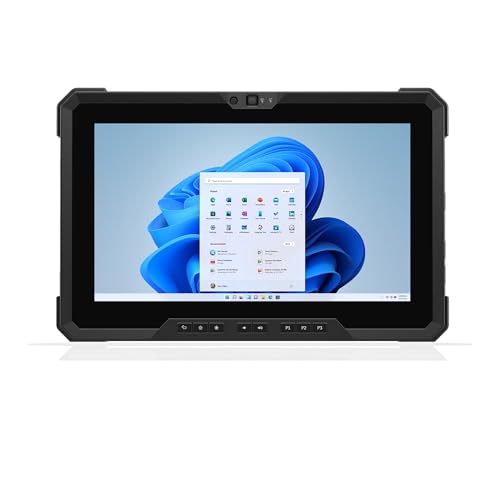
- Core i7 with 16GB RAM and 512GB SSD
- 1000-nit 11.6-inch outdoor-readable display
- GPS, smart card reader, and MIL-STD-810G build
Best For: Field professionals needing rugged performance and outdoor visibility
American-Assembled Value Pick
Fusion5 Rugged Windows Tablet PC

- 12GB RAM, 256GB SSD, and microSD expansion
- 10.1-inch Full HD IPS screen with up to 500 nits
- 2-year warranty with accidental damage coverage
Best For: Budget-conscious buyers who want rugged Windows 11 Pro support
Field Navigation Specialist

- Windows 11 Pro with Intel N5100, 8GB RAM
- 4G LTE, GPS, and dual-band WiFi connectivity
- MIL-STD-810G rugged build with sunlight-readable screen
Best For: Construction and field teams needing GPS and LTE
Rugged Power for Field Work
Dell Latitude 7212 Rugged Extreme
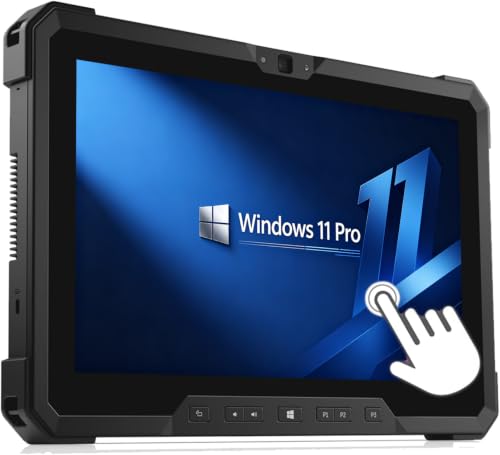
- Core i7-8650U for heavier workloads
- 16GB RAM with 256GB SSD storage
- 11.6-inch FHD touchscreen for field tasks
Best For: Field teams and business users needing rugged performance
All-Day Rugged Mobility

- MIL-STD-810G and IP65 rugged protection
- 4G LTE plus Wi-Fi 5 for mobile work
- 10.1-inch 800-nit daylight-readable display
Best For: Outdoor teams that need rugged connectivity and visibility
Compact Rugged Value
Dell Latitude 7212 Rugged Touchscreen
- Core i5-7300 for everyday business use
- 8GB RAM with 256GB SSD storage
- 11.6-inch FHD touchscreen and multiple ports
Best For: Budget-conscious buyers needing a rugged Windows tablet
Rugged Windows Field Tablet – Panasonic Toughbook FZ-G2 MK1 Rugged 10.1-Inch Tablet
For buyers comparing commercial-grade tablet computers, the Panasonic Toughbook FZ-G2 MK1 is built around durability and dependable field performance. It pairs a MIL-STD-810H rugged design with a sunlight-readable 10.1-inch WUXGA touchscreen, making it a practical choice when work continues outdoors, in dust, or in rough handling conditions.
Best For: Field service teams, construction crews, and outdoor professionals who need a rugged Windows tablet with strong connectivity.
Pros:
- MIL-STD-810H rugged build designed to resist drops, dust, and extreme conditions
- 10.1-inch 1920×1200 sunlight-readable display with anti-reflective coating
- Intel Core i5, 16GB RAM, and 512GB NVMe SSD for responsive everyday work
- USB-C, USB-A, Ethernet, Wi-Fi 6E, and Bluetooth 5.1 for flexible field connectivity
Cons:
- Renewed unit, so condition can vary versus buying new
- 2.9 lb weight is not the lightest option in this class
- Premium hardware may be more than basic note-taking or light apps require
Overall, this Toughbook is a strong fit when reliability matters more than portability. It looks especially appealing for jobs that need a rugged Windows platform, good display visibility, and practical port selection.
Compact Enterprise Field Tablet – Vanquisher 8-Inch Windows IoT Rugged Tablet
If you want commercial-grade tablet computers for mobile field workflows, this Vanquisher rugged tablet is aimed at enterprise users who need durability and fast data entry on the move. Its 8-inch 1200 x 1920 display, Windows 11 IoT Enterprise, and Wi-Fi 6 support make it suited to work where compact size and device control matter.
Best For: Mobile workforce, consultants, engineers, and field teams needing a compact rugged Windows tablet.
Pros:
- Windows 11 IoT Enterprise with lockdown and longer support-cycle focus
- Intel N100 processor, 8GB RAM, and 128GB storage for field productivity
- 8-inch 1200 x 1920 screen with 550 nits brightness for outdoor visibility
- Removable battery, integrated GPS, handstrap, and stylus included
Cons:
- 8-inch screen is smaller than many full-size rugged tablets
- 128GB storage may be limited for larger onsite files
- Best suited to business tasks rather than media or general consumer use
This model makes the most sense when compact size, enterprise OS features, and field-ready tools are more important than a big display. It is a practical option for teams collecting data, navigating sites, and reporting from the field.
Rugged Android Versatility – AGM PAD P2 Active 11-Inch Rugged Android Tablet
Among commercial-grade tablet computers, the AGM PAD P2 Active stands out as a rugged Android option for users who want a tougher tablet without moving to Windows. It combines IP68/IP69K water resistance, drop protection, and an 11-inch 90Hz display, so it can handle outdoor use, travel, and demanding day-to-day tasks.
Best For: Users who want a rugged Android tablet for outdoor work, navigation, and media use.
Pros:
- IP68/IP69K protection with 1.8-meter drop resistance and dustproofing
- 11-inch FHD display with 90Hz refresh rate and 480 nits brightness
- MediaTek Helio G99, 16GB RAM, and 256GB storage with microSD expansion
- GPS, compass, OTG support, and large 8000mAh battery
Cons:
- Android platform may not fit Windows-based business software needs
- Virtual RAM included in the 16GB figure, not all physical memory
- Rugged design adds bulk compared with standard consumer tablets
For buyers who need durability plus a modern Android experience, this is a versatile middle ground. It is especially attractive if sunlight visibility, battery life, and outdoor navigation features are priorities.
Warehouse Scanning Tablet – Arrvel I17J Rugged Windows Tablet with Barcode Scanner
For commercial-grade tablet computers built around inventory workflows, the Arrvel I17J is designed to speed up scanning and onsite data handling. Its Honeywell N4680 scan engine, Windows 11 Pro, and rugged IP65 construction make it a strong fit for warehouses, retail, and logistics environments where barcode capture is central to the job.
Best For: Warehouse, retail, and logistics teams that need integrated barcode scanning in a rugged Windows tablet.
Pros:
- Honeywell N4680 scan engine reads 1D/2D barcodes quickly, including damaged labels
- IP65 sealing and MIL-STD-810G durability for dusty or wet job sites
- Windows 11 Pro with Intel Celeron N5100, 8GB RAM, and 128GB storage
- Removable battery and battery-free USB-C mode for flexible shifts
Cons:
- Intel Celeron N5100 is modest compared with higher-end rugged tablets
- 8GB RAM and 128GB storage may be limiting for heavier workloads
- Built primarily for enterprise scanning rather than general entertainment
This is a purpose-built work tablet, not a do-everything consumer device. If barcode scanning, mobility, and reliable Windows compatibility are the priority, it offers a focused toolset for the job.
Premium Rugged Workhorse – Dell Latitude 7220 Rugged Extreme Tablet PC
If you need commercial-grade tablet computers that can handle real field use, the Dell Latitude 7220 Rugged Extreme stands out for its mix of performance, visibility, and connectivity. The 11.6-inch FHD 1000-nit display is built for outdoor readability, while the Core i7, 16GB RAM, and 512GB SSD keep work moving smoothly in demanding environments.
Best For: Field professionals who need a rugged Windows tablet with strong performance, bright-screen visibility, and built-in GPS.
Pros:
- Core i7-8665U vPro, 16GB RAM, and 512GB NVMe SSD for responsive multitasking
- 11.6-inch 1920×1080 display with 1000 nits, anti-glare, and glove-capable touch
- Dedicated GPS, smart card reader, fingerprint support, and dual cameras for work-ready connectivity
- MIL-STD-810G rugged build with USB-C, USB-A, RS-232, and docking/backpack connectors
Cons:
- Stylus is not included
- Refurbished condition may not suit buyers wanting a brand-new unit
- Heavier than some compact tablets at 2.93 lbs starting weight
Overall, this is a strong option when durability and business features matter as much as speed. It fits best in enterprise, logistics, and outdoor workflows where a bright display and rugged design are more important than consumer-tablet styling.
American-Assembled Value Pick – Fusion5 Rugged Windows Tablet PC
Among commercial-grade tablet computers, the Fusion5 rugged Windows tablet focuses on practical value: a tough body, Windows 11 Pro, and enough memory and storage for everyday business tasks. The 10.1-inch Full HD IPS display, Intel N100 processor, and included warranty support make it a sensible choice for work environments that need a dependable device without overcomplicating the setup.
Best For: Buyers who want a rugged Windows tablet with a strong warranty, decent specs, and U.S. assembly.
Pros:
- Assembled in Florida, USA for buyers who prefer domestic production
- 12GB RAM and 256GB SSD, plus microSD expansion up to 512GB
- 10.1-inch 1920×1200 IPS touchscreen with up to 500 nits brightness
- 2-year full warranty with accidental damage coverage for added peace of mind
Cons:
- Smaller screen than 11- to 12-inch rugged tablets
- Intel N100 is solid for general tasks, but not the most powerful option here
- Port selection is useful, though not as specialized as some field-focused models
This Fusion5 model is best viewed as a balanced work tablet rather than a heavy-duty specialty device. It offers a practical mix of protection, memory, and warranty coverage for businesses, schools, and mobile teams.
Field Navigation Specialist – MUNBYN Rugged Tablet IRT08
The MUNBYN IRT08 is built for outdoor and industrial work where connectivity, navigation, and readable display matter most. As one of the more practical commercial-grade tablet computers for field teams, it combines Windows 11 Pro, 4G LTE, GPS, and a sunlight-readable screen with a rugged MIL-STD-810G design.
Best For: Construction crews, warehouse teams, and field workers who need GPS, LTE, and a sunlight-readable rugged tablet.
Pros:
- Intel N5100 with 8GB RAM and 128GB storage for everyday work tasks
- MIL-STD-810G certification plus water-jet resistance for harsh environments
- 4G LTE, dual-band WiFi, Bluetooth 5.1, and SIM support for flexible connectivity
- Detachable battery and sunlight visibility film for extended outdoor use
Cons:
- 5000mAh battery is useful, but claimed runtime is only up to 6.5 hours
- 128GB storage may feel limited for larger local files without expansion planning
- 10.1-inch display may be small for users who prefer more screen space
For teams that spend time outside or moving between job sites, this tablet checks the right boxes. It is especially appealing if accurate GPS, LTE access, and rugged protection are higher priorities than raw processing power.
Rugged Power for Field Work – Dell Latitude 7212 Rugged Extreme
If you need commercial-grade tablet computers that can keep up with demanding field work, this renewed Dell Latitude 7212 Rugged Extreme is built around speed, portability, and a tough business-ready design. Its Core i7 performance, 16GB of RAM, and 256GB SSD make it a strong fit for multitasking, specialized software, and mission-critical data access.
Best For: Field teams, military users, and business professionals who need a fast rugged Windows tablet.
Pros:
- Intel Core i7-8650U delivers strong performance for intensive workloads
- 16GB RAM and 256GB SSD support fast multitasking and responsive storage
- 11.6-inch Full HD touchscreen is practical for maps, data entry, and field viewing
- Includes multiple ports such as USB-C, USB 3.1, microSD, and micro-SIM
Cons:
- Renewed condition means the charger and packaging may not be original
- No keyboard is included
- 30-day warranty is shorter than many new-device options
This model makes sense if you want a rugged Windows tablet with solid specs and a compact footprint for field use. It is especially appealing when performance matters more than having the latest generation hardware.
All-Day Rugged Mobility – Panasonic Toughbook FZ-G1 MK5
For buyers comparing commercial-grade tablet computers, the Panasonic Toughbook FZ-G1 MK5 stands out for its rugged chassis, daylight-readable display, and built-in cellular support. With an Intel Core i5-7300U, 8GB of RAM, and a 256GB SSD, it is designed for reliable business use in harsh or mobile environments.
Best For: Mobile workers, outdoor professionals, and businesses that need connectivity plus rugged protection.
Pros:
- MIL-STD-810G and IP65-rated design for rugged all-weather use
- 10.1-inch WUXGA display with up to 800 nit brightness and anti-glare treatment
- 4G LTE, Wi-Fi 5, Bluetooth 4.2, and HDMI expand connectivity options
- Includes stylus support, rear and front cameras, and Windows 11 Pro
Cons:
- 8GB RAM is modest for heavier multitasking
- Battery life is listed at about 4 hours
- Renewed unit may ship with non-original accessories
This is a practical choice if durability and mobility matter more than raw power. Its bright display and cellular features make it especially useful for teams that work outdoors or away from a desk.
Compact Rugged Value – Dell Latitude 7212 Rugged Touchscreen
This renewed Dell Latitude 7212 is a straightforward option among commercial-grade tablet computers for users who want rugged design without stepping up to the higher-spec i7 version. It pairs an Intel Core i5-7300 processor with 8GB of RAM and a 256GB SSD, giving it enough speed for everyday field applications, data entry, and multitasking.
Best For: Buyers who want a rugged Windows tablet with solid basics at a more modest spec level.
Pros:
- Intel Core i5-7300 handles common business and field tasks
- 8GB RAM and 256GB SSD provide a practical balance of speed and storage
- 11.6-inch Full HD touchscreen is useful for maps and data entry
- Multiple ports include USB-C, USB 3.1, microSD, and micro-SIM
Cons:
- Less powerful than the i7 version of the same tablet line
- Renewed product may include a non-original charger and packaging
- No keyboard is included
If you want a rugged tablet for field work but do not need the highest-end configuration, this Dell is a sensible middle ground. It keeps the same practical screen size and port selection while staying focused on core business use.
How We Picked These Commercial-Grade Tablet Computers
We looked for tablets that balance rugged construction with practical business features: modern processors, enough RAM for multitasking, durable displays, glove-friendly or outdoor-readable touchscreens, and options like LTE, GPS, or barcode scanning where they add real value. We also favored models with business-focused operating systems and accessories that support fleet use, docking, and mobile workflows.
Quick Comparison: Which Type Fits Your Team?
Windows rugged tablets are usually the best fit for Microsoft-first environments, legacy business apps, and tighter IT management. Android rugged tablets can be easier to deploy for mobile-first teams and app-based workflows. Barcode-scanner-equipped models make the most sense for inventory, logistics, and warehouse operations, while lighter 8-inch units favor mobility and one-handed use.
Key Buying Factors for Commercial-Grade Tablet Computers
Ruggedness and Environmental Resistance
Look for drop protection, sealed ports, and water/dust resistance that match your worksite. A tablet that survives rain, dust, vibration, and repeated handling will cost less over time than consumer devices replaced every few months.
Display Visibility and Touch Control
Outdoor-readable brightness, glove compatibility, and a responsive touchscreen matter in field service and industrial settings. If users work in sunlight or wear gloves often, screen quality should be a top priority.
Performance and Storage
For Commercial-Grade Tablet Computers, 8GB of RAM is a practical floor, while 12GB to 16GB is better for heavier multitasking, remote desktop work, or large forms and maps. SSD storage is preferable on Windows models for speed and reliability.
Connectivity and Workflow Tools
LTE/5G, Wi-Fi quality, GPS, and NFC can be just as important as raw specs. If your team works away from office Wi-Fi, built-in cellular connectivity and location tools may be essential. Barcode scanning is a major advantage for inventory, asset tracking, and proof-of-delivery workflows.
Who Should Buy Which Commercial-Grade Tablet Computers?
Choose a rugged Windows tablet if you need full desktop-style compatibility, IT control, or specialized business software. Choose an Android rugged tablet if your team uses cloud apps, mobile forms, and simpler deployment. Choose a scanner-equipped model if you need fast data capture in warehouses or stores. If your work is especially harsh, prioritize proven rugged lines and accessories over extra screen size or consumer-style features.
For most buyers, the best option is the tablet that fits the job site, the software stack, and the user’s daily workflow—not simply the highest specs on paper.
