
The best commercial-grade photo booth printers do more than produce attractive prints. They need to handle event volume, deliver consistent color, support the right paper sizes, and fit smoothly into your booth setup.
This roundup compares dedicated dye-sublimation printers, professional inkjet models, complete photo booth systems, and compact instant-print bundles so you can match the equipment to your venue, workflow, and budget.
Best 10 Commercial-Grade Photo Booth Printers Picks for 2026
High-Volume Pick
DNP DS620A Dye-Sub Photo Printer
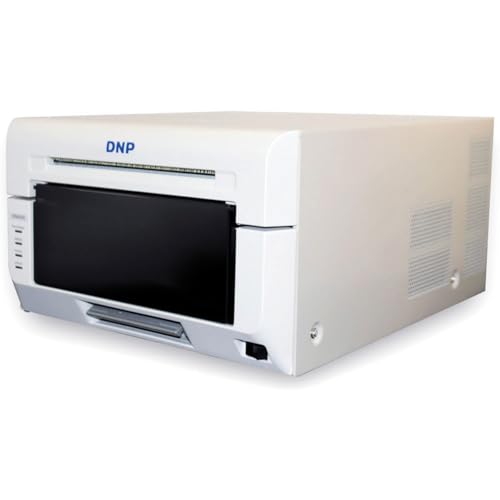
- Fast 4x6-inch prints in 8.3 seconds
- Handles 2x6 through 6x8-inch sizes
- Glossy and matte finish options
Best For: High-volume photo booths and event photographers
Portable Bundle

- Includes case, media, and key accessories
- Prints up to 280 photos per hour
- Supports 4x6, 5x7, and 6x8-inch media
Best For: On-location events and bundled photo booth setups
All-in-One Experience
MWE Mirror Photo Booth with Printer

- Includes 4K camera, mirror display, and printer
- Prints photos in about 20 seconds
- Adds RGB lighting and sharing software
Best For: Interactive weddings, parties, and creator events
Gallery-Quality Option

- Uses nine-color pigment ink and Chroma Optimizer
- Prints up to 13x19 inches and custom panoramas
- Offers Wi-Fi, Ethernet, and USB connectivity
Best For: Studios and photographers prioritizing premium print quality
Event Booth Bundle

- All-in-one booth package with printer and supplies
- 15.6-inch touchscreen with instant sharing
- Five-year warranty and protective transport cases
Best For: Event planners and photo booth rental businesses
Fine-Art Print Workhorse
Canon imagePROGRAF PRO-1100 17-inch Printer

- 11-color pigment ink system with Chroma Optimizer
- Prints formats up to 17 by 22 inches
- Professional calibration and workflow-management tools
Best For: Professional photographers and fine-art studios
Interactive Magic Mirror
4K Photo Booth with 32-inch Touchscreen

- 12MP 4K camera with instant printing
- 32-inch touchscreen and 47-inch mirror surface
- ChackTok software for effects, templates, and sharing
Best For: Weddings, corporate events, and photo booth rental businesses
Best Professional Print Quality

- 8-color dye ink for vibrant output
- Borderless sizes up to 13 x 19 inches
- Wi-Fi, Ethernet, and USB connectivity
Best For: Professional events requiring premium, large-format photo prints
Best Full-Service Mirror Booth
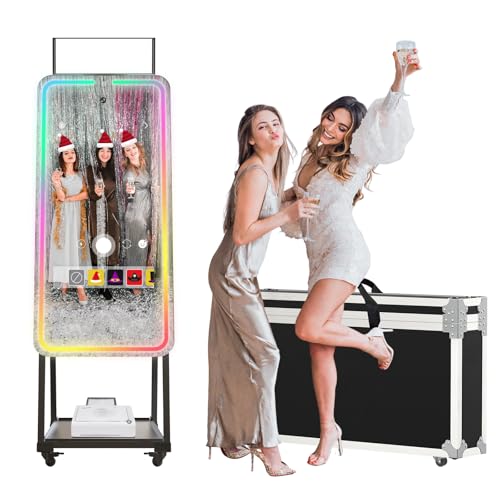
- 32-inch touchscreen with built-in camera
- RGB lighting with 20+ modes
- Supports printing and social sharing
Best For: Interactive event booths offering photos, effects, and instant sharing
Best Portable Instant Booth

- Portable 7.3-pound booth design
- Ink-free ZINK 3 x 4-inch prints
- Touchscreen with event controls
Best For: Mobile events needing compact, adhesive-backed instant photos
High-Volume Pick – DNP DS620A Dye-Sub Photo Printer
For commercial-grade photo booth printers, the DNP DS620A is a practical choice when fast, consistent dye-sublimation output matters. It prints from 2×6-inch strips through 6×8-inch photos, offers glossy or matte finishes, and supports high-volume event workflows.
Best For: Photo booth operators, event photographers, and businesses printing multiple photo sizes throughout an event.
Pros:
- Fast output, including 4×6-inch prints in 8.3 seconds.
- Supports photo booth strips, 4×6, 5×7, and 6×8-inch formats.
- Large roll capacities help reduce media changes during busy sessions.
- Offers glossy and matte finish options.
Cons:
- At approximately 26.4 pounds, it is less convenient for frequent transport.
- Connectivity is limited to USB 2.0/USB Type-B.
- Setup notes reference older Windows and macOS versions.
The DS620A stands out for speed, flexible sizing, and media capacity. It is especially well suited to established booths that prioritize throughput over wireless convenience.
Portable Bundle – HiTi P525L Roll Photo Printer
The HiTi P525L is one of the more travel-ready commercial-grade photo booth printers, arriving with media, accessories, and a padded carrying case. Its dye-diffusion thermal transfer system produces 300 dpi prints, while roll media supports common event-photo formats.
Best For: On-location event photographers and photo booth businesses that need a bundled, transportable printing setup.
Pros:
- Includes printer, media, accessories, and a padded carrying case.
- Prints 4×6-inch photos in 12.8 seconds, or up to 280 prints per hour.
- Supports 4×6, 5×7, and 6×8-inch roll-media formats.
- Works with Windows, macOS, Android, and iOS through USB connectivity.
Cons:
- The listed item weight is approximately 59.3 pounds, making transport substantial.
- The supplied details list a 6×4-inch maximum media size.
- It uses simplex printing rather than duplex.
This bundle is appealing when convenience matters as much as printer performance. The included case and supplies simplify deployment, although its listed weight may make frequent solo transport difficult.
All-in-One Experience – MWE Mirror Photo Booth with Printer
Unlike standalone commercial-grade photo booth printers, the MWE Mirror Photo Booth combines a touchscreen mirror, 4K camera, printer, lighting, and software in one event-ready system. It can print a photo in about 20 seconds and adds digital effects, sharing, and RGB lighting controls.
Best For: Weddings, parties, creators, and venues seeking an interactive mirror booth rather than a printer-only workflow.
Pros:
- Combines a 4K camera, touchscreen mirror, printer, and RGB lighting.
- Prints photos in approximately 20 seconds after capture.
- Supports Android 13 and can also work with Windows 10 systems.
- Software includes effects, frames, digital props, music, and social sharing.
Cons:
- It is a complete booth system, so it may be excessive for buyers who only need a printer.
- The supplied notes do not specify print sizes, resolution, or printer media capacity.
- Software VIP access is listed for six months.
The MWE is best evaluated as an entertainment and capture platform with printing included. Its lighting, camera, and software features can create a more engaging guest experience, but buyers should confirm print specifications before planning high-volume use.
Gallery-Quality Option – Canon imagePROGRAF PRO-310
The Canon imagePROGRAF PRO-310 is a professional inkjet alternative to dye-sublimation commercial-grade photo booth printers. Its nine-color pigment system and Chroma Optimizer target highly detailed, gallery-quality output, with support for media up to 13×19 inches and custom panoramic lengths.
Best For: Photographers and studios that prioritize fine-art image quality, large prints, and long-term pigment-based output over booth-speed production.
Pros:
- Nine-color pigment ink system is designed for gallery-quality prints.
- Chroma Optimizer improves gloss uniformity and scratch resistance.
- Supports media up to 13×19 inches plus custom lengths up to 13×129 inches.
- Includes Wi-Fi, Ethernet, USB, and a 3-inch color LCD.
Cons:
- Listed color output is approximately 2 pages per minute, much slower than event dye-sub printers.
- Inkjet operation requires cartridge management rather than dye-sub roll media.
- At about 31.6 pounds, it is not especially lightweight for mobile booths.
The PRO-310 is a strong fit for premium photo production, but its slower output makes it less practical for queues requiring instant prints. Consider it when image quality and larger formats matter more than throughput.
Event Booth Bundle – DSLR Photo Booth with Printer
For rental operators seeking commercial-grade photo booth printers in a complete event setup, this Enwozp system combines a DSLR booth, printer, touchscreen mini PC, supplies, and transport protection. It is designed for interactive sessions, instant printing, and social sharing at weddings, parties, exhibitions, and other events.
Best For: Event planners and photo booth rental businesses that want an all-in-one mirror booth package.
Pros:
- Includes a printer, 108 sheets of photo paper, two ink cartridges, props, masks, a red carpet, and a flight case.
- Intel i5 mini PC with 8GB RAM, 256GB SSD storage, Windows 10, and a 15.6-inch capacitive touchscreen.
- Supports touchscreen customization, instant printing, email sharing, and social-media sharing.
- Heavy-duty construction includes lockable wheels, protective cases, and a stated five-year warranty.
Cons:
- The listed configuration does not include a camera, so a compatible DSLR may be required.
- Its full booth design and protective cases make it less portable than a standalone printer.
This is a strong turnkey choice when the goal is an engaging booth experience rather than a printer alone. Confirm the camera and software requirements before purchasing, especially for a rental fleet.
Fine-Art Print Workhorse – Canon imagePROGRAF PRO-1100 17-inch Printer
For buyers comparing commercial-grade photo booth printers with professional image-output equipment, the Canon imagePROGRAF PRO-1100 is built for high-detail color printing rather than an event booth enclosure. Its 17-inch format, pigment inks, workflow tools, and broad media support suit photographers and studios producing exhibition-quality prints.
Best For: Professional photographers, studios, and fine-art workflows that need large, color-critical prints.
Pros:
- 11-color LUCIA PRO II pigment ink system with Chroma Optimizer for wide gamut and improved gloss uniformity.
- Supports media up to 17 by 22 inches and offers borderless color printing.
- Includes color calibration, media configuration, accounting tools, and professional print-layout software.
- Anti-clogging print-head technology and an air-feeding system are designed to support accurate, consistent output.
Cons:
- At 83 pounds, it is substantial equipment for mobile event use.
- It is a print-only unit, not a complete photo booth or camera system.
- The listed warranty is one year.
The PRO-1100 makes the most sense when print quality, large formats, and color management matter more than instant event convenience. It can serve a production workflow, but booth operators will need separate capture, display, and event-management equipment.
Interactive Magic Mirror – 4K Photo Booth with 32-inch Touchscreen
This Cryonavis system gives buyers considering commercial-grade photo booth printers a complete interactive booth centered on instant prints, sharing, and guest engagement. It combines a 12MP 4K camera, 32-inch touchscreen, lighting, Android-based ChackTok software, and a supplied printer for events and rental businesses.
Best For: Weddings, corporate parties, celebrations, and entrepreneurs building a photo booth rental offering.
Pros:
- 12MP 4K camera supports studio-style photos, videos, GIFs, rotating videos, time-lapse, and slow motion.
- 32-inch interactive touchscreen, 47-inch reflective surface, RGB lighting, and adjustable fill light create a prominent guest experience.
- ChackTok software supports templates, filters, beauty effects, digital props, stickers, custom assets, and social sharing.
- Includes a printer and is compatible with most mainstream photo printers, according to the supplied product information.
Cons:
- The 133.7-pound unit is heavy for frequent solo transport.
- The supplied notes do not specify print speed, paper capacity, or printer technology.
- Its large mirror-booth footprint may require dedicated event space.
This is a feature-rich choice for operators who want the booth itself to attract attention and generate shareable content. Before committing to commercial volume, verify the included printer’s consumables, throughput, and replacement-support details.
Best Professional Print Quality – Canon PIXMA PRO-200S
For commercial-grade photo booth printers that prioritize vibrant, presentation-ready images, the Canon PIXMA PRO-200S is a strong fit. Its 8-color dye ink system, 4800 x 2400 dpi resolution, and support for borderless prints up to 13 x 19 inches make it suitable for larger keepsake photos and event displays.
Best For: Event operators and photographers who need high-quality prints in multiple sizes, including large-format and square options.
Pros:
- 8-color dye ink system is designed for vibrant, high-quality color output.
- Supports borderless printing from 3.5 x 3.5 inches up to 13 x 19 inches.
- Prints a bordered 8 x 10-inch photo in approximately 53 seconds.
- Wi-Fi, Ethernet, and USB connectivity provide flexible setup options.
Cons:
- At 32 pounds, it is less portable than compact photo booth printers.
- Uses ink cartridges and has a maximum sheet capacity of 100.
- Its listed color print speed is approximately 2 pages per minute.
The PIXMA PRO-200S is best when print quality and media flexibility matter more than a compact footprint or instant-print convenience. It is a capable choice for professional booths producing premium take-home photos.
Best Full-Service Mirror Booth – MWE Magic Mirror Photo Booth
For commercial-grade photo booth printers in an all-in-one event setup, the MWE Magic Mirror Photo Booth combines a touchscreen mirror experience, camera, lighting, software, and printer support. It is designed for interactive photo capture, instant printing, and social sharing rather than standalone printer use.
Best For: Event businesses and venues wanting an interactive mirror booth with built-in lighting, customizable effects, and printer compatibility.
Pros:
- Built-in 4K HD camera and 32-inch touchscreen support an engaging guest experience.
- RGB surround lighting offers more than 20 lighting modes with adjustable brightness.
- Software includes frames, digital props, stickers, music, effects, and one-click social sharing.
- Supports the built-in software on Android 13 and can also support Windows 10 systems.
Cons:
- A printer is supported but may require selecting the printer-included model or confirming compatibility.
- The system is substantially less portable than a compact printer-only setup.
- Windows 10 use requires connection to another Windows system player.
The MWE is a complete booth platform rather than a dedicated printer. Its value comes from the interactive mirror, lighting, camera, and software ecosystem, with printing integrated into the overall experience.
Best Portable Instant Booth – HP Sprocket Photo Booth
For commercial-grade photo booth printers where portability and simple event operation are priorities, the HP Sprocket Photo Booth offers a compact instant-print setup. Its 10.1-inch touchscreen, built-in flash and LED ring light, and included ZINK paper make it easy to create small, adhesive-backed keepsakes without ink cartridges.
Best For: Event planners, family gatherings, and mobile setups that need lightweight 3 x 4-inch prints and straightforward customization.
Pros:
- Weighs approximately 7.3 pounds and includes a padded carrying case.
- ZINK paper prints without ink or toner and produces water-, smudge-, and tear-resistant photos.
- 10.1-inch touchscreen provides a live preview for layouts, frames, and filters.
- Event controls include print limits, guest privileges, sharing, brightness, and language settings.
Cons:
- Compatible only with HP 3 x 4 ZINK paper.
- Prints are limited to the compact 3 x 4-inch format.
- Listed print speed is approximately 1 page per minute, with an output capacity of 20 sheets.
The HP Sprocket is a practical mobile booth choice for casual events and personalized favors. Its small format and dedicated paper limit professional print flexibility, but the lightweight design and ink-free workflow simplify transport and operation.
How We Picked the Best Commercial-Grade Photo Booth Printers
We focused on the factors that matter during real events: print speed, output consistency, media availability, supported print sizes, connectivity, portability, and the level of equipment included. The selection spans standalone printers for existing booths and integrated systems with cameras, touchscreens, computers, and printer hardware.
We also considered the difference between event-focused dye-sublimation printers and professional inkjet photo printers. Dye-sub models are generally better suited to repeated, fast-paced booth printing, while inkjets can provide larger formats and more detailed fine-art output when speed is less important.
Quick Comparison
- Best for fast event throughput: Dedicated dye-sublimation printers such as the DNP DS620A and HiTi models.
- Best for large, exhibition-quality prints: The Canon imagePROGRAF PRO-1100.
- Best for detailed 13-inch prints: The Canon imagePROGRAF PRO-310 and PIXMA PRO-200S.
- Best all-in-one setup: Integrated magic mirror and DSLR photo booth systems with built-in cameras, displays, and printers.
- Best for compact, casual activations: The HP Sprocket photo booth bundle.
Key Buying Factors for Commercial-Grade Photo Booth Printers
Print Technology and Speed
Dye-sublimation printers are usually the practical choice for weddings, parties, corporate activations, and other high-volume uses. They produce dry, smudge-resistant prints quickly and are designed around predictable media sizes. Professional inkjets can deliver richer detail and a wider range of creative output, but they typically require more hands-on maintenance and may not be ideal for queues of guests.
Print Size and Media Cost
Check whether the printer supports the formats your booth software and customers need, such as classic 2×6-inch strips, 4×6-inch prints, or larger 6×8-inch and 13×19-inch photographs. Compare the cost per print, cartridge or ribbon yield, paper availability, and whether media is sold in convenient event-ready packs.
Workflow, Connectivity, and Reliability
Confirm compatibility with your camera, booth software, operating system, and connection method. USB is dependable for a fixed setup, while wireless connectivity can simplify placement. For professional use, prioritize accessible media loading, replaceable consumables, cooling and ventilation, sturdy construction, and a strong support or warranty program.
Who Should Buy Which Commercial-Grade Photo Booth Printers?
Choose a dedicated dye-sub printer if you already own a booth and need dependable, repeatable output. Choose a professional Canon inkjet if image quality, gallery-sized prints, or creative control matters more than rapid guest turnover. An integrated magic mirror or DSLR booth is better for buyers building a complete attraction from scratch and wanting the camera, touchscreen, and printer in one system.
Finally, choose a compact instant-print bundle for smaller events, photo favors, or occasional use where portability and simple operation matter more than maximum throughput. Before ordering, verify included accessories, software requirements, media compatibility, and the exact printer model—especially when a listing combines a primary product with a bundle or carrying case.
