
If you need a display that can do more than basic office duty, commercial-grade pen display monitors offer the clarity, durability, and workflow flexibility professionals expect.
This roundup focuses on options that balance sharp visuals, dependable operation, and the right feature set for creative studios, classrooms, and business environments.
Best 10 Commercial-Grade Pen Display Monitors Picks for 2026
Professional Color-Critical Studio Display

- 4K 23.8-inch display with optically bonded etched surface
- Calman Ready with five factory-calibrated color presets
- Includes Quick Keys plus two battery-free v2 pens
Best For: Artists and studios needing calibrated color and efficient shortcut control
Large-Format Commercial Signage Display
LG 55UH5Q-E 55-inch 4K Commercial Monitor

- 55-inch 4K HDR display with 500-nit brightness
- 24/7 duty cycle with IP5X dustproof, humidity-resistant build
- webOS 8 and flexible business connectivity options
Best For: Retail and corporate signage needing a bright always-on display
High-Refresh Pro Drawing Display

- 27-inch 4K display with 120 Hz refresh rate
- 99% Adobe RGB and 98% DCI-P3 color coverage
- Pro Pen 3 with 8,192 pressure levels and custom balance
Best For: Professional creators needing a large, fast, color-accurate pen display
Interactive Collaboration Display
Samsung WAD 65-inch Interactive Display
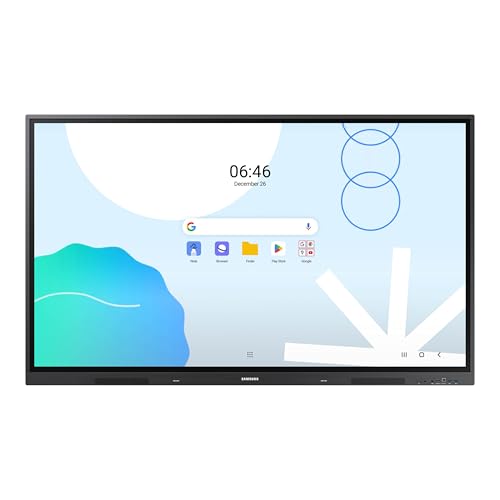
- Up to 40 touchpoints with dual pen support
- EDLA-certified Android display with Google services access
- USB-C, OPS slot, and multi-device screen mirroring
Best For: Education and training spaces focused on shared interaction
Pro-Grade Large-Format Pick
Sharp PN-E659 65" UHD Commercial Display

- 65-inch 4K UHD resolution
- Built-in 10W speakers
- 16/7 operation with tilt and portrait support
Best For: Large spaces needing a durable, flexible 4K commercial display
Slim Design Leader
Samsung QHC 55" UHD Signage Display

- Ultra-slim 28.5 mm depth
- Dynamic Crystal Color with 4K processing
- SmartView+ and Smart Calibration
Best For: Polished business installs that need a slim 55-inch 4K display
Collaboration-Friendly Workhorse
ViewSonic CDE5514 55" 4K Commercial Display

- USB-C hub with video, data, and power
- Android 14 with AV system certifications
- Anti-glare 350-nit panel
Best For: Rooms and teams that need easy connectivity and IT-friendly management
Large-Format Digital Signage
Samsung QM55R 55-inch 24/7 4K Commercial Display

- 55-inch 4K UHD screen with 500 nits brightness
- Rated for 24/7 operation with IP5X dust protection
- Built-in Wi-Fi, Bluetooth, and media player
Best For: Always-on signage in lobbies, conference rooms, and retail spaces
Collaboration-Ready Commercial Display
ViewSonic CDE4314 43-inch 4K Android Display

- USB-C hub supports video, data, and 15W power
- Android 14 with AV control system certification
- Anti-glare coating and 350-nit brightness
Best For: Huddle rooms, classrooms, and IT-managed commercial installs
Budget Commercial Signage
Samsung QE50T 50-inch 16/7 4K Display

- 50-inch 4K UHD display with non-glare finish
- 16/7 operation rating with IP5X dust protection
- HDMI, USB, and built-in media player
Best For: Budget-friendly business signage and meeting-room displays
Professional Color-Critical Studio Display – Xencelabs Pen Display 24+
If you’re comparing commercial-grade pen display monitors for professional creative work, the Xencelabs Pen Display 24+ stands out for its color-focused workflow and refined drawing feel. Its etched, optically bonded 4K screen is designed to reduce reflections and parallax, while Calman Ready support makes hardware calibration much easier for teams that need consistent color output.
Best For: Color-critical illustrators, digital artists, and studios that want a calibrated 4K pen display with workflow shortcuts.
Pros:
- 23.8-inch 4K UHD panel with 1.07 billion colors for detailed work
- Calman Ready integration plus five factory-calibrated color space presets
- 44 customizable shortcuts through the included Quick Keys system
- Two battery-free v2 pens included for different grip preferences
Cons:
- Calman calibration requires a compatible colorimeter and software
- Current Calman Ready functionality is unavailable for macOS users
- Physical shortcuts are handled through the separate Quick Keys unit rather than built into the display
Overall, this is a strong pick when accuracy, shortcut efficiency, and a premium pen feel matter more than simple screen-only value. It’s especially compelling for artists who want a polished desktop setup built around precision and control.
Large-Format Commercial Signage Display – LG 55UH5Q-E 55-inch 4K Commercial Monitor
For buyers looking at commercial-grade pen display monitors in a broader business context, the LG 55UH5Q-E is built more like a signage workhorse than a creative pen tablet. Its 55-inch 4K panel, 500-nit brightness, slim bezels, and webOS 8 platform make it a practical fit for spaces that need reliable visual communication rather than pen input.
Best For: Retail, hospitality, and corporate signage deployments that need a bright 24/7 commercial display.
Pros:
- 55-inch UHD 4K panel with HDR and 500-nit brightness
- 24/7 duty cycle with IP5X dustproof and humidity-resistant design
- webOS 8 built in, reducing the need for an external media player
- Flexible connectivity including HDMI, DisplayPort, Wi-Fi, and RS-232
Cons:
- Designed for signage and presentation use, not pen-based drawing workflows
- No built-in stylus or touchscreen drawing features are listed
- Its large size and wall-mount focus may be overkill for desktop use
This model makes sense when the goal is dependable commercial display performance at scale. It’s not a creative pen display, but it is a solid option for organizations prioritizing visibility, uptime, and remote content management.
High-Refresh Pro Drawing Display – Wacom Cintiq Pro 27
The Wacom Cintiq Pro 27 is aimed at serious creators who want a premium pen display monitor with high color fidelity and a fast, responsive screen. Its 27-inch 4K panel, 120 Hz refresh rate, and Pro Pen 3 with 8,192 pressure levels make it well suited to demanding illustration, animation, and 3D work.
Best For: Professional artists and designers who want a large, high-refresh pen display with advanced pen control.
Pros:
- 27-inch 4K UHD display with 120 Hz refresh rate
- 10-bit color plus 99% Adobe RGB and 98% DCI-P3 coverage
- Pro Pen 3 offers 8,192 pressure levels and customizable grip balance
- 8 customizable ExpressKeys and improved multi-touch gestures
Cons:
- Large 27-inch footprint requires substantial desk space
- Premium feature set may be more than casual users need
- Some setup flexibility depends on the user’s preferred mounts and accessories
In practice, this is a top-tier drawing display for users who value both speed and color performance. If you want a pen monitor that feels built for demanding creative production, the Cintiq Pro 27 is a very strong contender.
Interactive Collaboration Display – Samsung WAD 65-inch Interactive Display
The Samsung WAD 65-inch is less of a creative pen display monitor and more of a classroom and collaboration hub built around multi-touch interaction. With EDLA certification, Android-based software, split-screen support, and up to 40 touchpoints, it’s designed to keep groups working together smoothly in educational settings.
Best For: Schools and training spaces that need a large interactive display with Google services and multi-user writing.
Pros:
- Up to 40 simultaneous touchpoints for multi-user collaboration
- EDLA certification with access to Google Play, YouTube, and Google Classroom
- Dual pen function allows switching tools without downtime
- 3-in-1 USB-C, screen mirroring for up to nine devices, and OPS slot support
Cons:
- Built for education and collaboration, not pen-drawing precision
- 65-inch size is better suited to wall-mounted group use than desktops
- Refresh rate and response specs are modest compared with creator-focused displays
For classrooms or training rooms, this display is strong on connectivity and ease of use. It’s a practical choice when the priority is shared interaction, app access, and flexible presentation workflows rather than illustration tools.
Pro-Grade Large-Format Pick – Sharp PN-E659 65" UHD Commercial Display
If you need one of the more robust commercial-grade pen display monitors for large-format business viewing, the Sharp PN-E659 focuses on dependable 4K presentation rather than gimmicks. Its 65-inch UHD panel, metal frame bezel, and support for 16/7 operation make it a practical choice for lobbies, meeting areas, or signage setups that need a professional look.
Best For: Large commercial spaces that need a durable 4K display with flexible mounting and orientation options.
Pros:
- 65-inch 4K UHD panel delivers sharp, high-acuity visuals.
- Built-in 10W speakers add integrated audio.
- Industrial-strength panel with metal frame bezel supports 16/7 operation.
- Tilt-back mounting and landscape/portrait orientation increase installation flexibility.
Cons:
- Designed for commercial display use, so it is large and space-intensive.
- Uses an LCD panel rather than a more premium interactive or pen-based format.
- At 60 hertz and 8 ms response time, it is aimed at business content, not fast-motion use.
Overall, the Sharp PN-E659 is a straightforward choice if your priority is a durable, high-resolution commercial display that can be mounted in different orientations. It is especially appealing when reliability and screen size matter more than advanced smart features.
Slim Design Leader – Samsung QHC 55" UHD Signage Display
For buyers comparing commercial-grade pen display monitors, the Samsung QHC stands out for its ultra-slim 28.5 mm depth and clean, uniform bezel design. It is built to look polished in business environments while still delivering 4K signage performance, anti-glare visibility, and tools like SmartView+ and Smart Calibration for easier deployment.
Best For: Businesses that want a thin, polished 55-inch 4K signage display with strong color and easy multi-screen management.
Pros:
- Ultra-slim 28.5 mm depth saves space and looks refined.
- Dynamic Crystal Color and Quantum Processor Lite 4K improve image quality.
- Non-glare panel helps keep information visible in bright areas.
- SmartView+ and Smart Calibration support wireless sharing and consistent setup across displays.
Cons:
- Designed primarily as a signage display, not a pen-enabled or interactive monitor.
- Glossy screen finish may not suit every lighting setup.
- Wall-mount-friendly design may require additional mounting hardware.
In practice, the QHC is strongest when appearance, slimness, and clear presentation matter as much as image quality. It is a solid commercial option for retail, corporate, and lobby installs where a sleek footprint is important.
Collaboration-Friendly Workhorse – ViewSonic CDE5514 55" 4K Commercial Display
Invalid ASIN.The ViewSonic CDE5514 is a practical option in the commercial-grade pen display monitors category if you want modern connectivity and easy IT control. Its 55-inch 4K UHD panel, USB-C single-cable hub, Android 14 platform, and certified AV integrations make it well suited to rooms where collaboration and simplified management matter.
Best For: Huddle rooms, classrooms, and retail spaces that need simple connectivity and remote display management.
Pros:
- Single-cable USB-C setup carries video, data, and 15W of power.
- Android 14 platform offers a secure, updated built-in experience.
- Certified for Q-SYS, Crestron, and Extron integration.
- 350 nits with a high-haze anti-glare coating helps reduce reflections.
Cons:
- Brightness is lower than some signage-focused commercial displays.
- USB-C power delivery is limited to 15W.
- At 55 inches, it may be smaller than some large-format lobby installations.
Overall, the CDE5514 is a strong fit when you want a business display that is easy to connect, manage, and integrate into existing AV workflows. It leans toward collaboration and fleet control instead of oversized signage impact.
Large-Format Digital Signage – Samsung QM55R 55-inch 24/7 4K Commercial Display
If you need commercial-grade pen display monitors for a large lobby, conference room, or retail wall, the Samsung QM55R is built more like a signage workhorse than a consumer screen. Its 55-inch 4K UHD panel, 500-nit brightness, non-glare finish, and 24/7 operating rating make it a strong fit for always-on business environments where visibility and reliability matter.
Best For: 24/7 business signage, large meeting spaces, and mounted presentations that need a bright, durable display.
Pros:
- 55-inch 4K UHD panel with intelligent UHD upscaling and HDR conversion
- Rated for 24/7 operation with IP5X dust protection for commercial use
- 500-nit brightness and a non-glare screen help in bright spaces
- Built-in Wi-Fi, Bluetooth, and an embedded media player simplify deployment
Cons:
- Designed for signage and business use, not a pen-input workflow
- Large size may be more display than smaller rooms need
- Requires wall mounting and planning for installation
The QM55R stands out when you want a dependable commercial display with flexible connectivity and all-in-one signage features. It is a practical choice for organizations that need a large screen that can stay on and keep working.
Collaboration-Ready Commercial Display – ViewSonic CDE4314 43-inch 4K Android Display
The ViewSonic CDE4314 is a smart choice if you want commercial-grade pen display monitors for huddle rooms, classrooms, or retail installations with simpler connectivity and remote management. Its 43-inch 4K UHD panel, anti-glare coating, USB-C hub, and Android 14 platform are aimed at practical day-to-day business use rather than flashy consumer features.
Best For: Teams that need a clean USB-C setup, easy device management, and a professional 4K display for collaboration.
Pros:
- Single-cable USB-C carries 4K video, data, and 15W of power
- Android 14 platform plus Q-SYS, Crestron, and Extron certification
- 25% high-haze anti-glare coating and 350-nit brightness reduce reflections
- Free ViewSonic Manager software supports remote fleet management
Cons:
- 350 nits is lower than brighter signage-focused options
- Smaller 43-inch size may not suit larger presentation walls
- Best suited to commercial AV setups, not drawing or stylus work
Overall, the CDE4314 is built for organizations that care about clean integration and centralized control. It makes the most sense where collaboration, manageability, and consistent display quality are more important than maximum brightness.
Budget Commercial Signage – Samsung QE50T 50-inch 16/7 4K Display
For buyers comparing commercial-grade pen display monitors for a straightforward signage or presentation setup, the Samsung QE50T offers the essentials without overcomplicating the install. It combines a 50-inch 4K UHD panel, 300-nit brightness, a non-glare finish, and 16/7 operation, making it a dependable fit for business spaces that run on a daily schedule.
Best For: Cost-conscious business signage, meeting rooms, and educational spaces that need a reliable 4K commercial display.
Pros:
- 50-inch 4K UHD panel with Intelligent UHD upscaling
- Non-glare screen and 178-degree viewing angle support visibility
- Built-in media player with HDMI and USB playback options
- 16/7 operation rating and IP5X dust-proof protection
Cons:
- 300 nits is modest for very bright environments
- Not rated for 24/7 operation like higher-end signage models
- Fewer connectivity options than more collaboration-focused displays
The QE50T is a practical, commercial-ready display for buyers who want reliability and core signage features at a simpler spec level. It is especially useful when you need a well-sized 4K screen that can handle regular business use.
How We Picked These Commercial-Grade Pen Display Monitors
We prioritized screen size, 4K resolution where available, brightness, input flexibility, duty-cycle expectations, and features that matter in professional settings. For pen-enabled models, we also looked at stylus accuracy, touch support, and creator-focused workflows. For commercial displays, we emphasized reliability, connectivity, and signage-friendly operation.
Quick Comparison
Not every option here serves the same purpose. Some are true pen displays for illustration, annotation, and design work. Others are commercial panels better suited to signage, collaboration, and presentations. The best choice depends on whether you need a drawing-first surface or a high-uptime display for business use.
Key Buying Factors for Commercial-Grade Pen Display Monitors
Screen Size and Workspace
Larger panels make multitasking and detailed work easier, but they also need more desk space and stronger mounting support. Smaller screens can be a better fit for compact studios or shared workstations.
Resolution and Color Quality
For creative work, 4K resolution helps keep lines crisp and text readable. Look for strong color performance if you are doing design, photo editing, or client-facing visual work.
Brightness and Operating Conditions
Commercial-grade models often advertise higher brightness and longer duty cycles. That matters in bright rooms, retail spaces, conference areas, and other environments where a display may run for many hours each day.
Pen, Touch, and Input Support
If your workflow depends on handwriting, sketching, or markup, pen accuracy and touch responsiveness are essential. If the display is mainly for signage or meetings, prioritize ports, remote management, and platform support instead.
Connectivity and Compatibility
USB-C, HDMI, DisplayPort, RS232, and network features can make setup much easier. Make sure the display works with your existing computers, media players, or collaboration tools before you buy.
Who Should Buy Which Commercial-Grade Pen Display Monitors?
Creative professionals should lean toward pen-first models with high-resolution panels and responsive stylus support. Businesses that need reliable 24/7 operation should focus on commercial signage displays with strong brightness, solid input options, and easy management. Schools and meeting rooms may benefit most from interactive displays that combine touch, pen use, and collaboration features in one package.
In short, the best Commercial-Grade Pen Display Monitors are the ones that match your daily workflow, room conditions, and uptime needs—not just the biggest spec sheet.
