
Commercial-grade network attached storage systems give businesses a centralized platform for file sharing, backups, virtualization, surveillance, and media workflows. The right model depends on more than drive-bay count: network speed, expansion options, data protection, software, and support all matter.
We compared 10 business-focused NAS servers and storage bundles across rackmount and desktop designs, diskless and preconfigured options, capacity, connectivity, and intended workload. Use the guide below to narrow the list by deployment size, performance needs, and budget.
Best 10 Commercial-Grade Network Attached Storage Systems Picks for 2026
Rackmount ZFS Workhorse

- 12 hot-swap bays with ZFS support
- 32GB ECC RAM and dual 10GbE
- IPMI, VMs, plugins, and cloud sync
Best For: SMB storage, backups, surveillance, and virtualization
Virtualization Powerhouse

- Intel Core i3 with expandable DDR5 memory
- 10GbE plus 2.5GbE networking
- Docker, VMs, RAID, and dual M.2 slots
Best For: Developers, media workflows, and power users
Ready-Capacity Business Server

- 80TB across eight 10TB SATA drives
- 32GB ECC memory and Ryzen processor
- DSM, Btrfs, 10GbE, and NVMe support
Best For: SMB file storage, backup, surveillance, and streaming
High-Bandwidth Expansion Tower
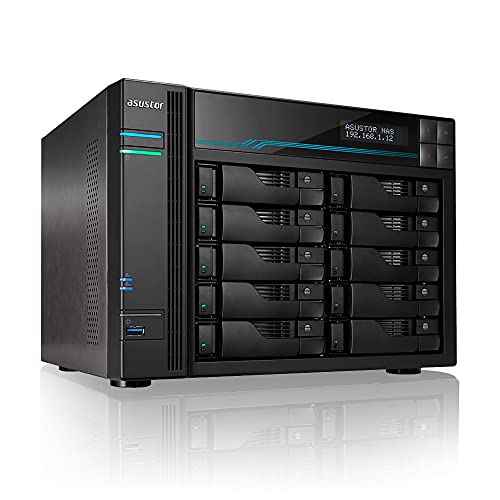
- 10 SATA bays for scalable RAID storage
- Dual 10GbE and dual 2.5GbE ports
- Dual M.2 NVMe cache slots
Best For: SMB storage, creative studios, and 4K/8K workflows
Best Balanced Business NAS

- 32TB bundle with four 8TB IronWolf drives
- Dual 2.5GbE, ECC RAM, and Ryzen quad-core CPU
- Expandable storage with hot-swap bays and NVMe slots
Best For: Small and medium-sized businesses needing ready-to-use, expandable storage
Best Enterprise Rackmount NAS
Buffalo TeraStation 71210RH 96TB

- 12-bay rackmount enclosure with 96TB installed
- Four native 10GbE ports and PCIe expansion
- RAID 6, snapshots, Btrfs, and encryption
Best For: High-workload business environments needing large, rackmount storage
Best 10GbE NAS for Small Teams

- 10GbE networking with 8GB DDR5 RAM and 128GB SSD
- Supports Docker, virtual machines, and up to 144TB
- Drive-free enclosure works with compatible third-party storage
Best For: Small teams and creators wanting fast, customizable network storage
Best Overall
BUFFALO TeraStation 5420DN 32TB

- Four 8TB NAS-grade drives included
- 10GbE connectivity and snapshot recovery
- Three-year warranty with U.S.-based support
Best For: Businesses needing ready-to-use storage and backup protection
Best for Video Production
Synology DS1825+ Enterprise NAS

- Designed for 50+ concurrent 4K/8K editors
- Scales from 160TB to 360TB
- Optional 10GbE or 25GbE networking
Best For: Growing video teams and post-production archives
Best for Small Businesses

- Dual 10GbE ports with link aggregation
- Six bays plus two M.2 NVMe slots
- Supports up to 208TB and multiple RAID levels
Best For: Teams building a fast, expandable local file server
Rackmount ZFS Workhorse – TrueNAS Mini R
For buyers comparing commercial-grade network attached storage systems, the TrueNAS Mini R emphasizes resilient storage, expandability, and network performance in a compact rackmount chassis. Its 12 hot-swap bays, ECC memory, dual 10GbE ports, and IPMI remote management make it well suited to demanding small-business environments.
Best For: SMB file sharing, backups, surveillance, virtualization, multimedia workflows, and remote or edge offices that want ZFS-based storage.
Pros:
- 12 hot-swap SATA bays support substantial storage expansion.
- 32GB ECC RAM, an eight-core Atom CPU, and dual 10GbE ports support serious multitasking.
- TrueNAS supports ZFS, multiple file-sharing protocols, plugins, VMs, and cloud synchronization.
- IPMI remote management and a short rail kit simplify rack deployment and administration.
Cons:
- Diskless configuration requires separate drive purchases and installation.
- Its 41.7-pound rackmount design is less convenient for casual desktop use.
- The listed hardware warranty is one year.
The Mini R is a strong fit when data protection, broad software support, and rack-ready expansion matter more than turnkey simplicity. Adding SSDs for caching can further improve read and write performance.
Virtualization Powerhouse – UGREEN NAS DXP4800 Pro
The UGREEN NAS DXP4800 Pro brings workstation-like hardware to the commercial-grade network attached storage systems category. Its 13th-generation Intel Core processor, expandable DDR5 memory, dual network interfaces, and support for Docker and virtual machines target teams with demanding development, media, and IT workloads.
Best For: Developers, video editors, power users, small offices, and teams running containers, virtual machines, private services, or large media libraries.
Pros:
- Intel Core i3-1315U performance, 8GB expandable DDR5 RAM, and integrated UHD graphics support demanding multitasking.
- 10GbE plus 2.5GbE networking enables transfers up to 1.25GB/s.
- Four drive bays and two PCIe 4.0 M.2 slots support up to 144TB and SSD caching or storage pools.
- Tool-free trays, multi-zone cooling, RAID options, and a two-year warranty support ongoing use.
Cons:
- The four-bay design offers less raw drive expansion than larger NAS enclosures.
- Storage capacity depends on separately installed drives.
- Its advanced Docker and VM features may be more than basic file-sharing users need.
Choose the DXP4800 Pro when compute flexibility is as important as storage. It is particularly compelling for users who want a private development or media workstation with local AI processing and fast networking.
Ready-Capacity Business Server – Synology DS1823xs+
For buyers seeking commercial-grade network attached storage systems with substantial included capacity, the Synology DS1823xs+ combines a Ryzen processor, ECC memory, 80TB of SATA storage, NVMe SSDs, and Synology DSM. It is designed as a flexible platform for file storage, backup, synchronization, surveillance, and streaming.
Best For: Individuals and small to medium-sized businesses needing high-capacity centralized storage, backups, shared files, surveillance, or multimedia services.
Pros:
- Eight 10TB SATA hard drives provide 80TB of listed storage capacity.
- 32GB DDR4 ECC memory and a four-core Ryzen CPU support varied server roles.
- One 10GbE port, two 1GbE ports with aggregation or failover, and an out-of-band management port offer networking flexibility.
- DSM, Btrfs, iSCSI, NVMe storage, USB 3.2, and eSATA expand its administrative and storage options.
Cons:
- The drives and memory are supplied separately from the chassis and require installation.
- Only one 10GbE port is listed.
- Its eight-bay capacity may be more than smaller teams require.
The DS1823xs+ is a practical choice for buyers who want a broad, scalable server platform rather than a basic backup box. Its prepackaged storage capacity and DSM software make it especially suitable for multi-role deployments.
High-Bandwidth Expansion Tower – Asustor Lockerstor 10 AS6510T
The Asustor Lockerstor 10 AS6510T is built for organizations that need scalable, always-on storage and multiple high-speed network links. Among commercial-grade network attached storage systems, its 10 drive bays, dual 10GbE ports, dual 2.5GbE ports, and NVMe cache support make it a capable foundation for shared business and production data.
Best For: Small businesses, creative studios, and IT environments handling centralized files, backups, 4K/8K production media, and continuous workloads.
Pros:
- Ten SATA bays provide extensive capacity expansion and RAID options.
- Dual 10GbE and dual 2.5GbE ports support high throughput and link aggregation.
- Dual M.2 NVMe slots can accelerate responsiveness, read/write speeds, and database workloads.
- Intel Atom C3538 hardware is designed for multitasking and 24/7 business operation.
Cons:
- The diskless configuration requires separate drives.
- The quad-core Atom platform is less performance-focused than newer Core-based NAS hardware.
- No video output is provided, limiting direct display use.
The Lockerstor 10 makes the most sense when bay count and network bandwidth take priority. It offers a strong expansion path for teams that need shared storage today and room to grow later.
Best Balanced Business NAS – Synology DS925+ 32TB Bundle
For small and medium-sized businesses seeking commercial-grade network attached storage systems, the Synology DS925+ combines a capable quad-core AMD Ryzen processor, ECC memory, and a ready-to-use 32TB four-drive bundle. Its dual 2.5GbE ports and flexible expansion options make it practical for centralized storage, backups, surveillance, and selected virtualization workloads.
Best For: Small and medium-sized businesses that want an expandable, pre-populated NAS with strong connectivity and business-focused applications.
Pros:
- Includes four 8TB Seagate IronWolf drives for 32TB of installed capacity.
- ECC memory, dual 2.5GbE LAN ports, and an AMD Ryzen V1500B quad-core processor support demanding workflows.
- Four hot-swappable bays, two M.2 NVMe slots, and support for expansion to up to nine drives add flexibility.
Cons:
- Its four-bay design offers less starting capacity than larger rackmount systems.
- Expansion beyond the included storage requires additional hardware and drives.
The DS925+ is a well-rounded choice when you want business-ready features without moving to a large rackmount enclosure. The included drives simplify deployment, while memory expansion and a DX525-compatible design leave room to grow.
Best Enterprise Rackmount NAS – Buffalo TeraStation 71210RH 96TB
The Buffalo TeraStation 71210RH is built for organizations that need commercial-grade network attached storage systems with substantial capacity and high-speed networking. Its 12-bay rackmount chassis, included enterprise-grade drives, four native 10GbE ports, and RAID 6 configuration make it suited to high-workload business environments.
Best For: Businesses and IT departments that need high-capacity rackmount storage, fast multi-gigabit transfers, and enterprise-oriented data protection.
Pros:
- Includes twelve 8TB enterprise-grade hard drives and ships with 80TB usable capacity in RAID 6.
- Four native 10GbE ports support accelerated network transfers.
- Snapshots, Btrfs, encryption, two-factor authentication, and backup features help protect business data.
- Two PCIe Gen 4×8 slots support SSD caching and high-speed network expansion.
Cons:
- The 54.2-pound rackmount enclosure is substantially less suitable for desktop or small-office placement.
- Its enterprise capacity and rackmount format may be more than smaller teams require.
For larger deployments, the TS71210RH offers the strongest capacity and networking profile in this group. It is a serious infrastructure purchase, particularly for teams that can take advantage of rack equipment, 10GbE networking, snapshots, and RAID 6.
Best 10GbE NAS for Small Teams – UGREEN DXP4800 Plus 4-Bay NAS
The UGREEN DXP4800 Plus is a flexible four-bay option for buyers comparing commercial-grade network attached storage systems for small offices, creative work, and collaborative storage. It combines an Intel five-core CPU, 8GB of DDR5 RAM, 10GbE networking, Docker and virtual-machine support, and broad device compatibility—but the drives must be purchased separately.
Best For: Small teams, creators, and families that want fast networking, modern applications, and the freedom to select their own HDDs or SSDs.
Pros:
- 10GbE networking and 10Gbps USB ports can support very fast transfers under suitable conditions.
- 8GB DDR5 RAM, a 128GB SSD, Docker, and virtual-machine support provide application flexibility.
- Supports up to 144TB with compatible drives and offers RAID options for drive-failure recovery.
- Includes encrypted private-cloud features, permission management, and cross-platform access.
Cons:
- Hard drives or SSDs are not included, so the total setup cost requires separate planning.
- Actual transfer speeds depend on the network, drives, processor load, and file sizes.
- Wired Ethernet is required; this NAS does not support Wi-Fi.
The DXP4800 Plus is appealing when fast 10GbE connectivity and application flexibility matter more than an included drive bundle. It gives buyers control over storage selection, but configuring the bays and network infrastructure is part of the purchase decision.
Best Overall – BUFFALO TeraStation 5420DN 32TB
For organizations seeking commercial-grade network attached storage systems with storage included, the BUFFALO TeraStation 5420DN combines four NAS-grade drives, business-focused data protection, and fast 10GbE connectivity. It ships in RAID 5 with 24TB usable capacity and supports several other RAID configurations.
Best For: Businesses that want a ready-to-use, high-capacity NAS for file sharing, backups, and hybrid-cloud workflows.
Pros:
- Includes four 8TB NAS-grade hard drives.
- 10GbE networking supports fast file transfers.
- Snapshots, encryption, two-factor authentication, and flexible backup features support data protection.
- Includes a three-year warranty, 24/7 U.S.-based support, and data recovery service.
Cons:
- RAID 5 configuration provides 24TB rather than the full 32TB capacity.
- Mechanical drives may be less responsive than SSD-based storage for some workloads.
The 5420DN is a strong all-in-one choice when predictable capacity, built-in drives, and recovery features matter more than diskless upgrade flexibility.
Best for Video Production – Synology DS1825+ Enterprise NAS
The Synology DS1825+ is a diskless option for demanding commercial-grade network attached storage systems, especially collaborative video workflows. It is designed to support more than 50 concurrent users editing 4K or 8K projects, while expansion units can increase storage from 160TB to 360TB.
Best For: Video production teams, post-production environments, and businesses managing large, growing media archives.
Pros:
- Supports more than 50 concurrent video-editing users according to the supplied specifications.
- Offers reported speeds up to 2,239 MB/s for demanding workflows.
- Can scale to 360TB with expansion units.
- Supports optional 10GbE or 25GbE network upgrade cards.
Cons:
- Drives are not included, so the initial setup requires a separate storage investment.
- Advanced networking requires an optional upgrade card.
- Enterprise features may be more than smaller offices need.
Choose the DS1825+ when collaborative media performance and future expansion are priorities, but budget for drives and any networking upgrades required by your workflow.
Best for Small Businesses – UGREEN NASync DXP6800 Pro
The UGREEN NASync DXP6800 Pro is a flexible six-bay choice among commercial-grade network attached storage systems for teams that want high processing power and substantial expansion potential. Its 12th-generation 10-core Intel Core i5 processor, dual 10GbE ports, and support for up to 208TB make it suitable for demanding file and collaboration workloads.
Best For: Small businesses and teams that need fast network transfers, broad RAID support, and room to build a large local storage pool.
Pros:
- Dual 10GbE ports can be aggregated for up to 20G bandwidth.
- Six SATA bays and two M.2 NVMe bays support up to 208TB.
- Supports JBOD, RAID 0, 1, 5, 6, and 10 configurations.
- Includes encryption and multifactor authentication features.
Cons:
- Storage drives are not included.
- Actual transfer speeds depend on the network, drives, processor, and file sizes.
- Wired Ethernet is required; Wi-Fi is not supported.
The DXP6800 Pro offers strong hardware flexibility for growing teams, provided they are prepared to source compatible drives and have a network capable of using its 10GbE performance.
How We Picked These Commercial-Grade Network Attached Storage Systems
We evaluated each NAS by looking at the factors that most affect business deployment: bay count, processor and memory configuration, network interfaces, RAID and filesystem support, expansion potential, included storage, management software, and physical format. We also considered whether a system is better suited to general file serving, backup, virtualization, video production, or larger enterprise environments.
Diskless models offer more control over drive selection and configuration, while prebuilt bundles simplify installation and provide a known starting capacity. Neither approach is universally better; the right choice depends on whether you prioritize customization or a faster, more predictable rollout.
Quick Comparison
- Rackmount deployment: The TrueNAS Mini R and Buffalo TeraStation 71210RH are designed for server racks and higher-density installations.
- Large desktop capacity: The 10-bay Asustor Lockerstor 10 and eight-bay Synology models suit teams that need substantial local storage without a rackmount chassis.
- Compact business storage: Four-bay options from UGREEN, Synology, and Buffalo are easier to deploy in offices with moderate capacity requirements.
- Preconfigured storage: Several Synology and Buffalo bundles include hard drives, reducing setup time but limiting some component choices.
- High-speed networking: Look for 10GbE, 25GbE, or multiple 2.5GbE ports when users regularly move large files or access shared project data.
Key Buying Factors for Commercial-Grade Network Attached Storage Systems
Capacity, RAID, and Expansion
Count usable capacity rather than raw drive capacity. RAID protection reduces available space, and backups require additional planning. Choose enough bays for future growth, especially if replacing a system is disruptive. Confirm supported drive types, expansion shelves, and hot-swap capability before buying.
Network Performance
Multi-gigabit Ethernet can significantly improve large-file transfers, but the rest of the network must support it. Check switches, cabling, client adapters, and link aggregation requirements. A fast NAS connected to a congested gigabit network will not deliver its rated performance.
Software and Data Protection
Review the operating system’s backup tools, snapshots, replication, access controls, encryption, monitoring, and cloud integrations. ZFS-based systems can be attractive for advanced administrators, while appliance-style platforms may be easier for smaller IT teams to manage.
Reliability and Support
For business-critical data, prioritize ECC memory where available, redundant or replaceable components, warranty coverage, firmware support, and clear drive-compatibility policies. UPS support and an independent backup are essential regardless of the NAS brand.
Who Should Buy Which Commercial-Grade Network Attached Storage Systems?
Choose a rackmount NAS for a server room, dense storage deployment, or centralized infrastructure. Choose an eight- to 12-bay system when you need high capacity, multiple RAID groups, or room to grow. Choose a four-bay model for a small office, branch location, or team with moderate shared-storage needs.
Creative professionals and video teams should prioritize 10GbE or faster connectivity, SSD caching support, and strong sequential performance. Small businesses and general office users may get more value from a preconfigured bundle with straightforward management. IT professionals, developers, and home-lab users should focus on filesystem flexibility, virtualization features, memory capacity, and expansion options.
Whichever system you select, plan the complete solution: enterprise-rated drives, a compatible network switch, UPS protection, tested backups, and documented recovery procedures. NAS storage improves availability, but it is not a substitute for a separate backup.
