
Choosing the right streaming rig is about more than raw specs. The best commercial-grade live streaming computers need dependable CPU performance, strong GPU encoding, fast storage, and stable networking under real-world broadcast loads.
Below, we focus on systems built to handle multi-app workflows, high-resolution capture, and long streaming sessions without constant tweaking.
Best 10 Commercial-Grade Live Streaming Computers Picks for 2026
Value-Performance Streamer
GMKtec M6 Ultra Ryzen 7640HS 32GB/1TB

- Ryzen 5 7640HS with 6 cores and 12 threads
- 32GB DDR5 memory and 1TB SSD included
- Triple-display support plus 2.5G dual LAN
Best For: Compact streaming setups that need efficient multitasking and strong connectivity
GPU-Ready NUC Build
Intel NUC 11 Extreme i7 RTX 3060

- Core i7-11700B with 8 cores and 16 threads
- RTX 3060 with 12GB GDDR6 graphics
- Thunderbolt 4 and 32GB RAM included
Best For: Creators who want a dedicated GPU and a richer I/O setup
Workstation-Class Performer
MINISFORUM MS-A2 Ryzen 9 9955HX

- Ryzen 9 9955HX with 16 cores and 32 threads
- 96GB DDR5 RAM and 2TB PCIe 4.0 SSD
- Dual 10G SFP+ plus dual 2.5G RJ45 networking
Best For: Heavy multitasking and high-speed networked production work
Modern Tower Streamer
HP OmniDesk Core Ultra 7 RTX 5060
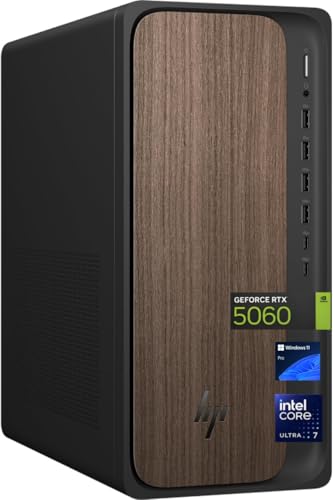
- Core Ultra 7 265 with 20 cores and 20 threads
- RTX 5060 graphics plus 32GB DDR5 RAM
- 2TB SSD and Windows 11 Pro preinstalled
Best For: Business-class streaming and productivity in a full-size tower
Quiet Power Pick
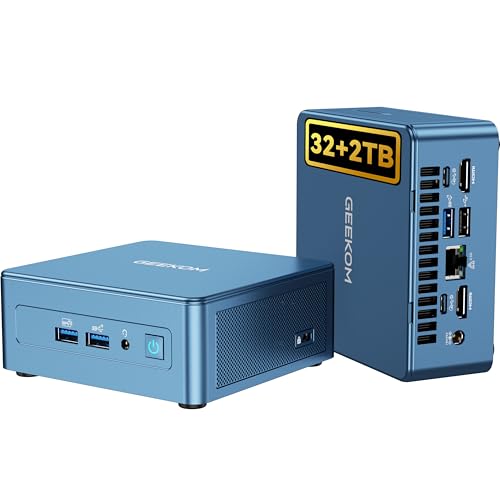
- Core i9-13900H with 14 cores and 20 threads
- 32GB RAM and 2TB Gen4 NVMe SSD
- Quiet cooling, metal build, and 3-year warranty
Best For: Compact Windows streaming and creator workflows
GPU Heavyweight

- Ryzen 9 8945HX with 16 cores and 32 threads
- Desktop RTX 5060 with 8GB GDDR7 graphics
- 5GbE, Wi-Fi 7, and quad 4K display support
Best For: High-end streaming and GPU-accelerated creator work
ChromeOS Simplicity Pick

- Core i3-1315U with 8GB DDR5 RAM
- Supports up to four 4K displays
- Titan C security chip and VESA mount included
Best For: Secure, browser-based streaming and light production
Pro Streaming Pick
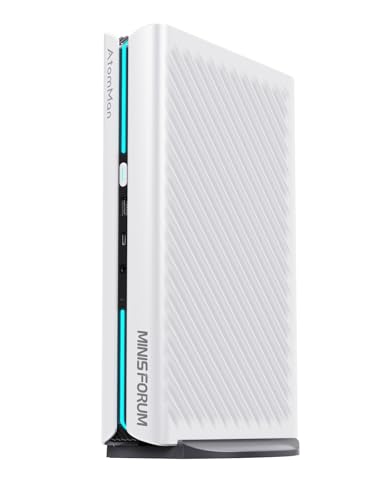
- 16-core Ryzen 9 CPU handles multitasking well
- RTX 5060 8GB adds strong graphics headroom
- Four-display support via HDMI and DisplayPort
Best For: Creators who want a compact live streaming PC with multi-monitor support
Enterprise Streaming Workstation
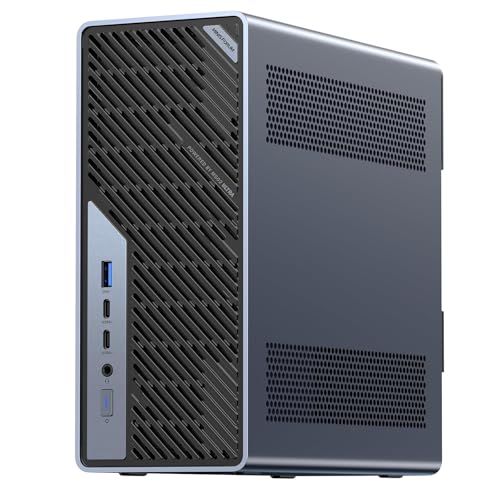
- Core Ultra 9 CPU with 13 TOPS NPU
- Dual 25GbE plus 10GbE and 2.5GbE networking
- Four M.2 and four DDR5 slots for expansion
Best For: Advanced streamers and teams needing workstation-grade networking and upgrade flexibility
Premium Compact Choice

- Core Ultra 9 Series 2 platform for high performance
- RTX 5070 mobile GPU with DLSS support
- Triple-fan cooling plus easy upgrade access
Best For: Users who want a premium compact streaming PC with strong graphics and cooling
Value-Performance Streamer – GMKtec M6 Ultra Ryzen 7640HS 32GB/1TB
If you want a compact option among commercial-grade live streaming computers, the GMKtec M6 Ultra brings a Ryzen 5 7640HS, 32GB of DDR5 memory, and a 1TB SSD in a mini PC footprint. It’s aimed at users who need efficient day-to-day performance, hardware video encode/decode support, and enough display and network flexibility for a practical streaming or production desk.
Best For: Streamers and small creators who want a compact, efficient mini PC with modern connectivity and solid multitasking headroom.
Pros:
- Ryzen 5 7640HS with 6 cores and 12 threads for responsive multitasking
- 32GB DDR5 RAM and 1TB PCIe SSD included
- Radeon 760M supports hardware encode/decode for AV1, HEVC, and AVC
- Triple-display support with USB4, HDMI 2.0, and DisplayPort
Cons:
- Integrated graphics are better suited to moderate workloads than heavy GPU production
- Built-in storage is PCIe 3.0 by default, even though expansion is available
Overall, this is a strong value pick if you need a small, efficient system that can handle streaming-related multitasking and modern codec support without taking up much space.
GPU-Ready NUC Build – Intel NUC 11 Extreme i7 RTX 3060
The Intel NUC 11 Extreme Kit is a more traditional high-power option in the commercial-grade live streaming computers category, combining an 8-core Core i7-11700B with an RTX 3060 and 32GB of RAM. With Thunderbolt 4, multiple USB ports, and dedicated graphics, it’s the kind of machine that suits streamers who want a stronger GPU foundation for encoding, overlays, and production tools.
Best For: Streamers and creators who want dedicated NVIDIA graphics and a larger, more expandable mini-PC-style build.
Pros:
- 8-core, 16-thread Intel Core i7-11700B for broad desktop productivity
- NVIDIA GeForce RTX 3060 with 12GB GDDR6 graphics
- Thunderbolt 4 plus plenty of USB connectivity
- 32GB DDR4 memory and 1TB NVMe SSD already installed
Cons:
- Much larger and heavier than ultra-compact mini PCs
- Wi-Fi is listed as Wi-Fi 6E, but wired LAN is only gigabit
If your streaming workflow benefits from a dedicated GPU and a more full-featured port layout, this NUC-style system is a strong, practical choice.
Workstation-Class Performer – MINISFORUM MS-A2 Ryzen 9 9955HX
For buyers comparing commercial-grade live streaming computers, the MINISFORUM MS-A2 stands out as a workstation-style mini PC with a Ryzen 9 9955HX, 96GB of DDR5 RAM, and a 2TB SSD. It’s built for heavy multitasking, fast wired networking, and multi-monitor work, making it well suited to production environments that need more than a basic streaming box.
Best For: Power users who need serious multitasking, high-speed networking, and triple-display support in a compact workstation.
Pros:
- Ryzen 9 9955HX with 16 cores and 32 threads
- 96GB DDR5 RAM and 2TB PCIe 4.0 SSD
- Dual 10G SFP+ ports plus dual 2.5G RJ45 ports
- Triple 8K output via HDMI and USB-C
Cons:
- Uses integrated Radeon 610M graphics instead of a discrete GPU
- Designed more as a workstation than a simple plug-and-play streaming desktop
This is the most network-forward and multitasking-heavy option in the group, so it makes sense for users whose streaming setup overlaps with storage, editing, or other demanding workstation tasks.
Modern Tower Streamer – HP OmniDesk Core Ultra 7 RTX 5060
The HP OmniDesk brings a newer desktop-tower approach to commercial-grade live streaming computers, pairing an Intel Core Ultra 7 265 with an NVIDIA GeForce RTX 5060, 32GB of DDR5 RAM, and a 2TB SSD. It’s aimed at business-class users who want a current-generation tower with enough horsepower for demanding streaming, productivity, and 4K output workflows.
Best For: Users who want a full-size Windows 11 Pro tower with modern CPU/GPU hardware and business-friendly features.
Pros:
- Intel Core Ultra 7 265 with 20 cores and 20 threads
- NVIDIA GeForce RTX 5060 dedicated graphics
- 32GB DDR5 RAM and 2TB SSD provide strong baseline capacity
- Wi-Fi 6, Bluetooth 5.4, and Windows 11 Pro included
Cons:
- Large tower design is less space-saving than a mini PC
- Only one video output interface is listed in the supplied details
For buyers who prefer a more conventional desktop tower, this HP offers a modern mix of CPU power, dedicated graphics, and business-oriented specs that fit a serious streaming desk.
Quiet Power Pick – GEEKOM IT13 Mini PC
If you need commercial-grade live streaming computers that stay compact but still handle serious multitasking, the GEEKOM IT13 is a strong fit. Its Core i9-13900H, 32GB of RAM, 2TB NVMe SSD, and quiet cooling make it well suited to creator workflows, studio use, and long runtime sessions where stability matters.
Best For: Streamers, editors, and small studios that want a compact Windows mini PC with strong daily performance and quiet operation.
Pros:
- 14-core, 20-thread Intel Core i9-13900H with up to 5.4GHz boost
- 32GB RAM and 2TB PCIe Gen4 NVMe SSD for fast multitasking and storage
- Quiet cooling, metal mid-frame, and 3-year warranty for steady 24/7 use
- Dual USB4 plus dual HDMI supports up to four displays, including 8K and 4K output
Cons:
- Integrated Intel Iris Xe graphics limit heavy GPU-based production work
- Compact mini PC design may not suit users who want desktop-class expansion
Overall, the IT13 is a practical choice when you want dependable streaming and productivity performance in a small footprint. It is especially appealing if your workflow values quiet operation, fast storage, and multi-display support over dedicated graphics power.
GPU Heavyweight – MINISFORUM G1 Pro Mini PC
For commercial-grade live streaming computers that also need serious graphics horsepower, the MINISFORUM G1 Pro stands out. It combines a Ryzen 9 8945HX with a desktop GeForce RTX 5060, 32GB of DDR5 memory, and high-speed connectivity, making it a strong match for demanding production, rendering, and multi-display streaming setups.
Best For: Streamers and creators who want a compact system with dedicated RTX graphics and high sustained performance.
Pros:
- Ryzen 9 8945HX with 16 cores and 32 threads for heavy multitasking
- Desktop-class RTX 5060 with 8GB GDDR7 and NVIDIA Studio support
- 245W performance release and 300W-rated cooling for sustained load handling
- 5GbE, Wi-Fi 7, and up to quad 4K display support for advanced setups
Cons:
- Performance-focused design and 245W power profile are more than many basic users need
- Higher-end hardware makes it less of a simple entry-level streaming option
In practice, this is the most powerful option in the group for users who need both streaming and GPU-accelerated creation. If your workflow includes gaming capture, editing, 3D work, or AI-assisted production, the G1 Pro is built to keep up.
ChromeOS Simplicity Pick – ASUS Chromebox 5a
The ASUS Chromebox 5a is a good fit for commercial-grade live streaming computers in simpler, browser-based environments. With an Intel Core i3-1315U, 8GB of DDR5 RAM, a fast NVMe SSD, and support for up to four 4K displays, it is designed for straightforward business, education, and personal use where reliability and easy management matter.
Best For: Teams that want a secure, Chrome OS mini PC for lightweight streaming, signage, or web-based production tasks.
Pros:
- Chrome OS with Titan C security chip and Kensington lock slot
- Quad-display support with dual HDMI, DisplayPort, and USB-C output
- 2.5Gbps Ethernet and Wi-Fi 6E for stable network connectivity
- Compact VESA-mountable design for clean installs
Cons:
- Core i3 processor and integrated graphics are better for light workloads than heavy production
- 128GB SSD and 8GB RAM are modest for larger media libraries or advanced editing
This model makes sense when your streaming setup is built around Chrome OS simplicity rather than raw horsepower. It is best viewed as a secure, compact machine for lighter workflows, not a top-tier production workstation.
Pro Streaming Pick – Ryzen 9 Mini PC with RTX 5060
If you’re shopping for commercial-grade live streaming computers, this MINISFORUM G1 Pro stands out for its Ryzen 9 8945HX CPU, RTX 5060 graphics, and support for four simultaneous displays. That combination makes it a practical fit for creators who need smooth encoding, monitoring, and workflow separation in one compact desktop.
Best For: Live streamers, editors, and multi-monitor users who want a compact PC with strong CPU and GPU headroom.
Pros:
- AMD Ryzen 9 8945HX offers 16 cores and 32 threads for heavy multitasking.
- Dedicated GeForce RTX 5060 8GB adds strong graphics support for demanding visual workloads.
- 2x HDMI plus 3x DisplayPort outputs support up to four UHD monitors.
- Wi-Fi 7, Bluetooth 5.4, and 5G Ethernet cover fast wired and wireless connectivity.
Cons:
- Expansion is good, but it is still a mini PC rather than a full tower workstation.
- Built-in storage starts at 1TB, which may be limited for large media libraries.
Overall, this is a strong compact option if you want a live streaming machine with real multitasking ability and enough display outputs for a serious production desk. It is especially appealing when you need performance without moving to a bulky desktop.
Enterprise Streaming Workstation – Ultra 9 Mini PC with 25GbE
For commercial-grade live streaming computers, the MINISFORUM MS-02 Ultra is built more like a mini workstation than a typical desktop. Its Core Ultra 9 285HX, PCIe 5.0 x16 slot, fast USB4 v2, and multi-speed networking make it a strong base for production rigs, AI-assisted workflows, and other heavy-duty streaming setups.
Best For: Teams and advanced users who need workstation-class networking, storage, and upgrade flexibility.
Pros:
- Intel Core Ultra 9 285HX delivers high-end performance with a 13 TOPS NPU.
- Dual 25GbE plus 10GbE and 2.5GbE ports are exceptional for fast network workflows.
- Four M.2 slots and four DDR5 SODIMM slots allow major storage and memory expansion.
- PCIe 5.0 x16 and USB4 v2 give it strong upgrade and connectivity options.
Cons:
- Premium capabilities make it more specialized than a simple plug-and-play mini PC.
- Best performance depends on compatible upgrades, especially for barebone configurations.
This is the most workstation-oriented option in the group, and it makes sense when network throughput, expandability, and mission-critical reliability matter as much as raw speed. If your streaming workflow also involves large file transfers or enterprise-style deployment, this one is especially compelling.
Premium Compact Choice – ROG NUC 2025 with RTX 5070
If you want commercial-grade live streaming computers in a premium compact form, the ROG NUC (2025) brings together an Intel Core Ultra 9 Series 2 processor, RTX 5070 mobile graphics, and Thunderbolt 4. It is aimed at users who want strong performance for gaming, content creation, and polished streaming setups in a small 3L chassis.
Best For: Streamers and creators who want a premium mini PC with strong graphics, fast I/O, and easy upgrades.
Pros:
- Intel Core Ultra 9 Series 2 platform targets high-performance everyday and gaming use.
- RTX 5070 mobile GPU with DLSS supports strong visuals and streaming-friendly graphics power.
- Triple-fan cooling and dual vapor chamber are designed for quiet, effective thermal control.
- Thumb-screw access makes memory and storage upgrades easier in the compact 3L design.
Cons:
- It ships with Windows 11 Home, which may be less ideal than a pro-focused OS for some workflows.
- Its smaller size means less internal room than a larger workstation-style system.
This model is a strong pick when you want a compact machine that still feels premium and capable for demanding media work. It is less about raw expansion than the MS-02 Ultra, but it offers a balanced mix of power, cooling, and convenience.
How We Picked These Commercial-Grade Live Streaming Computers
We prioritized processors with enough core headroom for streaming, recording, browser tabs, chat tools, overlays, and creative apps running at the same time. We also favored systems with modern GPUs, ample RAM, fast NVMe storage, and connectivity that fits wired-first production setups.
For Commercial-Grade Live Streaming Computers, reliability matters as much as speed. That means looking at cooling, port selection, upgrade potential, and the ability to sustain performance over long sessions rather than only short benchmark bursts.
Quick Comparison: What Matters Most
Higher-end models with RTX-class graphics and stronger CPUs are best when you stream while gaming, edit clips, or run demanding scene compositions. Mini PCs can be excellent for dedicated encoder or studio machines, but larger desktops and workstation-style systems usually offer better thermal overhead and expansion.
If you want the simplest path to stable 1080p or 1440p streaming, many of these systems are already overbuilt for the job. If you expect 4K workflows, multiple cameras, or simultaneous production tasks, prioritize the strongest CPU/GPU pairing and the most RAM you can afford.
Key Buying Factors for Commercial-Grade Live Streaming Computers
CPU Performance
Live streaming benefits from strong multi-core performance, especially when using software encoding, running virtual audio tools, or managing complex scenes. Look for modern Intel Core Ultra, Ryzen 9, or higher-tier H-series/HX processors for the best balance of speed and efficiency.
GPU Encoding and Graphics Headroom
An NVIDIA GPU can be a major advantage for streamers who want efficient hardware encoding and smoother multitasking. If you also game on the same machine, a stronger GPU helps preserve frame rates while the stream stays stable.
Memory and Storage
For Commercial-Grade Live Streaming Computers, 32GB RAM is a strong baseline. 64GB or more is preferable for heavier production work, and 1TB or larger NVMe SSDs help with local recordings, project files, and fast app launches.
Networking and Ports
Ethernet remains the safest choice for consistent broadcasts, so look for 2.5GbE or better when possible. Extra USB-C, USB4, and display outputs are also valuable for capture cards, cameras, audio interfaces, and multi-monitor setups.
Who Should Buy Which Commercial-Grade Live Streaming Computers?
If you want a compact desktop for a clean desk setup, a well-equipped mini PC can be a smart fit. If you stream games, need stronger encoding support, or plan to edit content on the same machine, a gaming mini PC or small-form-factor desktop with a discrete GPU is the better choice.
If your workflow includes heavier production demands, multiple video sources, or long broadcast schedules, choose the most expandable and thermally capable system on your shortlist. That extra overhead is often what separates a good machine from a truly dependable streaming workstation.
