
Commercial-grade large format scanners help offices, studios, archives, and technical teams digitize documents that standard letter-size scanners cannot handle. The right model can improve image quality, workflow speed, paper handling, and long-term document preservation.
Our 2026 roundup compares flatbed, sheetfed, wide-format, and overhead designs across important use cases, including CAD drawings, tabloid documents, books, photographs, maps, and business records.
Best 10 Commercial-Grade Large Format Scanners Picks for 2026
Wide-Format Workflow Scanner

- Handles large and odd-shaped documents
- 100-sheet capacity with jam-reduction features
- Includes PaperStream ClickScan and workflow compatibility
Best For: Daily business scanning of oversized and important documents
Graphic Arts Flatbed

- Accommodates media up to 12.2 x 17.2 inches
- 2400 x 4800 dpi with 48-bit color depth
- Includes color restoration, dust removal, and batch scanning
Best For: Detailed scanning of large photos and reflective artwork
36-Inch Production Scanner
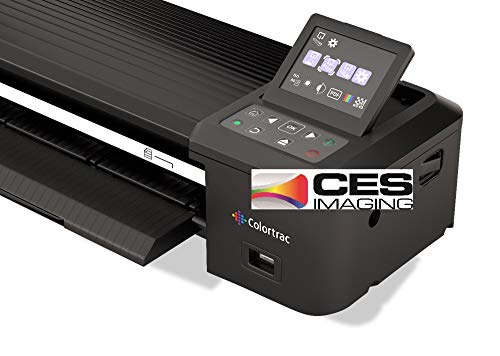
- Provides a 36-inch scanning width
- 600 dpi resolution for detailed capture
- Ethernet connectivity for networked environments
Best For: Scanning exceptionally wide paper originals
High-Capacity Sheetfed Scanner

- 120-sheet capacity supports batch scanning
- 600 dpi optical resolution
- Handles cards, passports, letters, and postcards
Best For: Mixed-media office scanning with sheetfed convenience
Fast A3 CAD Scanner

- 4-second A3 color scans at 200 dpi under specified conditions
- Frameless glass with auto-scan for edge-to-edge workflows
- Up to 2400 dpi optical resolution and 48-bit color
Best For: CAD drawings, blueprints, and fast A3 document digitization
Professional Photo Scanner

- Scans reflective media up to 12.2 x 17.2 inches
- 2400 x 4800 dpi with CCD imaging and 3.8 Dmax
- Includes restoration tools, SilverFast Ai, and TWAIN support
Best For: Large photos, artwork, archives, and color-critical scanning
Space-Saving Office Scanner
Plustek S30 Large Format Scanner

- Scans documents up to 12 inches wide
- Automatic size detection and blank-page removal
- Programmable job button and carrier-sheet support
Best For: Office paperwork, tabloid documents, blueprints, and mixed-size batches
Enterprise Flatbed

- Scans up to 11.7 x 17 inches
- TWAIN and ISIS drivers included
- Three-year warranty with next-business-day replacement
Best For: Workgroups scanning oversized documents
Versatile A3 Flatbed

- 12 x 17-inch A3 scan area
- Batch scanning and searchable-PDF OCR
- Supports Windows, Mac, and Linux
Best For: Mixed-format office and archival scanning
Overhead Book Scanner

- Captures A2-size books and documents
- 26MP camera with page-flattening software
- OCR exports to common editable formats
Best For: Digitizing books, maps, and bound materials
Wide-Format Workflow Scanner – RICOH fi-7460
RICOH fi-7460 Wide-Format Color Duplex Document Scanner | Auto Document Feeder (ADF)
Check Price On AmazonFor offices comparing commercial-grade large format scanners, the RICOH fi-7460 is built around dependable document handling. Its wider feed mechanism accepts large and odd-shaped documents, while the straight paper path helps protect important originals during routine scanning.
Best For: Businesses scanning oversized, mixed, or important documents in daily workflows.
Pros:
- Wide feed mechanism handles large and odd-shaped documents.
- 100-sheet capacity and paper-handling technologies help reduce jams.
- Includes PaperStream ClickScan for simple scan-to-email, print, or folder workflows.
- Supports TWAIN, ISIS, and Kofax VRS compatibility for workflow integration.
Cons:
- USB connectivity may be less flexible than network-connected models.
- 300 dpi resolution is more focused on document work than high-detail imaging.
- Listed warranty is limited to three months of basic onsite coverage.
The fi-7460 is a practical choice when safe paper handling and business workflow compatibility matter more than photographic resolution or network connectivity.
Graphic Arts Flatbed – Epson Expression 12000XL-GA
The Epson Expression 12000XL-GA is a strong option among commercial-grade large format scanners for graphics, photos, and reflective media. Its flatbed accommodates originals up to 12.2 by 17.2 inches and combines high optical resolution with 48-bit color depth.
Best For: Graphic arts, photo restoration, and detailed scanning of large reflective originals.
Pros:
- Scans reflective media up to 12.2 by 17.2 inches.
- 2400 x 4800 dpi resolution and 3.8 Dmax support detailed image capture.
- Color restoration and automatic dust removal assist photo workflows.
- Batch scanning allows multiple printed images to be scanned at once.
Cons:
- As a flatbed scanner, it is less suited to high-volume loose-document feeding.
- Its 10-sheet listed capacity is modest for batch document work.
- At 31.5 pounds, it requires substantial desk space and handling.
Choose this Epson when image quality, color detail, and oversized flatbed scanning are the priorities; it is less compelling for fast, unattended stacks of documents.
36-Inch Production Scanner – Colortrac SmartLF
The Colortrac SmartLF is designed for buyers who need a genuinely wide capture area in a commercial-grade large format scanner. Its 36-inch width, 600 dpi resolution, Ethernet connection, and LED illumination suit large paper documents and wide-format imaging tasks.
Best For: Offices and production environments scanning very wide paper originals over a network connection.
Pros:
- 36-inch scanning width accommodates exceptionally wide documents.
- 600 dpi resolution supports detailed document capture.
- Ethernet connectivity can fit networked scanning environments.
- LED light source and 24 bpp color support color document work.
Cons:
- The supplied specifications identify paper as the media type, limiting confirmed versatility.
- No automatic document feeder capacity is listed in the supplied details.
- At 31 pounds, it is not a lightweight desktop scanner.
The SmartLF stands out primarily for its exceptional 36-inch width and Ethernet connection, making it a specialized fit for wide paper rather than general-purpose office scanning.
High-Capacity Sheetfed Scanner – Epson DS-30000
The Epson WorkForce DS-30000 offers sheetfed convenience for buyers evaluating commercial-grade large format scanners for oversized documents. It supports resolutions up to 600 dpi, includes a 120-sheet capacity, and handles media such as cards, passports, letters, and postcards.
Best For: Offices that need sheetfed scanning for large documents and varied identification or card media.
Pros:
- Sheetfed design is suited to scanning large documents.
- 600 dpi optical resolution supports detailed captures.
- 120-sheet capacity helps support batch scanning.
- Handles business cards, passports, plastic cards, postcards, and other listed media.
Cons:
- USB is the listed connection, with no Ethernet option specified.
- Its 14.6-inch width is more compact than dedicated 36-inch wide-format scanners.
- The supplied details do not specify bundled scanning software or warranty coverage.
The DS-30000 is a sensible middle ground for organizations wanting a capable sheetfed scanner with broad media support, rather than an oversized flatbed or ultra-wide production unit.
Fast A3 CAD Scanner – VIISAN VF3240
The VIISAN VF3240 is a practical choice among commercial-grade large format scanners for offices, schools, and design teams that need fast A3 scanning. It scans A3 color documents in as little as four seconds at 200 dpi, while its frameless glass supports edge-to-edge capture of blueprints, CAD drawings, legal documents, and other oversized flat materials.
Best For: CAD drawings, architectural blueprints, business documents, and high-volume A3 scanning workflows.
Pros:
- Fast A3 color scanning at 200 dpi under specified conditions.
- Frameless design and auto-scan function support efficient workflows.
- Up to 2400 x 2400 dpi optical resolution with 48-bit color.
- Compatible with Windows and macOS, with a universal 100–240V power adapter.
Cons:
- Full A3 scanning at 2400 dpi requires macOS with native ICA support; Windows A3 scanning reaches 1200 dpi through ViiScan.
- Windows WIA drivers are limited to 600 dpi.
- CIS technology is intended for flat materials, not 3D objects or clothing.
The VF3240 stands out when speed and A3 coverage matter more than advanced media handling. Verify your operating system and resolution requirements before buying, especially if you use Windows.
Professional Photo Scanner – Epson Expression 13000XL
The Epson Expression 13000XL is built for commercial-grade large format scanners users who prioritize image quality and color accuracy. Its 12.2-by-17.2-inch reflective scanning area handles oversized photos and artwork, while CCD technology, 2400 x 4800 dpi resolution, and a 3.8 Dmax target detailed, faithful results.
Best For: Photo studios, archives, libraries, and creative professionals digitizing large photographs, artwork, and reflective media.
Pros:
- Supports reflective media up to 12.2 x 17.2 inches.
- 2400 x 4800 dpi resolution, MatrixCCD, and Micro Step Drive technology deliver detailed scans.
- Easy Photo Fix provides one-touch color restoration and automatic dust removal.
- Includes SilverFast Ai software, calibration targets, and a TWAIN driver.
Cons:
- Transparency scanning requires the optional Transparency Unit, sold separately.
- At 31.5 pounds, it is a substantial desktop scanner.
- Its feature set is focused on photo and reflective-media workflows rather than general document feeding.
The 13000XL is a strong fit for quality-focused imaging work, especially when accurate color and restoration tools are more important than compact size. Choose it if your workflow centers on photos, artwork, or archival originals.
Space-Saving Office Scanner – Plustek S30 Large Format Scanner
The Plustek S30 is a space-conscious option among commercial-grade large format scanners for offices handling both everyday paperwork and occasional wide documents. It scans documents up to 12 inches wide, including tabloid, ledger, A3, blueprints, and engineering plans, while automatic paper detection helps simplify mixed-size batches.
Best For: Busy offices that need wide-format capability without dedicating space to a much larger scanner.
Pros:
- Handles documents up to 12 inches wide alongside standard A4 and Letter media.
- Automatic paper detection identifies sizes, removes blank pages, and optimizes images.
- Programmable job button supports one-touch recurring scanning tasks.
- Carrier-sheet support helps protect thin or fragile documents and combine folded oversized sheets.
Cons:
- Its maximum resolution is 600 dpi, below the high-resolution output of some flatbed models.
- USB connectivity and the listed minimum requirements are oriented toward Windows systems.
- Some larger-than-tabloid materials require folding and a carrier sheet.
The S30 offers a useful balance for document-heavy offices that occasionally process wide originals. Its compact footprint and workflow automation are appealing, but specialized photo restoration or very high-resolution work may call for a different scanner.
Enterprise Flatbed – Epson DS-50000
The Epson DS-50000 is a commercial-grade large format scanner for offices that need a durable flatbed capable of handling documents up to 11.7 x 17 inches. Its CCD sensor, TWAIN and ISIS drivers, and included advance-exchange warranty make it a practical choice for established document workflows.
Best For: Workgroups scanning oversized business documents that need broad software compatibility and warranty-backed support.
Pros:
- Scans documents up to 11.7 x 17 inches.
- 4-line CCD sensor is designed for vivid color and crisp text.
- Includes both TWAIN and ISIS drivers.
- Three-year limited warranty includes next-business-day replacement.
Cons:
- Optional network scanning requires the Epson Network Scan module.
- Its large 34.6 x 24.7 x 16.4-inch footprint may require dedicated space.
- USB is the listed standard connection.
The DS-50000 stands out when reliability, driver compatibility, and oversized flatbed scanning matter more than a compact installation. It is a strong fit for professional document departments with room for a substantial scanner.
Versatile A3 Flatbed – Plustek OpticPro A320E
The Plustek OpticPro A320E is a commercial-grade large format scanner built around a 12 x 17-inch A3 scan area. It supports batch scanning, OCR, and scan-to destinations such as email, FTP, and print, making it useful for offices managing varied paper-based work.
Best For: Users scanning maps, drawings, bound books, and multiple printed images on Windows, Mac, or Linux systems.
Pros:
- 12 x 17-inch scan area accommodates A3 documents and wide-format media.
- Batch scanning can save multiple images to separate PDF files.
- OCR can create searchable PDFs.
- Supports TWAIN and WIA for software compatibility.
Cons:
- Linux users may need to request the SANE driver from the seller.
- Listed warranty coverage is one year.
- USB is the listed connection type.
With broad operating-system support and useful file-management features, the A320E is a flexible choice for mixed scanning tasks. Its combination of A3 coverage, batch scanning, and OCR is especially practical for small offices and creative or archival workflows.
Overhead Book Scanner – VIISAN S21 A2/A3
The VIISAN S21 takes a different approach to commercial-grade large format scanners, using an overhead 26MP camera to capture A2- and A3-size books, maps, documents, and objects. Its software adds automatic page flattening, finger removal, double-page splitting, and OCR-based file conversion.
Best For: Libraries, educators, archivists, and users digitizing oversized books, bound materials, manuscripts, or mixed objects.
Pros:
- Captures A2-size materials up to 594 x 420 mm.
- 26MP resolution and software-enhanced output up to 600 DPI.
- Automatically flattens curved pages and removes fingers from scans.
- OCR can export files to PDF, Word, Excel, EPUB, and text formats.
Cons:
- Bundled OfficeCam software is not compatible with ARM-based devices.
- It uses USB 2.0 connectivity.
- Glare-prone paper is not recommended with the built-in LEDs.
The S21 is best viewed as a flexible overhead capture system rather than a conventional flatbed. Its large capture area and book-focused software make it particularly capable for bound or delicate materials that are difficult to place on a standard platen.
How We Picked the Best Commercial-Grade Large Format Scanners
We evaluated these Commercial-Grade Large Format Scanners by looking at scan size, optical resolution, document handling, color accuracy, connection and driver support, workflow speed, and suitability for sustained office or professional use. We also considered design differences: flatbed scanners favor precise imaging and delicate originals, sheetfed models favor throughput, and overhead scanners are often better for bound books or oversized materials that should not be pressed against glass.
Because no single scanner fits every workflow, the selection covers several professional priorities rather than ranking products by resolution alone. Compatibility with existing software, maintenance requirements, and the types of originals you scan regularly can matter just as much as headline specifications.
Quick Comparison
- Best for high-volume document work: Choose a commercial sheetfed model with automatic document handling and business-oriented drivers.
- Best for photographs and artwork: Look for a high-resolution flatbed with strong color reproduction and a large glass surface.
- Best for CAD drawings and maps: A true wide-format scanner with a 24-, 36-, or larger scan width is usually the most practical option.
- Best for books and fragile originals: Overhead capture, automatic flattening, and page-curvature correction can reduce handling and preparation time.
- Best for occasional tabloid or A3 work: A more compact large-format flatbed may provide the needed size without the cost or footprint of a production machine.
Key Buying Factors for Commercial-Grade Large Format Scanners
Scan Size and Workflow Type
Confirm the maximum document dimensions before buying. A3 and 11-by-17-inch capability is sufficient for many business records, while engineering drawings, maps, and architectural plans may require a 24- or 36-inch scanner. Also decide whether you need a flatbed, sheetfed, wide-format roll-style design, or overhead camera system.
Resolution and Image Quality
Optical resolution is more meaningful than interpolated resolution. For routine documents, moderate optical resolution is often adequate; photographs, fine linework, and archival materials benefit from higher optical resolution, accurate color handling, and dependable calibration. High resolution also creates larger files, so confirm that your computers and storage system can support the workflow.
Speed, Feeding, and Software
For recurring batches, check pages-per-minute ratings, automatic document feeder capacity, duplex scanning, paper-size detection, and jam handling. TWAIN, ISIS, USB, and network support can affect whether the scanner integrates smoothly with document-management, OCR, CAD, or image-editing software.
Size, Service, and Total Cost
Large-format scanners need adequate desk or stand space and may be difficult to relocate. Account for included software, warranty coverage, replacement parts, calibration tools, and service availability. A faster or more durable scanner can cost less over time if it reduces manual preparation and operator labor.
Who Should Buy Which Commercial-Grade Large Format Scanners?
Choose a wide-format scanner if your main work involves engineering plans, maps, posters, or other oversized drawings. Choose a high-resolution flatbed for artwork, photographs, transparencies, and delicate originals where image fidelity is the priority. Choose a sheetfed model for offices digitizing large batches of loose documents and needing dependable duplex productivity. Choose an overhead book scanner for bound volumes, ledgers, and originals that should not be fed through rollers or pressed flat. If your needs are mixed, prioritize the document type you scan most often, then verify the supported size, software compatibility, and available workspace before comparing secondary features.
