
Commercial-grade gaming desktop computers need to do more than run modern games. They should deliver dependable performance, responsive multitasking, ample storage, and enough upgrade potential for changing workloads.
This roundup compares 10 prebuilt systems across premium, midrange, budget, and compact categories so you can match graphics capability, processor performance, and total value to your setup.
Best 10 Commercial-Grade Gaming Desktop Computers Picks for 2026
RTX 5070 Powerhouse

- Ryzen 7 8700F with 8 cores and 16 threads
- RTX 5070 graphics with 12GB memory
- 32GB DDR5 RAM and 2TB SSD
Best For: AAA gaming, streaming, and demanding multitasking
Compact AI Workstation

- 16-core/32-thread processor with up to 126 TOPS
- 128GB LPDDR5X memory and 8TB SSD
- 10GbE, 2.5GbE, Wi-Fi 7, and quad-display support
Best For: AI development, local servers, and technical multitasking
Polished Gaming Tower

- Intel Core Ultra 7 265F with 20 cores
- RTX 5060 Ti with 8GB GDDR7
- AlienFX lighting and one-year onsite service
Best For: Mainstream gaming, streaming, and multimedia
Budget Productivity Tower

- Intel i7-11700F with 8 cores
- 32GB RAM and 1TB PCIe SSD
- Wi-Fi 6, Bluetooth, and eight USB ports
Best For: Office work, education, and casual gaming
Best Overall
YAWYORE Ryzen 7 RTX 5060 Gaming PC

- Ryzen 7 5700X with 8 cores and 16 threads
- RTX 5060 8GB with DLSS 4 and ray tracing
- 32GB RAM and 1TB NVMe SSD
Best For: Gamers wanting a well-equipped 1080p-ready tower
Best for Versatility
STGAubron Core i7 RTX 3070 Desktop
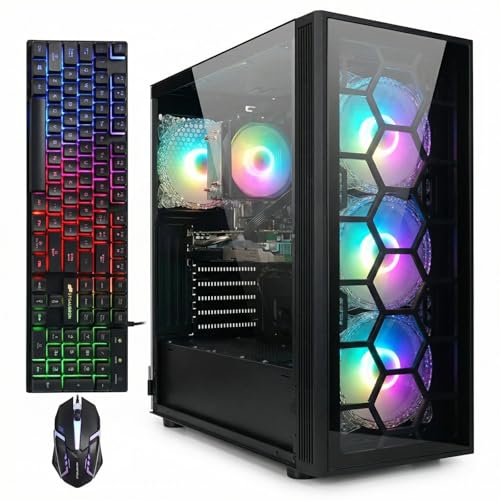
- RTX 3070 8GB dedicated graphics
- 32GB RAM and 1TB SSD
- Includes RGB keyboard and mouse
Best For: Gaming, streaming, editing, and productivity
Best Value
Ryzen 7 RTX 3050 Gaming Desktop

- 8-core, 16-thread Ryzen 7 4700LE processor
- RTX 3050 with 8GB GDDR6 graphics memory
- Wi-Fi 6 and 512GB NVMe SSD
Best For: Entry-level 1080p gaming and everyday use
Top Modern Pick
Skytech Ryzen 7 RTX 5060 Desktop

- RTX 5060 8GB GDDR7 graphics
- 1TB NVMe SSD with 16GB DDR4 RAM
- Includes keyboard, mouse, and one-year warranty
Best For: Modern 1080p gaming and ready-to-use setups
Best High-Memory Value
12-Core RTX 2070 Gaming Desktop

- 12-core Xeon processor and 32GB DDR4 RAM
- 512GB NVMe SSD plus 1TB HDD
- Liquid cooling with Wi-Fi 6 and Bluetooth 5.4
Best For: Multitasking, storage-heavy libraries, and 1080p gaming
Budget Renewed Pick

- 16GB RAM and 512GB SSD
- Windows 11 Pro with built-in Wi-Fi
- RGB keyboard, mouse, and speakers included
Best For: Casual gaming, office tasks, and low-cost bundled setups
RTX 5070 Powerhouse – MSI Codex Z2
The MSI Codex Z2 is a strong choice among commercial-grade gaming desktop computers for buyers who want high-end gaming hardware, ample memory, and fast storage in a traditional tower. Its Ryzen 7 processor and RTX 5070 graphics card are suited to demanding games, streaming, and multitasking.
Best For: AAA gaming, streaming, and users who want a well-equipped desktop with 4K-capable display support.
Pros:
- Ryzen 7 8700F offers 8 cores, 16 threads, and boost speeds up to 5.0 GHz.
- GeForce RTX 5070 with 12GB graphics memory supports demanding rasterized and ray-traced gaming.
- Includes 32GB DDR5 RAM, a 2TB SSD, Wi-Fi 6E-class connectivity, keyboard, and mouse.
- Four-fan air-cooling setup and customizable RGB lighting.
Cons:
- Windows 11 Home may be less suitable than Windows 11 Pro for business environments.
- The tower is larger and less portable than a compact workstation.
With its combination of modern graphics, generous storage, and 32GB of DDR5 memory, the Codex Z2 is built for buyers who prioritize gaming performance and upgrade-friendly tower proportions over compactness.
Compact AI Workstation – AI MAX+ 395 Mini PC
This AI MAX+ 395 mini PC takes a different approach to commercial-grade gaming desktop computers, emphasizing workstation and AI capabilities in a compact chassis. Its integrated Radeon graphics, large memory pool, fast storage, and high-speed networking suit technical and creative workloads more than conventional gaming setups.
Best For: AI development, local inference, virtualization, software engineering, and multi-display productivity.
Pros:
- 16-core, 32-thread processor with boost speeds up to 5.1 GHz and up to 126 TOPS of combined AI performance.
- 128GB LPDDR5X memory can be assigned as video memory through the BIOS.
- Integrated Radeon 8060S graphics support up to four displays and 4K/8K output.
- 10GbE and 2.5GbE LAN, Wi-Fi 7, and four M.2 PCIe 4.0 slots provide strong connectivity and expansion.
Cons:
- Integrated graphics are not the same as a dedicated desktop gaming GPU.
- Onboard LPDDR5X memory cannot be upgraded beyond the stated 128GB maximum.
- The compact design may provide fewer conventional desktop expansion options.
This is best viewed as a compact AI and development workstation rather than a typical gaming tower. Its unusually large memory capacity and networking features make it compelling for specialized professional workloads.
Polished Gaming Tower – Alienware Aurora
The Alienware Aurora is a commercial-grade gaming desktop computer for buyers who value a recognizable design, integrated lighting controls, and a current Intel processor platform. Its RTX 5060 Ti graphics and 16GB of DDR5 memory target modern gaming and multimedia use, while Dell’s onsite service adds support coverage.
Best For: Mainstream gaming, livestreaming, multimedia, and buyers who want a distinctive prebuilt desktop with included peripherals.
Pros:
- Intel Core Ultra 7 265F provides 20 cores and boost speeds up to 5.5 GHz.
- GeForce RTX 5060 Ti uses Blackwell architecture and includes 8GB of GDDR7 graphics memory.
- AlienFX lighting and Alienware Command Center allow lighting and performance-profile customization.
- Includes a wired keyboard, wired mouse, and one-year onsite service warranty.
Cons:
- 16GB of RAM is less generous than some competing configurations in this roundup.
- The 1TB SSD may fill quickly with a large game library.
- Windows 11 Home is less oriented toward business administration than Windows 11 Pro.
The Aurora balances gaming hardware with brand-specific software and support. It is a sensible pick for users who want a ready-to-use system and value Alienware’s chassis design and lighting ecosystem.
Budget Productivity Tower – HP Pavilion Desktop
The HP Pavilion is a practical option for buyers comparing commercial-grade gaming desktop computers but whose priorities are office work, education, and everyday computing. Its older Intel processor, 32GB of RAM, 1TB SSD, and entry-level GeForce graphics favor productivity and casual entertainment over modern demanding gaming.
Best For: Home offices, students, small businesses, video conferencing, documents, and casual gaming.
Pros:
- Intel Core i7-11700F provides 8 cores for multitasking.
- 32GB DDR4 RAM supports multiple applications and browser tabs.
- 1TB PCIe SSD offers fast boot times and practical everyday storage.
- Includes Wi-Fi 6, Bluetooth, HDMI, Ethernet, eight USB ports, keyboard, and mouse.
Cons:
- GeForce GT 610 2GB graphics is intended for casual gaming and multimedia, not current demanding games.
- The i7-11700F and DDR4 platform are older than the newer systems in this roundup.
- Windows 11 Home may not provide the business-management features some organizations need.
The Pavilion makes the most sense when dependable productivity matters more than gaming performance. It offers substantial memory, fast storage, and useful connectivity at a configuration aimed at work and school users.
Best Overall – YAWYORE Ryzen 7 RTX 5060 Gaming PC
For shoppers comparing commercial-grade gaming desktop computers, the YAWYORE pairs an 8-core, 16-thread Ryzen 7 5700X with an RTX 5060 8GB graphics card. Its 32GB of RAM, 1TB NVMe SSD, Wi-Fi, and Bluetooth make it a well-equipped Windows 11 tower for gaming and multitasking.
Best For: Gamers and multitaskers who want modern graphics features, ample memory, and substantial fast storage.
Pros:
- RTX 5060 supports DLSS 4, ray tracing, and Reflex 2 features.
- 32GB DDR4 RAM and a 1TB PCIe NVMe SSD provide a strong everyday configuration.
- Built-in Wi-Fi and Bluetooth simplify wireless networking and peripheral setup.
- Includes liquid cooling with ARGB fans and remote control.
Cons:
- Uses the older AM4 platform and DDR4 memory.
- The graphics-card brand may vary.
- Listed maximum display resolution is 1920×1080.
This is the most feature-forward option in the group, especially for buyers who value the RTX 5060 feature set and 32GB of memory. Confirm the included GPU brand and your monitor requirements before ordering.
Best for Versatility – STGAubron Core i7 RTX 3070 Desktop
The STGAubron is a versatile choice among commercial-grade gaming desktop computers, with an Intel Core i7, RTX 3070 8GB graphics, 32GB of memory, and a 1TB SSD. It is positioned for gaming as well as streaming, video editing, study, business, and other home-office tasks.
Best For: Users who need one ready-to-use desktop for gaming, streaming, editing, and general productivity.
Pros:
- RTX 3070 8GB dedicated graphics support HDMI and DisplayPort output.
- 32GB RAM and a 1TB SSD suit multitasking and game storage.
- Wi-Fi 6 and Bluetooth 5.0 provide current wireless connectivity.
- Includes an RGB keyboard and mouse, plus four RGB fans.
Cons:
- The supplied specifications do not identify the exact Core i7 generation.
- Listed maximum display resolution is 1920×1080.
- Uses SDRAM, with 32GB listed as the maximum memory.
With its included peripherals and broad use-case positioning, this desktop is convenient for buyers who want to start quickly without assembling a system. Verify the processor details if CPU generation is important to your workload.
Best Value – Ryzen 7 RTX 3050 Gaming Desktop
This Ryzen 7 and RTX 3050 system offers a practical entry point for shoppers seeking commercial-grade gaming desktop computers without an elaborate build process. It combines 8-core, 16-thread processing with 16GB DDR4 RAM, a 512GB NVMe SSD, Wi-Fi 6, and Windows-ready setup.
Best For: Gamers, students, and home users seeking ready-to-use 1080p gaming and everyday performance.
Pros:
- Ryzen 7 4700LE provides 8 cores and 16 threads with boost speeds up to 4.2GHz.
- RTX 3050 includes 8GB GDDR6 memory and ray-tracing support.
- Wi-Fi 6 supports faster wireless connectivity and reduced latency.
- NVMe storage offers quick boot and game-loading performance.
Cons:
- 512GB of storage is less spacious than the other listed systems.
- 16GB RAM provides less headroom than the 32GB alternatives.
- The Ryzen 7 4700LE uses the older Zen 2/AM4 platform.
This configuration emphasizes value and straightforward setup, while its 8GB graphics memory is useful for modern game textures. Buyers with large libraries or heavier editing workloads may prefer a 1TB drive and 32GB of RAM.
Top Modern Pick – Skytech Ryzen 7 RTX 5060 Desktop
For shoppers seeking commercial-grade gaming desktop computers with current-generation graphics, the Skytech Azure pairs an eight-core Ryzen 7 5700 processor with an NVIDIA GeForce RTX 5060 8GB GDDR7 card. Its 1TB NVMe SSD, Windows 11 Home, and included peripherals make it a ready-to-use option for 1080p gaming.
Best For: Gamers wanting a new, ready-to-play 1080p desktop with modern graphics hardware and ample fast storage.
Pros:
- RTX 5060 graphics with 8GB GDDR7 memory
- 1TB NVMe M.2 SSD and 16GB DDR4 RAM
- Includes gaming keyboard and mouse
- One-year parts-and-labor warranty plus lifetime technical support
Cons:
- 16GB RAM is the listed maximum for this configuration
- Wi-Fi is limited to Wi-Fi 5
- Specific graphics-card brand and some additional ports may vary
This is the strongest all-around choice of the three for buyers prioritizing newer components, fast storage, and straightforward 1080p performance. Air cooling and a tempered-glass case round out a practical gaming setup.
Best High-Memory Value – 12-Core RTX 2070 Gaming Desktop
This prebuilt is a practical contender among commercial-grade gaming desktop computers for users who value memory, storage flexibility, and multitasking. It combines a 12-core Intel Xeon processor, RTX 2070 8GB graphics, 32GB DDR4 RAM, a 512GB NVMe SSD, and a 1TB hard drive.
Best For: Gamers and multitaskers who want abundant RAM, dual-drive storage, liquid cooling, and built-in wireless connectivity.
Pros:
- 12-core Xeon processor with speeds up to 3.5GHz
- 32GB DDR4 RAM supports gaming and multitasking
- Combines a 512GB NVMe SSD with a 1TB HDD
- Liquid CPU cooling, Wi-Fi 6, Bluetooth 5.4, and RGB peripherals
Cons:
- RTX 2070 is an older graphics platform than the Skytech’s RTX 5060
- Only a 30-day free-return warranty is listed
- Windows version is listed without a Home or Pro designation
The large memory capacity and mixed SSD/HDD setup are useful for sizable game libraries and demanding everyday workloads. It is a compelling feature-heavy option, though buyers should weigh its older RTX 2070 platform and shorter stated return coverage.
Budget Renewed Pick – Dell RGB GTX 1050 Ti Tower
For buyers comparing commercial-grade gaming desktop computers on a tighter budget, this renewed Dell tower offers a basic Windows 11 Pro setup with an Intel Core i7 6th Gen processor, GeForce GTX 1050 Ti graphics, 16GB DDR3 RAM, and a 512GB SSD. It also includes Wi-Fi and a full RGB accessory bundle.
Best For: Casual 1080p gaming, office work, and buyers who want an inexpensive bundled desktop with keyboard, mouse, and speakers.
Pros:
- Windows 11 Pro and built-in Wi-Fi
- 512GB SSD with 16GB RAM
- Includes RGB keyboard, mouse, and speakers
- Compact Dell tower design
Cons:
- Older sixth-generation i7 processor and GTX 1050 Ti graphics
- Uses DDR3 memory rather than newer DDR4 or DDR5
- Only a 90-day limited warranty is listed
This renewed Dell is best viewed as an entry-level gaming and general-purpose computer rather than a high-end gaming rig. Its bundled accessories and SSD make it convenient, but the older hardware is better suited to lighter 1080p gaming and everyday tasks.
How We Picked These Commercial-Grade Gaming Desktop Computers
We evaluated the listed systems by comparing their processor class, graphics hardware, memory, storage, operating system, and overall suitability for demanding daily use. Gaming performance is important, but commercial-grade buyers may also need a desktop for content creation, office productivity, development, streaming, or AI-assisted workloads.
Newer GPUs such as the RTX 5070 and RTX 5060 series generally offer the best balance of current features and longevity. Older RTX 2070, RTX 3070, GTX 1050 Ti, and RTX 3050 systems can still be worthwhile when priced appropriately, especially for 1080p gaming and routine productivity.
Quick Comparison
- Best high-end option: MSI Codex Z2 with a Ryzen 7 8700F, RTX 5070, 32GB DDR5, and 2TB SSD.
- Best compact workstation-style option: The Mini PC AI Server, with a 16-core/32-thread processor, Radeon 8060S graphics, 128GB memory, and 8TB SSD.
- Best premium branded choice: Alienware with an Intel Core Ultra 7 265F and RTX 5060 Ti.
- Best practical midrange choices: The Skytech and YAWYORE systems with Ryzen 7 processors and RTX 5060 graphics.
- Best value-focused older systems: RTX 3070, RTX 2070, RTX 3050, or GTX 1050 Ti configurations, depending on price and condition.
Key Buying Factors for Commercial-Grade Gaming Desktop Computers
Graphics Performance
The GPU has the largest effect on gaming frame rates and many creative applications. Choose an RTX 5070 or RTX 5060 Ti system for newer games, higher settings, and better long-term flexibility. Older cards may be sufficient for 1080p play but offer less headroom for demanding titles.
Processor and Memory
A modern Ryzen 7 or Intel Core Ultra 7 processor is well suited to gaming and multitasking. Aim for at least 16GB of RAM, while 32GB is a better target for professional applications, streaming, virtual machines, and large projects. The 128GB compact workstation configuration is specialized for unusually heavy multitasking or AI workloads.
Storage, Cooling, and Expansion
Prefer a 1TB or larger SSD for fast startup and sufficient game storage. A 2TB or 8TB drive reduces the need for immediate upgrades. Also check cooling, power-supply capacity, available memory slots, drive bays, and graphics-card clearance before buying, particularly with less familiar brands or compact systems.
Operating System and Support
Windows 11 is convenient for current software and games, while Windows 11 Pro adds business-oriented features such as enhanced management and security tools. Brand reputation, warranty coverage, return policies, and replacement-part availability matter more for commercial use than they do for an occasional home gaming PC.
Who Should Buy Which Commercial-Grade Gaming Desktop Computers?
Choose the MSI system if you want the strongest gaming-focused configuration in this group. The Mini PC suits buyers prioritizing exceptional memory and storage in a compact workstation, though its form factor may limit upgrades. Alienware is a sensible choice for shoppers who value a major gaming brand and distinctive design.
Skytech and YAWYORE are well matched to mainstream 1080p and 1440p gaming, while the HP Pavilion and RTX 3070 desktop may appeal to buyers seeking productivity capability or previous-generation performance. RTX 3050, RTX 2070, and GTX 1050 Ti systems are best for tighter budgets, lighter gaming, or secondary workstations; verify the exact condition, warranty, and upgrade options before purchase.
