
The best commercial-grade electronic writing tablets make handwritten notes, digital signatures, sketches, and document workflows faster without forcing every user into the same format. This roundup compares purpose-built e-ink notebooks, drawing tablets, signature pads, and paper-like Android devices.
Use the buying guide below to match screen technology, stylus performance, software support, connectivity, and portability to the way your organization actually works.
Best 10 Commercial-Grade Electronic Writing Tablets Picks for 2026
Versatile Color Note-Taking Tablet

- 10.95-inch etched LCD with three display modes
- Battery-free 16,384-level pressure stylus
- Android 14 with note, PDF, and AI tools
Best For: Color note-taking, PDF annotation, meetings, and Android productivity
Professional Pen Tablet
- Battery-free EMR pen with 4,096 pressure levels
- Four ExpressKeys for workflow shortcuts
- Compatible with Windows, Mac, Chromebook, and Android
Best For: Computer-based drawing, photo editing, teaching, and document markup
Focused E Ink Writing Tablet

- 10.3-inch black-and-white E Ink display
- 21-millisecond digital ink response
- Organizes notes with folders, tags, and templates
Best For: Focused writing, reading, meetings, and document review
AI-Enabled E Ink Notebook

- 10.3-inch 300-ppi E Ink display
- Handwriting, voice-to-text, and note-summary tools
- 128GB storage with Android 14 and third-party apps
Best For: Document-heavy research, meetings, study, and organized note-taking
Color E-Ink Professional

- 11.8-inch color e-ink display with reading light
- Marker Plus with built-in eraser included
- Organizes notes and annotates PDFs
Best For: Professionals needing a paper-like digital notebook for writing and document review
Compact Pen Input
- Battery-free stylus with 8192 pressure levels
- Compatible with Windows, macOS, and Chromebook
- Slim 6-by-4-inch portable design
Best For: Teaching, remote work, signatures, and digital drawing on a connected computer
Dedicated Signature Capture

- Purpose-built USB electronic signature pad
- LCD 1-by-5-inch signing display
- Works with Windows, macOS, and Linux
Best For: Business signature workflows using a connected personal computer
Best Large-Screen Tablet

- 14.3-inch 2.4K paper-like display
- 4096-level stylus included
- 10,000mAh battery and multitasking support
Best For: Students, artists, musicians, and all-purpose tablet users
Best Paper-Based Smart Notebook

- Writes on real A5 paper
- 8192-level pressure sensitivity
- Bluetooth 5.3 phone syncing
Best For: Paper-preferring students, professionals, and meeting note-takers
Best Dedicated Signature Pad
- Compact USB signature-capture pad
- Backlit customizable LCD
- Biometric and forensic capture
Best For: Offices and businesses collecting electronic signatures
Versatile Color Note-Taking Tablet – XPPen Magic Note Pad
The XPPen Magic Note Pad is a strong option for buyers seeking commercial-grade electronic writing tablets with Android flexibility, color viewing, and advanced handwriting tools. Its 10.95-inch etched LCD uses three display modes, a 90Hz refresh rate, and a battery-free X3 Pro Pencil 2 with 16,384 pressure levels. Note that it is a standard Android tablet, not an E Ink device.
Best For: Students, professionals, and meeting users who want handwriting, PDF annotation, color content, and Android apps in one tablet.
Pros:
- Three selectable display modes, including monochrome, light color, and natural color.
- 90Hz refresh rate, 400-nit brightness, and support for 16.7 million colors.
- Battery-free stylus with 16,384 pressure levels and customizable shortcut controls.
- Native note app supports handwriting conversion, audio recording, PDF editing, cloud uploads, and AI features after updates.
Cons:
- It is an LCD Android tablet rather than an E Ink paper tablet.
- Some MyScript and AI features require a system upgrade.
Choose this model when productivity features and color matter more than an authentic E Ink display. Its etched screen and low-blue-light certifications may improve comfort, while Android support gives it broader functionality than a dedicated note device.
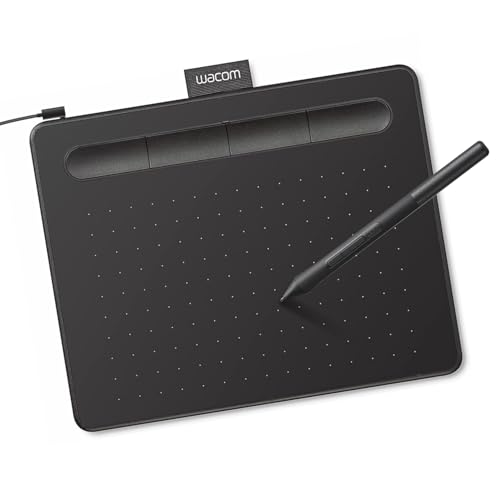
Professional Pen Tablet – Wacom Intuos Small
The Wacom Intuos Small is a compact, dependable choice among commercial-grade electronic writing tablets for computer-based drawing, editing, and document markup. It connects by USB-A and uses Wacom’s battery-free EMR pen with 4,096 pressure levels, delivering direct control without requiring a built-in screen.
Best For: Designers, teachers, students, and creative professionals who work on Windows, Mac, Chromebook, or compatible Android software.
Pros:
- Battery-free EMR pen provides a pen-on-paper feel.
- Works with creative, photo-editing, video, design, and document-markup software.
- Four ExpressKeys provide convenient shortcut access.
- Includes creative software access and Wacom online training after registration.
Cons:
- The small 6-by-3.7-inch active area may feel restrictive for larger artwork.
- Requires a connected computer or compatible device and does not have an integrated display.
The Intuos Small is best viewed as a focused input tool rather than a standalone digital notebook. Its compact size, familiar driver ecosystem, and battery-free pen make it practical for desk-based creative work and classroom use.
Focused E Ink Writing Tablet – reMarkable Paper Pure
The reMarkable Paper Pure offers a distraction-minimized approach to commercial-grade electronic writing tablets. Its 10.3-inch black-and-white E Ink display is designed for handwriting, document review, reading, and meetings, with digital ink response rated at 21 milliseconds and a streamlined reMarkable OS.
Best For: Professionals, students, and meeting users who prioritize focused handwriting, reading, and organized digital documents over color or general-purpose apps.
Pros:
- 10.3-inch E Ink display provides a paper-oriented black-and-white writing and reading experience.
- Fast 21-millisecond digital ink response supports fluid handwriting.
- Templates, folders, and tags help organize notes and documents.
- Works with reMarkable apps and plugins for Google Drive, Dropbox, Microsoft Word, email, and other workflows.
Cons:
- Black-and-white E Ink is less suitable for color documents or rich media.
- Some expanded capabilities, including unlimited cloud storage and additional integrations, require a Connect subscription.
This is a strong fit for users who want fewer distractions and a more paper-like workflow. Its focused operating system and document integrations support professional organization, but it is not intended to replace a full Android tablet.
AI-Enabled E Ink Notebook – Penstar eNote 2
The Penstar eNote 2 combines a 10.3-inch 300-ppi E Ink screen with Android 14, generous storage, and AI-assisted organization. For buyers comparing commercial-grade electronic writing tablets, it stands out with handwriting and voice-to-text tools, split-screen reading and note-taking, broad file support, and a battery-free stylus rated at 8,192 pressure levels.
Best For: Researchers, professionals, and students who need to read varied document formats while capturing, converting, and organizing notes.
Pros:
- Clear 2480-by-1860, 300-ppi E Ink display is designed for paper-like reading.
- Supports handwriting-to-text, real-time voice-to-text, note summaries, folders, and tags.
- 128GB storage, 4GB RAM, Android 14, and support for third-party apps.
- Includes a battery-free stylus, spare nibs, magnetic folio, microphone array, and four speakers.
Cons:
- The listed battery-life details vary between up to four weeks and a two-week average.
- At approximately 0.97 kg, it is heavier than some dedicated paper tablets.
The eNote 2 is a feature-rich choice for users managing PDFs, books, office files, and recorded discussions. Its broad format compatibility and AI tools make it more versatile than a basic note pad, while the E Ink display remains focused on reading and writing.
Color E-Ink Professional – reMarkable Paper Pro
The reMarkable Paper Pro is a premium option for professionals seeking commercial-grade electronic writing tablets for reading, organizing notes, annotating PDFs, and sketching. Its 11.8-inch color e-ink display, adjustable reading light, and included Marker Plus create a paper-like experience in a portable format.
Best For: Remote workers, educators, designers, and professionals who want a distraction-light digital notebook for writing, reading, and document review.
Pros:
- 11.8-inch color e-ink display with low-glare viewing and adjustable reading light
- Marker Plus includes a built-in eraser and six spare tips
- Supports folders, tags, PDF annotation, and handwriting-to-text conversion
- 64GB storage and Wi-Fi connectivity provide room for organized work files
Cons:
- Its 1.2-pound weight and large format are less compact than smaller writing pads
- Linux-based software and Marker Plus compatibility may limit accessory flexibility
The Paper Pro stands out when a natural writing feel, comfortable reading, and structured document management matter more than a conventional computer-style display.
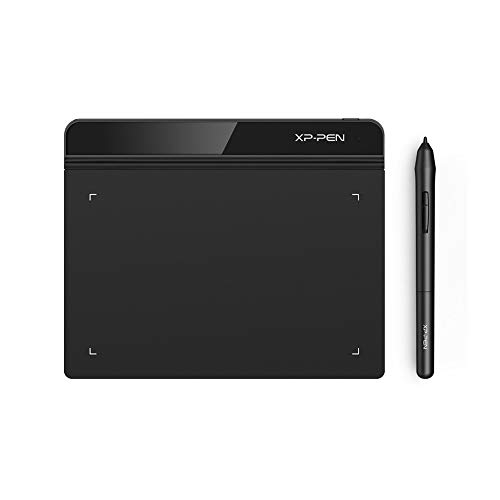
Compact Pen Input – XP-Pen StarG640
The XP-Pen StarG640 is a practical, compact choice among commercial-grade electronic writing tablets for digital drawing, signatures, teaching, and remote work. Its battery-free stylus and 6-by-4-inch active area make it a straightforward mouse alternative for compatible computers.
Best For: Teachers, students, remote workers, and creators who need an affordable USB writing and drawing pad for Windows, macOS, or Chromebook.
Pros:
- Battery-free stylus supports uninterrupted writing and drawing
- 8192 pressure levels provide responsive line control
- Works with Windows, macOS, and Chrome OS devices
- Only 2 mm thick for easy portability
Cons:
- It has no built-in display, so users draw while viewing the connected computer
- The 6-by-4-inch active area is relatively small for detailed artwork
Choose the StarG640 when portability, broad operating-system compatibility, and precise pen input are more important than an integrated screen.
Dedicated Signature Capture – Topaz T-L460 Signature Pad
The Topaz T-L460 is a specialized option for businesses comparing commercial-grade electronic writing tablets for electronic signatures. This USB-connected LCD signature pad is designed for computer-based signing and includes software, making it more focused than a general drawing tablet.
Best For: Offices and workflows that need a dedicated USB signature pad for a personal computer running Windows, macOS, or Linux.
Pros:
- Purpose-built for electronic signatures
- LCD display provides a signing surface with visible feedback
- Compatible with Windows, macOS, and Linux
- Includes a two-year factory warranty and software
Cons:
- Its 1-by-5-inch display and 5.72-square-inch active area are limited to signature-focused input
- USB connectivity requires use with a compatible personal computer
- 1024 pressure levels are lower than those of the XP-Pen StarG640
The T-L460 makes the most sense when reliable signature capture is the priority; it is not intended to replace a full-size drawing or note-taking tablet.
Best Large-Screen Tablet – TCL NXTPAPER 14
The TCL NXTPAPER 14 is a versatile option among commercial-grade electronic writing tablets, combining a large 14.3-inch paper-like display with a 4096-level T-PEN stylus. It suits writing, drawing, reading, sheet music, and multitasking, while NXTPAPER 3.0 adds glare reduction, blue-light filtering, and multiple viewing modes.
Best For: Students, artists, musicians, and users who want one large tablet for writing, drawing, reading, and media.
Pros:
- Large 14.3-inch 2.4K display with Standard, Color Paper, and Ink Paper modes
- Includes a 4096-level stylus and adjustable flip case
- 8GB RAM, 256GB storage, split-screen support, and floating windows
- 10,000mAh battery with 33W fast charging and reverse charging
Cons:
- MicroSD expansion is not supported
- Charger is not included
- Its 1.67-pound weight and large size are less portable than smaller writing devices
Choose this model when screen comfort and all-in-one versatility matter more than having a compact, dedicated writing pad. Its large display and included stylus make it the most broadly useful option here for creative and productivity work.
Best Paper-Based Smart Notebook – XPPen Note Plus
The XPPen Note Plus takes a different approach to commercial-grade electronic writing tablets: you write on real A5 paper with its dedicated ink pen, while Bluetooth 5.3 sends your handwriting to a phone. It is designed for notes, sketches, meetings, and offline writing rather than on-screen tablet use.
Best For: Students, teachers, professionals, and anyone who prefers the feel of paper but wants searchable, shareable digital notes.
Pros:
- Captures handwriting and sketches from real A5 paper without scanning
- 8192 levels of pressure sensitivity with Bluetooth 5.3 syncing
- Works offline and syncs automatically after reconnecting
- Supports replaceable A5 notebook cores up to 8mm thick
Cons:
- It has no electronic writing screen
- Requires the included matching ink pen for writing capture
- Phone compatibility is limited to Android 10 or later and iOS 14 or later
This is a strong fit for people who value natural pen-on-paper writing and convenient digitization. Its battery, offline storage, editing tools, and PNG/PDF sharing make it practical for mobile note-taking, though it is not a standalone display tablet.
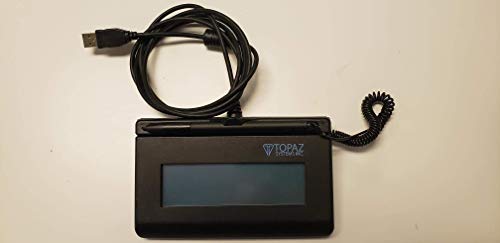
Best Dedicated Signature Pad – Topaz SigLite T-LBK460
Topaz SigLite T-LBK460-HSB-R 1x5 LCD Signature Capture Pad USB Connection (Backlit)
Check Price On AmazonThe Topaz SigLite T-LBK460-HSB-R is a compact, USB-connected signature capture pad for focused signing workflows. Its backlit LCD and touch-sensitive signing surface support customizable displays and biometric and forensic capture, making it more specialized than general-purpose commercial-grade electronic writing tablets.
Best For: Businesses and offices that need a small, portable USB signature-capture device.
Pros:
- Third-generation touch-screen signing surface
- Backlit LCD display supports customization
- Compact 1.1-pound design for easier portability
- USB connection and included stylus support straightforward setup
Cons:
- Designed for signature capture rather than general note-taking or drawing
- Requires a USB connection
- Its small 1-by-5-inch signing format limits writing space
For organizations collecting signatures at a desk, counter, or mobile workstation, the SigLite focuses on the essentials without the bulk of a full tablet. Buyers seeking broad creative or note-taking functionality should consider a larger tablet instead.
How We Picked the Best Commercial-Grade Electronic Writing Tablets
We selected these 10 tablets across the main professional use cases: handwritten note capture, creative work, electronic signatures, and low-glare productivity. We considered display type, pen responsiveness, pressure sensitivity, battery or power requirements, operating-system compatibility, file synchronization, software support, and the practical demands of office, education, retail, healthcare, and design environments.
“Commercial-grade” does not mean every model is intended for the same job. A signature pad optimized for point-of-sale forms is evaluated differently from an e-ink notebook or a USB drawing tablet. The right choice depends on workflow reliability and integration as much as hardware specifications.
Quick Comparison
- Best for color notes and flexible paper-style work: XPPen 3-in-1 Color Digital Notebook.
- Best for traditional digital art: Wacom Intuos Small or XPPen StarG640.
- Best for distraction-free handwriting: reMarkable Paper Pure or Paper Pro.
- Best for AI-assisted e-notes: Penstar eNote 2.
- Best for Android tablet versatility: TCL NXTPAPER 14.
- Best for phone-synced notes: XPPen Note Plus.
- Best for dedicated electronic signatures: Topaz SigLite models.
Key Buying Factors for Commercial-Grade Electronic Writing Tablets
Screen and Writing Feel
E-ink offers a paper-like, low-distraction experience and can be comfortable for extended reading or writing. LCD and color displays are better for rich visuals, apps, video, and interactive documents. Check screen size, surface texture, illumination, and whether the display supports color when selecting a primary work device.
Stylus Performance
Pressure levels matter most for drawing, illustration, and handwriting variation. Battery-free pens reduce interruptions, while tilt support and low latency improve control. For signatures, consistency and capture accuracy are generally more important than extreme pressure sensitivity.
Compatibility and Workflow
Confirm support for Windows, macOS, Android, or the specific signature and document software your organization uses. Also check whether files export as PDF or common image formats, whether synchronization requires a subscription, and whether the tablet connects by USB, Bluetooth, or Wi-Fi.
Durability, Security, and Support
For commercial deployment, prioritize a robust warranty, dependable drivers, replacement pen availability, and predictable software updates. Signature devices should be assessed for integration, USB reliability, and data-handling requirements. A folio, screen protection, and manageable charging routine can also reduce downtime.
Who Should Buy Which Commercial-Grade Electronic Writing Tablets?
Choose a reMarkable model or Penstar eNote 2 if focused handwriting and reading are your priorities. Pick the TCL NXTPAPER 14 when you need a larger paper-like display with full Android functionality. Choose Wacom or XPPen StarG640 for a computer-connected creative workstation, and consider the color XPPen notebook for users who combine notes, sketches, and portable organization.
For businesses capturing customer approvals or signatures, the Topaz pads are the most purpose-built options in this list. Select between models based on display style, backlighting, software requirements, and the signature applications already used by your team.
